
What JobNimbus Is (and Isn’t)
JobNimbus is the CRM I use to run my roofing operation, and I’ve been on it long enough to know exactly where it delivers and where it falls short. It’s a CRM and project management platform built specifically for roofing and exterior contractors — not a generic sales tool that someone slapped a “for contractors” label on.
Over 6,000 contractors use JobNimbus today. The company has raised $383 million in funding, acquired SumoQuote (proposal software) in 2023, and recently launched AI features that actually do useful things. They’re not going anywhere.
That said, it’s not perfect and it’s not cheap. Let me walk you through exactly what you’re getting, what it costs, and whether it fits your operation.
JobNimbus Board View: The Feature That Sells It
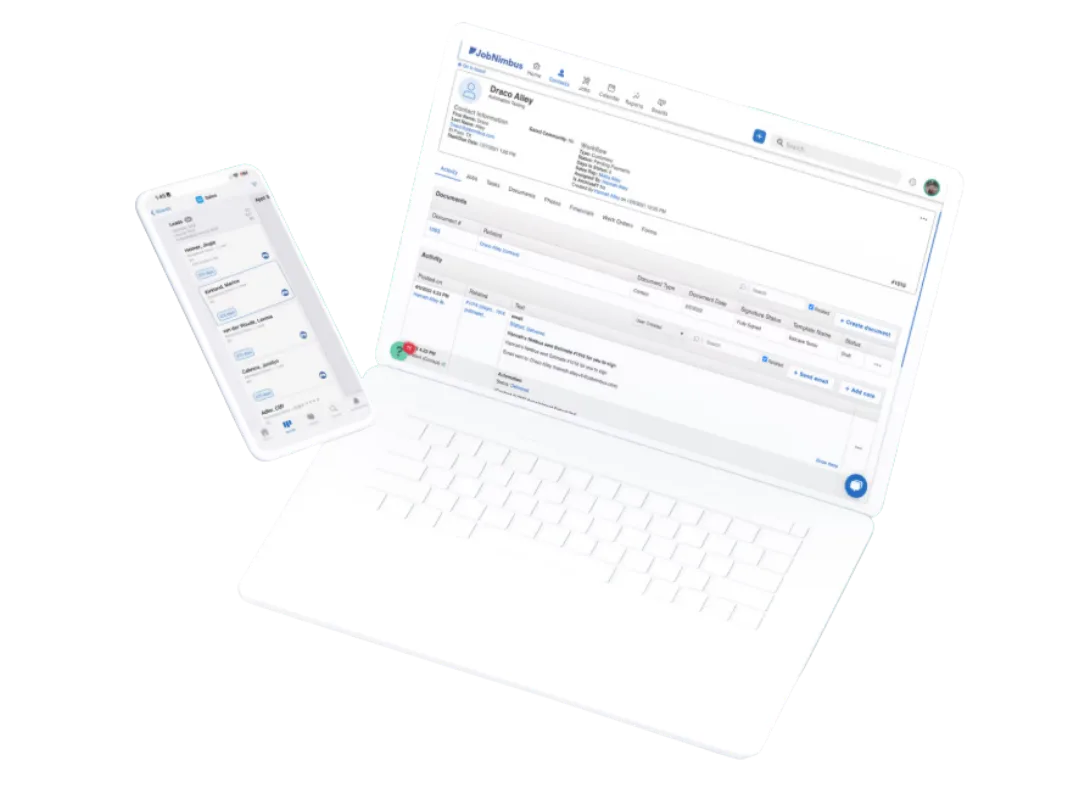
This is the feature that sold me on JobNimbus, and it’s what keeps most roofers on the platform.
The board view is a Kanban-style layout where every job is a card and every column is a stage in your workflow: Lead In → Inspection Scheduled → Estimate Sent → Contract Signed → Materials Ordered → Production Scheduled → Complete → Paid. Drag a card from one column to the next as a job progresses.
At a glance, you see exactly where every job stands. Your sales manager sees the pipeline. Your production manager sees what’s coming. Nobody has to ask “where are we on the Smith job?” — they look at the board.
What makes this work for roofers specifically:
- Multiple boards for different workflows — I run separate boards for retail jobs, insurance claims, and commercial work
- Customizable columns that match how your business actually operates
- Color-coded cards with up to 3 lines of custom info per card (job value, insurance carrier, crew assigned — whatever you need)
- Jobs Sidebar opens on the right when you click any card — full job details without leaving the board
The board limits vary by plan (3 boards on Essentials, 5 on Pro, unlimited on Premium/Enterprise), which is one reason the cheaper tier doesn’t work for most active contractors.
JobNimbus Features: What It Actually Does
Estimating and Material Ordering
JobNimbus acquired SumoQuote in December 2023 and has been integrating it directly into the platform. You can build polished, presentation-quality proposals with good/better/best tiered pricing options — not just a line-item spreadsheet.
The real power is SmartEstimates: pull aerial measurements from EagleView or HOVER, combine them with live material pricing from Beacon PRO+, ABC Supply, or SRS Distribution, and generate an accurate estimate without leaving the platform. When material costs change (and they always do), your numbers stay current because they’re pulling from supplier catalogs in real time.
You can order materials directly from the estimate. One click sends the order to your supplier. No phone calls, no switching to another system.
Invoicing and Payments
Convert any estimate to an invoice with one click. JobNimbus Payments accepts credit cards, debit cards, and ACH/eCheck with next-day funding on most transactions.
Text-to-Pay is the standout here — text a payment link to the homeowner, they tap it, done. Multiple users report payments arriving within minutes. No chasing checks. No “I’ll mail it.”
For bigger jobs, the Wisetack integration offers customer financing with instant approvals up to $25K — no hard credit pull for the pre-qualification. That removes the biggest objection on expensive jobs.
Workflow Automation
Set up automations using when/if/then logic:
- When a job moves to “Contract Signed” → automatically send a welcome email, create a task for the production manager, and notify the office
- When an invoice is 7 days past due → automatically send a follow-up text
- When a lead sits in “Estimate Sent” for 48 hours → automatically trigger a follow-up sequence
This is where JobNimbus saves real hours every week. The stuff that used to require an office manager spending half their day on follow-ups now happens in the background. One roofer told Capterra he “saved 10+ hours per week” after setting up his automations (Source: Capterra reviews).
The automation limits by plan: 10 active automations on Essentials, 30 on Pro, 100 on Premium, unlimited on Enterprise.
Engage: Built-In Texting and Communication
Engage is JobNimbus’s communication add-on. Dedicated business number, shared inbox, automated text sequences, review request campaigns after job completion, and caller ID that shows you who’s calling before you pick up.
All conversations are logged to the job record and visible to your whole team. No more “who texted the homeowner?” situations.
The catch: Engage is a paid add-on, not included in your base plan. Basic starts at $49/month, Standard at $149/month, Premium at $249/month. I think this should be bundled into the CRM — paying separately for texting in 2026 feels nickel-and-dime. But the feature itself is solid.
JobNimbus AI Features: AssistAI and Scout
AssistAI — AI Phone Answering
This is the headline AI feature and it solves a real problem. Roofing contractors miss calls — you’re on a roof, in an adjuster meeting, or it’s 8 PM and a homeowner just noticed a leak after a storm. Every missed call is potential revenue walking away.
AssistAI is an AI receptionist that answers calls 24/7. It handles basic questions about your business, captures lead information, and can schedule appointments directly into your calendar. You can configure it to transfer calls to a human for complex situations or just take a message.
JobNimbus claims contractors using AssistAI recovered $30K in revenue in 30 days and maintain a 95%+ call answer rate. Even if those numbers are generous, the concept is sound — an AI that answers every call with no payroll, no training, no sick days.
Pricing: $0.15 per minute. A 14-day free trial is available.
Is it as good as a sharp human receptionist? No. But it’s better than voicemail, and it’s way better than a missed call with no follow-up.
Scout — AI Mobile Assistant (Beta)
Announced January 2026, Scout lets you perform actions inside JobNimbus using voice or text commands on your phone. “Create a new job for 123 Oak Street” or “update the Johnson job status to materials ordered” — and it does it.
This is different from most AI that just gives you summaries. Scout actually takes actions inside the CRM. It’s in closed beta with a waitlist right now, so I can’t give you a full review yet. But the concept — voice-controlled CRM from the field — is exactly what roofers need.
JobNimbus Mobile App: What Contractors Actually Think
The mobile app carries a 4.8-star rating on iOS with over 11,400 ratings and 4.7 stars on Google Play. Those numbers are strong for business software.
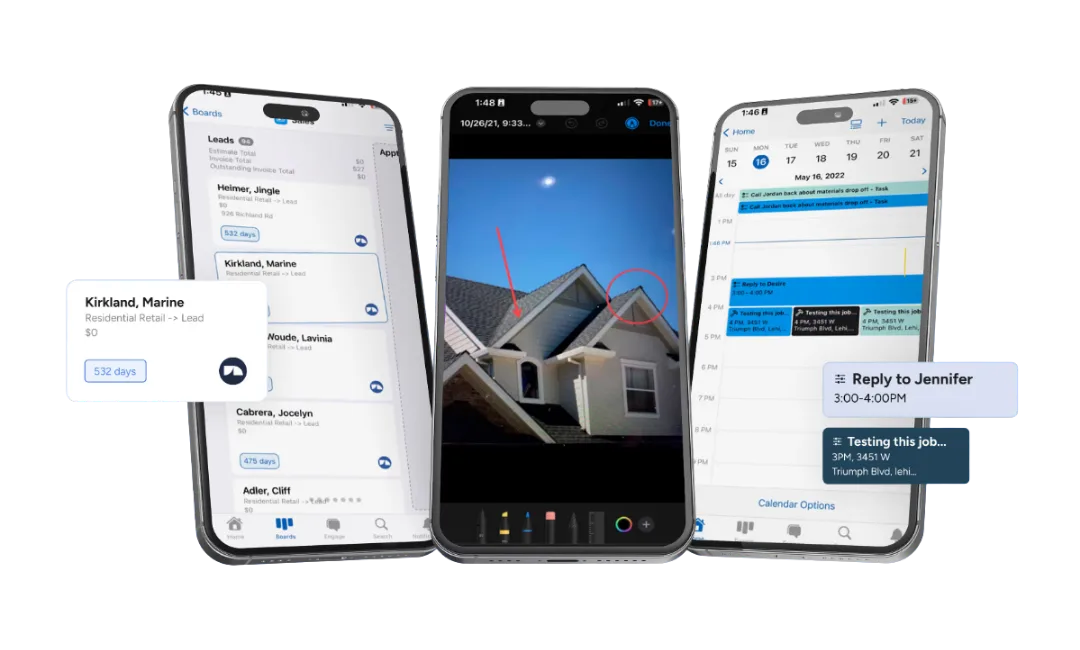
From the field, the app lets your crew: take and annotate job photos, fill out inspection forms, update job status on the board, create and send estimates, collect e-signatures, process payments, and manage their task list.
Here’s where I need to be honest though — the mobile app is the most polarizing part of JobNimbus in user reviews. While the overall rating is high, a vocal minority of users report real issues:
- “Mobile app barely works — half the features are broken or missing” (Source: App Store review)
- Some users report opening the desktop version on their phone’s browser instead of using the app
- Not every desktop feature is available on mobile — your office staff still needs the web version for heavy lifting
- Offline functionality is limited in practice
My experience has been more positive than the worst reviews suggest, but it’s fair to say the mobile app isn’t as polished as the desktop platform. If your crews are on older phones or in areas with spotty cell service, test it during the free trial before committing.
JobNimbus Pricing: How Much Does It Actually Cost in 2026?
JobNimbus doesn’t publish exact pricing on their website anymore — you have to request a quote. Here’s what the current pricing structure looks like:
Plan Tiers
| Plan | Users | Boards | Automations | Integrations |
|---|---|---|---|---|
| Essentials | Up to 3 | 3 | 10 | 2 max |
| Pro | Up to 10 | 5 | 30 | 5 max |
| Premium | Up to 19 | Unlimited | 100 | Unlimited |
| Enterprise | 20+ | Unlimited | Unlimited | Unlimited |
Per-User Fees (on top of base plan)
| Role | Monthly Cost |
|---|---|
| Admin/Owner | $75 |
| Sales/Office | $55 |
| Field Tech | $30 |
| Subcontractor | $20 |
What It Really Costs (Real-World Examples)
- Solo operator (1 admin + basic texting): ~$350/month
- Team of 5 (1 admin + 2 sales + 2 field + standard texting): ~$600-$700/month
- Team of 10 (2 admins + 3 sales + 4 field + 1 sub + premium texting): ~$1,200-$1,300/month
All plans include unlimited contacts, estimates, documents, e-signatures, reports, invoices, financing options, supplier integrations, QuickBooks integration, and JobNimbus Payments.
The 14-day free trial requires no credit card. Use it.
JobNimbus Integrations: What Connects
JobNimbus has built an integration ecosystem specifically for roofing and exterior contractors. These aren’t generic connections — they’re tools roofers actually use daily:
| Integration | What It Does |
|---|---|
| EagleView | Aerial roof measurements → feed directly into SmartEstimates |
| CompanyCam | Two-way photo sync — photos taken in either app appear in both |
| QuickBooks | Full 2-way sync — contacts, invoices, payments, products (Online & Desktop) |
| Beacon PRO+ / ABC Supply / SRS | Live material pricing and direct ordering from estimates |
| Zapier | Connect to thousands of other apps for custom workflows |
| Wisetack / Sunlight Financial | Customer financing with instant approvals up to $25K+ |
| Leap / Hatch | Sales presentations and automated follow-up sequences |
| HailTrace | Storm tracking for identifying leads after weather events |
| Google Calendar | Appointment and scheduling sync |
The CompanyCam and EagleView integrations are particularly well-done — they share data bidirectionally in a way that actually eliminates steps in your workflow, not just “connects.”
Note on integration limits: The Essentials plan only supports 2 integrations. The Pro plan supports 5. If you use EagleView, CompanyCam, QuickBooks, a supplier, and Zapier — that’s already 5. This is one of the biggest reasons the lower tiers don’t work for most active contractors. You’ll hit the integration ceiling fast.
What Real Contractors Say About JobNimbus
I use it every day, but don’t take my word for it alone. Here’s what the review data shows across G2 (4.7/5), Capterra (4.6/5, 480+ reviews), and the app stores:
What users consistently love:
- The board view and visual pipeline management
- Ease of setup compared to enterprise alternatives
- Workflow automation that “runs the business in the background”
- The integration ecosystem, especially QuickBooks and CompanyCam
- Estimate-to-invoice conversion in one click
What users consistently complain about:
- Email reliability — multiple users report missed emails causing real business damage. One user cited this as the reason they nearly switched platforms.
- Mobile app inconsistency — works great for some, crashes and lags for others
- Pricing complexity — the base + per-user + add-on model makes it hard to know your actual cost before signing up
- Missing features some expect — no built-in job costing, no customer portal, no vendor portal
- Reporting limitations — several users describe the Insights feature as lacking depth
These aren’t dealbreakers for most users — the overall ratings are strong and the majority of reviews are positive. But they’re real issues that affect real contractors, and you should know about them before committing.
Who Should Use JobNimbus
- Roofing contractors doing 10+ jobs per month with a team of 3-20 people
- Insurance restoration contractors who need customizable workflows for the claims process
- Retail roofing companies that want polished proposals and financing options to close more deals
- Contractors who want one system instead of juggling five disconnected apps
- Companies spending $500+/month on software already — consolidating tools into JobNimbus often saves money overall
Who Should NOT Use JobNimbus
- Solo operators doing under 10 jobs/month — the math doesn’t work at $350+/month. Start with something cheaper and upgrade when volume justifies it
- HVAC, plumbing, or electrical contractors — JobNimbus is built for roofing workflows, not service-call dispatch. Look at Jobber or ServiceTitan instead
- Large enterprises (50+ employees) — you’ll likely need deeper ERP functionality, commercial job costing, and vendor portals that JobNimbus doesn’t offer
- Teams that won’t invest in setup — plan for 2-3 weeks of configuration and training. Contractors who skip this step end up blaming the tool instead of the implementation
For a head-to-head breakdown with the main competitor, read our JobNimbus vs AccuLynx comparison.
The Bottom Line
I use JobNimbus every day across my roofing operation, and it earns its spot. The board view keeps my team organized across dozens of active jobs. The integrations with EagleView, CompanyCam, and my material suppliers eliminate hours of duplicate data entry every week. The automation handles follow-ups that used to fall through the cracks.
Is it perfect? No. The pricing is more complex than it needs to be, the mobile app has room to improve, and I wish the email system was more reliable. But those are the complaints of someone who uses the product hard every day — not dealbreakers.
For roofing contractors who are serious about running a professional operation, JobNimbus is the standard. It’s the CRM I recommend first, and the one I’d pick again if I had to start over.
Start with the 14-day free trial. Set up a board, import some contacts, build an estimate. You’ll know within a week if it fits how you work. And take them up on the live onboarding — the difference between a contractor who set up JobNimbus with help and one who tried to figure it out alone is night and day.