

What AccuLynx Is — and Why I Actually Switched to It
The honest version of this review: I was on JobNimbus and it was working. But I kept hearing enough “wait until you see AccuLynx’s estimating” from other roofers that I decided to find out for myself. Did a demo, ran the trial, migrated my operation over, and spent a few months on it before eventually switching back.
That experience taught me more about both platforms than any side-by-side spec sheet could. AccuLynx is a genuinely good platform. It’s not why I went back to JobNimbus. I went back because of how I run my business — I need workflow customization that AccuLynx doesn’t give you. For a lot of roofing contractors, that trade-off lands differently.
Here’s the full picture, starting from what AccuLynx actually is.
AccuLynx was founded in 2008 and has been roofing-only from day one. That’s not a marketing angle — every feature, every integration, every workflow they’ve ever built is built around how a residential roofing company sells, estimates, orders materials, and manages production. The platform is used by more roofing contractors than any other dedicated roofing software according to the company, and their customer ratings back that up: 4.6/5 on GetApp across 800+ verified reviews, with customer support consistently as one of the highest-rated dimensions.
First Impressions: Cleaner Than You’d Expect
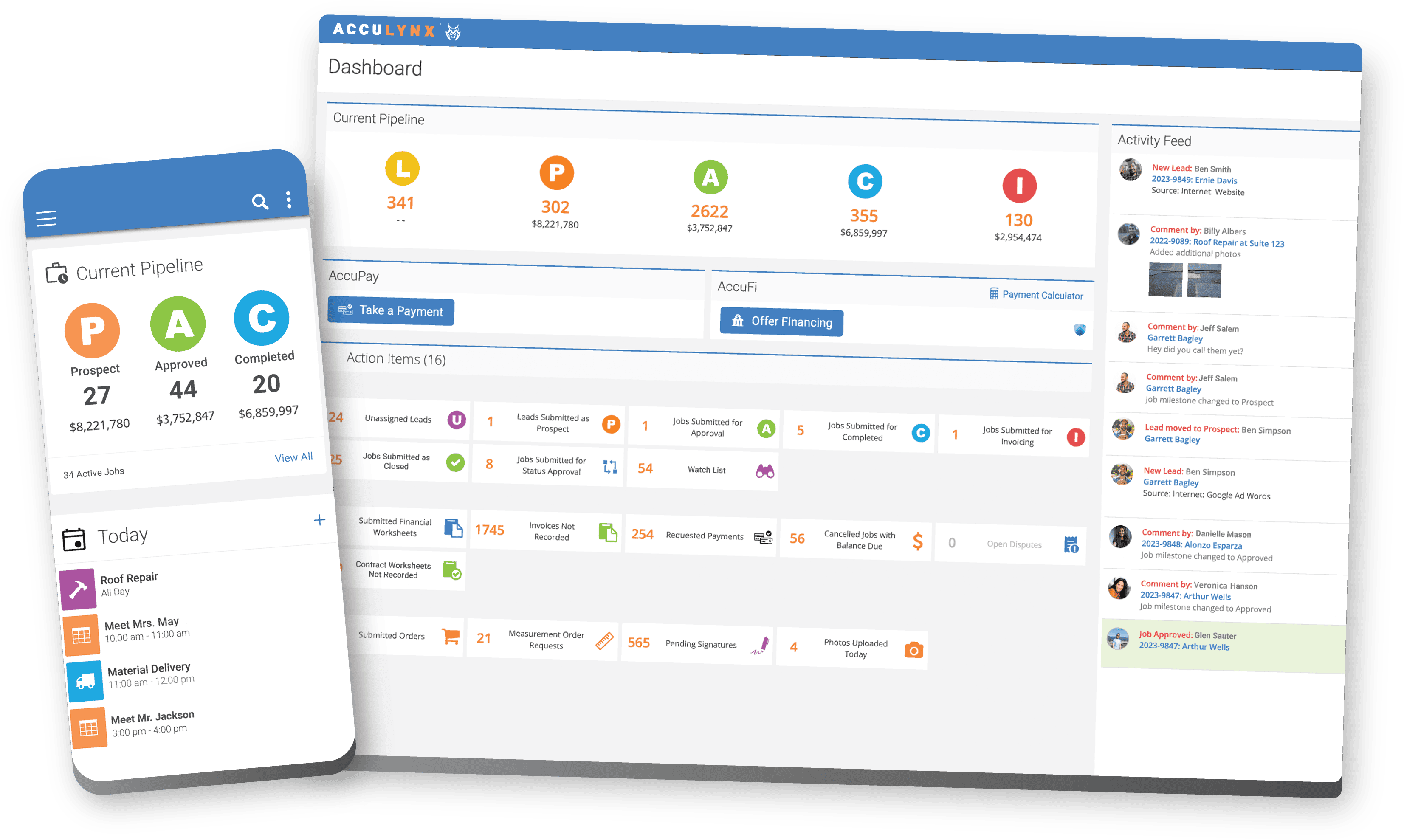
Coming from JobNimbus, the first thing I noticed about AccuLynx was how clean the interface feels. Less configuration noise, cleaner navigation, a logical progression from leads through to invoicing that you don’t have to think hard about. Everything has an obvious place.
That’s not an accident. AccuLynx builds for exactly one type of business. When you’re not designing for plumbers, electricians, and landscapers at the same time, you can strip out a lot of the abstract flexibility that makes general-purpose platforms feel cluttered. Every screen is there because a roofing contractor needs it.
The learning curve is shorter than you’d expect for a platform this deep. AccuLynx says most customers are operational in about a week with their free training sessions, and based on my experience, that’s realistic for the core CRM. The estimating tools take longer to configure well — but that’s where the payoff is, so it’s worth the investment upfront.
CRM and Lead Management: Solid Pipeline, Smart Lead Scoring
AccuLynx’s CRM is built around the roofing sales cycle — not a generic pipeline you have to reconfigure for roofing. Leads move through stages that match how residential roofing actually works: initial contact, inspection scheduled, estimate sent, contract signed, materials ordered, production scheduled, complete, paid. Every stage has associated tasks, documents, and communication history that builds automatically.
The single-job view is the operational strength here. Pull up any job and everything is on one screen: homeowner contact info, inspection notes, every photo, all measurements, every estimate and revision, the signed contract, material orders, production schedule, payment status, and every text and email ever sent to that customer. Nothing buried three clicks deep. For a sales rep in the field getting asked “what’s the status on the Johnson job” — it’s one tap.
Lead Intelligence: The AI Scoring Feature
AccuLynx added AI-powered lead scoring a few years back, calling it Lead Intelligence. The system analyzes your historical closed jobs and ranks active leads by their likelihood to convert — surfacing the best opportunities at the top of your pipeline when you’ve got 40 leads and need to know where to spend Monday morning.
In practice, it’s a useful triage tool, not a magic oracle. The accuracy improves with volume and time — it gets smarter as it learns from your specific customers and close patterns. For a company that’s been on AccuLynx for a year or more with consistent data, it’s genuinely worth using. For a new account, it’s less useful out of the gate.
Communication Tools
Text and email directly from the platform, with every message tied to the job record. Automated notifications keep homeowners informed about appointments, production dates, and milestones without someone on your team manually sending them. Review request automation triggers when a job closes. All communication history is visible to the whole team — no more “what did we tell the homeowner about Thursday?”

The Customer Portal
The Customer Portal is a legitimate differentiator. Homeowners get a branded self-service website where they can track their job status from start to finish, view their upcoming appointments, access documents and invoices, apply for financing, and pay their balance. You control what’s visible and when.
For contractors who spend half their day fielding “when are you coming?” and “can you send me a copy of my contract?” calls — the portal offloads that. Contractors who use it actively report it cuts inbound customer status calls significantly. It’s one of those features that sounds like a nice-to-have until you realize how much time your office spends on those calls every day.
Estimating and Smart(er) Docs: The Feature That Keeps Contractors on This Platform for Six Years
This is the section that matters most if you’re comparing AccuLynx to anything else in the market.
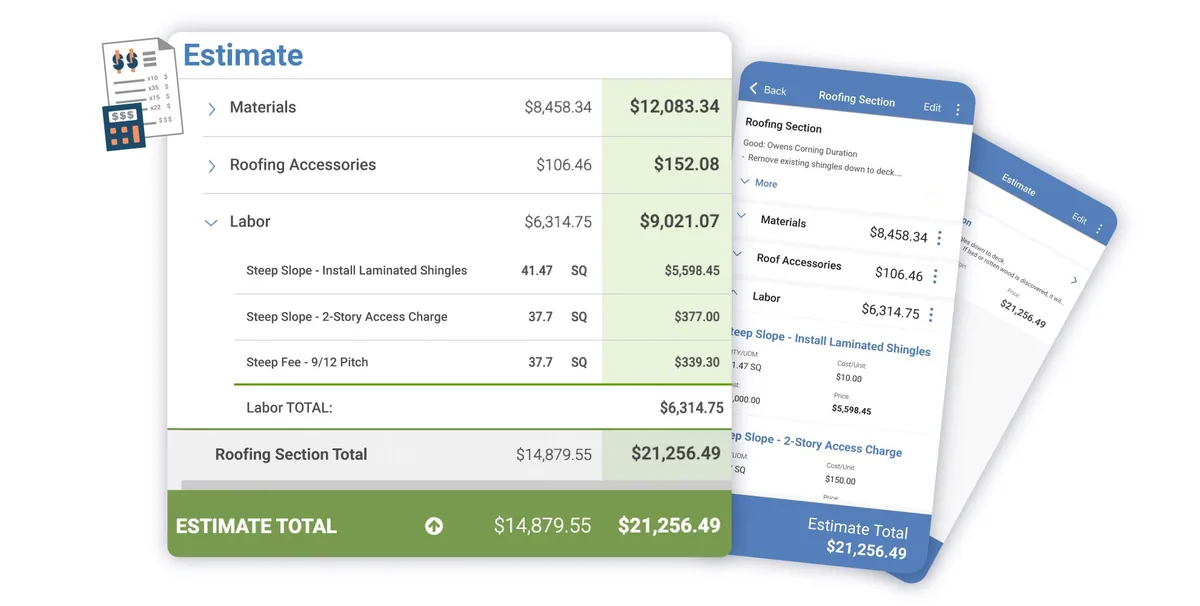
The estimating engine is built directly into the platform — not integrated from a third-party tool, not added on after the fact. It’s native. You order aerial measurements, they auto-populate into the estimate builder. You select materials from your supplier’s live catalog with your account pricing. Quantities calculate automatically from the measurement data. You build a proposal with your branding and tiered pricing options, send it for e-signature, and once the homeowner signs, the material order generates directly from the approved estimate. The whole workflow — from ordering a measurement to submitting a material order — without leaving AccuLynx, without re-entering a single number.
For a roofing company doing 30+ jobs a month, that chain eliminates hours of manual work and a lot of errors.
Smart(er) Docs
Smart(er) Docs is AccuLynx’s document automation suite. Build templates once for your contracts, lien waivers, change orders, warranty certificates, inspection reports, and supplement requests — and they auto-populate from the job file on every use. Customer name, property address, insurance carrier, claim number, shingle color selection, square footage, pricing — all pulled in automatically. Your team doesn’t fill them in, they review them.
Document features include:
- Drag-and-drop proposal builder with your branding and logo
- Good/better/best tiered pricing presentation options
- E-signature with automated follow-up reminders and expiration dates
- Auto-populated contract templates that eliminate manual data entry
- Insurance supplement tracking documents with approval and revision history
- Digital storage and organization of all documents in the job record
For insurance restoration specifically, the supplement workflow is genuinely useful. AccuLynx tracks which line items were approved, which are pending supplement, the current approved job value, and where each claim stands. Anyone who’s tracked this stuff in a spreadsheet knows how it falls apart — people update different versions, numbers get changed, you’re emailing back and forth to figure out where the claim actually stands. Having it in the same system as everything else solves that.
Where AccuLynx Lands Against the Estimating Dimensions
Scoring AccuLynx purely as an estimating tool against the seven estimating dimensions — separate from its CRM and production workflow — produces a 4.1 weighted score. The strengths translate cleanly: SmartBuild estimate accuracy (4.5/5) is industry-best for production roofing because of the supplement workflow + EagleView ingestion + supplier pricing freshness. Trade specialization (4.8/5) is roofing-purpose-built. Integrations (4.5/5) cover the deepest stack in roofing — every aerial measurement provider, every major supplier, QuickBooks, Sage. Proposal generation (4.3/5) is solid via SmartDocs.
The honest weaknesses on the estimating-specific dimensions: AI capabilities (3.0/5) — light AI surface; no AI-native estimating, no AI damage detection, no generative proposal writing as of April 2026. Pricing (3.5/5) — at $60/user/month, AccuLynx gets expensive at 5+ users where per-seat math compounds. AccuLynx’s strength is the integrated workflow depth; the weakness is the per-seat scaling and AI lag.
The Roofr pairing. For AccuLynx customers who specifically want to lift the AI dimension and reduce per-measurement costs, Roofr is the cleanest pairing in the category. Roofr handles the measurement layer at $13/report (50-75% cheaper than EagleView at contractor volumes) with the new $10 Verisk-certified Xactimate ESX add-on for insurance work. AccuLynx remains the production-CRM and supplement-tracking backbone. Frame: AccuLynx runs the business, Roofr runs the estimate — the two don’t natively integrate, but the data transfer is a manageable PDF-and-CSV workflow at the volume where this pairing makes financial sense (15+ measurements/month). For pure-EagleView-defending operations doing insurance restoration where adjuster acceptance trumps per-report cost, AccuLynx + EagleView native integration remains the right stack.
Aerial Measurements: Six Providers, All Direct
This is an area where AccuLynx is meaningfully ahead of most competitors, including JobNimbus.
You get direct integration with six aerial measurement providers:
| Provider | What Makes It Different |
|---|---|
| EagleView | Industry standard; orders and delivers inside AccuLynx |
| GAF QuickMeasure | Under an hour for residential; commercial reports too |
| Hover | 3D model-based measurements, integrates with photo documentation |
| Geospan | Full 3D models up to 99% accurate; auto-fills estimate quantities |
| RoofSnap by EverPro | Auto-syncs measurements and photos without manual uploads |
| RoofScope | Newest addition (Feb 2026); aerial measurements direct to job files |
Order from inside AccuLynx, receive inside AccuLynx, data auto-populates the estimate. No PDFs. No exporting. No manual re-entry. For a company ordering 25 measurements a month, that’s not just convenience — it’s error reduction. Wrong measurements mean wrong material orders. Wrong orders mean wasted product, delayed jobs, and callbacks you’re making on your own time.
Having six measurement providers also means you’re not locked into one service’s pricing. You can order from whoever your supply rep prefers, whoever has the fastest turnaround for your area, or whoever you’ve negotiated the best rate with.
Material Ordering: Your Supply House Is Already Connected
Three of the biggest roofing distributors in the country integrate directly:
ABC Supply — real-time product catalog with your account pricing, direct order submission SRS Distribution — real-time inventory by branch, live pricing, order tracking QXO — real-time product availability and pricing, direct order placement and status
The workflow is: estimate gets approved → material list generates from the estimate data → review and confirm quantities → submit the order. It goes to your supplier’s system directly. No phone call. No handwritten form. No someone on your team transcribing shingle colors and quantity counts from a printout.
Beyond the convenience, this closes a job costing loop that most roofing companies leave open. Because every material order is tied to the job record, AccuLynx tracks what you ordered, what it cost, and how that compares to your estimate. That visibility is hard to get any other way before you’re reconciling QuickBooks invoices three weeks after the job closed.
The limitation is straightforward: if your primary supplier isn’t ABC, SRS, or QXO, this integration loses its value. Regional distributors and specialty suppliers aren’t connected. It’s worth verifying your supply chain before you factor this into your decision.
Production Management: The Scheduler That Got a Real Upgrade

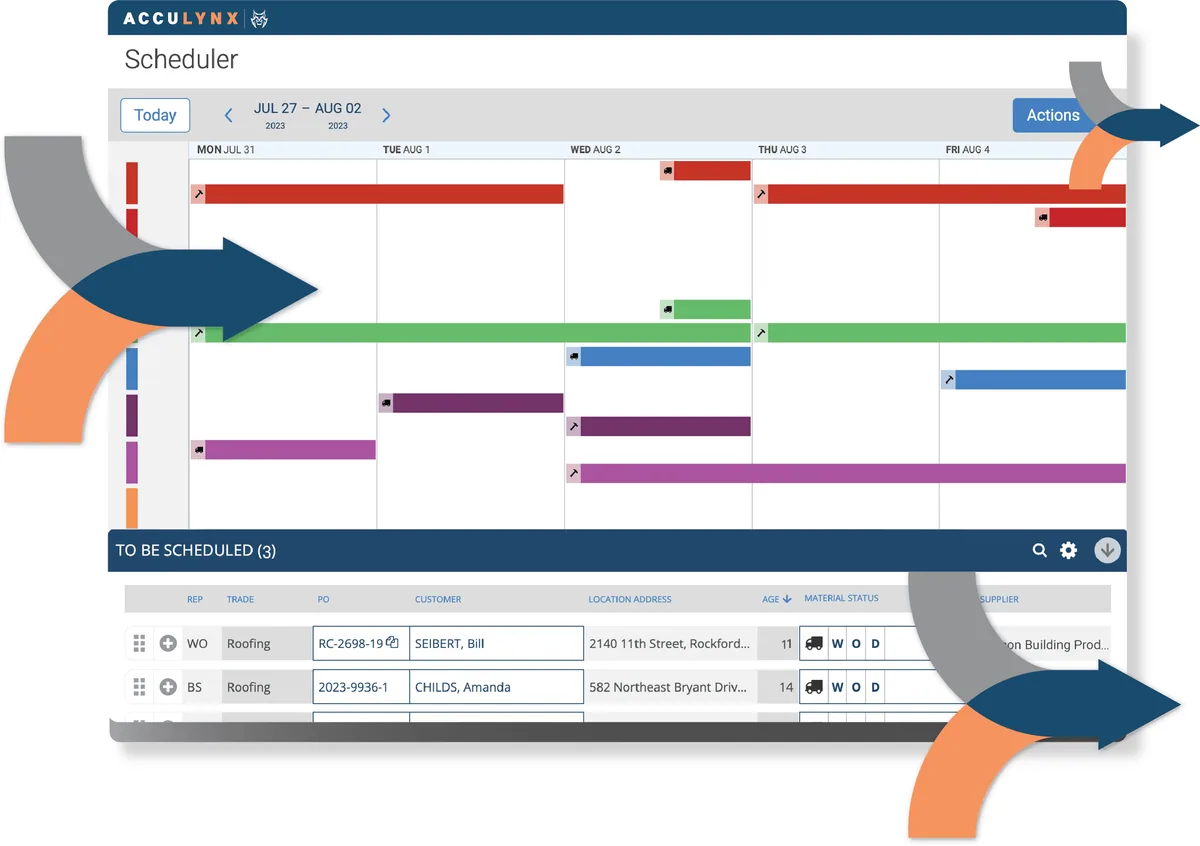
AccuLynx’s production tools center on a redesigned Scheduler — a dedicated production calendar with drag-and-drop functionality, color-coded crews, and views that range from a two-week overview down to hourly detail.
The Scheduler ties labor and materials together on the same view. Every job has a Labor Ticket showing the crew their assignment, the property address, on-site instructions, relevant documents and photos, and a custom checklist for that job type. Material delivery schedules sit alongside the labor assignments — the crew lead can see when the truck arrives at the same time they see when they’re supposed to show up.
When weather hits (which is always), drag-and-drop rescheduling updates the calendar, notifies affected crew leads through the mobile Crew App, and adjusts the production view automatically. For residential roofing where a single system can wipe out a week’s schedule, being able to move five jobs around in a few minutes and have everyone notified without making individual phone calls is worth real time.
The “To Be Scheduled” drawer collects all jobs that are contracted and waiting for a production date. Filter and prioritize from there, bulk-select jobs, and schedule batches when you’re doing weekly production planning. If you’re a production manager or office coordinator handling 15-20 active jobs, that centralized queue is a significant operational improvement over managing a whiteboard or shared spreadsheet.
Note: the more advanced scheduler features — hourly breakdown, full crew management, the Order Manager with bulk actions — are part of higher plan tiers. The Essential plan has basic scheduling tools.
AccuLynx’s Scheduling Layer in Practice
AccuLynx’s scheduling is built around the production board — not a multi-tech dispatch system. For roofing operations where the rep’s inspection appointment, the office’s production schedule, and the crew’s job assignments all flow through one CRM, AccuLynx works competently. For service-trade dispatch where 5+ techs need real-time GPS routing and capacity-based scheduling, AccuLynx is the wrong tool — that’s ServiceTitan or Housecall Pro territory.
What AccuLynx does well in the scheduling category: appointment scheduling tied to leads (sales rep books a storm-damage inspection, the appointment, photos, and EagleView measurement order all live on the same lead record); production-board crew assignment that respects the multi-step roofing workflow (inspection → estimate → contract → material order → install → invoice); and the Production Manager view that gives the office a live dashboard of jobs and their crew assignments. The 2025 scheduler upgrade (covered in Production Management above) cleaned up a long-standing complaint about calendar UX and brought drag-and-drop reschedule to the production board.
Where AccuLynx scheduling falls short: customer-facing online booking is light, recurring service plan automation isn’t really a feature (production roofing isn’t recurring), and GPS route optimization across a multi-crew day isn’t built into the platform. The scheduling-category fit is roofing-specific — not multi-trade.
Scheduling is included in every AccuLynx tier — there’s no separate add-on or higher tier required, though the advanced scheduler views only appear on higher plan tiers. For pure-play roofing operations where the entire CRM-to-production-to-invoice workflow lives in one platform, AccuLynx’s scheduling integrates cleanly. For multi-tech service-trade dispatch, see the scheduling category page.
Finance: AccuPay, QuickBooks, and Getting Paid Faster
AccuPay — Built-In Payment Processing
AccuPay is AccuLynx’s native payment processing, powered by WorldPay. Homeowners can pay by credit card, debit card, or ACH bank transfer from anywhere — the customer portal, a payment link you texted them, or a device your crew shows them at job completion.
Payments apply directly to the job record in AccuLynx and sync to QuickBooks automatically. No manual reconciliation. No “did that payment come in yet?” calls to your bookkeeper. The dashboard shows payment trends and outstanding invoices in real time.
QuickBooks and Sage Intacct
The QuickBooks integration is bidirectional — invoices, payments, and job data sync both ways. It works reliably, which matters more than it sounds for something you depend on daily. Multiple AccuLynx reviewers specifically call out the QuickBooks sync as one of the things that just works.
For larger or more complex accounting setups, there’s also a Sage Intacct integration with two-way financial data sync. That’s uncommon for roofing-specific software and worth knowing if your accounting infrastructure is more sophisticated.

Financing Options for Homeowners
Two financing integrations let homeowners apply for project financing from your customer portal:
- AccuFi™ (powered by Acorn Finance) — multiple lender marketplace, homeowners get pre-qualification reviews before committing
- GreenSky® — instant credit notifications with simple eligibility requirements
Having financing available in the customer portal changes how you handle the “that’s more than I expected” conversation. When the homeowner can apply for a loan on the same website where they reviewed the proposal and signed the contract, more of those conversations close same-day.
Commission Tracking
AccuLynx includes a commission module tied directly to job data. Sales rep pay calculates from actual closed job values, not from a spreadsheet someone updated last week. For companies with multiple reps or a commission structure, this eliminates a whole category of reconciliation headaches.
Mobile App: Better Than Average, With Real Complaints
AccuLynx’s mobile app is available on iOS and Android and is built for roofing field work specifically — not a watered-down version of the desktop platform trying to fit on a phone.
What works well in the field:
- Full job access: all photos, documents, estimates, and notes attached to any job
- Photo capture: takes and tags photos to the job record in real time; available to the office immediately
- Estimates on the road: show a professional proposal on an iPad during a kitchen-table close, collect an e-signature on the spot
- The Crew App gives production crews their labor tickets, job instructions, custom checklists, and real-time schedule updates
The complaints from reviewers are consistent enough to flag honestly:
“Mobile interface seems clunky” — several reviewers across platforms
“App crashes, site can be slow” — not universal, but appears often enough to be a real pattern
“Photo scrolling resets at photo 1 when you’ve scrolled past 40+ photos” — a specific functional bug that multiple users cite
Search in the mobile app is limited — you can’t search jobs by material type, which makes finding specific jobs harder than it should be on a job site.
My experience: the basics worked fine. The proposal and e-signature workflow on an iPad during a sales call is actually impressive. But for production crews who are in the app constantly throughout the day updating job statuses, documenting work, and checking schedules — test it with your actual crew during the trial period before committing. Some teams take to it; others find the friction real.
AccuLynx Integrations: Deeper Than It Gets Credit For
Most people think of AccuLynx as having a handful of integrations. The actual list is broader:
| Integration | Category | What It Does |
|---|---|---|
| EagleView | Measurement | Aerial orders and delivery inside AccuLynx |
| GAF QuickMeasure | Measurement | Fast residential + commercial reports |
| Hover | Measurement | 3D model measurements linked to estimates |
| Geospan | Measurement | 99%-accurate 3D models, auto-fills estimates |
| RoofSnap by EverPro | Measurement | Auto-syncs measurements and photos |
| RoofScope | Measurement | Aerial measurements direct to job files |
| ABC Supply | Materials | Live catalog, account pricing, direct orders |
| SRS Distribution | Materials | Real-time inventory + pricing by branch |
| QXO | Materials | Real-time pricing, order placement and tracking |
| QuickBooks | Accounting | Bidirectional sync of invoices, payments, jobs |
| Sage Intacct | Accounting | Two-way financial sync for complex accounting |
| AccuFi/Acorn Finance | Financing | Multi-lender homeowner financing |
| GreenSky | Financing | Instant credit approval financing |
| CompanyCam | Photos | Auto-syncs photos, tags, and documents to job files |
| HubSpot | Lead Management | Automatic lead sync, campaign tracking |
| SalesRabbit | Lead Management | D2D canvassing lead transfer, no manual entry |
| Spotio | Lead Management | Lead record transfer for door-to-door operations |
| Hatch | Lead Engagement | Automated personalized messaging campaigns |
| CallRail | Call Tracking | Auto-syncs call leads and activity data |
| GAF Leads | Lead Source | Bidirectional lead sync from GAF’s contractor network |
| Angi | Lead Source | Lead and ad sync for qualified opportunities |
| Roofle | Lead Source | Auto lead transfer from Roofle quote submissions |
| Google Calendar | Scheduling | Two-way appointment sync |
| Apple Calendar | Scheduling | Appointment sync for Apple device users |
| Microsoft Outlook | Scheduling | Unified calendar for Outlook-based operations |
| HailWatch™ | Storm Data | Real-time hail and wind alerts, storm mapping |
| CoreLogic Hail Maps | Storm Data | Hail activity reports and business intelligence |
| Google Maps | Navigation | Location services and route optimization |
| Zapier | Automation | Multiple auth keys for third-party app workflows |
That’s 29 connections — more than most people realize. The measurement ecosystem alone (six providers) is broader than any roofing competitor I’ve seen. The lead management integrations (HubSpot, SalesRabbit, Spotio, CallRail) mean that wherever your leads originate — door-to-door canvassing, inbound calls, storm-chasing campaigns — they flow into AccuLynx automatically without anyone retyping contact info.
The Zapier integration matters too. Multiple auth keys means you can have different Zapier workflows for different locations or business units, and it opens up connection to thousands of apps outside AccuLynx’s native partner list.
AccuLynx’s API and Agentic AI: What’s Actually Possible
Contractors building out AI automation workflows increasingly want to know: can this platform connect to an AI agent or LLM-based workflow? The answer for AccuLynx is — yes, with the right expectations.
The API: AccuLynx has a documented public REST API at apidocs.acculynx.com. It includes full endpoint documentation, webhook support, code samples in multiple languages, and rate limit documentation. An active account plus an API key is all you need to start building. Webhooks fire on meaningful business events: job creation, job updates, invoice changes, and changes to approved job value.
What this enables: You can wire AccuLynx into an agentic automation workflow. An AI call answering service captures a lead → pushes data to AccuLynx as a new job via API → AccuLynx fires a webhook → triggers an automated Zapier workflow → sends your sales rep a text and creates a follow-up task. That whole chain works today without custom code if you use Zapier as the connective layer. With direct API access, a developer can build something tighter.
What it doesn’t enable: AccuLynx has no native AI agent capabilities, no MCP server, no first-party voice or chat AI interface. It’s not designed to be the AI hub in a workflow — it’s the business data layer that an AI workflow talks to. That’s a meaningful distinction if you’re thinking about building a Claude or ChatGPT-based system that actively manages your CRM. For that kind of architecture, AccuLynx is one of the more API-accessible roofing platforms, but you’re building the connective tissue yourself.
For comparison: JobNimbus has a similar story — public API, Zapier support, no native agentic layer. ServiceTitan has deeper API coverage for large enterprise workflows. The roofing CRM category hasn’t built to native AI agent standards yet — AccuLynx is ahead of most competitors in having a real public API, but it’s still a data-in/data-out system rather than an AI-native one.
AI Call Answering That Pairs With AccuLynx
Adding AI call answering to your AccuLynx setup is one of the highest-ROI moves you can make — you’re already managing your jobs in one platform, you might as well stop letting leads go to voicemail. Here’s how the main options connect:
| Service | AccuLynx Integration | Monthly Cost | Best For |
|---|---|---|---|
| Upfirst | Native direct integration | From $24.95/mo | Best value, lowest friction |
| Rosie | Via Zapier | From $49/mo | Bilingual markets + roofing fit |
| Smith.ai | Via Zapier/webhooks | From $95/mo | AI + human backup for complex calls |
| ServiceAgent | Via Zapier | From $0.99/min | Roofing-specific AI model |
Upfirst is the standout pick for AccuLynx users. It has a documented native AccuLynx integration — call data flows directly into your account as new jobs and contacts without Zapier overhead. At $24.95/month for 30 calls, it’s the cheapest real entry point in the AI call answering category. If you’re already paying for AccuLynx’s higher tiers, adding Upfirst is nearly free in comparison.
Rosie fits well for roofing contractors in bilingual markets. English/Spanish on every plan with mid-call language switching, clean natural voice quality, and Zapier integration that pushes call data to AccuLynx. At $49/month for 250 minutes, it covers most residential roofing operations without running out of minutes mid-month.
Smith.ai is the call when stakes are high. Their hybrid AI + human model means a live US-based receptionist takes over when the AI gets stuck — relevant for insurance claim complexity, adjuster callbacks, or situations where a caller is upset and needs a human voice. Costs more but the fallback earns its keep on the calls that matter.
Read our full guide to AI call answering for contractors →
AccuLynx Pricing: What You’ll Actually Pay in 2026
AccuLynx doesn’t publish a transparent pricing page — you need to request a demo or call sales to get exact numbers. Based on what’s publicly available and what contractors report paying:
Essential Plan — $250/month
The advertised entry-level option for growing roofing teams. Covers the core CRM, basic estimating, job management, and QuickBooks integration. Some advanced features — the full scheduler, commission tracking, certain integrations — are gated to higher tiers.
Standard Per-User Plans — $60–$120/user/month
Larger operations move to per-user pricing that scales with team size. A 5-person team at $80/user runs $400/month. A 10-person team at $90/user is $900/month. Volume discounts apply for annual contracts and larger teams.
Where the Cost Adds Up: The Add-On List
Several features that feel like they should be included cost extra:
- SMS/texting communication
- Smart(er) Docs proposal builder
- Customer portal
- Individual measurement reports (billed per-report by EagleView, Hover, etc. — separate from AccuLynx’s subscription)
- AccuPay card processing fees (per-transaction percentage)
These add-ons can push your effective monthly cost well above the base subscription. Contractors who ran the math and found AccuLynx “too expensive” often calculated the base plan and forgot the add-ons. Run the full cost of ownership — every feature you’ll actually use — before comparing it against alternatives.
What You Get That Doesn’t Cost Extra
This is where AccuLynx earns back the cost differential: onboarding and support are genuinely included.
Most SaaS companies hand you a help center and some YouTube videos. AccuLynx assigns a trainer who schedules multiple live sessions with your team, walks through the estimating setup specific to your workflows, and stays available during the early weeks. Their U.S.-based support team picks up the phone when something breaks.
The training makes a real difference. The gap between a roofing company that uses 30% of AccuLynx and one that uses 90% of it is almost always whether they invested in setup. Take the training sessions. All of them.
It’s also worth negotiating. Annual contracts and volume deals get better rates. Sales teams have flexibility and they’re realistic about what different company sizes can pay.
What Contractors Actually Say About AccuLynx
With 800+ reviews on GetApp and Capterra (4.6/5 combined) and nearly 90 Trustpilot reviews (3.8/5), there’s enough data to see clear patterns beyond the marketing copy.
What Keeps Contractors on This Platform
The theme that runs through positive reviews across every platform:
The all-in-one workflow. “AccuLynx allows for seamless workflow, from scheduling to estimates to ordering” shows up in various forms across dozens of reviews. Contractors who were previously running estimates in Excel, proposals in a Word template, and material orders by phone call cite the integrated chain as a genuine operational shift.
Customer support that actually helps. Multiple reviewers specifically mention that support staff pick up the phone and stay on a problem until it’s resolved — not just sending a knowledge base link. That’s rarer than it should be in SaaS software at this price point.
The estimating and material ordering. One contractor who’d been on AccuLynx for six years and twice attempted to migrate to JobNimbus kept coming back: “Building labor and material orders is much better, much smoother, and integrates with original EagleView measurements.” Six years and two attempted migrations is a meaningful statement about what the platform gets right.
Roofing-specific design. “Vendor designed this product’s foundation for the industry we specialize in — some of the best support in the world” — Chris M., Owner, via GetApp. The trade-specific depth shows up in reviews consistently.
The Real Complaints Worth Taking Seriously
Billing practices. Trustpilot reviews include multiple reports of unexpected charges — users billed for “inactive” accounts they believed were deactivated, surprise line items, and difficulty resolving disputes. One reviewer reported $1,000+ in overcharges and a contentious resolution process. This is a legitimate flag. Before you sign up: get explicit clarity on what triggers billing, how user deactivation works, and what happens to your data and billing if your team size changes.
Data access after cancellation. Several reviewers report difficulty getting their own data out of AccuLynx after leaving the platform, including one contractor who was quoted $600 for access to their own job files post-cancellation. Before you sign anything, ask specifically: what format does my data export in? What does it cost? What’s the timeline? Get it in writing.
The message board removal. In January 2025, AccuLynx removed the message board feature — a tool contractors were using for tracking claim history and internal job communications. Users who relied on it were frustrated by both the removal and the lack of advance notice. This is less about the specific feature and more about knowing that AccuLynx will make platform changes that affect your workflows, and you may not get much warning.
Mobile app limitations. Photo scrolling resets, search limitations, occasional crashes — this is the most consistently cited operational complaint across all platforms. It’s not a dealbreaker for everyone, but it’s real.
Add-on costs. “Everything is an add-on, pricing becomes thousand-dollar range” — Capterra reviewer. The pattern is real. The base plan price is not the total cost.
Who AccuLynx Is Right For — and Who Should Look Elsewhere
Strong yes for:
- Established residential roofing companies doing consistent volume, typically $1M+ revenue
- Storm restoration contractors managing insurance supplements and claim tracking at scale
- Companies ordering aerial measurements in volume who want the measurement-to-estimate chain seamless
- Roofing companies primarily supplied by ABC Supply, SRS Distribution, or QXO
- Operations that value white-glove training and real support over lower base pricing
- Contractors who want simpler out-of-the-box operation without heavy configuration
Look elsewhere if:
- You do any trade other than roofing — AccuLynx is single-trade with no flexibility
- You’re a small crew (1-5 people) watching costs closely — the add-on model hits harder at this size
- You need maximum workflow customization and dashboard flexibility — AccuLynx has its own opinionated way of doing things
- You rely heavily on tools outside AccuLynx’s integration list
- You want to build aggressive AI automation workflows that integrate deeply with your CRM — JobNimbus’s Zapier ecosystem and open workflow builder gives you more to work with
AccuLynx vs. JobNimbus: The Honest Comparison
This is the matchup that actually matters for most residential roofing contractors, because one of these two is where most dedicated roofers end up. I’ve run my operation on both. Here’s my read:
AccuLynx wins on:
- Built-in estimating depth — purpose-built from day one, not integrated
- Aerial measurement options — six providers versus two for JobNimbus
- Insurance supplement and restoration workflow management
- Interface simplicity — easier to navigate out of the box, shorter initial learning curve
- Included training quality and proactive onboarding support
- Gross profit margin-based estimating instead of markup (more useful for sophisticated estimators)
JobNimbus wins on:
- Backend customization — workflow rules, board configuration, automation logic all bend further
- Integration ecosystem — Zapier support plus an open builder means connections to almost anything
- Multi-trade flexibility — if your business ever adds siding, gutters, or any exterior work outside roofing
- Pricing transparency — flat-rate base plans are easier to budget from the start
- Total cost of ownership, especially at smaller team sizes when add-ons are factored in
The contractor who told me about their six years on AccuLynx and two failed JobNimbus migrations made the case for AccuLynx clearly: the estimating workflow, the task management, the integration with EagleView — it just worked better for how they ran their production. I tried the same switch and found AccuLynx easier to get operational. But when I needed to set up different automation rules for insurance jobs versus retail jobs, customize how my boards triggered notifications, or connect to a specific tool that wasn’t on AccuLynx’s list — I kept hitting a wall. That’s the trade-off: AccuLynx is more polished and opinionated out of the box; JobNimbus bends further once you need it to.
See the full breakdown in our AccuLynx vs. JobNimbus comparison.
The Bottom Line
AccuLynx earns its 4.4 rating because it delivers on a hard promise: an end-to-end business management system that actually works for residential roofing, with the estimating workflow — aerial measurement to signed proposal to material order — as its crown jewel. The customer support is real. The training is real. The integration ecosystem is deeper than most people realize.
The trade-offs are equally real. Pricing adds up with add-ons and needs a hard conversation before you sign. The mobile app needs work. The billing practices have generated enough documented complaints to be worth taking seriously. And if your business ever grows beyond roofing into adjacent exterior trades, you’ll be managing two platforms.
But for a dedicated residential roofing company that wants one system handling CRM, estimating, proposals, material ordering, production scheduling, payments, and homeowner communication — without duct-taping together four separate tools and praying they sync — AccuLynx delivers that. Consistently. With people behind it who understand what roofing companies actually need.
Take the free trial. Book every training session they offer — seriously, all of them. Build a real estimate from an actual measurement, run a material order through the ABC Supply integration, and see how long the chain takes from measurement to submitted order. That workflow either convinces you or it doesn’t. You’ll know within a week.
Stats cited: AccuLynx reports an average of 9 hours saved per user per week and 32% growth in job profits after year one. Third-party ratings: 4.6/5 on GetApp (804 reviews), 4.6/5 on Capterra, 3.8/5 on Trustpilot (89 reviews). Industry context: 82% of AccuLynx users are in residential roofing per GetApp data.