

What JobNimbus Is (and Isn’t)
JobNimbus is the CRM I use to run my roofing operation, and I’ve been on it long enough to know exactly where it delivers and where it falls short. It’s a CRM and project management platform built specifically for roofing and exterior contractors — not a generic sales tool that someone slapped a “for contractors” label on.
Over 6,000 contractors use JobNimbus today. The company has raised $383 million in funding, acquired SumoQuote (proposal software) in 2023, and recently launched AI features that actually do useful things. They’re not going anywhere.
That said, it’s not perfect and it’s not cheap. Let me walk you through exactly what you’re getting, what it costs, and whether it fits your operation.
JobNimbus Ratings at a Glance (April 2026)
Verified Third-Party Ratings · April 2026
Highest-Rated Construction CRM Across Every Major Platform
Aggregated across G2, Capterra, iOS App Store, and Google Play. Editorial score is ours, built from hands-on use over multiple years of real roofing operations.
Capterra
4.6
/ 5
480+ verified reviews
iOS App Store
4.8
/ 5
11,400+ ratings
Google Play
4.7
/ 5
Field-tech adoption signal
Editorial Score
4.6
/ 5
Best Overall CRM · hands-on review
4.8/5 on iOS with 11,000+ ratings is rare for any B2B software, let alone contractor-specific. The mobile app adoption signal is the strongest validation in the data set.
JobNimbus is one of the highest-rated construction CRMs across every major review platform. The mobile app ratings in particular are exceptional — 4.8 on iOS with over 11,000 ratings is rare for any B2B software, let alone contractor-specific software. The editorial score here is ours, built from hands-on use; the other four are third-party aggregates.
JobNimbus Board View: The Feature That Sells It
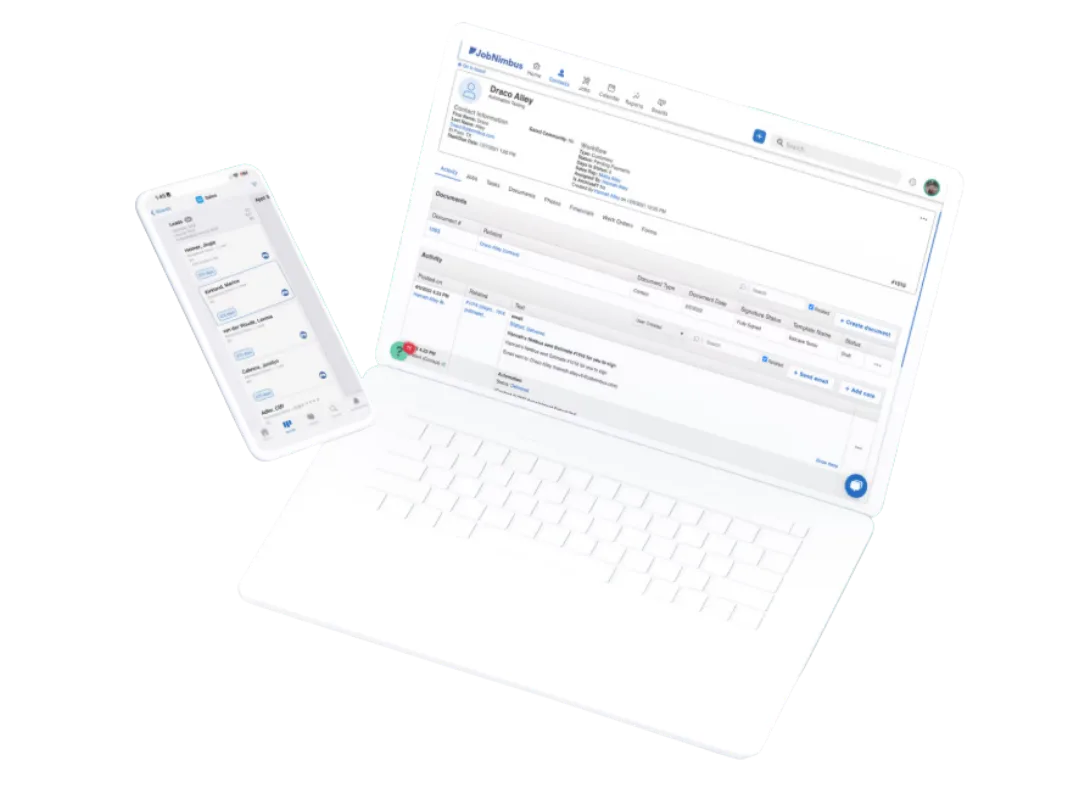
This is the feature that sold me on JobNimbus, and it’s what keeps most roofers on the platform.
The board view is a Kanban-style layout where every job is a card and every column is a stage in your workflow: Lead In → Inspection Scheduled → Estimate Sent → Contract Signed → Materials Ordered → Production Scheduled → Complete → Paid. Drag a card from one column to the next as a job progresses.
At a glance, you see exactly where every job stands. Your sales manager sees the pipeline. Your production manager sees what’s coming. Nobody has to ask “where are we on the Smith job?” — they look at the board.
What makes this work for roofers specifically:
- Multiple boards for different workflows — I run separate boards for retail jobs, insurance claims, and commercial work
- Customizable columns that match how your business actually operates
- Color-coded cards with up to 3 lines of custom info per card (job value, insurance carrier, crew assigned — whatever you need)
- Jobs Sidebar opens on the right when you click any card — full job details without leaving the board
The board limits vary by plan (3 boards on Essentials, 5 on Pro, unlimited on Premium/Enterprise), which is one reason the cheaper tier doesn’t work for most active contractors.
JobNimbus Features: What It Actually Does
Estimating and Material Ordering
JobNimbus acquired SumoQuote in December 2023 and has been integrating it directly into the platform. You can build polished, presentation-quality proposals with good/better/best tiered pricing options — not just a line-item spreadsheet.
The real power is SmartEstimates: pull aerial measurements from EagleView or HOVER, combine them with live material pricing from Beacon PRO+, ABC Supply, or SRS Distribution, and generate an accurate estimate without leaving the platform. When material costs change (and they always do), your numbers stay current because they’re pulling from supplier catalogs in real time.
You can order materials directly from the estimate. One click sends the order to your supplier. No phone calls, no switching to another system.
Invoicing and Payments
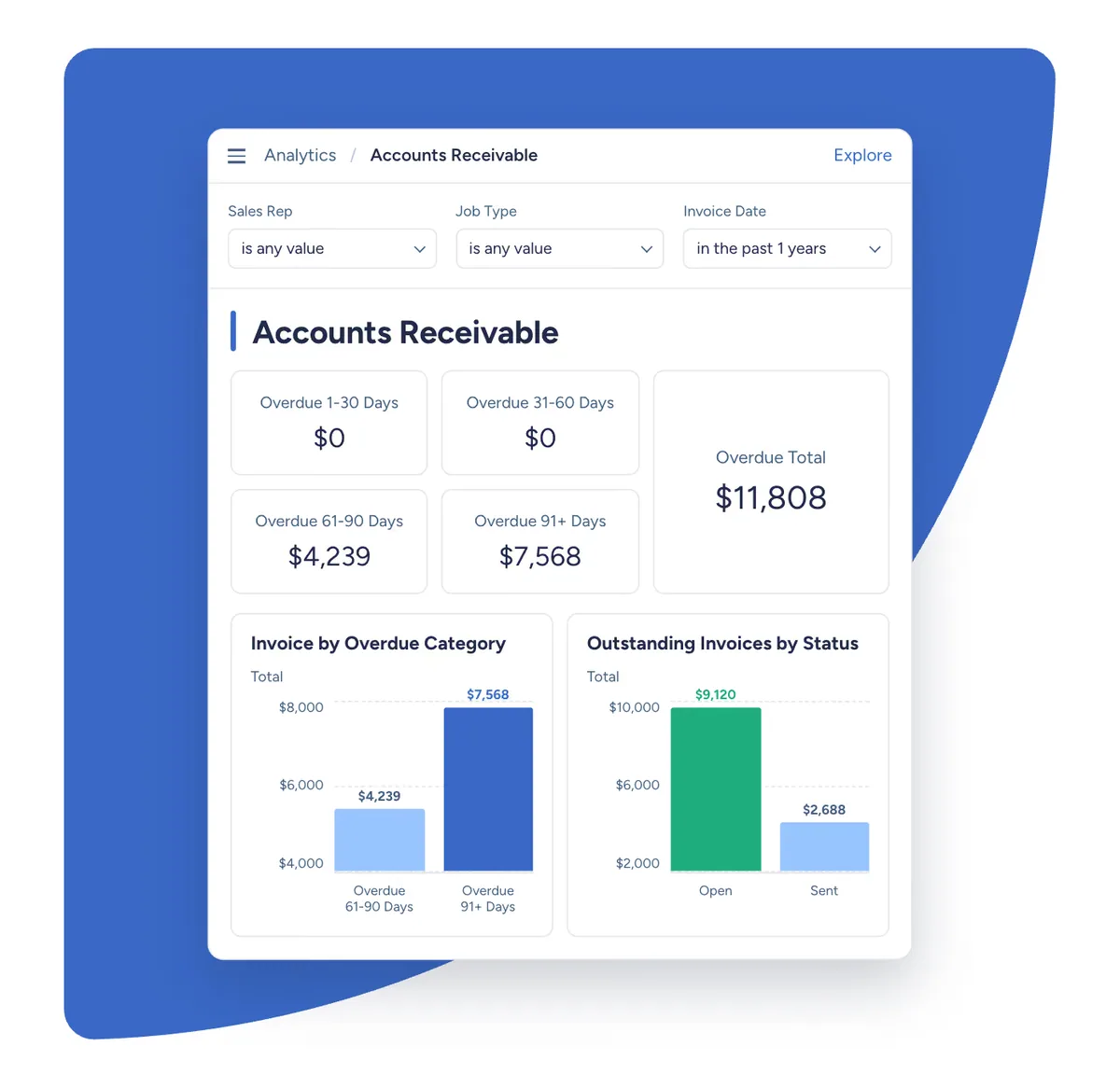
Convert any estimate to an invoice with one click. JobNimbus Payments accepts credit cards, debit cards, and ACH/eCheck with next-day funding on most transactions.
Text-to-Pay is the standout here — text a payment link to the homeowner, they tap it, done. Multiple users report payments arriving within minutes. No chasing checks. No “I’ll mail it.”
For bigger jobs, the Wisetack integration offers customer financing with instant approvals up to $25K — no hard credit pull for the pre-qualification. That removes the biggest objection on expensive jobs.
Workflow Automation
Set up automations using when/if/then logic:
- When a job moves to “Contract Signed” → automatically send a welcome email, create a task for the production manager, and notify the office
- When an invoice is 7 days past due → automatically send a follow-up text
- When a lead sits in “Estimate Sent” for 48 hours → automatically trigger a follow-up sequence
This is where JobNimbus saves real hours every week. The stuff that used to require an office manager spending half their day on follow-ups now happens in the background. One roofer told Capterra he “saved 10+ hours per week” after setting up his automations (Source: Capterra reviews).
The automation limits by plan: 10 active automations on Essentials, 30 on Pro, 100 on Premium, unlimited on Enterprise.
For the 12 specific automations every roofing contractor should build — with setup gotchas, plan-tier slot math, and skip-this-if criteria per automation — see our JobNimbus Automations for Roofers Guide.
Engage: Built-In Texting and Communication
Engage is JobNimbus’s communication add-on. Dedicated business number, shared inbox, automated text sequences, review request campaigns after job completion, and caller ID that shows you who’s calling before you pick up.
All conversations are logged to the job record and visible to your whole team. No more “who texted the homeowner?” situations.
The catch: Engage is a paid add-on, not included in your base plan. Basic starts at $49/month, Standard at $149/month, Premium at $249/month. I think this should be bundled into the CRM — paying separately for texting in 2026 feels nickel-and-dime. But the feature itself is solid.
JobNimbus AI Features: AssistAI and Scout
AssistAI — AI Phone Answering
This is the headline AI feature and it solves a real problem. Roofing contractors miss calls — you’re on a roof, in an adjuster meeting, or it’s 8 PM and a homeowner just noticed a leak after a storm. Every missed call is potential revenue walking away.
AssistAI is an AI receptionist that answers calls 24/7. It handles basic questions about your business, captures lead information, and can schedule appointments directly into your calendar. You can configure it to transfer calls to a human for complex situations or just take a message.
JobNimbus claims contractors using AssistAI recovered $30K in revenue in 30 days and maintain a 95%+ call answer rate. Even if those numbers are generous, the concept is sound — an AI that answers every call with no payroll, no training, no sick days.
Pricing: $0.15 per minute. A 14-day free trial is available.
Is it as good as a sharp human receptionist? No. But it’s better than voicemail, and it’s way better than a missed call with no follow-up.
Scout — AI Mobile Assistant (Beta)
Announced January 2026, Scout lets you perform actions inside JobNimbus using voice or text commands on your phone. “Create a new job for 123 Oak Street” or “update the Johnson job status to materials ordered” — and it does it.
This is different from most AI that just gives you summaries. Scout actually takes actions inside the CRM. It’s in closed beta with a waitlist right now, so I can’t give you a full review yet. But the concept — voice-controlled CRM from the field — is exactly what roofers need.
For the full breakdown of JN’s AI stack — pricing math, when AssistAI earns its keep vs. a standalone receptionist, what we know and don’t know about Scout, and how JN’s AI compares to AccuLynx and Roofr — see our JobNimbus AI Features Guide.
Third-Party AI Call Answering: What Pairs Best With JobNimbus
AssistAI is JobNimbus’s built-in option at $0.15/minute — no monthly minimum, but costs climb fast on a busy line. If you’re fielding 100+ calls per month, a flat-rate standalone AI answering service often beats it on both cost and call quality. The critical question for JobNimbus users: which services actually push lead data back into your board?
External AI Answering Pairings
When a Standalone AI Service Beats AssistAI
AssistAI is JobNimbus's $0.15/minute native option. At 100+ calls a month, a flat-rate service usually wins on cost and call quality — and all four below push lead data back into your board.
Best Value
Review →
Upfirst
$24.95
/mo
Pairing: Zapier · auto-creates contacts
Cheapest entry point. One-time 15-min Zapier setup, then it runs itself.
Roofing + Bilingual
Review →
Rosie
$49
/mo · 250 min
Pairing: Zapier · two-way sync
Best voice quality + native bilingual. Roofing-tuned templates.
High-Stakes Calls
Review →
Smith.ai
$97+
/mo · hybrid $292
Pairing: Zapier + webhooks
Live US receptionist takes over when AI gets stuck — only service that offers human fallback.
Custom Scripts
Review →
Dialzara
$35+
/mo
Pairing: Zapier
50+ voices and trade-specific intake templates. Stronger script customization than the others.
All four route inbound lead data into your JobNimbus board via Zapier — no native integrations on either side, but the Zapier flow is reliable for contact creation, job stage assignment, and call-recording attachment.
Upfirst is the strongest pick for JobNimbus users on a budget. At $24.95/month it’s the cheapest entry point of any AI answering service we reviewed, and it connects to JobNimbus via Zapier to automatically create contacts and job records when calls end. The Zapier setup is a one-time 15-minute job.
Rosie is the better fit for roofing contractors specifically. Voice quality is consistently the best we’ve heard from any AI service, it handles bilingual calls natively (useful in the South and Southwest), and $49/month for 250 minutes covers most residential roofing operations without math anxiety. It pushes to JobNimbus via Zapier — one-time setup, then it runs itself.
Smith.ai makes sense when your calls are high-stakes. Their hybrid model means a live US-based receptionist takes over when the AI gets stuck — something no other service on this list offers. Costs more ($97/mo AI-only, $292/mo hybrid), but for contractors where a single call could be a $50K commercial roof, the human fallback earns its keep.
One thing worth flagging: if you’re already paying for JobNimbus Engage (texting), a separate AI answering service, and AssistAI — you’re triple-paying for communication tools. Pick one answering strategy and commit to it.
Read our full AI call answering guide →
JobNimbus’s Native Estimating: The Roofing-Specific Workflow
JobNimbus earns a 4.2 weighted score in the estimating category — one of the strongest among CRM-led platforms — because the estimating module was built around the realities of roofing work, not retrofitted from generic line-item quoting.
The EagleView integration is the killer feature. From inside any Job, you order a Premium Residential or Premium Commercial report through the EagleView integration, the PDF auto-uploads to the Documents tab, and Smart Estimates pulls the measurement tokens — squares, ridge, valleys, hips, eaves, rakes, starter, waste factor — directly into the generated estimate. Zero copy-paste. For a roofer pulling 15-20 measurements per month, this single integration saves 3-4 hours weekly versus manual measurement-to-estimate transcription. It’s the deepest estimating-side integration in the EagleView ecosystem and a meaningful reason production roofers stay on JN even when cheaper alternatives appear.
Estimate templates with roofing-specific assemblies. Shipped templates handle asphalt shingle systems with waste-factor presets, metal roofing, ice-and-water-shield, ridge vents, drip edge, pipe boots, tear-off-by-material-type calcs, and labor schedules organized for residential retail or insurance-supplement workflow. SumoQuote integration (one of JN’s deepest estimating-side partnerships) layers premium proposal output on top — interactive options, branded PDFs, e-signature, financing modules at the kitchen table.
Real-time material pricing via supplier integrations. Beacon and SRS Distribution feeds keep estimate pricing current automatically — when shingle prices move at the supplier, your next estimate reflects it without manual pricebook updates. ABC Supply integration is also native. This is real-time material-cost depth that generalist estimating tools like Contractor Foreman or Buildertrend don’t ship out of the box.
Insurance-restoration workflow. JN tracks supplement status, stores adjuster correspondence and storm-damage photo documentation, and feeds the documentation trail Xactimate writers need. JN doesn’t replace Xactimate (no ESX export), but it pairs cleanly with EagleView’s native Xactimate integration so insurance-side estimate generation lives in Xactimate while the operational layer lives in JN. The new Roofr Verisk-certified $10 ESX bridge (April 15, 2026) is an alternative for roofers who want a cheaper Xactimate path on retail-tier work.
Where JN’s native estimating ends. Smart Estimates AI generates a draft from EagleView measurements + selected materials + your pricebook — useful as a starting point but you’ll review and edit before sending. There’s no AI-native generative estimating from a single photo (yet), no AI takeoff that bypasses EagleView, and no AI damage detection. AI estimating in the JN context is “fast templated estimate from clean inputs” rather than “AI generates the estimate from scratch.”
When you outgrow Roofr or iRoofing into JN. Three signals: you’re running 50+ jobs per month and need real production scheduling, your insurance-restoration book grows past 30% of revenue and adjuster workflow needs depth, or your team grows past 5 people and the standalone-tool model starts costing you in coordination friction. At that scale, JobNimbus + EagleView is one of the cleanest stacks in the residential roofing category. For solo through 4-person operations under 8 measurements/month, Roofr ($209-349/mo flat with the $10 ESX add-on) or iRoofing ($107-149/mo flat with the AI Color Visualizer) is materially cheaper while covering the measurement and proposal layer.
JobNimbus’s Built-in Calendar and Scheduling
JobNimbus’s scheduling is calendar-based rather than dispatch-board-based — a deliberate choice that fits its CRM-first positioning but sets a hard ceiling on multi-tech routing depth. For roofing operations where the calendar handles a sales rep’s inspection appointments, a foreman’s production schedule, and a small crew’s daily assignments, JobNimbus works fine. For HVAC, plumbing, or electrical shops dispatching 5+ techs against a real-time route board, JobNimbus is the wrong tool — those operations need ServiceTitan or Housecall Pro.
What works in the JobNimbus calendar: appointments tied directly to job records, EagleView measurement orders that auto-schedule the next workflow step, CompanyCam photo logs synced to the right job/date, mobile-first reschedule from the field, and bidirectional sync with field tech calendars. A typical roofing rep workflow: book the storm-damage inspection, the calendar slot ties to the customer record, the inspection photos and EagleView measurement attach to that job automatically, and the next step (estimate review, contract signing, production hand-off) can be scheduled from the same record. For sales-first roofing operations, this single-record-multiple-events flow is genuinely good UX.
What’s missing: GPS route optimization, capacity-based scheduling, customer-facing online booking widget polished to Calendly standards, and recurring service plan automation. These aren’t oversights — they’re features JobNimbus deliberately doesn’t build because its target audience (roofers running project-based work, not service-trade recurring) doesn’t need them. Scheduling lives inside whatever JobNimbus tier you’re on; it’s not a separate add-on.
For roofing-focused PM where scheduling is appointment-driven, JobNimbus is the right tool. For dispatch-driven service trades, see the scheduling category page.
JobNimbus Mobile App: What Contractors Actually Think
The mobile app carries a 4.8-star rating on iOS with over 11,400 ratings and 4.7 stars on Google Play. Those numbers are strong for business software.
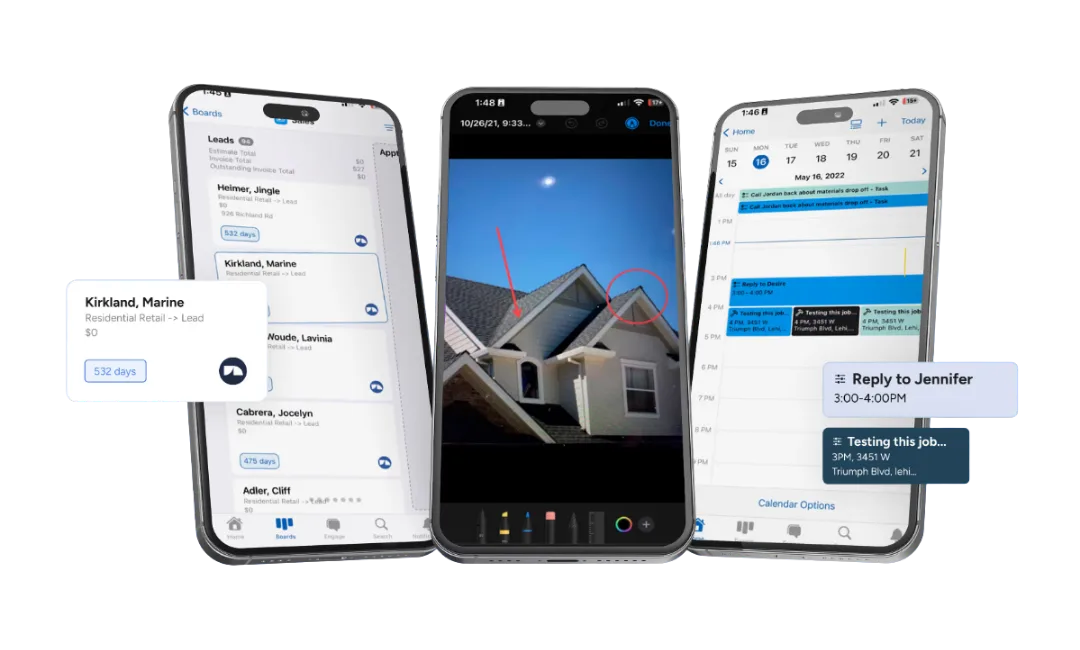
From the field, the app lets your crew: take and annotate job photos, fill out inspection forms, update job status on the board, create and send estimates, collect e-signatures, process payments, and manage their task list.
What the mobile app actually lets your crew do in the field:
- Capture and annotate photos tied to the right job in one tap — no end-of-day folder sorting
- Fill out inspection forms on the roof with required fields that prevent incomplete submissions
- Drag a job card from one workflow stage to the next as the day progresses
- Generate an estimate on-site using live material pricing from Beacon PRO+ or ABC Supply
- Collect e-signatures on proposals and change orders directly on the phone
- Take a credit card or text a pay link at completion — funds hit the next business day on most transactions
- See the day’s task list sorted by location so the crew doesn’t backtrack across town
A typical field-crew workflow: A sales rep pulls up to a storm-damaged house. They open JobNimbus, pull up the Johnson inspection job card, shoot 20 annotated roof photos, fill out the damage assessment form, and slide the card from “Inspection Scheduled” to “Estimate Pending.” Back in the truck, they pull the EagleView measurement that already synced to the job, drop in line items at Beacon’s current pricing, and text a proposal to the homeowner before pulling away. The office sees the status flip in real time and queues up the insurance adjuster paperwork.
iOS vs Android parity: Day-to-day field work is at full parity between iOS and Android — photos, forms, estimates, e-sigs, payments all behave the same. A few things still favor the web version: Insights reporting, bulk contact imports, and custom field edits. Your office staff still lives in the web app; your crews live on their phones.
Here’s where I need to be honest though — the mobile app is the most polarizing part of JobNimbus in user reviews. While the overall rating is high, a vocal minority of users report real issues:
- “Mobile app barely works — half the features are broken or missing” (Source: App Store review)
- Some users report opening the desktop version on their phone’s browser instead of using the app
- Not every desktop feature is available on mobile — your office staff still needs the web version for heavy lifting
- Offline functionality is limited in practice
My experience has been more positive than the worst reviews suggest, but it’s fair to say the mobile app isn’t as polished as the desktop platform. If your crews are on older phones or in areas with spotty cell service, test it during the free trial before committing.
JobNimbus Pricing: How Much Does It Actually Cost in 2026?
JobNimbus costs $350–$1,300/month all-in depending on team size. The base plan is only part of the math — per-user fees and texting add-ons determine what you’ll actually pay.
What drives the cost up: Every active user is billed separately on top of the plan fee. A team of five (one admin, two sales, two field) lands around $600–700/month before texting. Add Engage at $149/month for standard texting and you’re at $750+. The plan tier mostly buys you more boards, more automations, and more integration slots — not more user seats, which are always billed separately.
JobNimbus doesn’t publish exact pricing on their website anymore — you have to request a quote. Here’s what the current pricing structure looks like:
Plan Tiers
2026 Plan Tiers · Quote-Based
Base Plan + Per-User Fees + Engage Texting
Plans no longer published on jobnimbus.com — request a quote. Tier buys boards, automations, and integration slots; per-user fees are billed separately on every plan.
Entry · Solo / Small
Essentials
- UsersUp to 3
- Boards3
- Automations10
- Integrations2 max
Most Common · Growing Team
Pro
- UsersUp to 10
- Boards5
- Automations30
- Integrations5 max
Mid-Size Operations
Premium
- UsersUp to 19
- BoardsUnlimited
- Automations100
- IntegrationsUnlimited
Top Tier · 20+ Users
Enterprise
- Users20+
- BoardsUnlimited
- AutomationsUnlimited
- IntegrationsUnlimited
All tiers include unlimited contacts, estimates, documents, e-signatures, reports, invoices, financing, supplier integrations, QuickBooks, and JobNimbus Payments. The tier buys ceiling room — not user seats, which are always billed per role below.
Per-User Fees (on top of base plan)
Per-User Pricing · Stacks On Top
Every Active User Bills Separately by Role
A 5-person team (1 admin + 2 sales + 2 field) adds $245/month on top of the plan tier. Subcontractor seats are the cheap way to give read-only access to outside crews.
Highest Tier
Admin / Owner
$75
/mo
Full access · billing · automations · settings
Office Workflow
Sales / Office
$55
/mo
Pipeline · estimates · proposals · customer comms
Field Crew
Field Tech
$30
/mo
Mobile-first · job updates · photos · time tracking
Cheap Read-Only
Subcontractor
$20
/mo
Limited view · job assignments only · no admin
Real-world cost math: Solo operator ~$350/mo · Team of 5 ~$600-700/mo · Team of 10 ~$1,200-1,300/mo (all numbers include base plan + role fees + Engage texting).
What It Really Costs (Real-World Examples)
- Solo operator (1 admin + basic texting): ~$350/month
- Team of 5 (1 admin + 2 sales + 2 field + standard texting): ~$600-$700/month
- Team of 10 (2 admins + 3 sales + 4 field + 1 sub + premium texting): ~$1,200-$1,300/month
All plans include unlimited contacts, estimates, documents, e-signatures, reports, invoices, financing options, supplier integrations, QuickBooks integration, and JobNimbus Payments.
The 14-day free trial requires no credit card. Use it.
JobNimbus Integrations: What Connects
JobNimbus has built an integration ecosystem specifically for roofing and exterior contractors. These aren’t generic connections — they’re tools roofers actually use daily:
30+ Native Integrations
The Roofing-Tuned Integration Stack
Not generic connectors — these are tools roofers actually run daily. The EagleView + CompanyCam + QuickBooks trio is what saves 30-45 minutes per job in eliminated duplicate data entry.
Aerial Measurement
EagleView
Premium reports auto-populate into Smart Estimates — no retyping squares, ridge, valleys, hips
Photo Documentation
CompanyCam
Two-way bidirectional sync — photos in either app appear in both, organized by job
Accounting
QuickBooks Online + Desktop
Full 2-way sync — contacts, invoices, payments, products. The trio that saves 30-45 min/job
Material Suppliers
Beacon PRO+ · ABC Supply · SRS
Live material pricing and direct ordering from inside the estimate
Customer Financing
Wisetack · Sunlight Financial
Instant approvals up to $25K+ at the kitchen table — soft-pull pre-quals
Universal Glue
Zapier
Thousands of apps for custom workflows — uses one of your integration slots on lower tiers
Sales Workflow
Leap · Hatch
In-home sales presentations and automated follow-up sequences
Lead Generation
HailTrace
Storm tracking — identify roofing leads after weather events in your service area
Scheduling
Google Calendar
Appointment and scheduling sync — bidirectional with field tech calendars
Plan ceiling note: Essentials caps at 2 integrations · Pro at 5 · Premium and Enterprise unlimited. Most active roofers run 5+ daily (EagleView + CompanyCam + QuickBooks + supplier + Zapier) — Pro is the practical floor.
The CompanyCam and EagleView integrations are particularly well-done — they share data bidirectionally in a way that actually eliminates steps in your workflow, not just “connects.”
How the QuickBooks + EagleView + CompanyCam trio actually works together
This is the trio that eliminates the most manual work on a typical roofing job. EagleView generates the measurement, which auto-populates into a SmartEstimate in JobNimbus — no retyping ridge length or square counts. Once the contract is signed, CompanyCam photos taken on-site appear in both apps bidirectionally, so your production manager sees documentation without asking the crew for it. When the job closes, QuickBooks syncs the invoice and payment automatically — you never type the same number twice between systems. For a standard insurance job, this trio saves roughly 30–45 minutes of duplicate data entry versus running the same three systems disconnected. That’s why this is the integration stack most established roofers end up running, and it’s a big part of why contractors stay on JobNimbus once they’re past the setup curve.
Note on integration limits: The Essentials plan only supports 2 integrations. The Pro plan supports 5. If you use EagleView, CompanyCam, QuickBooks, a supplier, and Zapier — that’s already 5. This is one of the biggest reasons the lower tiers don’t work for most active contractors. You’ll hit the integration ceiling fast.
What Real Contractors Say About JobNimbus
I use it every day, but don’t take my word for it alone. Here’s what the review data shows across G2 (4.7/5), Capterra (4.6/5, 480+ reviews), and the app stores:
What users consistently love:
- The board view and visual pipeline management
- Ease of setup compared to enterprise alternatives
- Workflow automation that “runs the business in the background”
- The integration ecosystem, especially QuickBooks and CompanyCam
- Estimate-to-invoice conversion in one click
What users consistently complain about:
- Email reliability — multiple users report missed emails causing real business damage. One user cited this as the reason they nearly switched platforms.
- Mobile app inconsistency — works great for some, crashes and lags for others
- Pricing complexity — the base + per-user + add-on model makes it hard to know your actual cost before signing up
- Missing features some expect — no built-in job costing, no customer portal, no vendor portal
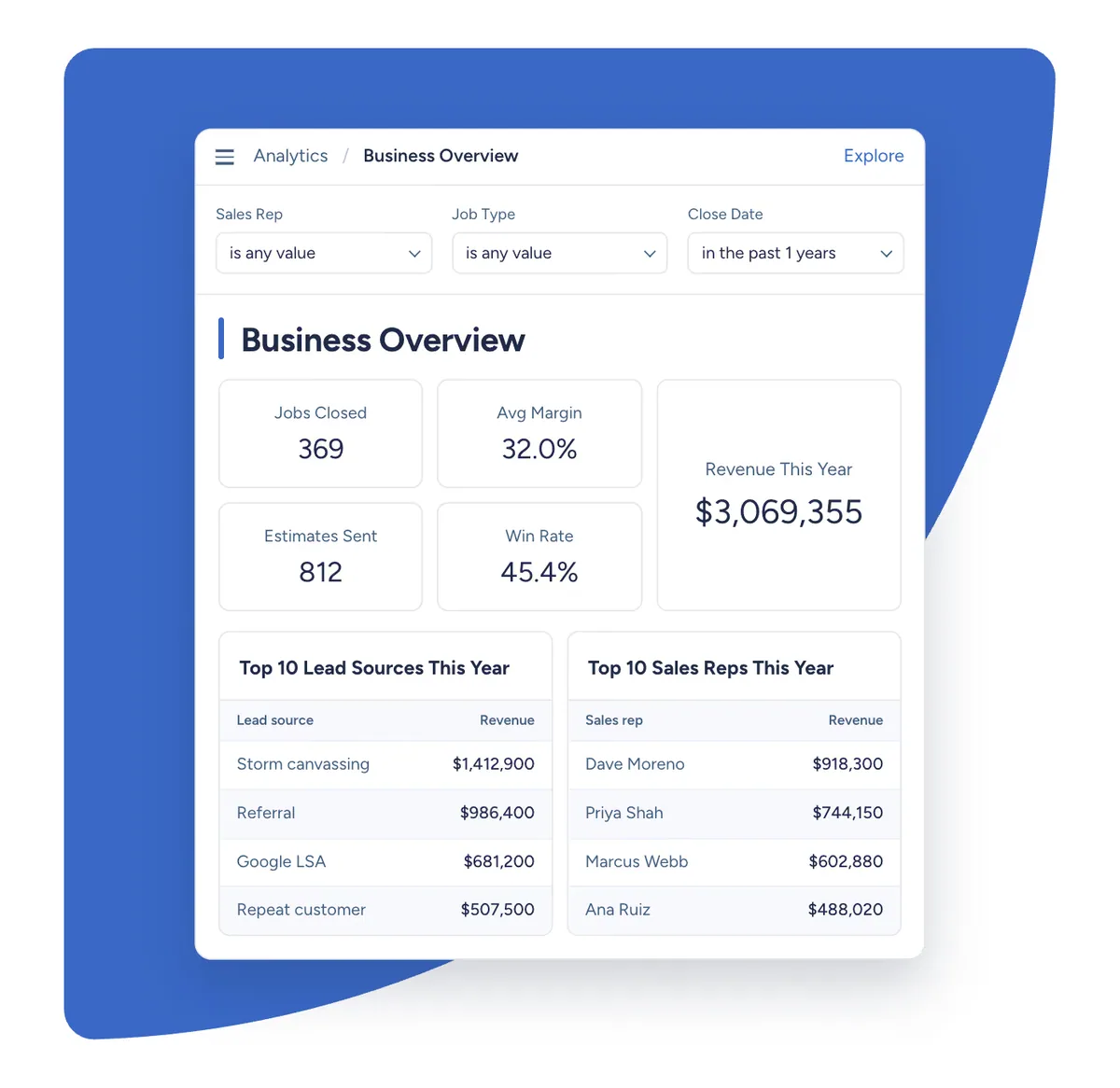
- Reporting limitations — several users describe the Insights feature as lacking depth
These aren’t dealbreakers for most users — the overall ratings are strong and the majority of reviews are positive. But they’re real issues that affect real contractors, and you should know about them before committing.
Who Should Use JobNimbus
- Roofing contractors doing 10+ jobs per month with a team of 3-20 people
- Insurance restoration contractors who need customizable workflows for the claims process
- Retail roofing companies that want polished proposals and financing options to close more deals
- Contractors who want one system instead of juggling five disconnected apps
- Companies spending $500+/month on software already — consolidating tools into JobNimbus often saves money overall
Who Should NOT Use JobNimbus
- Solo operators doing under 10 jobs/month — the math doesn’t work at $350+/month. Start with something cheaper and upgrade when volume justifies it
- HVAC, plumbing, or electrical contractors — JobNimbus is built for roofing workflows, not service-call dispatch. Look at Jobber or ServiceTitan instead
- Pressure washing, lawn care, house cleaning, window cleaning, or other exterior/maintenance trades — JobNimbus is roofing-and-restoration-first. QuoteIQ is purpose-built for these trades with AI Autopilot, Virtual Call Team, and MapMeasure Pro bundled into every plan starting at $29.99/mo
- Large enterprises (50+ employees) — you’ll likely need deeper ERP functionality, commercial job costing, and vendor portals that JobNimbus doesn’t offer
- Teams that won’t invest in setup — plan for 2-3 weeks of configuration and training. Contractors who skip this step end up blaming the tool instead of the implementation
For a head-to-head breakdown with the main competitor, read our JobNimbus vs AccuLynx comparison.
Complete Your Revenue Stack: JobNimbus + GoHighLevel
JobNimbus runs your jobs. GoHighLevel runs your marketing. Together they close the gap between a lead hitting your site and cash hitting your bank account.
JobNimbus is field operations — estimates, dispatching, invoicing, the board view. It’s what happens once a lead becomes a job. But it’s not a marketing platform. It doesn’t capture leads from your website, run AI text follow-up on unresponsive estimates, or automate review requests after job completion. That’s the other half of the revenue cycle — and it’s what GoHighLevel handles as well as any tool on the market under $500/month.
Most contractors who run both tools connect them via Zapier: a form fill on your GHL landing page creates a contact in JobNimbus, a completed job in JobNimbus triggers a review-request campaign in GHL. Two tools, one revenue cycle, no double entry.
See the full breakdown in our GoHighLevel review, or read GoHighLevel vs Jobber to understand how the marketing-vs-ops split works in practice.
The Bottom Line
I use JobNimbus every day across my roofing operation, and it earns its spot. The board view keeps my team organized across dozens of active jobs. The integrations with EagleView, CompanyCam, and my material suppliers eliminate hours of duplicate data entry every week. The automation handles follow-ups that used to fall through the cracks.
Is it perfect? No. The pricing is more complex than it needs to be, the mobile app has room to improve, and I wish the email system was more reliable. But those are the complaints of someone who uses the product hard every day — not dealbreakers.
For roofing contractors who are serious about running a professional operation, JobNimbus is the standard. It’s the CRM I recommend first, and the one I’d pick again if I had to start over.
Start with the 14-day free trial. Set up a board, import some contacts, build an estimate. You’ll know within a week if it fits how you work. And take them up on the live onboarding — the difference between a contractor who set up JobNimbus with help and one who tried to figure it out alone is night and day.