

What ServiceTitan Actually Is
ServiceTitan is the dominant field service management platform for residential and commercial trades — HVAC, plumbing, and electrical specifically. Founded in 2012 by Ara Mahdessian and Vahe Kuzoyan, the company went public on NASDAQ (TTAN) in December 2024 and reported $771.9 million in revenue for fiscal year 2024, a 26% increase year-over-year. More than 100,000 service businesses run on the platform.
Those aren’t just vanity numbers. They tell you something about who this platform was built for — and who it wasn’t. ServiceTitan is an enterprise-grade system that got built at the scale of HVAC and plumbing companies doing millions in annual revenue. It’s a full business operating system: dispatching, scheduling, pricebook management, invoicing, call tracking, marketing analytics, payroll integration, inventory, GPS fleet management, and increasingly AI-powered automation layered on top of all of it.
The catch, which nobody at ServiceTitan will lead with in a sales call, is that this depth costs serious money — both in subscription fees and in the time it takes to actually make the thing work.
The Dispatch Board: Where ServiceTitan Earns Its Reputation
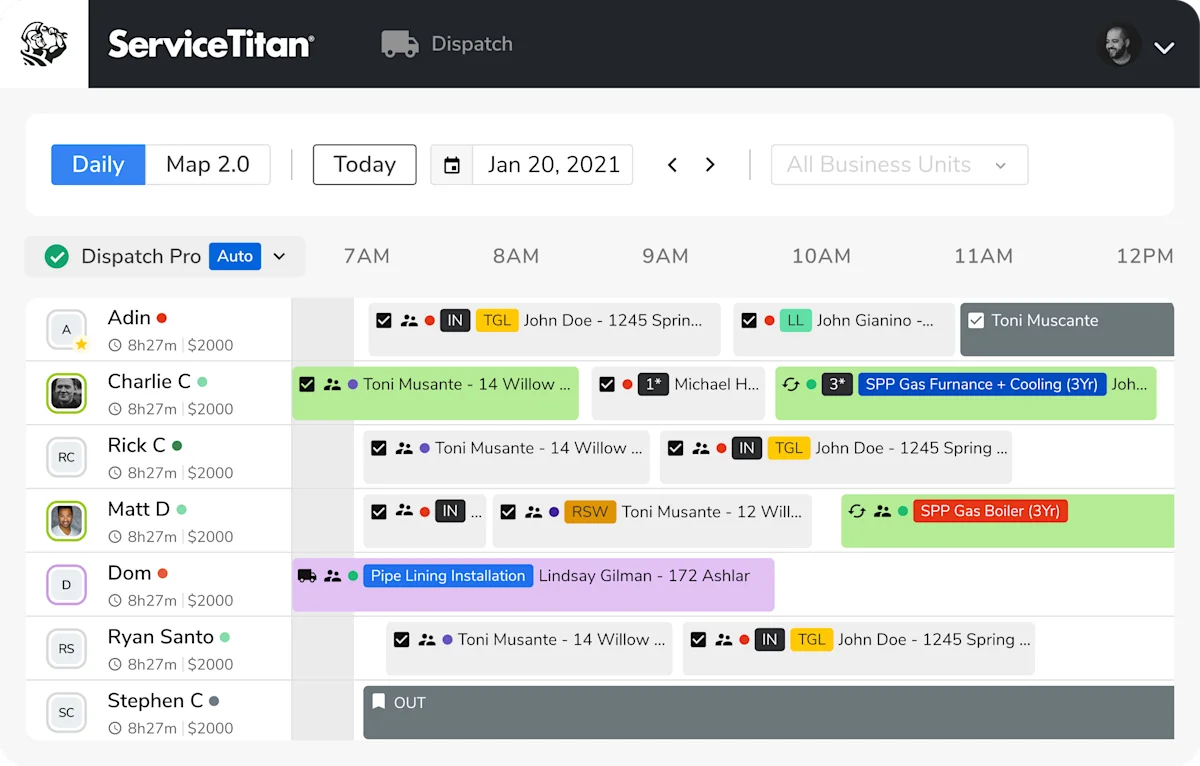
ServiceTitan’s dispatch board is genuinely best-in-class. This is the feature that separates it from everyone else at scale. You get a real-time view of every technician, every job, and every open slot — color-coded by job status, with drag-and-drop reassignment and live GPS positioning of your whole fleet.
The Fall 2025 release added a rebuilt dispatch board with vertical, horizontal, and weekly views. A new job holding area gives dispatchers a dedicated space to park unscheduled jobs without losing track of them — a small quality-of-life fix that ops managers with 15+ techs will appreciate immediately.
Dispatch Pro is the ML-powered add-on that takes this further. It analyzes job data and routes each incoming call to the optimal technician based on geographic zone, skill set, historical close rate, and estimated drive time. ServiceTitan’s own case studies show this reduces average drive time by 20–30 minutes per tech per day. If you’re running 15+ techs across a metro area, that’s real money — shaved fuel costs, more jobs per day, better technician utilization.
Smart Routing (rolling out through 2026) builds optimized daily routes automatically, similar to what delivery logistics companies run but calibrated to service dispatch instead of package drops.
For smaller operations with 3–5 techs, the standard dispatch board is solid but arguably overkill. You don’t need machine-learning-optimized routing when you have three guys and you know their neighborhoods. Jobber and Housecall Pro both offer clean drag-and-drop dispatching at a fraction of the cost.
ServiceTitan as Scheduling Software: The Multi-Tech Dispatch Reference
ServiceTitan’s scheduling layer is the same dispatch system covered above — but viewed through the scheduling category lens, three things stand out: capacity-based scheduling that respects per-tech availability and skill, GPS fleet routing that optimizes drive time across a 5-tech day, and recurring-service-plan automation that auto-rebooks 200-customer maintenance programs without manual intervention. For HVAC, plumbing, and electrical operations dispatching 5+ techs, ServiceTitan is the best-in-category scheduling platform. Real-time arrival ETAs flow to customer texts automatically; geofenced clock-in confirms tech presence; capacity warnings prevent the same tech from being booked across town at 10am.
Where ServiceTitan’s scheduling falls short: customer-facing self-booking. The web-booking widget exists but isn’t Calendly-class — for an embedded “book a service appointment from our website” flow at the polish level homeowners now expect, you’ll either accept the lighter ServiceTitan booking page or layer a Calendly-class front-end that pushes into the dispatch board via the API. Pricing is the other constraint: ServiceTitan starts at multi-thousand-monthly minimums, so for shops under 5 techs the dispatch sophistication is genuinely overkill. Housecall Pro and Jobber cover most of the same scheduling needs at a fraction of the price for sub-10-tech operations.
For shops who already run ServiceTitan, the scheduling layer doesn’t cost extra — it’s the platform itself. For shops shopping the scheduling category specifically, see the full scheduling category page for context on when standalone tools or lighter FSM-natives win.
Pricebook Pro: Flat-Rate Pricing Your Whole Team Can Execute
Pricebook management is one of ServiceTitan’s strongest and most differentiated features. Most contractors run into the same problem: your best tech sells jobs at the right price because he’s been doing it for 15 years. Your newest guy undersells everything because he doesn’t know what to charge. ServiceTitan’s Pricebook Pro standardizes that.
Pricebook Pro gives you a pre-built flat-rate pricing database with product images, service descriptions, and automatic cost updates as material prices shift. Your technicians present estimates on their tablets using good/better/best tiered options — professional-looking proposals that let homeowners self-select instead of negotiating.
Price Insights is the standout here: it pulls aggregate pricing data across ServiceTitan’s customer base and shows you how your rates compare to the regional market for each service type. If you’ve been wondering whether you’re leaving money on the table on water heater replacements or AC tune-ups, Price Insights gives you that answer with real data.
Pricing Builder, announced in 2025, adds automated pricebook maintenance — it tracks material cost changes and flags when your flat-rate prices need updating. The Fall 2025 release also made the pricebook download 4x faster (now 2–3 minutes), which matters when you’re pushing updates to 20 techs’ tablets at the start of the day.
The tradeoff: building your pricebook in ServiceTitan takes real work upfront. Multiple G2 reviewers mention spending weeks getting it properly configured. One Capterra reviewer noted it’s “extremely time-consuming” in the early stages but described it as a fixed cost — once done, the consistency pays dividends.
Marketing Scorecard and Contact Center Pro: ServiceTitan’s Biggest Differentiators
These two features are why established HVAC and plumbing companies pay ServiceTitan’s prices and don’t leave.
Marketing Scorecard is genuinely unique in the FSM space. It creates unique tracking phone numbers for each advertising campaign — Google Ads, LSA, direct mail, radio, whatever you’re running. When a customer calls one of those numbers and books a job, ServiceTitan traces the entire chain from the initial call to the completed invoice and records the actual revenue generated. You’re not seeing “47 calls from Google Ads.” You’re seeing “47 calls from Google Ads → 31 booked jobs → $18,200 in completed revenue.”
For any contractor spending $5,000+ per month on advertising, this changes how you make decisions. You pull the Marketing Scorecard and see that your Google LSA is generating $4.20 in completed revenue for every dollar spent while your Yelp ads are generating $0.80. That’s where to move the budget. Most marketing tools don’t give you this — they stop at leads or calls, not completed revenue.
Contact Center Pro (the expanded version of Phones Pro) brings AI into the call center layer:
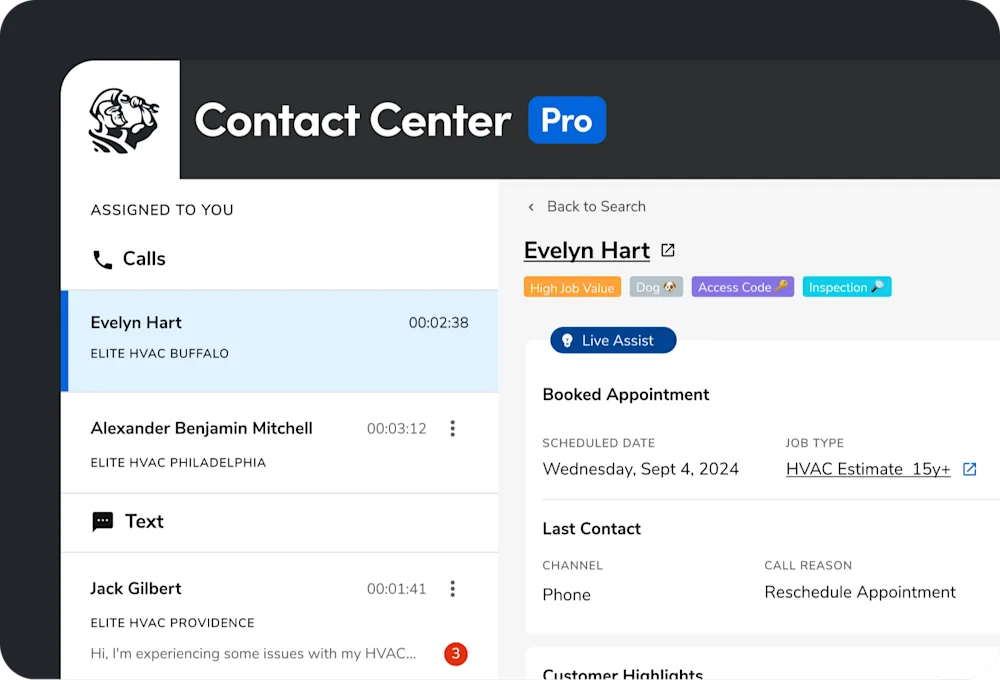
- AI Voice Agents — AI-powered CSRs that can answer and book calls 24/7. As of Fall 2025, ServiceTitan opened AI Voice Agents to all customers regardless of their phone system, not just Contact Center Pro subscribers.
- Real-time call transcription — every customer call is transcribed and summarized automatically (added Fall 2025)
- CSR performance coaching — AI reviews call recordings, scores CSR performance, and flags missed booking opportunities for manager review
- Recommendation cards — real-time prompts that appear during live calls suggesting upsell opportunities based on customer history and service type
The AI call summaries are genuinely useful — instead of managers manually listening to recorded calls to evaluate CSR performance, the AI does a first pass and surfaces the calls that need attention.
Third-Party AI Call Answering: What Pairs Best With ServiceTitan
If you’re not ready for Contact Center Pro’s full pricing, or you want to supplement it with a dedicated AI answering service for after-hours, here’s how the major options integrate with ServiceTitan:
| Service | ServiceTitan Integration | Monthly Cost | Best For |
|---|---|---|---|
| Upfirst | Native (direct connection) | From $24.95/mo | Budget option with deep ST integration |
| Smith.ai | Via Zapier/webhooks | From $95/mo | AI + human backup for complex calls |
| Rosie | Via Zapier | From $49/mo | Home services, bilingual |
| My AI Front Desk | Via Zapier | From $65/mo | Custom scripting |
Upfirst stands out here because it lists ServiceTitan as a native integration — meaning call data pushes directly into ServiceTitan without running through Zapier as a middleman. At $24.95/month to start, that’s a compelling entry point if you want AI call answering without Contact Center Pro’s price tag.
Smith.ai is the premium option — their hybrid model (AI + live US-based receptionists) catches the calls that trip up pure AI. They also have direct ServiceTitan integration. For any business where a single call could be a $10,000+ commercial job, the human fallback earns its keep.
Read the full AI call answering guide for contractors →
Titan Intelligence and Atlas: ServiceTitan’s AI Layer
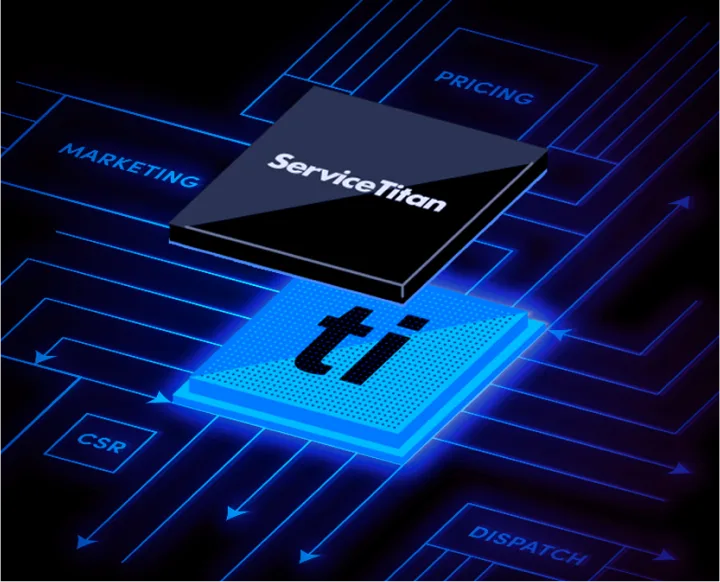
ServiceTitan’s AI story has two layers: Titan Intelligence (the data engine underneath everything) and Atlas (the AI co-pilot launched in September 2025).
Titan Intelligence is the aggregate data layer — it draws on transaction data across all 100,000+ ServiceTitan customers to power features like Price Insights (regional pricing benchmarks), Job Value Predictions (estimates the likely revenue of an incoming call), and the ML algorithms behind Dispatch Pro. This is ambient AI that improves the platform’s recommendations without requiring any setup from you.
Atlas is the conversational AI layer — the “co-pilot” that dispatchers, technicians, and office managers interact with directly. Announced at Pantheon 2025 as “the next evolution of AI,” Atlas is rolling out in stages through Summer 2026:
- Field Pro AI — Techs ask Atlas about equipment manuals, diagnostics, or parts information mid-job. The answer comes back instantly in the app. No calling the shop, no waiting for someone to Google it.
- Office automation — Atlas handles invoice reviews in accounting, flags scheduling conflicts, and surfaces capacity gaps before they become problems.
- Commercial workflows — daily logs auto-filled, RFIs and change orders created automatically, AR tracking simplified for commercial billing cycles.
- SMS Booking Agent — customers can schedule appointments via text conversation handled entirely by AI.
- Campaign Recommendations — Atlas monitors your booking rate and automatically recommends adjusting marketing spend up or down based on current capacity.
- Smarter Routing — demand-based route optimization that considers technician skills, geographic clusters, and historical job times.
The direction is unmistakable: ServiceTitan wants AI making real-time operational decisions alongside your team. How fully realized this is depends on which features are in general availability vs. private preview — several Atlas features were still rolling out as of April 2026.
Reporting and Business Intelligence
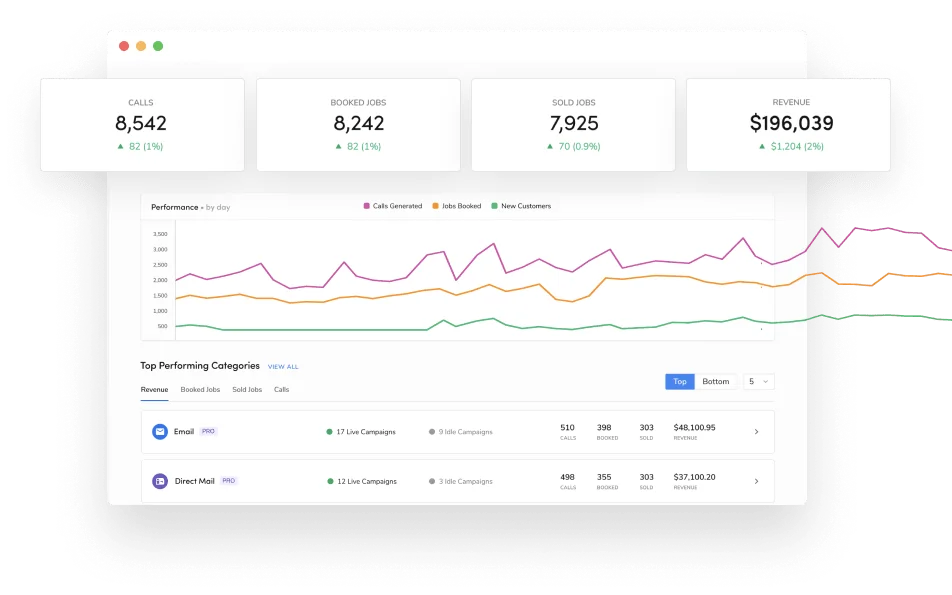
ServiceTitan’s reporting is the deepest in its class. Revenue by technician, by service type, by zip code, by marketing source. Booking rate and conversion rate by CSR. Membership agreement penetration. Days Sales Outstanding. Gross margin by business unit. Technician performance scorecards.
The KPI dashboards are customizable and genuinely visual — not just tables of numbers. Real-time updates mean a dispatcher or office manager can pull up the main dashboard during the day and actually see how the day is trending against targets.
One frequently cited G2 reviewer described it this way: “We have very useful data at our fingertips now” while noting the platform “covers everything from inventory and scheduling to calls and customer data” (Source: G2, October 2025).
The meaningful caveat: you need months of clean data before these reports tell you anything useful. Your reports in month one will be thin. By month six, they start revealing patterns. By year two, you’re making actual business decisions based on ServiceTitan data — which contractors consistently cite as the primary reason they don’t leave despite the cost.
The Mobile App: Functional, With Known Friction Points
ServiceTitan has two field apps: ServiceTitan Mobile (the legacy version) and ServiceTitan Field (the newer rebuild). Both are available for iOS and Android.
The app lets technicians view their daily schedule, navigate to jobs, build estimates with good/better/best tiered options, collect payment by card or ACH, capture job photos and videos, log equipment serial numbers, complete forms and checklists, get customer signatures, and message dispatch directly. Job status updates sync to the office in real time.
The app also saves data locally when cell service drops and syncs when connectivity returns — practical for HVAC service calls in basements and crawlspaces where signal is unreliable.
That said, the mobile app is the most polarizing part of ServiceTitan in customer reviews:
- “Office personnel cannot create an invoice without creating a dispatch under a technician, so don’t sell a filter!” — (Capterra, February 2026)
- Some users describe navigating backwards in the app as clunky — the flow between screens doesn’t always match how jobs naturally progress
- A common complaint on G2 is that the app makes you log out completely when switching between a tablet and a phone
The overall picture: the app gets the job done for day-to-day HVAC, plumbing, and electrical dispatch workflows. It’s less polished than Jobber’s mobile app, which consistently earns higher ratings from field users. But ServiceTitan’s desktop platform is so much deeper that most large operations accept the mobile app’s rough edges as part of the package.
ServiceTitan for Roofing: A Platform in Transition
ServiceTitan has been clear about its roofing ambitions. The company identified the roofing industry as the natural next vertical after dominating HVAC, plumbing, and electrical — and has been actively building since 2024.
The roofing-specific capabilities as of 2026:
Measurement integrations — EagleView, HOVER, and GAF QuickMeasure all connect to ServiceTitan, letting you pull aerial measurements directly into estimates. The spec-based estimating workflow has reportedly cut bid creation time from 30 minutes to roughly 4 minutes in controlled workflows (Source: ServiceTitan/Roofing Contractor, Pantheon 2025).
Material ordering — SRS Distribution and ABC Supply are connected, with automated nightly price updates that reflect your negotiated account-specific rates. When a job is won, ServiceTitan auto-generates a procurement list you can convert to a purchase order in one click.
Insurance claims — Xactimate integration lets you transfer estimate data for validation and compliance checking, which speeds up the often-tedious claims submission process.
Notable customer: TIMEPROOFUSA and Master Roofing Solutions selected ServiceTitan to power a 50-branch nationwide roofing expansion in early 2026 — a signal that the platform has enterprise-scale roofing credibility.
That said, the honest read is that for pure residential roofing operations — especially insurance restoration work with its specific workflow demands around supplements, adjuster communication, and insurance tracking — JobNimbus and AccuLynx are still more purpose-built. ServiceTitan’s roofing sweet spot is companies that operate across multiple service lines: if you’re running HVAC and roofing under the same business, ServiceTitan’s unified dispatch and reporting across both divisions is a meaningful advantage.
ServiceTitan and Agentic AI: Can It Plug Into Your Automation Stack?
This question matters more every year as contractors start building real AI automation workflows. ServiceTitan’s answer is better than most people expect.
What’s actually available:
ServiceTitan has a documented REST API with a developer portal. The API covers the core data objects you’d want to work with: jobs, customers, invoices, dispatch events, technician timesheets, and more. Full webhook support lets you subscribe to real-time events — a job booked, a job completed, an invoice paid — so downstream systems can react without polling.
More practically for contractors who aren’t developers: Zapier has built a dedicated ServiceTitan MCP server. This is meaningful. An MCP (Model Context Protocol) server is what lets AI assistants like Claude call ServiceTitan’s actions directly — query jobs, check schedules, trigger workflows — without writing glue code. You get a unique endpoint that connects AI assistants to ServiceTitan in a way that’s controllable and auditable.
What this enables:
- Pipe completed job data from ServiceTitan into a Claude-based workflow that drafts customer follow-up emails automatically
- Set up a Zapier trigger that fires when a job is marked complete and pushes data to a spreadsheet, Slack, and your review request system simultaneously
- Build a custom AI agent that reads ServiceTitan’s dispatch feed and surfaces bottlenecks in daily scheduling
Where the limits are:
The API requires developer setup — this isn’t a no-code experience. Rate limiting applies. Newer Atlas features may have limited API exposure during their rollout phase. And if you’re building a truly sophisticated agentic harness that needs real-time call data piped into an LLM, Contact Center Pro’s AI features are a more direct path than building around the API.
Compared to competitors, ServiceTitan is substantially more open. JobNimbus relies primarily on Zapier with limited API surface. Housecall Pro has an API but it’s narrower in scope. If custom AI integration is on your roadmap, ServiceTitan’s infrastructure handles it better than most alternatives at this price point.
ServiceTitan Integrations
ServiceTitan’s integration ecosystem is built around the tools that established trades businesses actually use, with some notable gaps:
| Category | Integrations |
|---|---|
| Accounting | QuickBooks Online, QuickBooks Desktop, Sage Intacct |
| Payment Processing | Built-in (credit, debit, ACH), with financing options |
| GPS / Fleet | Azuga, GPS Trackit, One Step GPS, Fleet Pro (native) |
| Aerial Measurement | EagleView, HOVER, GAF QuickMeasure |
| Material / Supply | SRS Distribution, ABC Supply, automated price updates |
| Insurance / Estimating | Xactimate (Verisk) |
| HR / Payroll | ADP, Gusto, QuickBooks Payroll |
| Marketing | Google Ads, Google Analytics, Local Services Ads |
| Reviews / Reputation | Birdeye (native), Podium (native), NiceJob, review request automation |
| AI Call Answering | Upfirst (native), Smith.ai (Zapier), Rosie (Zapier) |
| Automation | Zapier (limited but functional) |
| Developer / Custom | REST API, webhooks, Zapier MCP server |
The Sage Intacct integration is worth highlighting for multi-location and franchise operations — it handles cross-entity financials in a way QuickBooks doesn’t. That’s why large regional HVAC and plumbing chains stay on ServiceTitan even at the price.
The QuickBooks sync is functional but not bulletproof. Multiple Capterra reviewers have flagged sync issues: “Does not work well with QuickBooks, takes ten times longer to process checks and invoices” (Source: Capterra, 2025). It works — most of the time — but expect to babysit it occasionally rather than setting it and forgetting it.
On the payments side, ServiceTitan’s built-in processing supports consumer financing at the estimate — Wisetack integrates natively, and GreenSky remains common among established HVAC dealers. Our contractor financing tools rankings break down which lender fits which ticket size before you commit to one inside ServiceTitan’s workflow.
ServiceTitan Pricing: What Contractors Are Actually Paying in 2026
ServiceTitan doesn’t publish pricing. You get a demo, a custom quote, and a salesperson who builds a package around your team size and which modules you need. Here’s what user-reported data shows as of 2026.
Base Plan Costs (Per Technician, Per Month)
| Plan | Est. Cost/Tech/Mo | Best For |
|---|---|---|
| Starter | $245–$300 | Core dispatching, scheduling, invoicing — for getting started |
| Essentials | $325–$400 | Mid-size teams (5–20 techs) — adds advanced reporting, payroll |
| The Works | $400–$500+ | Large operations (20+ techs) — full suite with all Pro modules |
(Source: user-reported data via FieldCamp, Repair-CRM, MyQuoteIQ, 2026)
Implementation Costs (One-Time)
This is where most contractors get surprised. Implementation fees run from $5,000 to $50,000+ depending on plan tier, number of technicians, data migration complexity, and how much training your team needs. A 10-tech Essentials setup typically lands between $10,000–$25,000. One G2 reviewer reported paying nearly $25,000 in implementation fees before running a single live job (Source: G2, 2024).
ServiceTitan also requires that most businesses pay for their data to be migrated — if your records are messy or spread across multiple systems, that cost goes up.
Add-On Modules (Recurring Monthly)
The base subscription is just the floor. Pro add-ons — Marketing Pro, Contact Center Pro, Pricebook Pro, Dispatch Pro, Fleet Pro, Scheduling Pro, Sales Pro — are priced separately and not disclosed publicly. User reports indicate that a mid-size team activating Marketing Pro and Contact Center Pro can add $500–$1,500/month or more on top of their base subscription.
ServiceTitan now bundles these as the “Maximize Program” — a package deal on multiple Pro modules — but pricing still requires a quote.
Contract Terms
All plans require a 12-month minimum annual contract. Some businesses report being pushed toward 2–3 year agreements. Early termination fees range from $5,000 to $20,000+. There is no free trial and no money-back guarantee.
Real-World Year-One Cost Example
A 10-tech HVAC company on the Essentials plan:
| Cost Item | Amount |
|---|---|
| Base subscription (10 techs × $350/mo × 12) | $42,000 |
| Marketing Pro add-on (~$500/mo × 12) | $6,000 |
| Contact Center Pro (~$400/mo × 12) | $4,800 |
| Implementation fee | $15,000 |
| Year-One Total | ~$67,800 |
This is real money. Annual price increases of 5–15% after the initial term are common per contractor reviews on Reddit and GetOneCrew.
What Real Customers Are Saying: The Full Picture
ServiceTitan carries strong aggregate ratings: 4.5/5 on G2 (345+ reviews) and 4.4/5 on Capterra (as of April 2026). Those are genuinely good numbers for enterprise software. But the distribution matters — satisfied large operations rate it highly while smaller contractors who got burned tend to leave after they’ve gone.
What Users Consistently Praise
The data depth. Multiple reviewers across G2 and Capterra describe finally having real business intelligence: “ServiceTitan has significantly improved our business operations by streamlining scheduling, dispatching, invoicing, and reporting into one powerful platform. The automation features save time and reduce manual errors, while the reporting tools provide valuable insights for decision-making.” (Source: Capterra, March 2025)
The dispatch board. When it’s fully set up with a trained dispatcher, the board consistently earns praise: “ServiceTitan helps companies stay organized and keeps you accountable as everything is recorded from phone calls to text messages to purchase orders to equipment serial numbers.” (Source: Capterra, 2025)
Scale payoff. Long-term users who’ve built their operations around the platform tend to stay: one reviewer noted “After using ServiceTitan for numerous months, it has been game changing for our company… having this software has allowed us to maintain the same number of office personnel but grow our technicians.” (Source: Capterra, 2025)
What Users Consistently Complain About
Implementation failures. This is the single most dangerous pattern in ServiceTitan’s review profile. A BBB complaint from December 2024 states: “WE HAVE NEVER BEEN ONBOARDED…we have currently paid for 1 year even though we do not use the software.” That’s an extreme case, but the pattern of slow, disorganized onboarding shows up across multiple platforms.
Support that doesn’t scale to smaller accounts. A G2 reviewer in June 2025 wrote: “The product is complicated, which means you need help regularly, but their product support is TERRIBLE.” The theme across negative reviews is consistent — large enterprise clients get white-glove attention; smaller operations get put in a queue.
Workflow rigidity. G2 reviewers call the platform “excessively rigid” when their business doesn’t operate in a standard service-call model. One common specific complaint: “Office personnel cannot create an invoice without creating a dispatch under a technician” — meaning even counter sales require creating a fake dispatch record (Source: Capterra, February 2026).
QuickBooks sync issues. “Takes ten times longer to process checks and invoices” is a representative quote from users who’ve run into sync problems. The integration works, but it requires monitoring.
Inventory management is a known weakness. Multiple reviewers describe abandoning ServiceTitan’s inventory module entirely: “Their inventory tools are way too complicated. If you have a full-time inventory person, it MIGHT make sense.” Most contractors keep their parts tracking outside the platform.
Who Should Use ServiceTitan
ServiceTitan makes sense if you can check most of these boxes:
- Revenue above $1M annually — the cost-to-value ratio only works at scale
- 10+ technicians — dispatch optimization, routing, and reporting pay off with real field team volume
- Dedicated office staff — someone has to own the platform day-to-day; you can’t run ServiceTitan from the field
- Spending $5,000+ per month on advertising — the Marketing Scorecard ROI tracking is where the real competitive advantage lives
- HVAC, plumbing, or electrical — the platform was engineered for service-call dispatch, and these are where the workflow fit is cleanest
- Multi-location or franchise operations — Sage Intacct integration and centralized reporting across offices are hard to replicate elsewhere
- You want one platform for everything — and you’re willing to pay for the integration work that makes it actually unified
If you’re doing $2M+ in annual revenue with a dedicated dispatcher and an office manager who can own the platform, ServiceTitan typically pays for itself through recovered bookings, better technician routing, and data-driven marketing spend.
Who Should NOT Use ServiceTitan
Skip ServiceTitan if:
- You’re under $1M in annual revenue — the math doesn’t work. A 5-tech HVAC crew on Essentials is paying $1,750+/month in subscription fees plus implementation. That’s a second truck payment. Housecall Pro at $59–$254/month does the scheduling, dispatching, and invoicing your business needs at this stage.
- You have fewer than 5 technicians — you’ll pay for features (multi-zone dispatch optimization, enterprise reporting, AI pricing recommendations) that only pay off with real volume behind them.
- You need to be operational fast — ServiceTitan takes 3–6 months to implement properly. If you need software working next month, look elsewhere.
- You’re a roofer (primarily) — ServiceTitan is building roofing capabilities, but JobNimbus and AccuLynx are still purpose-built for how roofing operations actually run, especially insurance restoration. ServiceTitan roofing is a better fit if you also run service trade divisions.
- You hate long contracts — 12+ month minimums with $5,000–$20,000 exit fees. You are locked in before you’ve really learned whether it works for your team.
- Your margins are tight — year-one costs of $50,000–$80,000 for a mid-size operation are real. Every dollar of ServiceTitan subscription is a dollar not going into equipment, technicians, or your own pocket.
ServiceTitan vs. the Competition
| ServiceTitan | Jobber | Housecall Pro | JobNimbus | |
|---|---|---|---|---|
| Starting Price | ~$245/tech/mo | $39/mo | $59/mo | ~$225/mo |
| Free Trial | No | 14 days | 14 days | 14 days |
| Contract Required | Yes (12+ mo) | No | No | No |
| Dispatching | Advanced + AI optimization | Basic drag-drop | Basic drag-drop | CRM-focused |
| Pricebook | Best-in-class (flat-rate) | Basic | Good | Basic |
| Marketing ROI Tracking | Yes (Scorecard) | Basic add-on | Basic | No |
| Reporting Depth | Deep, customizable | Moderate | Moderate | Basic |
| AI Features | Titan Intelligence + Atlas | Limited | Basic | AssistAI + Scout |
| Roofing Focus | Growing (new integrations) | Weak | Weak | Core strength |
| Best For | $1M+, 10+ techs, HVAC/plumbing/electrical | $100K–$750K, any trade | $100K–$750K, any trade | Roofing, restoration |
| Learning Curve | 3–6 months | Under 1 week | 1–2 weeks | 2–3 weeks |
For a detailed breakdown against the closest competitor: ServiceTitan vs. Housecall Pro.
Also worth browsing: the full field service management category and CRM category pages to see how all the platforms compare side by side.
The Bottom Line
ServiceTitan is the most capable field service management platform money can buy for HVAC, plumbing, and electrical trades. Nothing else comes close on feature depth: the dispatch board with ML routing, the pricebook with regional pricing benchmarks, the Marketing Scorecard that ties ad spend to completed revenue, the Atlas AI layer that’s steadily automating more of the day-to-day decisions that used to require experienced office staff. For companies doing $2M+ in revenue with a real operational team, it can be a genuine competitive advantage.
But the cost is real, and the failure modes are also real. Implementation fees of $10,000–$25,000 before you’ve run a single job. Contracts that lock you in before you’ve proven fit. Support that gets mixed reviews for smaller accounts. Workflow rigidity that frustrates operations that don’t fit the classic service-call dispatch model. Those aren’t minor footnotes — they’re the reason dozens of BBB complaints and G2 reviews read like warnings from contractors who signed before they were ready.
The right answer is almost always one of these two: either your operation has the scale, the staff, and the budget to make ServiceTitan pay for itself — or you’re not there yet and Jobber or Housecall Pro is the smarter play until you are.
If you’re in the right tier, request the demo. Walk in with your actual call volume, tech count, and marketing spend numbers, and make them show you how the ROI math works for your specific operation. Don’t sign until you’ve seen that calculation.