
What Housecall Pro Is in 2026
Housecall Pro started in 2013 as a simple scheduling and invoicing tool for small home service businesses. Thirteen years later, it’s used by more than 40,000 businesses across North America — and it’s added enough features that calling it “simple” undersells what it does now.
The platform covers the full job cycle for home service contractors: online booking, scheduling, dispatching, estimates, invoices, payments, GPS tracking, customer communication, marketing, and an increasingly capable AI layer. It’s aimed squarely at the gap between Jobber’s simplicity and ServiceTitan’s enterprise depth — a gap where a lot of HVAC, plumbing, and electrical contractors live.
Two things changed significantly since most reviews were written. First, pricing. The MAX plan now has a published price ($299/month annually, $329 monthly) with an 8-user cap and $75/user overage — it’s no longer “custom pricing.” Second, Housecall Pro launched its AI Team Suite in 2024 and extended it throughout 2025. CSR AI answers your calls and books jobs around the clock. Analyst AI reads your business data on demand. Coach AI gives operational advice. These aren’t vaporware features — they’re live, and they change how the platform competes.
This review is built from Housecall Pro’s documentation, their product pages, 2,700+ verified Capterra reviews, 581 Trustpilot reviews, and contractor discussions across Reddit and the trades forums. Where I’m drawing conclusions from research rather than personal use of this specific platform, that’s what it is — this is a research-based review.
Scheduling & Dispatching
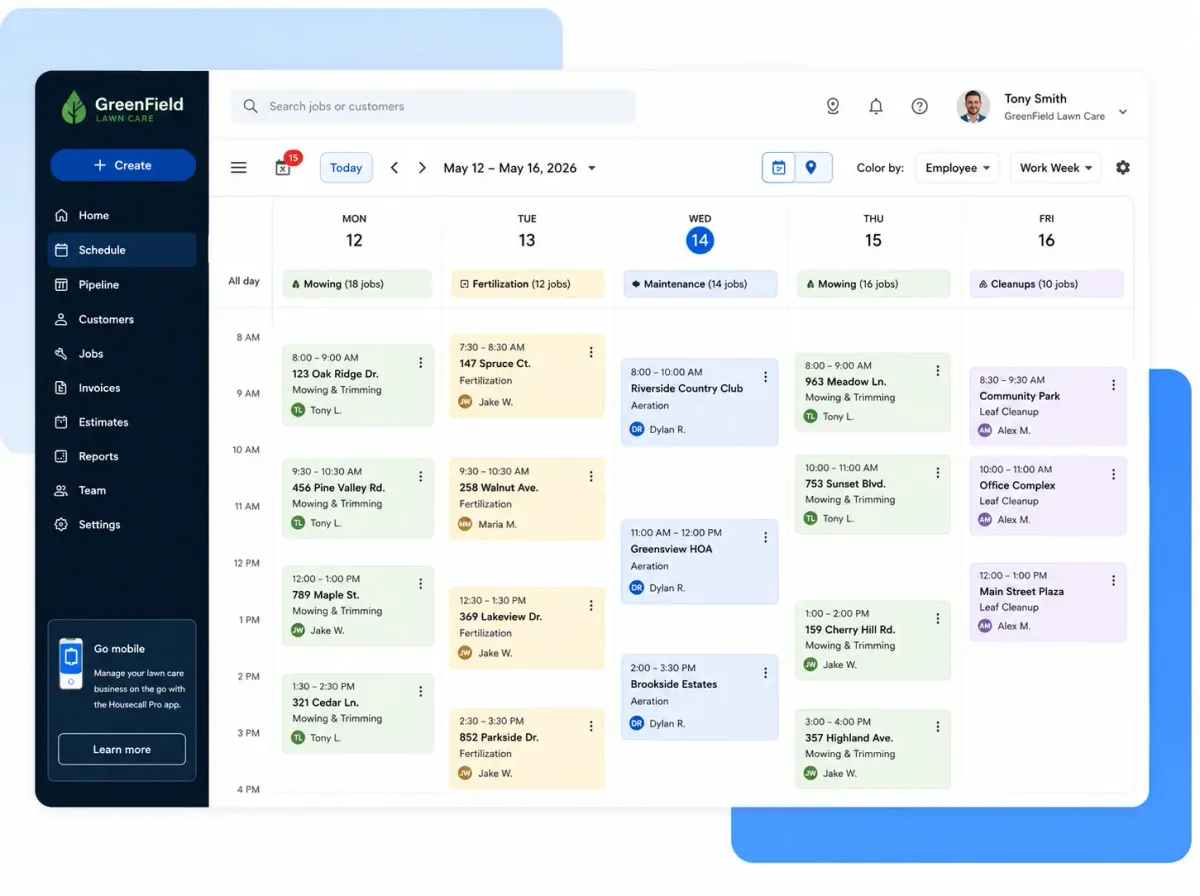
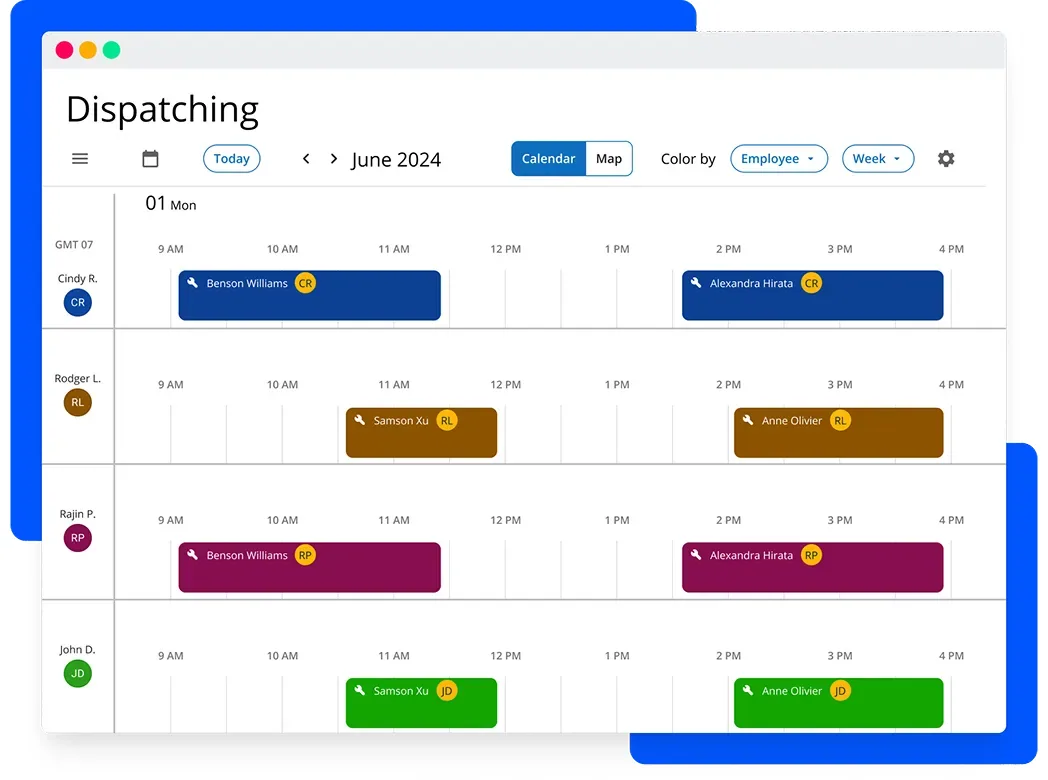
Housecall Pro’s scheduling interface is where most contractors spend their morning. It’s a drag-and-drop calendar where you can see every tech’s day at a glance, reassign jobs with a single drag, and push notifications to techs and customers automatically when anything changes.
The calendar supports color-coding by tech or by geographic area, multiple views (day, week, month), and multi-tech assignment when a job needs two people. When you book a new job, the system checks technician availability and can suggest assignments based on location — it’s not deep AI routing, but it’s enough to prevent obvious conflicts.
Route mapping is built in now — you get drive-time estimates and a visual route overlay on the scheduling map. For more advanced route optimization (sequencing a full day’s stops for fuel efficiency), the Beeline Routes integration handles that. It’s not a premium like it would be on some platforms — it’s just an add-on you connect.
Customer notifications run automatically based on job status: booking confirmation, “on my way” text with tech photo, job completion, payment link. The contractor sets these up once and they run without anyone touching them. The “on my way” text alone cuts inbound “where’s my guy?” calls by a measurable amount for most businesses.
GPS tracking updates throughout the day so the dispatcher can see where every truck is. The data also feeds into time-on-job reporting and job costing.
Housecall Pro in the Scheduling Category
Housecall Pro’s scheduling layer balances three things FSM scheduling rarely gets right at this price point: a dispatch board mobile-tech can navigate from the truck, a customer-facing online booking widget that converts homeowner web visits into booked appointments without office intervention, and recurring service plan automation that auto-rebooks the maintenance customers who actually drive lifetime value. The mobile reliability is what HCP was built for — service techs in cell-spotty basements who need today’s job, customer info, and rescheduling capability without round-tripping to the office.
The customer-facing booking widget is HCP’s quietest differentiator in the scheduling category. Embed the widget on your website, set the available service slots, and homeowners book themselves into your dispatch board with the same intake friction as a Calendly link. For service trades where the office gets 30+ inbound booking calls a week, the labor savings compound fast. ServiceTitan’s web booking exists but is heavier; GoHighLevel offers Calendly-class booking but doesn’t push into a real dispatch board.
Where HCP’s scheduling falls short of the dispatch leaders: GPS route optimization across a multi-tech day is lighter than ServiceTitan, and capacity-based scheduling (auto-honoring per-tech skill + availability constraints when a CSR books) is shallower than FSM-native heavyweights. For 1-5 tech operations the depth is enough; for 10+ techs running tight margins on drive time, ServiceTitan is the dispatch upgrade.
Scheduling unlocks at the Basic tier — same tier that gets the rest of the FSM core. See the scheduling category page for context on standalone Calendly-class tools vs FSM-native dispatch.
Estimates, Proposals & the Price Book
Housecall Pro has two layers of estimating depending on your plan.
Standard estimates are available on every tier — build a line-item quote from your price book, attach photos, and send it digitally for customer approval. Customer approves on their phone, job is created. The flow from estimate to invoice is one click once the job is done.
The Sales Proposal Tool is where the presentation quality gets serious. It lets you show before/after photos of the work, option boards with good/better/best pricing, and financing options woven into the estimate itself. This is included in the MAX plan. If you’re on Basic or Essentials, it’s a paid add-on.
The Price Book is one of the more underrated features. You build flat-rate prices for every service — trip charge, diagnostic, part with labor combined — so every tech is quoting the same numbers consistently. If you use Profit Rhino or The New Flat Rate for your flat rate pricing, both integrate directly with Housecall Pro’s price book.
For HVAC contractors specifically, On Call Air integrates with Housecall Pro to handle system installation proposals — the kind where you’re presenting multiple equipment tiers with full financing options. That’s a niche integration, but it’s the right one for HVAC.
Where Housecall Pro Lands as a Standalone Estimating Tool
Scoring HCP against the dedicated estimating-software dimensions tells a different story than scoring it as a CRM/FSM. The strengths translate cleanly: proposal generation is solid (mobile-first Sales Proposal Tool with Good/Better/Best, native e-signature, embedded Wisetack and Hearth financing, Stripe-rate payment collection at the proposal). The price book is genuinely useful for service-replacement quoting where every tech needs to quote the same number consistently. AI Voice and the broader AI Team Suite (covered below) bump the AI score above category baseline.
The weaknesses are structural to the FSM-first design. No aerial measurement or takeoff workflow at all — HCP isn’t designed for measurement-driven trades, and there’s no EagleView, Hover, or Roofr integration to bridge that gap. Cost Item Database is shallow until you build out your own price book or import from Profit Rhino. Trade specialization is generalist multi-trade rather than estimating-deep for any single trade — HVAC techs get the most polished workflow because On Call Air carries the equipment-proposal complexity, but no other trade gets that depth out of the box.
The honest framing for measurement-driven trades. Roofers, siding contractors, painting crews bidding on full-exterior jobs, and any contractor whose estimates start with measurements should pair HCP for the FSM layer with a specialist estimating tool: Roofr ($13 reports + Verisk-certified Xactimate ESX add-on launched April 15, 2026) for residential roofing; Hover Pro at $99/month for full-exterior visualization; iRoofing at $107-149/month flat for kitchen-table sales close on roofing. HCP handles the dispatch, scheduling, customer communication, and payment collection; the specialist tool handles the measurement-driven bid construction. This is the cleanest way for service-trade-led contractors who occasionally do measurement-heavy work to avoid the trap of trying to make HCP’s price book carry workflow it was never designed for.
For HVAC, plumbing, and electrical service shops where every estimate is a flat-rate equipment-replacement quote from a price book — HCP’s native estimating is sufficient and the integration with On Call Air covers the high-end HVAC system-installation workflow. No separate estimating tool needed at most operation sizes.
Payments: Where Housecall Pro Actually Differentiates Itself
This is the section that separates Housecall Pro from most of its competitors. The payments ecosystem isn’t just “we accept credit cards” — it’s a complete package that can materially change cash flow for a service business.
Card processing starts at 2.59% for standard transactions. ACH bank transfers are 1%. Both are competitive rates for integrated field service payment processing.
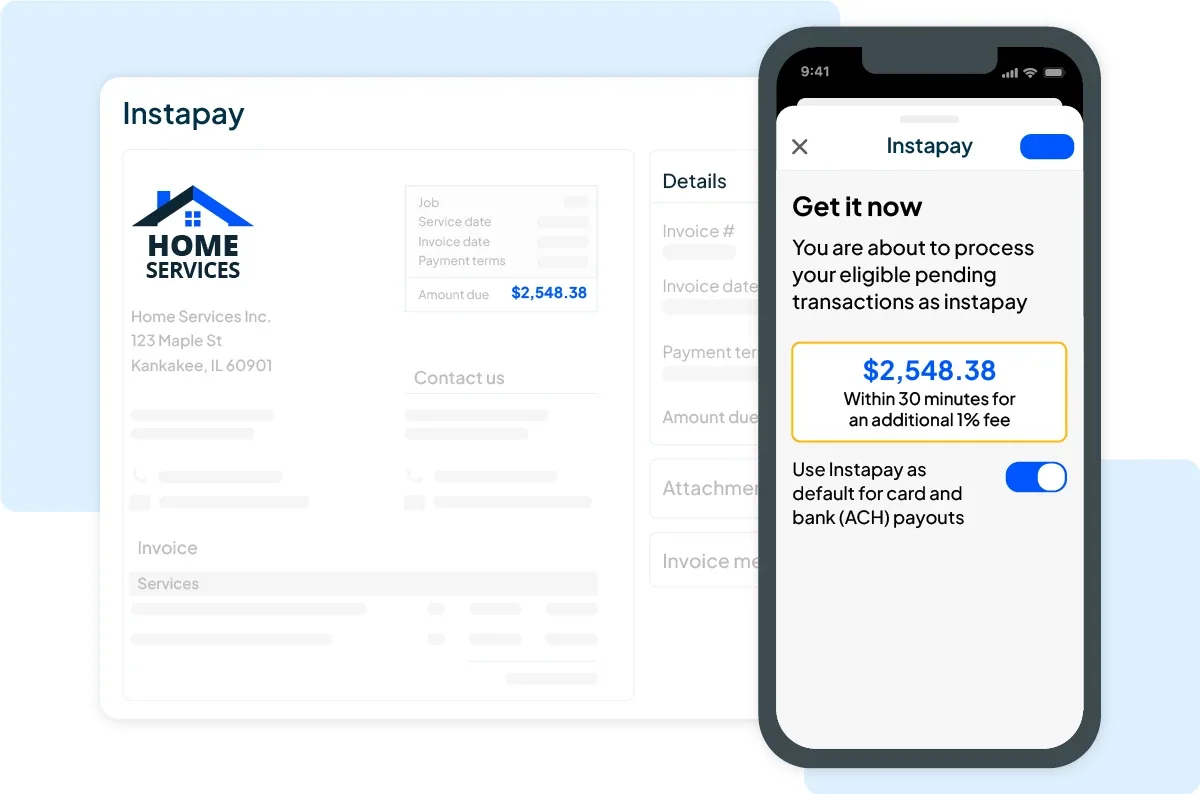
Instapay is the standout feature. Enable it and your payouts — both card and ACH — typically hit your bank account within 30 minutes. Not next-day. Not in 2-3 business days. Thirty minutes, including weekends and holidays. The fee is an additional 1% on top of the standard processing rate. So a card payment goes from 2.59% to 3.59% for same-day money. For transactions under $75, there’s an additional $0.75 charge. The per-transaction limit is $50,000, with a $100,000 daily cap — both more than enough for residential service work.
The practical value of Instapay for a service contractor: you finish a job Friday afternoon, collect payment, and the money is in your account before you drive home. No waiting through the weekend. No cash flow gap while you’re buying materials Monday morning.
Wisetack consumer financing is integrated directly into estimates and invoices. Customers apply for financing from the estimate they receive on their phone — no separate app, no redirecting them to a third party. Wisetack offers terms from 0% APR for 24 months up to 84 and 120-month terms for larger projects. The contractor pays a flat 3.9% on the financed amount with no subscription or monthly fee.
Why this matters: a $6,000 HVAC system replacement is a tough conversation. A $6,000 HVAC system at $187 a month with 0% interest for 36 months is a different conversation. Multiple contractors report that Wisetack financing pays for their Housecall Pro subscription many times over in additional job closes per month. If your average ticket runs past Wisetack’s $25,000 cap — full re-roofs, solar, whole-house HVAC — our contractor financing tools guide covers where Hearth and the other big-ticket lenders take over.
Tap to Pay lets your tech accept contactless card payments on their iPhone in the field — no card reader required. Card on File stores customer payment info securely for same-day checkout. Progress Invoicing handles multi-phase billing for larger jobs — you can invoice by dollar amount or percentage milestone.
No other platform in Housecall Pro’s price range has a payment stack this complete. Jobber has added some financing options, but they’re not as embedded. ServiceTitan has payment features, but at 3-5x the monthly cost.
The AI Team Suite: What Housecall Pro Actually Built
The old version of this review said Housecall Pro had no AI features. That’s no longer true. In 2024 and 2025, they rolled out what they call the AI Team — a set of built-in AI tools that work inside your existing account. Here’s what each one does:
CSR AI — 24/7 Call & Chat Answering (Paid Add-On)
CSR AI answers inbound calls and website chats around the clock. When a customer calls after hours, CSR AI picks up, references your business information and existing customer data, and books appointments directly into your Housecall Pro calendar. It discloses it’s AI at the start of the call and offers to transfer to a human if requested.
The company claims CSR AI delivers an average 42x ROI versus the subscription cost. That number is marketing math, but the concept is sound — a missed call is potential revenue walking away, and CSR AI doesn’t take nights or weekends off.
CSR AI is a paid add-on, not included in any base plan. Pricing isn’t publicly listed and requires a conversation with their sales team.
How CSR AI compares to standalone AI answering services:
If you’re already on Housecall Pro and want AI call answering, CSR AI has a real integration advantage — it books directly into your HCP calendar with no Zapier bridge, no mapping issues, no lag. That’s meaningfully smoother than connecting a third-party service.
That said, if you’re on the Basic or Essentials plan and want to evaluate AI call answering before paying for CSR AI, there are cheaper entry points. Upfirst ($24.95/mo) and Rosie ($49/mo) both integrate with Housecall Pro through Zapier — Upfirst actually lists Housecall Pro as a named native integration. The Zapier connection adds a step but works.
For AI call answering with a human backup option for complex calls, Smith.ai has a direct Housecall Pro integration and their hybrid model (AI + live US-based receptionists) catches what pure AI misses. Costs more — starts at $292/mo for the hybrid service — but the human fallback is real.
| Service | HCP Integration | Monthly Cost | Notes |
|---|---|---|---|
| CSR AI (native) | Built-in, no Zapier | Contact sales | Tightest integration, books directly |
| Upfirst | Native + Zapier | From $24.95/mo | Cheapest entry, named HCP integration |
| Rosie | Via Zapier | From $49/mo | Best voice quality, bilingual |
| Smith.ai | Direct integration | From $95/mo AI-only | Human backup option, most complete |
| Goodcall | Via Zapier | From $79/mo | Unlimited calls |
| Dialzara | Via Zapier | From $29/mo | Budget option |
See our full AI call answering guide for contractors →
Analyst AI — Your Data, Answered in Plain English
Ask Analyst AI a question like “what’s my revenue this month compared to last year?” or “which tech is closing the most jobs?” and it pulls the answer from your Housecall Pro data without you building a report. You type a question, you get numbers.
This is included in all plans. It won’t replace a real business intelligence tool for a large operation, but for a 5-10 tech shop, it makes your data accessible without needing to know where to find each report.
Coach AI — Business Advice On Demand
Coach AI answers questions about running your business: pricing strategy, how to win more repeat customers, when to hire your next tech, how to improve conversion rates. It’s an AI trained on business operations data, not a live human consultant.
Included in all plans. Think of it as a sounding board for decisions you’d normally make alone in your truck.
Marketing AI — Campaign Copy Without the Agency
Marketing AI writes email and SMS campaign content from a short description. “20% off HVAC tune-ups in April, expires Friday” becomes a complete campaign draft. Included in all plans. Useful if you’re running Campaigns (HCP’s built-in email/SMS marketing) and want to spend less time writing copy.
Service Plans & Recurring Revenue
The Recurring Service Plans feature is worth a dedicated callout for HVAC contractors in particular. You set up maintenance plans — two HVAC tune-ups per year at $199/year, for example — sell them in the field or online, and the system handles all the billing, scheduling reminders, and customer communication automatically.
Todd C. from Black Mountain Air (one of HCP’s published testimonials) said: “On our second year using Housecall Pro service contracts feature. It’s amazing how well it’s working for keeping repeat customers coming back.”
Service contracts do two things for an HVAC business: they smooth out seasonal revenue fluctuations, and they give you first-call priority with your best customers before they shop competitors. Housecall Pro’s implementation of this is solid. It’s included in the MAX plan; Basic and Essentials subscribers pay extra for it.
Customer Communication
Housecall Pro automates most of the communication touchpoints that usually require someone in the office:
- Booking confirmation — text or email immediately when a job is booked
- Appointment reminder — configurable 24 or 48 hours before the job
- “On my way” text — triggered when the tech is dispatched, includes tech photo
- Job completion — message confirming what was done
- Invoice + payment link — sent automatically when the job closes
- Payment reminders — automated follow-ups on unpaid invoices
- Review request — sent after payment, with direct link to Google/Yelp
The automated review request is one of the most consistently praised features across user reviews. Run it for six months and your Google rating will climb without anyone manually asking for reviews. For HVAC and plumbing contractors who compete heavily on local search, this is real value.
In-app chat lets your office and techs communicate inside the platform — no need to use personal text threads for job updates. Keeps communication logged and searchable.
Campaigns is HCP’s built-in email and SMS marketing tool. You can create automated sequences for past customers — maintenance reminders, seasonal promotions, referral requests. Not as sophisticated as a dedicated email platform, but enough for a service business that wants to stay in front of its customer list without a separate tool.
Mobile App: Strong on iOS, Inconsistent on Android
The Housecall Pro mobile app is rated 4.5 stars on the Apple App Store and 3.2 stars on Google Play. That gap is real and matters for your hiring decisions.
On iPhone, the app does what it’s supposed to do. Techs see their schedule, navigate to jobs, build and send estimates, collect signatures and payments, add photos, and update job status — all from the field without touching the desktop version. The interface is clean and the payment collection is particularly polished.
On Android, the story is different. Users report bugs with address display, slower load times on older devices, payment processing glitches, and occasional crashes mid-job. These aren’t isolated complaints — they show up consistently in recent 1-2 star Android reviews. For a team running a mix of iPhone and Android, expect a two-tier experience.
Practical implication: if your technicians are primarily on iPhones, the mobile app is a genuine strength. If Android is the default device for your crew, test thoroughly during the free trial. A single missed payment or corrupted job record in the field matters more than any feature list.
Integrations: A Deeper List Than Most Realize
Housecall Pro connects to a solid set of tools that home service contractors actually use. A few corrections from older reviews: CompanyCam now integrates with Housecall Pro — job photos from your techs flow directly into the platform. That integration existed when this review was updated; the previous version of this page incorrectly stated it wasn’t available.
Accounting & Financial:
- QuickBooks Online and Desktop — bidirectional invoice, customer, and payment sync (Essentials and up)
- Gusto — payroll and HR
- Wisetack — consumer financing (integrated at estimate level)
- Fundbox — business financing for the contractor
Field Operations:
- CompanyCam — job site photo documentation
- Beeline Routes — full route optimization
- Force by Mojio — fleet GPS and dashcam tracking
- MeasureQuick — HVAC diagnostic and measurement tool
Estimating & Pricing:
- Profit Rhino — flat rate pricing boards
- The New Flat Rate — flat rate menu pricing system
- On Call Air — HVAC system installation proposals
Lead Generation:
- Google Local Services Ads — direct booking from search
- Thumbtack — lead import
- Angi — lead management
- Yelp — lead inbox
Marketing & Communication:
- Mailchimp — email list and campaign management
- CallRail — call tracking and analytics
- Podium — text-based customer engagement and AI lead response
- CHIIRP — automated text, email, and voicemail sequences
Other:
- Zapier — connects to 8,000+ additional apps (all plans)
- Amazon Alexa — voice commands for business management
- Gift Up — gift card creation and sales
What’s still missing: No native aerial measurement integration (EagleView, HOVER, GAF QuickMeasure) — this rules Housecall Pro out for roofing contractors. No direct supplier ordering integration. No CompanyCam-style video documentation beyond basic photos.
API & Agentic AI Capabilities: The Honest Picture
This section is for contractors thinking about building AI workflows — piping call data into Claude, automating follow-ups with custom agents, or connecting HCP to a broader automation stack.
The bottom line: API access is restricted to the MAX plan.
Housecall Pro has a public REST API and a webhook system that fires on job, customer, invoice, and payment events. But both are gated behind the $299/month MAX plan. On Basic and Essentials, Zapier is the only automation bridge.
For contractors who just want Zapier automations — connecting HCP to a spreadsheet, triggering Slack notifications, pushing new jobs to another tool — that works on all plans and covers most use cases without touching the API.
For contractors building more sophisticated workflows — feeding call transcripts into a language model, running automated follow-up sequences triggered by job status, or wiring HCP into a Claude-based agentic harness — you need MAX. Once you have API access, Housecall Pro’s REST API exposes jobs, customers, invoices, employees, and payment events in a standard JSON structure. Webhooks let you receive real-time notifications rather than polling. That’s enough to build a functional integration with most AI platforms.
Compared to competitors for agentic use:
- ServiceTitan has a more mature API surface with better documentation and enterprise-grade webhook reliability, but at much higher cost
- Jobber also has a public API with a GraphQL option that’s arguably cleaner for developers
- HCP’s API is functional but the documentation depth and developer resources don’t match either competitor at this stage
Housecall Pro’s built-in agent: CSR AI is the most practical agentic feature for most contractors — it books calls and takes actions inside HCP without you writing any code. If you’re not a developer and just want AI doing work inside your system, CSR AI is the answer. For custom AI agent workflows, plan for MAX plan ($299/mo) plus developer time.
Pricing: What You’re Actually Paying in 2026
| Plan | Monthly (Annual) | Monthly (Month-to-Month) | Users | Key Additions |
|---|---|---|---|---|
| Basic | $59/mo | $79/mo | 1 | Scheduling, invoicing, price book, payments |
| Essentials | $149/mo | $189/mo | Up to 5 | + QuickBooks, GPS tracking, marketing, checklists |
| MAX | $299/mo | $329/mo | Up to 8 (+$75/user) | + Advanced reporting, API, webhooks, dedicated onboarding |
The honest math at different team sizes:
- Solo operator: Basic at $59/mo is workable, but you’re missing QuickBooks integration and GPS tracking. Essentials ($149/mo) unlocks both.
- 3–5 tech shop: Essentials at $149/mo is the realistic starting point. Most features you’d use are here.
- 6–10 tech shop: MAX at $299/mo makes sense for the reporting, API access, and dedicated support. At 8 users max, you pay $75/month per additional tech, and extra users on Essentials are $100 each.
- 10+ tech shop: Starts getting expensive. A 12-person team on MAX is $299 + ($75 × 4) = $599/month before any add-ons.
Add-ons that stack on top of base pricing:
This is where Housecall Pro’s billing model creates friction. Several features that feel core to running a service business are sold separately:
- CSR AI call answering — pricing requires contacting sales
- Sales Proposal Tool — included in MAX, paid add-on on lower tiers
- Recurring Service Plans — included in MAX, paid add-on on lower tiers
- HCP Assist (a human-staffed call answering option) — pricing not published
- Campaigns (email/SMS marketing) — add-on on lower tiers
- Payroll — add-on on all plans
- Website Builder — add-on on all plans
- Voice/VoIP phone system — add-on on all plans
- Vehicle GPS/Dashcams — add-on on all plans
The consistent complaint from contractors who leave Housecall Pro: they sign up at $149/month and find themselves at $300-400/month six months later after adding features they assumed were included. Read the feature matrix on each plan carefully before committing.
What Real Customers Say
Capterra: 4.7/5 across 2,737 verified reviews
This is the most reliable signal. Over 2,700 reviews is a statistically meaningful sample, and the 4.7 rating holds up across multiple categories: ease of use (4.6), customer service (4.7), features (4.5), value for money (4.6). Positive themes run consistently: scheduling just works, invoicing is fast, the payment experience is clean, and review automation builds Google ratings without any manual effort.
Direct quote from a verified Capterra reviewer: “Everything is very user friendly after practice and helps keep client data organized.”
Another: “Housecall Pro is great for small business owners — gives me more time expanding the business.”
The negative patterns on Capterra center on three areas: invoicing lacks batch options for multi-job clients, calendar sync with Google Calendar is inconsistent, and email templates feel dated.
Trustpilot: 2.9/5 across 581 reviews
This is the number that should give you pause, and it’s worth understanding why it’s so far from the Capterra number. Trustpilot reviews skew toward people who had bad experiences — it self-selects for complaints. But at 2.9 stars, the volume of negative reviews suggests real patterns:
Billing disputes are the most common theme: unexpected charges, difficulty getting credits applied, charges continuing after cancellation requests. One customer reported being billed three months after cancelling and waiting months for a refund. Another reported duplicate charges during a promotional onboarding period that weren’t resolved quickly.
Cancellation difficulty is the second pattern: multiple reviewers note they couldn’t cancel online and faced delays or resistance when requesting cancellation by phone or email.
A third theme emerged in early 2025: some customers reported that phone-based tech support became harder to reach, replaced by AI-assisted chat that wasn’t trained to handle complex issues. Phone support on Basic and Essentials is not a feature — only MAX gets escalated phone support.
The synthesis: Capterra’s 4.7 reflects day-to-day platform quality, which is genuinely strong. Trustpilot’s 2.9 reflects business practices around billing and cancellation, which have real problems. Both are worth knowing. If you’re evaluating Housecall Pro, use the free trial fully, test the features you need, and document your start date and billing terms clearly before you commit.
Reddit and trade forum sentiment: HVAC techs are the most consistently positive, citing the service contract features and automated review requests as the tools they’d miss most if they switched. Common Reddit complaint: “the pricing crept up faster than I expected.” Common praise: “scheduling and invoicing just work without drama.”
Who Should Use Housecall Pro
Strong fit:
- HVAC companies with 2–10 techs who want service contract management built in
- Plumbing and electrical shops that run service calls and want same-day payment processing
- Any home service business where Wisetack financing would close bigger jobs
- Contractors who want AI call answering connected natively to their scheduling (CSR AI)
- Businesses on iOS — the mobile app delivers on its promise on iPhone
- Contractors who want to be up and running in days, not weeks
Not the right fit:
- Roofing contractors — no aerial measurement, no insurance supplement workflow, better options exist (see JobNimbus or AccuLynx)
- Pressure washing, lawn care, house cleaning, window cleaning, or other exterior-services operators wanting AI bundled — HCP’s add-on model paywalls AI features; QuoteIQ ships AI Autopilot’s 35 tools, Virtual Call Team, AI Estimator, and MapMeasure Pro on the $29.99 entry tier and is purpose-built for these trades
- General contractors running multi-phase construction projects — Buildertrend is built for that
- Large operations (15+ techs) who need enterprise reporting — ServiceTitan is the next step
- Android-heavy field crews — the app quality gap is real and affects daily operations
- Contractors on tight margins who need phone support below the $299/mo tier
- Anyone who needs complex project management workflows — HCP is optimized for service calls, not phased construction
How It Stacks Up Against the Competition
Housecall Pro vs. Jobber
Jobber ($29–$399/month on annual billing) and Housecall Pro ($59–$299/month) serve almost identical customer profiles. The decision usually comes down to four questions:
What device does your crew use? Android users should lean Jobber hard — its Android app is rated 4.7/5. HCP’s is 3.2.
How important is payment speed? Instapay is an HCP-exclusive in this price range. Jobber doesn’t have an equivalent.
Do you want consumer financing built into estimates? HCP’s Wisetack integration is deeper than Jobber’s financing options.
Do you need phone support on a lower-priced plan? Jobber offers phone support starting at lower tiers. HCP reserves it for MAX.
The overall verdict: HCP wins on payments and financing. Jobber wins on mobile reliability and support accessibility. For most home service businesses with iOS-dominant field crews, HCP is the stronger platform at similar price points.
Housecall Pro vs. ServiceTitan
ServiceTitan ($245/month+) is more powerful on essentially every dimension — deeper reporting, more complex automation, better commercial capabilities, stronger phone and CRM features. It’s also meaningfully more expensive and has a steeper implementation curve. Contractors typically need weeks to set up ServiceTitan and often hire an implementation consultant.
For a service business under $3-5M in annual revenue, ServiceTitan’s depth isn’t a feature — it’s overhead. Housecall Pro gets you operational in days with features that cover 95% of what a 5-10 tech shop actually needs. When the business outgrows Housecall Pro, that’s a good problem to have, and ServiceTitan will still be there.
The Bottom Line
Housecall Pro has earned its place in the home service management category by doing a specific set of things very well: scheduling, invoicing, payment processing, and — now — AI-assisted operations. The AI Team Suite isn’t just a marketing slide anymore. CSR AI books calls. Analyst AI answers data questions. Coach AI gives advice. These are live features.
The Instapay and Wisetack combination remains genuinely differentiated for this price range. No other platform at $59–$299/month lets you collect a payment and have it in your bank account in 30 minutes, then offer the next customer 36-month 0% financing directly from the estimate.
The problems are equally real. The Android app underperforms. Support below the MAX tier is chat-only, and the Trustpilot record shows that billing and cancellation disputes happen at a higher rate than you’d want. Add-on pricing is aggressive — budget what you actually need, not just the headline plan price.
For HVAC, plumbing, and electrical contractors running 2–15 people on iOS devices, Housecall Pro belongs on the shortlist. Use the 14-day MAX trial. Test every feature you actually need — Instapay, the AI tools, the scheduling, the payment flow. Two weeks will tell you more than this review can. If the workflow fits, it’s a capable platform at reasonable pricing.