

Disclosure: This is a research-based review, not a hands-on one — I don’t run QuickBooks from the owner’s seat myself. It’s built from Intuit’s product documentation, Intuit’s September 2023 Intuit Assist launch announcement, the February 2026 Construction Edition release notes, G2’s 3,692-review dataset, Capterra sentiment, contractor-forum discussion on job costing, and conversations with contractors and bookkeepers who work inside QuickBooks every day. Where I’m drawing conclusions from research rather than personal use, I’ll say so directly.
Why QuickBooks Is Still the Default for Contractors
QuickBooks is the single most-used accounting platform in the trades — and the reason isn’t that Intuit designed it for contractors. They didn’t. Intuit built QuickBooks as a general-purpose small-business accounting tool, and out of the box it knows nothing about job costing, crew labor, change orders, or retention billing. So why does nearly every contractor in the trades end up there?
Because the ecosystem wins. Every major contractor CRM — JobNimbus, Jobber, Housecall Pro, ServiceTitan, AccuLynx — syncs natively to QuickBooks Online. Every bank in the country supports QuickBooks bank feeds. Every CPA, bookkeeper, and tax preparer you’d consider hiring already knows it. That network effect, not the product itself, is the real moat. Switching away from QuickBooks means asking your accountant to learn a new system, your CRM to build a new integration, and your bookkeeper to rebuild five years of reconciled history in an unfamiliar UI. Most contractors do the math and stay.
Intuit knows this. Their 2026 strategy leans into the ecosystem rather than away from it. In February 2026, Intuit launched the AI-powered Construction Edition for Intuit Enterprise Suite — their first industry-specific ERP, built explicitly for mid-market contractors. It’s the clearest signal yet that Intuit sees construction as a protected vertical, not just another SMB segment.
QuickBooks Online itself holds a 4.0/5 average across 3,692 reviews on G2 — 57% five-star, 7% one-star. The five-star consensus is predictable: universal accountant support, mature integrations, scales from solo operator to $10M+ businesses. The one-star consensus is also predictable: support hold times, pricing hikes, and the perennial frustration of building job costing on top of a general-purpose platform.
That tension — universal power paired with setup friction — defines the contractor QuickBooks experience in 2026.
How Much Does QuickBooks Really Cost in 2026?
QuickBooks Online starts at $20/month for Solopreneur and tops out at $340/month for Advanced, but the plan most contractors actually need — Plus — runs $140/month. Here’s the full 2026 pricing table, including the impact of Intuit’s July 2025 price hike. (For the true all-in number with payments fees, sub payments, and payroll stacked on, see our QuickBooks contractor pricing breakdown.)
| Plan | Monthly Price | Users | Job Costing (Projects) | Class Tracking | Best For |
|---|---|---|---|---|---|
| Solopreneur | $20/mo | 1 | ❌ | ❌ | Schedule-C gig workers, not real contractors |
| Simple Start | $38/mo | 1 + accountant | ❌ | ❌ | Solo operators billing under 20 jobs/year |
| Essentials | $85/mo | 3 | ❌ | ❌ | Small teams who don’t need job P&L |
| Plus ⭐ | $140/mo | 5 | ✅ | ✅ | The realistic contractor minimum |
| Advanced | $340/mo | 25 | ✅ | ✅ + custom roles | Multi-location contractors + IES Construction |
The price hike matters. Intuit raised QBO pricing in July 2025 (new/client-billed) and August 2025 (accountant-billed) — and that’s on top of the $5/month hike that hit every plan in August 2023. Customers who’ve been on QBO since 2022 have seen Plus climb roughly $30/month total over three rounds of increases. If you signed up before 2024, check your next renewal invoice — the grandfathered rates don’t hold forever.
Realistic all-in contractor cost:
- QBO Plus: $140/mo
- QB Payroll Core (if running payroll in-house): $50/mo base + $6.50/employee/month
- QB Payments: no monthly fee — pay only on transactions processed
- 1099 contractor-only plan (for GCs paying subs, no W-2 employees): $15/mo for up to 20 contractors — our QuickBooks 1099 filing walkthrough covers the full process and the new $2,000 reporting threshold for 2026
A 3-employee shop running Plus + Payroll Core lands at roughly $210/month all-in ($140 + $50 base + $6.50 × 3 = $209.50). A 10-employee operation runs closer to $255/month. Neither number is small, but it’s still meaningfully below Sage 100 Contractor ($700+/mo), Foundation Software ($1,500+/mo), or Buildertrend’s accounting bundle (part of a $499+/mo platform).
On the free trial and promos: Intuit offers a 30-day free trial with full feature access, and they run 50%-off-for-3-months promos almost continuously. If you’re signing up at list price, you’re overpaying — check for active discounts before clicking purchase.
One frustration worth naming: the list prices on quickbooks.intuit.com are the renewal rates. The promo rate lasts three months, then it jumps. Budget for the full $140 from month four, not the promo price on the signup page.
How Does QuickBooks Handle Job Costing for Contractors?
QuickBooks handles contractor job costing through the combination of Projects (per-job P&L) and Class Tracking (profit by trade, crew, or division) — both features included on the Plus plan and above. Used correctly, the two give you job-level profitability that’s good enough for 90% of residential and small-commercial contractors. Used incorrectly, they give you nothing useful at all. (For the full walkthrough plus where it breaks, see our dedicated guide on job costing in QuickBooks for contractors.)
The 4-Step Setup Most Contractors Skip
New to the platform? Our step-by-step QuickBooks setup guide for contractors walks the whole configuration from plan choice to CRM sync. The short version of the job-costing piece:
Step 1: Build a contractor-specific chart of accounts. The default QBO chart of accounts is generic. For contractor accounting you need separate COGS accounts for Materials, Subcontractor Costs, Direct Labor, Equipment Rental, Permits/Fees, and Waste Disposal. Overhead accounts go separately — Vehicle Expenses, Tool Purchases, Insurance (GL + Workers Comp + Vehicle), Office/Admin Salaries, Marketing. The point is to separate direct job costs from overhead, so job P&L reports answer the question “did this job make money?” instead of “did the whole business make money after subtracting overhead from this one job?”
Step 2: Turn on Class Tracking. Go to Settings → Account and Settings → Advanced → Categories, toggle “Track classes” to on, and build out classes that reflect how you actually segment the business. Common class structures contractors use: trade-based (Roofing, Siding, Gutters, Repairs), job-type-based (Insurance, Retail, Commercial, Warranty), or crew-based (Crew A, Crew B, Subs). Every transaction now gets tagged. At month-end, Profit & Loss by Class tells you which service lines print money and which ones don’t. Contractors regularly discover that their “bread and butter” service line is their least profitable once Class Tracking is running — that’s the insight the feature buys you.
Step 3: Create a Project for every job. QuickBooks Projects is QB’s version of job costing. Open a project per job, tag every invoice, bill, and expense to that project, and QB generates a project-level P&L showing revenue, costs, and margin. Not as automated as Foundation Software or Sage, but it works — especially when a CRM like JobNimbus or Jobber is auto-creating those projects on job creation.
Step 4: Build bank rules for common suppliers. Every transaction from Home Depot goes to Materials. Every Shell fuel charge goes to Vehicle Expenses. Every supplier-specific card swipe gets auto-categorized via rules. Enough rules, and daily transaction categorization takes five minutes instead of thirty.

The Credit Card Trap
Here’s the single most common job-costing failure in QuickBooks, and it’s worth calling out because most contractor accountants never catch it.
On Reddit and in ProcureDesk’s contractor job-costing research, the pattern is consistent: contractors using credit cards for 40-60% of their material purchases, and using journal entries to “clean up” credit card statements at month-end, leave 25-35% of actual job costs unassigned to projects in real-time reporting. The monthly P&L looks fine. The job-level P&L is garbage.
The fix is unglamorous: every credit card transaction needs to be categorized individually at the bank-feed level, with project and class tags attached the same day. Not cleaned up monthly. Not journal-entried to COGS in bulk. Line by line, with the project tag. This is the work most contractors skip, and it’s why most contractors think QuickBooks “can’t do job costing.” It can. The workflow is just tedious.
February 2026: The Construction Edition Finally Arrives
For the first time in QuickBooks’ history, contractors get industry-specific features built in — not bolted on via third-party integrations. (Confused about how this differs from the old Desktop Contractor Edition? We untangle all three in QuickBooks Construction Edition explained.)
On February 11, 2026, Intuit launched the Construction Edition for Intuit Enterprise Suite. This is Intuit’s first industry-specific ERP, available in open beta at no additional cost for IES subscribers and as a paid add-on for QuickBooks Online Advanced customers. The feature set is the one every contractor has been asking Intuit for since 2015:
- Cost Groups — plan and track project costs by industry-standard categories (Labor, Materials, Equipment, Subcontractors), with rollups across budgets, POs, bills, and expenses
- AIA-Style Invoicing (beta) — total contract value, invoiced-to-date, current draw, and remaining balance tracked at the phase level; eliminates the manual schedule-of-values spreadsheet most commercial contractors rebuild every billing cycle
- Project Phases — break jobs into phases with separate cost tracking per phase
- Negative Change Orders — handle credits and deducts without breaking the original estimate
- Proposals with E-Signatures — move from estimate to signed contract without exporting to DocuSign
- QuickBooks Time Assignments — tied into Payroll Premium and Elite, crews get assigned to specific jobs with labor cost allocation flowing straight into job costing
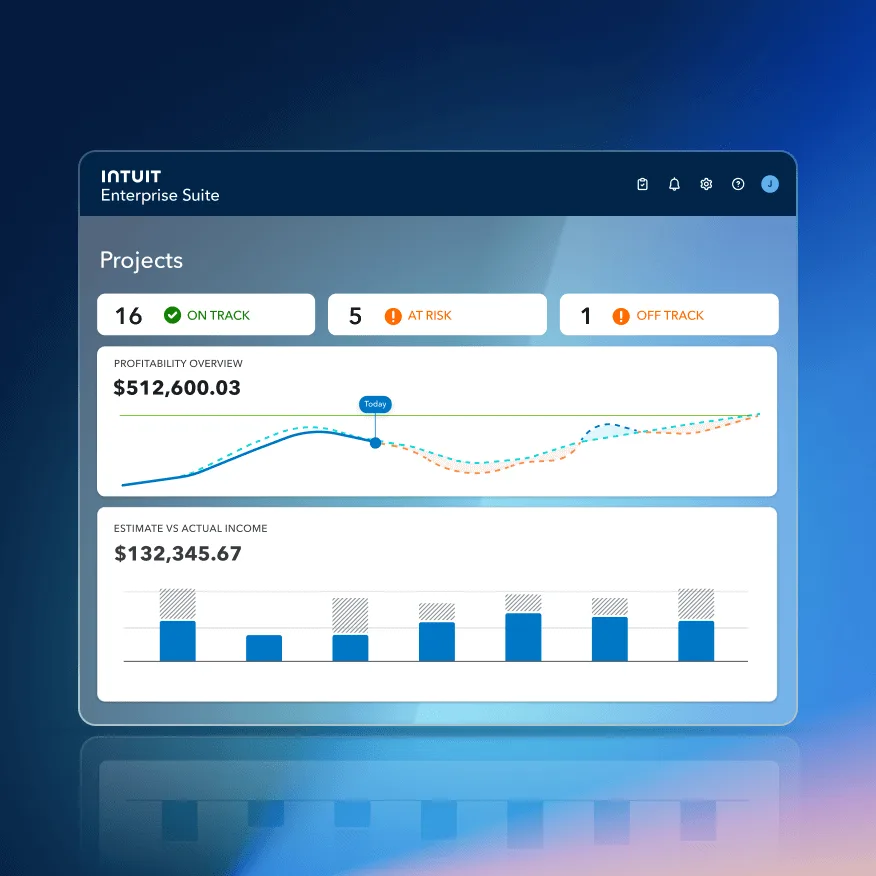
The catch: Construction Edition lives inside Intuit Enterprise Suite, which is positioned for mid-market contractors in the $5M-$250M revenue range — the tier where QBO Plus typically starts cracking under the weight of multi-entity job costing. Solo operators and small crews on QBO Plus won’t get these features directly, though the Cost Groups framework is available as a paid add-on for QBO Advanced, and AIA-style invoicing is on the QBO roadmap. For the first time in a decade, Intuit is actively investing in contractor-specific functionality instead of pushing contractors toward third-party add-ons.
What Is Intuit Assist and Can It Actually Help Contractors?
Intuit Assist is the generative AI layer built into QuickBooks Online. Intuit announced it in September 2023 and rolled it out broadly to US QBO customers through 2024. By 2026 it’s available on every QBO plan at no additional charge, and it’s matured from a demo feature into a genuinely useful one. For the first time, QuickBooks has AI features worth turning on.
What Intuit Assist actually does for a contractor in 2026, per Intuit’s own product documentation:
- Auto-generates invoices and estimates. Forward a customer email or upload a photo of a handwritten job note from the field, and Intuit Assist pulls out the line items, quantities, and pricing to draft an estimate or invoice based on your historical billing patterns. Review, edit if needed, send.
- Extracts receipts into expenses. Snap a receipt in the mobile app and Intuit Assist pulls the vendor, amount, date, and expense category automatically — and over time it learns how you categorize income and expenses and auto-matches recurring patterns.
- Drafts personalized payment reminders that actually get paid. Intuit Assist detects past-due invoices and writes reminder emails tailored to each customer. Per Intuit’s own data, this gets invoices paid an average of 5 days sooner than generic reminders — real cash flow impact for a contractor running $40K+ in monthly A/R.
- Flags cash flow gaps before they happen. A Business Feed on the QBO home page surfaces real-time warnings when A/R and scheduled bills suggest a shortfall is coming, with suggested actions. Useful for deciding whether to take on an emergency subcontractor or wait for a customer payment to clear first.
- Learns your patterns. Over time the expense categorization, invoice defaults, and reminder tone all improve based on what you accept vs. override.
Sasan Goodarzi, Intuit’s CEO, framed the 2026 AI push directly: “2026 will be a pivotal, consequential year in which Intuit must bring its strategy around data, AI, and human intelligence to life,” he told Semafor in February 2026. Goodarzi’s argument, in the same piece: “AI will eliminate almost all the drudgery and manual work over time, but it will not change the importance of human interaction.”
That’s the right frame for what Intuit Assist is actually good at. It handles drudgery. It doesn’t replace the contractor’s judgment on job costing setup, pricing decisions, or customer relationships.
How Intuit Assist Fits the Broader Contractor AI Stack
Intuit Assist handles back-office AI — the accounting side. That’s half the contractor AI stack. The other half is front-office AI — the calls, leads, and scheduling that happen before any of that revenue hits QuickBooks.
For contractors running a mature AI stack in 2026, the pairing looks like this:
- Front-office AI: Rosie (pure AI, $49/mo starting) or Smith.ai (hybrid AI + human, $95/mo Starter) answers the phone 24/7, qualifies leads, books appointments, and pushes customer data downstream
- CRM: Jobber, JobNimbus, or Housecall Pro captures the lead, schedules the work, dispatches the crew
- Back-office AI: Intuit Assist inside QuickBooks drafts the invoice, categorizes the expense, sends the payment reminder
Intuit Assist doesn’t replace Rosie or Smith.ai, and Rosie doesn’t replace Intuit Assist. They operate on different parts of the job lifecycle. Contractors who run all three layers — front-office AI + operational CRM + back-office AI — get dramatically more leverage than contractors running any one alone.
QuickBooks Desktop Is Being Phased Out — What Contractors Need to Know
If you’re still on QuickBooks Desktop Premier Contractor Edition or any Desktop SKU other than Enterprise, start planning your migration now. Intuit has been aggressively moving customers to QBO since 2023, and the Desktop sunset timeline is clearer than most contractors realize.
- September 2024: Intuit stopped selling new QuickBooks Desktop Pro Plus, Premier Plus (includes Contractor Edition), and Mac Plus subscriptions. Existing subscribers could still renew.
- May 31, 2026: QuickBooks Desktop 2023 support officially ends — including security patches, payroll updates, and bank-feed connections. This affects every Desktop SKU from 2023 and earlier.
- Ongoing: Intuit rolls out new features to QBO first. Desktop integrations with CRMs and contractor tools are increasingly second-class — fewer native connectors, more one-way Zapier bridges.
QuickBooks Desktop Enterprise is the only Desktop product Intuit continues to actively sell and support. If you genuinely need Desktop-style job costing depth — running a $5M+ commercial contractor with heavy WIP reporting and inventory — Enterprise is the path. But Enterprise starts around $1,922/year per user for the Gold tier, which puts it in Sage 100 Contractor territory price-wise.
For most contractors on Desktop Premier Contractor today, the migration path is QuickBooks Online Plus ($140/mo) or Advanced ($340/mo) — not Enterprise. You lose some Desktop reporting depth. You gain the integration ecosystem, mobile access, Intuit Assist, and the whole Construction Edition roadmap. For most residential and small-commercial operations, the trade-off favors migrating.
That May 31, 2026 cutoff has now passed — so if you’re still on Desktop 2023 or earlier, you’re already running unpatched software with dying bank feeds and payroll updates, and migration isn’t optional anymore. It’s also not a weekend project: you’re rebuilding your chart of accounts, reconnecting bank feeds, re-mapping every CRM integration, and retraining your bookkeeper on the new UI. The longer the old file sits frozen, the worse the cleanup gets at tax time — move now rather than limp through another quarter.
How QuickBooks Integrates with Contractor CRMs and Field Tools
QuickBooks Online has the deepest integration ecosystem in the contractor software market, and it’s the single biggest reason contractors stay. Every tool that matters for a trades operation has a native QBO connector, and the ones that don’t live one Zapier zap away.
Native QBO integrations worth naming:
- Jobber — Native sync (one-way from Jobber → QBO, with Jobber as the source of truth) for clients, products/services, timesheets, invoices, payments, tips, and payouts. Available on Connect and Grow plans. Jobber’s new integration improved error handling dramatically over the legacy version.
- JobNimbus — Configurable sync offering both one-way and two-way modes for contacts, jobs, estimates, invoices, and payments. You pick which system has priority when records exist in both. One of the tightest integrations in the roofing space, with detailed field-level sync mapping.
- Housecall Pro — Bidirectional sync supporting both QBO and Desktop. Strong for teams running dedicated bookkeepers.
- ServiceTitan — QBO integration available, though ServiceTitan’s own financial tools are increasingly self-contained at the enterprise tier.
- AccuLynx — Native roofing-specific sync for invoices, payments, and customer data.
- CompanyCam — Photo documentation ties to QBO transactions via project tags.
- Gusto — Third-party payroll sync for contractors who prefer Gusto over QB Payroll.
- Bill.com — AP automation for contractors managing high subcontractor volume.
- Zapier — 8,000+ apps, the universal glue when a direct integration doesn’t exist.

The Proven Contractor Tech Stack for 2026
Looking across how contractors are actually running their operations in roofing, HVAC, plumbing, and general contracting, one stack consistently outperforms the alternatives for small-to-mid-size contractors in 2026:
- Marketing + Reputation + AI Calls: GoHighLevel at $97-$297/mo handles lead capture, email/SMS automation, review requests, and AI Voice for inbound call answering
- Field Service Operations: Jobber at $39-$169/mo handles scheduling, dispatch, estimates, invoicing, and crew management
- Accounting + Payroll: QuickBooks Online Plus at $140/mo + Payroll Core ($50 base + per-employee) handles the books
The magic of this stack is the September 2025 native GoHighLevel ↔ Jobber integration combined with Jobber’s mature QBO sync. Client data flows from GoHighLevel (where the lead is captured) into Jobber (where the job runs) into QuickBooks (where the books close) without a single Zapier zap. Total monthly cost: $293-$600/mo all-in, depending on team size and GHL tier.
For roofing specifically, swap Jobber for JobNimbus and the stack still works — JobNimbus syncs to both QBO and GoHighLevel cleanly. The GoHighLevel + Jobber comparison page has the full stack cost math and integration details if you want to see how the pieces connect.
One layer worth adding once the books are clean: customer financing. Wisetack rides natively inside Jobber and Housecall Pro quotes, and financed jobs settle into the same QBO-synced invoice flow — the homeowner pays monthly, you get paid in full, and the books don’t need a single extra journal entry.
Upstream from this stack: AI call answering. Rosie at $49/mo or Smith.ai at $95/mo (Starter) catches the inbound calls GoHighLevel’s AI Voice can’t handle (Rosie/Smith.ai specialize in home services; GHL’s AI Voice is more generalized). Pair an AI call answering service with the GoHighLevel + Jobber + QuickBooks stack and you’ve got the closest thing to a full-automation contractor operation available in 2026.
Who QuickBooks Is Built For
QuickBooks Online is the right accounting platform for contractors who need universal ecosystem compatibility, scalable job costing, and AI-assisted bookkeeping — and who are willing to invest in setting it up correctly.
Residential contractors doing 20-500 jobs per year. Plus at $140/mo with Projects and Class Tracking enabled gives you job-level P&L, profit-by-service-line visibility, and the integration depth to plug into whatever CRM you choose. This is the QB sweet spot.
Multi-trade general contractors. Class Tracking is genuinely best-in-class here. Segment by trade (Roofing, Plumbing, Electrical, Repairs) and you see which lines drive margin. That insight is hard to get from any general-purpose accounting platform that doesn’t have Class Tracking.
Contractors running established CRM stacks. If you’re on JobNimbus, Jobber, Housecall Pro, ServiceTitan, or AccuLynx, the native QBO integration saves hours per week. That alone justifies QB over a cheaper alternative without CRM connectors.
Solo operators scaling toward a team. Start on Simple Start at $38/mo for invoicing and expense tracking. Upgrade to Plus when you hit the point where “did this job make money?” becomes a question you actually need to answer — typically around job #30-50 per year.
Contractors who want real AI in their accounting. Intuit Assist in 2026 is mature enough to save a bookkeeper 30-60 minutes per day on invoice drafting, expense categorization, and payment reminders. If you’re looking for back-office AI and you also run Rosie or Smith.ai on the front office, QuickBooks rounds out a strong AI-native contractor tech stack.
Who Should Skip QuickBooks (and What to Use Instead)
QuickBooks isn’t the right fit for every contractor. Here’s the honest breakdown of who should look elsewhere — with specific alternatives for each case.
Solo contractors under 20 jobs/year who hate accounting software. If you’re a one-truck operation doing a handful of jobs annually and you just want clean invoicing plus receipt capture, QuickBooks is overkill — even at the $38/mo Simple Start tier. Use FreshBooks instead (full FreshBooks review coming in our Accounting hub). FreshBooks was built from the invoicing-first direction and is genuinely easier to use for non-accountants than Essentials or Plus.
Contractors frustrated with Intuit’s ecosystem lock-in. If you’ve hit the QB price-hike wall one too many times and want a QBO alternative without Intuit dependency, Xero is the direct competitor — same feature ceiling for small-to-mid operations, cleaner UI, better non-US support, and no Intuit account-management games. Deep Xero review coming to our Accounting hub soon.
Commercial contractors above $5M revenue with heavy WIP reporting. You need Sage 100 Contractor, Foundation Software, or Intuit’s own Enterprise Suite Construction Edition. QuickBooks Online Plus, even with Projects and Class Tracking, can’t match the depth of dedicated commercial construction accounting. Our Sage Construction review is on the way as part of this accounting sprint.
Contractors who want zero-setup job costing. QBO requires manual setup for Projects, Class Tracking, and a contractor-specific chart of accounts. If that’s too much lift, Buildertrend and JobTread include built-in job costing inside their broader platforms — no QB setup required. You pay more per month, but you skip the chart-of-accounts learning curve.
Contractors who primarily need front-office automation, not back-office. QB doesn’t replace an AI call answering service, a marketing automation platform, or a field service tool. If your bottleneck is missed calls, stalled follow-ups, or dispatch chaos — not accounting — QuickBooks solves the wrong problem. Start with Rosie or Smith.ai for the phones, GoHighLevel for marketing, and Jobber for field operations. Bring in QB once those are running.
Contractors who want native mobile-first field invoicing. QBO’s mobile app handles receipt capture and basic invoice sending, but it’s not built for field-first workflows. Housecall Pro’s in-field invoicing (read our Housecall Pro review) or Jobber’s mobile invoicing (Jobber review here) are substantially better for contractors who collect payment at the kitchen table and expect to do it from a phone.
The Bottom Line: Is QuickBooks Worth It for Contractors in 2026?
QuickBooks Online earns its 4.3/5 rating because it’s the most ecosystem-compatible accounting platform available to contractors — not because it’s the easiest or the most contractor-native. It still requires setup that construction-specific software shouldn’t require. Support has slipped. The July 2025 price hike made it meaningfully less of a value play than it was three years ago.
But the ecosystem is real and it’s getting stronger. Every serious contractor CRM syncs to QBO natively. Every accountant in the country speaks it. Intuit Assist brings genuinely useful AI to the back office without an add-on fee. The February 2026 Construction Edition shows Intuit is finally investing in contractor-specific features after a decade of general-purpose drift.
The contractors who get the most out of QuickBooks are the ones who:
- Run Plus ($140/mo) or higher — not Solopreneur or Simple Start
- Set up Projects, Class Tracking, and a contractor-specific chart of accounts in the first month
- Pair it with a mature CRM stack — JobNimbus for roofing, Jobber for service trades, or the full Jobber + GoHighLevel + QuickBooks stack for most residential contractors
- Actually use Intuit Assist — don’t leave the AI drafting tools turned off
- Categorize credit card transactions at the bank-feed level with project tags, not in bulk at month-end
Contractors who skip the setup get an expensive way to send invoices. Contractors who do the setup get the financial backbone of the business, with AI assist, ecosystem integration, and the option to grow into Construction Edition when revenue crosses $5M.
Start with the 30-day free trial on QBO Plus. Set up a chart of accounts, turn on Class Tracking, create one test project, and run a Profit & Loss by Class report. If that workflow clicks in the first two weeks, you’ll understand why QuickBooks is still the standard in the trades. If it doesn’t, FreshBooks or Xero are waiting in our Accounting hub.