


$149 versus roughly $450 a month. That’s the gap between Housecall Pro’s Essentials plan and FieldPulse’s most-cited tier for a five-person crew, and it’s the number that decides this comparison for most of the shops that will read it.
The “roughly” is doing a lot of work in that sentence. Housecall Pro’s $149 is printed on its pricing page. FieldPulse’s $450 is five techs times a $90-per-user figure that comes from third-party aggregators, because FieldPulse’s own pricing page, checked September 2026, contains no dollar amounts at all. The page says pricing is “seat-based” and “customized to your team size and setup,” lists eight add-ons (Engage VoIP, Operator AI, Chat AI, Pricebook, FieldPulse Payments, FieldPulse Financing, Fleet Tracking, Custom Forms) without a price on any of them, and routes every button to “Get a Custom Quote” or “Book My Demo.”
So this page has two jobs. First, lay out the real cost at 3, 5, 8, and 12 users with the unverified numbers clearly marked. Second, explain what FieldPulse’s higher price buys, because for some contractors it buys exactly the things Housecall Pro doesn’t have.
What Each Plan Costs at Real Headcounts
Housecall Pro numbers below are from housecallpro.com/pricing as of September 10, 2026, on annual billing (monthly in parentheses). Basic is $59 ($79) for one user. Essentials is $149 ($189) for up to five users, then $100 per additional user. MAX is $299 ($329) for up to eight users, then $75 per additional user. Full breakdown, add-on list, and processing math are on our Housecall Pro pricing page.
FieldPulse numbers are the third-party estimates we cite in our FieldPulse review: about $65 per user on Essentials, $90 on Professional, $115 on Premium. FieldPulse has not confirmed any of them. We show the Professional estimate as the comparable tier because that’s reportedly where QuickBooks sync and payment processing appear, which Housecall Pro includes on Essentials.
| Team size | Housecall Pro (annual) | Housecall Pro (monthly) | FieldPulse (est. Professional) | FieldPulse (est. Essentials) |
|---|---|---|---|---|
| 3 users | Essentials, $149 | $189 | ~$270 | ~$195 |
| 5 users | Essentials, $149 | $189 | ~$450 | ~$325 |
| 8 users | MAX, $299 | $329 | ~$720 | ~$520 |
| 12 users | MAX + 4 seats, $599 | $629 | ~$1,080 | ~$780 |
Three things jump out of that table.
Housecall Pro’s flat tiers mean a three-person shop and a five-person shop pay the same $149. FieldPulse’s per-seat model means every hire costs money on day one. That difference compounds: at 12 users, Housecall Pro is $599 and FieldPulse is somewhere between $780 and $1,080, before either platform’s add-ons.
Neither platform’s headline number is the bill. Housecall Pro’s pricing page names eleven add-ons and prices one of them (the Sales Proposal Tool, listed as a “$40/mo value” inside MAX). CSR AI, Campaigns, Pipeline, Voice, payroll, and vehicle GPS are all sales-quoted. FieldPulse’s list is shorter but equally unpriced, and one Capterra reviewer reported spending over $1,000 on add-ons after expecting calling, texting, and email to be included in the base plan.
The trial gap is the one that matters most. Housecall Pro gives you 14 days of the MAX plan with no card. FieldPulse gives you a demo. You will commit to FieldPulse before you have run a real job through it.
Pricing: Housecall Pro, and it isn’t close. FieldPulse may be fairly priced for what it does. You still can’t find out what it costs without a sales call, and you can’t test it before you pay.
Dispatch and Scheduling
Both platforms run the same core dispatch model: a drag-and-drop board with a lane per tech, color-coded jobs, automated “on my way” texts, and GPS tracking. The differences are in the edges.
Housecall Pro’s board is the one most contractors learn fastest. It’s built for a dispatcher running 3 to 6 same-day calls per tech, with route mapping and drive-time estimates on Essentials and route optimization on MAX. Employee GPS is included on Essentials; vehicle GPS and dashcams are a separate add-on. The weak spot is capacity-based booking. When a CSR schedules a call, the system checks availability but doesn’t do much to honor per-tech skills or constraints automatically.
FieldPulse’s board adds multi-day weekly views and capacity-aware double-book prevention, and it layers ClearPath on top: guided step-by-step workflows per job type that walk a tech through confirm equipment, photograph condition, run diagnostic, build estimate, present options, collect signature, invoice, and sync. For a multi-trade shop where a plumbing call and an electrical call need different checklists, that’s the feature that justifies the platform. GPS runs through an Azuga integration rather than in-house.
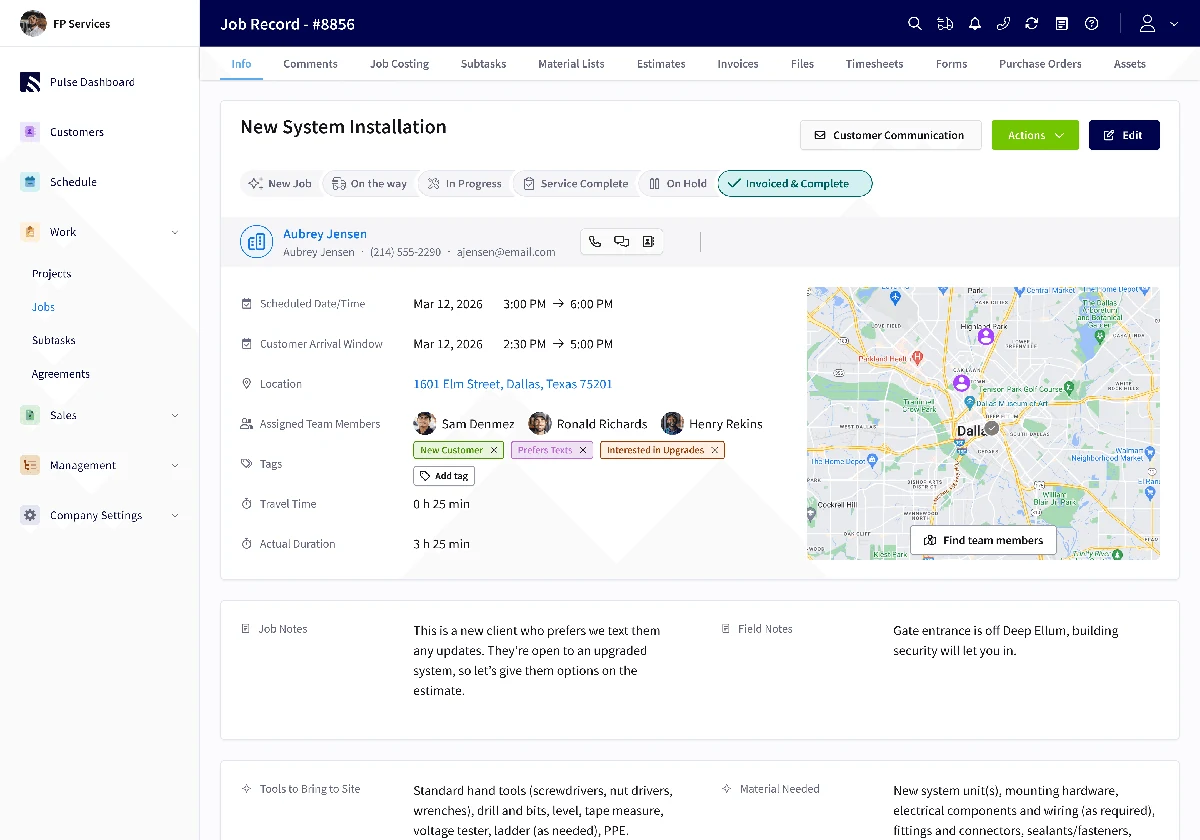
The caution on FieldPulse is sync. In Capterra’s tag analysis of critical reviews, “unreliable syncing and connectivity” shows up in roughly 88% of negative-sentiment reviews and “recurring bugs and glitches” in about 47%, clustered around mobile-to-desktop data integrity after offline mode. The 4.6 Capterra average says it works most of the time, but if your techs spend their days in basements and mechanical rooms with no signal, ask the sales rep about offline behavior specifically.
Housecall Pro’s equivalent weakness is the Android app: 4.5 stars on iOS, 3.2 on Google Play, with recent Android reviews reporting address display bugs, slow loads, and crashes mid-job. An iPhone crew won’t notice. A mixed crew runs two different apps in practice.
This round goes to FieldPulse on depth, with ClearPath and multi-day views. Housecall Pro is easier to set up and run for a single-trade shop.
Estimates and the Price Book
Housecall Pro includes a flat-rate price book on every plan, with the deeper flat-rate tools on Essentials. If you already buy pricing from Profit Rhino or The New Flat Rate, both push directly into it, so every tech quotes the same number. The Sales Proposal Tool (good/better/best option boards, before-and-after photos, financing inside the estimate) is included on MAX and a paid add-on below it. HVAC shops get one more piece: On Call Air integrates for full equipment-replacement proposals with financing.
FieldPulse’s estimating is built around the same good/better/best presentation, and it gets the strongest customer testimony on this page. Sal Gutierrez, owner of Fair Comfort Solutions (HVAC), in FieldPulse’s published case study: “Before FieldPulse, it took me four to eight hours for one quote. With FieldPulse now, I’d say about four to eight minutes.”
The catch is where the price book lives. FieldPulse’s September 2026 pricing page lists “Pricebook” as an add-on, and third-party reports put it on the Premium tier. Housecall Pro’s price book is included from Basic up. If a flat-rate book is central to how you sell, price that difference into your FieldPulse quote.
Neither platform does anything for measurement-driven trades. No aerial imagery, no takeoffs, no insurance supplements. Roofers and siding contractors need a different tool on either side.
Housecall Pro has the edge for a single-trade shop that wants the price book included and Profit Rhino wired in. FieldPulse’s quoting is excellent once you’ve paid for it.
Payments and Financing
This is the section where Housecall Pro’s product is simply better, and it’s the section that touches every job you run.
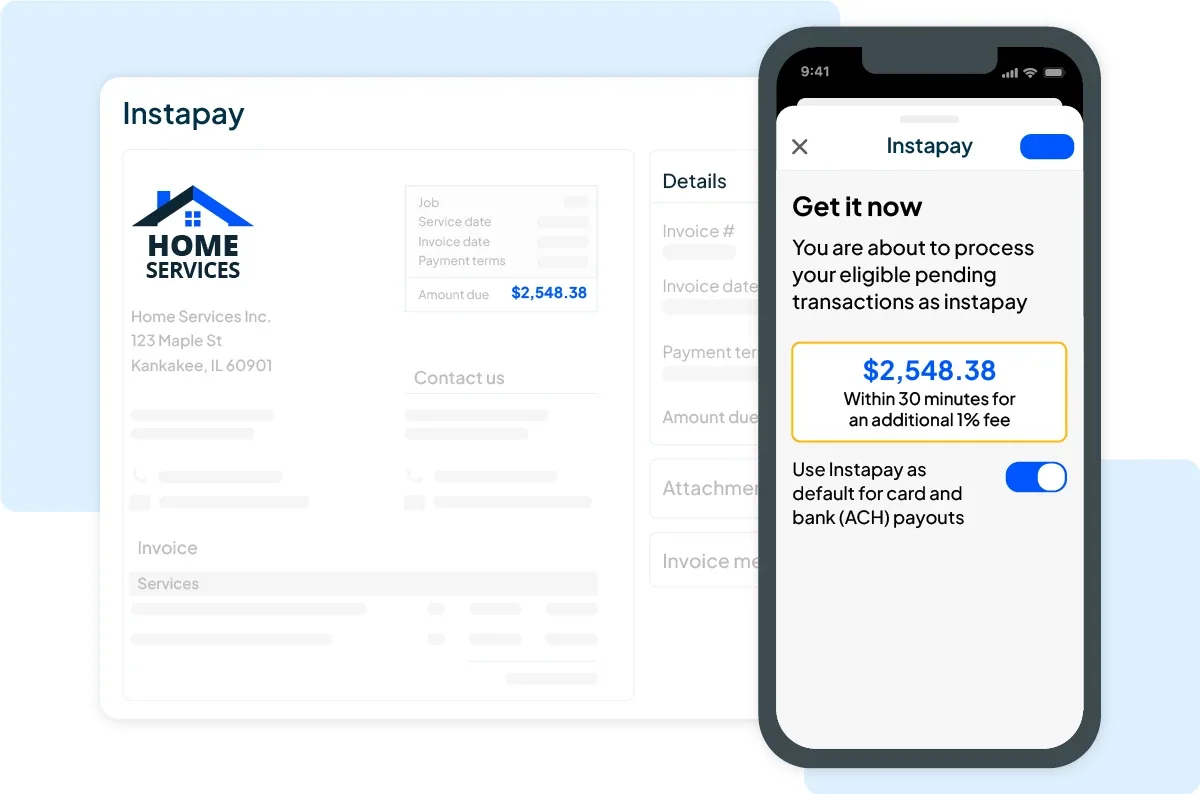
Housecall Pro processes payments in-house: cards from 2.59%, ACH at 1%. Instapay, opt-in on every plan, deposits card and ACH payments in about 30 minutes for an extra 1% (plus $0.75 on transactions under $75), weekends and holidays included. A tech who collects on a Friday afternoon has the money before he gets home.
Wisetack consumer financing sits inside the estimate at a flat 3.9% to the contractor, so a homeowner approving a $6,000 system replacement can set up monthly payments on the tech’s tablet. Hearth is also available. Our category scoring gives Housecall Pro a 5.0 on invoicing and payments in field service management, the highest mark in the category.
FieldPulse, per our May 2026 review, routes all card processing through Square at 2.9% plus $0.30 per transaction, with no Stripe option and no ACH at processor-published rates. On $50,000 of monthly card volume, the spread between 2.59% and 2.9% plus 30 cents is roughly $200 a month before you count Instapay. There is no same-day payout equivalent.
Where FieldPulse compensates is financing breadth: native Wisetack at the same 3.9%, an Acorn Finance marketplace with 30-plus lenders for loans up to $100,000, and FieldPulse Capital, the company’s own working-capital and equipment financing product for the contractor’s business rather than the customer’s. If you finance trucks and inventory through your software vendor, that’s a real option Housecall Pro doesn’t have.
One thing to verify: FieldPulse’s pricing page now lists “FieldPulse Payments” and “FieldPulse Financing” as named add-ons. That wording may mean a branded processing product has replaced or joined the Square arrangement. Ask what the rate is and whether Square is still the processor underneath.
Winner: Housecall Pro. Lower card rate, ACH at 1%, 30-minute payouts, and financing in the estimate. FieldPulse’s business-financing stack is the only piece Housecall Pro can’t match.
AI: CSR AI vs Operator AI
Both companies sell an AI receptionist as an unpriced add-on, so the comparison is about capability, not cost.
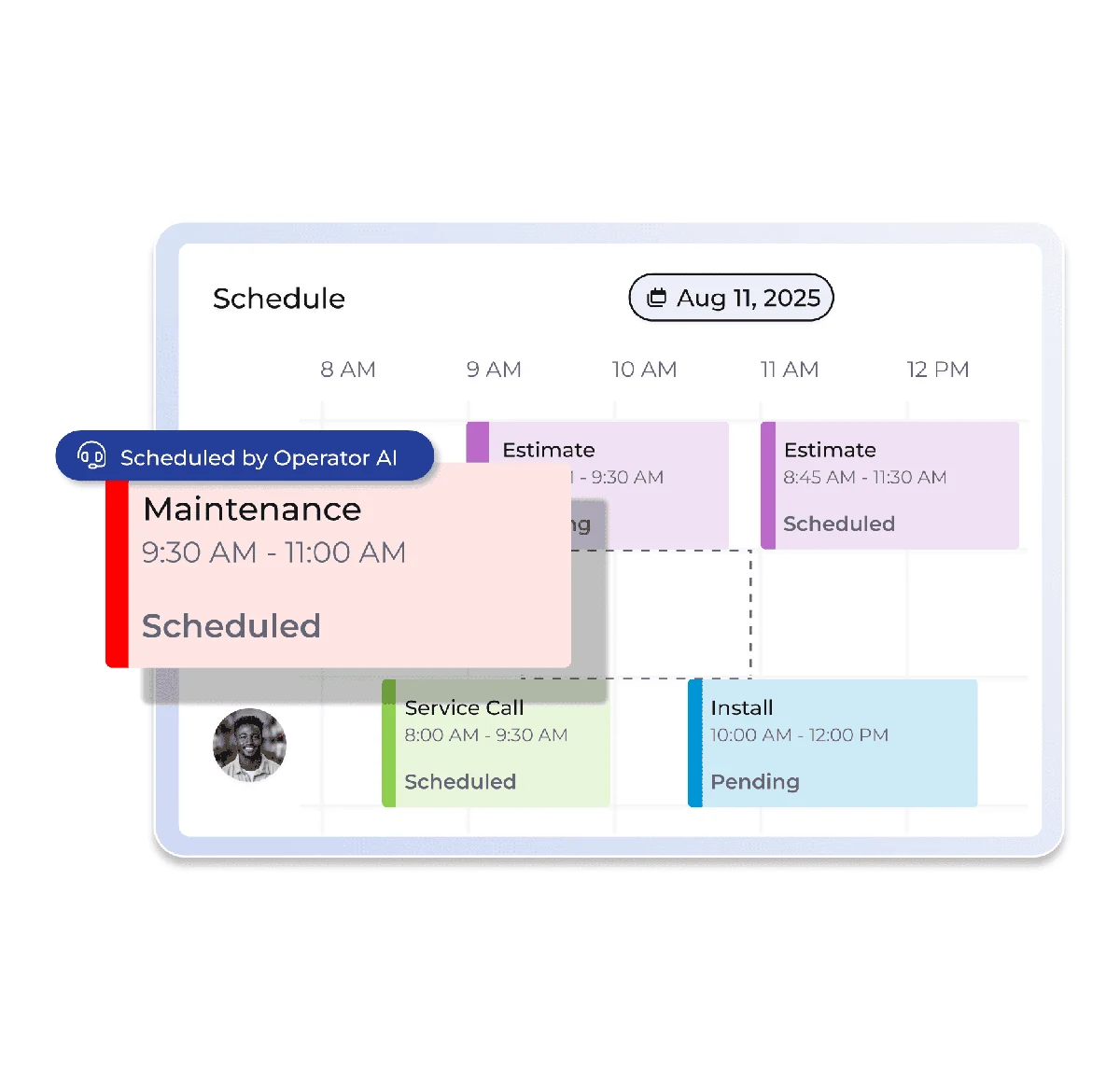
FieldPulse’s Operator AI is the more ambitious product. It answers when your team can’t, pulls the caller’s history from the CRM, runs your qualifying questions, offers real appointment slots from live tech availability, books, and sends confirmations. It handles 30-plus languages (Spanish, Mandarin, Vietnamese, Korean, Tagalog, and more), lets you build IVR-style phone trees, and routes urgent keywords like “gas leak” or “no heat” ahead of routine calls. It won the 2025 NECA Innovator Award, and notably, Operator AI accuracy is absent from FieldPulse’s critical reviews even when reviewers had other complaints. Chat AI covers website chat, and Field Intelligence handles analytics.
Housecall Pro’s CSR AI covers calls and website chat around the clock, discloses it’s AI, books directly into the calendar, and offers a human transfer. It doesn’t advertise language breadth or phone trees. What Housecall Pro has that FieldPulse doesn’t is the rest of the AI Team, included on every plan: Analyst AI answers plain-English questions about your numbers, Coach AI gives pricing and growth advice, and Marketing AI writes campaign copy. On a $59 Basic plan, those come free.
Housecall Pro also has the cheaper path if you’re not sold on either native option: Upfirst ($24.95/mo), Rosie ($49/mo), and Smith.ai (from $95/mo) all push calls into Housecall Pro through native or Zapier connections, so you can put a priced AI receptionist in front of a $149 plan. FieldPulse’s API access reportedly sits on the Premium tier, so the same workaround costs more to set up.
Operator AI is the better receptionist. Housecall Pro is the better AI bundle for the money. If you serve a multilingual market, that settles it for FieldPulse. If you want data and coaching tools included at $59, that settles it for Housecall Pro.
Support and the Review Record
FieldPulse’s strongest sub-score anywhere is customer service: 4.7 out of 5 on Capterra across 427 reviews, with in-app chat support drawing 93% positive sentiment in Capterra’s tag analysis. G2 adds 2,537 reviews at 4.8, the largest validated review base in the field service category. Heather Aila, office secretary at Qualified Plumbing LLC in Keaau, Hawaii, in FieldPulse’s published case study: “The online platform has helped us tremendously with everything from reporting to communication, and we love the easy-to-use CRM system.”
Housecall Pro’s record is split. Capterra: 4.7 across 2,737 reviews, customer service 4.7, with a verified reviewer summing up the daily experience as “Everything is very user friendly after practice and helps keep client data organized.” Trustpilot: 2.9 across 581 reviews, dominated by billing disputes, charges continuing after cancellation requests, and reviewers who couldn’t cancel online. The Capterra number describes the software. The Trustpilot number describes getting out of the contract.
On support access, Housecall Pro’s September 2026 pricing page lists “live phone and chat support” on all three plans with “escalated phone support” reserved for MAX. That’s a change from the chat-only-below-MAX reality contractors reported through 2025, and we’d treat phone access on Basic and Essentials as something to test during the trial rather than assume.
FieldPulse takes support. If chat-only help or billing friction is what’s pushing you off Housecall Pro, this is the column that should weigh heaviest, and it’s why FieldPulse ranks third on our Housecall Pro alternatives list.
Accounting and Integrations
Housecall Pro syncs with QuickBooks Online from Essentials up, plus CompanyCam, Wisetack, Hearth, Profit Rhino, The New Flat Rate, On Call Air, Beeline Routes, and Zapier. The API and webhooks require MAX.
FieldPulse syncs with QuickBooks Online, QuickBooks Desktop, Xero, MYOB, and QuickBooks Time, which is the broadest accounting coverage of any field service platform we track. It also has a native GoHighLevel integration that almost no competitor offers, plus CompanyCam, Wisetack, and Azuga. If your marketing automation already runs on GoHighLevel, FieldPulse is the only one of these two that connects without Zapier glue.
The one asterisk is QuickBooks Desktop: it’s the integration Capterra reviewers most often call “buggy.” If Desktop is your accounting system, it’s still your only native option between these two, but run a month of parallel books before you trust it.
FieldPulse wins on breadth. Housecall Pro is fine if you’re on QuickBooks Online and nothing else.
Trade-by-Trade Picks
HVAC (residential): Housecall Pro. Recurring Service Plans on MAX for maintenance agreements, On Call Air for equipment proposals, Wisetack in the estimate, and Instapay for the Friday afternoon install. Switch the pick to FieldPulse if your market is multilingual enough that Operator AI’s 30 languages would book calls you currently lose.
Plumbing: Housecall Pro. Emergency plumbing is collect-at-the-door work, and 2.59% cards, 1% ACH, and 30-minute payouts are worth more than any dispatch feature. FieldPulse’s urgent-keyword routing (“burst pipe” ahead of “leaky faucet”) is the strongest argument for the other side.
Electrical: Closer than the other two. FieldPulse’s Operator AI won its award from NECA, the electrical contractors’ own association, and ClearPath workflows suit the checklist-heavy nature of service electrical. Housecall Pro is cheaper and faster to set up. Single-crew residential electrical: Housecall Pro. Electrical plus a second trade: FieldPulse.
Multi-trade (HVAC + plumbing + electrical, or anything with septic, glass, restoration, solar): FieldPulse. This is the shop it was built for, and Housecall Pro’s single-service-line shape starts to fight you when each division needs its own price book, forms, and job types.
Commercial service: FieldPulse. Multi-location support, Xero and QuickBooks Desktop for the bookkeeper, FieldPulse Capital for equipment, and a product that isn’t shaped around a homeowner approving an estimate on a tablet. Housecall Pro’s consumer-facing polish (online booking widget, review automation, tech-photo texts) is a residential advantage that matters less when your customer is a property manager.
Three Questions That Settle It
Answer these in order and stop at the first yes.
1. Do you run more than one trade, or a trade most software ignores? If yes, FieldPulse. Its trade coverage, ClearPath workflows, and per-division configuration are the reason to pay per seat and sit through the sales call. If no, keep going.
2. Does your bookkeeper use QuickBooks Desktop, Xero, or MYOB, or does your marketing live in GoHighLevel? If yes, FieldPulse is the only one of these two that connects natively, and that outweighs the price gap. If you’re on QuickBooks Online or nothing yet, keep going.
3. Is support quality the reason you’re shopping? If you’re leaving a platform over chat-only help or billing friction, FieldPulse’s 4.7 support score and cleaner cancellation record are a real answer. If you’d trade some support quality for lower cost and faster payouts, you’ve landed on Housecall Pro.
Three no’s means you’re a residential service shop under 12 people, and that’s Housecall Pro’s customer. Start the 14-day Housecall Pro trial on the MAX plan, run real invoices through Instapay, test the Android app if your crew carries one, and get CSR AI’s price in writing before you commit to an annual term. Full feature breakdown in our Housecall Pro review.
Any yes, book a FieldPulse demo and go in with a list: first-year price per seat, renewal terms, the cost of Operator AI and the Pricebook add-on, whether payments still run through Square, and sandbox access before you sign. Our FieldPulse review has the full list of what to pressure-test.