

What Smith.ai Actually Is
Smith.ai sells two different products, and understanding the difference matters before you sign up for anything.
Product #1: AI Receptionist — This is an AI-first service that handles greetings, lead intake, appointment scheduling, and basic Q&A using AI voice technology. It can warm-transfer complex calls to a live agent when the AI detects it’s out of its depth. Starts at $95/mo (Starter), with Basic at $270/mo and Pro at $800/mo. This competes with services like Rosie, Goodcall, and Upfirst, but with the human backup option baked in.
Product #2: Virtual Receptionist — This is the product Smith.ai is known for. It’s a hybrid service where AI handles the initial call pickup, transcription, and data entry, but a live human receptionist takes over the actual conversation. These are real people based in North America — not an overseas call center. Starts at $292.50/mo for 30 calls.
Most contractors I’ve talked to who are evaluating Smith.ai are looking at the hybrid Virtual Receptionist. That’s the product with the unique value proposition — you get the 24/7 availability and cost efficiency of AI with the conversation quality of a trained human. When a homeowner calls about a complicated insurance claim or a frustrated customer wants to speak with someone about a warranty issue, a human handles it instead of an AI tripping over itself.
Aaron Lee, Smith.ai’s co-founder and CEO, has framed why the hybrid model exists in the first place:
“After 10+ years building call-handling solutions for law firms and listening to thousands of real AI-led calls, I can tell you: It’s not that simple. The decision isn’t binary. AI-only — efficient and scalable, but limited when calls go off-script. Human-only — adaptable and empathetic, but expensive to scale. Hybrid — AI handles the predictable parts. Humans step in when nuance matters.”
— Aaron Lee, Co-Founder & CEO, Smith.ai (Unite.AI interview series)
That framing matches what most contractors actually need on the phone. A simple “I want to schedule a roof inspection” call doesn’t need a person. A panicked “my basement is flooding and I don’t know what to do” call absolutely does.
The company was founded in 2015 by Aaron Lee (former CTO of The Home Depot, co-founder of RedBeacon, and an early Google Video team member) and Justin Maxwell (former design lead at Apple and Google). They’re headquartered in Los Altos, California, operate as a fully remote company with North America–based receptionists, and have handled over 10 million calls since launch (per Lee’s own Feb 2024 interview). GetLatka clocked Smith.ai at $22M+ ARR in May 2024 — they’re not a startup running on VC money and prayers.
Full disclosure: This is a research-based review. It draws from Smith.ai’s product documentation, integration guides, current pricing pages (verified April 30, 2026), and customer reviews across G2 (4.6/5 Virtual Receptionist, 4.7/5 AI Receptionist), Capterra, Trustpilot (4.4/5, 334+ reviews), Reddit, and the Smith.ai BBB profile.
Quick Answers · Updated April 30, 2026
The Four Things Contractors Actually Want to Know
Skip ahead to the section you're looking for. Pricing changed materially in 2026 — the old $4.25/call AI rates are gone, and a new annual price-lock tier just landed. Each card jumps to a direct, sourced answer.
Pricing
What does it cost?
AI Receptionist from $95/mo · Hybrid Virtual Receptionist from $292.50/mo · New annual price-lock tier
Features
What's actually included?
24/7 pickup, lead intake, appointment booking, emergency routing, CRM sync, bilingual
vs Competitors
How does it compare?
Smith.ai vs Ruby, Rosie, Upfirst, Goodcall, My AI Front Desk — side by side
Trust Check
Is Smith.ai legit?
BBB profile, Trustpilot 4.4/5, the real customer complaints (not the scam search results)
Editorial position: Smith.ai is the only major hybrid (AI + human) answering service that prices itself for contractors instead of law firms. The 2026 pricing change closes the gap with pure-AI competitors — but the hybrid plan still demands $5K+ average ticket value to make the math work.
What Are Smith.ai’s Main Features?
Smith.ai bundles five core features for contractors: 24/7 call pickup with your custom greeting, lead qualification using your intake script, direct appointment booking into your calendar or CRM, emergency keyword routing to your cell, and post-call data sync to Housecall Pro, ServiceTitan, or 7,000+ apps via Zapier. Bilingual answering (English/Spanish) is included on every plan.
Here’s what each one looks like in practice when a customer calls your business number and it forwards to Smith.ai.
The pickup: Your custom greeting plays — “Thanks for calling Mike’s Roofing, how can I help you?” The caller doesn’t know they’ve reached an answering service. On the hybrid plan, AI handles the initial moments of the call while routing information to a live receptionist who takes over without missing a beat.
Lead qualification: This is where Smith.ai earns its money. Before you ever see the lead, Smith.ai runs through your custom intake questions. You decide what gets asked — service type, property address, timeline, whether they have insurance, budget range, how they found you. The receptionist collects everything, and by the time you get the lead summary, you know exactly whether this is a priority callback or can wait.
Appointment booking: If you connect your calendar (Google Calendar, Calendly, Acuity, or through Housecall Pro), Smith.ai can book appointments directly during the call. The caller hangs up with a confirmed appointment on your schedule. No back-and-forth texts, no “I’ll call you back to schedule.” For contractors who lose jobs in the gap between “interested” and “booked,” this is where the ROI lives.
Emergency routing: You set up rules for urgent keywords — “flooding,” “gas leak,” “no heat,” “pipe burst.” When the caller says one of these, the call gets transferred to your cell immediately. This works on both the AI and hybrid plans. For HVAC and plumbing contractors who handle emergencies, test this before you go live. Call your own number, say “I have a gas leak,” and verify it routes correctly.
After the call: You get a notification — email, text, or Slack — with a detailed summary including the caller’s name, contact info, reason for calling, answers to your intake questions, urgency level, and a full transcript. If you’ve connected your CRM, this data gets pushed automatically.
What Does Smith.ai Cost in 2026?
Smith.ai’s AI Receptionist starts at $95/mo (Starter, ~60 calls included) with per-call rates of $1.60–$1.90 within tier and $2.40 overage. The hybrid Virtual Receptionist starts at $292.50/mo for 30 calls; most contractors land on the $585/mo Standard tier (75 calls). New annual Done-for-You AI plans price-lock at $500/$1,000/$2,000 per month with no overage charges and a dedicated success manager.
That’s the headline. The pricing page itself looks simple, but the math depends on which product you pick and what your real call volume is. Here’s the breakdown both ways.
AI Receptionist — Monthly Self-Service
AI Receptionist · Three Monthly Tiers · 2026 Pricing
$95–$800/mo · Per-Call Rates from $1.60–$1.90
AI handles routine calls and warm-transfers complex ones to a live agent at $3/call. Smith.ai dropped per-call rates significantly in 2026 — the old $4.25 structure is gone. All monthly tiers share the same $2.40 overage rate, so pick the tier nearest your real volume.
Entry · Lowest Volume
Starter
$95
/mo
- Calls included~60/mo (2/day)
- Per-call rate$1.90
- Overage$2.40/call
- Best forSolo ops, after-hours
Most Common · Mid-Volume
Basic
$270
/mo
- Calls included~150/mo (5/day)
- Per-call rate$1.80
- Overage$2.40/call
- Best forSmall crew, daytime AI
High Volume
Pro
$800
/mo
- Calls included~450/mo (15/day)
- Per-call rate$1.60
- Overage$2.40/call
- Best forMulti-trade, high call flow
AI Receptionist — Annual Done-for-You (NEW in 2026)
Annual Done-for-You · Price-Locked · No Overages
$500–$2,000/mo (Billed Annually) · Custom AI Training Included
Smith.ai's new 2026 annual plans price-lock the per-call rate, eliminate overage charges, and bundle the $2,000 custom AI training fee that monthly plans pay separately. Comes with a dedicated customer success manager. Best fit for contractors who already know their call volume and want predictable costs.
Annual Starter
$500
/mo
- Annual billing$6,000/yr
- Calls/day~10
- Per-call$1.50
- OverageNone
Annual Basic
$1,000
/mo
- Annual billing$12,000/yr
- Calls/day~25
- Per-call$1.33
- OverageNone
Annual Pro · Best Value
$2,000
/mo
- Annual billing$24,000/yr
- Calls/day~55
- Per-call$1.20
- OverageNone
Annual vs monthly math: A contractor at ~150 calls/mo on monthly Basic pays $270/mo + any overage. The same volume on Annual Basic is $1,000/mo billed annually — $730/mo more — but you get no-overage protection plus the $2,000 custom AI training as a freebie. Annual makes sense above ~25 calls/day or when call volume is unpredictable.
The AI Receptionist costs more than pure AI competitors like Rosie ($49/mo) or Upfirst ($24.95/mo), but includes the warm-transfer-to-human option that pure AI services don’t offer. At the new $2.40 overage rate (down from $4.25 in the old pricing), a Starter-tier contractor getting 90 calls/mo pays $95 + (30 × $2.40) = $167/mo all-in.
Virtual Receptionist (Hybrid: AI + Live Humans)
Virtual Receptionist · Hybrid Tiers
Live North American Receptionists with AI Backbone
All four tiers carry the same per-call overage rate ($9.75) — the math punishes underestimating volume. Pick the tier closest to your actual monthly call count, not below it.
Entry · Low Volume
Starter
$292.50
/mo
- Calls included30
- Overage$9.75/call
- Best forAfter-hours overflow
Most Common · Mid-Volume
Standard
$585
/mo
- Calls included75
- Overage$9.75/call
- Best forFull reception
High-Volume Operations
Professional
$1,170
/mo
- Calls included175
- Overage$9.75/call
- Best forMulti-location
Top Tier · Enterprise
Premium
$2,025
/mo
- Calls included300
- Overage$9.75/call
- Best forNational contractors
Tier-pick math: 60 calls/mo on Starter = $292.50 + (30 × $9.75) = $585 — same as just being on Standard. Always pick the tier nearest your real volume. Add-ons to budget: Outreach Campaigns (outbound) start at $600/mo + $750 setup; Web Chat is $5/chat with 120-chat min ($600/mo); first CRM integration free, additional integrations $0.50/call.
The math for a typical contractor: If you’re getting 60 calls per month and you’re on the Starter plan (30 calls included), you’d pay $292.50 + (30 overflow calls × $9.75) = $585/mo. That’s the same as just being on the Standard plan. Always calculate your real call volume before picking a tier.
What counts as a call: Spam and solicitation calls are blocked for free. If Smith.ai picks up and it’s a robocall, you don’t get charged. Legitimate calls that get answered count — even short ones.
Add-on costs to watch for (the ones that catch contractors off guard):
- Custom AI training: $2,000 one-time on monthly AI Receptionist plans. This is the big one. It’s free on the annual Done-for-You tier, but if you’re on the monthly Self-Service plan and want anything beyond stock prompts, it’s a real $2,000 hit. Budget for it before you sign up, not after.
- Live agent handoff on AI Receptionist: $3/call. Each time the AI warm-transfers a complex call to a live receptionist, you pay $3 on top of the per-call rate. Set strict transfer rules in onboarding or this line item runs away from you.
- Outbound follow-up calls (Outreach Campaigns): separate product starting at $600/mo for 50 contacts plus a $750 setup fee. Don’t assume your monthly plan covers outbound.
- Web chat: $5/chat with a 120-chat minimum — $600/mo floor. A separate product entirely.
- CRM integrations: first integration free, additional integrations $0.50/call. Connecting both Housecall Pro and Google Calendar means the second one adds $0.50 per call answered.
- Additional transfer destinations: $15/line beyond what’s included (1-5 depending on plan).
- Additional SMS/Slack notifications: $0.25 each.
Smith.ai’s 7,000+ Integrations: Which Ones Matter for Contractors
Smith.ai connects to roughly 7,000 apps — but the number is misleading because most of those are routed through Zapier, not native. The connections that actually matter for contractors are a much shorter list: native Housecall Pro, native ServiceTitan, Zapier-routed Jobber, plus direct Google Calendar, Calendly, HubSpot, and Salesforce hooks.
This is where Smith.ai pulls ahead of most competitors. The integrations aren’t afterthoughts — several are native API connections, not just Zapier glue.
Housecall Pro — Native integration. Smith.ai maps incoming callers to existing client records, logs call summaries, and books appointments directly into your HCP account. This is the deepest contractor-specific integration they offer. If you’re on Housecall Pro, Smith.ai is one of the few answering services that plugs in without Zapier as a middleman.
ServiceTitan — Direct connection. Call details flow into ServiceTitan automatically, creating work orders with customer info, problem descriptions, and scheduling preferences. Multiple users report this integration as “flawless.”
Jobber — Available through Zapier and request form integrations. Not as tight as the Housecall Pro connection, but functional. If you’re on Jobber, you’ll want to budget $20+/mo for Zapier to make the connection reliable.
Other notable integrations: Google Calendar, Calendly, HubSpot, Salesforce, Slack, Microsoft Teams, Clio (for contractors who also do legal-adjacent work), and over 7,000 apps through Zapier and Make.
What’s missing: No native JobNimbus integration. If you’re a roofing contractor on JobNimbus, you’d need to connect through Zapier. No native QuickBooks integration either — again, Zapier required.
Smith.ai Use Case Fit Guide: Which Plan Fits Your Operation
Before the trade-by-trade breakdown below, the buying decision for Smith.ai isn’t really “which trade are you in?” — every service trade can use it. The decision points that actually matter are which product (AI Receptionist vs Virtual Receptionist), which volume tier, and which use case you’re hiring it for. Use this card grid to land on the right plan in under a minute.
Use Case Fit Guide · 5 Decision Frames
Pick by What You're Hiring Smith.ai to Do — Not by Trade
Trade matters as a secondary axis. The primary axis is the use case (after-hours overflow vs full reception vs emergency dispatch vs sales qualifier vs high-stakes commercial). Each card recommends the right plan, the right volume tier, and the trades where that use case shows up most.
AI Receptionist · $97 base
Virtual Receptionist · $292+ hybrid
After-Hours Coverage
AI · $97
Catch overflow calls overnight + weekends
- Plan
- AI Receptionist
- Cost
- $95/mo + $2.40/overage
- Volume
- ~30 calls/mo
- Trades
- Roofing residential, painting, landscaping
Full Office Replacement
Virtual · $585
Replace your in-house receptionist
- Plan
- Virtual Receptionist Standard
- Cost
- $585/mo (75 calls)
- Volume
- 75-175 calls/mo
- Trades
- Multi-trade GC, busy roofing, remodelers
Emergency Dispatch
Virtual · $292+
"No heat" / "gas leak" / "flood" routing
- Plan
- Virtual + keyword routing
- Cost
- $292.50–$1,170/mo
- Volume
- Spikes in storm windows
- Trades
- HVAC, plumbing, restoration
Sales Qualifier
AI · $97
Pre-qualify leads before estimator calls back
- Plan
- AI Receptionist + intake forms
- Cost
- $95/mo + $2.40/overage
- Volume
- Scales with lead flow
- Trades
- Roofing storm leads, solar, restoration
High-Stakes Commercial
Virtual · $1,170
Every call could be a $30-50K job
- Plan
- Virtual Receptionist Professional
- Cost
- $1,170/mo (175 calls)
- Volume
- High-value, lower count
- Trades
- Commercial roofing, restoration, large remodels
Not the Right Fit?
Alternatives
Cheaper AI options if Smith.ai is overkill
- Upfirst
- $24.95/mo · cheapest in category
- Rosie
- $49/mo · best voice + bilingual
- Dialzara
- $35/mo · custom AI scripts
- ServiceAgent
- $0.99/min · trade-tuned voice
The honest editorial framing: if your average job is under $5K and your callers are mostly simple scheduling, a pure-AI service ($25-49/mo) does the job at a fifth the cost. Smith.ai earns its premium when calls get emotionally complex, when stakes are high, or when you're replacing in-house reception.
The trade-specific call shapes below explain how each use case shows up in real operations — read the use case card that fits your operation, then jump to the matching trade section for the workflow detail.
Smith.ai for Contractors: How It Works by Trade
Smith.ai for Roofing Contractors
Roofing is where the hybrid model most obviously earns its premium. Storm-chase season dumps volume unpredictably — a single hail event can trigger 40-60 inbound calls in 48 hours, and many of those callers have insurance questions that trip up pure AI scripts. A trained human receptionist can walk a caller through the difference between a supplement claim and a deductible, verify whether the homeowner has replacement-cost versus actual-cash-value coverage, and set expectations for a free estimate without overpromising.
Where the investment pays for most roofers: call summaries push into JobNimbus and AccuLynx via Zapier, so roof type, address, and insurance carrier land in the project record without manual re-entry. Pure AI competitors like Upfirst and Rosie hit the same integrations, but when a call gets emotionally complex — a homeowner distraught after tree damage, a claim adjuster disputing scope — Smith.ai’s human handoff is what keeps the conversation from going sideways.
Smith.ai for HVAC Companies
After-hours emergency handling is the Smith.ai use case HVAC contractors point at most often. “No heat” calls at 11 PM in January carry 2-3x the margin of weekday maintenance calls, and losing them to voicemail costs real revenue. Smith.ai’s emergency routing triggers on keywords you define (“no heat,” “furnace down,” “AC out,” “gas smell”) and transfers straight to your on-call tech.
Seasonal overflow is the second argument. When call volume triples during a heat wave, Smith.ai handles simultaneous pickups without queueing — every caller gets answered on the first ring whether they’re the third person or the fifteenth. The ServiceTitan native integration makes the data flow work without manual entry, and Housecall Pro users get the tightest appointment-booking sync in the category. For HVAC contractors on either platform, Smith.ai’s CRM pairing is unusually clean.
Smith.ai for Plumbers
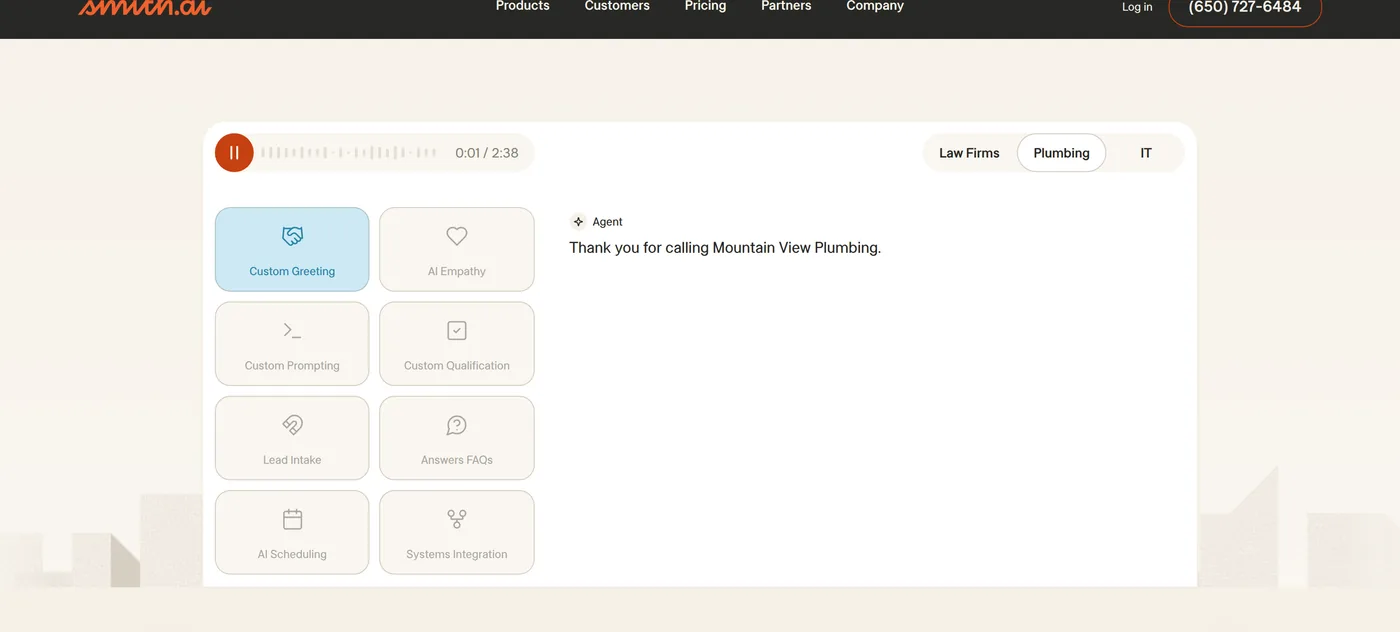
Plumbing calls follow a similar emergency/routine split, with the added wrinkle that callers are often panicked. “My basement is flooding and I don’t know how to shut off the water” is not a conversation any pure AI handles well — a trained Smith.ai receptionist can walk the caller through locating the main shutoff while a tech is dispatched. For water damage, burst pipes, and sewer backups, that human calmness during the call window is what keeps the job.
For non-emergency plumbing work (water heater quotes, drain cleaning, fixture replacement), the AI Receptionist tier at $95/mo handles the qualifying script adequately without needing the full hybrid plan. Many plumbing contractors run a tiered stack — AI Receptionist for routine, human escalation rules for anything urgent.
Smith.ai for Electrical Contractors
Electrical has fewer true after-hours emergencies than HVAC or plumbing, which shifts the Smith.ai ROI calculation toward consistency rather than emergency coverage. Every caller gets the same intake questions — permit requirements, commercial vs. residential, panel work vs. device-level troubleshooting — and the qualified leads reaching you are pre-sorted.
For electrical contractors doing commercial or multi-family work, the bilingual capability is worth flagging. Spanish-speaking property managers and on-site crew leads calling for service coordination get handled in their language without a language-line surcharge. The native ServiceTitan integration also covers electrical-specific workflows for contractors on that platform.
Smith.ai for Restoration Contractors
Restoration is arguably the strongest fit for Smith.ai in the entire contractor category. Calls are urgent, emotionally charged, high-value, and require insurance-related intake that pure AI stumbles on. A homeowner calling at 6 AM because a pipe burst during a cold snap needs a human to say “we’ll have a tech there within two hours and we can bill your insurance directly” — that sentence closes jobs. AI fumbling the insurance conversation costs the call.
Average restoration ticket values run $8,000-$30,000+. A single recovered job covers a year of Smith.ai on the Professional plan. For water mitigation, fire, and mold contractors who can’t afford to have AI miss the conversational cues of a distressed caller, Smith.ai’s math works cleanest in the category.
Can Smith.ai Plug Into an AI Agent Workflow?
This question comes up for contractors building automation stacks or wanting to connect phone answering into a broader AI system.
The short version: yes, primarily through Zapier and Make, with documented REST APIs for outbound calls and chat.
Smith.ai’s documentation covers three integration layers worth knowing:
1. Zapier and Make connectors (primary path). Smith.ai maintains documented Zapier and Make integrations covering connection setup, pushing call summaries downstream, lead routing, and event notifications via the Zapier webhooks URL. For 90% of contractor use cases — push call data to your CRM, drop new leads into a Google Sheet, trigger an email to the tech who owns that territory — this is the expected path and it’s well-supported.
2. REST APIs for outbound actions. Smith.ai publishes three documented APIs: an Outbound Call Request API, an Outreach Campaigns Call Request API, and a Chat API. Virtual Receptionist plans can generate an API key to trigger outbound calls programmatically, and Outreach Campaigns plans have their own key for campaign orchestration. For contractors running a custom agent that enriches leads overnight and needs to trigger an outbound qualification call the next morning, this is the mechanism.
3. Call event data through the Zapier webhook URL. Inbound call events — a call came in, here’s the summary, here’s the intake data — flow through the Zapier webhook URL rather than a dedicated inbound webhook product. Contractors who want a Claude-driven agent to react to every call in real time wire the Zapier webhook to their agent endpoint, and the data lands within seconds.
Where Smith.ai falls short for fully agentic voice integration: you can’t swap in your own LLM or voice model on the live call. The AI Receptionist runs Smith.ai’s voice stack — Claude, GPT-4, and alternate LLM providers can’t plug into the conversation itself. For contractors who want full control over the voice agent on the phone, platforms like Retell AI or Vapi.ai are the right tools. Smith.ai is the right fit when you want call handling done for you and just need the post-call data to flow cleanly into your agent system.
For most contractors building out automation, the Zapier connector plus the documented outbound APIs is enough to make Smith.ai one node in a larger agent-driven stack.
What Real Customers Are Saying
I dug through reviews on G2, Capterra, Trustpilot, and Reddit to get the actual customer picture. Here’s what keeps showing up.
G2: 4.6/5 with 90% five-star reviews on the Virtual Receptionist. The AI Receptionist scores even higher at 4.7/5. These are genuinely strong numbers.
Trustpilot: 4.4/5 across 334 reviews. This is where the complaints concentrate.
What people consistently praise:
The receptionists are professional and sound natural. Multiple reviewers mention that callers don’t realize they’ve reached an answering service. The ability to provide custom scripts and adjust intake questions gets high marks. The dashboard is well-designed — you can listen to recordings, read transcripts, and manage blocked callers without calling support.
What people consistently complain about:
Billing is the #1 issue. Trustpilot reviews describe the AI Receptionist auto-transferring calls to live agents without the customer’s authorization, inflating bills beyond expectations. One reviewer wrote that the service “transfers calls to live agents without my consent which will raise my bill.” If you go with the AI Receptionist plan, set strict transfer rules from day one.
Inconsistency is #2. You don’t get the same receptionist on every call. G2 reviewers describe the quality as “hit or miss” depending on who picks up. The recommendation from experienced users: provide extremely detailed scripts and periodically test by calling your own number to check quality.
Contractor-specific feedback: Most Smith.ai reviews come from law firms and professional services — they’re heavily adopted in legal. Contractor-specific feedback is thinner. The bilingual capability and after-hours answering are the features home service businesses mention most. The Housecall Pro integration gets strong marks from the contractors who use it.
Representative sentiment patterns across platforms (paraphrased, not verbatim):
- On caller perception (recurring across G2 Virtual Receptionist reviews, 4.6/5): the most common praise is that callers don’t realize they’ve reached an answering service — the receptionists sound like in-house staff, which is exactly what contractors worry about getting wrong with AI.
- On script customization (Capterra, SMB service-business reviews): owners consistently highlight the ability to adjust intake questions, call flow, and escalation rules in real time without waiting on support tickets.
- On appointment booking (G2, contractor-adjacent reviews): having the receptionist book directly into the calendar during the call — rather than taking a message for later callback — is the single feature reviewers most credit with changing their lead-to-booked-job conversion rate.
- On the Housecall Pro integration (G2, contractor reviews): contractors running HCP repeatedly mark this connection as one of the cleanest in the category; call data lands in the client record without copy-paste.
- On the ServiceTitan connection (G2, HVAC-heavy reviews): multiple HVAC users describe the data flow as “flawless” — work orders create automatically with caller details, problem descriptions, and scheduling preferences populated.
- On bilingual answering (G2, Capterra): contractors with Spanish-speaking customer bases consistently flag the English/Spanish capability as a meaningful conversion lift; callers who would have hung up stay on the line.
- On dashboard and call playback (G2, Capterra): the ability to listen to every call recording, read full transcripts, and manage blocked callers without contacting support gets repeated high marks.
- On support responsiveness (Capterra, Trustpilot positive reviews): the account management and onboarding teams get specifically called out — new customers report setup completed in the first week with a named point of contact.
Recurring user tips that address the two most-cited setup gotchas:
- Dial in transfer rules on day one. The AI Receptionist lets you cap which calls auto-transfer to live agents. Setting strict transfer rules upfront is the advice veteran users share most — it keeps billing predictable and matches what the advanced-settings workflow is designed for.
- Provide a detailed script and test quality monthly. Reviewers who treat the script as a living document — updating it as their business changes, calling their own number periodically to check handling — consistently report the highest satisfaction. Smith.ai’s setup is designed to reward that kind of iteration.
Is Smith.ai Legit?
Yes. Smith.ai is a legitimate, venture-backed company founded in 2015 by Aaron Lee (former Home Depot CTO) and Justin Maxwell (ex-Apple/Google design lead), headquartered in Los Altos, California, with $22M+ in reported ARR (GetLatka, May 2024) and over 10 million calls handled. There are no regulatory complaints, lawsuits, or scam allegations on record — the legitimacy question itself mostly surfaces because competitors publish “Is Smith.ai legit?” content to capture the search traffic.
The Better Business Bureau lists Smith.ai under its Los Altos, CA online-shopping category. The company is not BBB-accredited, but a non-accredited BBB profile isn’t the same as a bad rating — many SaaS companies skip BBB membership entirely. There’s no F-rating, no published consumer alert, no documented pattern of unresolved complaints. Smith.ai also publishes its own anti-scam notice clarifying that the company doesn’t recruit through social media — any “Smith.ai job offer” arriving via Facebook DM or Instagram is a third-party scam impersonating the brand, not Smith.ai itself.
The real concerns from real customers — verified across Trustpilot (4.4/5, 334+ reviews) and Reddit — are not legitimacy concerns. They’re operational ones, and you should know about them before you sign up:
- Continued billing after cancellation. A handful of Trustpilot one-star reviews describe charges hitting their card after they thought they’d cancelled, with refunds taking weeks to process. The fix: cancel through your account dashboard and email billing@smith.ai for a written confirmation, not just a phone call.
- Auto-transfers inflating the bill. On the AI Receptionist plan, the AI can warm-transfer complex calls to a live agent at $3 per transfer. If you don’t tighten the transfer rules in setup, you can rack up transfers you didn’t expect. The fix: in setup, restrict auto-transfers to specific keywords or scenarios you’ve explicitly approved.
- Spam misclassification. A small percentage of legitimate callers occasionally get flagged as spam and sent to voicemail. Support fixes it on escalation, but it’s worth a monthly audit of blocked-call logs.
- Receptionist quality variance. On the hybrid plan, you don’t get the same receptionist every call. Some follow scripts tighter than others. The fix is the same fix every reviewer recommends: write the script in plain language, update it as your business changes, and call your own number once a month to listen to a real handling session.
None of these rise to “scam” — they’re the kind of complaints that show up on every reasonably-sized SaaS company’s review pages. Smith.ai is legitimate; it’s also a service that rewards careful setup. Treat the first 30 days like an active onboarding (use the money-back guarantee window) rather than a passive subscription.
Who Smith.ai Is For (And Who Should Skip It)
Smith.ai makes sense if:
- Your average job value is $5,000+ and a single recovered lead covers the monthly cost
- You’re getting 50+ calls per month and missing a meaningful percentage of them
- Your callers regularly have complex questions that would trip up a pure AI service — insurance claims, multi-phase project discussions, warranty issues
- You’re on Housecall Pro or ServiceTitan and want a native integration instead of Zapier hacks
- You need bilingual answering (English/Spanish) on every call
- You want human backup without hiring a full-time receptionist ($3,000-4,000/mo)
Smith.ai probably isn’t for you if:
- You’re a solo operator doing under $500K in annual revenue — the hybrid plan is hard to justify at 30+ calls/month pricing
- Most of your calls are simple scheduling and message-taking — pure AI handles those fine at 1/5 the cost
- You’re on a tight budget — start with Rosie at $49/mo or Upfirst at $24.95/mo and see if AI alone handles your call volume before upgrading
- You need a mobile app — Smith.ai doesn’t have one. You manage everything through the web dashboard or email/text notifications
How Does Smith.ai Compare to Other Virtual Receptionists?
Smith.ai is the only premium hybrid in the category — AI handles routine calls, real humans take complex ones. Ruby is the closest direct competitor at $250/mo for 50 minutes, but Smith.ai’s per-call billing is usually cheaper for contractors with short calls. Pure AI competitors like Rosie ($49/mo) and Upfirst ($24.95/mo) cost a fraction but can’t escalate when a caller goes off-script.
Here’s how it stacks up against the main alternatives a contractor would actually consider.
vs. Ruby — Ruby is the other major human+AI hybrid. Ruby is more expensive ($250/mo for just 50 minutes vs. Smith.ai’s $292.50/mo for 30 calls), but Ruby’s receptionists are often rated as warmer and more natural. Smith.ai’s per-call billing is usually cheaper for contractors with short calls. Ruby uses per-minute billing, which penalizes longer conversations. For most contractors, Smith.ai is the better value of the two human hybrids.
vs. Rosie — Rosie is pure AI, built for home services, $49/mo for 250 minutes. If 90% of your calls are straightforward — “I need a roof inspection,” “what’s your availability this week?” — Rosie handles them well at a fraction of Smith.ai’s cost. Where Rosie falls short: complex calls, emotional callers, and anything the AI script didn’t anticipate. That’s exactly where Smith.ai’s human backup shines.
vs. Goodcall — Goodcall is pure AI at $79/mo with unlimited calls. Their per-customer pricing model is interesting for contractors with lots of repeat callers. But Goodcall lacks the human fallback and native contractor CRM integrations that Smith.ai offers.
vs. My AI Front Desk — My AI Front Desk is a pure-AI competitor starting around $79/mo for ~200 minutes, popular with agencies because it ships a white-label/reseller model that Smith.ai doesn’t offer. The trade-off: My AI Front Desk has no human fallback, weaker contractor-specific CRM integrations (no native Housecall Pro or ServiceTitan hooks), and is built more for marketing-agency resale than direct contractor use. If you’re a contractor evaluating both directly, Smith.ai is the safer pick for stakes-aware calls; My AI Front Desk wins on price and on white-label flexibility if you’re an agency reselling to clients.
vs. an all-in-one platform with built-in AI calling (e.g., GoHighLevel) — If you’re already paying $297+/mo for GoHighLevel and using its built-in Voice AI for calls, you may not need a separate Smith.ai subscription for routine call handling — GHL’s voice agent can do the basic intake and booking on calls you’re already paying for. Where Smith.ai still earns its keep on top of GHL: calls where a human escalation matters (insurance claims, restoration emergencies, frustrated customers) and contractors who specifically want hybrid coverage rather than pure AI. Treat them as complementary, not competing.
For a full breakdown of all options, see our AI Call Answering category page.
The Bottom Line
Smith.ai’s hybrid model is genuinely unique. No other service in this category gives you AI speed and efficiency with live human quality on the same call. For contractors who can’t afford to have an AI fumble a $15,000 re-roof lead or a frustrated homeowner calling about storm damage, that safety net has real dollar value.
The cost is the sticking point. At $292.50-$585/mo for the hybrid plan, it’s 3-10x more expensive than pure AI alternatives. You need to be generating enough call volume — and enough revenue per call — to justify the premium.
My recommendation: if you’re currently missing calls and losing jobs to voicemail, start with a pure AI service like Rosie or Upfirst first. See how AI handles your specific call patterns. If you find that too many calls get dropped or callers get frustrated with the AI, upgrade to Smith.ai’s hybrid plan. That gives you data to compare instead of guessing whether you need the human backup.