


The math for any commercial estimator looks like this: 4-8 hours per takeoff times 50 bids per quarter times $75/hour of estimator time is roughly $15,000 of payroll burned identifying material quantities before any actual bid math runs. Material takeoffs account for 50-80% of total estimating time per Beam AI’s own published benchmarks — and the contractors who win the bids they actually submit are the ones who can compress that takeoff time enough to bid more jobs without hiring more estimators.
Beam AI’s pitch is that the math gets compressed by an order of magnitude: 10 minutes for DIY HVAC and mechanical takeoffs, 24-72 hours for human-QA-reviewed multi-trade takeoffs across 15+ disciplines, with Capterra reviewers averaging 4.9/5 across 30 verified reviews and named contractor case studies citing 25-to-5 hour weekly time savings, 10x bid volume increases, and $500K-$1M of attributable revenue growth. Attentive.ai — Beam AI’s parent company — closed a $30.5 million Series B in November 2025 led by Insight Partners with Vertex Ventures, Tenacity Ventures, and InfoEdge Venture Fund participating, bringing total funding to $48 million and explicitly earmarking the capital for expansion beyond takeoffs into full-cycle preconstruction.
What this review covers: how the two service modes (DIY and DFY) actually differ, what the published license pricing means at real contractor scale, the trade coverage breadth that makes this the broadest AI takeoff platform on the market, where the integration ecosystem falls short, what 30+ verified Capterra customers actually say in their own words, and which contractor segments should be requesting a demo today versus waiting for the integration layer to mature.
“In construction, you can only win the bids you submit. We’re moving the industry from blueprint to bid in 24-72 hours.” — Shiva Dhawan, Co-founder and CEO, Attentive.ai, in the April 2026 press release
DIY or DFY: The Two Service Modes Explained First
This is the architectural decision every Beam AI customer makes before signing a contract, so let’s get it on the table early.
Both run on the same underlying AI extraction model. The differences are speed, accuracy, and whether a human estimator reviews the output before delivery.
- →90% feature capture accuracy — fast enough for scope checks, smaller jobs, and quick sanity on which projects are worth a full bid
- →Live for HVAC and mechanical today — plumbing and structural steel rolling out in 2026 as Series B engineering lands
- →No human QA layer — output requires contractor cleanup before going on a bid; trade off speed against accuracy
- →±1% accuracy versus in-house estimates — human QA reviewer verifies every takeoff before delivery; bid-ready output for high-stakes work
- →All 15+ trades supported today — HVAC, mechanical, plumbing, electrical, roofing, structural steel, concrete, painting, paving, and more
- →This is what most production customers run — the 4.9/5 Capterra rating reflects DFY workflow; DIY is the recent addition for speed-sensitive use cases
Most contractors run a hybrid: DFY for bid-stakes work where ±1% accuracy matters, DIY for fast scope qualification on smaller jobs. License tiers include both modes by trade.
The reason this decision matters first: the rest of the Beam AI evaluation depends on which mode you’re committing to. If you’re buying for high-stakes commercial bids where a 5% material miss kills your margin, you’re buying the DFY service and the 24-72 hour turnaround is the relevant speed benchmark. If you’re buying for fast scope qualification across hundreds of small jobs per year, the DIY 10-minute speed is the value driver and the 90% accuracy is acceptable.
The platform’s 1,200+ existing customers run mostly on DFY today — that’s the original product and the source of the 4.9/5 Capterra rating. The DIY mode launched as part of the November 2025 Series B engineering investment and is currently limited to HVAC and mechanical, with plumbing and structural steel in active rollout per the April 2026 press release.
What Beam AI Costs in 2026 (And Why the License Tiers Matter)
Pricing transparency is one of Beam AI’s strengths relative to category competitors — the tier structure is published on ibeam.ai/pricing, unlike sales-gated alternatives like XBuild and Buildertrend. The tiers are organized by trade complexity rather than user count or project volume.
Each license supports unlimited annual bid capacity for the trade it covers. No per-project, per-takeoff, or per-user fees. No published volume discount. No free trial.
Multi-trade GCs needing GC + Concrete + Steel + HVAC + Plumbing licenses are looking at \$25K + \$25K + \$25K + \$8K + \$18K = \$101,000/year in license fees. Beam AI's own ROI math claims 60-90 days payback at typical commercial bid volume — verify against your own estimator hours saved.
This pricing model has two implications worth understanding before you sign anything.
First: pricing per trade is structurally fair for specialty subs and structurally expensive for multi-trade GCs. A pure HVAC subcontractor on the $18K HVAC & Piping tier (which includes one bundled DIY license) is paying for the trade they actually bid in. A general contractor running mixed scopes across GC + Concrete + Steel + HVAC + Plumbing is stacking five licenses to cover their bid mix — $101,000/year just for takeoff acceleration before any other tooling. The Capterra reviewer who wrote “I just wish it would be cheaper” wasn’t wrong; the math gets ugly fast at multi-trade scale.
Second: there’s no free trial as of April 2026. This is unusual for the AI estimating category and a meaningful friction point. XBuild offers a no-credit-card free trial. Roofr has a free Starter tier. Beam AI requires a sales conversation and a contract before you can run the AI on your own real-world plans. The implication: budget two to three discovery calls into your evaluation timeline, and ask the sales team for production case studies in your specific trade before committing.
The 60-90 day ROI claim cited in the Series B announcement is plausible for high-volume commercial estimators — at 15-20 hours per week of recovered estimator time and $75/hour fully-loaded cost, a single estimator recovers $60K-$80K of annual capacity, which justifies the $8K-$25K license. The math gets meaningfully harder at low bid volume, which is why Beam AI is editorially the wrong pick for solo and small residential operations regardless of how good the AI is.
Trade Coverage: The Broadest in the AI Estimating Category
This is the most defensible point in Beam AI’s marketing — and the one differentiator that’s hard to argue with.
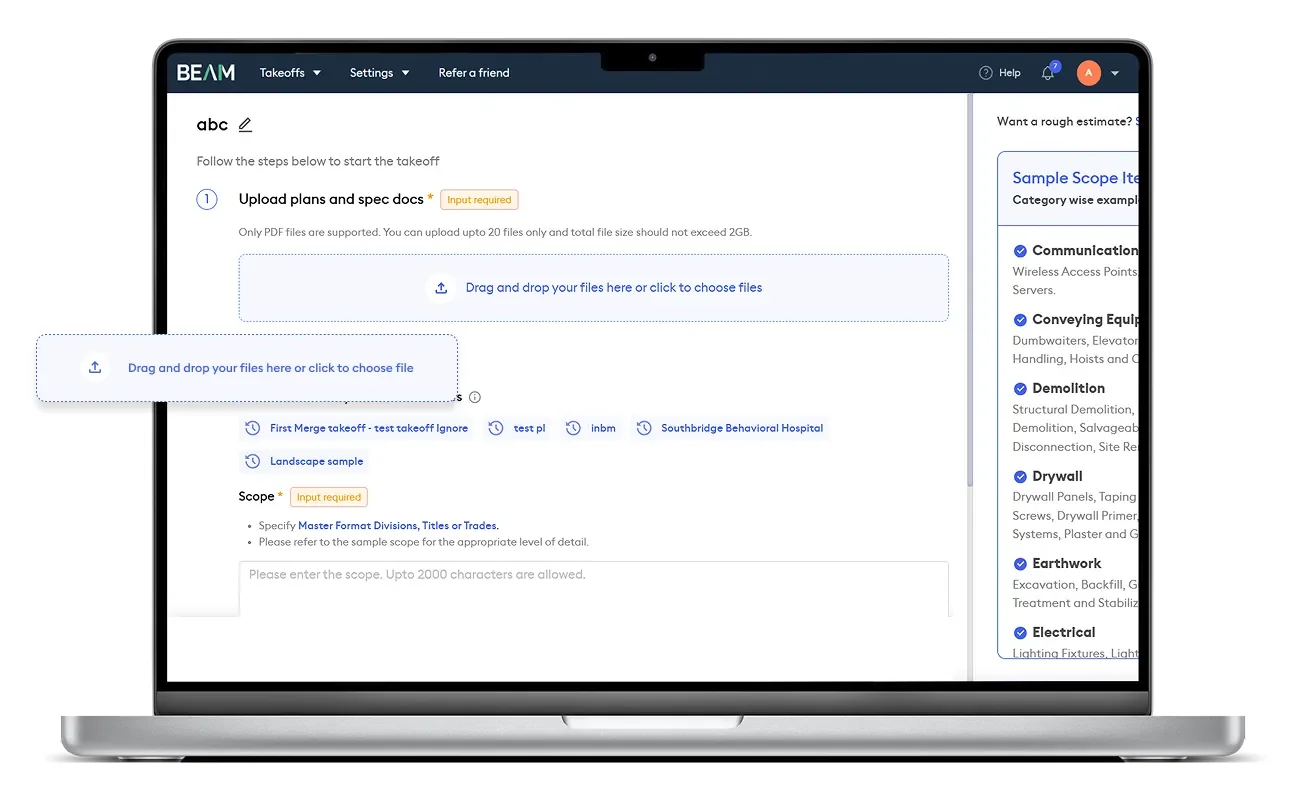
Most AI estimating tools are single-trade specialists. XBuild is roofing-only as of April 2026, with eight additional trades on the post-Series A roadmap but none yet shipped. Roofle is roofing-only. Roofr is roofing-only. The pattern across the category is “ship one trade well, then expand.”
Beam AI launched multi-trade and stayed multi-trade. The current April 2026 trade list covers 15 major construction disciplines:
Hybrid AI-plus-human-QA delivery on every trade today via DFY mode (24-72 hr). DIY mode (10 min) currently HVAC and mechanical only, with plumbing and structural steel in active rollout.
Series B funding explicitly targets full-cycle preconstruction expansion — expect estimating, bid management, proposal workflows, and team collaboration features in 2026-2027.
For a multi-trade general contractor, the practical implication is real: one platform handles every trade you bid, instead of stitching together a roofing-specific tool plus an HVAC-specific tool plus a concrete-specific tool. For a specialty subcontractor in HVAC, electrical, or plumbing, the DIY 10-minute mode (live for HVAC today, rolling out for the others) is the meaningful productivity unlock — fast enough to qualify scope on inbound RFPs without burning a full DFY review cycle.
What this trade coverage doesn’t include: insurance restoration line-item formats (Xactimate), residential proposal workflow (Good/Better/Best to homeowner), service-trade dispatch (HVAC service calls vs HVAC new construction), or specialty roofing assemblies that need waste-factor presets in a roofer’s pricebook. Beam AI is built for plan-room estimators bidding from architectural drawings, not for in-field measurement or kitchen-table close.
How Accurate Are Beam AI’s Takeoffs? (And the QA Discipline Behind the Numbers)
This is the most important question in any AI estimating evaluation, so let’s get specific on what the accuracy claims actually mean.
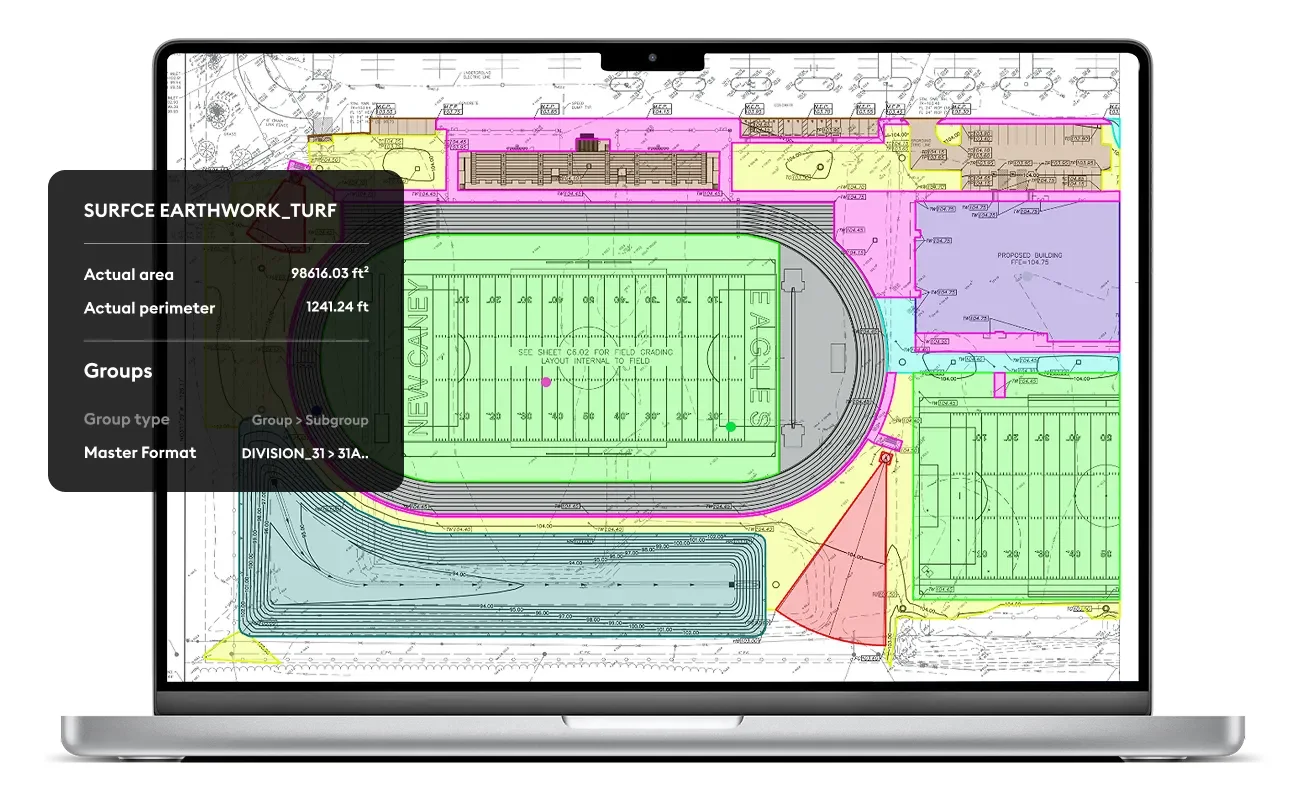
Three accuracy benchmarks Beam AI publishes:
- ±1% accuracy versus in-house estimates — the headline DFY claim, validated against contractor benchmarking on production bids
- 90% feature capture accuracy — the DIY mode claim, specifically for HVAC takeoffs (the trade that’s been DIY-live longest)
- 75% reduction in ductwork takeoff time — the productivity claim, again HVAC-specific
The mechanism behind these numbers is the hybrid AI-plus-human-QA model on DFY. The AI does the heavy lifting on quantity extraction from PDF plans; a human estimator reviews the output before delivery to catch edge cases the AI missed — complex flashing details, custom assemblies, plan-set ambiguities, scope items hidden in spec notes. That human review layer is what gets the platform from “useful first draft” to “bid-ready output” and what underpins the 4.9/5 Capterra rating across 30 verified reviews.
The DIY mode skips the human QA step in exchange for 10-minute turnaround. The 90% feature capture accuracy is honest: 10% of features will need contractor cleanup before the takeoff is ready to use. For HVAC and mechanical work where the geometry is well-defined and the assemblies are standardized, 90% is workable. For roofing or concrete where conditions are more variable, the DFY mode remains the recommended path.
Real customer validation from the Capterra review base:
“95% in timesaving per each project. Lightning-fast project turnaround. Amazing Beam team.” — Goran P., Commercial Division Estimator
“Increased number of bids x3. Increased deal flow and ‘win’ rate.” — Brian P., Managing Member
“It speeds up takeoffs and helps us generate accurate quantities much faster than manual methods.” — Imen F., Estimator
The 30-review sample is statistically meaningful for a five-figure-per-year B2B platform — most enterprise SaaS has lower review density because customers don’t bother to leave Capterra reviews when they’re paying $25K/year on contract. The fact that Beam AI customers are actively writing reviews (and rating the product 4.9/5 with 5.0 sub-scores on Ease of Use and Customer Service) is itself a strong signal.
What the accuracy claims don’t solve: labor pricing, project-specific risk premiums, plan-set quality issues that confuse any AI, scope items that aren’t in the architectural drawings, and the inherent judgment calls that estimators make at bid time. The takeoff is one component of an estimate — Beam AI handles that component well, but the bid math, margin decisions, and proposal generation still happen in your existing estimating tool.
The 4-Step Workflow
The Beam AI workflow is straightforward enough that the friction is in the contract negotiation, not the daily use.
Same four-step flow whether you're running DIY (10 min, HVAC only) or DFY (24-72 hr, all trades). The core difference is whether a human reviews step 4.
Drop a full plan set into the cloud portal. Multi-page, multi-discipline, addenda included. No file size or page count limits noted in published documentation.
Flag scope decisions, assumptions, and any deviations from spec — what's in scope, what's out, which addenda apply, your cost-coding preferences.
AI scans plans, identifies trade-specific assemblies, extracts material quantities, generates color-coded HD sitemaps with each line item visually traceable to its plan location.
DFY: human QA reviewer verifies output, sends to inbox in 24-72hr. DIY: 10-min direct delivery, no human review. Excel imports into your existing estimating tool.
The workflow itself is the easy part. The real Beam AI evaluation work happens before the contract — confirming the trade mix, validating the AI accuracy on your specific plan-set complexity, and aligning the license tier to your bid volume.
Integrations: Excel + PDF, and That’s It
This is the platform’s biggest gap, and it’s important to be clear about what this means in daily workflow.
Beam AI has no native CRM, FSM, accounting, or estimating-tool integrations as of April 2026. No published Zapier triggers or actions. No public API documentation. No native connection to JobNimbus, AccuLynx, Jobber, Housecall Pro, ServiceTitan, GoHighLevel, Salesforce, HubSpot, QuickBooks, Sage Estimating, ProEst, B2W Estimate, HCSS HeavyBid, or any of the major contractor operations platforms.
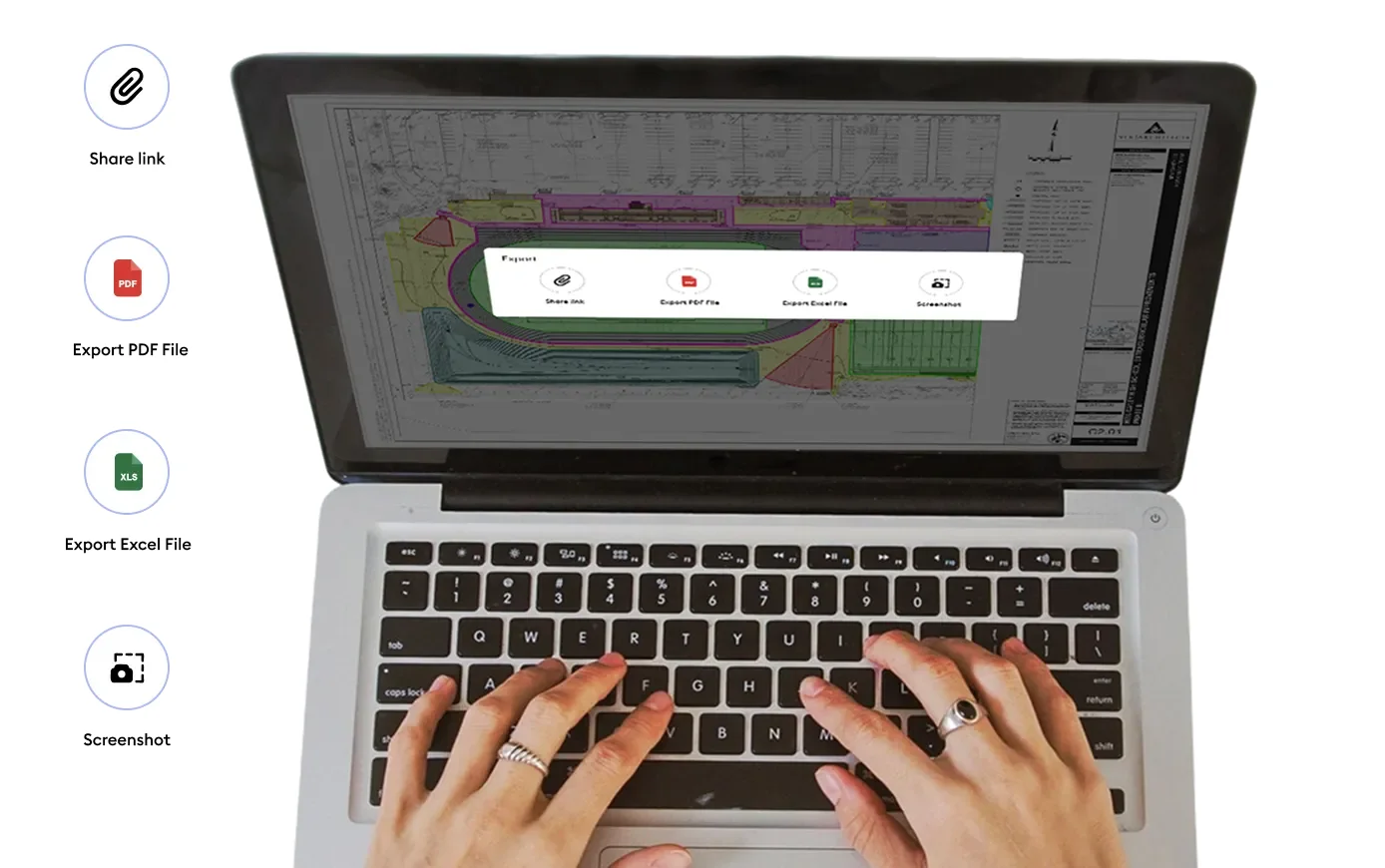
What you get instead: Excel and PDF files, plus a shareable view-only link to the takeoff for collaboration. The Excel format imports cleanly into any estimating tool that accepts spreadsheet imports — which covers most major commercial estimating platforms — but the import is a manual file transfer, not an automatic sync.
What this looks like in daily workflow:
- Commercial GCs running ProEst, Sage, B2W, or HCSS HeavyBid: Excel handoff is straightforward; estimators are used to importing takeoff data from external sources and the workflow friction is minimal. Beam AI integrates by being the input source, not the system of record.
- Service-trade contractors running JobNimbus, ServiceTitan, or Housecall Pro: the takeoff gets emailed to the estimator, who then manually re-keys quantities into the CRM’s estimating module. This is workable but kills part of the time-savings story — your AI takeoff has to be transferred to your CRM by hand, which adds 15-30 minutes per bid.
- Subcontractors using Excel as their primary estimating tool: zero friction. Beam AI’s Excel output IS your estimate format; download, fill in your unit costs, send the bid.
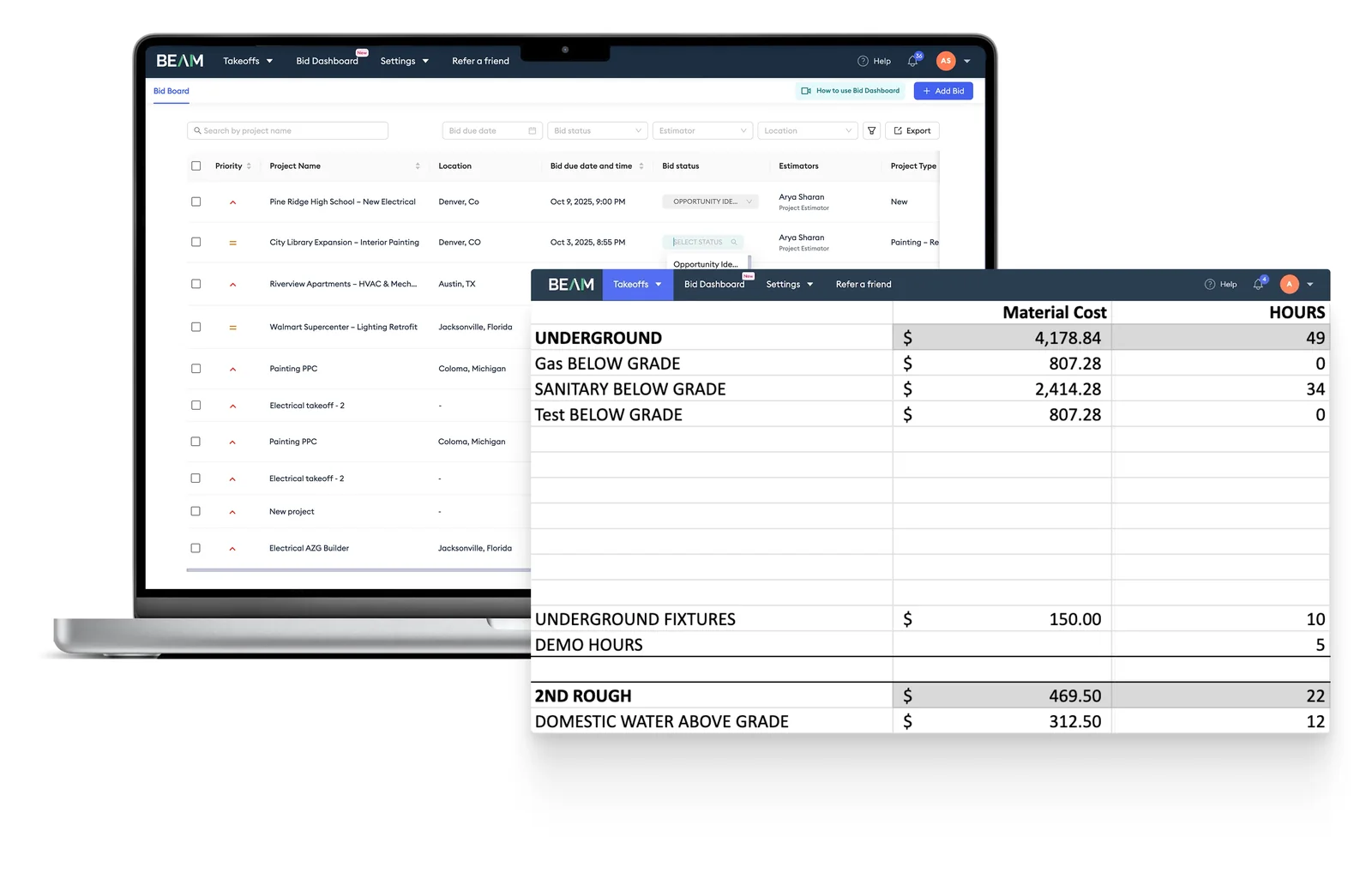
The Series B funding announcement specifically calls out “team collaboration” and “bid management” as expansion targets, and the Bid Dashboard plus Bid Sniper tools launched in April 2026 are the first steps in that direction. Whether this evolves into native CRM integrations in the 12-18 month window is the open product strategy question — there’s funded capacity for the engineering, but no public roadmap commitment yet.
What 30+ Verified Customers Actually Say
Beam AI’s biggest differentiator versus newer AI estimating competitors isn’t the AI — it’s the customer base. With 4.9/5 across 30 Capterra reviews including 5.0 sub-scores on Ease of Use and Customer Service, plus named contractor case studies in the company’s own April 2026 press release, there’s enough public sentiment to triangulate against vendor claims.
The strongest validation comes from named contractors with specific revenue impact:
“I used to spend 25 hours a week on takeoffs; now it’s just 5.” — Henry Greenberg, Guardian Roofing & Exteriors
“Since switching to Beam AI, we’ve submitted 10X more bids.” — Mike Gibson, New View Roofing
“With Beam AI, we’re saving 2 days of work per week. Our bid volume has doubled.” — Bryan Ramirez, Senior Estimator, Rays Stairs Steel Company
The Bommarito Construction case study in the April 2026 press release reports 8 additional projects bid per month and $500K-$1M of attributable revenue growth. Pilkington Construction reports 1.5x business growth. Desert Rat Welding reports 80% time savings on takeoffs. These are press-release numbers from named contractors at named companies — verifiable enough that the company would face credibility damage if they were materially inflated.
The most-cited critical complaint:
“The thing I like the least about Beam AI has to be the price…I just wish it would be cheaper.” — Meyer S., Vice President, Construction
Other recurring critical themes from the Capterra review base: turnaround time occasionally exceeds the advertised 24-72 hour window during peak bidding seasons, Excel output formatting could better organize items by scope (some contractors report needing to reformat for their bid template), and minor manual corrections are sometimes required. None of these are deal-breakers — the 4.9/5 rating reflects that the productivity gains outweigh the friction — but they’re real workflow notes worth knowing about before signing a contract.
What’s notably absent from the Capterra review base: complaints about AI accuracy on the DFY tier. The hybrid AI-plus-human-QA model appears to be doing what it’s designed to do; the accuracy concerns that show up in reviews of pure-AI competitors don’t appear in Beam AI’s review base at meaningful frequency.
Series B and the Roadmap to Full-Cycle Preconstruction
The November 2025 Series B is the most important strategic context for evaluating Beam AI today.
Funding history:
- Seed and earlier rounds — undisclosed
- Series A — $12 million (date undisclosed in public materials)
- Series B — $30.5 million on November 12, 2025, led by Insight Partners with Vertex Ventures, Tenacity Ventures, and InfoEdge Venture Fund participating
- Total to date: $48 million
For comparison: XBuild closed a $19M Series A in January 2026. Beam AI has more than 2.5x the total funding capital, and Insight Partners is one of the most experienced vertical SaaS investors in the market. The capital signal is strong.
What the Series B funds, per the official announcement:
- Expansion beyond takeoffs into full-cycle estimating
- New bid management capabilities (Bid Dashboard and Bid Sniper launched April 2026)
- Proposal workflows (the gap that XBuild owns today)
- Team collaboration features
- Geographic expansion beyond US and Canada
- New market verticals supporting self-perform contractors and suppliers
The strategic implication: Beam AI is funded to become a unified preconstruction platform — takeoff plus estimating plus bid management plus proposal — within the 18-24 month window post-Series B. If the execution lands, the integration gap that’s the platform’s biggest weakness today shrinks because more of the workflow lives inside Beam AI itself rather than requiring handoffs to external tools.
If you’re evaluating Beam AI in April 2026, the realistic timeline is:
- Today: Best-in-class multi-trade takeoff with hybrid AI + human QA, Excel/PDF outputs, sales-led pricing
- Late 2026: DIY 10-minute mode rolled out to plumbing and structural steel; full Bid Dashboard and Bid Sniper in production
- 2027: Native estimating tools, proposal generation, and likely the first wave of CRM/accounting integrations
- 2028: Closer to a full-cycle preconstruction platform competing more directly with Procore-class incumbents
That’s an editorial extrapolation based on Series B execution velocity, not commitments Beam AI has made publicly. The actual sequence and timing depend on engineering velocity and customer demand signals.
Who Should Use Beam AI
Commercial general contractors bidding 50+ projects per year where takeoff time is the bottleneck and the multi-trade scope justifies stacking several licenses. The math works: at $25K/year for the GC tier and 15-20 hours per week of recovered estimator time across the year, the ROI math closes in 60-90 days per the company’s own benchmarks.
Specialty subcontractors in HVAC, mechanical, electrical, plumbing, structural steel, or concrete doing volume bidding where the trade-specific licenses ($8K-$25K/year) are easier to budget than a multi-trade stack. HVAC subs specifically benefit from the 10-minute DIY mode for fast scope qualification.
Suppliers who need to quickly quote material packages for contractor bids — the platform supports both contractor and supplier license tiers, and the multi-trade coverage means one platform handles all the scopes a supplier might quote.
Estimators currently spending 25+ hours per week on manual takeoffs where the documented Beam AI customer outcomes (Henry Greenberg at Guardian Roofing went from 25 hours to 5 hours per week) directly map to your operation. The productivity gain is the highest-leverage investment available in commercial estimating today.
Contractors using Excel or commercial estimating tools (ProEst, Sage, B2W, HCSS HeavyBid) as the bid system of record — the Excel output integration is straightforward and the workflow friction is minimal. The integration gap that hurts service-trade CRMs doesn’t apply here.
Operations where bidding more projects without hiring more estimators is the strategic priority — Beam AI’s value proposition is fundamentally about capacity multiplication, not cost reduction. If you’re trying to grow bid volume without growing payroll, this is the right tool category.
Who Should NOT Use Beam AI (And What to Use Instead)
Solo contractors and small residential operations under 50 bids per year — the $8K-$25K annual license math doesn’t pencil at low bid volume. Use Roofr at $13 per measurement report or XBuild on the no-credit-card free trial instead.
Insurance restoration roofers writing primarily Xactimate scopes — Beam AI’s Excel/PDF output isn’t structured for adjuster-line-by-line Xactimate workflow. Stay with Xactimate native, or use Roofr’s new Verisk-certified ESX export to bridge satellite measurement to Xactimate.
Residential roofing contractors doing kitchen-table close — Beam AI doesn’t generate proposals, doesn’t ship to homeowners, and doesn’t handle e-signature or deposit collection. XBuild is built specifically for that workflow; Roofr handles it with the proposal builder layered on top of measurement.
Operations dependent on deep CRM integration as system of record — if JobNimbus, AccuLynx, or ServiceTitan is the spine of your daily workflow, the manual file transfer from Beam AI to your CRM may exceed the AI time savings. Either wait for Beam AI to ship native integrations (likely in the 12-18 month window post-Series B) or use your CRM’s native estimating module instead.
Anyone who wants to test before committing to a five-figure annual contract — no free trial means you sign first, validate later. XBuild offers a no-credit-card free trial specifically because this is a friction point in the AI estimating category. If pre-purchase validation is non-negotiable for your buying process, look elsewhere until Beam AI offers a trial.
Service-trade operations needing in-field workflow — HVAC, plumbing, and electrical service businesses doing in-driveway estimates need Housecall Pro, Jobber, or ServiceTitan for that workflow. Beam AI is for office-based plan-room estimators bidding new construction, not for field crews handling service calls.
Custom home builders selling design-heavy work — Beam AI doesn’t generate proposals, doesn’t handle Selections workflow, and doesn’t ship to homeowners. Use Buildertrend for that use case at $339-$829/month with the Selections module included on the Complete tier.
Cost-sensitive small commercial GCs doing under $5M in annual revenue — at low bid volume, Contractor Foreman at $49-$332/month with included estimating modules is the better entry point. Revisit Beam AI when bid volume grows past the threshold where five-figure license fees pay back in recovered estimator hours.
Verdict: The Strongest AI Takeoff Bet for Commercial Multi-Trade Contractors
Beam AI is the most defensible AI estimating platform for commercial general contractors, specialty subcontractors, and suppliers in April 2026. The Series B funding, the founder commitment to full-cycle preconstruction expansion, the production volume in five years (500K+ takeoffs, 20M+ hours saved), the 4.9/5 Capterra rating across 30 verified reviews with named customer testimonials, and the breadth of trade coverage (15+ trades supported today) all line up. The hybrid AI-plus-human-QA model is the right architectural choice for high-stakes commercial bidding where ±1% accuracy matters more than 10-minute speed.
The constraints to be clear about: $8K-$25K per year per trade license is the highest pricing in the AI estimating category and the #1 critical complaint in the Capterra review base. No free trial means you commit to a five-figure contract before testing fit on your specific plans. No native CRM integrations means the AI takeoff has to be manually transferred into whatever job pipeline you already run. None of these are failures of the product — they’re product-stage realities for a platform built around enterprise-deal-sized customers, not freemium SaaS.
For commercial general contractors bidding 50+ projects per year, specialty subcontractors in HVAC/electrical/plumbing/concrete/steel doing volume bidding, and suppliers quoting material packages — Beam AI is worth a sales conversation today and likely worth a contract within the quarter. The AI workflow is mature enough, the customer validation is strong enough, and the Series B execution path is clear enough that the platform is a defensible long-term bet for commercial preconstruction.
For solo contractors, residential roofers, custom home builders, insurance restoration specialists, service-trade operators, and anyone needing a CRM-integrated stack today — the wait-and-see argument holds. Beam AI is built for a different use case, and forcing it into the wrong workflow is more expensive than choosing a better-fit alternative.
The category is moving toward AI-native preconstruction whether Beam AI specifically wins or not. The right question for any commercial contractor in 2026 isn’t “should we use AI takeoffs?” — it’s “which AI takeoff platform is mature enough for our trade mix and bid volume today, and which one are we positioning to use as our bid volume scales 12-18 months from now?” For commercial multi-trade operations, Beam AI is the clearest answer to both halves of that question right now.
Reviewed by Steven Risher — Louisiana tradesman and software reviewer. This review is research-based; updated when product changes or new customer data warrants. See how we review for our methodology.
