


Twenty years on, Buildertrend’s competitive moat is one feature: Selections. Not the schedule. Not the client portal. Not the AI Client Updates that launched in June 2025. Not the Bill Pay tool they shipped at IBS Orlando this past February. The Selections module — the homeowner-facing portal where your client picks every cabinet, fixture, paint color, and finish before trades start — is the reason custom home builders pick Buildertrend over Contractor Foreman at five times the price.
Founded in 2006 in Omaha by Dan Houghton and brothers Jeff and Steve Dugger, the platform now serves 20,000+ residential builders worldwide and just celebrated its 20th anniversary at the International Builders’ Show in Orlando in February. Co-founder Dan Houghton is still CEO. Charlotte Bradley joined as Chief Product Officer in Q1 2026 and Jason Cleary was promoted to Chief Business Officer the same quarter — both signaling continued investment, not a turnaround. The company is private equity-backed (Bain Capital Tech Opportunities + HGGC + Serent Capital, 2021 round) but has not gone public. CoConstruct, which Buildertrend acquired in July 2021, is on a slow sunset — still operating, no longer actively developed.
The product itself in April 2026 is mature, polished, and aggressively priced relative to its competitive set on the high end (Procore at $20K-$100K+/year for enterprise commercial) and meaningfully more expensive than its competitive set on the low end (Contractor Foreman at $49/month for unlimited users). It carries 2,483 Capterra reviews at 4.5 stars and a 4.7/5 customer service sub-score — the largest review base in the construction management category covered on this site. None of that solves three real concerns most reviews bury: pricing is demo-gated and renewal hikes of 50-75% are documented, the mobile experience is fragile in 2026, and the integration ecosystem is narrower than the “category leader” marketing implies.
Let’s get into it.
The Selections Module Is Buildertrend’s Moat
This is the section to read first because it’s the answer to “why pay Buildertrend over a cheaper alternative.” The Selections module is genuinely best-in-class for residential custom home builders and remodelers, and no competitor in the residential construction software category has shipped a feature that matches its depth.
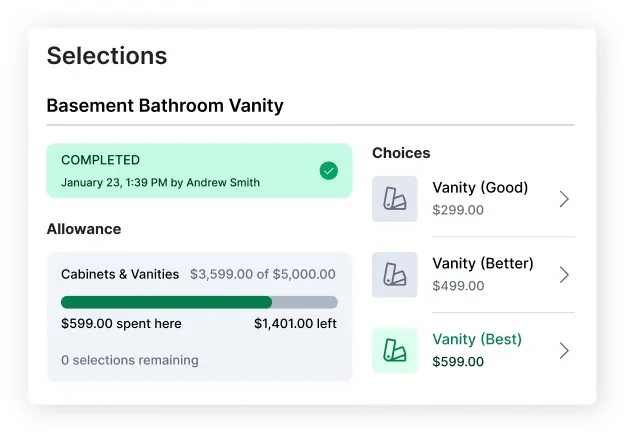
Here’s what it does in practice: your custom home client logs into the Client Portal, navigates to Selections, and sees every decision they need to make organized by room and category. For each line item — say, “Basement Bathroom Vanity” — they get Good/Better/Best options with real product photos, brand SKUs, and pricing ($299 / $499 / $599 in the live UI). The allowance budget shows them how they’re tracking against the $5,000 cabinets-and-vanities allowance you negotiated in the contract. Selections that are completed get a green status badge with timestamp and decision-maker name; pending selections show what’s still owed. The system auto-tracks deadlines, captures approvals with timestamps, and pushes any over-allowance picks into change-order workflow with budget impact attached.
The reason this matters: in custom home construction, the homeowner experience is what gets you the next referral. Builders who handle selections through emails, spreadsheets, and showroom appointments lose 20-40 hours per project to coordination friction and miss budget control. Builders who run selections through Buildertrend turn a chronic pain point into a sales asset — homeowners walk away from the Selections meeting feeling in control, and the next referral closes faster because the existing client is happier with the process.
Capterra reviewer Joseph M. (Senior Engineer) makes this concrete:
“The interactive client site has also impressed me since it enables easy contact and keeps all parties informed about the status of the project.”
This is the #1 reason custom home builders pick Buildertrend over Contractor Foreman at 5× the price. The math: if Selections workflow saves you 20 hours per project at $75/hour PM cost = $1,500 savings per home. On 6 custom builds per year, that’s $9,000 of recovered PM time. Buildertrend’s annual cost on the Complete tier (where Selections lives) is $9,948. The first $9,000 of value is paying for itself; everything else is the close-rate lift, the higher referral rate, and the homeowner-experience moat against builders running spreadsheets.
For tract builders, spec builders, light remodelers, and contractors selling jobs without homeowner finish-selection workflow — Selections doesn’t matter, and the Complete tier isn’t the right pick. Stay on Advanced ($499/month annual) and skip it.
What Buildertrend Costs (And Why You Have to Ask Twice)
Pricing transparency is one of the most documented friction points in the Buildertrend buying experience, so let’s get the numbers right.
Buildertrend does NOT publish pricing on its official pricing page. The buildertrend.com/pricing page requires a multi-step demo form (builder type, annual revenue, implementation timeline) before sales will quote you. This is unusual category behavior in 2026 — Contractor Foreman, Roofr, iRoofing, and RoofSnap all publish their tier pricing transparently. Buildertrend doesn’t.
Verified third-party pricing aggregators (buildertrendpricing.com, Projul, Capterra, Costbench) confirm the following April 2026 rates:
| Tier | Monthly (Annual Billing) | Monthly (Month-to-Month) | What’s Included |
|---|---|---|---|
| Essential | $339/month | $499/month | Project management core only — schedules, daily logs, client communication, mobile time tracking. NO estimating module. |
| Advanced | $499/month | $799/month | Adds full estimating suite — proposals, change orders, takeoff tools, bid requests, purchase orders |
| Complete | $829/month | $1,099/month | Adds Selections + warranty management |
Every tier includes unlimited users and unlimited projects. The annual discount runs approximately 10% — verified savings of $1,920-$3,240/year between monthly and annual billing per third-party sources.
Implementation and onboarding fees add $500-$2,000 to year-one cost, depending on package — template setup, data migration, training sessions.
The renewal price story is the worst part of the pricing experience. Multiple G2 and Capterra reviews — plus the ContractorTalk forum “BuilderTrend Warning” thread — document renewal increases of 50-75% without notice. One customer reported a 75% hike claiming the renewal email never arrived. Others report multi-thousand-dollar disputed billing sequences with friction in cancellation. Buildertrend appears to have removed transparent pricing from their site sometime in the last 2-3 years, and the qualitative experience aligns with that decision: opaque published rates, sales-driven quotes, hard renewal conversations.
For a published-rate comparison, Buildertrend Essential at $339/month annual ($4,068/year) sits roughly in the middle of construction-software pricing — about 10× more than Contractor Foreman’s Basic single-user tier ($588/year) and roughly one-fifth of Procore’s small-commercial entry ($20K+/year). The Complete tier at $9,948/year is competitive against Procore for custom home builders who don’t need enterprise commercial workflow but need real client-portal depth.
Estimating, Proposals, and the Tier Lock You’ll Hit
The estimating module is the reason most contractors pick Advanced over Essential. Essential’s lack of estimating tooling is a real bait-and-switch on the lowest published price — if you sell jobs and want to send proposals from inside Buildertrend, you cannot do it on the cheapest tier.
What’s in the Advanced+ estimating module:
- Native digital takeoff tool — measures linear, area, and count from uploaded plans
- STACK Takeoff & Estimate integration for AI-powered takeoffs and regional cost data (third-party partner)
- Proposals with branded output and e-signature
- Change orders generated from estimates
- Bid requests sent to subs with response tracking
- Purchase orders, cost catalog, cost-code centralization
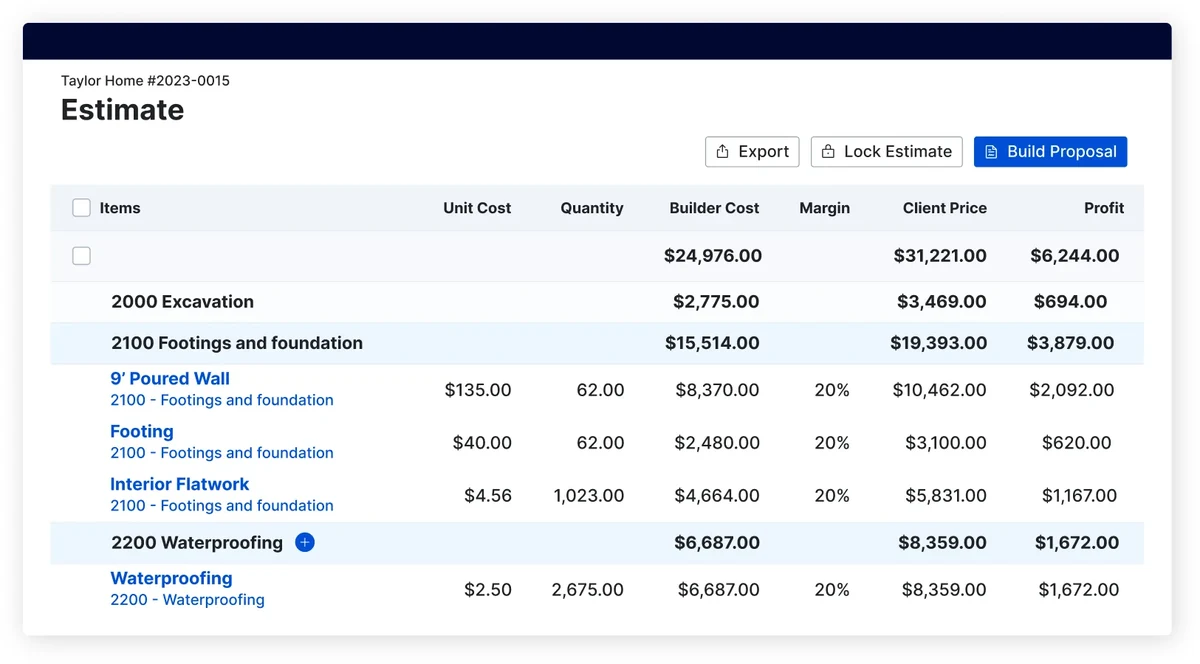
- Markups separated cleanly into builder cost vs client price vs margin vs profit (visible in the Estimate UI)
The native takeoff is solid for residential but lighter than dedicated estimators like PlanSwift. For commercial estimating depth, the STACK integration fills the gap.
Proposals output as branded PDFs with your logo, terms & conditions, and signature lines. The Build Proposal button in the Estimate UI converts an estimate to a sendable proposal in one click — same data, no re-entry. E-signature is native; no DocuSign integration is needed because Buildertrend ships its own e-sig.
Where the module wins: the cost-vs-price separation is cleaner than most competitors. You see builder cost, margin %, client price, and profit per line item — which makes it easy to dial markups by line type rather than blanket-applying across the estimate.
Where it doesn’t: no aerial measurement integration (no EagleView, Hover, Roofr connection — for roofing-specific estimating you’d run those tools standalone and import takeoffs). No Xactimate integration for insurance restoration. The cost catalog is shipped sparse — most builders import their existing pricebook from Excel rather than relying on Buildertrend’s defaults.
Project Management, Schedules, and the Client Portal
The PM stack is where Buildertrend’s residential focus shows up most clearly. The platform organizes work around projects rather than work orders or service tickets — it’s built for the multi-week-to-multi-month residential construction timeline, not service-trade dispatch workflow.
Core PM modules:
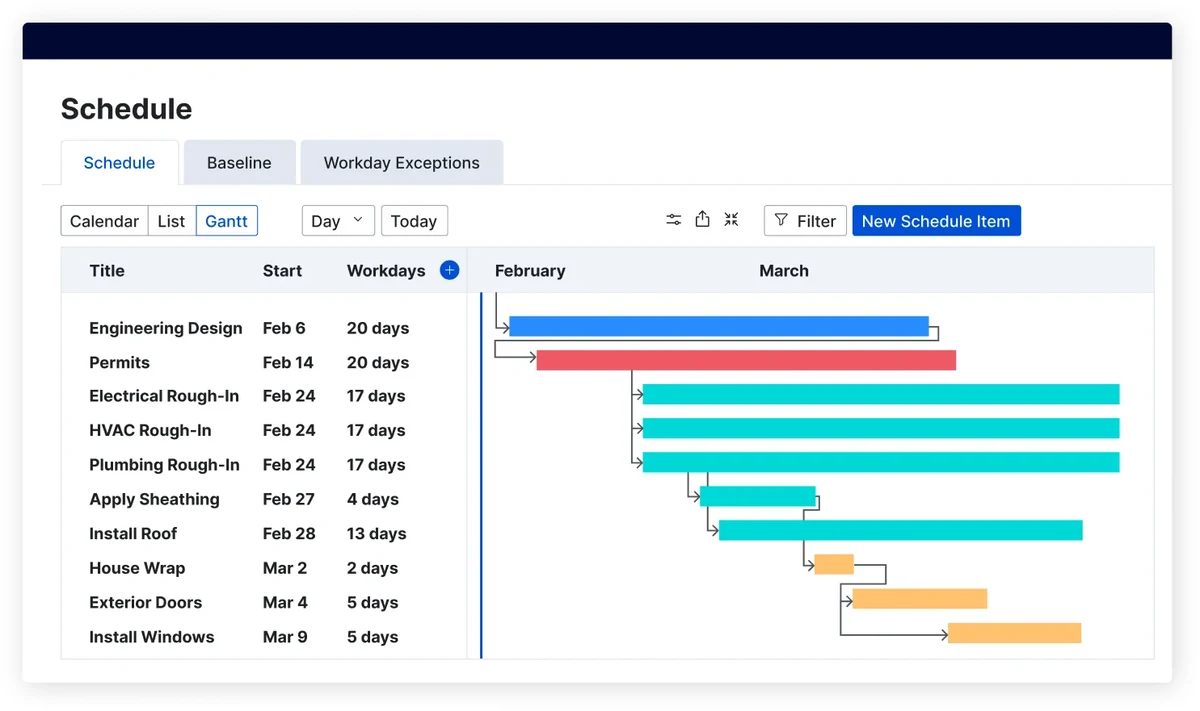
- Schedules — Gantt-style with dependencies, calendar views, baselines, conflict detection
- Daily logs — mobile-first with photos, weather auto-fetch, notes, crew hours
- Drawings & document management with markup
- RFIs (Requests for Information) — adequate for residential, lighter than Procore for commercial
- Submittals — workflow exists but not enterprise-grade depth
- Change orders with the new estimate-to-CO generation
- Punchlists, to-dos, project templates for repeatable build types
Client Portal is the second pillar of Buildertrend’s residential moat (alongside Selections). Real-time job access for homeowners covers schedule, selections, photos, financials, change orders, and invoices — with builder-controlled visibility per client.
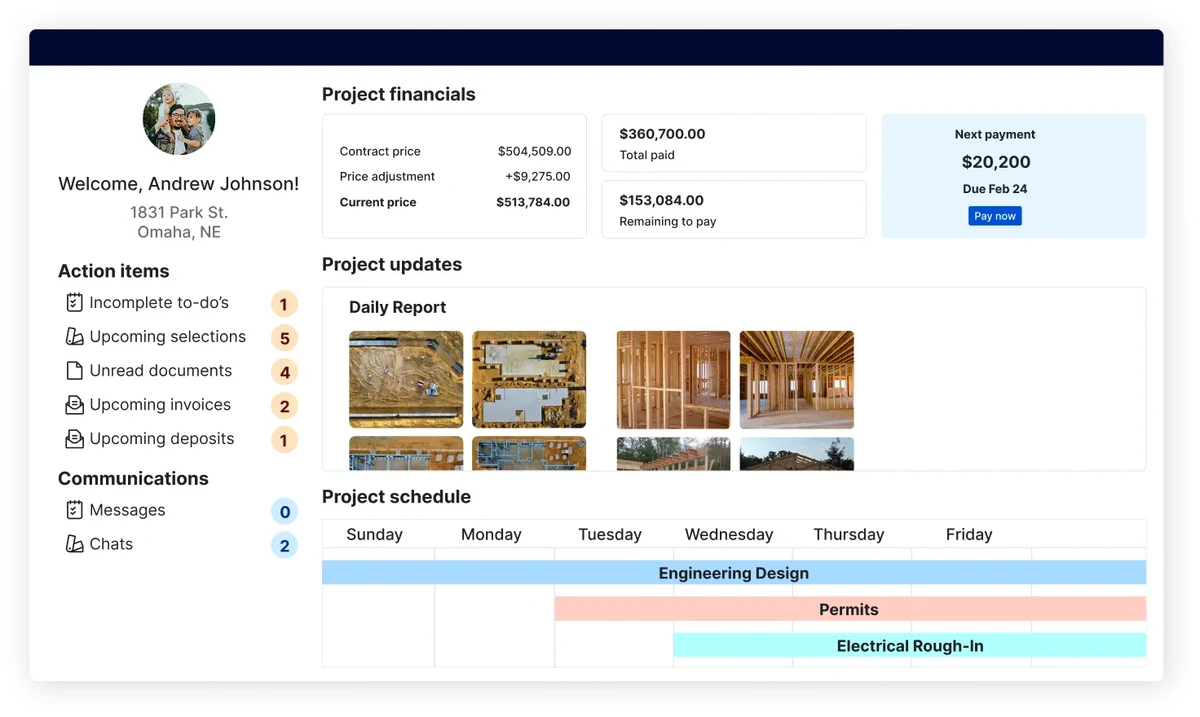
The Client Portal was redesigned in 2025 with cleaner mobile UX and is the consumer-facing surface that AI Client Updates feed into. For builders selling experience as much as construction, this is real differentiation — homeowners get a polished progress view comparable to consumer-app experiences (Amazon order tracking, Uber trip history) rather than the typical contractor-portal experience of weekly emails or no visibility at all.
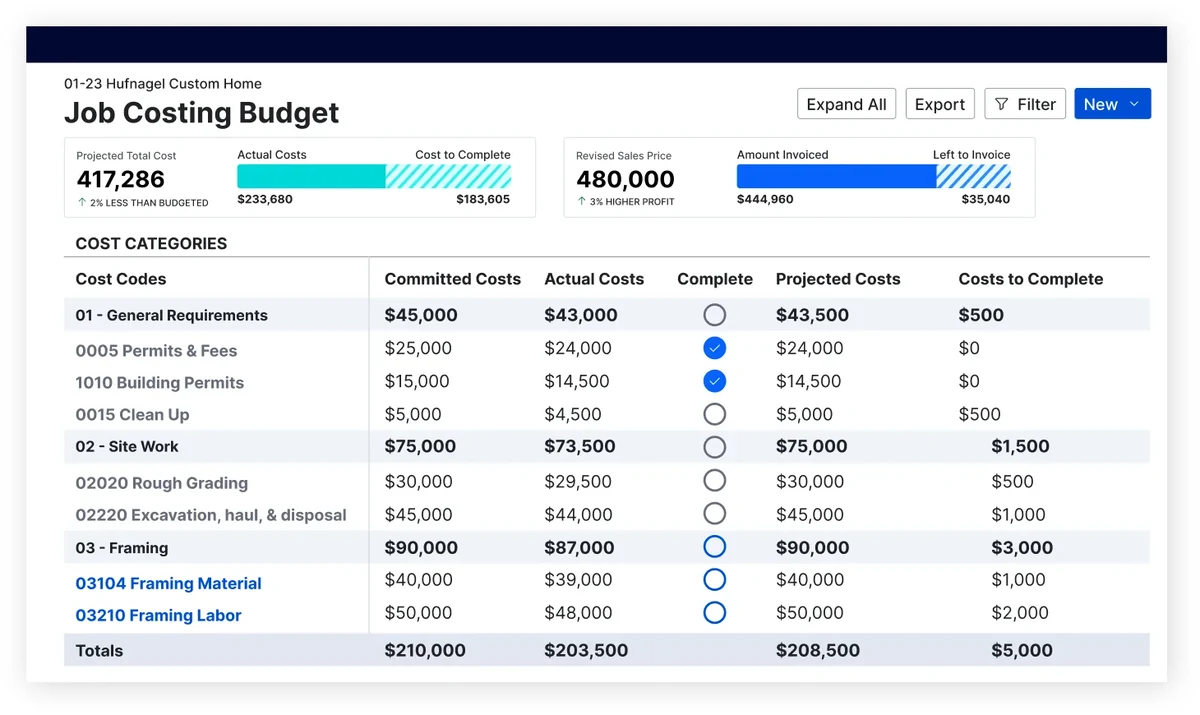
Job Costing got a refresh at IBS 2026 with a new Job Costing Budget tool. The financial backbone is functional but recurring complaints flag it as “difficult to navigate” — Capterra reviewer Hugo F. (Director) writes the financial module is “too far behind the functionality of a QuickBooks or Xero so makes using it for processing really poor.” The honest framing: use Buildertrend’s job costing for project-level budget tracking, keep QuickBooks Online as your accounting backbone via the native sync.
Buildertrend’s Scheduling Engine: Construction Phase Management
Buildertrend’s scheduling is project-management scheduling — Gantt charts with task dependencies, baselines for variance tracking, and trade-conflict warnings that flag when the framer and the electrician are booked on the same job-day before the framing’s done. For custom home builders and remodelers running 8-week project schedules with 12+ trade hand-offs, this is genuinely useful and matches the mental model of the work. For service-trade dispatch where today’s calendar matters more than next month’s Gantt, Buildertrend is the wrong tool entirely — use Jobber or Housecall Pro.
What Buildertrend’s scheduling actually does in the scheduling category: phase-based Gantt views with drag-to-extend reschedule, dependency awareness (move the cabinet install and the trim follows automatically), trade-conflict warnings before you double-book, baseline-vs-actual variance tracking on schedule slip, and scheduled change-order timeline impact analysis. The Selections module ties into the schedule too — a homeowner approving a tile selection in week 3 unblocks the tile-install task in the schedule, not just the budget. This bidirectional schedule-to-selections-to-budget flow is the kind of construction-PM depth Contractor Foreman and standalone PM tools struggle to match.
Where the schedule falls short: the mobile foreman experience is functional but inconsistent (offline mode is partial; switching between jobs while clocked in is clunky per their own reviews), and customer-facing schedule visibility lives in the homeowner client portal — there’s no Calendly-class self-booking widget for new-job intake.
Scheduling is in the Essential tier and up — no extra add-on. For full Gantt+dependencies+trade-conflict warnings on a custom home schedule, Buildertrend is best-in-category. For dispatch-style scheduling, see the scheduling category page.
AI in Buildertrend: Client Updates and Bill Pay
Buildertrend’s AI footprint in April 2026 is two specific shipped features with measurable outcomes — narrower than competitors’ broader copilot pitches, but real.
1. AI Client Updates (launched June 7, 2025). The most measurable AI feature in the construction management category in 2026. The system auto-generates polished weekly homeowner summaries by pulling data from Daily Logs, Schedule items, Change Orders, and Invoices — covering one week back and one week forward. The builder reviews and edits the AI-drafted summary before sending; controls visibility per client. Buildertrend’s claimed time savings: 97% faster — 6.5 minutes vs 30-60 minutes manual. Beta phase: 180 updates published, ~115.5 hours saved across the test cohort.
Sagar Desai, Group Product Manager at Buildertrend, framed it in the launch announcement:
“This isn’t just a time-saver. It’s a trust-builder.”
For builders whose moat is the homeowner experience (which is exactly the demographic Buildertrend targets), this is a real competitive feature — automated weekly client communication that previously required dedicated PM time.
2. AI Bill Pay (launched IBS 2026 in February). AI captures, digitizes, and categorizes vendor invoices automatically, embeds in Buildertrend Payments, connects bills to live job-cost data for approval routing, and tracks ACH confirmations and payment status inside the platform. Marketing positioning: addresses subcontractor payment delays that drive sub churn — a real industry pain point.
What Buildertrend does NOT have in AI:
- AI estimating from natural language or voice input
- AI photo analysis (damage detection, progress monitoring)
- AI scheduling assistance
- AI document extraction beyond invoices
- AI chatbot or copilot
- AI predictive analytics for cost or schedule risk
Buildertrend stated at IBS 2026 they’re “experimenting with AI integration into daily workflows” — implying more shipping in 2026-2027. Compared to JobTread (developing copilot features) and Togal AI (AI-first estimating), Buildertrend’s AI breadth is narrower but their two shipped features are more measurable than competitor AI announcements that don’t have published time-savings data.
Integrations, the Marketplace, and What’s Not Connected
Buildertrend’s “category leader” positioning suggests broad integration depth. The reality is narrower than the marketing — the Marketplace exists but is thin compared to JobTread or Procore ecosystems.
Native integrations confirmed via official sources:
- Accounting: QuickBooks Online (cost codes, bills, invoices, payments), Xero
- CRM: HubSpot, Salesforce, Pipedrive (3 added in 2024)
- Payroll: Gusto
- Productivity: Outlook, iCal, Dropbox, Google Suite
- Materials/Suppliers: The Home Depot Pro Xtra loyalty program, Lowe’s, Ferguson (Group Purchasing launched IBS 2026)
- Financing: Parafin (builder financing, Celtic Bank-issued), Nelnet Bank ($150K homeowner financing), Rocket Loans, GreenSky
- Estimating/Takeoff: STACK Takeoff & Estimate (third-party)
- Public API + revamped Marketplace in active rollout, but the listed roster is short
Not integrated as of April 2026:
- No native CompanyCam — Buildertrend operates a “Buildertrend vs CompanyCam” page positioning them as competitors, not partners. CompanyCam users must choose one platform or maintain manual file transfer.
- No native DocuSign — built-in e-sig handles this inside the platform
- No native EagleView, Hover, Xactimate — Buildertrend is residential-builder-focused, not insurance-restoration-focused, so this is consistent with their target market but a real gap for restoration roofers
- No native JobNimbus, AccuLynx, Jobber, or GoHighLevel — if you’re already running one of those as your primary CRM, you’ll need API/Zapier glue or accept manual data transfer
- Zapier integration not surfaced in official integration lists — flag as needs verification at signup
For lead-capture and after-hours call answering (which Buildertrend doesn’t do natively), consider pairing with Smith.ai or Rosie for the top-of-funnel layer — Buildertrend handles project management once the sale closes, but front-of-funnel call handling is separate.
For CRM-alongside-Buildertrend decisions: if you’re picking between Jobber and GoHighLevel as your CRM layer for a residential GC, our GoHighLevel vs Jobber breakdown covers which fits which business model — and both would run alongside Buildertrend rather than integrate with it.
The honest framing: Buildertrend works best as a self-contained hub where QuickBooks Online is your accounting backbone, the platform handles client-facing workflow end-to-end (Selections + Client Portal + Payments + Financing), and integrations beyond the native QBO/CRM/financing stack run through manual workflow or API custom development. If you need broad third-party integration depth like Procore offers in commercial, Buildertrend is meaningfully thinner.
The CoConstruct Migration Story
Buildertrend acquired CoConstruct in July 2021 — at the time, the second-largest residential construction management platform behind Buildertrend itself. The acquisition was announced alongside the Bain Capital Tech Opportunities + HGGC + Serent Capital growth investment in mid-2021.
As of April 2026, CoConstruct still operates as a separate platform at approximately $399/month, but Buildertrend has stopped active product development on the CoConstruct codebase. Existing CoConstruct customers are being actively migrated to Buildertrend, with no public sunset date — multiple sources describe CoConstruct as on a “countdown timer” rather than a hard end-of-life.
What this means in practice:
- A dedicated Buildertrend migration team handles CoConstruct → Buildertrend data transfer
- Legacy CoConstruct customers retain indefinite access to historical project data
- Reports from 2024-2025 cite declining support quality and slower feature updates for CoConstruct compared to pre-acquisition years
- New customers shopping for CoConstruct should look at Buildertrend directly — CoConstruct as a standalone product is in slow sunset and not a future-proof choice
For existing CoConstruct customers, the practical migration path is Buildertrend’s Complete tier ($829/month annual), which most closely matches CoConstruct’s feature footprint with Selections + Client Portal. The migration is a multi-week project; budget the implementation fee ($500-$2,000) plus internal time for chart-of-accounts, project template, and historical-data cleanup.
The strategic takeaway: Buildertrend bought market consolidation. The CoConstruct acquisition removed the second-largest residential construction management player and folded its customers into Buildertrend’s revenue base. For the residential construction software market, this is part of why Buildertrend’s pricing has been able to escalate at renewal — competitive pressure on the high end of the residential category is now Procore (different segment) and a handful of growing challengers like JobTread.
Who Buildertrend Is Built For — and Who Should Run
Buildertrend is the right pick if most of these describe your operation:
- 5-50 person residential general contractor, custom home builder, or remodeler running 5-30 active projects per quarter — the sweet spot where the platform breadth pays off and the per-project cost is justifiable
- You sell design-heavy work where homeowner experience drives the close — Selections is the moat, and if you’re competing on builder reputation rather than lowest price, this is the tool
- Your annual volume is $1M-$15M — below $1M the math doesn’t work, above $15M you’re either using Procore or you’ve outgrown what residential platforms can do
- You’re on QuickBooks Online (and have disciplined chart-of-accounts hygiene to handle the sync friction)
- You want native financing options for both your business (Parafin) and your homeowners (Nelnet, Rocket, GreenSky) without setting up separate broker relationships
- Your team values polished UX over feature breadth — Buildertrend is more polished than Contractor Foreman, less feature-dense than Procore, and that tradeoff is what you’re paying for
The core demographic: a 15-person custom home builder doing 6-8 builds per year in the $500K-$2M price range, where every customer expects an Amazon-tier digital experience and every project’s success drives the next 2-3 referrals. This is the customer Buildertrend is built for, and the platform earns its $829/month Complete-tier price for this operation every time.
Buildertrend is the wrong choice if any of these describe your situation:
- Solo contractors or 1-3 person crews — pricing too high, feature set overkill. Use Contractor Foreman ($49-$166/month) or stay on Excel until you grow.
- $20M+ commercial general contractors — submittal/RFI workflow not enterprise-grade. Use Procore.
- Specialty roofing contractors with insurance restoration work — no Xactimate integration, no ESX export. Use AccuLynx (production roofing leader with native Xactimate), JobNimbus (tier-two roofing CRM), or Roofr (2026 modern alternative with Verisk-certified $10 ESX add-on). Pair with EagleView, Hover, iRoofing, or RoofSnap for measurement.
- Service-trade contractors (HVAC + plumbing + electrical dispatch) — wrong tool category. Use ServiceTitan for larger ops, Jobber or Housecall Pro for smaller crews.
- Contractors who need transparent published pricing — Buildertrend’s demo-gated rate quotes and 50-75% renewal hikes are a real friction. JobTread publishes pricing transparently; Contractor Foreman publishes pricing transparently.
- CompanyCam-heavy operations — no native integration; you’ll choose one platform or run both with manual file transfer
- Sub-$500K annual volume — economics don’t work at the Essential tier price ($4,068/year minimum)
- Contractors prioritizing data portability — no bulk data export means real lock-in friction if you ever decide to leave
- Field-heavy operations needing offline-first workflow — mobile reliability and limited offline mode are documented weaknesses
The Buy/Don’t-Buy Call
Buildertrend wins for the 5-50 person residential custom home builder or remodeler whose competitive moat is homeowner experience, and where the Selections module + Client Portal + AI Client Updates form a coherent kitchen-table sales narrative no other residential construction platform matches. At $499-$829/month flat with unlimited users, it’s the right pick for builders who’ve graduated from spreadsheets and Contractor Foreman but aren’t ready for Procore. The 2,483 Capterra reviews at 4.5/5 with category-leading 4.7/5 customer service is the clearest voice-of-customer signal that the platform earns its premium for the demographic it’s built for.
The losses fall in three demographics: solo contractors and 1-3 person crews (pricing too high — use Contractor Foreman), specialty roofing with insurance restoration (no Xactimate path — use AccuLynx, JobNimbus, or Roofr), and $20M+ commercial GCs (Procore is the right tool for enterprise commercial). Add to that anyone who needs transparent published pricing, broad third-party integration depth, or guaranteed bulk data portability — these are real friction points that should weight against the buy decision.
The 3.5/5 rating reflects the structural reality: Buildertrend is a category-leading platform within a narrow target market (residential custom builders and remodelers), but the estimating-category scoring framework weighs aerial measurement (1.5/5 — none) and pricing transparency (3.0/5 — demo-gated, escalating renewals) heavily enough to drag the weighted score below 4.0. For the 15-person custom home builder this review is written for, the practical rating is closer to 4.0+ — the framework just doesn’t reward “polished residential platform” the way it rewards measurement-tool depth.
The thesis in one sentence: if your competitive moat is the homeowner experience and you’re willing to pay for category leadership at non-transparent pricing, Buildertrend wins. If you need transparent pricing, integration breadth, or specialty-trade depth, the alternatives are stronger.
Updated April 2026 — pricing verified via third-party aggregators (buildertrend.com does not publish pricing publicly). See also our Roofr review, EagleView review, Hover review, iRoofing review, RoofSnap review, Contractor Foreman review, and the full estimating software category and project management software category for side-by-side context.
