


Three hundred and thirty-two dollars a month. Unlimited users. Unlimited projects. Twenty-plus modules in a single subscription. That’s the headline pricing math Contractor Foreman has been leaning on for over a decade — and in April 2026, with 820 Capterra reviews averaging 4.5 stars and a 4.6 on value specifically, it’s still the pricing math that defines the product.
A 30-person construction crew pays $332 a month for the whole platform. That’s $11 per user per month for estimating, project management, scheduling, time tracking, financials, CRM, safety, equipment tracking, and a client portal bundled together. The same 30-person crew on Buildertrend’s per-seat tiers is looking at 5 to 10 times that number. Procore’s small-commercial starting tier runs $6,000+/month and ratchets up from there. At 30 users, Contractor Foreman costs less than a single Buildertrend seat in the same month.
That’s not the whole story. It’s never the whole story with all-in-one tools that compete on price. But it is the gravitational center of this review — and of whether the product makes sense for your operation.
Let’s walk through what’s actually under the hood.
What Contractor Foreman Actually Is (and What It Isn’t)
Contractor Foreman is a cloud-based construction management platform built for residential general contractors, remodelers, custom home builders, and small-to-mid commercial GCs. Founded in 2014, headquartered in Forest City, North Carolina (sales number: 828-375-8042), and led from day one by founder-CEO Steven Gabbard, the company is privately held, bootstrapped, and has no parent company or acquiring investor. That’s an unusual profile in a SaaS market where Buildertrend was acquired by private equity, CoConstruct was absorbed into Buildertrend in 2021, and Procore is NYSE-listed at a $7B+ valuation. Contractor Foreman is genuinely the founder-owned budget alternative.
The platform covers 20+ modules on every tier:
- Estimating and bid management — line-item estimates, takeoffs, cost-item database, bid packages
- Project management — projects, daily logs, drawings with PDF markup, RFIs, submittals, change orders
- Scheduling — Gantt/CPM scheduling, crew scheduling
- Time tracking — GPS time clock with geofencing, offline time cards (Q1 2026 preview)
- Financials — invoicing including AIA/progress, purchase orders, subcontracts, bills & expenses, job costing
- CRM — directory, leads manager, opportunities, team chat, Angi Leads auto-entry
- Safety — meetings with 800+ topics library, incidents, signatures
- Equipment — vehicle and equipment logs
- Forms and reports — 50+ prebuilt forms, 100+ reports, Custom Report Builder (beta)
- Client portal — homeowner-facing progress and document access
Three things Contractor Foreman explicitly is not:
- Not a roofing-specific tool. No native Xactimate integration, no ESX export, no insurance-supplement workflow. Specialty roofers should use JobNimbus, AccuLynx, or Roofr instead.
- Not an enterprise-grade commercial GC platform. No SSO/SAML, no enterprise SLAs, no multi-subsidiary consolidation, no BIM/3D design integration at Procore’s depth. Commercial GCs at $20M+ ARR default to Procore for a reason.
- Not AI-native in 2026. AI capabilities are narrow and bolted on (Clark Bot chatbot + Kreo CSV takeoffs). Contractors shopping for AI-first construction tooling will be disappointed.
The competitor framing that makes sense: Contractor Foreman is what you get when you take the 80% of features a residential GC actually uses from Buildertrend, Procore, and CoConstruct combined, strip out the enterprise polish, and price it for a 10-user crew that doesn’t want to pay per-seat. That’s the product. Everything else is in service of that price-to-features equation.
The $332/Month Unlimited-Users Pricing Story
Pricing is the thesis, so let’s get it right. All five tiers are published publicly on contractorforeman.com/pricing — no demo-gate, no contact-sales wall.
| Tier | Annual Billing | User Cap | Training & Setup |
|---|---|---|---|
| Basic | $49/month ($588/year) | 1 | None included |
| Standard | $105/month ($1,264/year) | 3 | 2 private sessions |
| Plus | $166/month ($1,997/year) | 8 | 3 private sessions + setup implementation |
| Pro (Most Popular) | $221/month ($2,654/year) | 15 | 4 private sessions + setup |
| Unlimited | $332/month ($3,984/year) | ∞ | Unlimited + free setup implementation |
Quarterly billing is approximately 25% more expensive than annual across every tier (Standard $132/mo · Plus $206/mo · Pro $282/mo · Unlimited $415/mo quarterly). There is no true month-to-month option — and this is a real friction point The Digital Project Manager specifically calls out in their independent review: “No monthly payment option (quarterly/annual only).”
What every tier includes:
- Every single one of the 20+ modules (Basic is not feature-locked, just user-limited)
- Unlimited projects on every plan
- 30-day free trial, no credit card required
- Plus tier and above: 100-Day Money-Back Guarantee
- Price Lock Guarantee — contractor rates never increase once locked in
Pricing mathematics that matter:
- 10-user crew on Pro: $221/month = $22.10/user/month
- 30-user crew on Unlimited: $332/month = $11.07/user/month
- 100-user crew on Unlimited: $332/month = $3.32/user/month
At 30 users, Contractor Foreman is cheaper than a single Buildertrend seat on most tiers. At 100 users, it’s pocket change per user. This is the pricing play, and it’s the reason 820+ Capterra reviewers rate the platform 4.6/5 on value specifically — higher than every construction management competitor in the 2026 Capterra Shortlist.
The one caveat worth noting: one Software Advice reviewer reported that their rate “doubled after 10 years” — which would predate the Price Lock Guarantee marketing. Whether the guarantee applies retroactively to legacy accounts isn’t publicly documented; confirm in writing at signup if you’re planning to lock in for the long term.
Estimating: Capable but Not Class-Leading
The estimating module is what lands Contractor Foreman on the 2026 Capterra Shortlist for Construction Estimating Software. It’s also the module with the most documented ceilings.
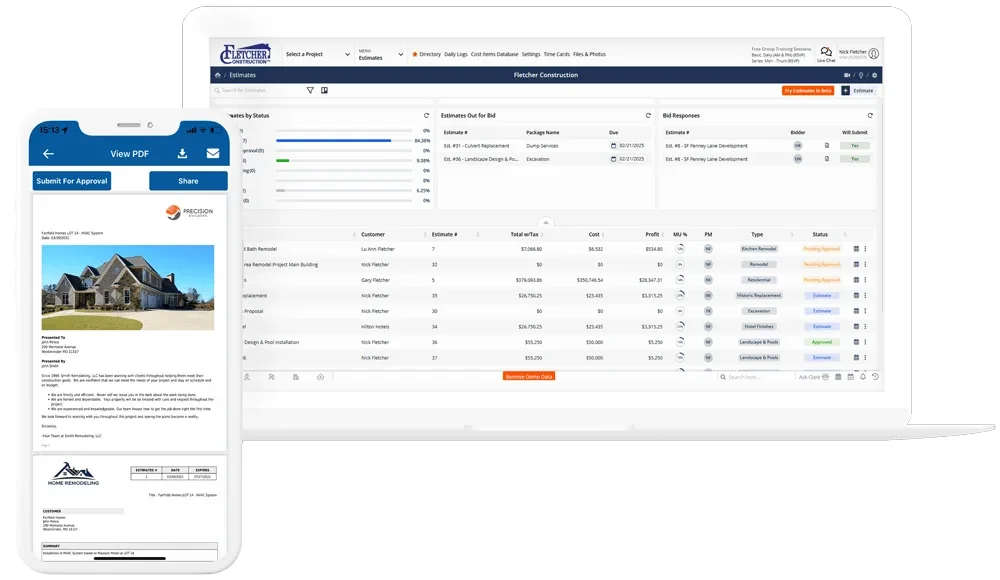
What works:
- Line-item estimates with individual and bulk markups, taxes, item descriptions
- Bid management with bid packages split into sections (added 2025)
- Good/better/best tiered output support via estimate templates
- Cost codes in NAHB, CSI, or custom taxonomies
- Real-time material cost database via the 1Build integration (added August 2023) — updates from supplier pricing feeds
- Kreo AI takeoff integration — 2D plan takeoffs processed by Kreo’s ML engine, items exported to Contractor Foreman estimates via CSV
- Default estimate templates shipped Q1 2026
- Estimate opened notifications — track sent/delivered/opened/clicked events at the line-item level
- CSV import/export with line-item totals (Q1 2026)
- Item variations during estimate creation (Q1 2026)
What doesn’t:
The Cost Item Database (CIDB) is shallow. Capterra reviewer Timothy S. (Project Manager, Construction, February 2026) puts it plainly:
“The live updated estimate database is missing tons of everyday items contractors utilize.” — Capterra review
This means in practice you’ll build your own pricebook from scratch — importing historical estimates via CSV or manually entering your assembly library. That’s fine for contractors with existing Excel-based pricing libraries, and frustrating for shops hoping to plug in and go.
Performance issues on large estimates are a recurring complaint theme. Capterra reviewer Paul G. (Project Manager, 11-50 employees, October 2025): “When making very large estimates the software slows down a lot.” For smaller residential estimates (sub-$100K jobs with fewer than 100 line items), performance is fine. For complex custom home or commercial estimates with 500+ line items, you’ll feel the lag.
Classic View of Estimates is being deprecated per the Q4 2025 announcement — if you’re on the older interface, plan for the migration to the new Estimates UI during 2026.
Where Contractor Foreman falls behind Roofr, EagleView, or Hover on estimating: it has no native aerial measurement. The Kreo integration provides 2D takeoffs from uploaded plans, but there’s no satellite-based measurement workflow, no Xactimate bridge, and no ESX export. For contractors whose bidding process starts with roof measurement, this is a structural gap — use Contractor Foreman for the estimate-and-proposal layer, paired with Roofr, EagleView, or Hover for the measurement input.
Project Management: Where the Platform Earns Its Price
This is actually Contractor Foreman’s strongest module — and the reason the product is dual-listed in both estimating and project-management on this site. For residential GCs running actual multi-project workflow, the PM depth is where the $332/month math pays off.
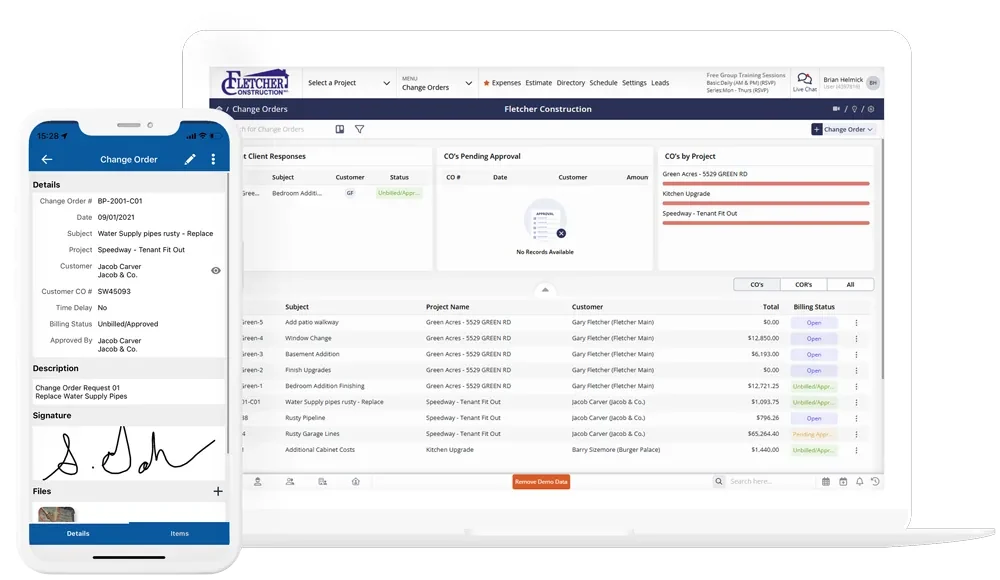
Core PM modules:
- Projects with status tracking, budgets, schedules, and linked financial/contact data
- Opportunities (pipeline stage before project) — leads convert to opportunities, opportunities convert to projects
- Work Orders for service/maintenance crews
- Inspections — checklist-based with signature capture
- Punchlists with assignment and photo attachment
- Permit Manager — track permit applications and approvals
- Daily Logs with weather auto-fetch, photos, notes, crew hours
- Service Tickets — field-service ticket workflow
- To-Do’s — task lists with assignment
- Drawings & PDF Markup — upload plans, mark up with annotations, share with crews
- RFIs (Requests for Information) — full RFI workflow with responses
- Submittals — submittal log with review cycles
- Document Writer — generate documents from templates with merge fields
- Files & Photos — centralized project media storage
Change Orders are where the 2025-2026 release cycle focused the most attention:
- Q4 2025: Change Orders can now be generated from RFIs
- Q1 2026: Change Orders can be generated from Estimates
- Inline markup editing on change orders (Q1 2026)
Project Templates (added November 2023) let you pre-configure projects with standard daily logs, to-dos, schedules, and document structures — useful for standardizing repeatable build types (spec homes, kitchen remodels, roof replacements).
Where this module wins: against Buildertrend, the depth of RFI/submittal/permit workflow is competitive, and the multi-user pricing makes it accessible to smaller GCs than Buildertrend usually serves. Against JobNimbus and AccuLynx, Contractor Foreman’s general-contractor-first architecture handles multi-phase construction workflow (drawings, RFIs, submittals) that roofing-CRM tools don’t support.
Where it doesn’t win: Procore for $20M+ commercial GCs, Buildertrend for custom-home-builder-specific design workflows, and ServiceTitan for service-heavy HVAC/plumbing/electrical operations.
Scheduling and Crew Assignment (With the Split-View Gotcha)
Contractor Foreman ships two separate scheduling interfaces that independent reviewers consistently flag as confusing:
- Task scheduling — Gantt/CPM chart with dependencies, critical path, milestone markers
- Crew scheduling — separate calendar view for crew assignment and resource allocation
The split between these two views causes workflow friction for teams where task-scheduling and crew-scheduling are the same mental model. The Digital Project Manager’s review flags this as a specific con: scheduling is “awkward for specialty trades” where crew-to-task assignment is typically a single workflow.
What works well: native Google Calendar and Outlook 365 sync (contractors don’t need Zapier glue to push schedules to their personal calendars), and MS Project import/export for GCs interfacing with commercial project-management consultants using Gantt-chart standards.
What doesn’t: no weather-integrated auto-rescheduling, no route optimization for crew dispatching (field service tools like Jobber, Housecall Pro, and ServiceTitan do this better), and no drag-and-drop crew reassignment from a single calendar view.
For residential GC workflow where scheduling is typically project-level (not individual-service-call-level), the module is sufficient. For service-trade operations where scheduling is the daily rhythm, pair Contractor Foreman with a specialized FSM tool or consider Jobber instead.
Contractor Foreman in the Scheduling Category
Stepping back from the split-view gotcha covered above, Contractor Foreman’s scheduling capabilities in the scheduling category specifically: Gantt scheduling with dependency awareness for project work, separate crew scheduling for daily assignments, GPS time clock with geofencing that confirms tech presence at the job, recurring jobs for the maintenance side, and integration with the platform’s other modules (estimates feed scheduled tasks, invoicing follows schedule milestones, daily reports and time cards roll up into the same project view). For 5-30 person GCs and remodelers running construction schedules with crew assignments in parallel, the bundle covers the use case at a price point no specialist matches.
Where CF’s scheduling falls short of category specialists: customer-facing online booking is light (no Calendly-class widget), GPS route optimization across a multi-tech service-trade day isn’t really there (CF is project-PM, not field-dispatch), and the task/crew split-view that confuses reviewers is the kind of UX ceiling that drives users to either Buildertrend (more polished construction-PM) or to dispatch-first FSM tools (Jobber, ServiceTitan, Housecall Pro) for service work.
Scheduling is included in every CF tier — no add-on. The Unlimited tier ($332/mo, all users) is where the math becomes unbeatable for crews of 15+. For pure scheduling-category fit beyond what CF bundles, see the scheduling category page — particularly Buildertrend for higher-polish construction PM, or ServiceTitan and Jobber for service-trade dispatch.
Time Cards, GPS, and the 2026 Offline Preview
Time tracking is a core module with legitimately strong GPS and geofencing implementation:
- GPS-based time clock — clock-in/out with geolocation attached to every punch
- Geofencing — auto-detect when a crew member enters/exits a job site radius
- Crew timecards — batch time entry for crew leads submitting hours for multiple workers
- Mandatory cost code enforcement — require workers to tag hours to a cost code
- Payroll integration — native Gusto sync; ADP export (added January 2025)
The 2026 feature that matters most: Offline Time Cards, moved from beta in Q3 2025 to preview mode in Q1 2026. For crews working in low-signal rural sites, underground utility work, or metal-roof builds where reception is bad, this closes a real gap.
The catch: offline functionality is currently limited to time cards. Daily logs, photos, project files, and general platform access still require internet in April 2026. Capterra reviewers and Workyard’s third-party review both flag “no offline mode” as a platform-level weakness that’s still not fully solved. If your crews work in genuine off-grid conditions (remote mountain builds, underground work, utility corridors without LTE), the platform will still struggle.
Mobile app: iOS and Android apps exist for time cards, daily logs, photos, and basic project access. Reviewer sentiment is mixed — Jake M. (Manager, Construction, February 2026, Capterra) endorses it: “The mobile app allows crews to complete time tracking directly from the field, reducing paperwork and improving payroll accuracy.” Other reviews cite slow photo uploads and occasional crashes. The mobile experience is functional, not class-leading.
Financials, CRM, and the 20+ Module Inventory
Where Contractor Foreman earns the “all-in-one” label is the breadth of modules that aren’t the core estimating-PM stack but are included on every tier:
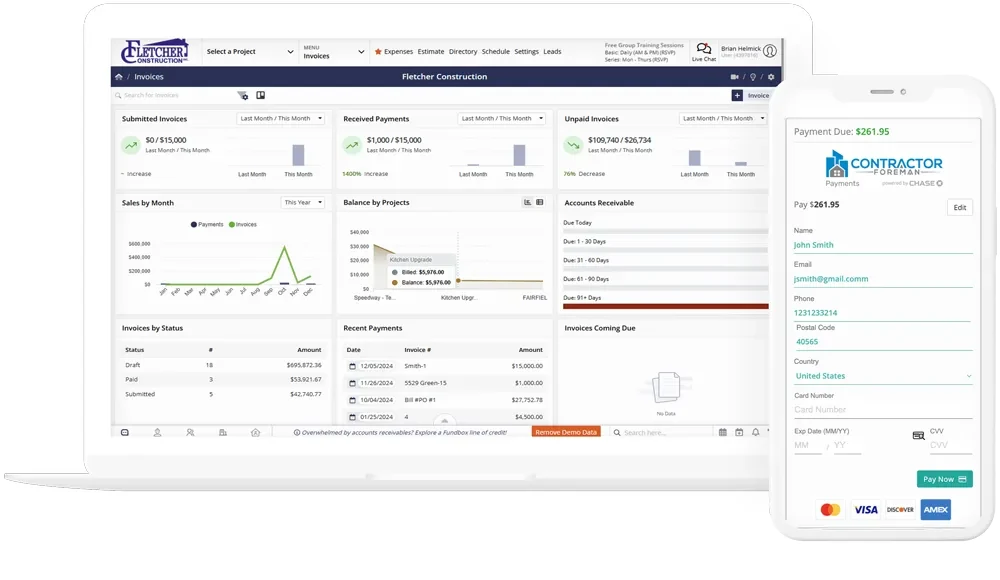
Financials:
- Invoicing — standard, AIA/progress, T&M (Time & Materials) billing
- Purchase Orders with vendor management
- Sub-Contracts — full subcontract lifecycle
- Bills & Expenses — AP tracking
- Job Costing — actual-vs-budget by project
- Financial Dashboard — cash position, A/R aging, project P&L
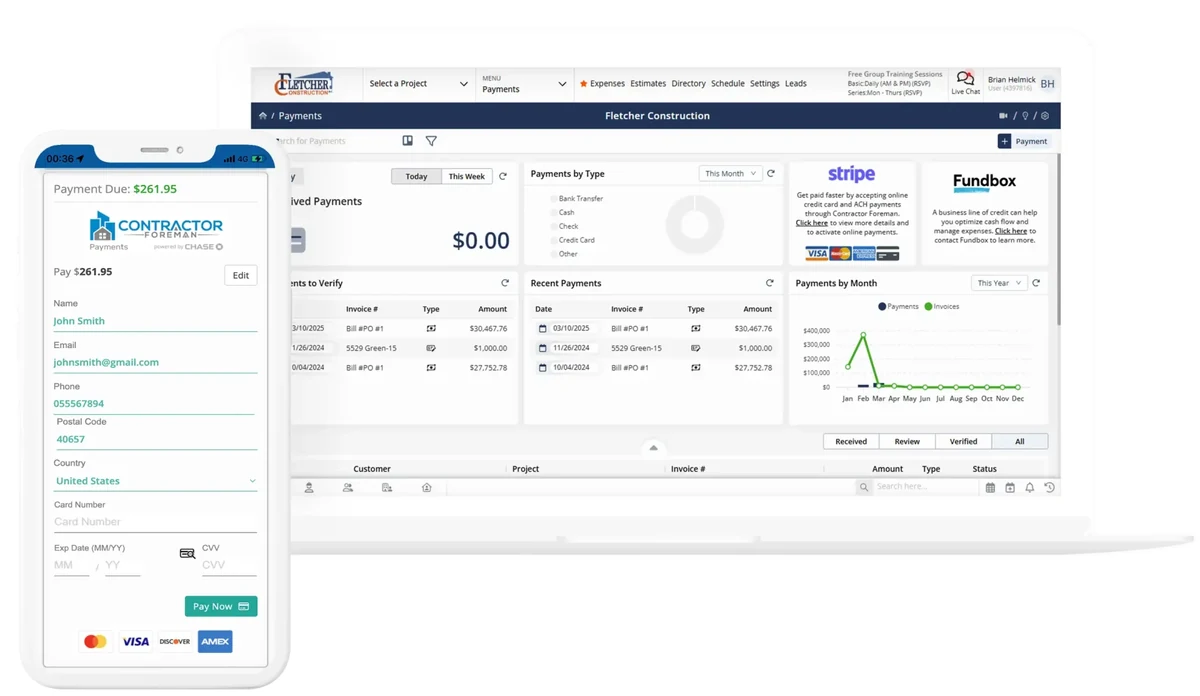
- Stripe payments (native, added 2023) — credit cards and ACH
- Fundbox client financing (added October 2024) — up to $150K credit offered to your customers
- SweetPay client financing — alternative financing marketplace (Basic tier eligible as of March 2024)
CRM:
- Directory — contacts, customers, vendors, subs
- Leads Manager — pipeline stage tracking
- Opportunities — deal stage before project conversion
- Team Chat — in-platform messaging
- Lead forms with source tracking and URL redirection (added Q2 2025)
- Angi Leads integration — automatic lead entry from HomeAdvisor/Angi
Safety:
- Safety Meetings with a library of 800+ safety topics and attendee signature capture
- Incidents — OSHA-aligned incident reporting
- Safety Procedure Systems partnership for custom safety manuals
Equipment and Operations:
- Vehicle & Equipment Logs — track asset utilization
- Equipment time cards inside Daily Logs
- 50+ prebuilt Forms & Checklists plus custom form builder
- 100+ reports plus Custom Report Builder (still in beta as of Q1 2024)
- Client Portal — homeowner-facing access to progress, documents, invoices
- Audit Logs, Activity Logs, Kanban boards, Custom Fields, Custom Branding
The honest framing: most contractors will never use all 20+ modules. The value calculation isn’t “I’ll use every module” — it’s “I’ll use 6-8 of these modules and the per-module cost is effectively zero because they’re bundled.” For a 15-person GC running estimating + PM + time tracking + financials + CRM + safety, that’s six modules for $221/month on Pro. Versus buying six separate best-of-breed tools — $200+ for estimating, $100+ for PM, $30+/user for time tracking, $80+ for financials/accounting, $50+/user for CRM, $30+ for safety — which compounds into $1,000+/month before per-seat scaling. The math is why 820+ Capterra reviewers rate value at 4.6/5.
AI in Contractor Foreman: Clark Bot, Kreo, and What’s Not Here
Contractor Foreman’s AI story is real but narrow, and honesty matters here more than in almost any other section of the review. What’s actually in the platform as of April 2026:
1. Clark Bot (launched January 2025) — an in-platform chatbot accessible from the footer menu. Scope is not publicly documented but appears to be help and navigation oriented. This is not an operational AI assistant in the Microsoft Copilot or JobTread Copilot sense.
2. AI-powered live chat (added July 2024) — ChatGPT 4.0 powers customer support live chat. This is support AI, not product AI.
3. Kreo AI integration — Kreo is a standalone AI-powered 2D takeoff tool that partners with Contractor Foreman. Drawings are uploaded to Kreo, processed with their ML engine, and takeoff items export to Contractor Foreman estimates via CSV. Integration is CSV-based, not one-click. Kreo has publicly roadmapped a more integrated connection, but it’s not live yet.
What Contractor Foreman does not have in April 2026:
- AI-native estimating — no generative estimate creation from natural language or voice input
- AI takeoff within the product itself (Kreo is external)
- AI damage detection from photos/imagery (competitors like EagleView Assess have this)
- AI copilot or assistant for project management workflow
- Generative AI proposal writing
- AI-driven pricing optimization
- AI lead scoring or qualification
- AI call answering (contractors pairing CF for lead capture should look at Smith.ai, Rosie, or Upfirst for after-hours call handling)
Honest framing: Contractor Foreman’s AI is bolted-on rather than built-in. No AI partnership announcements, no AI roadmap commitments, and no AI-focused features beyond Clark Bot and Kreo have been publicly disclosed for 2025-2026. If AI-native construction workflow is a 2026 priority, JobTread (developing copilot features) and Togal AI (AI-first estimating) are further along. If AI isn’t a priority for your operation — and for a 10-person residential GC, the honest answer is often that it isn’t yet — Contractor Foreman’s narrow AI surface is a neutral, not a disqualifier.
Integrations: QuickBooks-Centric with Zapier for the Rest
Contractor Foreman markets “50+ integrations” on its homepage, but the honest native integration surface is much narrower. The real breakdown:
Native integrations (real bi-directional or API-based):
- QuickBooks Online — bi-directional, the core accounting integration
- QuickBooks Desktop for Windows — sunsets January 1, 2026 (see next section)
- Gusto — payroll, native sync
- Stripe — online payments (2.9% + $0.30 CC, custom ACH rates)
- WePay — alternative payment processor
- Fundbox — client financing up to $150K
- SweetPay — alternative client financing
- CompanyCam — photo documentation, native (added January 2023, one-way sync options added Q3 2025)
- Kreo — AI takeoffs via CSV
- 1Build — real-time material cost data feed
- Dropbox — file import (added September 2024)
- Angi Leads / HomeAdvisor — auto-lead entry
- Google Calendar — native sync
- Outlook 365 — native sync
- MS Project — native
- ADP — payroll report export (added January 2025)
In development for 2026: Xero integration (testing per Q3 2025, reiterated Q1 2026 roadmap).
Zapier-only for everything else:
- No native JobNimbus or AccuLynx integration — roofing-CRM workflow is Zapier-bridged
- No native Jobber, Housecall Pro, or field-service-management integration
- No native GoHighLevel, HubSpot, or Salesforce — marketing-automation CRM workflow is Zapier-bridged; if you’re choosing between Jobber and GHL as your CRM layer, our GoHighLevel vs Jobber breakdown covers which fits which model
- No native DocuSign — built-in e-sig handles this inside the platform
- No native Square payment processor
- No native Xactimate — no ESX export, no in-Xactimate workflow
- No native EagleView, Hover, iRoofing, or aerial measurement tool
Public API exists but is “limited third-party integrations despite API availability” per The Digital Project Manager’s review. The ecosystem of third-party developers building on Contractor Foreman’s API is thin compared to Procore’s (which has dozens of integration partners) or Buildertrend’s.
The honest framing: Contractor Foreman works best as a self-contained hub where QuickBooks Online is your accounting backbone, Gusto is your payroll, Stripe handles payments, CompanyCam captures photos, and everything else lives inside the platform. If you need deep integration with JobNimbus, Jobber, Xactimate, or a non-QuickBooks accounting tool, you’ll either live in Zapier workflow or run parallel tools with manual data transfer.
The January 1, 2026 QuickBooks Desktop Sunset
This deserves its own section because it’s the single most important operational change contractors should know about.
As of January 1, 2026, Contractor Foreman has discontinued the QuickBooks Desktop for Windows integration. The announcement was made Q4 2025 and is documented in the What’s New release notes. Contractors on QB Desktop who were syncing to Contractor Foreman lost that sync on the sunset date.
What this means in practice:
- Contractors on QB Desktop must migrate to QuickBooks Online to restore sync
- Migration is a multi-week project — chart of accounts, vendor records, customer records, class tracking, item lists, and historical transactions all need to move
- Intuit has its own QB Desktop → Online migration tooling, but complex chart-of-accounts structures often require manual cleanup
- Alternative accounting tools (Xero, Sage) aren’t natively supported either (Xero is in development for 2026 but not live)
Why this matters for your buying decision in April 2026:
If you’re already on QuickBooks Online, ignore this section — you’re fine. If you’re still on QB Desktop, Contractor Foreman becomes significantly harder to justify unless you were planning the QB Online migration anyway. The platform’s accounting integration story is now QBO-only until Xero ships (and Xero’s timeline is “coming in 2026” with no specific quarter committed).
Competitor alternatives that still support QB Desktop as of April 2026: Buildertrend (still sunsetting, check current status), AccuLynx (supports both), JobNimbus (supports both). If QB Desktop holdout is non-negotiable for your operation, those are currently better fits.
Who Contractor Foreman Is Built For
Contractor Foreman is a good fit if most of these describe your operation:
- 5-30 person residential general contractor, remodeler, or custom home builder running 10-50 active projects per month — the sweet spot where the Pro or Unlimited tier math works and the PM depth pays off
- Small-to-mid commercial GC (under $20M ARR) where Procore’s enterprise pricing is overkill but you need real PM workflow (drawings, RFIs, submittals, AIA progress invoicing)
- You’re on QuickBooks Online already (or prepared to migrate from QB Desktop by January 2026)
- You want 20+ modules bundled in one subscription rather than paying for 5-6 separate best-of-breed tools
- You’re price-sensitive at multi-user scale — the $332/month Unlimited plan math is unmatched at 15+ users
- You have an existing Excel-based pricebook or estimate library you can import — you’re not relying on the shipped Cost Item Database to be deep
- Your workflow tolerates Zapier-bridged integrations for CRM, marketing, and specialty tools outside the native list
- You don’t need AI-native estimating or damage detection — the narrow AI surface isn’t a dealbreaker for your 2026 plans
The core demographic: a 15-person residential GC doing custom remodels and spec builds in a suburban market, running QuickBooks Online, using Gusto for payroll, and tired of paying per-seat on Buildertrend. This is the customer Contractor Foreman is optimized for, and the platform earns its $11-per-user-per-month pricing for this operation every time.
Who Should Look Elsewhere (With Alternatives)
Contractor Foreman is the wrong choice if any of these describe your situation.
Specialty roofing contractors with insurance-restoration work. No Xactimate integration, no ESX export, no supplement workflow. Use AccuLynx (production roofing category leader with native Xactimate), JobNimbus (tier-two roofing CRM with native EagleView integration), or Roofr (2026 modern alternative with Verisk-certified $10 ESX add-on). Pair any of those with EagleView, Hover, iRoofing, or RoofSnap for measurement.
$20M+ commercial GCs. Procore is the category leader for enterprise commercial construction — SSO/SAML, enterprise SLAs, multi-subsidiary consolidation, deep BIM integration, and a third-party developer ecosystem that Contractor Foreman’s API doesn’t support.
Service-trade contractors (HVAC + plumbing + electrical dispatch operations). Use ServiceTitan for larger HVAC/plumbing/electrical operations, Jobber or Housecall Pro for smaller service-trade crews. Contractor Foreman’s scheduling module isn’t built for daily-dispatch FSM workflow.
Custom home builders with design-heavy workflows. Buildertrend absorbed CoConstruct in 2021 and inherited its custom-home-builder workflow depth (homeowner-facing selections, design file management, specifications). For $10M+ custom home operations, Buildertrend still wins.
Contractors needing offline-first field work. Offline time cards are in preview as of Q1 2026, but daily logs, photos, project files, and general platform access still require internet. For crews working in off-grid conditions (remote builds, underground utility work, metal-roof reception issues), this is a real gap.
QuickBooks Desktop holdouts who aren’t ready to migrate by January 2026. The desktop integration sunset is a forcing migration — if you’re not ready to move to QuickBooks Online, pick a competitor that still supports QB Desktop.
AI-first contractors expecting damage detection, AI takeoff, or AI copilot features. JobTread, Togal AI, EagleView Horizon, Hover Connected Platform, and the AI-agent layer of tools like Rosie or Smith.ai (for call answering) are further along than Contractor Foreman’s Clark Bot + Kreo stack.
Contractors wanting month-to-month billing flexibility to try before committing to a year. Annual or quarterly only — and quarterly is ~25% more expensive. If cash flow flexibility matters, this is real friction.
What 820 Capterra Reviewers Are Actually Saying
Contractor Foreman’s review volume is the largest in the construction management category covered on this site — 820+ Capterra reviews, 360+ G2 reviews, 350+ TrustRadius reviews as of April 2026. That’s a meaningfully bigger sample than Roofr (101 Capterra), iRoofing (23), or RoofSnap (11).
Aggregate ratings (April 2026):
- Capterra: 4.5/5 across 820+ reviews — 92% positive, 4% neutral, 3% negative
- G2: 4.5/5 across 360 reviews — 5-star 71%, 4-star 23%, 3-star 2%, 2-star 1%, 1-star 1%
- TrustRadius: 9.2/10 trScore across 350+ reviews — 2025 Top Rated Award + 2026 Buyer’s Choice (Best Capabilities, Best Value, Best Customer Relationships)
- GetApp: 4.5/5 — Ease 4.3, Features 4.4, Value 4.6 (category-leading), Support 4.5
Awards in 2025-2026:
- 2026 Capterra Shortlist for Construction Estimating Software
- 2026 Gartner Digital Markets Leader
- 2026 SoftwareReviews Gold Data Quadrant — 8.2 composite, 8.6 customer experience
- Constructech 2026 Top Construction Product
- G2 Spring 2025 Momentum Leader
- Ranked #1 construction estimating software by ClickUp and #1 construction cost tracking by Cloudwards (January 2026)
The five-star consensus centers on three themes: all-in-one consolidation, price-to-feature ratio, and responsive support.
“The price is hard to beat and it really is an all-in-one package!” — Chris P., Owner, Construction (August 2025, Capterra)
“The mobile app allows crews to complete time tracking directly from the field, reducing paperwork and improving payroll accuracy.” — Jake M., Manager, Construction (11-50 employees) (February 2026, Capterra)
“The platform makes it easy to track safety documentation, daily logs, photos, and project updates.” — Josie M., Project Engineer, Civil Engineering (March 2026, Capterra)
“I am impressed at how much it offers for the price. I like that it has almost everything in one place.” — Shawn B., Avan Company LLC (switched from Procore, Contractor Foreman testimonials)
“Contractor Foreman saved our company from bouncing through three different BIM packages.” — Karl E., Effectual Construction LLC (switched from STACK and HouzzPro)
The critical review pattern is narrower but substantive:
“The live updated estimate database is missing tons of everyday items contractors utilize.” — Timothy S., Project Manager, Construction (February 2026, Capterra)
“When making very large estimates the software slows down a lot.” — Paul G., Project Manager, Construction (11-50 employees) (October 2025, Capterra)
“My experience with Contractors Foreman has been unacceptable and has raised serious concerns regarding their business practices.” — Marcos F., CEO, Construction (6-12 months on platform, December 2025, Capterra)
Recurring themes from Capterra, G2, and Workyard’s third-party review:
- Performance lag on large estimates and QuickBooks sync failures requiring manual re-sync
- Cost Item Database depth — “missing tons of everyday items”
- Scheduling module complexity (task vs crew view split confuses specialty trades)
- No true offline mode (offline time cards in preview, rest of platform cloud-only)
- iOS and Android mobile app reliability, especially photo upload speed
- Post-sale support drop-off (one reviewer: “You will be flooded with emails offering support during your trial, which is very misleading.”)
Expert vouch: Contractor Foreman carries the 2026 TrustRadius Buyer’s Choice Award (three categories: Best Capabilities, Best Value, Best Customer Relationships), 2025 Capterra Shortlist for Roofing & Construction CRM, and 2026 Capterra Shortlist for Construction Estimating Software. Research.com rated the platform 5/5 in a January 2026 in-depth review. The Digital Project Manager ranked Contractor Foreman #1 best free construction PM software in January 2026 and #1 in their “34 Best Construction Project Management Software for 2026” list.
No controversies, lawsuits, or data breaches were identified in 2025-2026 public record.
Who Walks Away a Winner
Contractor Foreman wins for the 5-30 person residential general contractor who wants 20+ modules bundled in one subscription at a price that per-seat competitors structurally can’t match at multi-user scale. At $332 a month for unlimited users, it’s genuinely the cheapest credible all-in-one construction management platform in the 2026 market — and 820+ Capterra reviewers rating it 4.6/5 on value specifically is the clearest voice-of-customer signal that the pricing math works.
The losers are specialty roofing contractors (no Xactimate path), $20M+ commercial GCs (Procore is the right tool), service-trade dispatch operations (use Jobber, Housecall Pro, or ServiceTitan instead), QuickBooks Desktop holdouts who aren’t ready to migrate to QB Online by January 2026, and AI-first contractors expecting damage detection or AI-native estimating. For these demographics, the alternatives aren’t close — Contractor Foreman isn’t the fit.
The 3.5/5 rating reflects real strengths (price, 20+ module breadth, 820+ review validation, strong PM depth, Price Lock Guarantee) offset by real weaknesses (narrow AI surface, Zapier-dependent integrations outside the native list, shallow Cost Item Database, no true month-to-month billing, no offline mode for full field workflow, QB Desktop sunset forcing migration). For the demographic Contractor Foreman is built for, it’s a solid 4+ tool — the rating is dragged down by category-specific scoring dimensions (aerial measurement and AI) where the product legitimately scores low because it isn’t trying to compete on those axes.
The thesis in one line: if price and module breadth matter more than AI-native workflow and deep third-party integration, Contractor Foreman wins. If they don’t, it isn’t the right pick.
Updated April 2026 — pricing verified on contractorforeman.com/pricing, not third-party aggregators. See also our Roofr review, EagleView review, Hover review, iRoofing review, RoofSnap review, and the full estimating software category and project management software category for side-by-side context.

