
What Tagnetix Actually Is
Tagnetix is a QR-label record system. You create a record for a tool, a battery, a trailer key, or a box of gloves, print a label whose code is the record’s web address, and stick it on the case. Anyone who scans it with a phone camera lands on that record’s page, sees where it lives and who has it, and can change either one while the tool is still in their hand. Every change is logged with a name and a timestamp.
That’s the whole product. It is not GPS, it is not a Bluetooth beacon, and it is not a field service platform with an equipment module bolted on. Tagnetix says so itself on its tool-tracking page: “Tool tracking without GPS or enterprise overhead.” It’s also not contractor-only. The same app is sold for camera kits, church equipment, storage bins, and restaurant inventory, and the record types are generic on purpose.
The company behind it is FrickForm LLC, and the person behind that is Jordan Frick, who built it alone. His founder page describes a manufacturing quality job where the inventory system “often said a part was sitting in a location where it did not exist,” and sums up the problem in one line worth keeping: “The system expected perfect behavior from people who were already busy doing the work.” The fix he built is to put the record on the phone people already carry. That instinct is right, and it’s the reason to keep reading.
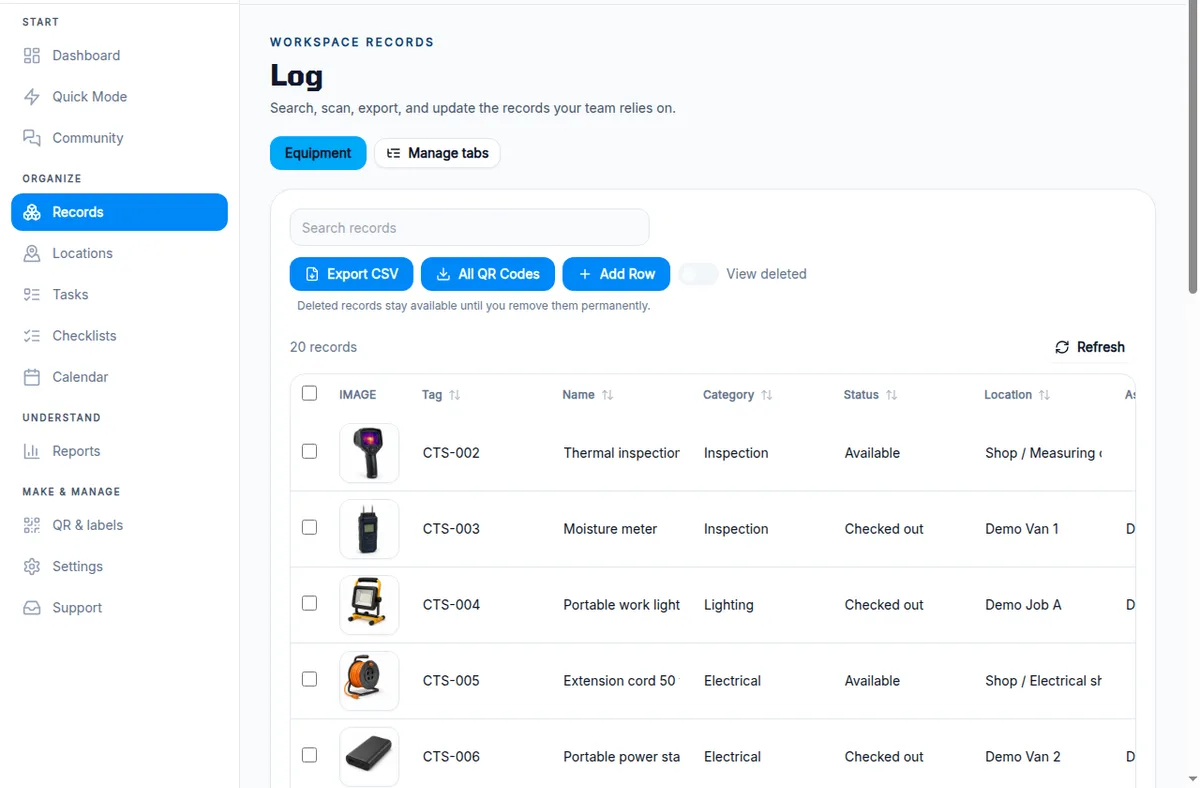
How we tested. Frick offered a working account and a 20-item contractor workspace instead of a sales demo. We registered from our own address on September 11, 2026; he loaded 20 fictional tools (a rotary laser, thermal camera, three battery packs, chargers, a dust extractor, keys, PPE, consumables) with eight marked checked out, two on maintenance hold, and two assigned. On September 14 we worked the app the way a shop would: moved a tool between locations and checked the history, probed every action on a record page, printed and decoded a label, exported the data, opened a label link on a phone with no login, and priced every plan. No affiliate relationship, no vendor program, no money changed hands.
What Happens When You Scan a Label
The scan lands on a page built for updating, not reading, and that’s the best design decision in the product.
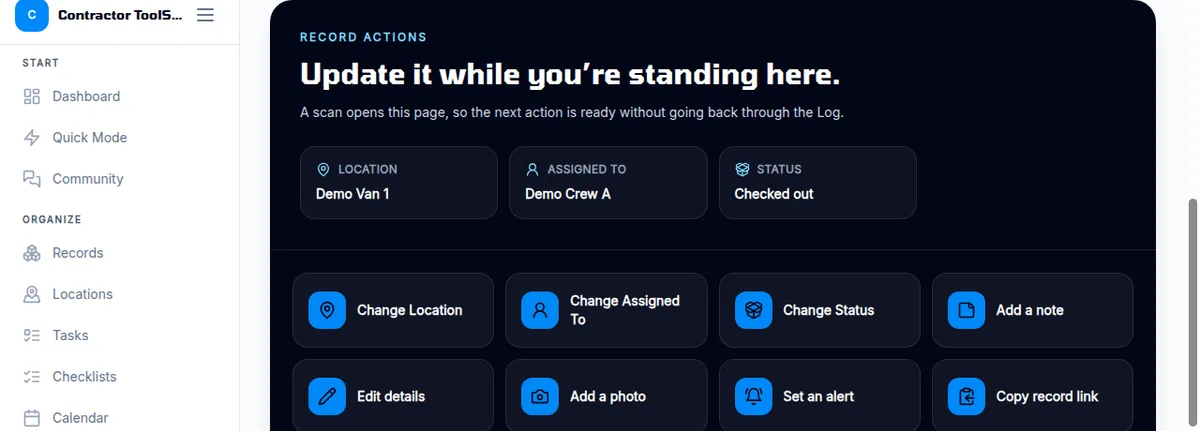
We decoded a downloaded label to see what it encodes: the record’s full URL, workspace ID included. Scan it and you’re on the page above. Location, Assigned To, and Status are the three tiles; below them are one-tap buttons to change each, add a note or photo, edit every field, print another label, or start a checklist against this specific tool.
We took the rotary laser (CTS-001, checked out to “Demo Crew A” at “Demo Job A”) and moved it to “Demo Van 1.” The change saved in about a second, and the history immediately read: Moved from Demo Job A to Demo Van 1 — info, 9/14/2026, 10:19 AM, with a Move back to Demo Job A button beside it.
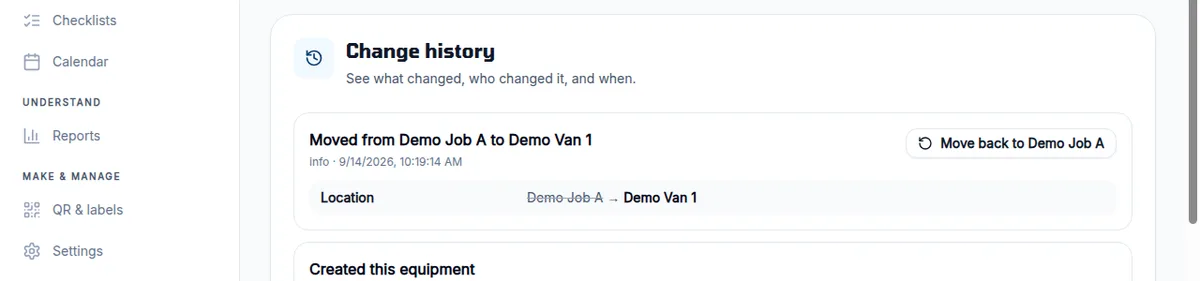
That one-click revert is a small feature that matters on a real crew. The guy who scanned the wrong case and moved the wrong tool can fix it without finding the office.
Here’s the problem we hit on the same screen. When we opened Change Location, the field was a blank text box. No list of the shop’s locations, no dropdown of the vans, no autocomplete when we typed “Demo V.” Assigned To is the same. So is Status. “Checked out,” “Maintenance hold,” and “Available” in our workspace are words somebody typed, and the next person can type “checked-out” or “Van 1” or “van #1” and the Log will treat each as a different thing. On a two-person shop you’ll be disciplined. On a six-person crew with a rotating laborer, the location column turns into a spelling contest inside a month.
Checkout, Due Dates, and Maintenance Holds
Tagnetix has no checkout, and that’s the finding a contractor needs before anything else on this page.
A checkout, in any tool crib system worth the name, is a transaction: this tool, to this person, due back on this date, flagged when it isn’t. Tagnetix stores the words. The equipment record type ships with Status, Assigned To, and Due Back fields, and you can fill them in on any record. Nothing reads them. Two tools in our workspace, the laser and a moisture meter, carried a Due Back date of September 14, 2026. We opened the dashboard on September 14 and the Alert Center said “Nothing urgent right now” on every filter setting.
The one alert you can set on a record is a quantity threshold: “Alert me when Quantity reaches 5.” The dialog says you “can also schedule a dated reminder,” but on the free plan the only field is the number; dated reminders are Tasks, which are Pro. Either way it’s built for glove boxes and tape, not for a $600 thermal camera that should have been back on Friday. Frick’s own walkthrough email was careful about this: the sample statuses are “not automated checkout or enforcement.” He’s right, and the product doesn’t pretend otherwise. But the tool-tracking landing page sells “employee checkout,” and what you get is a text field and a good history.
The maintenance-hold test went the same way. Frick asked whether the note on Battery pack C (CTS-009) was visible enough to stop someone from issuing it. On a desktop, yes: “Maintenance hold” sits in the status tile at the top of the record. On a phone, the status tile is there after you scroll past the hero photo, but the reason, “damaged casing example; do not issue,” is in the Notes field about five screens down. The status chip is the same color as every other status. A tech in a hurry sees a word, not a stop sign.
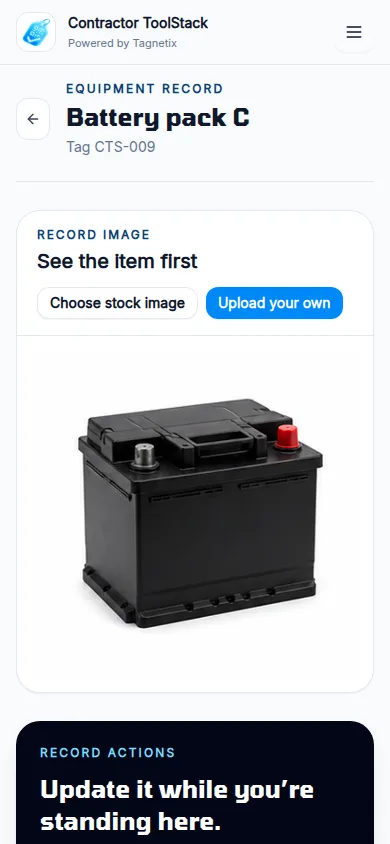
What Tagnetix does give you is a trustworthy trail. Every field change lands in the history with a user and a time, deleted records stay recoverable until you purge them, and the workspace-level activity feed shows every edit, import, and restore. If the question is “who moved this and when,” the answer is there. If the question is “what’s overdue,” you’re building a saved view and checking it yourself.
Labels and Printing: The Best Part
The label system is the most finished thing in the product, and it would be a fair feature on software costing three times as much.
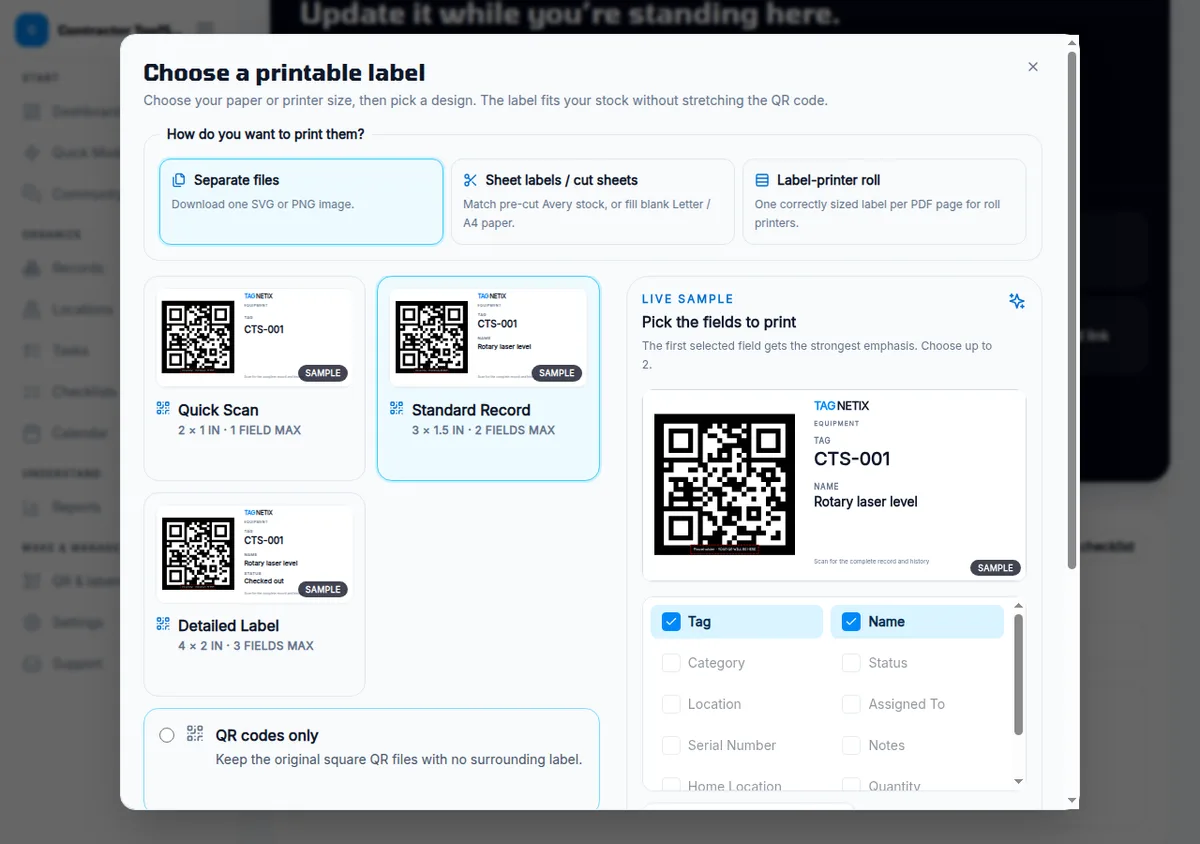
From any record, or for the whole Log at once, you pick a size: Quick Scan at 2 × 1 inch with one field, Standard Record at 3 × 1.5 with two, Detailed at 4 × 2 with three, or a bare QR. Then you pick how it comes out: a single SVG or PNG at 300 or 600 DPI, a cut-sheet PDF matched to Avery stock or blank Letter and A4, or a roll-printer PDF with one label per page. Long values shrink to fit and the code never gets squeezed. The label shows the tag number and whatever fields you check, which means a tool case can carry the tag, name, and home location in plain text for anyone without a phone in hand.
What it doesn’t offer is anything beyond paper. No Bluetooth tag, no RFID, no GPS puck. If a tool walks off the site, Tagnetix knows where someone last said it was. That’s the design, and for a shop that loses tools between its own trucks rather than to theft, it’s enough. For a shop that loses tools to theft, it isn’t.
Tagnetix Pricing: The Plan a Crew Actually Needs
Tagnetix starts free and the headline paid price is $24.99/mo, but a crew of any size needs the $129/mo Teams plan, because every other plan is one seat.
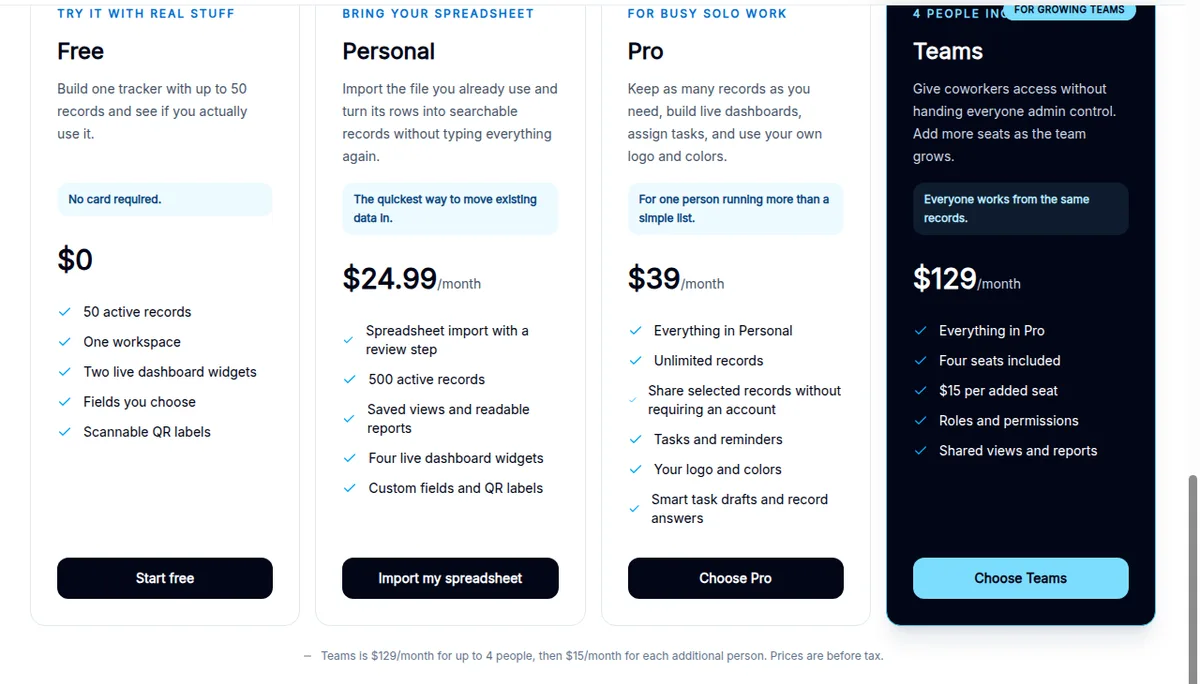
Plan comparison
| Plan | Monthly | Yearly | Records | People | What it adds |
|---|---|---|---|---|---|
| Free | $0 | $0 | 50 active | 1 | Custom fields, QR labels, two dashboard widgets, CSV export, manual checklists. No card. |
| Personal | $24.99 | $229.99 ($19.17/mo) | 500 active | 1 | Spreadsheet import with a review step, saved views, CSV and PDF reports, four widgets |
| Pro | $39 | $349.99 ($29.17/mo) | Unlimited | 1 | Tasks and reminders, share selected records without a login, your logo and colors, AI checklist drafts and the OpenAI Smart Assistant |
| Teams | $129 | Monthly only | Unlimited | 4 included, $15/seat after | Roles (Commander, Collaborator, Observer), shared views and reports, everything in Pro |
Prices are before tax. Per the terms, paid plans renew until cancelled, cancelling stops the next renewal, and “completed subscription payments are nonrefundable and we do not provide prorated credits for unused time.” If you stop paying, Tagnetix says it won’t delete active records, but plan limits kick back in.
What the free plan really includes
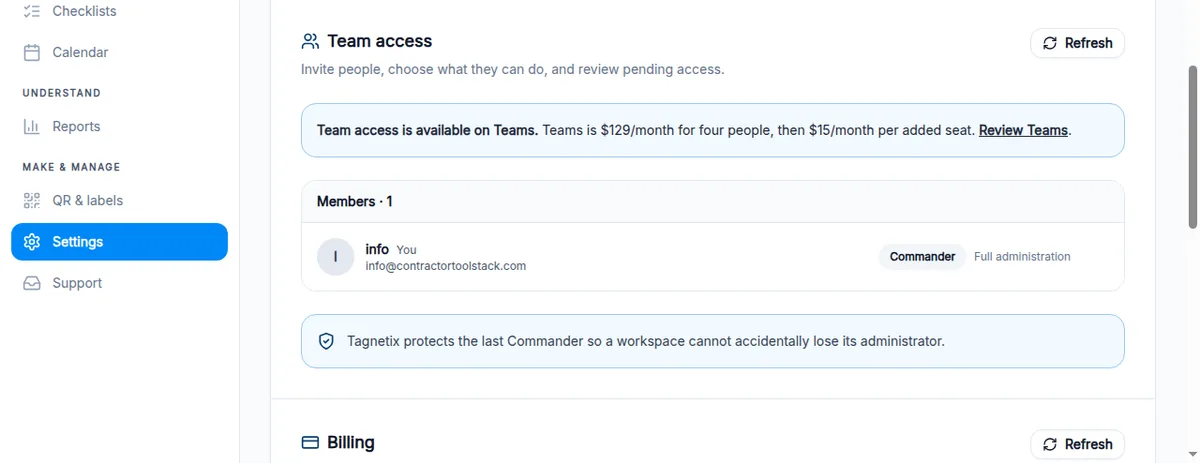
We ran the whole test on the free plan, so we can be specific about what’s gated. Import is locked (Personal). Reports are locked (Personal). Tasks show up but you can’t create or move one (Pro). The AI checklist builder, custom logo, and Smart Assistant are Pro. Team access is Teams, full stop; the Settings page says so under Members. Private image storage on Free is 100 MB. What works: your own record types and fields, 50 records, every label option, the Log with search and sort, CSV export, manual checklists, the Locations page with address pins and floor plans, and the full change history.
Fifty records is a real number for a one-truck shop’s critical tools. Frick’s own onboarding advice is to start with “the 20 to 50 items that stop work or cost real money when nobody can find them,” and that fits the cap on purpose.
The math for a four-person crew
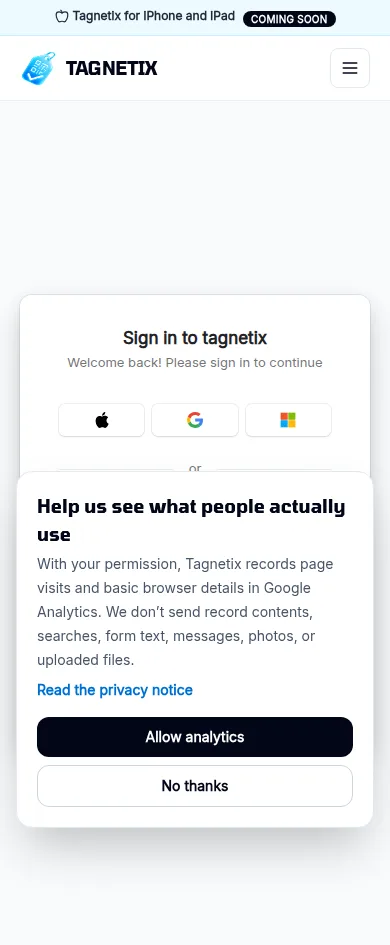
Say you run four people and about 150 tagged items. On Tagnetix that’s Teams, $129/mo, $1,548 a year, because Personal and Pro won’t let the second person in and a scan without a login goes to the sign-in page.
For the same crew, ShareMyToolbox is $100/mo for the first admin plus $10 per added employee sold in blocks of five, so $150/mo if all four need to sign in, or $100/mo if three of them only need view-only access, which ShareMyToolbox gives away unlimited. Sortly’s Ultra plan is $149/mo for five users and 2,000 items. GoCodes is $1,000 a year for five users and 500 assets, with the labels included in the price. Milwaukee ONE-KEY is $0 with no seat count.
At ten people, Tagnetix is $129 plus six seats at $15, $219/mo. ShareMyToolbox is $200/mo with everyone signed in. GoCodes is $1,750 a year for ten users, about $146/mo.
So Tagnetix is not the cheap option for a crew. It’s priced next to products that run a real checkout, and it doesn’t. Where it’s cheap is exactly where it’s built for: one person, 50 records, $0.
Mobile, Offline, and the “Coming Soon” App
There’s no Tagnetix app yet, and no offline mode, which limits it to sites with signal.
Every page on tagnetix.dev carries a banner: “Tagnetix for iPhone and iPad — COMING SOON.” The privacy notice already describes account deletion “in the Tagnetix iPhone and iPad app,” so it’s built or close to it. Android is not mentioned anywhere on the site, in the docs, or in the terms.
What you use today is the web app on your phone. It’s responsive and reasonably quick, and the manifest lets you add it to a home screen so it opens without browser chrome. But we checked for a service worker, and there isn’t one, which means no caching and no offline. Scan a label in a basement mechanical room or a rural jobsite with one bar and the page won’t load. Sortly, for what it’s worth, is the product Tagnetix’s own comparison page tells you to choose when “offline mobile access is a firm requirement.”
Scanning itself works the way you’d hope. There’s no in-app scanner; you point the phone’s regular camera at the label, tap the link, and the record opens in the browser. That’s simpler than a scanner tab and it’s why any phone works. The record page on a phone, though, is long: the item photo takes the first screen, the action block is the second, and the field details and history start around the fourth. One-handed on a ladder, that’s a lot of thumb.
Integrations, Exports, and the AI Assistant
Tagnetix connects to nothing. There’s no API, no webhooks, no Zapier, and no field service or accounting integration, and the docs don’t promise any.
That leaves the spreadsheet as the bridge. CSV export from any Log tab works on the free plan; ours came out clean with every field as a column. Import (CSV and multi-sheet Excel, with a preview and a matching step for related sheets) needs Personal. Settings also has a full workspace export covering records, members, tasks, dashboards, and label templates, and the terms say to run it before you close an account. For a product with no integrations, that’s the right minimum, and it’s more than some bigger names offer.
The AI is the Smart Assistant on Pro and Teams. Per the privacy notice it stays off until a signed-in member reads a disclosure and switches it on for that browser session; then the request and the record go to OpenAI to answer a question, draft a task, or draft an email. Drafts show for review before anything is saved. Tagnetix asks OpenAI not to retain the output but notes OpenAI “may still process information under its service terms.” On the free plan the panel just says the assistant is off and no record data is sent. We couldn’t test it and won’t score it.
If your shop already runs a platform with an equipment module, that changes the comparison. Contractor Foreman bundles vehicle and equipment logs into a plan that starts at $49/mo alongside estimating and scheduling, and Workiz lists inventory and equipment tracking on its top tier. Neither is a dedicated tool crib, but neither makes you keep a second login and a second spreadsheet.
What Real Users Are Saying
There aren’t any yet, and Tagnetix doesn’t pretend otherwise.
As of September 14, 2026, Tagnetix has no listing on G2, Capterra, or Product Hunt, no App Store presence, and no named customers, logos, or case studies on its site. The in-app Community board has exactly one post, the founder’s “Test Post” from late August. When we asked for two or three contractor references, Frick wrote back: “I do not have two or three contractor references ready for calls yet, and I would rather be honest about that than manufacture social proof.” He also said there’s no referral or affiliate program, which is why there are no affiliate links on this page.
The terms and privacy notice are dated August 23, 2026. The founder page says the product took “about three years to reach the version I was willing to release.” The infrastructure is standard and named: Clerk for sign-in, Google Cloud and Firebase for hosting and storage, Stripe for billing. Nothing about it reads like a weekend project, and the honesty about references is a better signal than a page of stock testimonials would be. It’s still a product with zero track record, and you should treat the free plan as the only evidence that matters.
For the category more broadly, the demand is real and the phrasing is consistent. Travers Trim of The Gentleman Pros, quoted on Milwaukee’s ONE-KEY page, put it the way most shop owners do: “We needed an inventory system, not just to prevent theft, but to know who has what.” Tagnetix answers the second half of that sentence on the honor system.
When Tagnetix Is the Right Call
The answer depends almost entirely on how many people need to touch it.
Solo operator, one truck. Yes, and use the free plan. Tag your 30 or 40 tools that cost real money, print Standard Record labels on Avery stock, and stop buying a second Milwaukee packout because the first one is in the garage behind the mower. You’re the only one scanning, so the single seat doesn’t matter and the free-text fields are your own handwriting. If you grow past 50 records, Personal at $24.99 gets you import and reports.
Two-person shop, two trucks. Probably, on Pro. One of you is the Commander; the other person scans labels and reads them through Pro’s share links (untested by us, but that’s what the plan lists). Updates still go through the one account. If you’re both moving tools daily, that gets old, and you’re a Teams customer at $129.
Four- to ten-person crew. Only on Teams, and only if what you want is a shared record with a good history rather than a checkout. If your problem is “which van has the press tool,” Tagnetix answers it at $129 to $219 a month. If your problem is “the moisture meter didn’t come back and nobody noticed for a week,” it doesn’t, and the products below do.
Restoration and HVAC shops that deploy equipment to customer homes. Air movers, dehumidifiers, recovery machines: the “where is unit 14 right now” question fits Tagnetix well, and the Locations page will hold customer addresses on a map. The missing due-back alert hurts more here than anywhere.
Tagnetix Isn’t the Right Fit When…
- You need a real check-in/check-out. ShareMyToolbox is built as a tool crib: tools transfer from person to person or out of the warehouse crib, notifications fire on transfers and maintenance reminders, GPS coordinates are captured on every scan, view-only users are unlimited, and it has native iOS and Android apps, from $100/mo. That’s the product for the crew that loses tools between its own people.
- Your tools are red. Milwaukee ONE-KEY is free on web, iOS, Android, and iPad, does tool assignments with roles and permissions, and adds Bluetooth locating for ONE-KEY tools and anything wearing a TICK tracker. If you’re mostly Milwaukee, start there before paying anyone.
- You need offline, purchase orders, or stock counts. Sortly (free for 100 items, $49/mo Advanced, $149/mo Ultra for five users) has offline mobile access, item check-in/check-out, date-based alerts, and inventory operations Tagnetix doesn’t try to do. Tagnetix’s own comparison page concedes the point: “Sortly is a mature inventory platform with broader purchasing, stock-count, and integration features.”
- You want the labels handled for you. GoCodes includes its patented custom QR tags in the subscription, from $500/yr for 200 assets and three users, with check-in/check-out and GPS location on every scan built in.
- You already run a platform with an equipment module. Contractor Foreman has vehicle and equipment logs inside a $49/mo-and-up plan that also does your estimating and scheduling. Read our Contractor Foreman review →
- You can’t be an early customer. No reviews, no references, one developer, nonrefundable billing. If your shop needs a vendor with a support desk and a track record, wait a year.
How Tagnetix Compares
| Tagnetix | ShareMyToolbox | Milwaukee ONE-KEY | Sortly | GoCodes | |
|---|---|---|---|---|---|
| Free plan | 50 records, 1 user | 14-day trial | Free | 100 items, 1 user | 15-day trial |
| Crew of 4 | $129/mo (Teams) | $100–$150/mo | $0 | $149/mo (Ultra, 5 users) | $1,000/yr (5 users) |
| Crew of 10 | $219/mo | $200/mo | $0 | Premium $299/mo stops at 8 users; Enterprise is a quote | $1,750/yr (10 users) |
| Check-out to a person | Text field, no enforcement | Person-to-person transfer | Tool assignments with roles | Check-in / check-out | Check-in / check-out, transfer between users |
| Date or overdue alerts | No (quantity thresholds only) | Transfer and maintenance notifications | Not verified | Date-based alerts | Not verified |
| Location tech | QR only | QR/barcode + GPS on scan | Bluetooth (ONE-KEY tools, TICK trackers) | QR/barcode | QR/barcode + GPS on scan, GPS trackers optional |
| Native mobile app | Coming soon (iOS); Android not mentioned | iOS + Android | iOS, Android, iPad | Mobile app with offline mode | iOS + Android |
| People who can use it without a paid seat | No below Teams (Pro share links, untested) | Unlimited view-only users | Free product | No | No |
| Labels | In-app printing, three sizes, Avery and roll | Asset tags sold separately | Not applicable | In-app label creation | Custom QR tags included |
| API / integrations | None | Not published | Not published | API and webhooks on Enterprise; QuickBooks Online on Premium | Add-ons, priced separately |
Everything in the four competitor columns was read from that vendor’s own public pricing or features page on September 14, 2026; “not verified” means the page we read didn’t say. Sortly shows a first-year promotional discount on yearly billing that we’ve left out. None of the four has been through our full review process yet, so none carries a rating here.
vs. ShareMyToolbox: the closest competitor and the one to pick if accountability is the point. It costs about the same for a crew and runs the person-to-person transfers Tagnetix doesn’t. Tagnetix prints its own labels and has a friendlier record page.
vs. ONE-KEY: if your fleet is mostly Milwaukee, ONE-KEY does assignments for free and adds real locating. Tagnetix’s advantage is that it doesn’t care what the record is: it will track keys, consumables, and customer sites the same way it tracks a drill.
vs. Sortly: Sortly is the inventory system; Tagnetix is the label-to-record system. If you count stock, Sortly. If you just need to know where the thing went, Tagnetix’s free plan is the better first try.
The Bottom Line
Tagnetix gets the scan right. A label opens a page that shows the three things a crew needs and lets them change it on the spot, the history is clean with an undo, and the label printing is better than the price suggests. For one person with a truck full of tools that keep hiding from each other, the free plan is a real answer and costs nothing to find out.
It scores 3.4 because of what’s missing for a crew. There’s no checkout, only a status field someone types into. A due date does nothing. Every plan under $129 is one seat, and scanning a label without a login shows a sign-in page. There’s no app, no offline, no API, and no customers we could find. At $129 to $219 a month for a crew, it sits on the same shelf as products that do the accountability job it doesn’t.
If you’re solo, install it this week. If you have a crew, put your name on the iPhone app waitlist, check back when Tagnetix ships a checkout with due-date alerts, and in the meantime price ShareMyToolbox or try ONE-KEY for free. We’ll re-test and re-score when either of those ships.