

It’s 8:47 on a Tuesday morning in a five-tech HVAC shop outside Baton Rouge, and three calls are coming in at the same minute. The first is a returning customer whose AC quit overnight. The second is a Reserve with Google booking from someone the dispatcher’s never spoken to. The third is a wholesale supplier calling about a delivery window. The dispatcher is on call number one. Calls two and three would historically go to voicemail, get lost, and take a full day to recover — except Genius is picking up both. Jessica handles the homeowner: identifies the address from prior service history, confirms the unit’s a 2018 Carrier, books a 2 PM appointment in the dispatch board, sends the customer a confirmation text. Mike (the alternate AI voice) takes the supplier call, captures the delivery window in the job notes, no human required.
That’s the daily-life sales pitch for Workiz in 2026 — and unlike most AI marketing copy in the contractor software category, the underlying capability has been in production with real customers for 14 months as of April 2026, since Genius Answering launched in December 2024. The platform serves 120,000+ field service professionals across 5,000+ organizations, holds 4.4/5 across 218 verified Capterra reviews with 4.6/5 on G2, and was named to the Deloitte Technology Fast 500 in November 2024. Idan Kadosh, Workiz’s co-founder, was elevated to the newly-created Chief AI Officer role in June 2024 — and in the announcement he framed the bet directly:
“Our goal is to create an intelligent platform that not only streamlines operations but also anticipates the needs of our users. We are committed to staying ahead of the curve and ensuring our customers benefit from the latest technological advancements.” — Idan Kadosh, Co-founder & Chief AI Officer, Workiz, June 2024
What this review covers: how Genius Answering and the broader Genius AI stack actually work in production, where the dispatch board and mobile app earn their reputation, what Workiz costs in 2026 (it pulled published pricing in favor of sales quotes, so the last published numbers are a reference point, not a rate card), the integration map and where it has gaps, what 218 verified Capterra reviewers actually say about the phone system and pricing transparency, how Workiz compares against ServiceTitan for HVAC operations and against Jobber for general service trades, the 2026 product roadmap, and which contractor segments should be running the 7-day free trial today versus picking a different platform.
Genius Is the Real 2026 Story (and Why It Matters Before Anything Else)
The single most defensible reason to evaluate Workiz over Jobber, Housecall Pro, or ServiceTitan in 2026 is the AI layer — and not because every FSM is shipping an AI bullet point now, but because Workiz built theirs first, shipped it to production 14 months ago, and has the largest deployed AI footprint in the FSM category at SMB scale.
As of September 2026, Genius Leads and Genius Scheduling ship inside the Pro plan; Genius Answering is sold separately, and Call Insights and Smart Messaging sit under the separately sold Genius Phone add-on. Plan and add-on prices are sales-quoted. Hey Genius mobile voice is beta-only and not currently accepting new users.
AI receptionist (Jessica/Mike/Lori/Bill voices, EN/ES/FR) handles inbound calls 24/7, books jobs into dispatch board, 2-min average booking time, three concurrent calls supported.
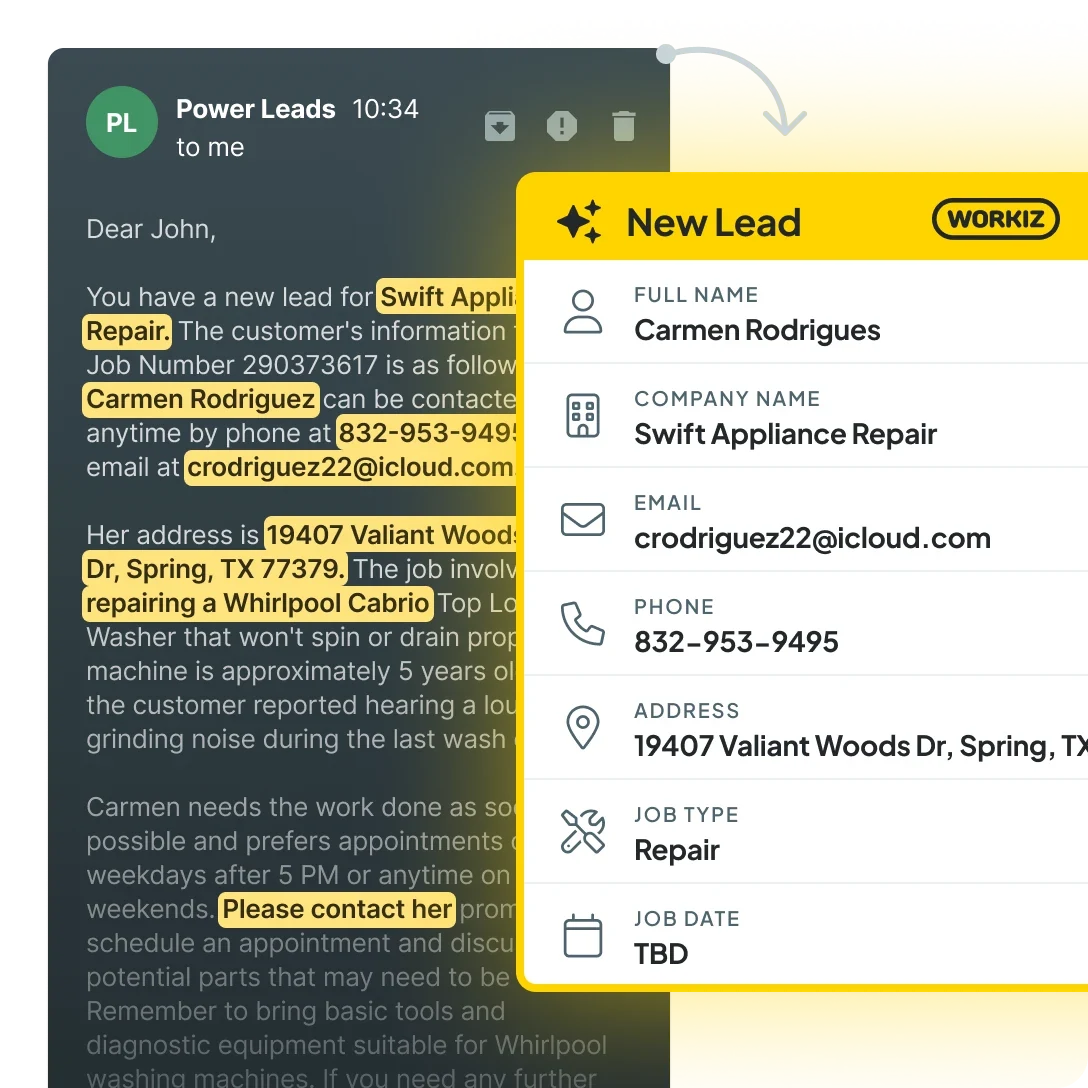
Pulls inbound from email, web forms, Reserve with Google, Angi, Thumbtack into a single Workiz lead pipeline — eliminates manual data entry from external lead sources.
Generates context-aware reply drafts based on customer history, rewrites tech messages to sound professional before sending — reduces office-staff time on text-message back-and-forth.
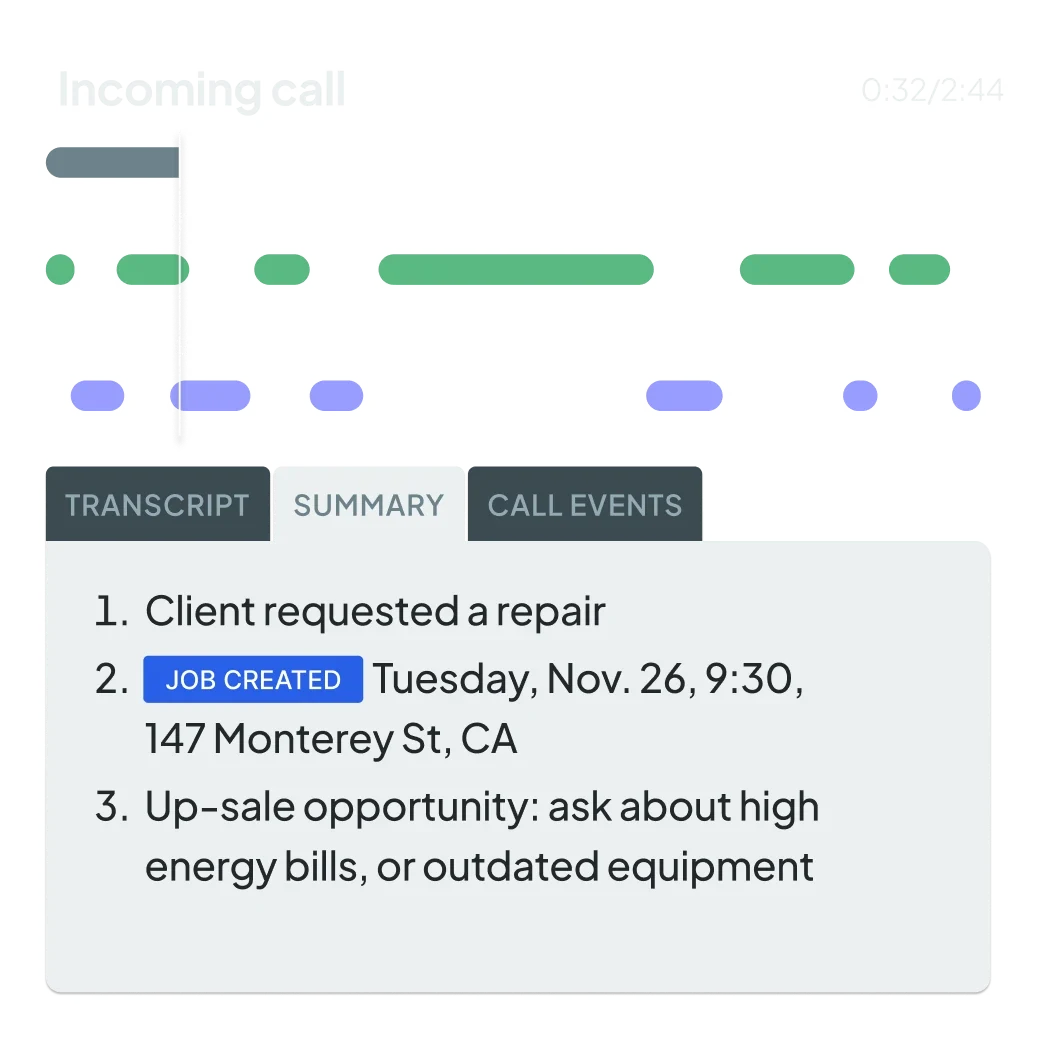
Auto-transcribes and summarizes recorded calls, surfaces upsell opportunities flagged in conversation, identifies team training gaps from real call patterns.
Suggests optimal job slots based on tech availability, route, current schedule, drive-time minimization — used by both Jessica when booking AI calls and human dispatchers placing manual jobs.
"Hey Genius, what's my next job?" — voice commands on the mobile app for techs (EN/ES). Beta-only, not currently accepting new users; expect general availability later in 2026.
Genius Marketing was added in 2025 (lead-gen and re-marketing automation tools) and Checklists shipped the same year as standardized job-completion workflows. The 2026 expansion focus is mobile voice and proactive customer-retention automation.
The strategic architecture decision worth understanding is that Workiz built Genius inside the FSM, not as a layer next to it. ServiceTitan’s Atlas AI launched September 2025 as enterprise-tier additions to a much larger platform; Smith.ai sits in front of your FSM as an external receptionist; Dialzara and AI Front Desk compete in pure AI-call-answering as separate products you’d bolt on top. Workiz’s bet is that AI dispatcher + AI lead capture + AI call insights + AI scheduling all need to share the same data model with the dispatch board, mobile app, and invoicing flow — and the integration tax of running an external AI service that doesn’t natively know your customer history, technician schedule, and pricebook is real.
For a 5-to-25-tech HVAC, plumbing, electrical, garage door, or appliance repair shop where call volume directly maps to revenue and missed calls are the bottleneck, this architecture argument is the most defensible reason to evaluate Workiz over the alternatives in 2026.
How Genius Answering Actually Works on a Live Call
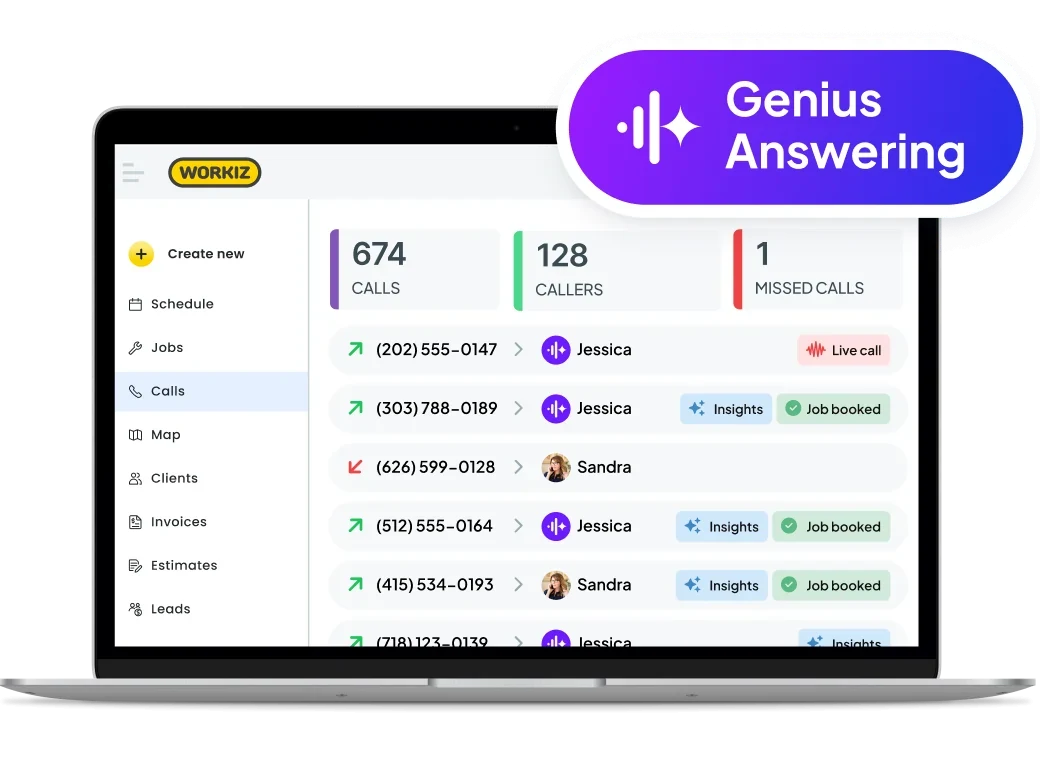
The mechanics matter because every contractor evaluating AI receptionists has the same first question: what does the customer hear when they call my number, and what does the AI know about them?
Step one — call routing. An inbound call hits your Workiz number. You configure the rule: ring the office for X seconds, fall through to Genius if unanswered (or send straight to Genius for after-hours and weekends). Most shops set Genius as primary backup with the office rolling to her after 4 rings.
Step two — caller identification. Genius checks the caller ID against your CRM history. For returning customers, she opens the call with their name and references their last service date if relevant: “Hi Sarah, I see we last serviced your AC in August — what can we help with today?” For new callers, she introduces herself by name (the four voice options — Jessica, Mike, Lori, Bill — let you match brand voice to customer expectation) and asks the qualifying questions you scripted.
Step three — qualifying questions. You configure these per trade: address, service type, urgency, equipment age, system access. Genius asks them conversationally rather than as a checkbox interrogation, handles natural language responses (a homeowner saying “the AC in the upstairs bedroom” maps to a multi-zone system), and handles common objections like “I just need a quote” by routing to the appropriate workflow you defined.
Step four — scheduling. Genius pulls real-time availability from your dispatch board, accounts for which techs cover which trades and zones, suggests two or three appointment options, books the one the customer picks, sends a confirmation text plus calendar invite, and creates the job record with all call notes attached.
Step five — handoff. You receive a Slack-style notification or email with the job summary, full call transcript, audio recording, and any flags Call Insights identifies (upsell opportunities, escalation requests, complaint patterns). The job appears in the dispatch board ready for tech assignment.
The trades where this architecture shines: high-volume routine service work where 80% of inbound calls are recurring patterns the AI can handle. HVAC tune-ups, garage door repairs, drain cleaning, locksmith calls, appliance service, junk removal — all map cleanly. The trades where it shines less: emotionally weighted residential emergencies (water damage, biohazard, slab leaks) where customers want to feel heard before they get scheduled. For those, Smith.ai or Ruby Receptionists layered in front of Workiz makes editorial sense.
The Dispatch Board: Drag, Drop, and the Smart-Filter Layer Underneath
The dispatch board is what most Workiz reviewers actually credit as the “won-me-over” feature when they describe the platform — Genius gets the headlines, the dispatch board does the daily work.
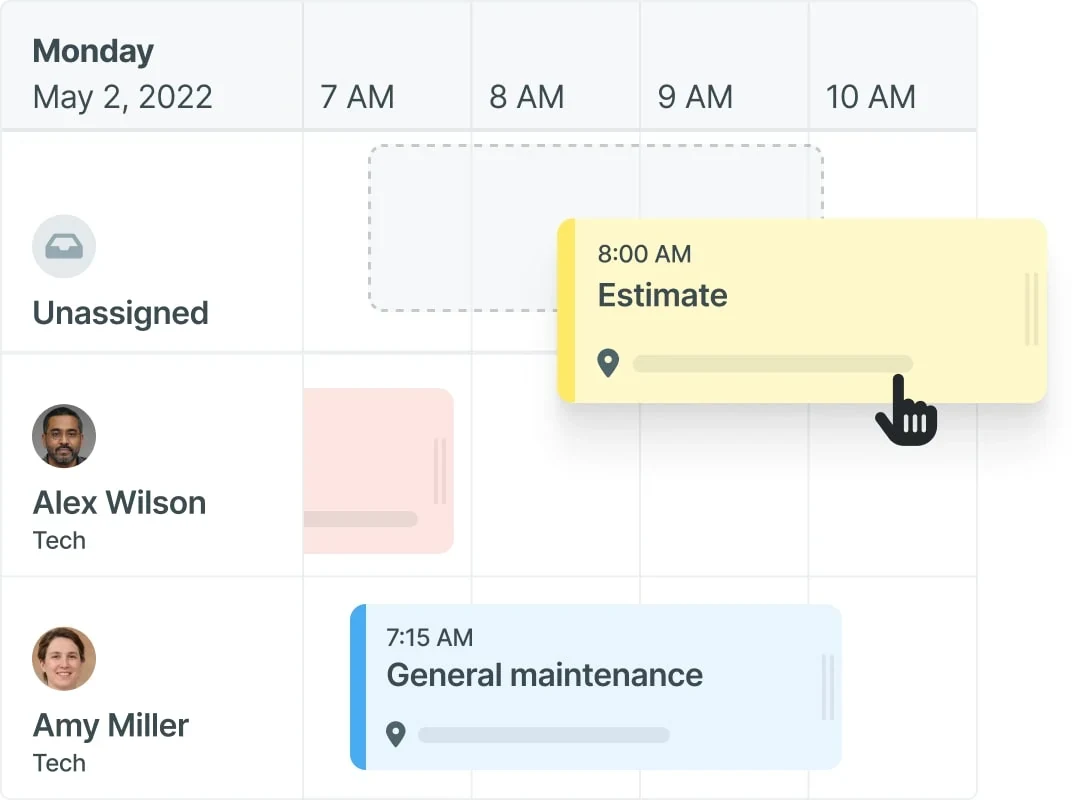
Drag-and-drop everywhere. Re-assign a 9 AM HVAC service call from Tech A to Tech B by dragging the job card. The system automatically pushes the on-the-way text to the customer when the new tech’s GPS shows arrival is imminent. Same workflow for changing day, time, or duration — drag the corner of the appointment block to extend it.
Smart filtering by trade and team. Filter the board to show only HVAC techs, only plumbers, only the morning shift, only the south-side route. The filter is persistent in the URL so a dispatcher can bookmark “morning HVAC” and “afternoon plumbing” as two separate views.
Real-time GPS tracking via Linxup integration. Each tech’s truck shows on a map view; the system surfaces “nearest available tech” suggestions when an emergency call comes in. For multi-truck dispatch operations, this is the single most-used feature after the calendar itself.
Capacity-based scheduling. The dispatch board enforces availability gates — you can’t double-book a tech who’s already on a job, and the system warns you before you schedule a 9 AM downtown appointment for a tech currently on a 8 AM job in the suburbs that’s 45 minutes away.
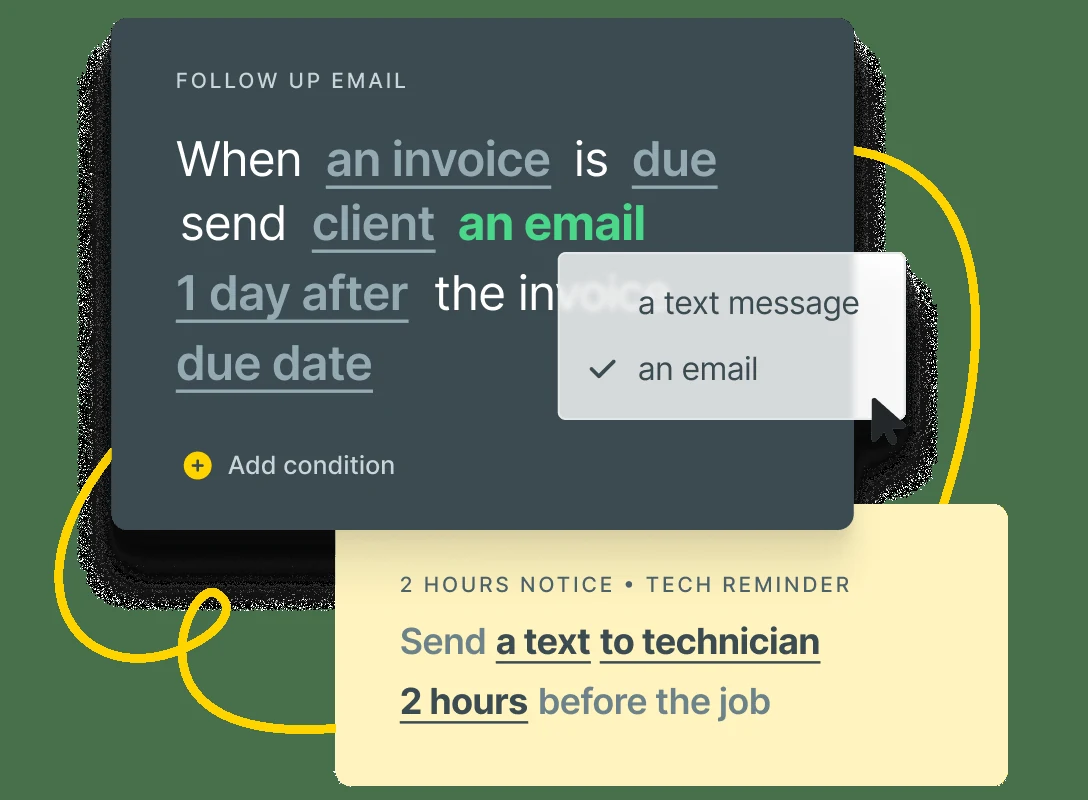
Customer notifications wired in. Appointment confirmation texts, on-the-way ETAs, post-job review requests — all automated from dispatch board events. The text templates are customizable per trade, and the timing rules (send confirmation 24 hours before, ETA 30 minutes before, review request 2 hours after job complete) are configurable per workflow.
The dispatch board doesn’t quite reach ServiceTitan’s Dispatch Pro depth — ServiceTitan owns the multi-day route optimization story for 30+ tech operations — but for the 3-25 tech service-trade scale Workiz targets, the dispatch board is genuinely category-leading at the price.
The Mobile App: What Field Techs Actually Get on the Truck
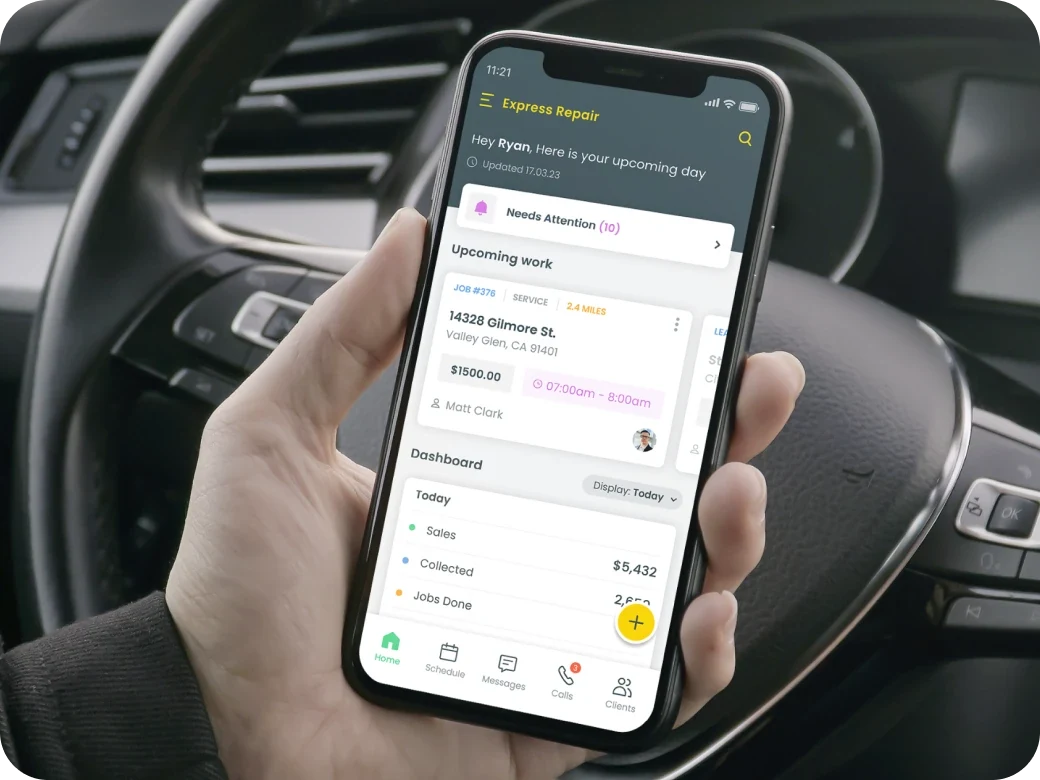
Field service software lives or dies on the tech’s phone. The dispatcher’s UX matters, but if the field tech opens the app and gets confused or it crashes on weak cell service, the platform fails operationally regardless of how good the office-side workflow looks.
iOS and Android, both in active development. App Store and Google Play, with feature parity across platforms. No “the iOS app is way better” or vice versa pattern that shows up with some FSM competitors.
Job details on the phone. Customer name, address, history, service notes, photos, equipment records, parts lists. Techs can pull the full customer file on a basement service call without driving back to the truck for a tablet.
Offline mode that genuinely works. This matters more than most contractors realize until they’ve worked a job in a basement, a metal-roofed warehouse, or a rural area where cell service drops to zero. Workiz lets techs view assigned jobs and update status, photos, and notes offline — sync triggers automatically when connection restores. The Capterra review base validates this: offline reliability is one of the consistent praise patterns and rarely complained about even in critical reviews.
In-field invoicing and payment collection. Tech generates invoice on the phone, customer reviews it, signs digitally, taps to pay (card on phone via Workiz Pay) or chooses ACH. Payment hits the merchant account same-day; the invoice lands in QuickBooks Online via the native sync. The whole loop closes without the tech driving back to the office.
Photo capture tied to jobs. Native camera integration, photos auto-attach to the job record. The CompanyCam integration adds organized photo workflow on top for shops that already standardize on CompanyCam — more powerful for documentation-heavy trades like restoration and roofing services.
Push notifications for new jobs. Tech receives a push the moment dispatch assigns a job; tap-to-accept or message the dispatcher about conflicts. The notification velocity is genuinely fast — measured in seconds, not minutes.
Where the app earns critical reviews. Some Capterra reviewers report occasional crashes during high-load moments (multiple simultaneous syncs after returning from offline mode) and a handful flag the photo upload speed on weak cell connections. These aren’t deal-breaker patterns — the 4.4/5 rating reflects the app working well most of the time — but they’re real workflow notes worth knowing.
Invoicing & Payments: Closing Out at the Truck
The mobile invoicing flow is what closes service-trade operations, and Workiz handles the full loop from invoice generation to deposit in your account.
Payment methods supported: credit and debit cards (chip, swipe, tap-to-pay on phone), ACH bank transfer, Apple Pay, Google Pay, and consumer financing through Wisetack and Sunbit. The financing integrations are the underrated feature — homeowners see “as low as $X/month” inline on the estimate, which materially raises close rates on $5K+ HVAC and plumbing replacements.
Smart invoice rules. Configure automated workflows: “When job marked complete, generate invoice with these line items, send via SMS and email, charge late fee 5% if unpaid past 30 days.” This eliminates the office-manager-as-bottleneck pattern where invoicing only happens when someone has time at the end of the week.
Branded invoice templates. Logo, color scheme, custom line-item descriptions, tax handling configurable per state and trade. The invoice doesn’t look like a generic FSM template — customers see a professional document with your brand front and center.
QuickBooks Online native sync. Two-way: invoices flow from Workiz to QBO, payments sync back, customers and items stay aligned. For shops running QuickBooks Online (the most common service-trade accounting pattern), this eliminates 80% of manual reconciliation work.
Workiz Pay processing rates — not published. This is the cons-list item. Workiz doesn’t publish their card processing fee schedule on the public site as of September 2026 (and since 2026 doesn’t publish plan prices either), and third-party review aggregators report some reviewers complaining about hidden fees. The platform offers competitive rates by request, but you’ll need to ask sales for a written rate sheet during the demo. Practical recommendation: at $30K+/month in card volume, a 0.4% rate difference is real money — don’t sign without published rates documented.
Digital tipping prompts. Configurable prompt at payment time asking the customer if they’d like to add 10/15/20% tip — particularly relevant for residential service trades where the tech-customer relationship is direct and tips are meaningful supplemental income for techs.
What Workiz Costs in 2026 (Standard to Ultimate, Now Sales-Quoted)
Workiz moved to sales-quoted pricing. The live pricing page now shows Standard, Pro, and Ultimate behind a "Request pricing" button with no dollar amounts, the free Lite tier is gone, and Genius Answering, Genius Phone, and Genius Marketing are each marked "sold separately." The 7-day free trial with no credit card is still offered. Every dollar figure below is the last published price from April 2026, kept as a reference for your sales call.
Pricing transparency is where I want to be especially careful. In April 2026, Workiz’s own pricing-plans page published five tiers with real numbers (higher than the $187/$229/$270 that third-party aggregators like ITQlick and Capterra were still showing). By September 2026 the numbers were gone, the old /pricing/ URL 404s, and the only price on the page is the FAQ line that annual billing saves “$400+.” The table below is that April rate card, labeled as such — it’s the best anchor you have for judging whether a quote is in line.
Annual billing rates as last published. As of September 2026 the live page lists Standard / Pro / Ultimate only, all "Request pricing." 7-day free trial with no credit card still offered. Plan prices, Genius add-on prices, and Workiz Pay processing rates are all sales-quoted — get every one in writing before signing.
Last-published math (April 2026): 10-tech Pro plan = $325 + (5 × $54) = $595/month annual = $7,140/year, before the now-separate Genius Answering add-on. Versus ServiceTitan Essentials at 10 techs roughly $3,250-$4,000/month plus $10K-$25K implementation.
The pricing structure has two practical implications worth understanding before you sign anything.
First: on the last published rate card, the flat-base structure was genuinely competitive at 3-5 techs and degraded into per-user math past that. A 5-tech HVAC shop on Pro paid $325/mo flat in April 2026 — $65/tech/mo for the dispatch board, the mobile app, QuickBooks sync, and (at the time) the Genius AI stack. A 15-tech shop on Pro paid $325 + (10 × $54) = $865/mo — still cheaper than ServiceTitan but with the per-user economics visible. Whether the quote you get in late 2026 still works that way is the first thing to ask: is there a flat base with users included, what’s the per-user rate above it, and what does the Genius Answering add-on cost on top? Don’t assume the April structure until sales confirms it.
Second: Workiz Pay rates are not public. This is the single most-flagged transparency gap in the Capterra review base. Oleksandr C., Owner of a consumer services company, wrote in a 1-star review: “CRM + phone service costs around $400 per month…hidden fees at every step.” That’s one anecdote, not a representative sample of the 218 reviews — but the pricing-transparency complaint pattern is real enough across critical reviews that the practical recommendation is: ask sales for a written processing rate sheet before signing, especially if you’re processing more than $30K/month in card volume where a 0.4% rate difference is meaningful margin.
The 7-day free trial with no credit card addresses a major friction point in the FSM category — ServiceTitan has demo-only access, Beam AI requires a sales conversation before trial, and most enterprise contractor software lives behind sales gates. Workiz lets you actually run real jobs through the platform for a week before committing — use it.
Integrations: Strong on Service-Trade Stack, Material Gaps on CRMs
Workiz publishes 17 named integrations as of April 2026 with solid coverage on accounting, lead generation, financing, and field-tech tools — but with material gaps on the CRM and marketing automation side that you should map against your existing stack before committing.
Strong coverage on accounting, lead-gen, financing, and field-tech tools. Material gaps on CRM and marketing automation — JobNimbus, ServiceTitan, GoHighLevel, Salesforce, HubSpot all not natively connected.
- → QuickBooks Online — two-way sync
- → Wisetack — consumer financing
- → Sunbit — consumer financing
- → Reserve with Google
- → Angi Leads
- → Thumbtack
- → HouseHappy · SearchKings
- → CompanyCam — photo doc
- → Linxup — fleet GPS
- → JB Warranties — extended HVAC
- → Google Calendar
- → AnswerConnect (human backup)
- → Nexa virtual receptionist
- → NiceJob — review automation
- → Mailchimp — email
- → Zapier — 5,000+ app workflows
- ✗ JobNimbus · ServiceTitan
- ✗ GoHighLevel · Salesforce · HubSpot
- ✗ Jobber · AccuLynx · Pipedrive
The Trane and American Standard partnership announced February 2025 is operational (preferred-FSM dealer-network status) rather than software-integration. The Reserve with Google integration is the highest-leverage lead-gen connection — homeowners click "Book" from the SERP and put themselves on the dispatch board.
The integration architecture reflects a strategic choice: Workiz wants to be your system of record, not a layer on top of someone else’s. That means if your sales pipeline already lives in JobNimbus or GoHighLevel, the path forward is either fully migrating to Workiz (giving up the CRM-side workflow) or running two systems with Zapier glue (which works but adds operational overhead).
What this looks like in daily workflow:
- Service-trade shop running QuickBooks + CompanyCam + Wisetack — the most common pattern; native integrations cover everything important, no Zapier required, low integration overhead.
- HVAC operation running JobNimbus or GoHighLevel as the spine — Workiz wants the CRM seat your existing platform already owns; either commit to migration or expect Zapier complexity.
- Multi-location operation needing Salesforce or HubSpot — Workiz isn’t built for enterprise CRM coexistence; the Ultimate tier may include some custom integration scope but evaluate carefully against ServiceTitan which has more enterprise-stack maturity.
For shops where the lead path is “homeowner clicks Book on Google → arrives on dispatch board → tech runs the job → invoice generates → payment hits QuickBooks Online” — the most common service-trade workflow — Workiz’s native integration map is genuinely complete. The gaps matter for shops with more complex stacks.
What 218 Capterra Reviewers Actually Say
The customer-base scale matters because review patterns at 218 reviews are statistically meaningful in a way that smaller-base SaaS isn’t.
The five-star consensus pattern across the Capterra review base: drag-and-drop scheduling that works on the first day, invoicing speed via SMS/email delivery, customer support responsiveness during onboarding, and the integrated client portal that lets homeowners see their service history without calling.
“Invoicing customers is very easy and can be sent via email and SMS texting which is a great feature.” — Louis A. F., President, Construction (5/5 — switched to Workiz from Housecall Pro)
“After testing out a few other client/job platforms, WorkIz turned out to be head and shoulders above the rest. The customer service people are super-responsive to input, are easy to reach, and take care of their clients. Highly recommend!” — Capterra reviewer, 5/5
“I have been using Workiz for over 5 years and initially, it was hard to transition from paper invoicing… But today, I can’t go without it. This software will do everything you need to run your business professionally.” — Capterra reviewer, 5/5 long-term customer
The one-star consensus pattern is what every Workiz prospect needs to read before signing. The dominant complaint is the built-in phone system reliability — multiple reviewers describe the same operational issue:
“Our biggest ongoing issue was with the phone system. For the entirety of our time with Workiz, we dealt with calls coming in where we would hear hold music, but no one was on the other end. We reported this multiple times, but support consistently told us nothing was wrong.” — paraphrased pattern across multiple Capterra 1-star reviews
The pricing transparency complaint is the secondary critical pattern:
“CRM + phone service costs around $400 per month…hidden fees at every step.” — Oleksandr C., Owner, Consumer Services (1/5 Capterra review)
Account management churn appeared in some critical reviews:
“Throughout the last year, we were assigned roughly six different account managers.” — Jesus S., Construction Professional (1/5)
What’s notably absent from the critical review base: complaints about the AI dispatcher’s accuracy, the dispatch board itself, or the offline mobile mode. Those features get consistent praise even from 3-star reviewers who had other issues. The 4.4/5 average reflects a genuinely strong core product with two specific operational weaknesses (phone reliability and pricing transparency) that you should pressure-test during the free trial and the sales conversation before committing to an annual contract.
Workiz vs ServiceTitan vs Jobber vs Housecall Pro: Where It Wins
Putting Workiz in context against the three other major service-trade FSM platforms is the most useful framing for evaluation.
All four platforms are 4.5+ rated and each owns a distinct lane. The right choice depends on your scale, trade mix, and whether AI dispatcher / call answering is core to your operation.
| Dimension | Workiz | ServiceTitan | Jobber | Housecall Pro |
|---|---|---|---|---|
| Starting price | Sales-quoted (last published $225/mo, April 2026) | $245/tech/mo (no free) | $39/mo Core | $59/mo Basic |
| Free trial | 7 days, no CC | No (demo only) | 14 days | 14 days |
| Native AI receptionist | Genius Answering (Dec 2024) ✓ — sold separately | Atlas AI Voice (Sept 2025) ✓ | Limited | AI Voice ✓ |
| Dispatch board depth | Strong (drag-drop + GPS) | Best in category (Dispatch Pro) | Solid | Strong |
| Best for trade scale | HVAC/plumb/elec 3-25 techs | 10-100+ techs $1M-$50M+ | Solo to 10 techs, all trades | 5-30 techs residential |
| Built-in phone system | Genius Phone add-on, sold separately (some reliability complaints) | Add-on (Contact Center Pro) | No | ✓ |
| Implementation time | Days, not months | 3-6 months + $10K-$25K fee | Days | 1-2 weeks |
| Capterra rating | 4.4 (218 reviews) | 4.4 | 4.5 (1,440 reviews) | 4.7 (2,739 reviews) |
The honest answer: no single FSM dominates. Match the platform to your specific stage. Workiz wins decisively for AI-forward HVAC/plumbing/electrical at SMB scale.
Workiz wins decisively when: you run HVAC, plumbing, electrical, garage door, or appliance repair at 3-25 techs, you want a built-in AI receptionist, and you’re not ready for ServiceTitan’s $50K-$80K year-one commitment. The Genius Answering + Genius Leads + Smart Messaging stack is genuinely category-leading at SMB scale — but since 2026 the plan is sales-quoted and Genius Answering is a separate add-on, so price the full stack, not the plan, before calling it the cheaper option.
ServiceTitan wins when: you run $1M+ revenue, 10+ techs, and you have dedicated office staff to absorb the 3-6 month ramp. The Marketing Scorecard, pricebook depth, and Atlas AI capabilities pay back at scale — but the math doesn’t work below $1M revenue.
Jobber wins when: you’re a solo operator or under 10 techs across mixed trades (lawn care, painting, handyman, light HVAC). At $39-$149/mo with the broadest trade reach in the category and the simplest UX, Jobber is the best fit for trades-generalist operations.
Housecall Pro wins when: you’re 5-30 techs in residential service trades and Instapay (next-day card deposits) plus the deep marketing automation matter more than AI dispatcher features. HCP’s 2,739 Capterra reviews at 4.7/5 reflect a genuinely loved residential-service-trade product.
The four platforms are all strong; the choice comes down to your specific stage and trade mix. Run the Workiz 7-day free trial, get a Jobber 14-day trial, and decide based on which platform’s UX matches your team’s working style.
The 2026 Roadmap: Hey Genius Mobile, Genius Marketing, and the Trane Partnership
Workiz’s 2026 product trajectory matters because the AI investment isn’t slowing down and the operational signals (executive talent, manufacturer partnerships, recognition awards) all point the same direction.
Hey Genius mobile voice assistant — beta-only as of April 2026, expected GA in 2026. “Hey Genius, what’s my next job?” voice commands on the mobile app for techs, in English and Spanish. Workiz is not currently accepting new beta users, but the public help center confirms the feature is in active development and will roll out to all Pro and Ultimate tier customers when it ships.
Genius Marketing — launched 2025. Lead-gen and re-marketing automation tools that surface dormant customers, schedule follow-up campaigns, and build re-engagement sequences. The full feature set is still expanding through 2026; this is one of the areas where Workiz is positioning to compete with GoHighLevel-style marketing automation built into the FSM rather than as a separate tool.
Genius Marketing’s strategic implication: if it ships well, Workiz reduces the case for layering GoHighLevel on top for service-trade marketing automation. Today GHL is the better marketing platform; in 12-18 months Genius Marketing might close enough of the gap that Workiz alone covers the stack.
Trane and American Standard partnership announced February 2025 — operational rather than software-integration. The agreement positions Workiz as a preferred FSM for Trane and American Standard’s HVAC dealer networks, which materially helps Workiz with credibility in the largest single trade vertical (HVAC) and provides a co-marketing channel for new shop acquisition. Don’t expect immediate API integrations from this; expect Trane-branded training programs and Workiz being recommended in dealer onboarding materials.
JB Warranties integration July 2025 lets HVAC technicians and plumbers sell extended service contracts directly from inside Workiz. For trades where service-agreement attach rate is a key margin driver, this is meaningful — selling a 5-year extended warranty at the time of installation (versus calling the customer back later to sell it) typically lifts attach rate from 8-12% to 25-35%.
Recognition awards 2024-2025: Deloitte Technology Fast 500 (November 2024), Inc. 5000 list third appearance (August 2024), San Diego Business Journal’s Fastest Growing Companies (November 2024). Awards aren’t product features but they’re signals — companies losing market traction don’t get those recognitions.
The realistic roadmap timeline:
- Today (April 2026): Genius Answering / Leads / Smart Messaging / Call Insights / Scheduling all in production
- Mid-late 2026: Hey Genius mobile voice GA; Genius Marketing maturing into full re-engagement automation
- 2027: Likely native CRM-side integration plays (Salesforce, HubSpot) as Workiz pushes upmarket toward enterprise
- 2027-2028: Probable expansion of Genius into autonomous tech-side workflows (“Hey Genius, write up this job for the customer”)
That’s editorial extrapolation from current trajectory, not commitments Workiz has made publicly. The actual sequence depends on engineering velocity and customer demand signals.
Who Should Use Workiz
HVAC, plumbing, and electrical service shops at 3-25 techs doing $300K-$3M in annual revenue — the sweet spot for the platform. Genius Answering — now a separately priced add-on — pays for itself and a good chunk of the plan if you’re losing 4+ leads per week to missed calls. The dispatch board handles the daily operational load; QuickBooks integration cleans up the back-office. The math at this scale is hard to beat.
Garage door, locksmith, appliance repair, and similar high-volume routine trades where the Genius Answering script handles 80% of inbound calls cleanly. These are the trades where the AI receptionist’s structured-script architecture is the right fit; emotionally complex calls are rare and routine intake dominates volume.
Multi-trade service operations running HVAC plus plumbing plus electrical under one roof — the dispatch board’s smart filtering handles dispatching the right tech for the right trade, the pricebook supports multi-trade SKU management, and the trade tags let reporting roll up by trade or by tech.
Operations losing meaningful revenue to missed inbound calls — Workiz’s stat is that 40% of missed calls are new business and 78% of leads who don’t get answered on the first try go to a competitor. Genius Answering at 24/7 coverage with three-concurrent-call capacity addresses this directly.
Shops on QuickBooks Online needing tight invoice-to-accounting sync — Workiz’s QBO integration is one of the most complete in the FSM category and the daily reconciliation workflow is meaningfully better than alternative platforms requiring manual export-import.
Service-trade businesses competing on local search visibility — the Reserve with Google integration places a booking link directly in your Google Business Profile that pulls homeowners straight from the SERP into your dispatch board. For trades where Google search is the dominant lead source, this is the single most-leveraged integration.
Who Should NOT Use Workiz (and Where to Go Instead)
Roofing-only contractors, especially insurance restoration shops — Workiz works for roofing service calls but doesn’t have purpose-built features for insurance scope, supplements, or Xactimate workflow. Use JobNimbus for sales-first roofing operations or AccuLynx for insurance-restoration-leaning shops.
Custom home builders and high-end remodelers — Workiz’s strengths in dispatch and service-call workflow don’t map to construction project management, change-order workflow, or Selections. Use Buildertrend for custom-home work or BuilderPad for the homeowner-portal-first remodeler workflow.
Operations using JobNimbus, GoHighLevel, or ServiceTitan as system of record — Workiz wants to BE your CRM, and the lack of native integration with these platforms means you’re either fully migrating or running parallel systems with Zapier glue. If your pipeline already lives in JobNimbus or GoHighLevel, the switching cost is high; evaluate carefully whether Genius Answering alone justifies it.
Solo operators with under 5 calls per day — the free Lite tier is gone as of September 2026, and the dispatch board and AI features are overkill at that volume versus a $39/mo Jobber Core plan or even Google Calendar plus Stripe links. Don’t take a Pro quote (last published $325/mo, April 2026) plus a Genius Answering add-on unless your call volume justifies the AI features.
Pressure washing, lawn care, cleaning, or exterior-maintenance service trades — Workiz is HVAC/plumbing/electrical-first. QuoteIQ is purpose-built for exterior-service operations with the same AI-first philosophy at a materially lower price point — Max tier is $699/mo flat-rate with unlimited users versus Workiz Pro at its last published $325/mo for 5 users (then $54-$65/user/mo above that, April 2026 — sales-quoted now). For crews 8+ in non-HVAC trades, QuoteIQ’s price math typically wins by a wide margin.
High-volume commercial GCs bidding 50+ projects per year — Workiz isn’t built for plan-room takeoff workflow. Use Beam AI for AI-powered multi-trade takeoff acceleration and Procore for the GC-side operations spine.
Operations doing $5M+ in annual revenue with 25+ techs — at this scale ServiceTitan’s Marketing Scorecard, pricebook depth, and Atlas AI enterprise features pay back the higher cost. Workiz scales technically to this size on the Ultimate tier but the platform’s design center is SMB; ServiceTitan is the editorial recommendation above 25 techs in single-trade HVAC/plumbing/electrical operations.
Service-trade shops in highly emotional residential services (water damage restoration, biohazard remediation, slab leaks, smoke damage) where the first call’s tone and empathy materially affect close rate — Genius Answering is structured-script AI; consider Smith.ai layered in front of Workiz for that specific use case where human receptionists with optional AI assist deliver better outcomes than fully autonomous AI.
Shops where published pricing is non-negotiable — as of September 2026 Workiz doesn’t publish plan prices, Genius add-on prices, or Workiz Pay processing rates; everything runs through a sales quote. If you want to see the whole bill on a public page before you talk to anyone, Housecall Pro and Jobber both publish their plan prices and processing rate sheets.
Anyone whose primary need is human-touch customer service over AI automation — Workiz’s strength is the AI layer; if the last thing you want is more automation between you and your customers, this isn’t the right platform. Stick with Jobber or Housecall Pro and run a human-staffed answering service like Smith.ai or Ruby Receptionists on top.
The Bottom Line: Best AI-Native FSM for Service Trades in 2026
Workiz is the most defensible AI-native field service platform on the market in 2026 for HVAC, plumbing, electrical, garage door, and appliance repair shops at 3-to-25-tech scale. The Genius AI stack — Answering, Leads, Smart Messaging, Call Insights, Scheduling — has been in production for 14 months, has the largest deployed AI footprint in the FSM category at this price point, and delivers measurable ROI on missed-call recovery alone. The 218-review Capterra base averaging 4.4/5 with 4.6/5 on G2 reflects a genuinely strong service-trade product, validated by 120,000+ professional users on platform — not a startup pitch. The dispatch board, mobile app, QuickBooks integration, and Reserve with Google connection cover the daily operational stack that service trades actually run.
The constraints to be clear about: Workiz pulled published pricing in 2026 — plans are sales-quoted now (last published $225/$275/$325 monthly, April 2026), the free Lite tier is gone, and Genius Answering, Genius Phone, and Genius Marketing are sold as separate add-ons — the built-in phone system shows up as the dominant complaint in critical reviews and is worth pressure-testing during the free trial, Workiz Pay processing rates aren’t published publicly so you’ll need a written rate sheet from sales before signing, and there’s no native integration with JobNimbus, ServiceTitan, GoHighLevel, Salesforce, or HubSpot — Workiz wants to be your system of record, not a layer on someone else’s. None of these are deal-breakers; they’re product-stage realities you need to factor into your evaluation.
For HVAC, plumbing, electrical, garage door, and appliance repair operations doing $300K-$3M in annual revenue with 3-25 techs — this is the most editorially defensible AI-forward FSM bet of 2026 and the one that delivers the most ROI from the AI layer specifically. Run the 7-day free trial — no credit card, no commitment — and decide based on whether Genius Answering picks up the calls you’d otherwise lose, whether the dispatch board matches the way your team actually works, and whether the QuickBooks integration cleans up the back-office mess you’re currently managing manually.
For roofing-only operations, custom home builders, restoration shops chained to Xactimate, anyone needing JobNimbus/ServiceTitan-as-system-of-record integration, or shops where pricing transparency in card processing is non-negotiable — the fit is materially weaker and a different platform earns the recommendation.
The category is moving toward AI-native service-trade operations whether Workiz specifically wins or not. The right question for any HVAC, plumbing, or electrical operation in 2026 isn’t “should we use AI for our calls?” — it’s “which AI dispatcher is mature enough for our trade and call volume today, and which is positioned to scale with us through 2027 as the AI features deepen?” For the SMB service-trade segment, Workiz is the clearest answer to both halves of that question right now.