

Before we get to whether iRoofing is worth $107 a month on a two-year lock or $149 month-to-month, here’s the moment that makes small-shop residential roofers pay for it.
The homeowner is standing in her driveway looking at the weatherbeaten roof she’s been putting off replacing. You open the iPad. You point the camera at her front elevation. In under a minute she’s looking at a photorealistic preview of her actual house with charcoal Owens Corning Duration shingles on it. You tap once and she’s seeing Driftwood. Tap again — Weathered Wood. Tap — Quarry Gray. She decides on Driftwood before you’ve even climbed a ladder. You write the estimate while she’s still picking upgrade options. You both sign the proposal on the tablet in the driveway.
That’s iRoofing’s pitch in one paragraph. Not measurement speed, not aerial accuracy — close rate. This is a sales tool that happens to do measurement, not a measurement tool that happens to have a proposal builder. And understanding that distinction is the single most important thing about deciding whether iRoofing belongs in your 2026 stack.
What iRoofing Actually Is (and Where It Fits in 2026)
iRoofing is a residential roofing platform built around four things: a DIY aerial measurement tool, a proprietary high-resolution imagery service called Clearoof, an AI-powered material visualizer, and an estimating/proposal builder. It’s been in market since 2011 — older than most of the roofing-software competitors it’s compared against — and was acquired by Porch Group (NASDAQ: PRCH) on December 31, 2020. It sits today inside Porch’s Software & Data segment.
The marketing category it gets listed under is “roofing software,” but that undersells how narrow iRoofing’s scope actually is. This is not a CRM. Not project management. Not accounting. Not field service. It is measurement + visualization + proposal, running on a flat $107-$149/month subscription that includes three users and unlimited standard-resolution measurements.
iRoofing processes more than 485,000 jobs annually (Source: Porch Group acquisition filing, January 2021) and positions itself against EagleView on imagery, Roofr on measurement and proposals, and Hover on visualization simultaneously. The real answer is that iRoofing sits in the overlap of those three — less accuracy-benchmarked than EagleView, less modern than Roofr, less visualization-deep than Hover — but with a flat-rate unlimited-measurement pricing model none of them match at small-contractor scale.
The Color Visualizer Is Doing the Actual Closing
Talk to contractors who pay for iRoofing and the conversation comes back to the visualizer every single time. This is not coincidence — it’s the feature doing the sales lift, and it’s the single reason most subscribers renew.
The AI Roof Color Visualizer works from a standard street-view photo of the homeowner’s actual house. The app detects the roof outline using computer vision, then overlays manufacturer-specific shingle products in real time. The homeowner doesn’t see a generic rendering — they see their own house with specific SKUs they can actually buy, rotating through six to a dozen color options as fast as you can tap the screen.
Named contractor quotes tell the story plainly:
“By using the iRoofing Visualizer, we have doubled our closed rate, and your measurement tool has increased our productivity by 40%.” — Eric Caraballoso, Latite Roofing & Sheet Metal (Source: iRoofing testimonials page)
“Game changer! We love iRoofing, it has reduced our costs and improved our accuracy and pricing.” — Anna Olivier, Roofing Louisiana (Source: iRoofing testimonials)
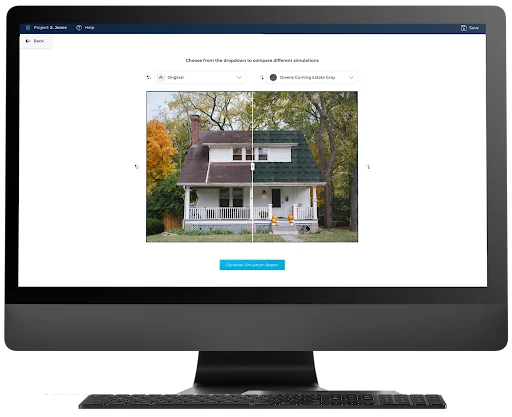
The visualizer supports traditional asphalt shingles and standing-seam metal roofing across multiple manufacturers. Iconic exemplar colors shown in-app include Terra Cotta, Amber, Driftwood, Teak, Midnight Plum, and Quarry Gray, with side-by-side comparison and customizable rotation, tilt, and shading. It runs on iPad, iPhone, and browser, with seamless handoff between devices.
Compared head-to-head against Hover’s Instant Design — which launched February 2025 and shares the same sales-tool premise — iRoofing’s visualizer has two real advantages. First, it works from a single street-view photo rather than requiring a homeowner-captured 8-photo sequence, which means you can pre-render visualizations before you even knock on the door. Second, it’s included in every subscription tier at no extra per-job cost, whereas Hover’s Pro plan runs $99/month on top of $29-$139 per-project fees.
The tradeoff: Hover renders against a full 3D model of the exterior, which looks more photorealistic for full-exterior applications (roof + siding + paint + trim). iRoofing is a 2D street-view layer — faster and cheaper for roof-only visualization, but less impressive if you’re selling a full exterior remodel where the walls, trim, and soffit matter as much as the shingles.
For residential retail roofing shops that close at the kitchen table, this is the feature that justifies the subscription. Everything else iRoofing does is in service of that moment.
Clearoof: iRoofing’s Second Real Differentiator
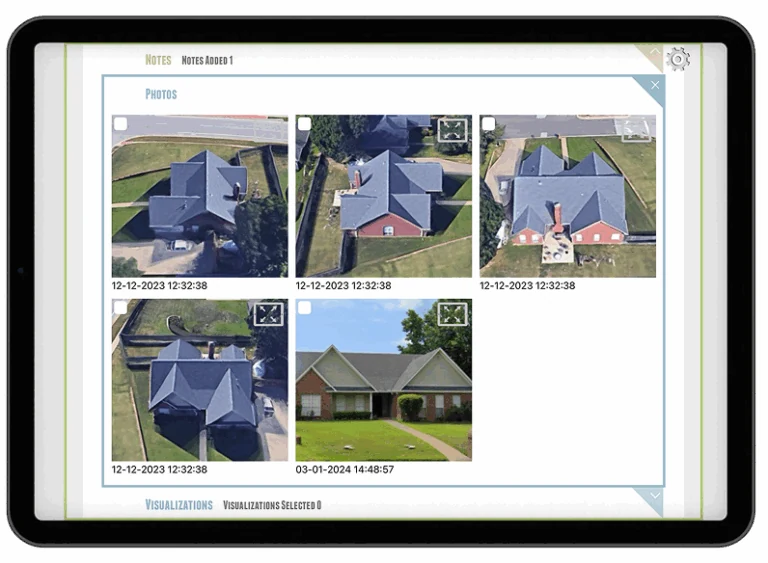
Clearoof is iRoofing’s proprietary aerial imagery service — launched July 30, 2019 — and it’s the technical capability that separates iRoofing from basic Google Maps-based DIY measurement tools. The imagery claim is specific: 3-inch square pixel aerial photography, which iRoofing publicly states is 4× clearer than Google Maps and 16× clearer than Apple or Bing Maps (Source: PR Newswire, July 30, 2019).
Unlike satellite imagery, Clearoof is captured from airplanes, which gives it substantially better resolution at roof scale. More importantly, the archive includes multiple seasonal captures per covered property — Fall and Winter views in addition to the standard Spring/Summer imagery satellites default to. For a roofer working in heavy-tree markets like South Louisiana, the Pacific Northwest, or the wooded Northeast, this matters. When the summer imagery is obstructed by oak canopy, you can pull a January capture of the same address and measure against a clean roof.
iRoofing CEO and co-founder Daniel Meridor framed the Clearoof launch this way in the company’s 2019 press release: “By developing Clearoof we have removed the last barrier to fulfilling our customers’ complete needs. Before, if a satellite or aerial image was hindered by obstructions such as springtime foliage, they were stuck with it. Now they can go back in time.”
The coverage claim is “over 90% of areas” — iRoofing says Clearoof doesn’t cover every market, and the shape of that coverage isn’t publicly mapped. In practice the coverage is strongest in major metros and contractor-dense suburbs; rural and exurban markets are hit-or-miss.
Every subscription tier includes a $75/month HD imagery credit — 150 Clearoof credits, each one credit per HD roof. That works out to approximately 25 HD-mode measurements per month before you start paying out-of-pocket per credit. For a solo-to-small-team operation running 10-20 measurements/month, 150 credits is more than enough. For a volume lead-gen operation pulling 100+ measurements, it’s a real friction point that doesn’t exist on Roofr’s flat per-report pricing.
Standard-resolution aerial measurement is unlimited regardless of plan. The credit limit only applies to HD-mode Clearoof captures, which is an important distinction if you’re doing high-volume but don’t need HD for every job.
The DIY Measurement Workflow: What 4 Minutes Actually Looks Like
iRoofing markets a 4.36-minute average moderate-roof measurement time. Based on contractor feedback on Capterra and the iRoofing testimonials page, that number is realistic for a trained user on a standard suburban two-story. John Walters at AAA Construction & Restoration publicly reports “17 estimates in 1 hour” — that’s closer to three-and-a-half minutes per estimate at pace, which lines up with the published benchmark.
Here’s what the measurement process actually looks like:
- Enter the property address. iRoofing loads the best available imagery — Clearoof HD if the property is covered, standard aerial if not, or you can override to a drone image you uploaded yourself.
- Pick the imagery source. Toggle between satellite (primary), uploaded drone imagery, Clearoof HD, or blueprint upload for new construction where no aerial has been flown yet.
- Outline the roof. The sketch tool auto-snaps to visible roof edges; the Automatic Pitch Detector reads pitch from the photo.
- Verify pitch per facet. The auto-detector is accurate on clean suburban asphalt roofs. It gets tripped up on multi-pitch cut-up ranch profiles and flat-over-pitched mixed-structure roofs — override manually on those.
- Generate the report. Output includes squares, eaves, valleys, ridges, hips, penetrations, and a pitch diagram.
iRoofing claims 98-99% measurement accuracy. That’s a marketing number — unlike EagleView, there’s no published independent benchmark (EagleView published a 98.77% CompassData LiDAR-validated accuracy in June 2025 for the Denver metro). Contractor reviews on Capterra consistently corroborate iRoofing’s claim within 1-2% tolerance. Del Bales of Bales Co. writes on the iRoofing testimonials page: “We just completed a condo complex that we measured using iRoofing (didn’t put a tape measure on the job). iRoofing measurements 898.66 squares, actual 892 squares. Not bad.” That’s a 0.75% variance on a large commercial job — in the same ballpark EagleView delivers.
The Scale Verify tool lets you field-verify critical measurements against a known on-site dimension (a door frame, a standard 4×8 sheet of plywood). It’s a useful sanity check when the imagery quality is iffy or the automatic pitch detector reads something surprising.
Where the measurement workflow breaks down: heavily tree-covered properties where even Clearoof’s seasonal archive can’t find a clean view, complex commercial roofs with multiple flat-over-pitched sections, and new construction built in the last 6-18 months that hasn’t been flown yet. The workaround for the first two is drone upload (you fly the site yourself). The workaround for new construction is blueprint upload, which works if you have the architectural plans but not for a typical spec-build where you don’t.
For residential retail estimating, the measurement tool is solid. It’s not insurance-adjuster-grade and you shouldn’t treat it that way — if you’re writing a $40,000 insurance supplement, you still want EagleView underneath it.
Estimating, Pricebooks, and the Proposal Output
iRoofing’s estimating engine lets you build pricebooks around either line-item pricing (per-square of underlayment, per-vent, per-pipe-boot) or flat price-per-square billing. The pricebook supports labor rates, material costs, and profit margin settings, plus good/better/best tiered pricing for upsells — a useful structure for the kitchen-table close where you’re showing the homeowner three options on the iPad.
The material catalog is where iRoofing’s roofing-trade specialization shows up most visibly. Native line items include:
- Tear-off calculation by material type (layers of existing shingles, tear-off method, dumpster-weight math)
- Asphalt shingle systems with waste factor support
- Metal roofing (including standing seam)
- Underlayment, ice-and-water-shield, ridge vents, drip edge, pipe boots
- Warranties (manufacturer + labor)
- Permit fees
- Local material pricing suggestions
Commercial roofing is supported — Steve Little at KPost Roofing & Waterproofing, a large Texas commercial roofer, publicly vouches for iRoofing on the testimonials page — but TPO and specialty single-ply systems aren’t as deeply prebuilt as in commercial-first estimating tools. You’d build those line items yourself in your pricebook. Residential retail is where the prebuilt depth actually shows up.
Proposals generate as branded PDFs with your company logo, terms & conditions, and photos. The homeowner can e-sign the proposal on the iPad, in a browser, or on their phone. Proposals auto-save to the customer database and can be shared via email, Dropbox, Google Drive, or Microsoft OneDrive.
The meaningful gap in the proposal workflow: iRoofing does not process payments natively. No integrated Stripe, Square, or ACH payment acceptance from the signed proposal. No deposit collection at signature. No financing integration — no GoodLeap, no Wisetack, no Hearth, no Financeit. This is a meaningful feature gap against Roofr (processes cards at 2.8% + $0.30 and has GoodLeap financing embedded in the proposal) and against AccuLynx (which integrates both payment processing and financing). If you close at the kitchen table and want to run the card while the homeowner is still sitting there, iRoofing is not the tool.
The Integration Gap Is the Biggest Thing to Know Before You Buy
This is the section I’d feel wrong not being direct about. iRoofing’s integration story is the weakest of any tool in the 2026 estimating category.
The complete list of confirmed native integrations on the iRoofing platform is:
- Google Drive
- Dropbox Business
- Microsoft OneDrive
- iCloud
That is the full list. Those are file-storage connectors for proposal attachments — not workflow integrations.
iRoofing has no native integration with:
- JobNimbus — the most popular CRM among roofing contractors
- AccuLynx — the production-roofing category leader
- Jobber — the multi-trade service CRM
- GoHighLevel — the marketing-first CRM many roofing lead-gen shops run
- HubSpot or Salesforce
- QuickBooks — this alone disqualifies iRoofing for contractors whose accounting is load-bearing
- Xero or Sage Construction
- CompanyCam — the photo documentation standard
- EagleView or Hover
- DocuSign (iRoofing has built-in e-sig, which partially offsets this)
- Stripe, Square, or any payment processor
- Zapier — meaning there’s no general-purpose automation escape hatch either
The most painful absence is Xactimate. If you’re an insurance-restoration contractor writing claims in Xactimate, iRoofing’s sketches and measurements don’t flow into your claim workflow. The Capterra complaint is verbatim: “Roof sketches don’t integrate with Xactimate estimate program” (Source: Capterra verified reviewer). This is a category-leading weakness — EagleView has native in-Xactimate integration via the February 3, 2025 Verisk partnership, and Roofr launched a Verisk-certified $10 ESX export on April 15, 2026. iRoofing is the only major DIY-measurement player in this category without an Xactimate path.
What this means in practice: iRoofing is a standalone tool. If you buy iRoofing, you’re running it alongside your real CRM, your real accounting system, and your real photo documentation tool, with manual data transfer (or PDF email) between them.
What to pair it with:
- CRM: JobNimbus if you’re roofing-first. AccuLynx if you’re production roofing. Jobber if you’re multi-trade service. GoHighLevel if you’re marketing and lead-gen heavy. If you’re deciding between the last two, our GoHighLevel vs Jobber breakdown covers which fits which business model.
- Accounting: QuickBooks for the overwhelming majority of roofing contractors.
- Photo documentation: CompanyCam — you’ll manage the handoff via shared cloud folders since there’s no native integration.
- Aerial measurement for insurance work: EagleView as the adjuster-accepted supplement for claim work. iRoofing’s Clearoof is for the retail side of your book.
If you’re spending $149/month on iRoofing plus $200-$300/month on JobNimbus plus $80/month on QuickBooks plus $34/user/month on CompanyCam — do the honest math on whether iRoofing is adding $149/month of value over just buying Roofr’s $209-$349 plan, which gets you the measurement tool, the CRM, and the proposal workflow in one integrated stack. For a lot of small operations, it isn’t.
iRoofing’s AI — Real, But Narrow
iRoofing markets three AI features. Two are real and narrowly useful; the third is marketing polish on standard template automation.
The AI Roof Color Visualizer (covered in detail above) uses computer vision to detect roof outlines from street-view photos and overlay manufacturer shingle products in real time. This is legitimately AI — the roof detection has to work reliably across thousands of home designs, and the material overlay has to match perspective and lighting convincingly. It’s the single AI feature in the product that materially moves the sales needle.
The Automatic Pitch Detector reads roof pitch from aerial and street-view photos. This is a computer-vision-based ML feature and it works well on clean suburban asphalt roofs. Multi-pitch, flat-over-sloped, and heavily cut-up ranch profiles trip it up, and you override per-facet manually when that happens. It’s a useful time-saver on standard work, not a replacement for your own judgment on complex roofs.
The AI Smart Proposal is the feature where the “AI” label is doing the most marketing work. It generates proposals from saved templates, filled with measurement data and pricebook line items. It’s template automation with a light intelligence layer — not generative AI proposal writing. If you’re expecting the LLM-powered rewriting you’d get from RoofD AI or Beam AI’s proposal generators, this isn’t that.
What iRoofing does not have:
- AI damage detection from drone or aerial imagery (EagleView Assess has this; it expanded September 10, 2025 to large and complex roofs)
- AI takeoff — automatic roof sketching from a satellite photo without manual tracing
- AI chatbot, copilot, or assistant
- Generative AI estimate writing
- AI-driven pricing optimization
Honest context: iRoofing’s AI is a visualization and detection layer, not an intelligence layer. In a category where Roofr is building Lead Capture AI Agents (announced roadmap for late 2026), EagleView launched the agentic Horizon platform with an MCP-based architecture April 21, 2026, and Hover’s Connected Platform unified material-pricing AI in January 2026, iRoofing’s AI feels behind the pace of the category.
That’s not a disqualifier — the color visualizer is genuinely the best-of-category feature for closing residential jobs at the kitchen table — but it’s worth calibrating expectations. No broader AI partnership announcements or roadmap commitments have been made publicly by iRoofing for 2025-2026 beyond the features above.
2026 Pricing (Verified on iRoofing.org, Not Reseller Pages)
iRoofing’s pricing is published publicly on iroofing.org/pricing. Third-party review aggregators — Software Advice, Capterra, GetApp — still display older pricing tiers, which should be ignored. The April 2026 verified tiers:
| Plan | Effective Cost | Billing | Position |
|---|---|---|---|
| Monthly | $149/month | Month-to-month | No long-term commitment |
| 12-Month | $124/month | $1,488 billed annually | Marketed as “Most Popular” |
| 24-Month | $107/month | $2,576 billed every 2 years | Marketed as “Best Value” |
Every plan includes:
- Unlimited DIY standard-resolution measurements
- $75/month HD imagery credit — 150 Clearoof credits = ~25 HD-mode roofs per month
- AI Roof Color Visualizer
- Digital Pitch Book for kitchen-table presentations
- Light customer database (not a CRM)
- E-signatures on proposals
- 3 users — flat, no per-user fees
- iOS + Android + desktop access, 3 concurrent device logins
- Unlimited training
Separately priced add-ons:
- iRoofReports — ordered measurement reports delivered by iRoofing’s own team. Approximately $10 for perimeter-only reports, $24 for full residential reports. Subscribers get 20% off. Non-subscribers can also order à la carte without a subscription.
- Additional HD Clearoof credits — beyond the 150/month included in the $75 credit, you pay per-report overage.
Hidden costs worth knowing:
- No free trial is publicly disclosed on iroofing.org/pricing. The CTAs are “Book a Demo” or “Watch Video.”
- No free tier. Unlike Roofr’s $0 Starter, iRoofing requires a paid subscription from day one.
- Pricing increased from $129 to $149 monthly at some point in 2024-2025 — third-party sites still showing $129 are out of date, and the change wasn’t publicly announced in iRoofing’s news archive.
- Device-switching friction — the 3-device login cap means sales teams moving between office iPad, truck phone, and home laptop sometimes have to log out to switch.
The real-world math for a small roofing shop:
At $107/month on the 24-month plan, iRoofing costs $1,284/year (plus 20% off iRoofReports you order). Roofr’s Essentials plan is $2,508/year annualized plus $13 per report. If you’re pulling fewer than ~15 measurements/month and don’t need the Roofr CRM, iRoofing wins on raw subscription cost. If you’re pulling 20+ measurements/month, Roofr’s per-report pricing starts adding up — but you’re also getting the CRM, proposal workflow, payment processing, and financing integration, which you’d have to buy separately alongside iRoofing.
iRoofing wins the subscription-cost fight for small, low-volume, measurement-first shops that already have a CRM. Roofr wins for any contractor where CRM and proposal workflow matter as much as measurement.
Who iRoofing Is Built For
iRoofing is a good fit if most of these describe your operation:
- Solo-to-small-team residential roofing contractor (1-5 people) running 10-30 measurements per month
- You close jobs in person, at the kitchen table or in the driveway — the color visualizer materially lifts your close rate on the appointment
- Roofing-first and residential-first — asphalt shingle retail work with occasional metal, gutters, and light commercial
- You want flat-rate pricing with unlimited measurements rather than per-report fees
- You already have a CRM you’re happy with (JobNimbus, AccuLynx, GoHighLevel, or Jobber) and you’re looking specifically for a measurement and visualizer tool to plug into it manually
- You do limited insurance-restoration work — less than 25% of your book — and Xactimate integration isn’t your critical path
- You value the sales-close feature (visualizer) more than integration depth
- You’re comfortable with PDF-based data transfer between iRoofing and your CRM, accounting, and photo tools
The core demographic: the 3-person residential retail roofing shop in a suburban market where the sales process is an in-home demo and the close happens before the homeowner gets out of the driveway. This is what iRoofing was designed for, and it does the job well.
Who iRoofing Is Not For (and What to Use Instead)
iRoofing is the wrong choice — and will actively cost you money or time — if any of these describe your situation.
Insurance-restoration roofers writing claims in Xactimate. The Xactimate gap isn’t going away — iRoofing’s sketches don’t flow into your adjuster workflow. Use EagleView for the adjuster-defensible measurement (98.77% CompassData-benchmarked accuracy, live in-Xactimate integration via the Verisk partnership) or Roofr’s $10 Verisk-certified ESX export if you want a cheaper satellite-to-Xactimate bridge.
Production roofers running 50+ jobs per month. iRoofing’s light customer database isn’t a CRM — you’ll hit its ceiling fast on crew management, job costing, supplement workflow, and production reporting. AccuLynx is the category leader for production residential roofing; JobNimbus is the tier-two choice at a lower price point. Pair either with EagleView for the measurement layer.
Multi-trade contractors (roofing + HVAC + plumbing + electrical). iRoofing is roofing-only and residential-first. If you’re running a service business that spans trades, use Jobber or Housecall Pro as your platform. For mixed roof-and-exterior work, Hover is the better visualization tool because it covers siding, paint, doors, and trim — not just roofs.
Any contractor whose accounting is load-bearing. No QuickBooks integration means every job’s cost-to-revenue reconciliation is a manual PDF shuffle. If job costing is how you know whether your business is actually healthy, iRoofing’s standalone architecture will cost you hours per week. JobNimbus or AccuLynx with native QuickBooks integration is a meaningfully better fit.
Marketing-heavy lead-generation roofing shops. If most of your pipeline comes from paid ads and you’re optimizing for conversion on the first appointment, iRoofing’s visualizer is excellent — but the lack of integration with GoHighLevel or call tracking means the top-of-funnel handoff breaks. You’re better off with Roofr’s Instant Estimator ($149/mo) as the landing-page conversion tool plus a real CRM for the follow-up.
Solar installers, painting contractors, and landscapers. iRoofing doesn’t support solar PV design, is weak on paint-specific visualization (Hover owns this segment), and has no landscaping features. Use trade-specific tools instead.
Very high volume operations (100+ measurements/month). The $75/month HD credit (150 Clearoof credits) caps you at ~25 HD measurements; beyond that you pay per credit. At very high volume, EagleView’s subscription-based pricing starts winning on unit economics even at their premium per-report cost.
What Real Contractors Are Saying
iRoofing’s review volume is lower than competitors — a legitimate caveat worth noting before interpreting the aggregate ratings. Current April 2026 aggregates:
- Capterra: 4.5/5 across 23 verified reviews — ease of use 4.5, customer service 4.7
- G2: 4.8/5 across 3 reviews — a statistically thin sample that shouldn’t be weighted heavily
- ITQlick: 4.4/5, ranked #2 of 4 in their Roofing Contractor systems taxonomy
For comparison: AccuLynx has 800+ Capterra reviews, JobNimbus has thousands, and Roofr has 101 Capterra reviews. iRoofing’s smaller review base means the aggregate numbers are directionally useful but statistically thin.
The five-star consensus comes back to three themes: measurement speed, accuracy against tape verification, and the visualizer’s sales lift.
“This is a great program. Picked it up in Florida. More accurate than EagleView. I can draw up a roof in 10 mins.” — David Bothe, Aspen Industries (Source: iRoofing testimonials)
“I was able to do 17 estimates in 1 hour. Got the job and a raise. Thanks to Elizabeth for signing us. iRoofing paid for itself for 10 years today.” — John Walters, AAA Construction & Restoration Services (Source: iRoofing testimonials)
“My investment in iRoofing is a no-brainer. We’re saving time. We’re increasing sales. As a result, we’re growing profits.” — Steve Little, KPost Roofing & Waterproofing (Source: iRoofing testimonials)
Support consistency at 4.7/5 on Capterra is the strongest individual sub-score, and named-contractor testimonials back it up.
The critical review pattern is narrower but pointed:
- Feature bugginess and device compatibility — a 2019 Capterra review by a construction estimator called the software “very buggy” and noted incompatibility with certain devices (Capterra, May 31, 2019). This is older feedback; the complaint volume has dropped in more recent reviews, suggesting iRoofing addressed some of this.
- Tree-cover defeats aerial imagery — multiple Capterra reviewers flagged this. Clearoof’s seasonal archive (launched July 2019, after most of the critical reviews were written) mitigates but doesn’t fully eliminate the problem.
- HD imagery credit metering — the $75 credit / 150 Clearoof credits cap frustrates high-volume operators who’d prefer unlimited HD measurement.
- Device-switching friction — the 3-device login cap requires log-in/log-out when moving between office iPad, field phone, and home computer.
- The Xactimate gap — the single most damaging feature-level complaint among insurance-restoration contractors.
Expert vouch: Jim Johnson of Contractor Coach Pro — a recognized industry coaching brand active in contractor operations training — publicly endorses iRoofing on iroofing.org/testimonials: “During the current evolution of contractors with social distancing, the iRoofing app is a must have that solves so many obstacles all in one package!” The endorsement is from the 2020 pandemic era, but Contractor Coach Pro remains active in the roofing trade.
Overall expert consensus across review platforms: iRoofing is legitimately useful for small residential roofing shops, especially ones that sell on visualization. It’s not the most integrated, not the most AI-advanced, not the most insurance-grade tool in the category — but the sales-close feature is genuinely best-in-class, and the flat pricing is a structural advantage for low-volume operators that no per-report competitor can match.
The Short Answer
iRoofing is the right tool if you’re a solo-to-small-team residential retail roofer who closes on visualization and doesn’t need real integrations. The color visualizer alone justifies the subscription for shops whose close rate lives or dies on the kitchen-table demo. Clearoof’s proprietary imagery is a genuine differentiator — especially in tree-heavy markets where the multi-season archive actually pays off on properties satellite tools can’t see.
It’s the wrong tool if you write insurance estimates in Xactimate (no ESX path), run 50+ jobs per month (the CRM is too light), care about QuickBooks integration (it doesn’t exist), or are operating a multi-trade service business. In those situations iRoofing becomes a component you’re manually shoveling data into and out of — the economics stop working quickly.
At $107/month on the 24-month plan with three users included, it’s the cheapest legitimately-good DIY aerial measurement option for a small roofing shop. At $149/month month-to-month, it’s competitive with Roofr’s Essentials plan on subscription cost but loses on CRM depth and integration ecosystem.
The 3.5/5 rating reflects real strengths (visualizer, Clearoof, pricing model, roofing trade depth) pulled down by real weaknesses (integrations, Xactimate gap, AI depth, thin review volume). For the narrow demographic iRoofing is built for, it’s a solid pick. For any operation whose stack extends beyond measurement and proposal, it’s an incomplete answer.
Updated April 2026 — pricing verified on iroofing.org/pricing, not third-party aggregators. See also our Roofr review, EagleView review, Hover review, and the full estimating software category for side-by-side context.
