


There’s a question every contractor evaluating Procore lands on within the first sales call: is this overkill for me? It’s the right question. Procore is the heavyweight in construction project management — 20+ years of build-out, 3 million projects across 160 countries, 4.5/5 across 2,657 verified Capterra reviews with 94% positive sentiment, public on the NYSE under ticker PCOR since May 2021 — and the platform is unambiguously shaped for commercial general contractors, large specialty subcontractors, and $20M+ residential operations rather than for the solo painter or the 5-employee roofing crew.
The honest framing for this review: Procore solves problems that emerge specifically at $20M+ revenue and 30+ concurrent project scale. RFIs that require a documented review chain. Submittals with revision tracking. Daily reports across 15 active projects. Drawing markup that has to survive a lawsuit. Job costing that flows into Sage 300 CRE without rebuilding the picture in Excel. AI agents drafting standardized RFI responses across hundreds of identical questions per quarter. Those problems don’t exist at small residential scale, and the ACV-based pricing model — typically $15K-$30K/year for $10M-$50M GCs and $35K-$60K/year for $50M-$100M operations — locks small contractors out by design.
What this review covers: how Procore’s ACV-based pricing actually works at real contractor scale (and why the lack of public pricing is an evaluation friction worth budgeting around), the document workflow depth that makes Procore the commercial GC moat, the Datagrid acquisition closed January 2026 and what Procore Helix + Procore Assist + Procore Agent Builder ship today versus what’s on the 2026 roadmap, why QuickBooks Online is conspicuously missing from the 9 native ERP integrations, what 2,657+ verified reviewers actually say in their own words, the three-category dimension scoring (project management primary, estimating secondary, accounting secondary), and which contractor profiles the platform fits versus the ones who should run from it toward Buildertrend, Contractor Foreman, or Projul at one-tenth the cost.
“10/10 the best construction management software on the market!”
— Levi H., Project Coordinator, on Capterra
The Honest Frame: Who Procore Is Actually Built For
Most reviews of Procore on the open web fail at this exact step — they treat the platform as a generic “construction PM solution” and try to recommend it to operations across the entire scale spectrum. That’s a category error. Procore is shaped for a specific contractor profile, and getting the audience-fit question right before the pricing conversation is the single most useful thing this review can do.
The Procore-fit profile: commercial general contractors of any size; large specialty subcontractors (mechanical, electrical, plumbing, structural, finishes) with $10M+ in active project value; $20M+ residential general contractors and custom home builders managing 30+ concurrent projects; institutional owner-developers tracking portfolios across multiple projects and regions; specialty contractors whose work routinely involves RFIs, submittals, BIM coordination, and revision-tracked drawing markup; and any contractor whose accounting team already runs Sage 300 CRE, Sage Intacct, Vista, Spectrum, MRI, or Acumatica as the construction-grade ERP.
The not-Procore-fit profile — and this is the larger group: solo contractors and 1-3 person crews where $15K-$30K/year is heavier than monthly revenue; residential GCs and remodelers under $20M annual volume where Buildertrend, Projul, or Contractor Foreman ship the workflows you actually need at one-tenth the cost; FSM dispatch operations (HVAC, plumbing, electrical service work) where the workflow shape is fundamentally different and ServiceTitan, Housecall Pro, or Jobber are the architectural picks; insurance restoration roofers writing in Xactimate where JobNimbus or AccuLynx carry the trade-specific workflow; and any contractor running QuickBooks Online as the accounting backbone without willingness to add a third-party connector to bridge it (Procore natively integrates with QuickBooks Desktop, not Online).
The honest read: if you’re in the first profile, Procore is a serious architectural decision worth the ACV math, and most of this review’s value is in walking the dimensions where it earns the check. If you’re in the second profile, the rest of this review is useful as competitive context but the actual buying decision should happen on a different platform’s pricing page.
The ACV Pricing Problem
Pricing transparency is Procore’s single most-cited friction point on Capterra and the dimension where the platform compares unfavorably to every alternative we’ve reviewed. The model is ACV-based — Annual Construction Volume — which means Procore’s pricing scales with the aggregate dollar value of construction work flowing through your projects rather than with user count or feature tier. Custom-quote-only, sales-gated, no public pricing page, no published free trial, no money-back guarantee.
Pricing benchmarks aggregated from TrustRadius, scanmanifold.com, projul.com, and procorepricing.com — Procore does not publish official pricing. Approximate range: $500-$1,000 per $1M of Annual Construction Volume depending on modules.
- →Project Execution + Project Financials base config
- →Up to ~$30K/year for $50M ACV at full base bundle
- →Implementation services $5K-$15K one-time, separate
- →Full module bundle + ERP integration
- →Procore Pay add-on for subcontractor payments
- →2-3 year contract discount typically available
- →Custom enterprise terms · regional rollouts
- →Dedicated CSM + Premium support
- →Implementation services 8-16 weeks for full rollout
The price-vs-alternatives math: at a $30M ACV residential GC, Procore is roughly $20K/year vs [Buildertrend](/software/buildertrend/) Complete at $9,948/year flat or [Projul](/software/projul/) Pro at $14,388/year annual. At a $5M ACV residential remodeler, Procore is roughly $5K/year quoted minimum but the configuration and onboarding overhead alone exceeds [BuilderPad's](/software/builderpad/) entire $1,500/year Professional tier. The price-fit inflection happens around $20M-$30M ACV — below that, lighter platforms are operationally and financially the better picks.
The opacity is the actual problem, not the absolute cost. A commercial GC quoted $45K/year for the full Procore stack at $80M ACV with mature ERP integration and active subcontractor invoicing is paying a defensible price for category-leading depth. The friction is in the buying process: months of sales conversations, RFP cycles, custom quote turnarounds, contract negotiations, and procurement-team approvals before you know whether the platform’s ACV math works for your specific operation. Compared to Buildertrend’s demo-gated-but-fairly-public $339-$829/month tiers or Contractor Foreman’s fully-published $49-$332/month tiers, Procore’s evaluation cycle is meaningfully longer and the price uncertainty is real until the formal quote lands.
The honest recommendation: if you’re seriously evaluating Procore, request a quote with your specific ACV and module preferences disclosed upfront, ask for the implementation services cost as a separate line item, and validate the multi-year contract discount against the 1-year contract before committing. The pricing model is not designed to be transparent, but the underlying math is consistent enough across the published third-party benchmarks that you can pre-validate whether your operation falls inside or outside the platform’s economic fit before the sales call.
What Procore Does Better Than Anyone
Document workflow rigor is the single dimension where Procore is genuinely category-leading and the feature set that earns the commercial GC’s check. Every credible competitor in residential PM (Buildertrend, Projul, Contractor Foreman, BuilderPad, ClickUp) ships a meaningfully shallower version of this stack. The depth specifically maps to commercial GC pain points — and that’s the audience.
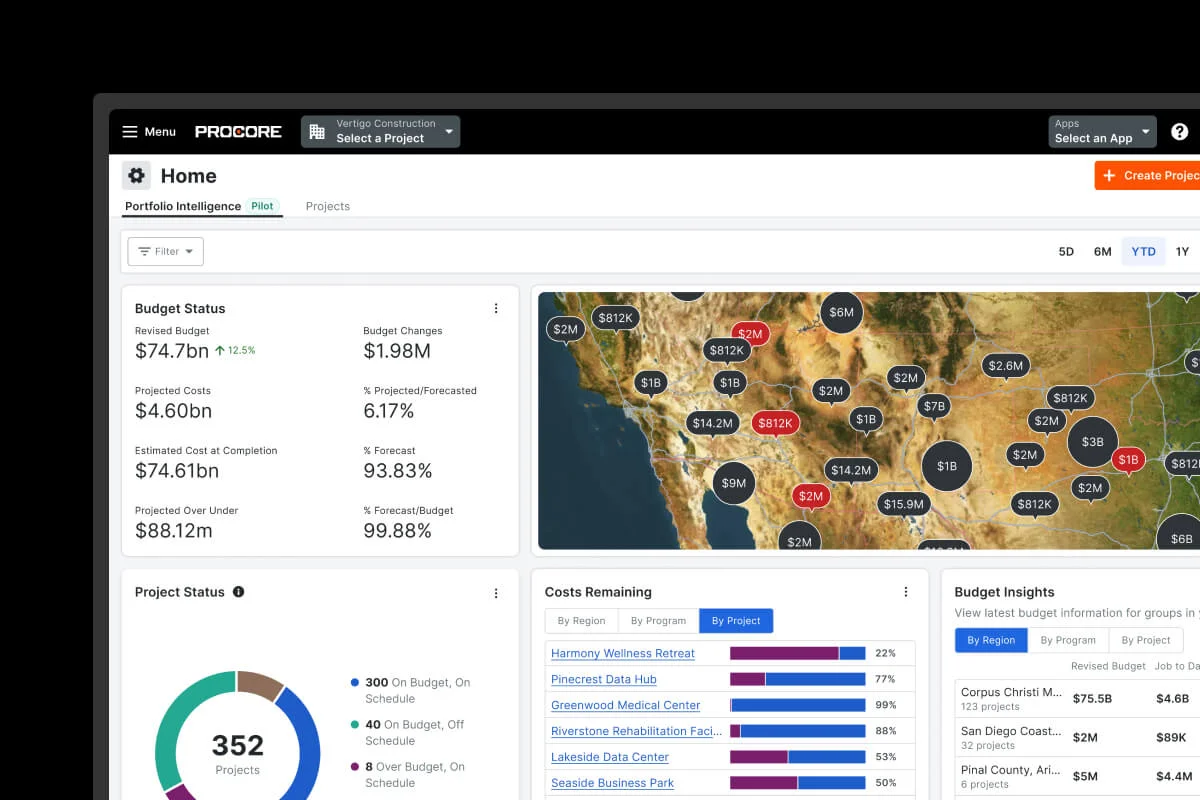
The depth shows up across seven specific workflows:
RFIs (Requests for Information) — structured submission with required fields, automated routing to the right respondent, due-date tracking, response chain visibility, attachments and drawing references, and integration into the project record. The audit trail is the value: when a sub claims they never received the answer to RFI #248 about the slab depth, the timestamped record is the conversation-ender. Capterra reviewer feedback consistently cites RFI workflow as one of the top three reasons commercial GCs justify the platform’s cost.
Submittals — submission packages, revision tracking with rev numbers, review chain routing across architect/engineer/owner roles, approval and rejection logging, package distribution back to the trade subcontractor. The submittal log becomes the procurement source of truth and integrates with the schedule so submittal approvals gate task starts.
Drawing markup with OCR-powered Contract Management — uploaded drawings open in-platform with markup tools (rectangles, callouts, dimensions, comments) that all team members see in real time; OCR extracts contract terms from uploaded documents which speeds change-order processing meaningfully; revision history surfaces drawing version evolution across the project.
Daily Logs — structured daily reporting with photos, weather, manpower counts, deliveries, equipment, safety incidents, and notes; mobile capture from the foreman’s phone syncs to the office in real time; the day-by-day record is the basis for any later schedule dispute or claim.
Punch Lists — distributed punch list creation with assigned trades, due dates, photo evidence of completion, and re-inspection workflow; the closeout phase compresses meaningfully when punch is structured rather than emailed.
BIM Integration — field teams access building information modeling data on mobile; BIM-linked quantity takeoffs feed estimating; BIM coordination clashes route into RFI workflow.
Photos & Videos — unlimited photo and video documentation with project, location, and trade tagging; 360-degree photo support; videos for progress documentation; the visual project record is the basis for owner status reporting and any future claim defense.
The combined effect is that on a $50M commercial project, Procore is the construction record-of-truth for every documented decision, every change in scope, every approved submittal, every drawing revision, every safety incident, every closeout deliverable. That’s not what residential PM platforms ship — and it’s the dimension where Procore’s value at $35K-$60K/year for a mid-market GC is genuinely defensible.
Procore Helix and the AI Bet
The 2026 strategic story for Procore is unambiguously the Datagrid acquisition closed January 2026 — Procore’s largest AI investment to date and the move that positions the platform’s AI capabilities ahead of Buildertrend’s AI Client Updates and AI Bill Pay, Projul’s 1build cost-data partnership, and ClickUp’s Brain MAX (which is strong but generic-PM-shaped, not construction-shaped).
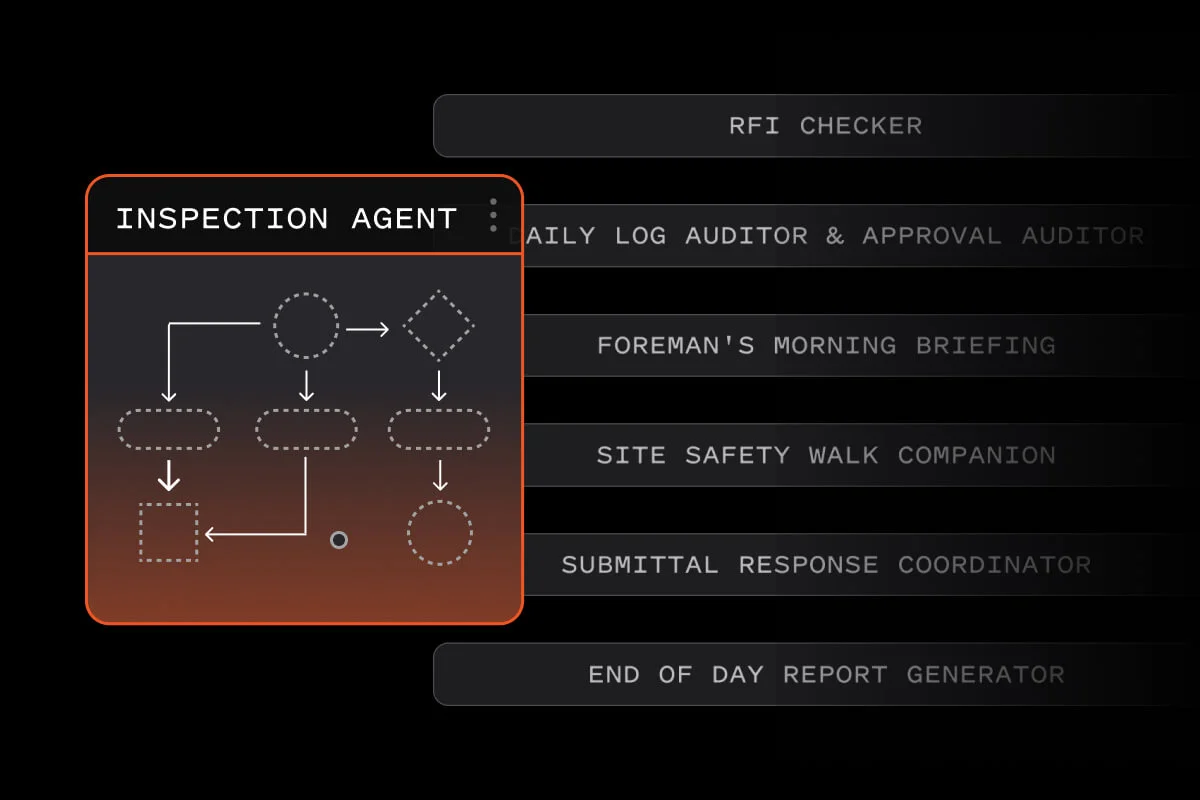
The architecture in 2026, layered from infrastructure up:
Procore Helix — the unified intelligence layer launched at Groundbreak 2025 in Houston (October 14-16, ~6,000 attendees). Helix is the underlying platform that connects Procore’s data, third-party data via integrations, and the AI models that operate across both. Think of it as the foundation that makes everything else work — agents, assistants, predictive insights all pull from Helix’s unified view of project data.
Procore Assist — the conversational AI assistant that provides contextually relevant answers on-demand, finding information from specs, RFIs, submittals, and building codes in seconds. The Groundbreak 2025 release added three major features: photo intelligence (analyze jobsite photos for safety insights and progress summaries), multilingual support (Spanish and Polish for field teams asking and receiving answers in their native language), and mobile support (search, reporting, and voice capabilities directly on mobile devices for the foreman in the field).
Procore Copilot — the in-context AI surface inside Procore modules, suggesting actions and surfacing relevant data inside the workflow you’re already in. Pre-Datagrid, this was suggestion-and-accept (the AI proposed an action, you clicked to apply). Post-Datagrid, the model shifts toward autonomous workflow execution.
Procore Agent Builder — the open beta tool that lets customers create custom AI agents to automate workflows like drafting RFIs and daily logs. Customers built 1,000+ new agents at Groundbreak 2025 alone — RFI Checker, Daily Log Auditor & Approval Auditor, Foreman’s Morning Briefing, Site Safety Walk Companion, Submittal Response Coordinator, End of Day Report Generator are all real customer-built examples shown in the announcement materials. The Agent Builder is the customer-extensibility surface — if Procore doesn’t ship an agent for your specific recurring workflow, your team builds it.
Datagrid (acquired January 2026) — the agentic AI capability layer that goes beyond suggestion-and-accept into autonomous workflows that operate across third-party systems. Datagrid is data-agnostic by design, connecting fragmented sources including ERP systems (Sage 300, Sage Intacct, Vista, Spectrum), cloud storage (Dropbox, Box, Google Drive), document repositories, and project platforms — then applying AI reasoning to orchestrate actions across them. The press release named two specific autonomous workflows: submittal review managed across platforms and RFI drafting with greater speed and efficiency. Steve Davis (President of Product & Technology, Procore) led the acquisition; Thiago da Costa (Datagrid CEO) joined Procore to lead AI and data strategy.
The competitive read is sharp: for commercial GCs evaluating AI capability across the construction PM category in 2026, Procore’s stack is the deepest available. The Agent Builder pattern in particular is the kind of customer-extensibility moat that competitors will struggle to match without comparable infrastructure investment. For residential builders, the AI investment matters less directly — but the architecture under the hood (Helix as the data and AI fabric, Datagrid for cross-system reasoning) compounds over the next 24 months, and the operational gap between Procore’s AI capability and lighter platforms widens with every shipped release.
What this isn’t: AI estimating in the Beam AI or XBuild sense. Procore’s AI is shaped for project execution workflows (RFIs, submittals, daily logs, site safety), not for AI-native estimating with photo-to-line-item generation or Stripe-deposit closing workflows. For AI estimating specifically, dedicated tools are stronger.
The Mobile Field Experience
Mobile-first usage is the validation test for any contractor PM platform — and Procore’s mobile experience is explicitly cited as a category-leading strength on Capterra and G2. The reviewer-verified themes are field-to-office sync reliability, push notification quality, photo and video capture speed, and the breadth of desktop functionality available on mobile.
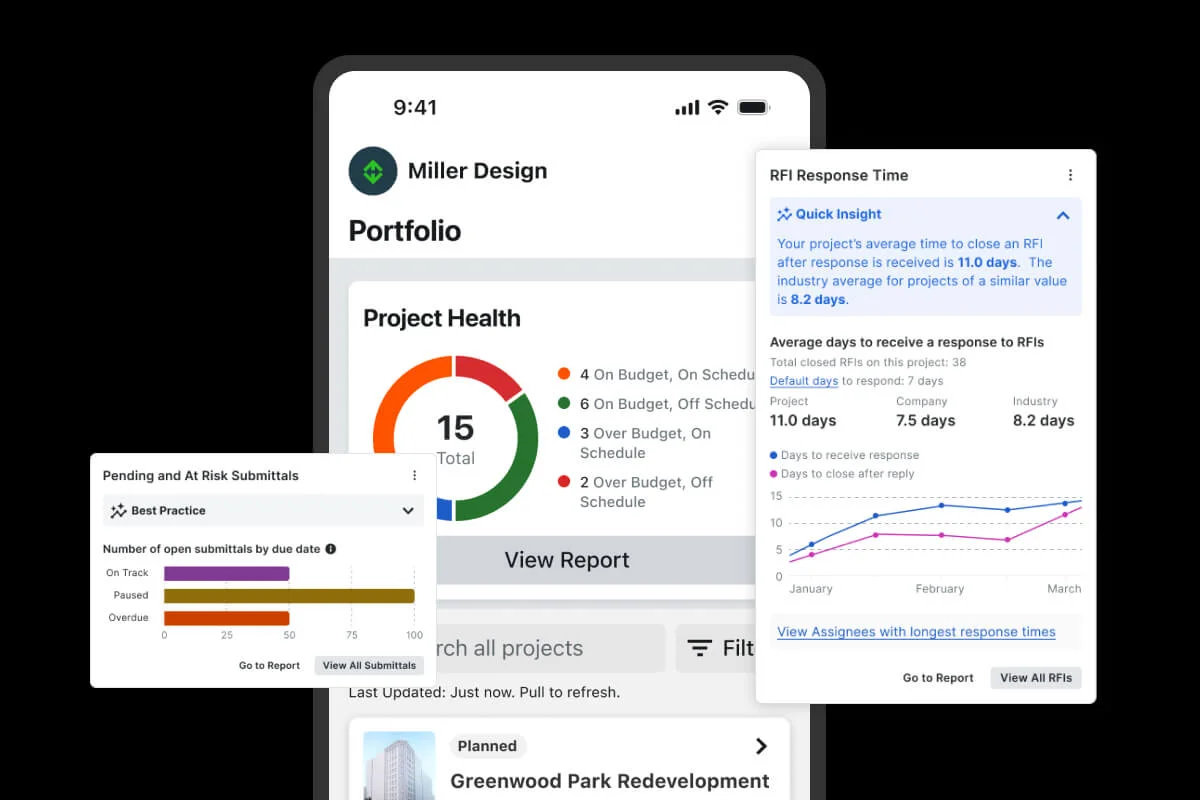
What the mobile app actually ships:
Daily Logs from the field — foreman captures the day’s work, weather, manpower, deliveries, equipment, safety incidents, and notes from the phone. Photos attach to the log directly. The log lands in the office before the foreman leaves the site.
RFI submission and response from the field — questions raised at the wall get filed as RFIs immediately rather than waiting for a desk return. Photo attachments document the in-place condition. The clock starts on the office response immediately.
Drawing markup on tablet — drawings open with full markup capability (callouts, dimensions, comments, rectangles); the field crew sees what the office sees; revisions sync in real time.
Punch list capture — punch items get filed with photos and assignments from the walk-through; trades see their assigned items immediately; closeout compresses.
Photos and videos — unlimited capture with location and project tagging; 360-degree photo support for visual project documentation.
Time tracking via Timecard — crew time clock-in and clock-out from the phone; integrates into the labor cost layer for job costing.
Mobile AI capabilities (Groundbreak 2025 additions) — Procore Assist now ships with mobile voice and search, plus Spanish and Polish multilingual support for field teams in those languages.
Push notifications — assignments, RFI responses, submittal approvals, schedule changes all hit the phone in real time; the notification model is configurable per role and project, but the default settings are aggressive and contractor reviewers consistently flag this as the friction point that requires admin tuning during onboarding.
What the mobile app doesn’t ship as well as residential PM platforms: homeowner-facing mobile workflow — Procore’s mobile is built for the foreman, the project manager, and the superintendent, not for the homeowner who wants to see project progress and approve selections. For residential builders where the homeowner mobile experience is a sale-driver, Buildertrend ships a meaningfully better homeowner-facing mobile portal.
Project Financials and Job Costing — Where the ROI Lives
The job costing depth at commercial scale is one of Procore’s strongest dimensions and the place where the ACV math justifies itself for $20M+ operations. The architecture: Procore’s Project Financials module captures budget data and committed costs in real time; subcontractor invoicing flows through Procore with automated approval routing; Contract Management uses OCR for change orders and pay applications; T&M tickets document out-of-scope work; prequalification ties subcontractor financial health into bid management; AIA-style progress billing with retainage ships natively. All of this integrates bidirectionally with one of 9 native ERPs — the construction-grade GL systems where the actual books live.
Specifically, what Procore ships in the Cost Management module:
Budget — configurable budgeting with cost code structure, original budget vs revised budget tracking, change-order budget impact, real-time vs forecast variance reporting.
Project Financials — committed costs vs actual costs, profit fade tracking, real-time spending visibility against budget, and the integration into the Job Costing layer that flows to your ERP.
Contract Management with OCR — drawing management, contract document storage, AI-powered extraction of contract terms (the OCR is what speeds change-order processing); change orders, contract revisions, and amendment routing.
Invoice Management — unified billing platform for stakeholders (general contractor, subcontractors, owners); approval workflows; payment tracking; AIA G702/G703 progress billing.
Subcontractor Invoicing — enables trades to manage monthly invoices proactively; approval routing through the GC; payment tracking through Procore Pay (an add-on subscription).
Time & Material Tickets — document out-of-scope work as it happens; tickets become the basis for billable T&M change orders.
Prequalification — real-time cost and labor insights for budget management; subcontractor financial health checking; the prequal-to-bid-to-contract flow stays inside Procore.
The ERP integration is the commercial-grade differentiator. Job cost data, committed costs, T&M tickets, and subcontractor invoicing flow FROM Procore TO your ERP (Sage 300 CRE, Sage Intacct, Vista, Spectrum, etc.) in real time, then financial statements are generated in the ERP. This is the architecture commercial accounting teams expect — Procore is the project management layer, the ERP is the GL system, and the integration handles bidirectional sync without manual reentry.
What the financial layer does not ship as well as dedicated tools: AIA pay application generation is documented as slower than dedicated AIA billing tools. Capterra reviewer Andrew H., Financial Analyst, explicitly notes: “time consuming preparing a pay application is compared to other software.” The workflow involves inputting billing data into Procore, exporting a PDF, manual signing, and reuploading — multiple steps versus one-click generation in dedicated AIA platforms. For operations where pay application volume is high, this is a real friction point worth budgeting against the alternative cost of dedicated AIA billing software running parallel to Procore.
The 9 Native ERP Integrations (and Why QuickBooks Online Is Missing)
The integration ecosystem is one of Procore’s clearest competitive advantages — 500+ third-party tools through the Procore App Marketplace plus 9 native ERP connectors that handle bidirectional sync of jobs, budgets, cost codes, vendor records, subcontractor invoices, change orders, and direct costs. The integration depth is the dimension that meaningfully separates Procore from every residential-shaped PM platform we’ve reviewed.
The 9 native ERPs:
-
Sage 100 Contractor — connection runs through hh2 synchronization client (lightweight Windows app installed on the server); secure connection between Sage, hh2 cloud, and Procore; sync runs continuously in background.
-
Sage 300 CRE — same hh2 architecture; the dominant commercial construction ERP and Procore’s tightest integration partner historically.
-
Sage Intacct — bidirectional connector with instant export upon approval by Accounting Users; imports happen on-demand from Project and Accounting Teams directly within Procore. Baker Tilly explicitly markets the Procore + Sage Intacct combination as the best accounting integration for mid-market construction.
-
QuickBooks Desktop — native connector that lets project managers and field teams have one-click access to accurate job costing on the construction site, while the accounting team retains full control over data pushed into accounting. QuickBooks Online is NOT included in this native list as of April 2026 — the QBD-only support is a specific architectural choice, and QBO users connect via third-party Smoothlink or hh2 connectors.
-
Viewpoint Vista — Trimble’s commercial construction ERP; native bidirectional sync.
-
Viewpoint Spectrum — Trimble’s mid-market commercial ERP; native bidirectional sync.
-
Yardi — primarily real estate development ERP; relevant for owner-developer customers.
-
MRI — real estate and property management ERP; relevant for owner-developer customers managing portfolios.
-
Acumatica — cloud-native ERP with strong mid-market construction adoption; native bidirectional sync.
The QuickBooks Online gap is the headline integration friction for residential contractors evaluating Procore. QBO is the dominant SMB accounting platform — most $5M-$50M residential GCs run QBO as the books of record, not Sage 300 or Sage Intacct. Procore not natively supporting QBO means the residential operation either:
- Runs QuickBooks Desktop instead (which Intuit is migrating customers away from)
- Adds Smoothlink ($150-$500/month subscription) to bridge Procore to QBO via API
- Adds hh2 synchronization client ($200-$400/month) for the same purpose
- Migrates accounting to Sage 300 CRE, Sage Intacct, or Acumatica (which is a meaningful platform change with implementation cost)
For commercial GCs, the gap matters less — Sage 300 CRE, Sage Intacct, Vista, and Spectrum cover the vast majority of commercial accounting deployments and Procore’s native integration there is mature. For residential operations specifically, this is one of the clearer architectural reasons why Procore is overkill below ~$20M ACV: the accounting workflow is fighting the platform’s design rather than flowing with it.
Beyond ERPs, the App Marketplace covers the full breadth of commercial construction tools: Bluebeam, Autodesk Construction Cloud, BIM 360, DocuSign, PlanGrid, CompanyCam, ProEst, B2W Estimate, HCSS HeavyBid, Microsoft Power BI, Tableau, Salesforce, HubSpot, and many more. The public Procore API plus webhook support also enables custom integration work for operations with engineering capacity. What the Marketplace doesn’t natively include with deep integration: JobNimbus, Jobber, Housecall Pro, ServiceTitan, Smith.ai, GoHighLevel — the residential and FSM ecosystem stays largely outside Procore’s integration roster, which is consistent with the platform’s commercial-GC audience focus.
Estimating, Bid Management, and What Procore’s Lifecycle Module Actually Ships
The estimating cross-listing on this site reflects how Procore positions itself in the construction stack rather than the platform’s strength as a standalone estimating tool. Procore ships estimating capability inside the Project Lifecycle Management module — quantity takeoffs, project estimation, bid management for inviting and tracking subcontractor bids, and a connected workflow into Project Financials and Contract Management once the estimate becomes a project.
What the estimating module does well:
BIM-integrated quantity takeoff — for commercial projects with BIM models, the takeoff layer pulls quantities directly from the model rather than requiring manual measurement. This is the commercial-grade differentiator that residential estimating platforms don’t ship.
Bid Management — invite subcontractors to bid, track bid responses, compare bids side-by-side, award contracts. This is the GC-perspective workflow (managing trades’ bids on your project), not the trade-perspective workflow (preparing bids to submit on others’ projects).
Prequalification ties into estimating — subcontractor financial health, capacity, and prior performance feed into bid evaluation; the prequal-to-bid-to-contract flow stays inside Procore.
Real-time cost data — once a project is awarded, the estimate baseline becomes the budget in Project Financials and the variance tracking starts immediately.
Connection into Cost Management module — the estimate-to-budget-to-actual pipeline is bidirectionally integrated rather than living in separate silos.
What it doesn’t ship as well as dedicated estimating tools:
No AI-native estimating in the Beam AI (4.9/5 Capterra, $30.5M Series B Insight Partners-led November 2025) or XBuild (AI-native chat-first proposal platform, $19M Series A) sense. Procore’s AI is shaped for project execution rather than for AI-native estimating with photo-to-line-item generation. Beam AI’s 10-minute AI takeoffs across 15+ trades and XBuild’s AI-generated Good/Better/Best proposals are fundamentally different products.
Light trade-specific assemblies — roofing, HVAC, electrical, plumbing pricebooks specific to those trades are not Procore’s strength. For trade-specific estimating, Roofr, iRoofing, RoofSnap, or trade-specific tools are stronger picks.
No native EagleView or Hover aerial measurement — for roofing-heavy estimating workflow where aerial measurement is upstream, the dedicated stack is better.
No kitchen-table close workflow — branded proposal PDFs, e-signature capture, deposit collection from the proposal itself are the residential builder’s Selections-and-close workflow that Buildertrend, Roofr, or XBuild ship for residential trades. Procore’s bid management is structured for inviting subcontractor bids on commercial projects, not for closing residential homeowners at the kitchen table.
For commercial GCs running takeoff-heavy bid workflow with BIM models, Procore’s estimating is functional, integrated cleanly with downstream Project Financials, and the bid management workflow specifically handles the GC-to-trade procurement layer better than residential PM platforms. For residential trades or anyone needing kitchen-table close tools, dedicated estimating platforms paired with a residential PM make more sense.
What Real Procore Customers Say
The third-party validation depth for Procore is unusually strong relative to the rest of the construction PM category. Capterra has 2,657 verified reviews at 4.5/5 with 94% positive sentiment — by far the largest validated sample we cover. The sub-scores tell the story consistently: ease of use 4.4/5, features 4.3/5, customer service 4.5/5, value for money 4.1/5. Customer service is rated at category-best level; value for money is the dimension where the ACV pricing pulls the rating down.
“It is a great resource we use in our small painting business every day. If it were not for Procore we would still be doing a lot of things by paper.”
— Verified small painting business user, on Capterra
“You can either go directly to a live chat with a representative or reach out to the support center and they most always answer your question or show you how to accomplish your task.”
— Verified Financial Analyst, construction firm, on Capterra
“Finally getting a handle on the chaos of multi-site Organizational Management.”
— Mike P., Compliance Analyst, on Capterra
“10/10 the best construction management software on the market!”
— Levi H., Project Coordinator, on Capterra
“Makes everything run so smooth from the office to the job site.”
— Natalie Y., Office Assistant, on Capterra
The critical reviews are equally honest and worth surfacing — Procore’s negative reviewer feedback concentrates on three themes: cost, complexity, and notification overload. Each is real and worth weighing.
“The cost! It can get crazy expensive. There is nothing else that is a con.”
— Verified anonymous user, on Capterra
“Way too many unnecessary notifications or sometimes important ones get missed.”
— Junaid H., Project Coordinator, on Capterra
“Time consuming preparing a pay application is compared to other software.”
— Andrew H., Financial Analyst, on Capterra
The customer logos on the procore.com homepage are themselves social proof at scale: Balfour Beatty, The Beck Group, Brookfield Properties, Gilbane, Greystar, Honeywell, HITT Contracting, The Weitz Company — these are commercial GCs with national or global operations. Notable case studies feature Vantage Data Centers (specialized commercial), TruEdge Builds, and Brookfield Properties (institutional owner-developer). The customer base profile validates the platform’s positioning: large commercial GCs and institutional owners are the target audience, not solo painters or 5-employee residential remodelers — even though both ends of the spectrum are represented in Capterra reviews.
How We Scored Procore Across Three Categories
Procore is one of the few platforms in our review database that earns triple-listing on project management (primary), estimating (secondary), and accounting (secondary) — the platform genuinely operates across all three category surfaces, though with meaningfully different depth on each. The dimension breakdown below uses the 70/30 primary-weighted formula with our +0.20 calibration constant; the full methodology is published at /how-we-review/.
Project Management primary (weighted 4.21) carries 70%; Estimating (3.56) and Accounting (3.88) average 30%. Plus +0.20 calibration constant adopted April 2026.
RFIs with structured routing, submittal logs with revision tracking, drawing markup with OCR Contract Management, daily logs, punch lists, BIM integration. The dimension where Procore beats every residential PM platform on the market and earns the commercial GC's check.
500+ App Marketplace integrations plus 9 native ERPs (Sage 100, Sage 300 CRE, Sage Intacct, QuickBooks Desktop, Vista, Spectrum, Yardi, MRI, Acumatica). Public API + webhooks. The deepest integration ecosystem in commercial construction PM.
Procore Helix unified intelligence layer, Procore Assist with photo intelligence + multilingual + mobile voice, Procore Agent Builder (open beta — 1,000+ customer agents at Groundbreak 2025), Datagrid acquisition January 2026 for agentic AI across third-party ERPs. Most aggressive AI roadmap in commercial PM.
Native iOS and Android with daily logs, RFIs, drawing markup, punch list, photos/videos, time tracking, mobile AI search/voice, real-time bidirectional web sync. Capterra reviewers consistently cite mobile-to-desktop sync as practical productivity gain.
Real-time committed costs vs actuals, T&M tickets, prequalification, subcontractor invoicing with approval routing, Contract Management with OCR, AIA-style progress billing with retainage, bidirectional ERP sync. Best-in-category job costing depth at commercial scale; pay app generation slower than dedicated AIA tools.
Gantt scheduling with task dependencies, BIM-integrated schedule, multi-trade crew assignment, change-order schedule impact tracking. Mobile schedule editing has friction (multiple Capterra reviews). Solid commercial-grade scheduling depth.
Owner portal is built for institutional owner-developers (portfolio dashboards, multi-project rollups), NOT for residential homeowner experience. No homeowner-facing Selections module like Buildertrend ships. Right depth for commercial; light for residential design-build.
ACV-based custom quote ($15K-$80K+/year typical range), no published pricing, no free trial, annual minimums, multi-year contracts for discount. The dimension that most directly limits operational fit for sub-$20M operations and the #1 reviewer-cited friction point.
Computed math: PM weighted = 4.3×0.15 + 5.0×0.15 + 4.5×0.13 + 5.0×0.13 + 3.5×0.12 + 2.0×0.12 + 4.7×0.10 + 4.5×0.10 = 4.21. Estimating weighted = 3.56. Accounting weighted = 3.88. Triple-category 70/30 formula: 0.70 × 4.21 + 0.30 × 3.72 (avg of secondaries) + 0.20 = 4.26 → rounds to 4.3/5.
The 4.3/5 reflects the honest split — category-leading on the dimensions that matter for commercial GC document workflow (Documents 5.0, Integrations 5.0, AI 4.7, Mobile 4.5, Financials 4.5), pulled down meaningfully by the pricing dimension (2.0) that locks out small operations and by the residential-shaped client portal (3.5) where competitors like Buildertrend ship deeper homeowner-experience workflow. For commercial GCs, the score understates the operational fit; for residential operations under $20M ACV, the score is generous because the audience-fit problem is more important than any single dimension’s score suggests.
Procore vs Buildertrend, Sage 300 CRE, JobTread
The four-platform comparison covers the products commercial GCs and large residential operations typically evaluate side-by-side with Procore. Each represents a meaningfully different architectural fit, and the right pick depends on revenue scale, accounting backbone, and whether the operation needs commercial-grade document workflow rigor or residential-shaped homeowner experience.
Buildertrend at $339-$829/month flat with unlimited users is the category-leading purpose-built residential PM. Native QuickBooks Online two-way sync, AIA-style progress billing, native financing partnerships (Parafin builder financing, Nelnet Bank homeowner financing), the deeply-developed Selections module that’s the residential PM moat, AI Client Updates and AI Bill Pay shipping in 2025-2026, and 4.7/5 customer service across 2,483+ Capterra reviews. Pick Buildertrend for $1M-$15M residential GCs, custom home builders, and remodelers selling on homeowner experience where QuickBooks Online is the accounting backbone.
Sage 300 CRE is not a PM platform — it’s the construction-grade ERP that Procore integrates with natively. The architectural pattern for commercial GCs is Procore + Sage 300 CRE (or Sage Intacct or Vista) rather than Procore vs Sage. The combined cost is meaningfully higher than either alone (Sage 300 CRE itself is $250-$500/user/month plus implementation), but the integrated stack is what commercial accounting teams expect for $50M+ operations.
JobTread is the closest direct competitor at the residential-to-light-commercial scale — purpose-built for residential builders and remodelers, native QuickBooks Online, growing AI capabilities, $349-$799/month flat tiers. Procore’s depth advantages (RFIs, submittals, BIM, ERP breadth, AI roadmap) are real but JobTread is meaningfully cheaper and easier to onboard at small scale.
The decision matrix:
- $1M-$20M residential GCs and remodelers: Buildertrend, Projul, or Contractor Foreman over Procore — the price-fit math is clearer and the residential workflow is shaped for your operation.
- $20M-$50M residential GCs scaling toward commercial: this is the cross-shop band — Procore Light (just Project Execution + Project Financials) starts to make sense, especially if accounting is already on Sage 300 CRE or migrating off QuickBooks Online.
- $50M+ commercial GCs, large specialty subs: Procore is the architectural fit and the ACV math justifies itself.
- Specialty trades (roofing, HVAC, plumbing, electrical): JobNimbus, AccuLynx, Jobber, Housecall Pro, or ServiceTitan over Procore — the trade-specific workflow depth matters more than the commercial-PM rigor.
- Insurance restoration: Xactimate-native tools (JobNimbus, AccuLynx, Roofr) over Procore.
- FSM dispatch operations: ServiceTitan, Housecall Pro, Jobber over Procore.
For high-touch commercial GCs and large residential builders where the inbound prospect call volume is meaningful, pairing Procore with an AI call answering service like Smith.ai addresses the front-of-funnel layer that Procore itself doesn’t ship. Smith.ai handles the prospect intake and lead qualification; Procore runs the construction once the contract signs. This is the pragmatic 2026 stack pattern for builders running multi-million-dollar projects where every inbound call could be the next $5M opportunity.
Who Procore Is Built For
The honest profile of the contractor where Procore is the architecturally correct pick:
Commercial general contractors at any size — single-site to national operations; the platform’s document workflow rigor (RFIs, submittals, BIM coordination, drawing markup) maps directly to commercial GC pain points and the integration ecosystem covers virtually every commercial construction tool.
Large specialty subcontractors ($10M+ active project value) in mechanical, electrical, plumbing, structural steel, finishes — operations where the GC is running Procore and the sub needs to integrate cleanly into the GC’s project workflow rather than running a separate tool that doesn’t sync.
$20M+ residential general contractors and custom home builders — operations that have outgrown Buildertrend’s $339-$829/month tiers and need the depth on document control, multi-project portfolio management, and ERP integration that Procore ships.
Owner-developers running portfolio dashboards across multiple projects — institutional real estate, healthcare, education, industrial owners — where the multi-project rollup view and integration with Yardi or MRI is the operational requirement.
Operations whose accounting team is already on Sage 300 CRE, Sage Intacct, Vista, Spectrum, MRI, or Acumatica — the native ERP integration eliminates the manual reentry tax and is one of Procore’s clearest competitive moats.
Contractors who view AI capability as central to the next-24-month operational stack — Procore’s Helix + Assist + Agent Builder + Datagrid roadmap is the deepest in commercial construction PM, and the customer-extensibility surface (Agent Builder) compounds over time.
Operations running 30+ concurrent projects with multiple field teams and dedicated office staff — Procore’s depth is built for this scale and the platform’s complexity becomes operational leverage rather than friction at this size.
Who Should Run Far From Procore
The honest profile of the contractor where Procore is the wrong architectural pick — and what to pick instead:
Solo contractors and 1-3 person crews — the ACV-based pricing math doesn’t pencil and the implementation overhead exceeds the productivity gain at this scale. Look at: Contractor Foreman at $49-$332/month or BuilderPad at $39-$199/month with unlimited users.
Residential GCs and remodelers under $20M revenue — Buildertrend, Projul, or Contractor Foreman ship the workflows you actually need at one-tenth the cost. Look at: Buildertrend for design-heavy residential work, Projul for contractor-authored construction-purpose-built workflow with native QB Desktop, Contractor Foreman for the bundled-module budget pick.
Specialty trades — roofing, HVAC, plumbing, electrical — Procore is commercial-GC-shaped despite marketing breadth; trade-specific workflow lives on different platforms. Look at: JobNimbus or AccuLynx for roofing CRM/PM, ServiceTitan, Housecall Pro, or Jobber for service-trade FSM dispatch.
Insurance restoration roofers writing in Xactimate — Procore has no Xactimate integration, no ESX export, no aerial measurement integrations with EagleView or Hover. Look at: JobNimbus, AccuLynx, or Roofr for that workflow.
Custom home builders selling on homeowner experience as the moat — Procore’s owner portal is institutional-developer-focused, not residential-homeowner-experience-focused; no homeowner-facing Selections module. Look at: Buildertrend for the design-heavy residential homeowner experience workflow.
Contractors running QuickBooks Online without willingness to add a third-party connector — Procore doesn’t natively sync to QBO; Smoothlink or hh2 are required ($150-$500/month additional cost). Look at: Buildertrend (native QBO two-way sync), Contractor Foreman (native QBO), or Projul (native QBO on Core+).
Operations needing transparent published pricing for budgeting — Procore’s ACV-based custom-quote model is opaque by design. Look at: Buildertrend at $339-$829/month flat, Contractor Foreman at $49-$332/month with public pricing, or Projul at $399-$1,199/month annual.
Operations needing a homeowner financing flow at point-of-sale — Procore has no native Wisetack or Hearth partnerships and no Stripe-native deposit collection. Look at: Buildertrend’s native financing partnerships (Parafin, Nelnet, Rocket Loans, GreenSky) or pair financing tools with your existing PM.
Residential remodelers running 1-5 concurrent jobs — Procore is built for the 30+ concurrent project workflow; the platform’s depth is wasted at small concurrent project counts. Look at: BuilderPad at $39-$199/month with unlimited users, or Projul Core at $399/month annual.
Final Verdict
Procore is the most architecturally serious construction project management platform on the market in 2026 and the right answer for a specific contractor profile that includes commercial general contractors at any size, large specialty subcontractors with $10M+ active project value, $20M+ residential GCs scaling toward commercial work, and institutional owner-developers tracking portfolios across multiple projects.
For that audience, the ACV-based pricing model — typically $15K-$30K/year for $10M-$50M small GCs and $35K-$60K/year for $50M-$100M mid-market operations — is genuinely defensible against the dimensions where Procore earns its keep: best-in-category document workflow rigor (RFIs, submittals, drawing markup with OCR, daily logs, BIM integration), 9 native ERP integrations covering virtually every commercial accounting platform plus 500+ App Marketplace integrations, the most aggressive AI roadmap in commercial construction PM with the Datagrid acquisition closed January 2026 and Helix + Assist + Agent Builder all shipping today, and category-leading mobile field-to-office sync that Capterra reviewers consistently cite as the practical productivity gain.
For the larger group of contractors — solo operators, residential GCs under $20M, specialty trades running on dispatch boards, insurance restoration roofers, custom home builders selling design-build at the residential price point, anyone running QuickBooks Online without willingness to add a third-party bridge — Procore is the wrong architectural pick, the pricing locks you out by design, and lighter platforms ship the workflows you actually need at one-tenth the cost. Buildertrend, Projul, Contractor Foreman, BuilderPad, JobNimbus, Jobber, Housecall Pro, ServiceTitan, AccuLynx, and Roofr cover the audiences and workflows where Procore doesn’t fit.
The honest recommendation: if you’re in the commercial-GC, large-sub, or $20M+ residential profile, request a quote with your specific ACV and module preferences disclosed, ask for the implementation services cost as a separate line item, validate the multi-year contract discount, and pilot the Agent Builder and Procore Assist capabilities specifically — those are where Procore’s 2026 architectural moat is widening fastest. If you’re outside that profile, the rest of this review is competitive context and the actual buying decision should happen on a different platform’s pricing page.
Visit procore.com to start a sales conversation.
