

What Rosie Actually Is
Rosie is an AI-powered phone answering service that picks up your business calls 24/7, answers questions about your services, takes messages, books appointments, and sends you notifications — all without a human on the other end. It’s built specifically for small businesses, with a heavy lean toward home services and contractor trades.
The pitch is simple: you’re on a roof, under a sink, or running conduit through a crawlspace, and your phone rings. You can’t answer. With voicemail, 80% of those callers hang up and call the next contractor on their list. With Rosie, the caller gets a friendly, conversational AI that sounds natural enough that most people don’t realize they’re talking to a machine. Rosie answers their questions, takes their info, and sends you a text and email with the full summary and recording.
The company is based in Pittsburgh, PA. Their phone number has a 412 area code, and the product launched around 2022. They’ve processed over 2.4 million calls for more than 1,700 businesses as of early 2026. Those aren’t just contractor calls — they serve law firms, property management, real estate, salons, and automotive too — but the contractor and home services verticals are clearly their bread and butter. Their industry-specific landing pages target construction, HVAC, plumbing, electricians, and home services directly.
Full disclosure: I haven’t tested Rosie on my own business phones yet. That’s on the list — I plan to demo it soon and update this review with hands-on results. This review is built from thorough research of their product, documentation, pricing, Zapier integration data, and what independent sources exist. Where I’m drawing conclusions from research rather than personal use, I’ll say so.
How Rosie Handles Contractor Calls
Here’s the actual call flow, step by step.
Setup (before any calls come in): You give Rosie your Google Business Profile URL or your website address. The AI scans your online presence and auto-learns your business name, services, hours, location, and FAQ-type information. You review what it pulled, adjust anything that’s wrong, write a custom greeting, and add any specific questions you want Rosie to ask callers. The whole process takes most people under 10 minutes. That’s genuinely the fastest onboarding in this category — Smith.ai requires a full onboarding call, and most competitors need you to manually build out scripts.
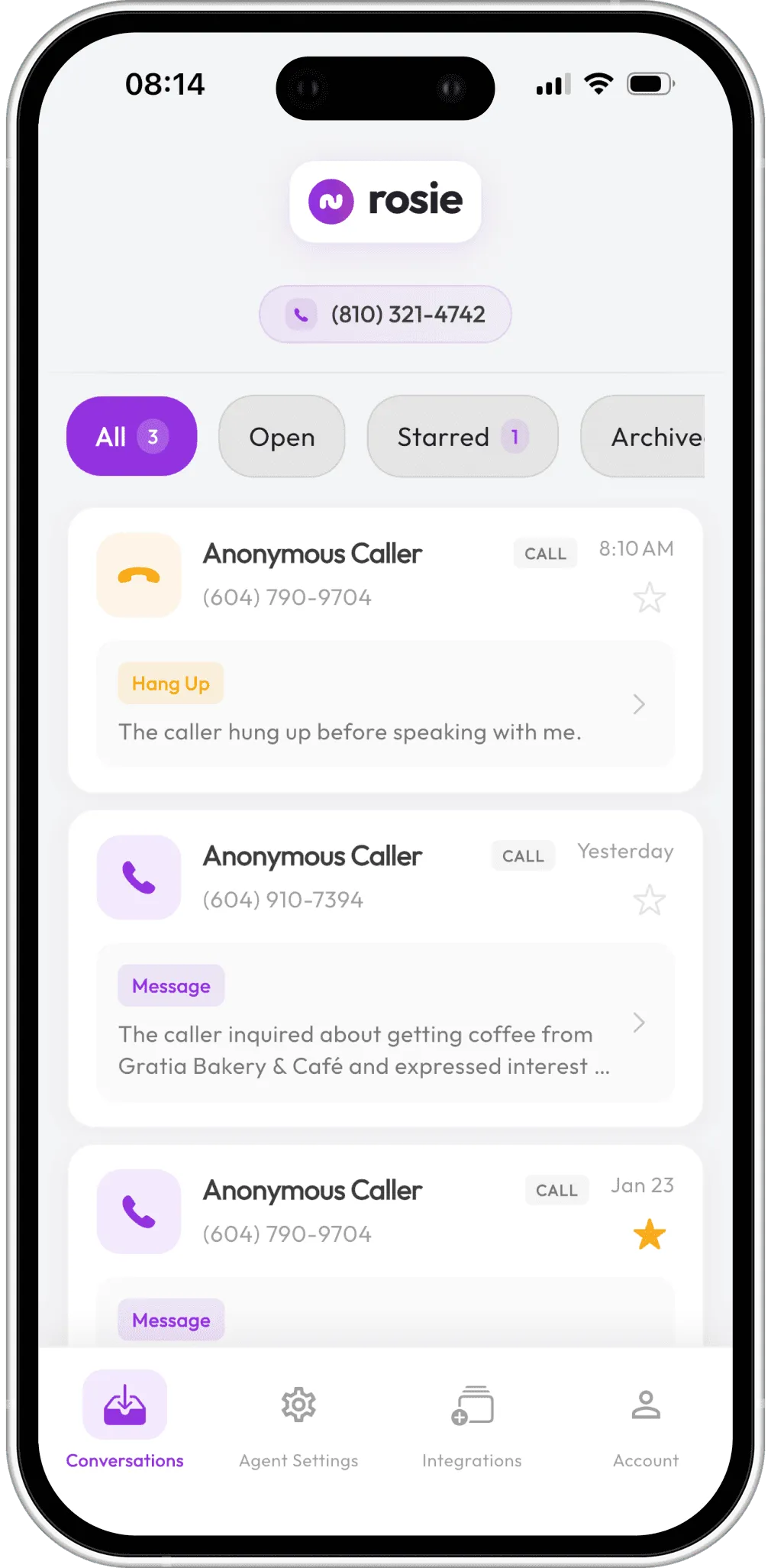
When a customer calls: Your existing business number forwards to Rosie. The caller hears your custom greeting — “Thanks for calling Mike’s Roofing, how can I help you?” — and Rosie takes over from there. She answers questions about your services, operating hours, service area, and anything else you’ve trained her on. She takes messages using the custom questions you defined: “What type of work do you need done? What’s the address? When are you available for an estimate?”
Appointment booking (Scale plan and above): If you’ve connected a calendar — Google Calendar, Calendly, Acuity, or Appointlet — Rosie can check your availability and book the appointment right on the call. The caller hangs up with a confirmed time on your schedule. No phone tag, no “I’ll call you back.” For contractors who lose jobs in the gap between “interested” and “booked,” this feature alone can pay for the service.
During the call — extra capabilities: On the Scale plan, Rosie can send text messages to callers during the conversation. Need to text someone a booking link, your license number, or a link to your portfolio? She handles that mid-call. She can also do direct call transfers — routing the caller to your cell or a specific team member — or warm handoff transfers where she briefs you before connecting the caller.
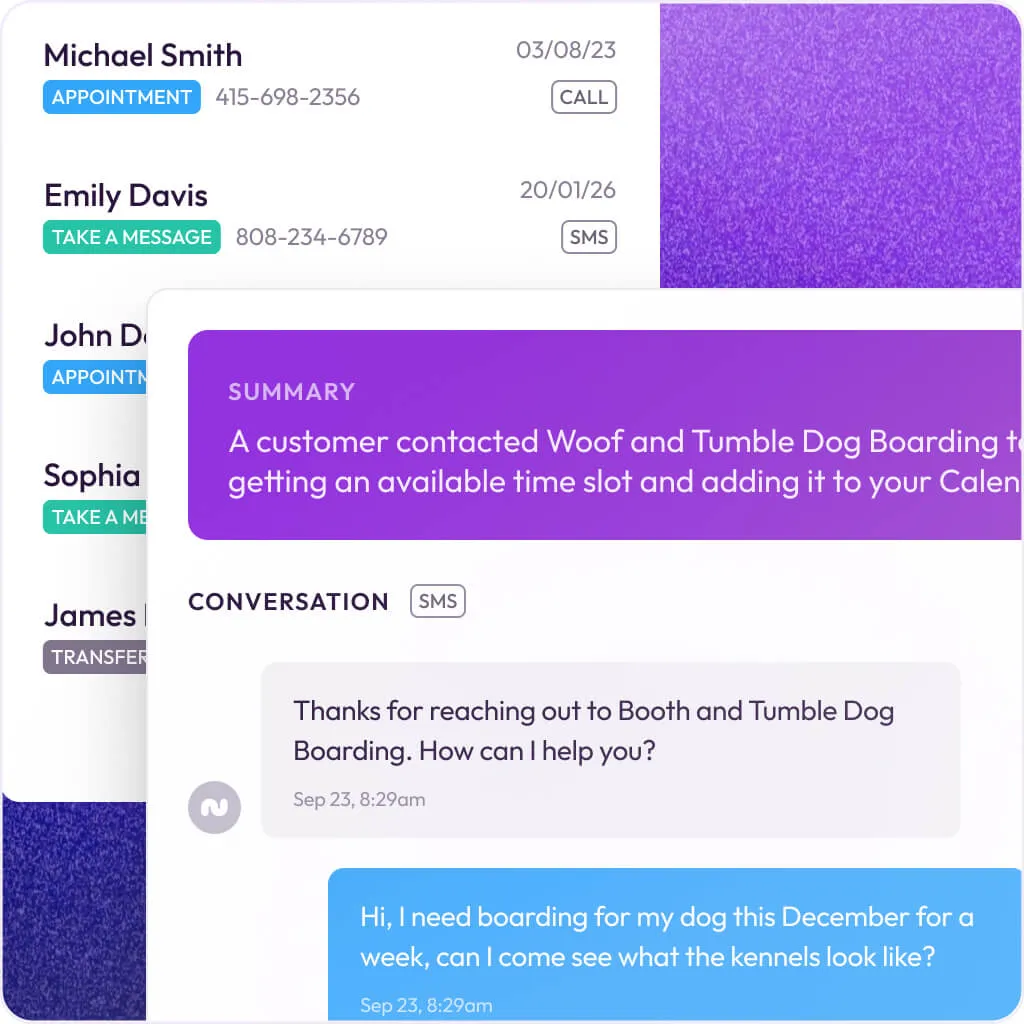
After the call: You get an instant notification via email, text, or both. The notification includes a summary of the call, what the caller asked about, their contact info, and answers to your custom intake questions. Full call recordings, transcripts, and AI-generated summaries are saved in your Rosie inbox and the mobile app. Every call is documented — no more “what did that person say again?”
Spam filtering: Rosie automatically blocks robocalls and spam before they eat into your minutes. Blocked calls don’t count toward your plan.
Rosie’s Contractor-Specific Features
This is where Rosie separates itself from generic AI answering services. They’ve clearly studied what home service businesses actually need.
Trade-Specific Knowledge
When you set up Rosie for a plumbing business, she understands plumbing terminology. She can field questions about leak detection, water heater installation, drain cleaning, and common pipe issues. Set her up for HVAC, and she talks about furnace repair, AC installation, thermostat problems, and emergency heating failures. For construction, she handles inquiries about structural repairs, renovations, project timelines, and permit questions.
This isn’t just keyword matching — the AI adapts its responses to your specific trade context. A caller asking “Can you fix my circuit breaker?” gets an answer that reflects your electrical services, not a generic “I’ll take a message.”
Emergency Call Handling
Contractor calls have an urgency dimension that most businesses don’t deal with. A burst pipe at 2 AM isn’t the same as someone asking about a kitchen remodel estimate. Rosie can detect urgency in the caller’s tone and topic and immediately notifies you via text and email. On the Scale plan ($149/mo) and above, she can transfer the call directly to your cell.
One thing to know: Rosie’s emergency detection is AI-driven, not rule-based. You don’t set specific keywords like “flood” or “no heat” that trigger an automatic transfer. The AI decides what sounds urgent based on context. That’s both a strength (it catches things keyword rules might miss) and a weakness (you can’t set deterministic rules for specific scenarios). If you need guaranteed keyword-triggered routing, Upfirst and Smith.ai offer that.
Lead Qualification and Filtering
Rosie doesn’t just take messages — she qualifies leads. She collects the information you actually need: service type, property address, timeline, how they found you. By the time you see the notification, you know whether this is a priority callback or a tire-kicker. She also filters out non-qualifying inquiries, so you’re not wasting time returning calls that were never going to turn into jobs.
The custom message-taking feature lets you define exactly what Rosie asks. For a roofing company, you might want to know: type of roof, approximate square footage, whether it’s insurance work, and their availability for an inspection. For HVAC: system type, age of unit, nature of the problem, and whether they have a service contract.
Bilingual English/Spanish Support
This is a genuine differentiator. Rosie speaks English and Spanish on every plan — including the $49/mo entry tier. She can switch languages mid-call if a customer starts speaking Spanish. For contractors in markets with significant Spanish-speaking populations, this matters. It’s not an add-on, it’s not an extra charge, and it’s not a “premium feature” locked behind a higher tier. Painting crews, landscapers, general contractors, and roofing companies with bilingual customer bases — this is built for you.
Most competitors either charge extra for bilingual support or don’t offer it at all. Upfirst goes further with 35+ languages, but Rosie’s English/Spanish coverage handles the primary need for the vast majority of US contractors.
Rosie Pricing: What You’ll Actually Pay
Rosie’s pricing is straightforward compared to most competitors. No per-call surcharges, no hidden integration fees, no surprise overage bills.
Plan Comparison
| Plan | Monthly Price | Minutes Included | Key Features Added |
|---|---|---|---|
| Professional | $49/mo | 250 | Message taking, custom questions, spam detection, bilingual, mobile app, Zapier |
| Scale (Most Popular) | $149/mo | 1,000 | Everything in Pro + appointment booking, direct call transfers, warm handoffs, text-a-link during calls |
| Growth | $299/mo | 2,000 | Everything in Scale + training file uploads for deeper knowledge |
| Custom | $999+/mo | High volume | Multiple locations, custom agents, expanded knowledge base, custom integrations, dedicated account rep |
Annual billing: Pay yearly and get two months free. That drops the Professional plan to effectively $40.83/mo and Scale to $124.17/mo.
Add-Ons
Website Texting — $50/mo with 25 AI text conversations included, $1 per additional conversation. This puts a chat widget on your website that captures leads through AI-powered text conversations. It’s not a traditional chatbot — the AI carries on a real conversation, collects phone numbers, and creates a lead you own. Worth testing if your website gets decent traffic.
What the Math Looks Like for a Typical Contractor
A solo roofer or small HVAC outfit doing 5-10 calls per day would use roughly 100-200 minutes per month. The $49/mo Professional plan (250 minutes) covers that comfortably. You’re paying under $0.20 per minute for AI call answering versus $1.50-2.00 per minute for a traditional live answering service.
A growing crew handling 15-25 calls per day needs the Scale plan at $149/mo (1,000 minutes). At that volume, you’re also getting the appointment booking and call transfer features that make the most sense at higher call loads.
Compare that to the alternatives:
- Traditional live answering service: $500-1,000+/mo for comparable coverage
- Full-time receptionist: $3,000-4,000/mo with benefits
- Smith.ai hybrid (AI + human): $292.50-585/mo
- Upfirst (budget AI): $24.95/mo for 30 calls
- Goodcall: $79/mo with unlimited calls but per-customer pricing
Rosie sits in the sweet spot: more features and better contractor focus than the budget options, at a fraction of what hybrid services charge.
Integrations: What Connects and What Doesn’t
This is where Rosie has room to grow. The integration story is functional but not deep.
What Works Today
Zapier (all plans) — This is the primary integration path. Rosie’s Zapier connection provides three instant triggers:
- New Call — fires when any new call comes in
- New Booking — fires when an appointment gets booked
- Updated Call — fires when an existing call record changes
Through Zapier, these triggers connect to 8,000+ apps. The integrations that matter most for contractors:
- Jobber — Create new client records from incoming Rosie calls automatically
- Housecall Pro — Push lead data into HCP
- Google Sheets — Log all calls in a spreadsheet for tracking
- Google Calendar — Create calendar events from new calls
- Slack — Get call notifications in a team channel
- HubSpot — Create contacts from qualified leads
- Gmail / Outlook — Trigger follow-up emails automatically
Calendar integrations (Scale plan+) — Google Calendar, Calendly, Acuity Scheduling, and Appointlet connect directly for appointment booking. Rosie checks availability, confirms the time, and creates the event.
Mobile app (all plans) — Native iOS and Android app with push notifications, call summaries, transcripts, recordings, and tap-to-callback. This is a genuine advantage — most AI answering competitors (Smith.ai, Goodcall, Upfirst) don’t offer a dedicated mobile app. For a contractor who lives on their phone, this matters.
What’s Missing
No native CRM integrations. There’s no direct API connection to JobNimbus, ServiceTitan, Jobber, or any contractor CRM. Everything runs through Zapier. That works, but it adds ~$20/mo for Zapier and introduces a middleman. Smith.ai has native Housecall Pro and ServiceTitan integrations that are tighter. Upfirst lists native connections with ServiceTitan, Housecall Pro, Jobber, JobNimbus, and AccuLynx.
No public API or webhooks (standard plans). If you want to build custom integrations — connecting Rosie to your own systems, piping data into a custom dashboard, or integrating with a tool Zapier doesn’t support — you need the $999/mo Custom plan to get API access. On the standard plans, Zapier is your only option.
No QuickBooks connection. Not direct, and not even a clean Zapier path. If you want call data to flow into your accounting workflow, you’d need a multi-step Zapier chain.
Can Rosie Plug Into AI Agent Workflows?
This is the question that matters for contractors who are starting to build AI automation across their operations — and it’s worth an honest answer.
The short version: Rosie works as a trigger source for basic automation through Zapier. It doesn’t work as a node in a sophisticated agentic system.
What you can do today: Set up a Zapier trigger so that every new Rosie call pushes the transcript and caller details into a Google Sheet, Slack channel, or CRM. From there, you could have a downstream automation — say, a Claude or ChatGPT-powered workflow — that reads the call summary and drafts a follow-up email or generates an estimate request. The Zapier bridge makes this possible.
What you can’t do: Rosie has no public REST API, no native webhook system, and no way to feed real-time call data directly into an LLM-based agent on standard plans. You can’t connect it to a Claude MCP server, pipe live transcripts to an AI for real-time analysis, or build a custom agentic harness that treats Rosie as a data source. The Zapier layer adds latency (typically 1-15 minutes depending on your Zapier plan) and limits the granularity of data you can pass downstream.
If agentic integration is a priority: Smith.ai offers a more open API that lets you build deeper custom connections. For the most API-flexible option in the AI voice space, platforms like Bland.ai and Vapi give you direct programmatic control over the entire call flow — but they’re developer tools, not contractor-friendly products. Rosie is designed for business owners who want to forward their phone and forget about it, not for people building custom AI pipelines.
My take: For 95% of contractors, Rosie’s Zapier triggers are more than enough automation. You don’t need a real-time API to get value out of AI call answering. Set up the Zapier triggers, push call data into your CRM, and let the AI handle the phones. The agentic stuff is a real consideration for the technically ambitious — but if that’s you, you probably already know that a $49/mo answering service isn’t going to be the centerpiece of your AI stack.
The Mobile App: A Real Advantage
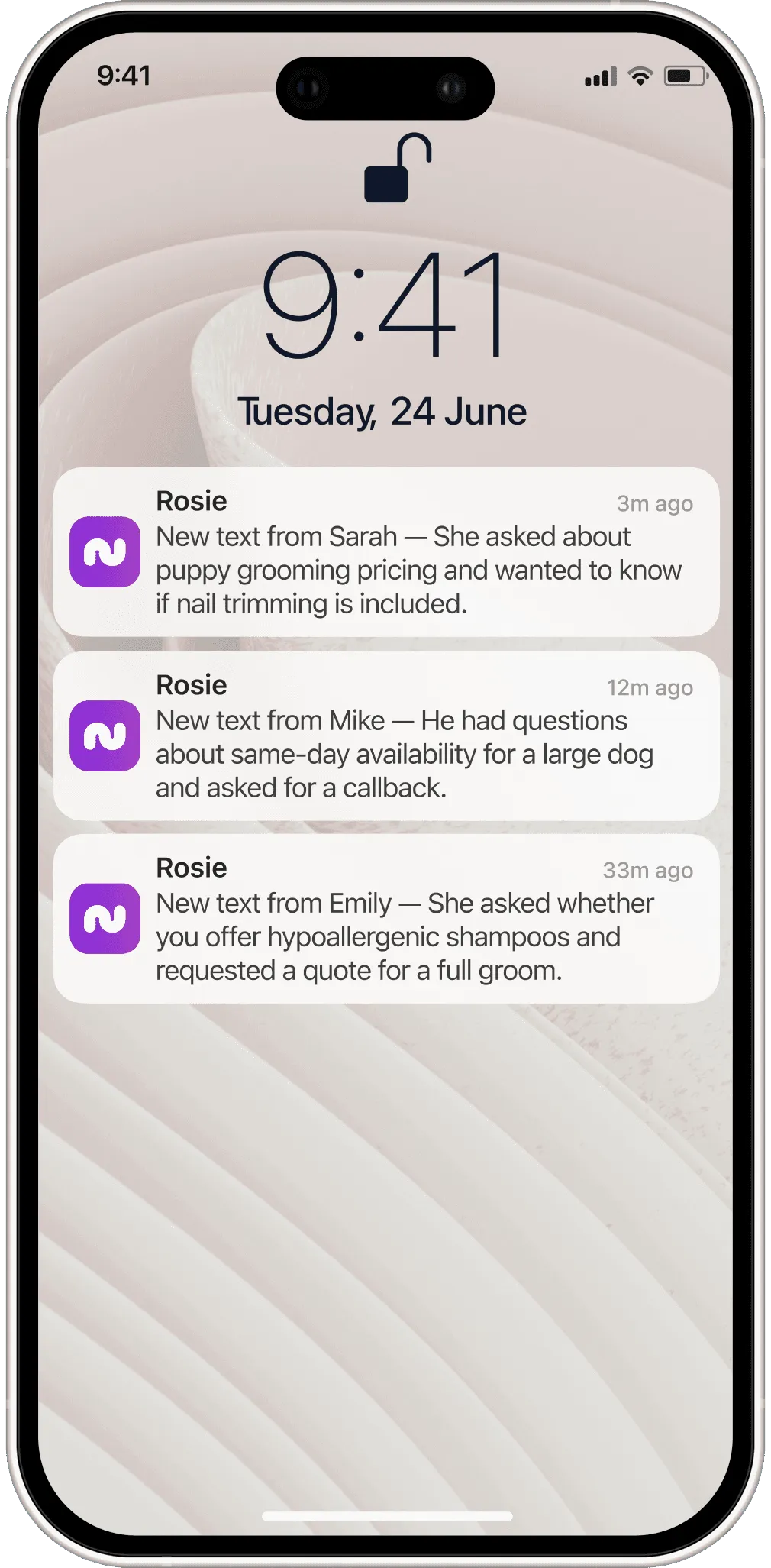
Most AI answering services give you a web dashboard and email/text notifications. Rosie gives you a dedicated mobile app, and it’s worth highlighting because this matters for contractors who are on job sites all day.
Push notifications — Every call triggers a push notification with an AI-generated summary and the lead’s contact info. You see who called and what they need before you even open the app.
Tap-to-callback — One tap on the notification dials the lead back. No copying numbers, no switching apps. You’re on the phone with your new lead in seconds.
Unified inbox — All your calls and texts in one place. Recordings, transcripts, AI summaries — everything is searchable. Need to find what that customer said about their attic access three days ago? It’s in the inbox.
Free on all plans — The app isn’t a premium feature. Even the $49/mo Professional plan includes it. Available on iOS and Android.
For a contractor checking leads between jobs in their truck, this is substantially better than digging through emails or logging into a web portal.
What Real Users Are Saying
Here’s where I need to be straightforward: Rosie’s independent review data is thin. As of April 2026, Capterra shows zero verified reviews. G2 doesn’t have a substantial review profile. SourceForge has a listing but limited community feedback. This is the biggest gap in their story right now.
What we do know from their own customers:
Their homepage claims 2.4 million calls handled and 1,700+ businesses using the service. Named testimonials on their site include owners from Crunch Fitness, First Class Luxury Limos, Crystal Clear Quotes, Hello Sugar Salon, and Classic City Transportation. One business owner with 50 years of experience said he fired his live answering service after switching to Rosie because it delivered “more accuracy, faster responses, and 24/7 availability” at a fraction of the cost.
A duct cleaning company owner mentioned that 50% of calls went wrong with their previous human answering service due to high staff turnover. After switching to Rosie for overflow and after-hours calls, the issue disappeared.
Third-party assessments:
Ready Business Systems reviewed Rosie positively, noting that “one $1,000 job recovered through Rosie can cover the monthly cost — and then some.” They cited a case where a client recovered a $3,200 job from a 9:40 PM call that Rosie answered. Their main criticism: Rosie isn’t ideal for emotionally complex situations or active upselling during calls.
Multiple “best AI answering service” roundup articles (from TechnologyAdvice, Ringly, and others) consistently rank Rosie in their top 5-6, typically praising the fast setup and home-services focus while noting the lack of human backup as the primary limitation.
What’s missing from the picture:
No verified user reviews on major platforms (G2, Capterra, Trustpilot) means we can’t independently validate claims about call quality, AI accuracy, or customer support responsiveness. Compare that to Smith.ai, which has 90+ G2 reviews at 4.6/5 and 334 Trustpilot reviews at 4.4/5. Rosie’s product may be excellent, but the public proof isn’t there yet. That’s worth knowing before you commit.
Who Rosie Is Built For (And Who Should Look Elsewhere)
Rosie makes sense if:
- You’re a solo operator or small crew (1-10 people) losing calls to voicemail regularly
- Most of your incoming calls are straightforward — “I need a quote,” “What’s your availability,” “Do you service my area?”
- You need bilingual English/Spanish answering on a budget
- You want appointment booking that works with Google Calendar or Calendly
- You’re looking for the fastest possible setup — get AI answering running today, not next week
- Your average job value is high enough that one recovered lead per month covers the $49
- You want a mobile app for managing leads on the go, not just email notifications
Rosie probably isn’t the right fit if:
- Your callers frequently have complex conversations — insurance claim coordination, multi-phase project discussions, warranty disputes — where AI stumbles and a human receptionist handles it better. Look at Smith.ai instead.
- You need tight, native CRM integration with ServiceTitan, Housecall Pro, or JobNimbus. Rosie runs everything through Zapier. Upfirst and Smith.ai have more direct connections.
- You’re building sophisticated AI automation and need API access or direct webhooks. Rosie locks that behind the $999/mo Custom plan.
- You’re a larger operation (20+ employees) running a high-volume call center. The minute-based plans max out at 2,000 minutes on the Growth plan before you’re into custom pricing.
- You want the absolute cheapest option and your call volume is under 30 calls per month. Upfirst starts at $24.95/mo and covers that use case for less.
How Rosie Stacks Up Against Competitors
| Feature | Rosie | Smith.ai | Upfirst | Goodcall |
|---|---|---|---|---|
| Starting price | $49/mo | $97/mo (AI) / $292.50/mo (hybrid) | $24.95/mo | $79/mo |
| Minutes/calls included | 250 min | 30 calls | 30 calls | Unlimited (per-customer) |
| Human backup | No | Yes (hybrid plan) | No | No |
| Mobile app | Yes (iOS + Android) | No | No | No |
| Bilingual | English/Spanish (all plans) | English/Spanish (AI detects) | 35+ languages | English only |
| Appointment booking | Scale plan ($149) | All plans | All plans | Limited |
| Native CRM integrations | Zapier only | Housecall Pro, ServiceTitan direct | ServiceTitan, HCP, Jobber, JN, AccuLynx | Limited |
| Call transfers | Scale plan ($149) | All plans | All plans | No |
| API access | Custom plan ($999) | Available | Zapier only | Limited |
| Free trial | 7 days | No (30-day money-back) | 14 days, no CC | 14 days |
vs. Smith.ai: Smith.ai’s hybrid model (AI + live humans) is the safety net for complex calls that trip up pure AI. But you pay 3-6x more for it. If 80%+ of your calls are straightforward, Rosie handles them at a fraction of the cost. If you’re regularly dealing with frustrated homeowners, insurance disputes, or nuanced project conversations, Smith.ai’s human backup earns its premium.
vs. Upfirst: Upfirst wins on price ($24.95/mo) and has more native CRM integrations. Rosie wins on the mobile app, bilingual built-in, and contractor-specific training. If budget is your #1 concern, start with Upfirst. If you want the best overall feature set for home services, Rosie has the edge.
vs. Goodcall: Goodcall offers unlimited calls on a per-customer pricing model, which can be great for contractors with lots of repeat callers. But Goodcall doesn’t have a mobile app, bilingual support, or the same depth of contractor-specific training that Rosie brings.
For a full breakdown of all options, check our AI Call Answering category page.
The Bottom Line
Rosie sits in a sweet spot that makes sense for a lot of contractors. It’s not the cheapest option (that’s Upfirst at $24.95/mo), and it doesn’t have the human safety net that Smith.ai provides. What it does better than anything else in this price range is combine fast setup, bilingual support, a real mobile app, and enough automation through Zapier to fit into a modern contractor’s workflow.
The weak spots are real: no native CRM integrations, no API on standard plans, and thin public review data. Those matter. But for a contractor who’s currently sending calls to voicemail and watching leads walk away, none of those weaknesses matter as much as the calls Rosie catches.
One recovered job covers months of Rosie’s cost. At $49/mo, the math is almost always in your favor.
I’m planning to demo Rosie on my own lines soon. When I do, I’ll update this page with hands-on results — how the AI actually sounds, how it handles trade-specific questions, and whether the appointment booking works as smoothly as advertised. Check back for that update.