


I ran Monday.com at a small roofing company for about a year before we outgrew it and moved everything to JobNimbus. While we were on it, I genuinely liked it. The visual board model just made sense — color-coded statuses, drag-and-drop updates, every active job laid out so I could scan our whole production schedule in one screen. For a 5-person operation where I was running both the office and the project layer, that visibility was the whole game. The price was reasonable, the configuration didn’t take a weekend, and the team picked up the UI in a couple days.
This review is shaped by that experience. The 4.7/5 across 17,695 G2 reviews is real cross-category validation; the named construction customers on Monday.com’s construction page (HOLT CAT, Falkbuilt) match the use case I lived. Below the surface, Monday.com is competing in the same lane as ClickUp — generic productivity-class PM with a construction-friendly template library — but it wins on something ClickUp doesn’t have: a visual paradigm that contractors who hate spreadsheets can actually internalize.
“monday.com has helped centralize operations, improve communication, and stay on schedule. As a construction company juggling multiple projects, crews, and deadlines, the visual board approach changed how our office runs.”
— Construction Office Manager, 2+ year Capterra reviewer (source)
What this review covers: who Monday.com fits — and where I personally hit the ceiling that pushed me to JobNimbus — the verified 2026 pricing reality and where the seat minimums hurt, the March 2026 AI Agent Infrastructure release that closed the AI gap with ClickUp 4.0, why native QuickBooks Online sync was the integration that earned its keep for me, the stack patterns that make Monday.com work alongside contractor-specific operations tools, what 17,695 G2 reviewers actually flag as the platform’s strengths and ceilings, and which contractor profiles should pick Monday.com versus look elsewhere.
Whom Monday.com Is Actually Built For (And Where I Hit the Wall)
When I started on Monday.com, the company was 4-5 people including me — owner, two roofers, an office assistant. Within a year we’d grown to about 12, and that’s where the cracks started showing. Not because the platform stopped working, but because the configurations I’d built when we were small (boards keyed to specific roofers, automation rules tied to status changes I’d named based on our 5-person workflow) needed real reengineering once we had multiple crews working in parallel and an actual production manager who needed to think differently than I did.
I knew what was coming next: another month of weekend configuration work to scale my Monday.com setup. Or a switch to JobNimbus which had a roofing-purpose-built CRM-and-production stack out of the box. I picked the switch. Not because Monday.com was bad — it was working — but because I didn’t want to keep rebuilding generic primitives every time my business changed shape.
That experience maps to the 64% small-business mix on Monday.com’s customer base (per G2’s verified data). The platform is optimized for 3-15 seat residential operations where one person owns the project layer and the configurations they build don’t need to scale across multiple production managers and dozens of crew members. Above that scale, the configuration-rebuilding cost compounds.
The contractor segments where Monday.com is the right pick (based on what I lived plus what the named construction customers describe): 3-15 person residential GCs, remodelers, and small specialty trades where someone genuinely owns the project board, where the office runs QuickBooks Online, and where the team thinks in visual workflow rather than nested task hierarchies.
Where Monday.com is wrong (also based on what I’d recommend now): solo and 2-person operations (the 3-seat minimum locks you out of paid tiers — use ClickUp Free instead); operations scaling past 15-20 employees where the configuration overhead starts compounding (use JobNimbus for roofing-specific scale, Contractor Foreman for general contracting at 15+ users); service-trade dispatch operations needing FSM tools (ServiceTitan, Housecall Pro, Jobber); insurance restoration roofers needing Xactimate; custom home builders selling on homeowner Selections (Buildertrend).
Boards, Views, and Why “Visual-First” Actually Matters
What hooked me about Monday.com on day three was that I could open the platform on my phone in the truck between jobs, see every active roof we had in production, and know within five seconds which projects needed attention. The status chips — “Working on it” in orange, “Stuck” in red, “Done” in green — are the same shape and color whether you’re on desktop or mobile, so my crew leads and my office assistant were reading the same visual cues. After two years on a CRM that buried job status in a tab three clicks deep, that single design choice changed how I worked.
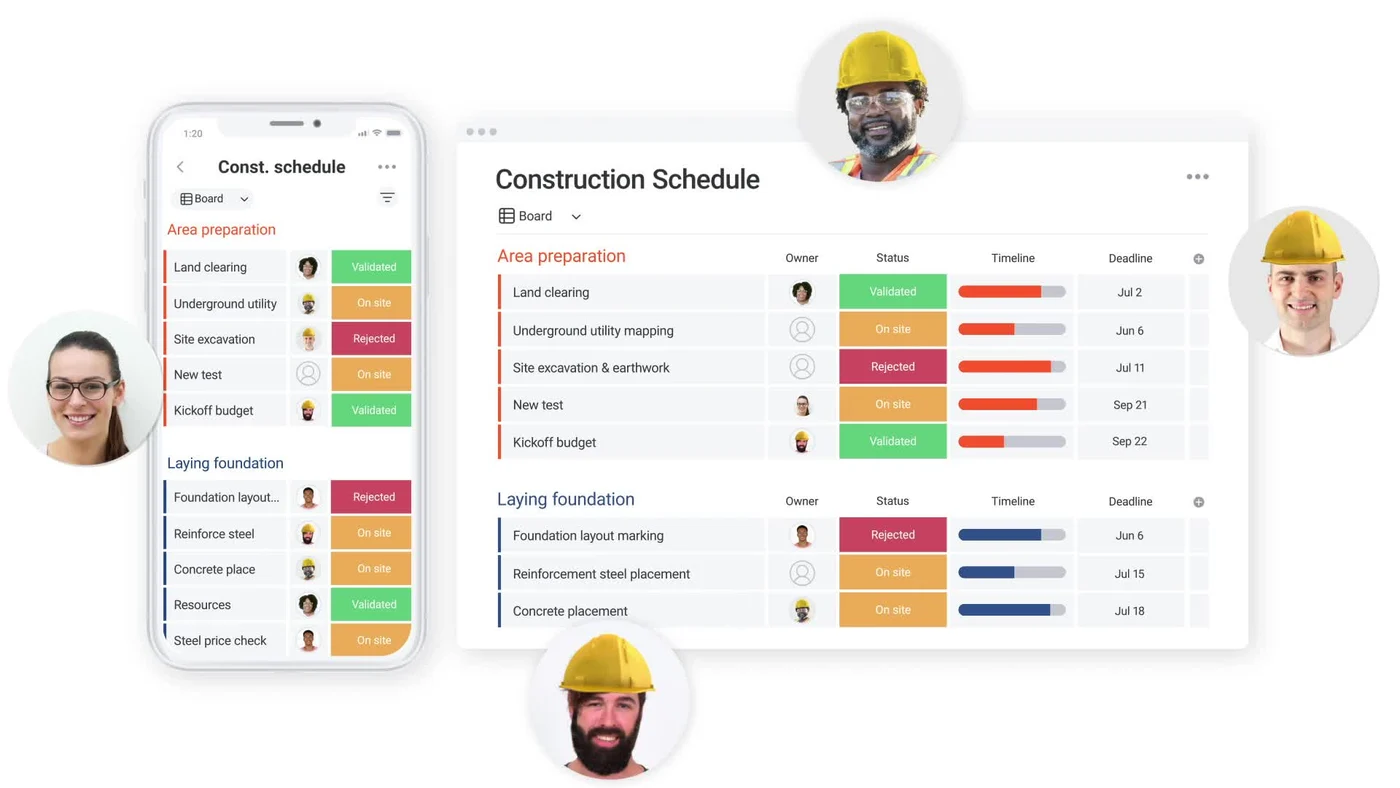
Boards are the foundation, views are how you slice them. A single board with all your active jobs as items can render as a Kanban board (statuses become columns), a Gantt chart (items become bars on a timeline — Standard tier and above), a Calendar (items show on dates — Standard+), a Timeline (Standard+), a Map (items with addresses plotted geographically — useful for field-team route planning), a Workload view (capacity visualization across team members — Enterprise only), or a Chart view (items aggregated into reporting visualizations — Pro tier).
Custom columns carry the data behind the visual layer: Status, Person (assignees), Date, Numbers, Currency, Files, Email, Phone, Country, Location (with map integration), Tags, Timeline, Rating, Checkbox, Formula (Pro tier — calculations across columns), Mirror (reference data from other boards), Connect Boards (relationships between boards), and dozens more. The 8-column-type cap on the Free tier is the immediate ceiling that pushes most contractors to Basic or higher.
Items can have subitems (one level of nesting, less deep than ClickUp’s 7-level subtasks but practically sufficient for residential project workflows), updates (threaded comments per item), files attached, and dependencies between items. The Files column supports inline annotation and proofing on PDFs and images — useful for marking up drawings, submittals, and spec sheets.
The visual paradigm is also the platform’s biggest learning curve: contractors switching from spreadsheets or list-based PM tools take 2-4 weeks to internalize the board mental model. Capterra reviewers consistently flag the learning curve for “field crew members who are less tech-savvy” — the platform’s flexibility is great when someone owns the configuration; it’s overwhelming when no one does. For a residential GC with a dedicated operations manager, this is fine. For a 3-person crew where everyone configures their own workspace, it falls apart.
Pricing Tiers, Seat Minimums, and the Real Math
I genuinely don’t remember the exact tier we ended up on by the time we left — somewhere in the Basic-to-Standard range, since we never needed time tracking or formula columns badly enough to push to Pro. What I do remember is that the math worked at small scale and the conversation about cost-per-seat never came up the way it did with the CRM I’d been on before. Below is the verified 2026 pricing with the structural notes that actually matter for contractors evaluating today.
Verified 2026 Pricing · monday.com/pricing
Five Tiers · 3-Seat Minimum on All Paid · 18% Annual Discount
All prices verified against monday.com/pricing in April 2026. Yearly billing applies up to 18% discount versus monthly. 14-day free trial of Pro plan. 30-day money-back guarantee on yearly purchases.
Free
$0
up to 2 seats
- →3 boards · 3 Docs · 200+ templates
- →8 column types
- →iOS/Android apps
- →No automations or integrations
Basic
$9
/seat/mo
- →AI credits · Unlimited items
- →Unlimited free viewers
- →5GB storage · 1-board dashboard
- →3-seat minimum
Standard · Most Popular
$12
/seat/mo
- →AI Sidekick (Lite)
- →Timeline + Gantt + Calendar views
- →Guest access · 5-board dashboard
- →250 monthly automations + integrations
Pro
$19
/seat/mo
- →Private boards · Chart view
- →Time tracking · Formula columns
- →20-board dashboard
- →25K monthly automations + integrations
Enterprise · Custom
Custom
- →Enterprise AI bundle (Vibe + Sidekick Plus)
- →Portfolio + Resource management
- →Multi-level permissions · 50-board dashboard
- →40+ user minimum · 250K automations
All paid tiers require minimum 3 seats. Pro 14-day free trial unlocks the full feature set. AI features ship across tiers: Basic gets AI credits, Standard adds Sidekick Lite, Enterprise gets the full Vibe + Sidekick Plus bundle.
The pricing math at typical contractor scales:
| Team Size | Monday Basic | Monday Standard | Monday Pro | ClickUp Unlimited | Buildertrend Essential |
|---|---|---|---|---|---|
| Solo | N/A (3-seat min) | N/A | N/A | $7/mo | N/A |
| 3 person | $27/mo | $36/mo | $57/mo | $21/mo | $339/mo flat |
| 10 person | $90/mo | $120/mo | $190/mo | $70/mo | $339/mo flat |
| 30 person | $270/mo | $360/mo | $570/mo | $210/mo | $339/mo flat |
ClickUp wins decisively on per-seat economics; Monday wins decisively on visual UX and native QuickBooks; Buildertrend wins decisively on shipped construction modules at the $339/mo unlimited-users tier when you’re past 15+ seats.
The honest framing: Monday.com’s pricing earns its keep specifically when (a) you’re 3+ seats already, (b) the visual board paradigm clicks for the way your team thinks, and (c) you’re running QuickBooks Online for accounting (the native sync is meaningfully better than ClickUp’s beta status). For solo and 2-person operations, ClickUp’s Free Forever tier with no seat minimum is the better economic fit. For 15+ seat residential operations where you need workflows that come pre-built rather than configured, JobNimbus, Contractor Foreman, or Buildertrend ship turnkey what Monday.com expects you to keep building yourself.
March 2026: The AI Agent Infrastructure Bet
Most reviews of Monday.com’s AI before March 2026 describe Sidekick as a chat assistant that suggests actions you accept. That description is meaningfully out of date now. The March 11, 2026 AI Agent Infrastructure release was Monday.com’s structural shift from suggestion-and-accept AI to autonomous AI agents that act on behalf of humans inside the platform. The architectural difference is genuine, not marketing: agents now sign up to workspaces as first-class users, authenticate with their own permissions, and operate with their own audit trail.
What agents actually do once provisioned:
Organize projects — describe a job to the agent (“create a kitchen remodel project for the Henderson address — standard 6-week schedule, four trade phases, foreman is Mike, homeowner notification by SMS at each phase transition”) and the agent creates the board, populates the items from your standard template, configures the assignees, and provisions the homeowner notification automation.
Update workflows — agents trigger status changes based on external events. Materials arrive at the supplier? The agent updates the “Materials Ordered” status to “Materials Delivered” automatically, triggering downstream automations.
Trigger automations end-to-end — multi-step automation chains that previously required user intervention at each step now run autonomously. The agent recognizes the trigger, validates conditions, executes the chain, and handles error states.
Generate reports — pull data across multiple boards into formatted summaries on demand. “Give me the status of every active job by phase, flag delays of 3+ days, format as a one-page weekly summary for Friday’s office meeting” runs against the live data and produces the document.
Coordinate work across teams — assign tasks, send notifications, manage dependencies, escalate stuck items. Agents act as workflow conductors rather than passive observers.
The pre-built monday agents available as of April 2026: Project Analyzer (analyzes project health and surfaces risks, especially useful for residential GCs running 10-15 active jobs simultaneously), Sales Advisor (guides sales workflow), AI Service Agent (handles customer service intake), Research Assistant (web research and synthesis for sales prep, vendor research, and product comparisons). Custom agents are buildable without code through Sidekick configuration.
The March 30, 2026 Sidekick Skills Marketplace extended this further with third-party “Skills” that agents can activate — a Skill is a packaged capability set (Salesforce data pulls, GitHub PR reviews, Slack notification routing, etc.) that agents acquire and deploy. The marketplace approach signals Monday.com’s bet on a third-party AI ecosystem similar to Slack apps or Salesforce AppExchange — but for AI capability packages rather than UI widgets.
The honest comparison with ClickUp 4.0’s Super Agents: ClickUp shipped Super Agents GA in December 2025; Monday.com’s Agent Infrastructure shipped GA March 11, 2026. ClickUp had a 3-month lead, but the architectural depth (Monday’s agent-as-first-class-user identity layer + the Skills Marketplace) is comparable. By April 2026, both platforms ship genuinely autonomous AI agents, and the gap that existed in late 2025 has materially closed. Contractors evaluating today should treat AI capability as roughly equivalent across the two platforms — the differentiation lives in workflow paradigm (visual boards vs. tasks-and-hierarchy) and pricing ($9-$19/seat vs. $7-$12/seat), not in AI maturity.
Construction Templates: What Ships Pre-Configured
Three construction-specific templates ship in Monday.com’s 200+ template library, and they’re the most useful on-ramp for contractors evaluating against ClickUp’s generic Construction Management template. The pre-configured columns cover the standard residential GC starting point — project name, phase, status, budget, completion percentage, foreman, scheduled dates — so the work is customizing the template rather than building from a blank workspace.
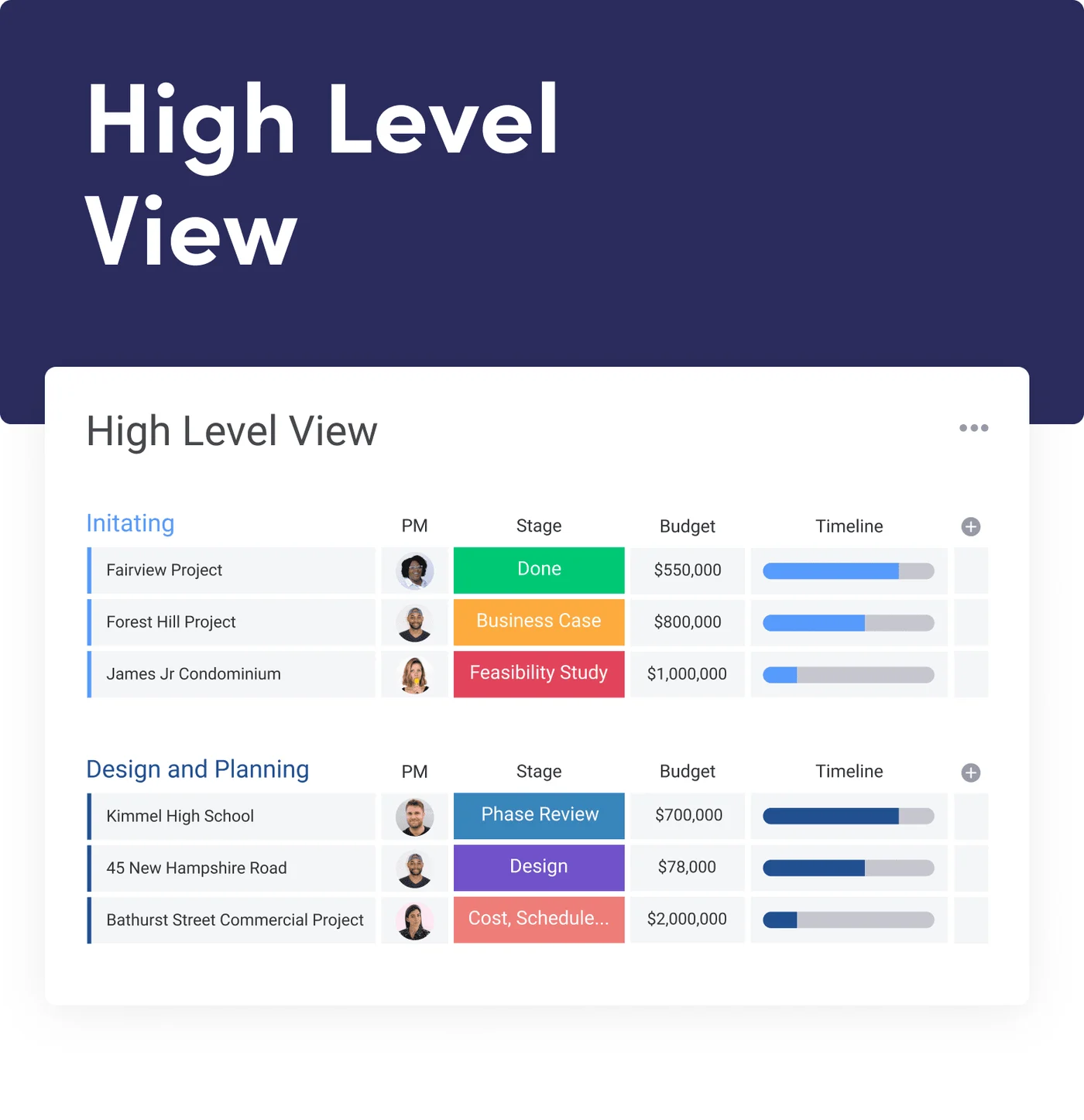
High-Level View is the multi-project overview template — one row per active job, columns for project name, phase (pre-construction → demolition → framing → MEP rough → drywall → finish → punchlist → closeout), status, budget, completion percentage, foreman assigned, scheduled start date, scheduled end date, and any custom fields you add. For a residential GC running 8-15 simultaneous jobs, this is the dashboard the operations manager opens first thing every morning to identify which projects need attention.
Construction Project Tracking is the per-project deep-dive template — one board per project, items per phase, subitems per task within phase, columns for assigned crew, materials needed, RFIs open, change orders pending, inspection status, and homeowner contact log. Useful when the High-Level View flags a project that needs attention and you drill in.
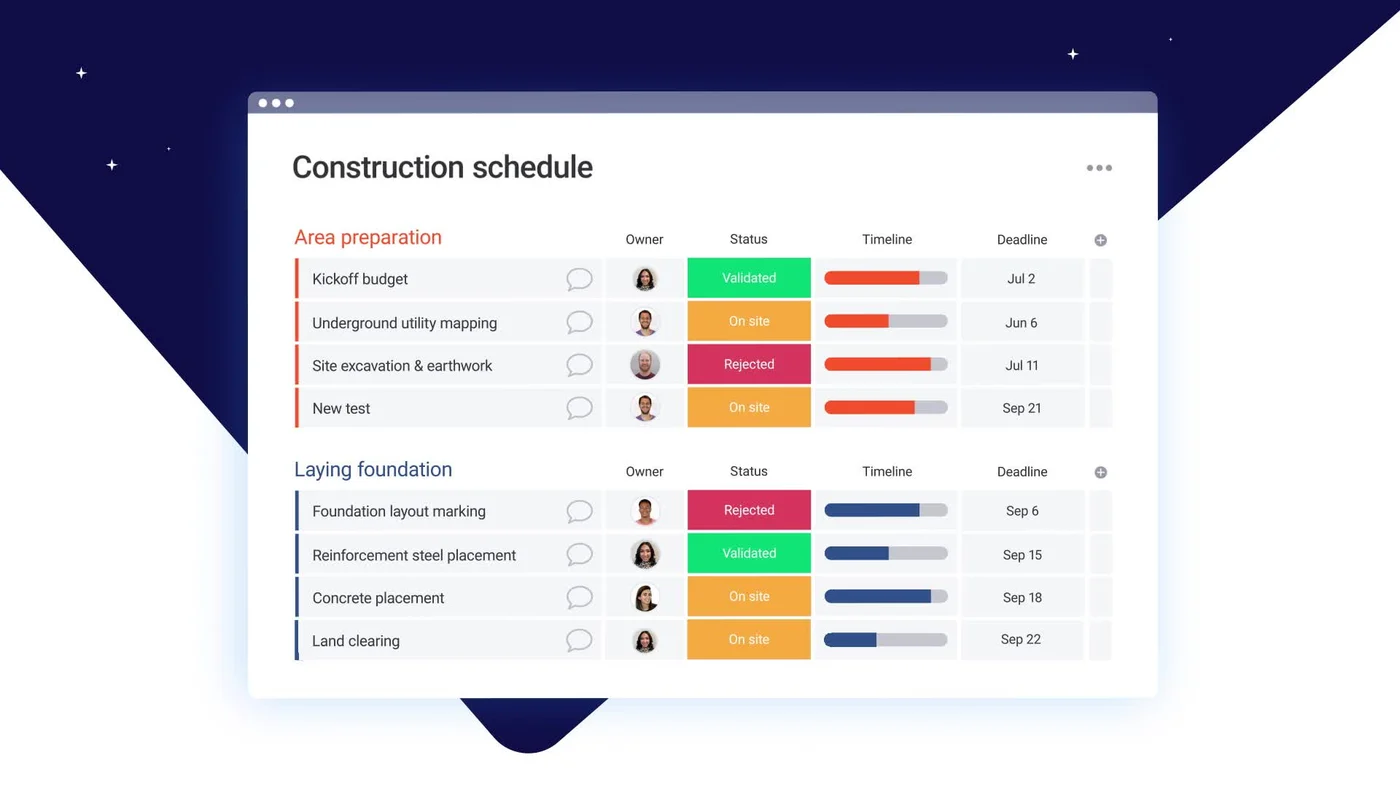
Construction Schedule Templates is the deliverables-and-permits template — items for permits required (building, plumbing, electrical, mechanical), permit application dates, expected approval dates, inspection scheduling, deliverable milestones, and dependencies between items. Useful as a reference template when starting a new project, even if you don’t run the full schedule from this board.
What you’ll still configure yourself: RFI submission workflow (custom form pointing to a “RFIs Open” board with automation rules for routing), change-order approval workflow (similar pattern with cost impact, schedule impact, and homeowner-approval-required custom fields), submittal review (Files column with annotation, custom statuses for the review chain), daily logs (forms-based pattern for foreman end-of-day submission), and homeowner client portal (Guest access at Standard tier+ with restricted board permissions). Configuration time for these custom workflows runs 4-8 hours for an experienced operations manager — meaningfully less than ClickUp’s blank-slate Construction Management template, but more than Buildertrend’s shipped RFI/submittal/change-order modules that work out of the box.
The honest framing: Monday.com sits between ClickUp (configure everything yourself) and Buildertrend (everything ships turnkey) on the configuration spectrum. The three construction templates do real work as starting points — saving meaningful build time versus a blank ClickUp workspace — but the residential GC operations workflow doesn’t ship complete out of the box. The lock-in cost worth thinking about: the longer you’ve been on the platform, the more custom workflow you’ve layered on top of those templates, and the harder it is to rebuild that configuration in another tool when you scale past Monday.com’s natural fit.
Native QuickBooks Online and the Contractor-CRM Gap
The 850+ integrations are a genuine ecosystem strength, and the native QuickBooks Online integration is the structural advantage over ClickUp for contractor accounting workflows. But the integrations directory has the same critical gap as ClickUp: zero native connections to contractor-specific operations tools.
Native integrations confirmed for contractor workflows:
- QuickBooks Online — bidirectional sync of customers, invoices, products, and services on all paid tiers (not gated to higher plans, not in beta); this is Monday.com’s most contractor-relevant native integration and the genuine differentiator over ClickUp’s beta-on-Business-Plus QBO Sync
- Slack — full two-way integration; Slack messages convert to items, board updates post to Slack channels
- Microsoft Teams — same pattern as Slack
- Microsoft Outlook — calendar sync, email-to-item creation
- Google Workspace — Drive (file embedding), Calendar (two-way sync), Gmail (email-to-item)
- Zoom — meeting scheduling, recording attachment
- Salesforce — opportunity and lead sync; relevant for $5M+ commercial GCs running real Salesforce CRM
- HubSpot — same pattern as Salesforce
- Stripe — payment processing (useful for contractors taking deposits or progress payments)
- Dropbox, OneDrive, Box — cloud storage integration
- Mailchimp — marketing automation for contractor email campaigns
- GitHub, GitLab — development workflow (relevant for contractors with in-house custom-software efforts; rare)
- Active Directory, SCIM — enterprise identity
- Twilio — SMS automation
Zero native integrations with contractor-specific operations tools as of April 2026:
- Jobber — Zapier only
- JobNimbus — Zapier only
- ServiceTitan — Zapier only
- Housecall Pro — Zapier only
- AccuLynx — Zapier only
- GoHighLevel — Zapier only
- Smith.ai — Zapier only
- DocuSign, Xero, EagleView, Hover, Xactimate — all Zapier-mediated
The 850+ integrations marketing claim is technically accurate via Zapier and Make as the bridge, but native vs. third-party-bridge integrations matter for evaluating contractor-stack fit because native integrations break less often, don’t add a recurring middleware bill, and don’t require manual error handling when the bridge fails.
API and webhook architecture: Monday.com has a documented GraphQL API with full webhook support and the monday Apps Framework for custom integrations. The monday Integration Protocol (MCP) exposes the platform as an AI-callable tool for custom agent workflows — comparable to ClickUp’s MCP integration. For contractors building custom AI automation stacks, both platforms are equally agent-friendly.
The practical workflow for contractors: pair Monday.com with Jobber or JobNimbus for the field-service operations layer, use the native QuickBooks Online integration for accounting sync, and bridge the field-service-to-PM data via Zapier. Total Zapier cost adds $30-$60/month but the contractor stack does function — and the native QBO link removes one of the most common failure points (accounting sync) from the Zapier dependency layer.
Mobile and Field Sync for Job Site Conditions
Monday.com’s mobile experience is meaningfully more thoughtful for construction than ClickUp’s generic productivity-app mobile, primarily because of one feature: offline mode is explicitly built and called out for construction job sites on monday.com/use-cases/construction.
What works on mobile:
- Same visual board UX as desktop — color-coded statuses, Kanban view, items with files, comments, updates; foreman scanning the board on a phone reads the same visual cues the office sees on the desktop
- Offline mode for board updates — change item statuses, add comments, attach photos while offline; changes queue and sync when connectivity returns; explicitly designed for the basement/attic/rural-job-site reality where cell signal drops
- File capture — photos and videos directly from the camera roll into items, with metadata preservation (timestamp, GPS if location services enabled)
- Notification routing — push notifications for assigned items, status changes on watched boards, mentions in comments
- Quick-add items via voice through native iOS/Android voice-to-text (not Monday-specific AI voice, but functional)
What’s missing for true field-tech workflows:
- No GPS time clock with geofenced clock-in — for service-trade operations needing payroll-grade time tracking with location verification, Jobber, Housecall Pro, and ServiceTitan ship this and Monday.com doesn’t
- No route optimization for multi-tech daily schedules
- No driveway-quote workflow — no in-field estimate building with materials catalog and live pricing
- No customer-facing portal for homeowners to track project progress on a branded URL — Guest access exists but it’s not the polished homeowner experience Buildertrend ships
The practical framing: Monday.com mobile is the upper-management tool for project status visibility from the field, not the field-tech operations tool. A foreman or super using Monday.com on a phone is checking project status, updating phase completions, attaching daily-log photos, and routing RFIs to the office — that workflow runs cleanly. A service tech using Monday.com on a phone for in-driveway estimating, GPS-stamped time clocking, and route optimization is the wrong tool.
Stack Patterns: Pairing Monday.com With Field-Service Operations
The contractors I see running Monday.com successfully aren’t using it as their everything-tool. They’re pairing it with field-service-specific operations platforms that fill the gaps Monday.com doesn’t ship.
Monday.com + Jobber ($9-$19/seat + $39-$439/month): for service-trade contractors (HVAC, plumbing, electrical, painting, landscaping) running Jobber as the dispatch and invoicing system of record. Jobber handles scheduling, customer-facing booking, payments, recurring service plans, and the field-tech mobile workflow. Monday.com handles the project-style work that Jobber doesn’t model well — multi-week installs, complex remodels, marketing/operations projects. Bridge via Zapier: when a Jobber job closes, create a project tracking item in Monday; when a Monday project completes, trigger a Jobber invoice. Total stack cost at 5 seats Standard tier: $60 Monday + $119 Jobber Connect (5 users included, one-year commitment billed monthly) = $179/month. Same operation on ServiceTitan is $1,225-$1,500/month — the Monday+Jobber pairing earns its keep at sub-$2M revenue operations where ServiceTitan’s enterprise depth is overkill.
Monday.com + GoHighLevel ($9-$19/seat + $97-$497/month): for residential GCs and home-services contractors running marketing-heavy operations where GHL is the lead-to-customer engine. GHL handles SMS automation, AI Voice call answering, review request automation, customer-facing booking widgets, and the post-job review-request loop. Monday.com handles the operational project management for active jobs. The bridge: when a GHL deal closes, create a project in Monday; when a Monday project completes, trigger the GHL post-job automation sequence. The GoHighLevel review covers this pattern in detail. Pairing makes sense for operations running 50+ leads/month through paid ads — GHL’s marketing engine plus Monday.com’s project layer is one of the most capable combinations under $500/month.
Monday.com + Smith.ai ($9-$19/seat + Smith.ai per-call pricing): for solo-to-5-person contractors who want professional call answering without a CSR team. Smith.ai catches the calls, qualifies leads, and pushes new-lead data to Monday via Zapier (Smith.ai integrates with Zapier for downstream automation). Monday creates the lead item, the contractor follows up. This pairing matters specifically for after-hours and overflow calls — see the Smith.ai review for the full economics. Total cost at 3 seats Standard: $36 Monday + Smith.ai’s per-call pricing typically running $200-$400/month at 50-100 calls.
Monday.com + JobNimbus ($9-$19/seat + $200/mo + per-user fees): for roofing contractors where JobNimbus is the CRM-and-production system of record. JobNimbus runs the full roofing-specific workflow (EagleView measurement, SumoQuote proposals, Beacon material ordering, Xactimate-adjacent supplement tracking, claim status). Monday.com handles the office-side operational work — internal SOPs, marketing campaigns, equipment maintenance, hiring pipelines, business-unit-level reporting. Less common than Jobber and GHL pairings; mostly seen in 10-30 person roofing operations with dedicated office staff.
The common thread: Monday.com isn’t trying to replace the contractor-specific operations tool — it complements it on the upper-management and project-coordination layer. Contractors who try to make Monday.com handle everything (estimating, dispatch, invoicing, customer portal, field-tech mobile) find the configuration overhead exceeds the value. Contractors who pair it with the right operations tool find the math works at 3-50 seat scale where the bundled construction PM platforms feel too heavy.
What 17,695 G2 Reviewers and 4,000+ Capterra Reviewers Actually Say
The platform’s review volume is the largest in the project management category, and the user sentiment patterns are genuinely useful for evaluating fit because the construction-specific signal isn’t drowned out by enterprise software-team feedback.
Verified Third-Party Ratings · April 2026
Largest Validated Review Volume in the PM Category
Aggregated from G2 and Capterra in April 2026. monday.com leads G2's PM category by review count and is on Capterra's 2026 Shortlist for Project Management.
G2 Score
90
Of 100 · 84% 5-star
Editorial Score
4.0
/ 5
Contractor-weighted
The gap between the third-party 4.7 ratings and our 4.0/5 editorial score is meaningful but smaller than ClickUp’s gap: the cross-category 4.7 reflects Monday.com being a great platform across marketing, software, IT, consulting, and design teams (where it’s most heavily reviewed); our 4.0 reflects contractor-specific weighting plus a hands-on perspective from running it at small contractor scale where the platform genuinely earns its keep. The construction-fit dimensions (financialsJobCosting at 2.4/5, clientPortal at 2.7/5) drag the score below the cross-category average; the dimensions where Monday.com excels for residential contractors (scheduleManagement at 4.4/5, pricingValue at 4.5/5, aiCapabilities at 4.6/5, integrations at 4.6/5) lift it back up to where the platform deserves to sit.
What construction-specific reviewers consistently flag positively:
- “As a construction company juggling multiple projects, crews, and deadlines, monday.com has helped centralize operations, improve communication, and stay on schedule.” — Capterra construction office manager, 2+ year reviewer
- HOLT CAT (Jason Doan, VP) on monday.com/use-cases/construction: “given us the visibility we need to get everyone on the same page and keep track of all the moving parts”
- Falkbuilt (Allie Swindlehurst, Operations Manager): “instant access to the project information they need and makes connecting with the team at HQ easy”
What positive reviewers consistently call out across the broader 17,695-review base:
- Visual organization and UX — “The visual organization and automation features are particularly valued for enhancing productivity and keeping teams aligned”
- Customization without code — boards, columns, automation rules can be configured by non-technical users
- Quick setup — “intuitive interface and ease of use enabling quick setup and customization for diverse needs”
- Mobile parity — same workflow across desktop and mobile
What negative reviewers consistently flag:
- Pricing pain — “pricing structure becomes expensive if you need many seats or advanced features”; the $19/seat Pro tier is the recurring complaint
- Tier-gating critical features — time tracking only at Pro, formula columns only at Pro, workload management only at Enterprise; reviewers feel the headline pricing understates the cost-of-ownership
- Field-crew learning curve — “the biggest challenge is the learning curve for new team members, particularly those in the field who are less tech-savvy. Without proper training, the flexibility can feel overwhelming”
- Notification volume — “notifications tend to be overwhelming in quantity and hard to curate properly”
- Search inaccuracy — “search functionality isn’t always intuitive”
- Cancellation friction — the persistent banner on cancelled team accounts is widely reported
- Calculation limitations — “unable to carry out complex calculations”; for contractors needing real job-costing math, this is a constraint
The construction testimonials are thinner than the marketing/software/consulting feedback because the platform’s installed base in construction is smaller than its broader installed base. The named testimonials are real (sourced from Monday.com’s own construction landing page) — but a contractor evaluating Monday.com shouldn’t read the 4.7/5 G2 score as construction-specific validation. It’s cross-category validation that includes some construction operations among many other use cases.
How Monday.com Scored Against the 8 PM Dimensions
We score project management platforms on eight dimensions weighted by what matters for contractor operations specifically (full methodology on /how-we-review/). The AI Capabilities dimension was added in April 2026.
Schedule & Phase Management — 4.4/5 (15% weight): This is where I scored Monday.com the most generously relative to other PM platforms because the visual scheduling clarity is what set the platform apart in daily use. Gantt and Timeline views unlock at Standard tier ($12/seat); Calendar view at Standard; Workload management at Enterprise (40+ user minimum); Map view across tiers; Chart view at Pro tier. Every active job laid out in color-coded statuses you can scan in five seconds is a real differentiator from list-and-task PM tools. Slightly less raw schedule-dependency depth than Buildertrend’s construction-native Gantt, but for residential GC and small-team scale, the visual clarity matters more than the dependency model depth.
Documents, RFIs & Submittals — 3.4/5 (15% weight): WorkDocs ships built-in with rich-text editing, threaded comments, and item linking. WorkForms (a separate but bundled product) handles RFI submission with conditional logic and direct routing into board items. Files column supports annotation and proofing on PDFs and images. Three construction templates ship pre-configured with submittal review patterns. What’s missing: shipped RFI/submittal/change-order modules with built-in approval routing, version control, and homeowner-facing visibility — things Buildertrend and Contractor Foreman include out of the box. Slightly higher than ClickUp’s 3.0 because the construction templates plus WorkForms-to-board automation pattern reduces the setup time meaningfully versus a blank generic-PM workspace.
Financials & Job Costing — 2.4/5 (13% weight): Native QuickBooks Online integration on all paid tiers is the standout — bidirectional customer/invoice/product sync without Zapier middleware, not in beta, not gated to higher plans. Stripe native integration handles point-of-sale payments. Formula columns at Pro tier enable manual job-cost calculations. What’s missing: AIA-style progress billing, retainage tracking, committed costs vs. actuals reporting, estimate-to-PO-to-invoice workflow. The 2.4 score is meaningfully higher than ClickUp’s 1.8 specifically because the QBO integration is on every paid tier and works reliably in production — meaningful for contractors where QuickBooks is the accounting system of record.
Integrations — 4.6/5 (13% weight): 850+ via native and Zapier. Native QuickBooks (key for contractors), Stripe, Salesforce, HubSpot, Slack, Microsoft Teams, Outlook, Google Workspace, Dropbox, Mailchimp, Twilio, GitHub, GitLab, Active Directory. GraphQL API + webhooks + monday MCP make this competitively agent-friendly. The only ding: zero native contractor-specific integrations (Jobber, JobNimbus, ServiceTitan, HCP, AccuLynx, GoHighLevel all Zapier-only). Slightly higher than ClickUp’s 4.5 because the QBO integration is on every paid tier, not gated to Business Plus+ in beta status.
Client & Homeowner Portal — 2.7/5 (12% weight): Guest access at Standard tier and above with restricted board permissions handles the basic give-customers-visibility-into-job-status use case competently. WorkForms handles client intake cleanly — public RFI forms can be embedded on a contractor’s website and feed straight into project boards. Where the score caps: no Selections-grade homeowner portal, no change-order approval workflow with timestamps and signature capture, no progress-photo gallery on a custom domain, no branded homeowner experience at the polish level Buildertrend ships. For roofing and service-trade operations where homeowner Selections isn’t load-bearing, Guest access is sufficient. For residential remodelers and custom home builders selling on the homeowner experience, it’s the gap that drives migration to Buildertrend.
Pricing & Value — 4.5/5 (12% weight): This is the dimension worth being most honest about scoring relative to platform fit. Free tier limited (2 seats, 3 boards, 3 docs); Basic at $9/seat (3-seat min); Standard at $12/seat (3-seat min, the sweet spot for residential GCs); Pro at $19/seat (3-seat min, where Pricing & Value would drop to a 3.0 for a 30-seat operation rather than 5-15); Enterprise at custom (40+ user min). 14-day Pro trial unlocks full feature set; 30-day money-back on yearly. The 4.5 score reflects the small-contractor value reality — at 5-15 seats on Basic or Standard, the math is genuinely good. At 30+ seats on Pro, the math gets worse fast and contractor-purpose-built alternatives (Contractor Foreman at $332/mo unlimited users, Buildertrend at $339/mo flat) start to outprice it.
AI Capabilities — 4.6/5 (10% weight): AI Sidekick (Lite at Standard+, Plus at Enterprise) for assistant workflows; monday Vibe (Beta) for build-any-app capability; March 2026 AI Agent Infrastructure shipping autonomous agents that act on behalf of humans; March 30, 2026 Sidekick Skills Marketplace for third-party AI capability packages; AI Blocks across paid tiers (extract info, categorize data, detect sentiment, summarize, translate, custom prompts); pre-built monday agents (Project Analyzer, Sales Advisor, AI Service Agent, Research Assistant); AI Governance for admins (per-user credit limits, threshold warnings). Just slightly below ClickUp 4.0’s 4.7 score because Sidekick and most agents are still Early Access/Beta as of April 2026 — though the architectural depth (especially the Skills Marketplace) is genuinely competitive. The AI gap that existed in late 2025 is meaningfully closed.
Mobile & Field Use — 3.6/5 (10% weight): iOS and Android apps with the same visual workflow as desktop — that visual continuity is what makes the mobile UI actually usable on a phone in the truck. Offline mode explicitly built and called out for construction job sites is a real construction-relevant feature. Photo capture, voice quick-add, push notifications, file annotation. Missing: GPS time clock, geofencing, route optimization, in-driveway estimating workflow. Functional for project managers and operations managers checking project status from the field; not a foreman’s field-tech tool. The 3.6 score reflects the visual mobile UX and offline mode advantage versus ClickUp’s generic productivity mobile (3.2).
Weighted Total: 4.4(0.15) + 3.4(0.15) + 2.4(0.13) + 4.6(0.13) + 2.7(0.12) + 4.5(0.12) + 4.6(0.10) + 3.6(0.10) = 3.76 weighted, plus the +0.20 site-wide calibration constant = 4.0/5 final rating.
Best-Fit Contractor Profiles
3-50 person residential GCs and remodelers with a dedicated operations manager — this is the canonical Monday.com fit. The visual board model rewards having someone who owns the project layer and configures it for the team. The 3-seat minimum doesn’t constrain you; the $12-$19/seat pricing earns its keep when the operations manager’s time savings compound across the team.
Custom home builders running operations management at $1M-$10M annual volume — Monday.com’s High-Level View template plus Construction Project Tracking gives the visibility layer that operations roles at this scale need. For higher-end custom home builders selling on homeowner Selections experience, Buildertrend is the more direct fit; for the operations-management layer that complements Buildertrend, Monday.com works alongside.
Specialty trades doing project-based work (custom carpentry, finish work, restoration with project-style timelines, design-build contractors) — discrete projects with defined scope, schedule, and budget map cleanly to Monday’s board paradigm.
Operations heavy on QuickBooks Online for accounting — the native QBO integration on every paid tier is meaningfully better than ClickUp’s beta-on-Business-Plus status; this is a real architectural advantage for contractors where QuickBooks is the system of record.
Marketing-heavy contractor operations running campaigns through HubSpot or Salesforce — the native integrations with both make the operations layer continuous with the marketing layer.
Tech-forward contractor operations building custom AI automation stacks — Monday’s GraphQL API, webhooks, MCP integration, Sidekick skills, and pre-built agents are competitively agent-friendly. For contractors integrating with Claude, ChatGPT, or custom MCP-based agents, both Monday.com and ClickUp work; the Skills Marketplace gives Monday a slight edge on third-party AI ecosystem development.
Operations switching from spreadsheets and Asana — Monday.com’s import tooling from Asana, Trello, Jira, Excel, and Google Sheets is mature; the visual board model often clicks faster for spreadsheet-fluent operations than ClickUp’s task-and-hierarchy model.
Where to Look Instead
Solo contractors and 2-person operations — the 3-seat minimum on every paid tier and the Free tier’s 3-board cap make the math punitive. Use ClickUp Free or Unlimited at $7/seat with no minimum.
Insurance restoration roofers writing in Xactimate — no Xactimate integration, no ESX export, no aerial measurement integration with EagleView or Hover. Use JobNimbus for the roofing CRM workflow or AccuLynx for production roofing operations.
Multi-tech HVAC, plumbing, or electrical operations with 5+ field techs — Monday.com is project management, not field service management. No FSM-style dispatch board, no GPS route optimization, no capacity-based scheduling, no field-tech mobile app optimized for in-driveway estimating. Use ServiceTitan for enterprise-scale, Housecall Pro for mid-market service trades, or Jobber for sub-15-person service operations.
Custom home builders selling on the homeowner Selections experience — no Selections module at the polish level Buildertrend’s clients expect, no AIA progress billing, no retainage tracking. Buildertrend is purpose-built for this use case at $339-$829/month flat with unlimited users.
Contractors who think in nested task hierarchies rather than visual boards — Monday.com’s signature value is the visual workflow; if the team prefers list-and-checkbox UI with deep task nesting, ClickUp fits the mental model better at a lower price point.
$20M+ commercial GCs — Monday.com doesn’t ship the document control depth, RFI workflow, submittal review structure, or compliance audit trails that Procore is purpose-built for. The Monday.com configuration that approximates Procore is a 100-hour build, not a weekend.
Contractors needing turnkey construction modules with zero configuration — even with Monday’s three construction templates, you’re configuring custom fields and automations. Contractor Foreman at $49-$332/month ships 20+ pre-built construction modules including job costing, AIA billing, RFIs, submittals, and scheduling that work out of the box.
Contractors running primarily off Xero rather than QuickBooks Online — Monday’s native accounting integration is QBO-specific; Xero connection requires Zapier.
Operations needing native homeowner financing at point-of-sale — no Stripe-and-financing-partner stack equivalent to Jobber’s Wisetack integration or Buildertrend’s Parafin and Nelnet partnerships.
The Verdict for Contractors
Monday.com at 4.0/5 is the visual-first project management platform I actually used at a small roofing company before we scaled out — and the rating reflects general impressions from running it daily, not just feature-spec analysis. The visual board model genuinely changed how I worked at that scale. The native QuickBooks integration was a structural advantage I appreciated. The pricing felt fair for the value at small-team scale. The March 2026 AI Agent Infrastructure plus Sidekick Skills Marketplace closed the AI gap with ClickUp 4.0 that existed in late 2025 — both PM platforms now ship genuinely autonomous AI agents.
The ceilings are real and well-defined: $9-$19/seat pricing meaningfully higher than ClickUp’s $7-$12, the 3-seat minimum locks out solo and 2-person operations, several practically-needed features (Gantt, time tracking, formula columns, workload management) gate to higher tiers in ways the headline pricing understates, AI products are mostly Early Access or Beta as of April 2026, and the construction-specific gaps are identical to ClickUp’s — no native job costing, no AIA progress billing, no Selections-grade homeowner portal, no contractor-CRM native integrations.
The right buying motion: spend the 14-day Pro trial validating that the visual board model actually fits your team’s workflow before committing. Configure the Construction Project Tracking template against one real active job and have the operations manager run that job through Monday.com end-to-end. If the team uses it daily through the trial period, upgrade to Standard at $12/seat (the sweet spot for residential GCs without time-tracking needs) or Pro at $19/seat (if time tracking and formula columns matter). If the team stops opening the app or the configuration falls apart, it’s not the platform — it’s the fit, and ClickUp’s Free tier is a better next stop to test the task-and-hierarchy paradigm before committing to either platform.
