

What Is ServiceAgent and Who Built It?
ServiceAgent is an AI-powered phone answering agent built specifically for home service businesses. When a customer calls, the AI picks up, asks the right questions for your trade, qualifies the lead, books appointments, and sends you a summary with action items. It runs 24/7, handles calls while you’re on the job, and never calls in sick.
What separates ServiceAgent from the rest of the AI answering market is its approach to training. Instead of running one general-purpose AI model and customizing it with your FAQs, ServiceAgent built separate AI models for each trade — HVAC GPT, Roofing GPT, Plumbing GPT, Electrical GPT, Solar GPT, and Garage GPT. Each model is pre-trained on thousands of real-world conversations from that specific industry. The idea is that when a homeowner calls your plumbing company at 2 AM about a slab leak, the AI doesn’t need to be taught what a slab leak is or why it’s urgent. It already knows.
The company was built by SaaS Labs, the same team behind JustCall.io — a cloud phone system used by over 130,000 businesses. So this isn’t a startup learning voice AI from scratch. The founder, Gaurav Sharma, has been building phone and communication tools since 2016. ServiceAgent launched publicly on April 15, 2025, so it’s about a year old as of this writing.
As of early 2026, ServiceAgent reports 7,639 agents launched, 350,527 calls handled, and 12,792 appointments booked since March 2025. The company is SOC NonCPA certified. They have both iOS and Android apps, and their main CRM integration is with Jobber.
Full disclosure: I have not run ServiceAgent on my business lines. This review is built from extensive research of their product, website documentation, pricing model, press materials, integration details, App Store listings, Product Hunt data, and what limited independent feedback exists. Where I’m drawing conclusions from research rather than direct testing, I’ll tell you.
How Do ServiceAgent’s Trade-Specific AI Models Work?
This is the feature that matters most, so let me dig into it.
When you create a new agent in ServiceAgent, the first thing you do is pick your trade. You’re not just entering your business name and hoping the AI figures out the rest. You’re selecting from pre-built AI models that were trained on data from your specific industry.
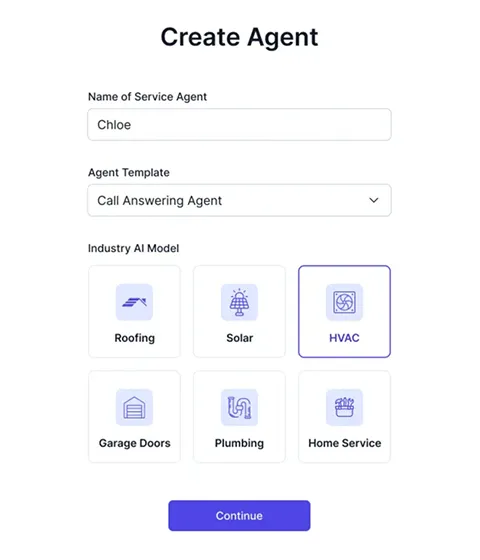
Here’s what each model claims to understand:
HVAC GPT — Pre-trained on heating and cooling scenarios including emergency no-heat calls, AC installation inquiries, SEER rating questions, thermostat issues, and seasonal maintenance requests. Knows the difference between a routine tune-up and a furnace failure at midnight.
Roofing GPT — Handles insurance claim conversations, material inquiries (shingle types, metal vs. asphalt), emergency leak calls, and storm damage assessments. Trained to understand the urgency difference between “I’m thinking about a new roof next year” and “water is coming through my ceiling right now.”
Plumbing GPT — Understands slab leak emergencies, tankless water heater inquiries, drain cleaning requests, and the difference between a $200 faucet repair and a $15,000 repipe. Trained to ask the right qualifying questions for plumbing calls.
Electrical GPT — Handles circuit breaker issues, panel upgrade inquiries, outlet and wiring questions, and emergency electrical situations.
Solar GPT — Trained on utility rate structures, net metering policies, and homeowner qualification questions. Can verify home ownership during lead qualification — a critical step for solar sales teams that don’t want to waste consultations on renters.
Garage GPT — Understands torsion spring diagnostics, opener compatibility questions, and emergency vs. routine repair triage.
No other AI answering service in this category offers this depth of pre-built trade knowledge. Rosie learns your business by scanning your Google Business Profile or website. Upfirst lets you customize scripts and FAQs. Smith.ai uses human receptionists who can adapt on the fly. But none of them ship with AI models that were specifically trained on thousands of conversations from your trade. That’s a real differentiator.
The question is whether that trade-specific training actually produces meaningfully better call handling in practice — and without hands-on testing, I can’t confirm that yet. The testimonials on their site claim customers can’t tell they’re talking to AI. But those are vendor-curated quotes, not independent reviews.
What Happens When a Customer Calls?
Here’s the actual call flow.
Setup (before calls come in): You pick your trade’s AI model, give ServiceAgent your business details, add your FAQs, upload PDFs or paste URLs for your knowledge base, write call guidelines, and choose a voice. The whole process is faster than hiring a receptionist — their own customers describe setup as “way quicker than the month it usually takes to train someone.”
When a customer calls: The AI picks up, greets the caller by your company name, and handles the conversation. It asks qualifying questions relevant to your trade — for an HVAC company, that might be “What type of system do you have?” and “Is this an emergency?” For a roofer, it could be “Is this an insurance claim or a private job?” and “When did the damage happen?”
Lead qualification: ServiceAgent doesn’t just take messages. It qualifies leads during the conversation, gathering the information your team actually needs before dispatch. For solar companies, it can verify homeownership. For roofers, it can distinguish between a tire-kicker asking about costs and a homeowner with active storm damage.
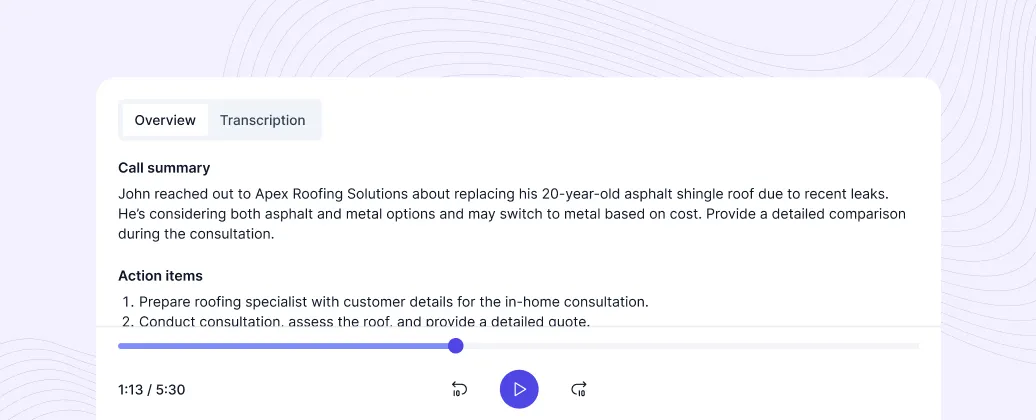
Appointment booking: ServiceAgent sends booking links via text during the call, letting the customer pick a time directly. You configure your booking URL and availability, and the AI handles the rest. It supports rescheduling and cancellation through the same link.
After the call: You get a summary with the caller’s details, what they asked about, a transcript of the full conversation, and specific action items. Everything is logged — in the mobile app, in the web dashboard, and in Jobber if you have that integration connected. Call recordings are accessible so you can hear exactly how the AI handled the interaction.
How Does ServiceAgent Handle Emergency Calls?
Emergency call handling is where the trades have different needs than regular businesses, and ServiceAgent’s approach is thoughtful here.
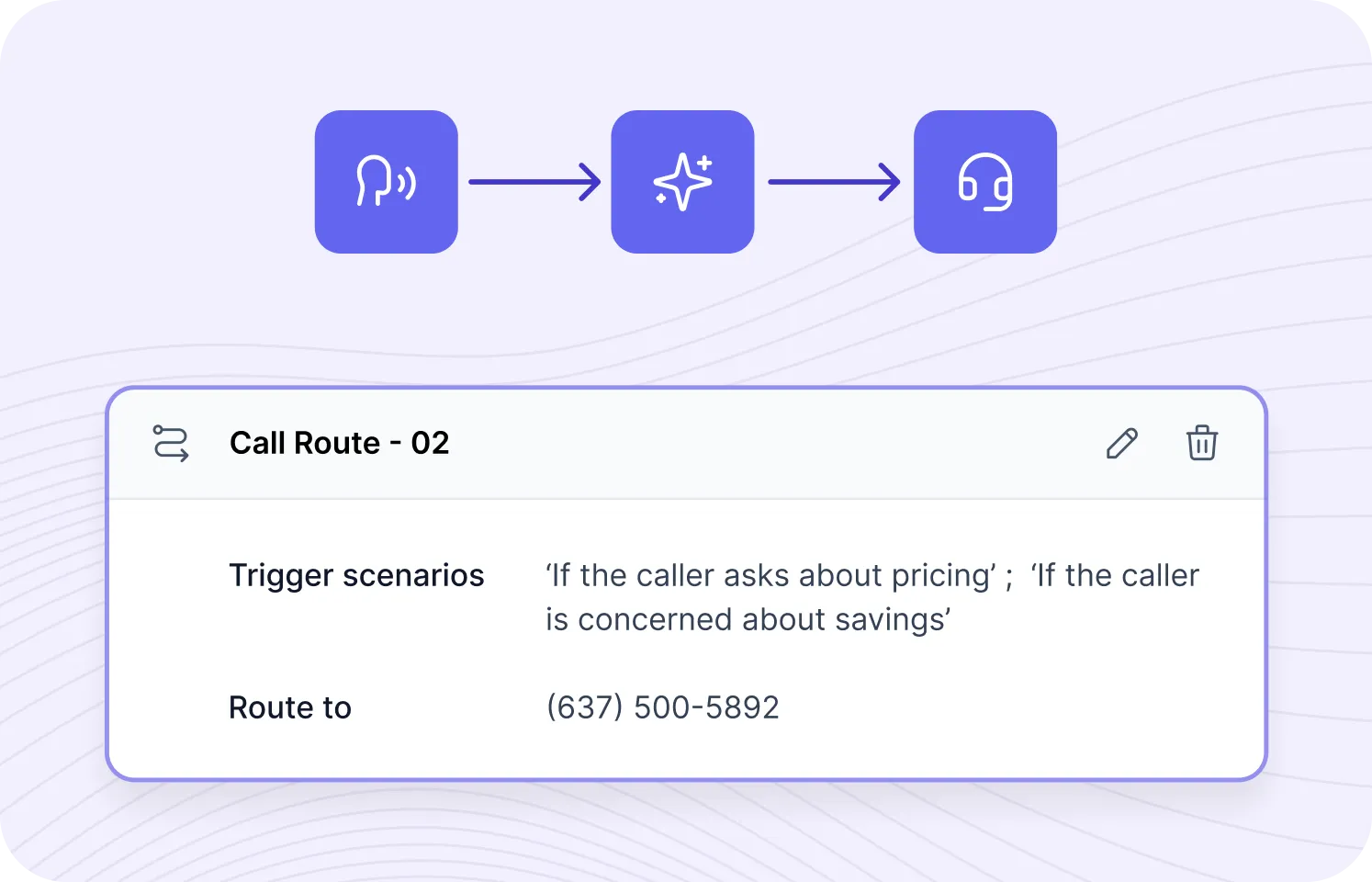
Instead of relying entirely on AI judgment to detect urgency, ServiceAgent lets you build custom routing rules with specific trigger scenarios. You define conditions like “if the caller mentions a gas leak” or “if the caller has an active water emergency” and route those calls to a specific phone number — your cell, your on-call tech, or your dispatcher.
This is rule-based routing, not just AI-driven detection. You’re telling the system exactly which scenarios should skip the AI and go straight to a human. Each rule can point to a different number, so you could route electrical emergencies to one tech and plumbing emergencies to another.
Compare that to Rosie, where emergency detection is entirely AI-driven — the AI decides what sounds urgent based on context. Rosie’s approach catches things keyword rules might miss, but you can’t set deterministic routing rules for specific scenarios. Upfirst offers keyword-triggered routing that falls between the two approaches. Smith.ai uses live humans for the most complex calls, which is the most reliable but also the most expensive option.
ServiceAgent’s human handoff gives you more control than most pure-AI competitors. The flow diagram on their site — incoming call → AI analysis → human routing — shows a three-step process where the AI makes the initial determination and either handles the call itself or passes it along based on your rules.
ServiceAgent Pricing: What Will You Actually Pay?
ServiceAgent uses a pay-per-use pricing model that’s fundamentally different from most competitors. There are no monthly plans with bundled minutes. You pay per minute of call time, period.
How the Pricing Works
| Standard Agent | Expert Agent | |
|---|---|---|
| Pricing model | Pay-per-use | Custom (contact sales) |
| Rate | $0.99 per minute | Volume discounts available |
| Free credits | $20 to start (~20 minutes) | Custom |
| Concurrent calls | 1 | Multiple |
| Languages | English only | English, Spanish, French |
| Knowledge bases | 1 | Multiple |
| Analytics | Not included | Included |
| Support | Standard | Dedicated |
What the Math Looks Like for Contractors
Solo operator (5 calls/day, avg. 3 min each): 15 minutes/day × 22 work days = ~330 minutes/month = ~$327/month
Small crew (10 calls/day, avg. 3 min each): 30 minutes/day × 22 work days = ~660 minutes/month = ~$653/month
Low-volume or after-hours only (2-3 calls/day, avg. 3 min): ~130-200 minutes/month = ~$130-$200/month
How That Compares
| Service | Monthly Cost (typical solo operator) | Pricing Model |
|---|---|---|
| Upfirst | $24.95/mo (30 calls) | Per-call plans |
| Rosie | $49/mo (250 min) | Per-minute plans |
| ServiceAgent | ~$130-330/mo (usage) | Pay-per-use |
| Smith.ai | $95-2,025/mo (AI + hybrid range) | Per-call + hybrid |
| Traditional answering service | $500-1,000+/mo | Per-minute |
| Full-time receptionist | $3,000-4,000/mo | Salary |
The pay-per-use model works best in two scenarios: you get occasional calls and don’t want to pay for a plan you’ll underuse, or you want to test the service without committing to monthly billing. The $20 in free credits gives you about 20 minutes of call time to evaluate it.
Where the model hurts is at volume. A contractor handling 10-15 calls a day is looking at $500-800/month — nearly as much as a traditional answering service. At that call volume, Rosie at $149/month for 1,000 minutes is dramatically cheaper.
Integrations: What Connects and What Doesn’t
This is ServiceAgent’s weakest area right now, and it needs to be said plainly.
What Works Today
Jobber CRM (live) — This is the only active CRM integration. ServiceAgent connects to Jobber through OAuth, and the integration is genuinely useful. Call summaries, duration, action items, and tags sync automatically. The AI can even reference existing Jobber customer data during calls — past jobs, outstanding quotes, scheduled appointments — to provide personalized responses. Follow-up tasks flow directly into Jobber so nothing slips through the cracks.
Mobile app (iOS + Android) — Both are available and provide call summaries, transcripts, recordings, and push notifications. The app launched in April 2025.
What’s Missing
No ServiceTitan integration. If you’re an HVAC or plumbing company running ServiceTitan, ServiceAgent call data doesn’t flow into your dispatch system.
No Housecall Pro integration. Same problem for HCP users.
No JobNimbus or AccuLynx integration. Roofers on either platform are out of luck.
No Zapier. This is the big one. Rosie connects to 8,000+ apps through Zapier. Upfirst uses Zapier as its middleware bridge. ServiceAgent has no Zapier integration at all, which means if Jobber isn’t your CRM, there’s no way to automatically push call data into your other systems.
No QuickBooks connection. Not direct, not through Zapier, not through any middleware.
SMS Agent and WhatsApp Agent — Both are listed on their features page as “coming soon.” Not live yet.
Mini CRM — Also listed as “coming soon.” This would give users without Jobber a way to track customer interactions, but it’s not available as of April 2026.
If you compare integration depth across the category, Upfirst connects natively to ServiceTitan, Housecall Pro, Jobber, JobNimbus, and AccuLynx. Smith.ai integrates directly with Housecall Pro and ServiceTitan plus dozens of other platforms. ServiceAgent’s single Jobber integration is a significant gap that limits its usefulness for a huge portion of the contractor market.
Can ServiceAgent Plug Into AI Agent Workflows?
If you’re a contractor starting to build AI automation across your business — piping call data into Claude for follow-up drafting, feeding transcripts into a custom agent for lead scoring, or connecting your phone system to an MCP server — the answer here is straightforward: ServiceAgent doesn’t support it yet.
No public API. There’s no documented REST API for programmatic access to call data.
No webhooks. You can’t set up event-driven triggers that fire when calls come in.
No Zapier. The standard middleware bridge that most AI tools use to connect to downstream automation isn’t available.
The Jobber connection is the only data pipe. If you need call data to flow somewhere other than Jobber, you’re stuck with manual review through the app or web dashboard.
Compare that to the competition:
- Smith.ai has an API that lets you build custom integrations and pull call data programmatically. It’s the most agentic-compatible option in the traditional AI receptionist category.
- Rosie connects through Zapier, which lets you pipe call events to webhooks, Google Sheets, Slack, or any downstream system. Not as direct as an API, but workable for basic automation.
- Upfirst also uses Zapier as its automation bridge.
- Developer platforms like Bland.ai and Vapi give you full programmatic control over the entire call flow — but they’re tools for engineers, not drop-in solutions for contractors.
If you’re building an agentic harness — a ClawBot-style setup where multiple AI systems coordinate call handling, CRM updates, estimate generation, and follow-up communications — ServiceAgent isn’t the right building block. It’s designed for contractors who want to forward their phone and let the AI handle things, not for people architecting multi-agent workflows. For agentic use cases, Smith.ai’s API gives you the most flexibility among contractor-friendly products, or you step up to a developer-grade voice AI platform.
For 95% of contractors, the lack of agentic integration doesn’t matter. You forward your business number, the AI answers calls, and you review summaries in the app. That workflow works fine without an API.
The Voice Library: Customizing How Your Agent Sounds
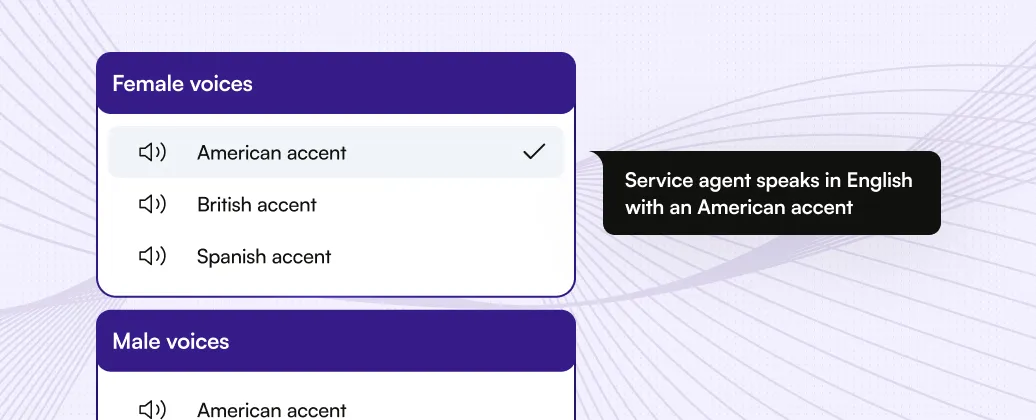
ServiceAgent offers both male and female AI voices with multiple accent options — American, British, and Spanish. You pick the voice that fits your brand, write custom call guidelines, and the AI maintains that personality across every call.
One important note: the Standard plan only supports English. If you need Spanish or French language support, that’s locked behind the Expert plan, which is custom-priced. Rosie includes bilingual English/Spanish on every plan starting at $49/month, and Upfirst supports 35+ languages on all tiers. For contractors in markets with large Spanish-speaking customer bases, this limitation matters.
The voice customization does go beyond just accent selection, though. You write call guidelines and scripts — the greeting, how to handle specific request types, fallback responses when the AI doesn’t have an answer — and the AI follows them. There’s a “Use Sample Script” option that gives you a starting template you can modify. You can also upload PDFs, paste website URLs, or add FAQ pairs to the knowledge base so the AI can answer questions specific to your business.
What Real Customers Are Saying (And What’s Missing)
Let me be straightforward about the independent review situation: it’s thin.
App Store: The iOS app has 1 rating — 1.0 out of 5 stars. One review, and it’s negative. The app launched April 2025, so it’s had a full year to accumulate feedback, and that’s all there is.
G2 and Capterra: No verified reviews on either platform as of April 2026.
Product Hunt: ServiceAgent launched on April 15, 2025, reaching #6 Product of the Day with 253 followers and 21 comments. One detailed review gave it 5.0/5, praising the setup speed and home services focus.
AI Agents Directory: Listed with 0 user reviews and a 23% popularity score.
What their own site says:
Rajat Singh, CEO of Hot Damn Heating & AC Service, says the AI “is like our first line of defense, 24/7” and that setup was “way quicker than the month it usually takes to train someone.” He claims customers can’t tell they’re talking to AI.
Tim from Aurora Energy Solutions reported cutting workload “by nearly one hundred hours last month.”
A plumbing company (Greenflow Plumbing in California, cited in their press release) says they eliminated missed after-hours calls entirely.
Summit Peak Roofing in Texas describes ServiceAgent as “having an employee who never sleeps.”
What this tells us:
These are vendor-curated testimonials — the kind every SaaS company puts on their homepage. They may be completely accurate, but they’re not the same as verified third-party reviews. Compare that to Smith.ai, which has 90+ G2 reviews at 4.6/5 and 334 Trustpilot reviews at 4.4/5. Or even Rosie, which at least has identifiable customer stories with company names and specific results.
ServiceAgent’s product might deliver everything they claim. But until independent reviewers confirm it, the thin public review data is a real gap in their story. I’d like to see more verified feedback before I move them higher in our AI call answering rankings.
Who ServiceAgent Fits (And Who Should Look Elsewhere)
ServiceAgent makes sense if:
- You run an HVAC, plumbing, roofing, electrical, solar, or garage door business — the trades with dedicated AI models
- You want an AI that understands your trade terminology out of the box, without spending hours writing custom scripts
- You use Jobber as your CRM and want automatic call logging
- Your call volume is low to moderate — the pay-per-use model rewards light usage
- You want rule-based emergency routing where you control exactly which calls get escalated to humans
- You’re comfortable being an early adopter of a relatively new product
ServiceAgent probably isn’t the right fit if:
- You run ServiceTitan, Housecall Pro, JobNimbus, or any CRM besides Jobber — there’s no integration path
- You’re a high-volume operation handling 15+ calls per day — the per-minute pricing makes Rosie or Upfirst dramatically cheaper
- You need bilingual English/Spanish answering on a budget — Rosie includes it at $49/month, ServiceAgent locks it behind custom pricing
- You’re building AI automation workflows and need API access or Zapier connectivity
- You want the safety net of human backup for complex calls — Smith.ai’s hybrid model handles what AI can’t
- You’re risk-averse about new software — the thin review data makes it hard to verify reliability
How ServiceAgent Compares to Competitors
| Feature | ServiceAgent | Smith.ai | Rosie | Upfirst |
|---|---|---|---|---|
| Starting price | $0.99/min | $97/mo (AI) / $292.50/mo (hybrid) | $49/mo (250 min) | $24.95/mo (30 calls) |
| Pricing model | Pay-per-use | Per-call plans | Per-minute plans | Per-call plans |
| Trade-specific AI models | Yes (6 trades) | No | No | No |
| Human backup | Handoff routing | Yes (hybrid plan) | No | No |
| Bilingual (standard plan) | English only | English/Spanish (AI detects) | English/Spanish (all plans) | 35+ languages |
| CRM integrations | Jobber only | Housecall Pro, ServiceTitan, 30+ | Zapier (8,000+ apps) | ServiceTitan, HCP, Jobber, JN, AccuLynx |
| Concurrent calls | 1 (Standard) | Unlimited | Unlimited | Unlimited |
| Mobile app | Yes (iOS + Android) | No | Yes (iOS + Android) | No |
| API access | No | Yes | Custom plan ($999) | No |
| Free trial | $20 free credits | No (30-day money-back) | 7 days | 14 days, no CC |
vs. Smith.ai: Smith.ai wins on integration depth, human backup for complex calls, and proven track record with 90+ G2 reviews. ServiceAgent wins on trade-specific AI training. Smith.ai costs more but offers a more complete package. If your callers regularly deal with insurance disputes or emotional conversations, Smith.ai’s human receptionists handle what AI can’t.
vs. Rosie: Rosie offers better value at volume ($49/mo for 250 minutes vs. $247/mo for the same on ServiceAgent), built-in bilingual support, Zapier connectivity to 8,000+ apps, and a polished mobile app. ServiceAgent offers deeper trade-specific AI training. If cost and integration flexibility are priorities, Rosie wins. If trade-literate AI is what you need most, ServiceAgent has the edge.
vs. Upfirst: Upfirst is the budget pick at $24.95/month with surprisingly deep contractor CRM integrations — ServiceTitan, Housecall Pro, Jobber, JobNimbus, and AccuLynx all connect natively. ServiceAgent has better trade-specific AI but worse integration coverage and higher costs. For price-conscious contractors, Upfirst is the clear winner.
For the full breakdown of all options, check our AI Call Answering category page.
The Bottom Line
ServiceAgent has the most trade-specific approach to AI call answering in the category. No other product ships with six pre-trained industry models that understand HVAC emergencies, roofing insurance claims, plumbing leak triage, and electrical panel questions out of the box. That’s a genuine competitive advantage that the FAQ-and-script approach of most competitors can’t fully match.
But the product is still early. One live CRM integration (Jobber), no Zapier, no API, English-only on the standard plan, one concurrent call, and almost no independent reviews — these are gaps that matter. The per-minute pricing also makes it more expensive than the competition at moderate to high call volumes.
If you’re in HVAC, plumbing, roofing, or electrical and you use Jobber, ServiceAgent is worth evaluating. The $20 in free credits gives you enough call time to hear how the trade-specific AI handles your actual callers. Start there, compare it to what you’d get from Rosie or Upfirst, and decide based on real conversations — not marketing claims.
I’ll update this review with hands-on testing results when I get a chance to demo it on my own lines. Check back for that.