

What CallsAround Actually Is
CallsAround is a 24/7 AI phone receptionist with an emergency dispatch engine bolted to the front of it. The AI answers your line and handles the routine work — questions, messages, intake. When a caller has a real emergency, it stops behaving like a receptionist and starts behaving like a dispatcher: it rings your on-call people one at a time until a human physically accepts the call.
That second half is the product. Every AI answering service we’ve reviewed can take a message about a burst pipe. A few can transfer to one number. None of them, until now, would ring the second guy when the first guy’s phone rolled to voicemail, text both of them, ring the third, and brief whoever answered before connecting the homeowner. CallsAround is built to do exactly that, and it’s aimed at restoration, HVAC, plumbing, and electrical shops that run after-hours emergency work.
The company behind it is TetraCore, a small AI software studio in Bowling Green, Ohio. The founder is Toby Miller. CallsAround says the product was built alongside an emergency restoration company and a multi-office HVAC company, and the docs support that — the restoration intake asks for carrier, claim number, and adjuster; the HVAC triage asks whether there are elderly people or infants in the home and what the outside temperature is. Those aren’t questions a generic AI receptionist knows to ask.
Full disclosure, updated September 15, 2026. Two things changed since this review first published and you should weigh both. We now earn money if you sign up through this page — CallsAround runs an affiliate program and pays us 30% of collected revenue for 12 months on referrals using our code, and links here carry it. Separately, CallsAround bought a $99/year Vendor Basic listing on September 11, 2026. Neither touched the score: the rating is computed from published dimension weights you can see above, and the two numbers that moved on this update moved because the vendor changed its product and its price, which we re-verified against their own pages. How we make money is at /disclosure/.
On the testing: we have a full CallsAround account but still haven’t put it on live lines. Hands-on call testing is scheduled and this page will be updated with real results. Everything below is built from their public documentation, pricing page, integrations page, API reference, user guide, and demo line.
One more thing up front: this is a young product with no G2, Capterra, or Trustpilot reviews and no named customers on the website. The engineering docs are more detailed than most of the competition’s, which is a good sign, but detailed docs aren’t a year of uptime under a summer heat wave.
How the Emergency Dispatch Chain Works
Here’s the full call flow as CallsAround documents it.
The AI answers and triages. Your number forwards to CallsAround — all calls, after-hours only, or overflow. The AI greets the caller by your business name, answers from up to 4,000 characters of business facts you’ve entered, and takes messages. Flooding, fire, gas leak, and no heat are auto-detected as emergencies; you add your own trigger phrases on top (“sewage,” “sparking panel,” “water through the ceiling”).
The chain starts ringing. Once a call is flagged, the dispatch engine rings the first contact and waits the timeout you set — 25 seconds by default, adjustable from 5 to 120. Each step has a retry count (0 to 3) and a contact method: call, call plus SMS, or SMS only. Run it sequentially (tech 1, tech 2, then the owner) or as a broadcast where everyone rings at once and the first to accept wins.
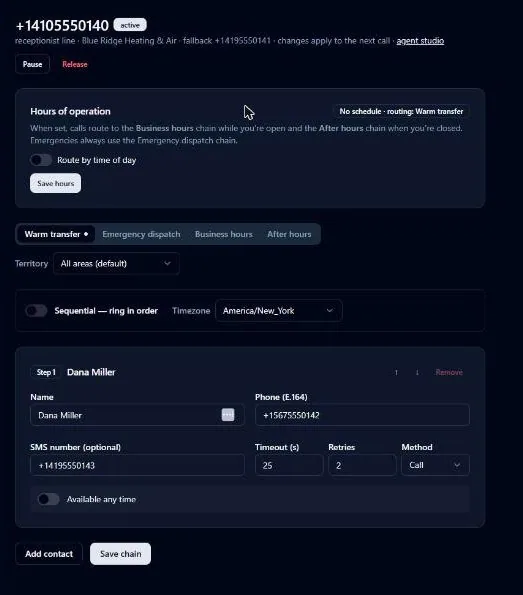
Voicemail is never an answer. This is the piece the rest of the category doesn’t have. Answering-machine detection runs on every leg, and in CallsAround’s words, “a machine is never a valid answer.” If the on-call tech’s phone rolls to voicemail, the trail logs “voicemail detected and skipped” and the engine moves on. When a person does pick up, they hear a short whisper — who’s calling, where, what the problem is — and press 1 to accept. A voicemail greeting can’t press 1, so there’s a second gate against a dispatch that “succeeded” into a mailbox nobody checks until morning.
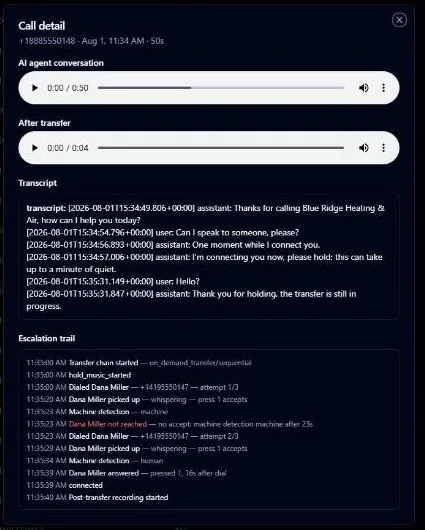
SMS at every hop. Each contact who misses the ring gets a text with the caller’s details, so even the tech who was in the shower has the address in his messages thirty seconds later.
The caller never sits in silence. While the chain walks, the AI stays on with the homeowner, explains it’s reaching the on-call tech right now, and keeps them on the line. When a human accepts, the two calls are bridged and the tech already knows the address and the problem.
Chain exhausted. If nobody accepts, the call forwards to your fallback number and the whole team gets an alert that it went uncovered. Every call gets a timestamped escalation trail in the dashboard: who was rung, for how long, what happened.
Time-of-day routing sits on top: a weekly schedule with timezone and holiday closures, per-step availability windows, and four separate chains (warm transfer, emergency dispatch, business hours, after hours) you can staff differently.
What makes this different from Rosie, Dialzara, and Smith.ai
Every competitor we’ve reviewed handles emergencies as a single-step action. Dialzara detects urgent keywords and transfers to one on-call number. Rosie detects urgency from context and, on the $149 Scale plan, transfers to one number. Upfirst routes by time of day. Goodcall takes a message. Smith.ai has live humans who will genuinely keep calling people — the closest thing to a real chain — but the hybrid plan starts at $292.50/mo.
The failure mode in all the single-step products is the same: the one number you transferred to doesn’t answer. For a $300 tune-up lead that’s annoying. For a restoration company where the 11 PM water-loss call is a $15,000 job that goes to whoever answers first, it’s the whole business. CallsAround is the first pure-AI product we’ve seen that engineered for the second, third, and fourth phone number.
Line health and carrier-level failover
Every line gets a “conversational canary” — an automated probe that calls the line around the clock and holds a scripted conversation with your actual production agent through the same telephony path a real caller uses. If two probes in a row fail, CallsAround says “the business number is switched to plain carrier call forwarding at the phone network — below our servers, below the AI, below the APIs.” Calls ring straight to your fallback phone until the probes pass again, and you get an email and SMS on both the failover and the restore.
A public status page runs off the same canary; when we checked it showed all systems operational with a last incident on September 6, 2026. No uptime percentage or SLA is published.
The Free After-Hours Line Test
Before you spend a dollar, CallsAround will test how your current line performs after hours. Enter your business name, number, trade, state, and email. Between 7 and 9 PM local time, an AI places one call asking a genuine question about after-hours availability — under 90 seconds, and it never fabricates an emergency. As they put it, “A fake ‘burst pipe’ could send a real crew to a real address — that’s a line we don’t cross.”
You get a play-by-play and an After-Hours Answer Score from 0 to 100: 40 points for reaching a live human, 20 for speed, 40 for engagement. One test per number every 30 days, no card required. It’s a lead magnet, and it’s also a useful diagnostic. Score 90 and you don’t have the problem this product solves — read our Rosie review instead. Score 20 because your after-hours line rolls to a full mailbox, and you’ve learned something your customers already knew.
CallsAround Pricing: What You’ll Actually Pay
Pricing is fully public at callsaround.com/pricing — no “contact sales,” no gated enterprise tier. That alone puts it ahead of half the category.
Plan Comparison
| Plan | Monthly | Annual | AI Minutes | SMS | Overage | What You Get |
|---|---|---|---|---|---|---|
| Starter | $79/mo | $790/yr ($66/mo) | 300 | 50 | $0.29/min | Full 24/7 AI receptionist, lead qualification, message taking, all five native CRM connectors plus Zapier, API and webhooks, carrier failover, recordings and transcripts. No escalation chain |
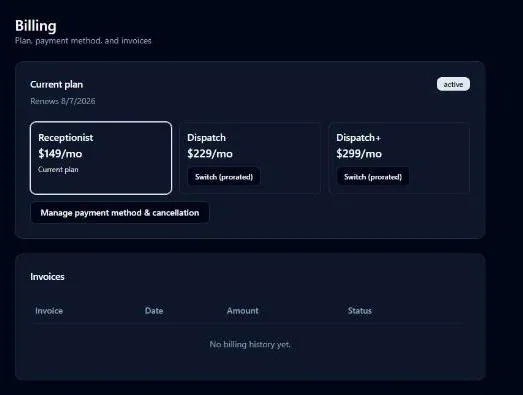
| Receptionist | $149/mo | $1,490/yr ($124/mo) | 500 | 100 | $0.25/min | Everything in Starter + emergency dispatch chain, up to 3 on-call contacts with voicemail detection + warm transfer during business hours, Google Calendar availability checks, your own local number |
| Dispatch (most popular) | $229/mo | $2,290/yr ($191/mo) | 800 | 250 | $0.22/min | Everything in Receptionist + chains up to 10 contacts, per-contact availability windows, broadcast ring, ZIP-based territory routing, SMS alerts at every escalation step, after-hours and business-hours routing rules |
| Dispatch+ | $299/mo | $2,990/yr ($249/mo) | 1,200 | 500 | $0.20/min | Everything in Dispatch + outbound “technician en route” calls, manual incident switchboard, priority support |
Every plan: 7-day free trial with 100 AI minutes (card required, nothing charged until day 7), month-to-month, usage alerts at 80% and 100%, no per-call fees, no setup fees, no after-hours premiums. Service never pauses when you go over — overage bills at the flat rate on your next invoice. SMS currently has no overage charge at all.
What counts as a minute: in CallsAround’s own words, “Time the AI spends on a live call with a caller, rounded per call. Escalation rings to your team while the caller holds are part of the same call.” So a 4-minute emergency call where the chain walked for 90 seconds bills as one call.
Number porting takes 1–2 weeks with their support team and your existing service stays live during the switch. Or skip it and start in overflow mode — keep your number, forward only missed or after-hours calls.
The pricing gotchas
The feature you’re buying starts on the second tier, and that’s new. Until September 14, 2026 the escalation chain was locked to the $229 Dispatch plan, which meant a shop that came here for the one thing CallsAround does better than anyone had to pay 4.7× Rosie’s entry price to get it. That’s fixed. The $149 Receptionist plan now includes an ordered chain of up to three on-call contacts with voicemail detection. Starter at $79 is still a plain receptionist: no chain, no voicemail detection, no SMS at every hop. If you want the dispatch engine, your entry price is $149.
The per-minute math improved but still isn’t the category’s best. Starter went from 200 to 300 minutes for the same $79 in the September restructure, which takes it from about $0.40 to about $0.26 per included minute. Rosie is still cheaper at 250 minutes for $49, about $0.20. Dialzara is 60 minutes for $29. If all you need is daytime overflow, CallsAround still isn’t the value pick and doesn’t try to be.
The math for an emergency-services contractor
A restoration company or 24-hour plumber fielding 3–4 after-hours emergencies a week at 4–5 minutes each, chain walk included, uses roughly 60–80 emergency minutes a month plus daytime overflow. Receptionist’s 500 minutes now covers that, chain included, for $149 — which is the tier most emergency shops should start on since the September change. Dispatch’s 800 minutes and ten-contact chains are for shops running multiple crews or territories, and one dispatched water loss pays for the year either way. The human alternative runs $135–450+/mo base plus per-minute or per-call fees that spike 30–50% in storm and heat season — and most of them take a message rather than dispatch. Flat overage with no surge pricing matters most during a CAT event, when call volume goes 10× and every per-call service sends you a bill that looks like a phone number.
Integrations: Native, Zapier, and the API
CallsAround’s native CRM coverage doubled in September 2026, and its developer surface is still the widest in the category.
What changed. When this review first published, the natives were Jobber, PSA, and ServiceMonster, and we marked missing Housecall Pro and JobNimbus as the reason a roofer or a home-services shop would be stuck on Zapier. Both now have native connectors, on every plan including the $79 Starter. We verified this on their integrations page on September 15, 2026; we have not run a message through either connector ourselves, so treat the behavior below as documented rather than tested.
Native: Jobber is one-click OAuth — every message becomes a Jobber client plus request plus note, with duplicate prevention by phone match and urgency in the request title. PSA by Canam Systems (the restoration back-office platform) turns every message into a PSA job; if you’re a restoration company on PSA, this is the reason CallsAround exists. ServiceMonster gets every message as a Web Lead. Google Calendar connects for availability checks, but the pricing page says “self-serve booking rolling out” — don’t count on confirmed on-call booking until you’ve tested it.
Native, added September 2026: Housecall Pro connects with an API key from its App Store, and every message becomes a Housecall Pro customer with the problem, callback number, and spoken address in the customer notes — CallsAround explicitly keeps Housecall Pro from texting your caller so the call experience stays theirs. JobNimbus connects with an API key from your settings and every message becomes a contact in your workflow with the story in the description. Those two cover the roofing, restoration, and home-services shops that were on Zapier a week ago.
Through Zapier: ServiceTitan (create lead, job, or booking), ServiceTrade, QuickBooks, Google Sheets, Slack, and 8,000+ other apps connect through the message.taken webhook. The recipe is in their API docs: point a Zapier Catch Hook at a webhook subscription and map contact_name, callback_e164, address, problem, and urgency into whatever you’re writing to.
Still missing: no native ServiceTitan, no AccuLynx, no mobile app. An HVAC shop on ServiceTitan is still on Zapier, with Zapier’s latency and monthly bill. Smith.ai connects to ServiceTitan directly if that’s your platform.
Can CallsAround plug into AI agent workflows?
Yes, and this is the best part of the integration story. CallsAround publishes a full OpenAPI 3.1 reference at api.callsaround.com/api/v1 with scoped bearer tokens and endpoints for lines, numbers, escalation chains, calls (with recordings and transcripts), messages, usage, outbound SMS/voice notifications, and webhook subscriptions. Outbound webhooks are HMAC-SHA256 signed, retried five times with backoff, then dead-lettered. Events: call.completed, emergency.dispatched, message.taken, call.uncovered, call.failed, line.health_changed, usage.threshold, usage.exceeded. There’s an “agency key” that acts across child organizations, which suggests they’re courting managed-service resellers.
It’s on every plan, including the $79 Starter. Rosie locks API access to the $999/mo Custom plan; Goodcall has no public API at all. If you’re building an agent that reads every emergency transcript and drafts the job in your CRM, or one that watches call.uncovered and pages the owner through a separate channel, CallsAround gives you the hooks without a middleman. That’s why the youngest product on the list scores highest in the category on our Agentic AI Compatibility dimension.
What Real Users Are Saying
There are no third-party reviews yet. As of September 2026, CallsAround has no G2 listing, no Capterra listing, and no Trustpilot profile. The website has no named testimonials, no logos, no case studies — the industry pages use hypothetical scenarios (“A Saturday-night water loss, handled”), and the “anatomy of a 2 AM call” page walks a burst-pipe call from 2:04:11 AM first ring to a 3:15 AM crew commitment in under four minutes as an illustration, not a customer’s log.
What we can evaluate is the paper trail. The user guide is detailed down to ring timeouts and retry counts. The API reference is a real OpenAPI spec with test-mode keys. The status page publishes incident timestamps. The reliability page explains failover in more engineering detail than any competitor we’ve reviewed. Companies faking it don’t usually write docs like this.
CallsAround says it was built alongside an emergency restoration company and a multi-office HVAC company; we can’t verify that and are stating it as their claim. This is a product you evaluate by running it on your own line — the 7-day trial covers a real week — because there are no reviews to read. Ours will land here when testing is done.
Who CallsAround Is Built For (And Who Should Look Elsewhere)
CallsAround makes sense if:
- You run real after-hours emergencies — water and fire restoration, 24-hour plumbing, HVAC no-heat and no-cool, electrical outages — and a missed dispatch is a lost four-figure job
- Your on-call setup has more than one person in it, and you’ve been burned by the first number rolling to voicemail
- You’re on Jobber, PSA, or ServiceMonster and want leads landing there without Zapier
- You want a public API and webhooks without an enterprise tier, because the answering layer is one node in a bigger automation stack
- You’re a restoration company that needs flat pricing that doesn’t spike during CAT events
CallsAround probably isn’t the right fit if:
- Your calls are mostly daytime quotes and scheduling — Rosie does that for $49/mo with a mobile app and bilingual on every plan, and you don’t need a dispatch engine
- You want the cheapest way to stop missing calls — Upfirst at $24.95/mo or Dialzara at $29/mo, and Dialzara has single-number emergency transfer
- You need native ServiceTitan or Housecall Pro — Smith.ai or Upfirst connect directly
- Your emergency calls are emotionally complicated (insurance disputes, angry property managers) and you want a human on the line, not an AI walking a chain — that’s Smith.ai’s hybrid plan
- You live on your phone and want a native app with push notifications — CallsAround is dashboard, email, and SMS only
- You’re not comfortable being an early customer of a product with no independent track record
How CallsAround Stacks Up Against Competitors
| Feature | CallsAround | Rosie | Dialzara | Smith.ai |
|---|---|---|---|---|
| Starting price | $79/mo (300 min) | $49/mo (250 min) | $29/mo (60 min) | $95/mo AI / $292.50/mo hybrid |
| Tier with emergency routing | Receptionist, $149/mo | Scale, $149/mo | Business Pro, $99/mo | All plans |
| Emergency handling | Ordered on-call chain, voicemail skipped, SMS every hop, fallback number | AI urgency detection, transfer to one number | Keyword detection, transfer to one number | Live humans transfer and follow up |
| Warm transfer with context | Whisper + press 1 to accept | Warm handoff on Scale | Basic transfer | Yes |
| Carrier-level failover | Yes, automatic | Not documented | Not documented | Not documented |
| Native CRM integrations | Jobber, Housecall Pro, JobNimbus, PSA, ServiceMonster | Zapier only | Zapier only | Housecall Pro, ServiceTitan direct |
| Public API and webhooks | Every plan | $999/mo Custom plan | Zapier only | Available |
| Mobile app | No | Yes (iOS + Android) | No | No |
| Free trial | 7 days, 100 min, card required | 7 days | 7 days | No (30-day guarantee) |
| Third-party reviews | None yet | Thin | Thin | 90+ G2, 300+ Trustpilot |
| Our rating | 4.1 | 4.5 | 3.9 | 4.7 |
vs. Rosie: Rosie is the better general-purpose contractor receptionist — cheaper, proven, mobile app, faster setup. CallsAround is the better dispatcher. If under 10% of your calls are emergencies, Rosie. If your business is emergencies, CallsAround.
vs. Dialzara: Dialzara is the budget way to get keyword-triggered transfer to one number. CallsAround is what you upgrade to when that one number sometimes doesn’t pick up.
vs. Smith.ai: Smith.ai’s live receptionists will chase your on-call list and handle the emotionally messy calls an AI can’t. You pay $292.50/mo and up, and per-call pricing gets expensive at restoration volumes. CallsAround gets you most of the dispatch behavior at a flat $229 with no per-call fees — if you can live without the human.
For the full category breakdown, see our AI Call Answering hub.
The Bottom Line
CallsAround does one hard thing better than anyone else in the category: it makes sure an emergency call ends up with a human, not a mailbox. It’s the first pure-AI answering service where the engineering is organized around the 2 AM call instead of the 2 PM one, and the public API, signed webhooks, and no-sales-gate pricing are all on every plan.
It scores 4.1, up from 3.9 when this review first published. Two of the three things we marked it down for were fixed in September 2026: the escalation chain came down from the $229 tier to $149, and native Housecall Pro and JobNimbus connectors closed the gap that put roofers and home-services shops on Zapier. What still holds it back is proof. No independent reviews, no named customers, no hands-on call data from us yet, no mobile app, and no native ServiceTitan.
If you run emergency work and your current setup takes a message when the on-call tech doesn’t answer, run the free line test, then put the 7-day trial on your after-hours line for a week. If the chain does what the docs say, the price is easy to justify. We’ll update this page with our own results when hands-on testing is complete.