

Disclosure: Invoicer.ai has purchased a Verified Vendor Profile placement on this site. That placement is labeled Sponsored wherever it appears, and it did not influence this review or its score. Our vendor terms spell out what a paid placement buys and what it never buys. This is a research-based review built from invoicer.ai’s product pages and help center, the Capterra and G2 listings, and the Stripe partner directory. Invoicer.ai has given us a demo account; I have not yet run real jobs through it, and a hands-on update is planned once I have.
What Invoicer.ai Actually Does
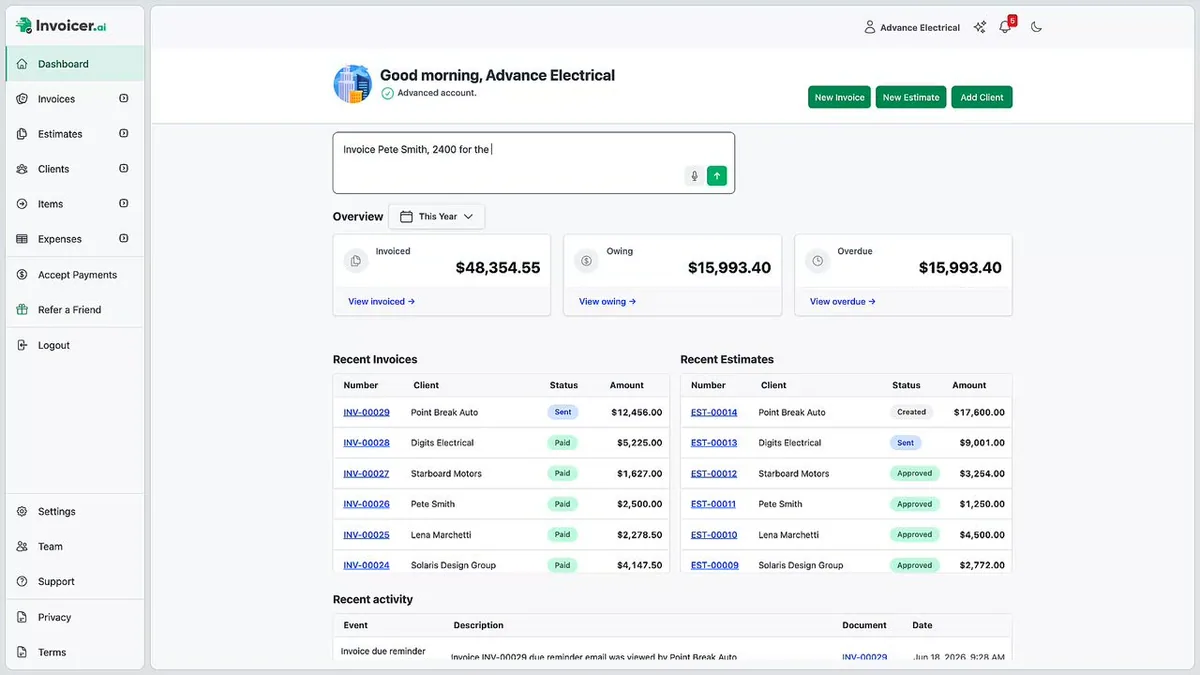
Invoicer.ai is an estimate and invoice tool for small service businesses, with a chat box on the dashboard that builds documents when you type or talk to it. The company, based in Victoria, British Columbia, states its mission as building “invoicing software that’s powerful, affordable, and doesn’t punish you for growth.” That last part is the pitch: unlimited clients, unlimited invoices, unlimited estimates on every plan, starting at $12 a month.
What it does: estimates, invoices, deposits, discounts, taxes, receipts, online payment through Stripe, late-payment reminders, view tracking, scheduled and recurring sending, and an AI expense manager that reads receipt photos.
What it does not do: scheduling, dispatch, job costing, time tracking, progress billing, bank reconciliation, payroll, or a general ledger. It also has no native connection to any other software you run; data moves in and out by CSV. Keep both lists in mind, because the second one decides whether this review applies to you at all.
Who Should Use Invoicer.ai, and Who Should Skip It
Use it if you are a one- or two-person service outfit that bills by the job, does your own paperwork at the kitchen table, and wants estimates and invoices out the door in under a minute. Solo electricians doing service calls, painters, landscapers, house cleaners, handymen, fence installers: the people Invoicer.ai lists on its own industries page. If your customer pays by card or bank transfer from an email link and your accountant is happy with a CSV at tax time, this tool covers you for less than the price of a box of screws.
Skip it if any of the following is true:
- You run a crew of three or more. Invoicer.ai has no scheduling, no dispatch, and no crew app. Jobber starts at $39/mo and Housecall Pro at $59/mo, and both invoice from the field with the job record attached.
- You are already on a CRM or field service platform. Nothing syncs natively. Getting data out means exporting a CSV and importing it somewhere else, which is a monthly chore rather than a workflow. Use the invoicing built into Jobber or Housecall Pro, which both push to QuickBooks on their own.
- You need your books to update themselves. QuickBooks Online Simple Start at $38/mo invoices and keeps the ledger. FreshBooks Plus at $43/mo does the same with a nicer invoice builder.
- You do insurance restoration or commercial work. No supplements, no AIA G702/G703 billing, no retention. That is QuickBooks Plus territory at minimum, and usually a roofing CRM on top.
How Much Does Invoicer.ai Cost in 2026?
Three plans, no setup fee, verified on invoicer.ai/pricing on October 1, 2026. Advanced dropped from $49/mo to $39/mo in September 2026. The page advertises savings of up to 36% on annual billing, and the math holds: 33% off Basic, 20% off Pro, 36% off Advanced.
| Plan | Monthly | Annual (per month) | Users | What you get |
|---|---|---|---|---|
| Basic | $12/mo | $8/mo ($96/yr) | 1 | Unlimited invoices, estimates, and clients; AI invoice generator; light AI assistant use; Stripe payments; 135+ currencies; branding removal; 50 documents per day; 3-receipt trial of the expense manager |
| Pro ⭐ | $25/mo | $20/mo ($240/yr) | 3 | Everything in Basic plus viewed notifications, real-time invoice tracking, late-payment reminders, custom email messages, scheduled invoices, attachments, receipts, standard AI use |
| Advanced | $39/mo | $25/mo ($300/yr) | 5 | Everything in Pro plus recurring invoice schedules, automation, full AI expense manager, CC recipients, heavy AI use |
The 14-day free trial runs with no card on file. If you let it lapse, your invoices and clients stay viewable but you cannot send or download until you subscribe. That is a fair way to handle it.
Pro is the real starting point for a contractor. Basic has no late-payment reminders, no view tracking, and no scheduled sending. Those are the three features that shorten your collection cycle. At $25/mo, Pro is still cheaper than FreshBooks Lite ($23/mo, capped at 5 clients) once you have more than five customers, and it is $18/mo cheaper than FreshBooks Plus.
Seat counts, confirmed in the app: Basic 1 user, Pro 3, Advanced 5. An earlier version of this review flagged a conflict with the help center, which listed 1/2/3; Invoicer.ai corrected the help center in September 2026 and the Team screen on an Advanced account reads “1 of 5 team members used.” Roles are configurable per member. Per-seat purchases beyond the plan cap are still listed as coming later, so a sixth person has nowhere to go.
Referral program: $10 in account credit for every person you refer who subscribes to a paid plan, and $10 off their first month. Contractor ToolStack is not enrolled in it and earns nothing if you sign up.
How Good Is the AI Assistant?
Better than I expected for a $12 product, and it is the reason to pick Invoicer.ai over a free template.
The assistant lives in a side panel and on the dashboard. According to the help center, it does four kinds of work:
- Answers questions about your account. “Which invoices are overdue?” “What did I bill Solaris Design Group this year?” It filters by status, date, and keyword and summarizes the numbers.
- Creates records in bulk. Up to 50 invoices, estimates, clients, or items in one prompt, and payments recorded across up to 20 invoices at once. “Create monthly retainer invoices for my top 5 clients” is an example the vendor gives, and it is exactly what a landscaper with maintenance contracts wants.
- Edits the open document. Line items, tax, discounts, deposits, shipping, due dates, currency, client details.
- Updates account data. Item prices, client addresses, company info.
- Prices work it has never seen. This is the one that matters for contractors, and it is the thing our first pass at this review missed. Describe a job in a sentence and the AI builds a priced estimate, drawing on your own account history and, per the vendor, local market rates for your location.
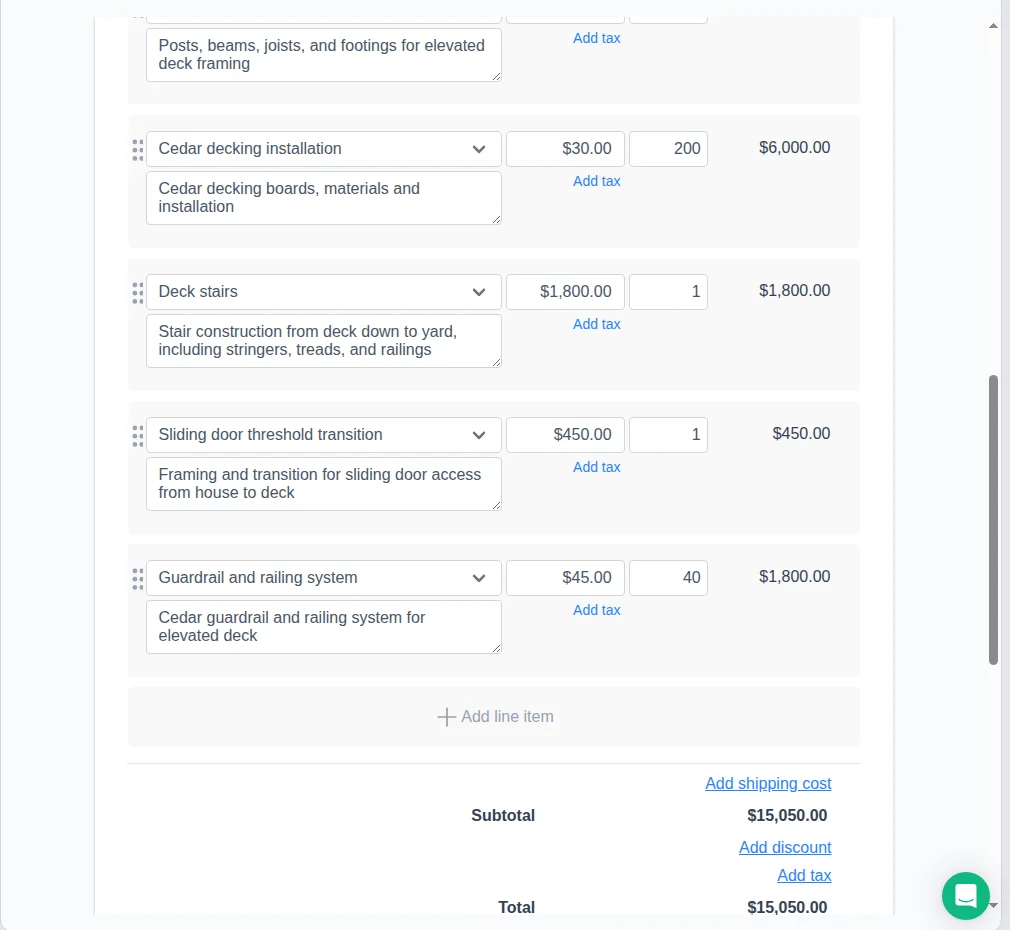
I tested it on a fresh Advanced account with no items, no clients, and no history, using a single prompt: “Create an estimate for 200 sq ft cedar deck, one-story off the ground, with stairs down to the yard, and a sliding door access from the house.” It asked who the estimate was for, then produced a five-line estimate totalling $15,050 with unit rates and quantities it worked out on its own:
| Line item | Rate | Qty | Total |
|---|---|---|---|
| Deck substructure (posts, beams, joists, footings) | $25.00 | 200 | $5,000.00 |
| Cedar decking installation (boards, materials, labor) | $30.00 | 200 | $6,000.00 |
| Deck stairs (stringers, treads, railings) | $1,800.00 | 1 | $1,800.00 |
| Sliding door threshold transition | $450.00 | 1 | $450.00 |
| Guardrail and railing system | $45.00 | 40 | $1,800.00 |
Two things stand out. It broke the job into the right pieces, including a threshold transition line most estimating tools would never think to add, and it inferred that the railing runs 40 linear feet around a 200-square-foot deck without being told. The rates land in a believable range for cedar. It is not a takeoff and it has no cost database behind it, so treat the numbers as a starting point you correct rather than a quote you send. But for a solo operator staring at a blank estimate on a Sunday night, going from one sentence to a structured, priced document in under a minute is the most useful thing in this product.
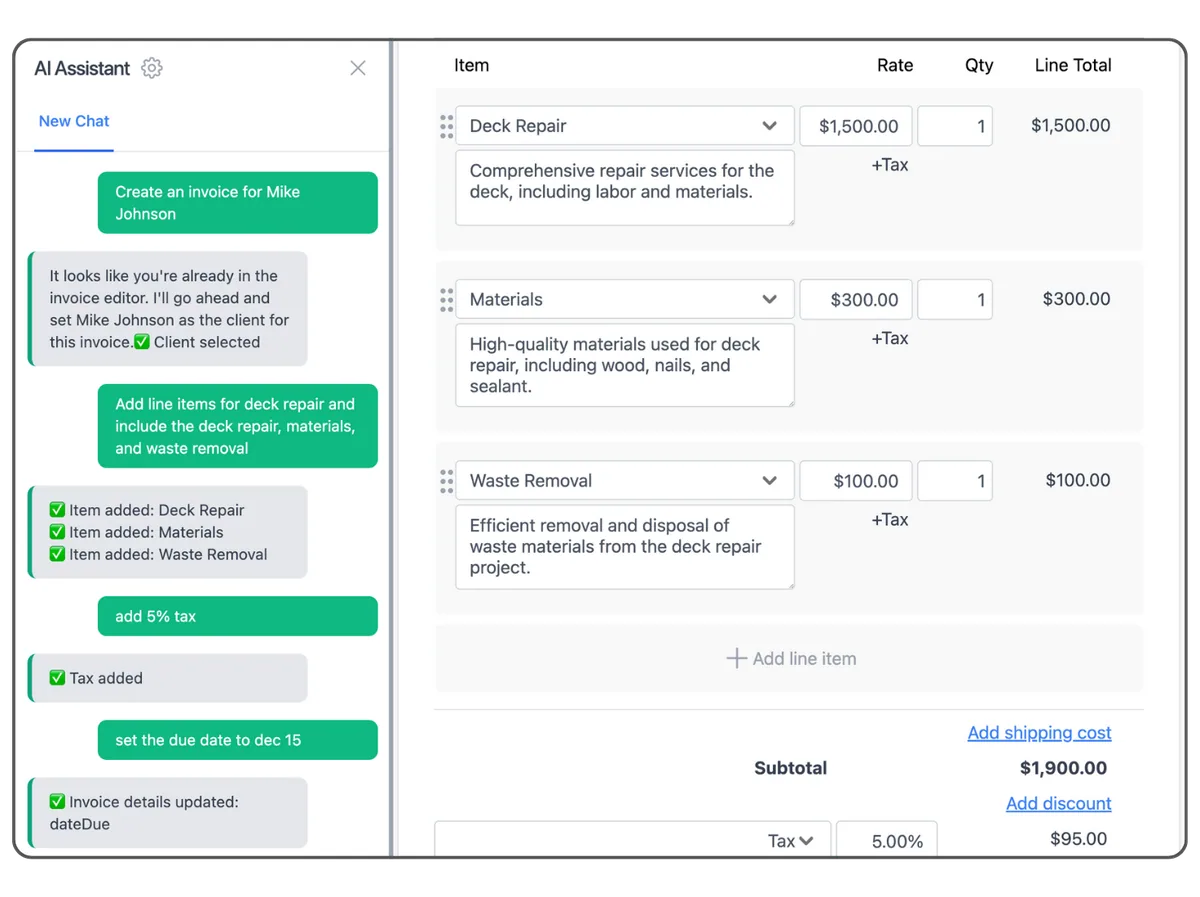
What it will not do: send anything (you click Send), change an invoice’s status, or touch data outside your account. Those are sensible guardrails.
The catch is metering. AI use is counted in tokens, and per the help center the monthly allowance is 250,000 on Basic, 2 million on Pro, and 5 million on Advanced, with nothing rolling over. Basic’s allowance is enough for a few dozen simple invoices a month. If you plan to run your whole billing through the chat box, budget for Pro.
The AI expense manager (Advanced only, three-receipt trial on the lower plans) reads a photo or PDF of a receipt and pulls the date, vendor, and amount into a searchable list, then exports to CSV for QuickBooks or Xero. It ships with twelve expense categories, and the contractor-relevant ones are there: subcontractors, vehicle, insurance, business fees and licenses, professional fees. You can add your own. Invoicer.ai says that once you categorize an expense from a given vendor, later expenses from that vendor categorize themselves. It is a receipt filing cabinet with a scanner and a sorting rule. It does not connect to your bank, and the categories are its own list rather than a chart of accounts your accountant controls.
Getting Paid: Stripe, Fees, Deposits
Invoicer.ai is a Stripe partner, and Stripe does all of the money movement. You complete Stripe’s onboarding inside Invoicer.ai, and your customer pays from the link in the invoice email.
What customers can pay with: credit and debit cards, Apple Pay, Google Pay, Stripe Link, and ACH bank transfer, in 135+ currencies. Invoicer.ai says Cash App Pay is on the list too.
What it costs: Invoicer.ai’s FAQ points you to Stripe’s published pricing and adds no markup of its own. In the US that is 2.9% + 30¢ per card or wallet transaction and 0.8% capped at $5 per ACH transfer. On a $6,000 water heater replacement, the customer paying by card costs you $174.30; paying by ACH costs you $5. Push ACH on anything over a thousand dollars.
Payout timing: the first payout takes about 7 business days, then 2 to 7 business days after that. ACH payments show as “Payment Pending” for 3 to 5 business days while they clear. Stripe will also hold payouts if your business has no website, social profile, or app URL on file, so give them a Facebook page if that is all you have.
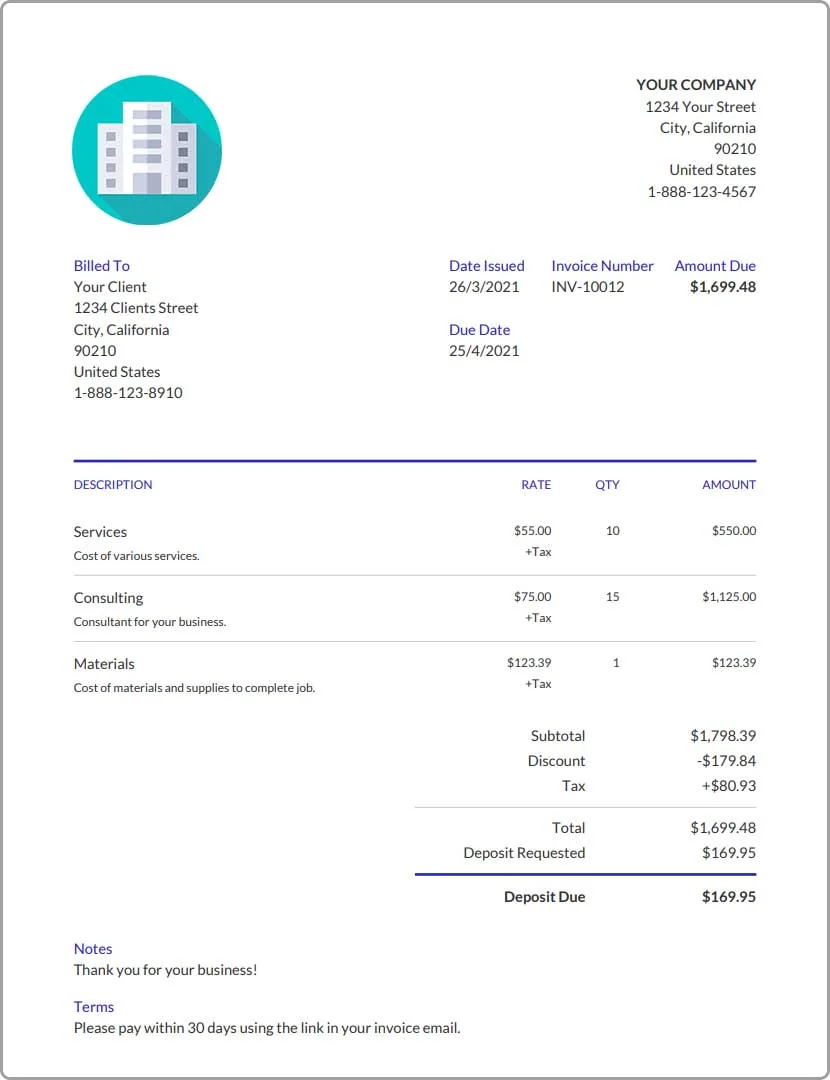
Deposits: you can add as many deposits as you want to one invoice, as a percentage or a fixed dollar amount, and the customer pays the deposit online with the same methods. The invoice shows “Deposit Requested” and “Deposit Due” separately from the total. For a solo painter who wants 30% up front before buying material, that is the whole feature set you need.
What is missing on the payments side: no tap-to-pay, no card reader, no customer financing partner. Wisetack and Hearth live inside Housecall Pro, Jobber, and Workiz invoices; there is nothing like that here. If your average ticket is over $2,000 and financing moves your close rate, that gap matters more than the subscription price.
Integrations: The Big Hole
There are no native ones. No QuickBooks Online, no Xero, no Zapier, no Jobber, no Housecall Pro, no JobNimbus, no ServiceTitan.
What there is, and what an earlier version of this review got wrong, is CSV in both directions. Invoices, estimates, and expenses export to CSV; clients and items import from CSV, with Import and Export buttons sitting side by side on both screens. So moving a client list in at setup and handing your bookkeeper a spreadsheet at month end are both real, and you are not re-keying invoices by hand into another system.
The help center’s expense manager article says “automatic accounting software sync” is on the roadmap. It is not live, so until it is, your bookkeeper imports a CSV into QuickBooks Online or Xero once a month.
For a solo operator whose accountant already works from a shoebox of receipts and a bank statement, this is a non-issue; the CSV is an upgrade. For anyone with a real CRM or a bookkeeper who reconciles weekly, it is the reason to pick something else. I score integrations at 2.0/5, the lowest number on our invoicing hub. The dimension measures native connections to contractor platforms, and there are none; bidirectional CSV is portability, not integration.
What Invoicer.ai Is Actually Competing With
Worth saying plainly, because Invoicer.ai’s founder raised it after reading this review and the point is fair enough to answer in public: FreshBooks and QuickBooks are accounting software, Jobber and Housecall Pro are field service platforms, and Invoicer.ai is invoicing software. Judged as products, they are not the same category of thing.
We score them together anyway, and here is the reasoning. This hub is not “best invoicing software.” It is invoicing and payments for contractors, and the question a contractor actually faces is not “which dedicated invoicing tool is best,” it is “what do I send invoices from.” For most of them the honest answer set includes the invoicing already built into a tool they pay for. Leaving those out would make the page tidier and less useful.
That framing does cost Invoicer.ai real points, and it costs them in two specific places. Field and mobile use is 15% of the score and rewards collecting payment on a phone in a driveway; it is a web app built for a phone that installs to the home screen, but there is no app-store app, no tap-to-pay, and no offline mode, so it scores 3.2. That is still last on this hub, because every other product on it ships a native app. Integrations is 11% and measures native connections to contractor platforms; there are none, so it scores 2.0. Together that is a quarter of the weighting where a standalone tool structurally cannot win.
I am leaving both in, because a contractor deciding between these needs to know there is no tap-to-pay, no offline mode, and no native sync. But read the 3.7 correctly: it is not “this is a weak product.” It is “this is a narrow product, scored against broad ones, for a trade audience.” Against other dedicated invoicing tools — Invoice Simple, Invoice2Go, Invoice Home, none of which we cover — the AI estimate builder and the $12 entry price would look strong and the lack of an app-store app would matter less. If your question is “what is the best pure invoicing app,” this review is not answering it. If your question is “what should I run my contracting paperwork on,” it is.
Invoicer.ai vs FreshBooks vs QuickBooks vs Jobber Invoicing
| Invoicer.ai | FreshBooks | QuickBooks Online | Jobber | |
|---|---|---|---|---|
| Our rating | 3.7/5 | 3.9/5 | 4.3/5 | 4.6/5 |
| Starting price | $12/mo | $23/mo (5 clients) | $38/mo | $39/mo |
| Contractor-realistic tier | Pro, $25/mo | Plus, $43/mo | Plus, $140/mo | Core, $49/mo |
| Users at that tier | 3 | 1 + accountants | 5 | 1 |
| Card / ACH fees | 2.9% + 30¢ / 0.8% cap $5 | 2.9% + 30¢ / 1% | 2.9% / 1% | Jobber Payments, rate sheet |
| AI | Chat assistant that builds and edits documents | Background AI: reminder timing, expense OCR | Intuit Assist: drafts, reminders, cash flow alerts | Copilot quote drafts |
| Native mobile app | No (web app on home screen) | Yes | Yes | Yes, field-first |
| Job costing / accounting | None | Basic project profitability, full books | Projects + Class Tracking, full books | Job costing, no ledger |
| QuickBooks sync | CSV only | Zapier | Is QuickBooks | Native |
| CRM / FSM sync | None | None (Zapier) | Every major contractor CRM | Is the FSM |
| Customer financing | None | Add-on | None native | Wisetack native (Connect tier) |
| Free trial | 14 days, no card | 30 days | 30 days | 14 days |
Read that table top to bottom and the pattern is obvious. Invoicer.ai wins on price and on the AI builder. It loses everywhere that a growing contractor eventually needs to win. That is a perfectly good trade for a solo operator and a bad one for everybody else.
What Users Say
The review base is small: 3 reviews on Capterra at 4.7/5 and 2 on G2 at 4.8/5 as of September 2026. The “4.8 · 4.7 · 4.6” line on Invoicer.ai’s homepage and the “trusted by thousands of businesses” claim are the vendor’s numbers; the first two match G2 and Capterra, and I could not confirm the source of the 4.6. Capterra’s sub-scores are ease of use 5.0, customer service 5.0, features 4.7, and value 4.7.
The praise is consistent and it is all about speed:
“It is simple, Intuitive, and to the point. This combination makes this app powerful and time saving.” — Jonathan C., owner, Don’t Forget LLC, Capterra (5/5)
“The app really gets out of the way and lets me create an invoice quickly.” — Nick H., marketing and advertising, Capterra (4/5)
The one contractor testimonial is on the vendor’s own homepage, so weigh it accordingly:
“With Invoicer, it’s so fast and easy I never have to worry about how I’d like it to feel, rather, it does the job I need it to do and I LOVE IT!” — Nathan, owner, War Pony Exteriors (invoicer.ai testimonial)
The complaints match the cons list: one Capterra reviewer flagged the lack of an iOS app, and SelectHub’s roundup notes users asking for a pay-per-invoice option instead of a subscription. Nobody is complaining that it is hard to use.
The Bottom Line for Contractors
Invoicer.ai earns 3.7/5 on our invoicing-payments dimensions. The breakdown says exactly what the product is:
- Fee transparency 4.2 and invoice builder 4.3: Stripe’s published rates with no markup, plus a builder that handles deposits, discounts, tax, signatures, and attachments, bulk CSV import of clients and items, and an AI layer that prices and fills in a whole estimate from a sentence.
- Payment acceptance 3.5: cards, wallets, ACH. No financing, no tap-to-pay.
- Automation 3.9 and AR reporting 3.2: three post-due reminders and scheduled sending on Pro, recurring on Advanced, an owing/overdue dashboard and status filters, and a setting that creates and emails the invoice automatically the moment a client approves an estimate. No late fees, no aging buckets, no forecast.
- Field and mobile use 3.2: a mobile web app that is genuinely built for a phone, not a squeezed desktop page. Re-tested on a phone in September 2026 after the vendor pushed back on our first read. It installs to the home screen and works well for sending an invoice from the truck. No native app, no tap-to-pay, no offline.
- Integrations 2.0: CSV both ways, no native platform connection.
If you are solo and your paperwork is the thing you put off until Sunday night, start the 14-day trial, go straight to Pro, connect Stripe before you send your first invoice, and set the reminders to fire at 3, 7, and 14 days past due. You will spend $25 a month and stop losing invoices in your truck.
If you run a crew or you already pay for Jobber, Housecall Pro, or QuickBooks, you have better invoicing than this built into what you own. Use it. The rest of the invoicing and payments hub ranks those options by what they do in the field and in the books.