


There’s a structural reason ServiceM8 doesn’t show up first when most field service software gets compared head-to-head — and once you understand it, you can decide whether ServiceM8 is genuinely the right fit for you or fundamentally not. Founded in July 2009 in Northern Territory, Australia by Kim Ford (later joined by his son Ben Ford), ServiceM8 made an architectural bet most US-based FSM platforms didn’t: build the entire product around the Apple ecosystem first, web second. The full mobile app runs on iPhone, iPad, and Mac. Tap to Pay works through the iPhone’s NFC chip. The voice-activated AI Chat assistant is iOS-deep. Android contractors get ServiceM8 Lite, which is materially restricted.
That architectural choice is what makes ServiceM8 either the clearest winner in its lane or fundamentally not the right fit — and the lane is solo operators and 1-20 staff trade businesses on Apple hardware running QuickBooks, Xero, or MYOB accounting.
What this review covers: the actual 2026 pricing math (including the genuinely useful Free plan, which is rare in FSM), how the September 2025 Phone Agent launch compares against Workiz Genius and FieldPulse Operator AI, what Auto-Invoice and Smart Writing Helper actually deliver in production, why Tap to Pay on iPhone is structurally different from every other FSM’s payment story, the triple platinum accounting partnerships that make this the deepest QuickBooks/Xero/MYOB integration in the category, the integration ecosystem catches outside accounting, what 311 Capterra reviewers actually say (4.5/5 with the highest value-for-money sub-score in the FSM category at 4.6), how ServiceM8 stacks against the broader SMB FSM competitive set, and which contractor segments should be looking at different platforms entirely.
The iOS-First Architectural Bet (And Why It Matters)
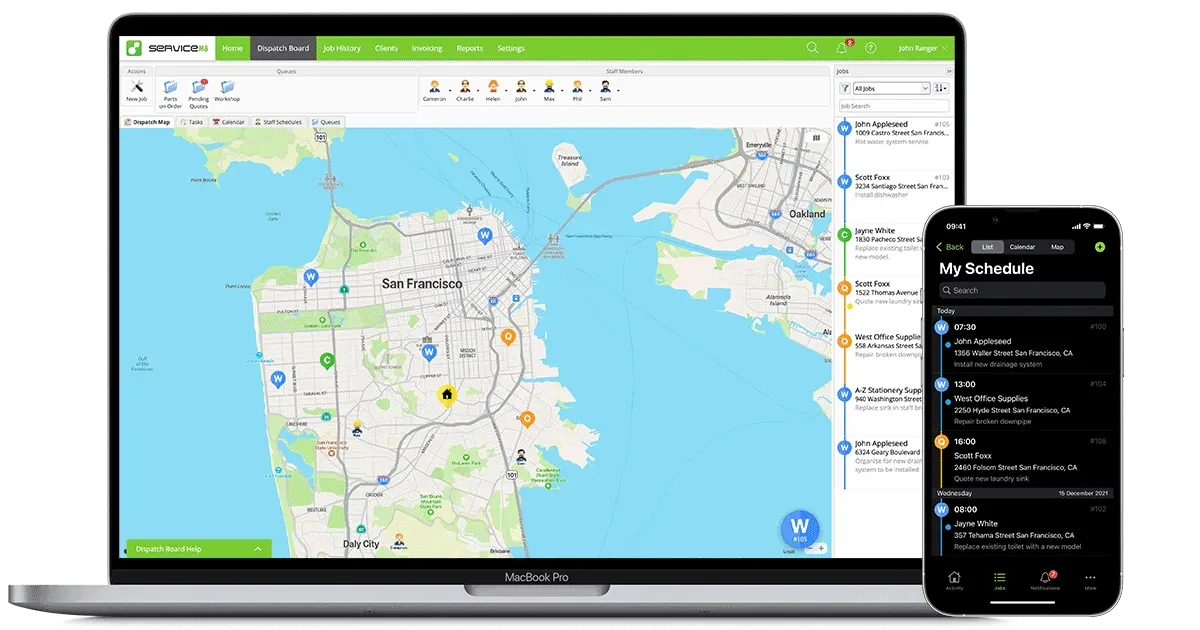
Most FSM platforms in 2026 are built web-first with mobile apps as a secondary deliverable. ServiceM8 is the inverse: the iPhone, iPad, and Mac apps are the primary product, with the web dashboard as the office-side complement.
What this means in practice: every iOS feature Apple ships becomes a ServiceM8 capability faster than competitors can match it. Tap to Pay on iPhone (Apple’s NFC payment feature) showed up in ServiceM8 within months of Apple shipping it — no Bluetooth card reader, no Stripe M2 hardware, just hold the customer’s card to the back of the iPhone and the payment processes at standard Stripe rates. The voice-activated AI Chat assistant runs natively on iOS and macOS. Apple Calendar integration is the deepest of any FSM. The iPad job card workflow uses the larger screen for parts lists and signature capture in a way that web-first FSMs can’t match.
What this means structurally: if your crew is on Android phones, ServiceM8 is fundamentally not the right fit. ServiceM8 Lite for Android exists, but it’s positioned for field technicians needing basic functionality only — quoting, invoicing, AI Chat voice assistant, and Tap to Pay all require Apple hardware. For mixed-platform shops, the two-tier UX problem is real.
The customer base validates the architectural bet: ServiceM8 is trusted across 40+ countries to manage over $22 billion in jobs. Founded 2009, launched 2010, 16 years of compounding without a forced acquisition — and the founder/CEO Kim Ford is still leading the company. That’s structurally distinct from Service Fusion (acquired by EverCommerce 2020), FieldPulse ($50M Series C August 2025), and Workiz ($40M Series C, Lead Edge Capital). ServiceM8 is privately held, profitable enough to operate independently, and has shipped product velocity at the iOS pace for over a decade.
What ServiceM8 Costs in 2026 (Including the Free Plan That Actually Works)
The pricing model is genuinely different from most FSM platforms — and worth understanding before anything else.
USD pricing for US market. 14-day free trial on every paid plan with no credit card required. No setup fees. No annual contract required.
Real-world math at 5 techs running 6-8 jobs/week each (120-160 jobs/mo) → Growing tier $79/mo. At 10 techs at 8 jobs/week each (320 jobs/mo) → Premium $149/mo. Versus Workiz Pro at 10 techs ($595/mo on last published April 2026 rates; sales-quoted since 2026) or FieldPulse Professional at 10 techs (~$900/mo).
The Free plan is genuinely useful — 30 jobs per month, single user, full feature access including job scheduling, mobile app, basic AI (10 uses per day), and core integrations. For a solo HVAC tech, plumber, or electrician running 5-10 jobs per week, this is a real production-ready FSM at $0/month. No other major FSM offers a comparable free path that actually works at solo scale.
The job credit limits are the structural catch worth understanding. Each tier caps monthly job capacity, and exceeding the cap on Premium Plus costs $0.20 per additional job. Real-world math: a 10-tech residential plumbing operation completing 8 jobs per tech per week (320 jobs/month) fits comfortably under Premium’s 500-job cap at $149/month flat. A 15-tech operation at the same per-tech volume (480 jobs/month) is still under Premium. Push to 20 techs (640 jobs/month) and you’re upgrading to Premium Plus at $349 — still cheaper than every per-user competitor at that scale.
The 14-day free trial on every paid plan with no credit card required is unusual in the FSM category and meaningfully better than FieldPulse (no trial), ServiceTitan (no trial), and Service Fusion (no trial). Jobber and Housecall Pro offer 14-day trials too.
The 2025 AI Stack: Phone Agent, Auto-Invoice, Smart Writing Helper, and Chat
ServiceM8 shipped a meaningful AI stack in 2025 — and the September 2025 product update was the inflection point.
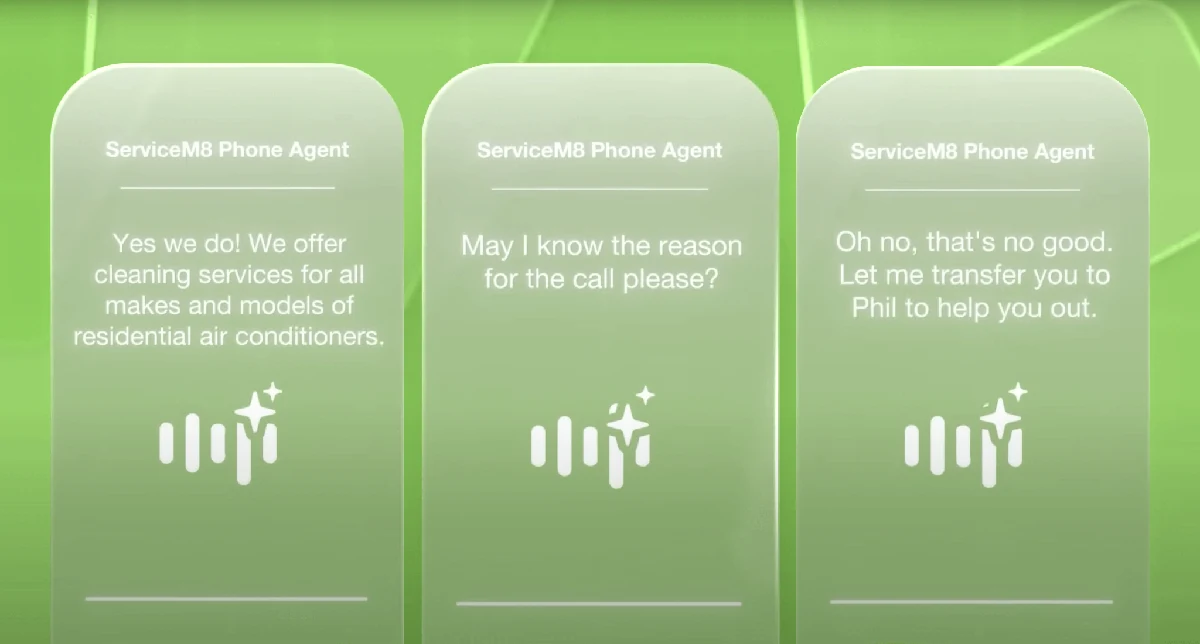
Phone Agent (launched September 2025) is the flagship AI feature — an autonomous AI receptionist that answers inbound calls, takes messages to your ServiceM8 Inbox, sends callers SMS links to your online booking form, completes bookings on behalf of callers, routes urgent matters to staff, deflects telemarketer and spam calls automatically, and logs every call with summaries, transcripts, and recordings. Three operating modes: Business Hours (screens calls before staff routing), After Hours (handles off-hours and urgent issues), Voicemail (replaces standard voicemail entirely). Free for existing customers from before September 19, 2025; available as an add-on for newer Connect Plus and Unlimited tier subscribers.
Versus the competition: Workiz Genius Answering launched December 2024 and has 14 months of production runtime versus Phone Agent’s 7 months as of April 2026. FieldPulse Operator AI won the 2025 NECA Innovator Award and supports 30+ languages. ServiceM8 Phone Agent is genuinely competitive on architecture but younger in production deployment — the trajectory is right but the maturity gap is real.
Smart Writing Helper is the underrated everyday AI feature — auto-drafts emails, texts, quotes, and invoice descriptions; rewrites for clarity, grammar, and professionalism; specific length adjustments (shorter/longer) on selected text. ServiceM8’s published metric: small businesses average 1,200+ uses per month, saving over 13 hours of writing administration per week. For shops where the office staff spends meaningful time on customer communications, this is a real productivity win.
ServiceM8 Chat is the voice-activated AI CRM assistant — ask “Tell me about this job” for instant summaries, “What materials do I need?” for billable items, “Call the Property Manager” to initiate contact calls. Hands-free job management on iOS using natural language rather than memorized commands.
Auto-Quote and Auto-Invoice generate AI-drafted bid-ready documents from job card data — analyzing job descriptions, notes, checklists, time tracked, supplier correspondence, and transcribed videos. Specific published claim: 30% of Auto-Invoice drafts are accepted as-is by customers, which is a productivity claim specific enough to verify against your own workflow.
Office Agent (also September 2025) handles routine administrative tasks like chasing quotes and flagging overdue items, with user approval controls — closer to a true agentic AI feature than most FSM AI bullet points.
The Job Card: Where ServiceM8’s iPhone-Native Workflow Actually Lives
The job card is the operational unit ServiceM8 is built around — and the iOS-native architecture shows in how it actually works.
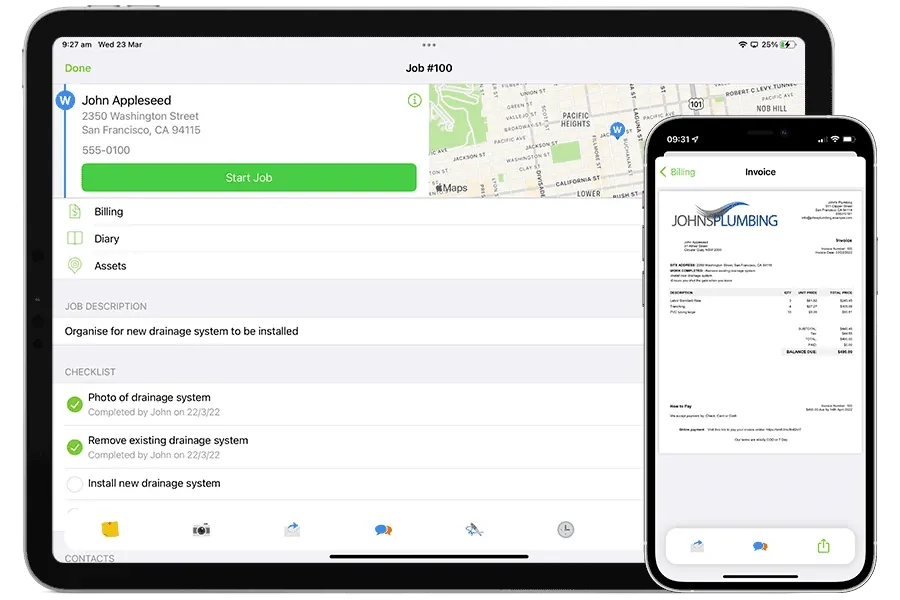
Every job in ServiceM8 has a single job card that lives across desktop, iPhone, and iPad — accessible to all staff with appropriate permissions, real-time synced across devices, and structured around the actual operational flow: customer details → job description → quote/estimate → schedule → field work → photos → time tracking → parts/materials → signature → invoice → payment. The whole loop closes inside the job card without bouncing between separate modules.
On iPhone the job card surfaces through a clean iOS-native interface — swipe to navigate between sections, tap to edit, voice-activate via Chat for hands-free updates (“Add a note saying customer requested follow-up next month”), photo capture using the iPhone’s native camera with auto-attachment to the job. The mobile app earned a 96% positive sentiment specifically on field tech tools across Capterra reviews — the highest mobile sub-score in the FSM category.
On iPad the larger screen unlocks workflow patterns iPhone can’t match — split-view with parts catalog open alongside the active job card, side-by-side comparison of estimate versus actuals, signature capture using the Apple Pencil for higher-fidelity legal signatures, and the larger screen makes pricebook navigation meaningfully faster for shops with deep parts catalogs.
On Mac the desktop app delivers what most FSM web dashboards can’t — keyboard shortcuts, multi-window office workflow, deeper integration with Apple Mail and Apple Calendar, and the same UI conventions Mac users already know. For office staff who live on macOS, this is materially faster than the Chrome-based web dashboards Workiz, FieldPulse, and Service Fusion all run.
The trade-off is unambiguous: Android contractors get ServiceM8 Lite, which is positioned for field technicians needing basic functionality only. The full quoting, invoicing, AI Chat voice assistant, Tap to Pay, and Apple Pencil signature features all require iOS hardware. For mixed-platform shops, this is the structural disqualifier worth knowing about before any other comparison.
Tap to Pay on iPhone: The Field Payment Story That No Other FSM Matches
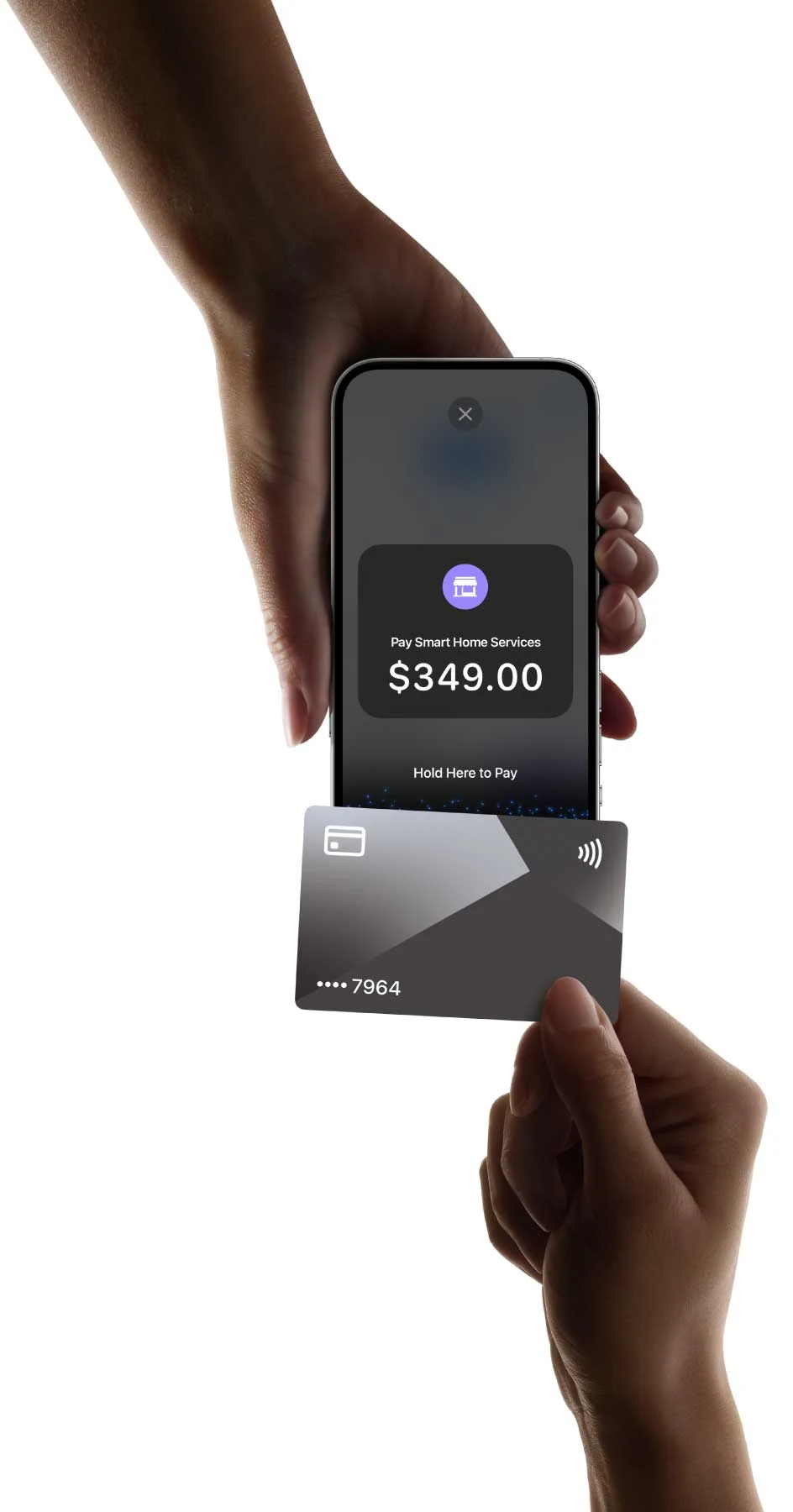
Tap to Pay on iPhone is the most distinctive ServiceM8 feature — and worth being specific about because it changes the in-field payment workflow materially.
How it works: at job completion the tech generates the invoice on iPhone, the customer reviews on the same iPhone screen, the customer holds their contactless credit card or Apple Pay-enabled phone to the back of the iPhone, the iPhone’s NFC chip handles the payment authentication via Apple’s secure enclave, the payment processes through Stripe at standard rates (2.9% + $0.30 for cards), the funds flow into the merchant account same-day, the invoice marks as paid in the job card, and the QuickBooks/Xero/MYOB sync fires automatically.
Why this matters operationally: every other FSM platform requires either a Bluetooth card reader (Workiz, FieldPulse, Service Fusion all use Stripe M2 or similar hardware) or an integrated card reader add-on. The hardware introduces failure modes — battery dies, Bluetooth pairs to wrong phone, reader gets left at the previous job. Tap to Pay on iPhone eliminates all of that — the iPhone the tech is already holding becomes the payment terminal.
The architectural requirement: this works ONLY on iPhone XS or newer running iOS 16.4+. Apple’s NFC payment feature is hardware-locked to iPhone-class devices with the Secure Enclave for payment authentication. Android equivalents exist but ServiceM8’s implementation is iOS-only.
The processing fee structure: standard Stripe rates apply — 2.9% + $0.30 per card transaction, predictable for ACH, same Apple Pay and Google Pay support as desktop Stripe. No ServiceM8-specific markup. This is meaningfully more transparent than Workiz Pay (rates not publicly published).
For solo operators and small crews collecting payment in the field, Tap to Pay on iPhone genuinely saves 5-10 minutes per job versus the card-reader workflow — and over a year of jobs, that compounds into real recovered field time.
The Three Platinum Accounting Partnerships (QuickBooks, Xero, MYOB)
The accounting integration depth is where ServiceM8 most clearly outperforms most FSM competitors — and it matters more than the AI features for shops where the books are the operational spine.
Intuit Platinum Partner status for QuickBooks — ServiceM8 holds the highest tier of the Intuit partner program, which means bi-directional native sync covering QuickBooks Online and QuickBooks Desktop with deeper integration than most FSM platforms achieve. Customers, products, services, invoices, payments, and tax handling all flow automatically in both directions.
Xero Preferred App designation — Xero’s Preferred App program is the equivalent of Intuit’s Platinum tier. ServiceM8’s Xero integration is deeper than Jobber’s native Xero sync (the only major US-market FSM with native Xero before ServiceM8) and meaningfully deeper than the Zapier-mediated Xero workflows most FSM platforms offer.
MYOB Certified Add-on — MYOB is the standard accounting platform for Australian and New Zealand operations, and ServiceM8’s MYOB partnership reflects its Australian origins. For shops operating across the ANZ region or running MYOB for any reason, this is genuinely best-in-class.
The combined picture: ServiceM8 is the only FSM platform with platinum-tier partnerships across all three major small-business accounting platforms. Service Fusion is a QuickBooks Solution Provider with 4-version coverage but lacks Xero and MYOB. FieldPulse has QB Online + Desktop + Xero + MYOB but the integrations aren’t platinum-tier. Workiz has QuickBooks Online only.
Practical implication: if your books are on QuickBooks (Online or Desktop), Xero, or MYOB, ServiceM8 delivers a genuinely best-in-FSM accounting flow. If you’re on Sage Intacct, NetSuite, or another platform, ServiceM8’s accounting depth doesn’t apply.
Integrations Beyond Accounting: Where the Ecosystem Gets Sparse
Outside the triple platinum accounting partnerships, ServiceM8’s native integration ecosystem is meaningfully sparser than Workiz or FieldPulse — and being clear about this matters before signing.
Triple platinum accounting (QuickBooks + Xero + MYOB) is best-in-FSM. Native ecosystem outside accounting is sparse versus Workiz and FieldPulse. Zapier and n8n provide automation glue but aren't native sync.
- → QuickBooks Online · Intuit Platinum Partner
- → QuickBooks Desktop · Intuit Platinum Partner
- → Xero · Preferred App designation
- → MYOB · Certified Add-on (ANZ standard)
- → Tap to Pay on iPhone (Stripe)
- → Apple Calendar (deepest in FSM)
- → Apple Pay · Google Pay support
- → Apple Pencil signatures (iPad)
- → Zapier (5,000+ apps)
- → n8n (open-source workflow)
- → AWS infrastructure
- → ServiceM8 Phone Agent (Sept 2025)
- → Online booking forms
- → SMS messaging (carrier rates)
- → Email integration
- → Most CRM/marketing tools
- → Most photo doc platforms
- → Most lead-gen integrations
- → Most consumer financing
- ✗ CompanyCam · Wisetack
- ✗ GoHighLevel · Reserve with Google
- ✗ JobNimbus · ServiceTitan · Salesforce
For comparison: Workiz ships native CompanyCam, Wisetack, Reserve with Google, and 14 other integrations. FieldPulse ships native HighLevel, Xero, MYOB, CompanyCam, and 21 others. ServiceM8's accounting depth is best-in-FSM; the non-accounting ecosystem is the gap.
The strategic implication is clear: ServiceM8’s architectural bet is that deep accounting + Apple ecosystem + AI is enough for the solo-to-small-trade-business sweet spot. For shops with broader integration needs — CompanyCam for photo documentation, Wisetack for consumer financing on estimates, GoHighLevel for marketing automation — Workiz, FieldPulse, or Jobber deliver materially more native integration coverage.
What this looks like in daily workflow:
- Solo plumber on iPhone running QuickBooks + Stripe: ServiceM8 native coverage is sufficient and the accounting flow is genuinely best-in-class.
- 5-tech HVAC shop on Xero accounting: ServiceM8’s Xero Preferred App integration is the cleanest in the FSM category — material advantage over Workiz (no native Xero) and Service Fusion (no native Xero).
- Shop running CompanyCam for photo workflow: ServiceM8’s photo capture is iOS-native and works fine for basic documentation, but if you’ve standardized on CompanyCam across multiple platforms, expect Zapier glue or workflow gaps.
- Shop running GoHighLevel for marketing automation: ServiceM8 doesn’t have native HighLevel sync; FieldPulse does. For aggressive-growth contractor operations layering GHL on top of FSM operations, FieldPulse + GHL is the cleaner architecture than ServiceM8 + GHL via Zapier.
What 311 Capterra Reviewers Actually Say
The customer base validates the platform genuinely works for the lane it targets — and the review patterns are clear once you read the data.
Capterra: 4.5/5 across 311 verified reviews with sub-scores of 4.3 ease of use, 4.5 customer service, 4.3 features, and 4.6 value for money. That value-for-money sub-score is the strongest in the FSM category — meaningfully ahead of every direct competitor.
The dominant five-star pattern: intuitive user-friendly interface, comprehensive job/staff/client management, strong value at multiple price tiers, mobile field app functionality (96% positive sentiment specifically), customizable features and workflows.
“Every single aspect of our business has been improved by implementing ServiceM8.” — Tom Martin, Water Tight Plumbing
“It took us no more than 2 hours to set up.” — Grant Cochrane, Prowater Plumbing
“The efficiency the system has provided has probably halved our admin time.” — Marcus I., Engineer, Facilities Services (Capterra reviewer)
“Efficient job management platform with superb value for money.” — Gareth B., Director, Financial Services (Capterra reviewer)
“Innovative design and good text chat tech support.” — Kirk B., Owner, Security & Investigations (Capterra reviewer)
The dominant critical pattern clusters around three concerns. First, the iOS-only architecture — “limited Android support” appears across multiple negative reviews; ServiceM8 Lite for Android is functionally restricted versus the iOS app, and mixed-platform shops report two-tier UX problems.
Second, customer service responsiveness — chat-only support (no direct phone access to management) is consistently flagged in negative reviews. Ben B., Electrical Contractor: “horrible customer service” despite acknowledging strong software customization. The 4.5/5 customer service sub-score reflects most users report responsive support, but the chat-only structure has friction at scale.
Third, occasional feature deprecation — some reviewers report features being discontinued without alternatives, which creates workflow disruption for shops that built operations around specific capabilities.
What’s notably absent from critical reviews: complaints about the AI features, the accounting integrations, the iOS app reliability, or the value-for-money equation. Those features get consistent praise even from 3-star reviewers. The 4.5/5 average reflects a genuinely strong platform with three specific operational concerns worth pressure-testing during the 14-day free trial.
ServiceM8 vs Workiz vs FieldPulse vs Jobber for Solo & Small Trades
All four are 4.3-4.6 rated and target the SMB sweet spot. Match your hardware (iOS vs Android), accounting platform, and integration needs to the right pick.
| Dimension | ServiceM8 | Workiz | FieldPulse | Jobber |
|---|---|---|---|---|
| Free plan | $0/mo · 30 jobs · 1 user | No (Lite dropped 2026) | No | No |
| Starting paid price | $29/mo (cheapest paid) | Sales-quoted (last pub. $225/mo) | ~$65/user/mo | $39/mo Core |
| 10-tech monthly cost | $149/mo Premium | $595/mo (last published) | ~$900/mo | $349/mo Grow |
| Free trial | 14 days, no CC | 7 days, no CC | No (demo only) | 14 days |
| Mobile platform | iOS-native (Lite for Android) | iOS + Android (parity) | iOS + Android (parity) | iOS + Android (parity) |
| Native AI receptionist | Phone Agent (Sept 2025) | Genius (Dec 2024 · 14mo mature) | Operator AI · NECA Award · 30+ langs | Limited |
| Accounting integrations | QB Online + Desktop + Xero + MYOB (triple platinum) | QB Online only | QB Online + Desktop + Xero + MYOB | QB Online + Xero |
| Native CompanyCam | No | Yes | Yes | Yes |
| Field payments | Tap to Pay on iPhone (no hardware) | Multi-method + financing | Square only | Jobber Payments + Wisetack |
| Capterra rating | 4.5 · 311 reviews · 4.6 value-for-money (best) | 4.4 · 218 reviews | 4.6 · 427 reviews | 4.5 · 1,440 reviews |
The honest answer: no single FSM dominates the SMB market. ServiceM8 wins on iOS-native architecture + Free plan + triple platinum accounting + Tap to Pay. Workiz wins on AI maturity. FieldPulse wins on multi-trade flexibility + GoHighLevel. Jobber wins on cross-platform simplicity.
ServiceM8 wins decisively when: you’re on iPhone/iPad/Mac hardware (the iOS-native architecture is the structural advantage), you need a genuine free plan that works for solo operators, your accounting is on QuickBooks/Xero/MYOB (triple platinum partnerships are best-in-class), and Tap to Pay on iPhone for in-field payments matters.
Workiz wins when: HVAC/plumbing/electrical at 3-25 techs needs the most mature AI dispatcher, you want native CompanyCam and Wisetack integrations, and you’re cross-platform (iOS + Android).
FieldPulse wins when: multi-trade flexibility across HVAC + plumbing + electrical + septic + glass + senior care is the priority, you run GoHighLevel marketing automation needing native FSM integration, you’re on Xero or MYOB.
Jobber wins when: solo or under 10 techs across mixed residential service trades, you want broadest trade reach with simplest UX, and you need cross-platform (iOS + Android) without iOS-specific features.
The September 2025 Update: Phone Agent, Office Agent, Reporting Engine
ServiceM8’s September 2025 product update was the most meaningful release in the platform’s recent history — and the features shipped are still being absorbed across the customer base in 2026.
Phone Agent (covered above) is the flagship addition — autonomous AI receptionist competing with Workiz Genius and FieldPulse Operator AI.
Office Agent is the second AI feature — handles routine administrative tasks like chasing quotes that haven’t been responded to, flagging overdue items, and managing recurring follow-ups, all with user approval controls. This is closer to true agentic AI (autonomous task execution with human oversight) than most FSM AI bullet points.
New Reporting Engine is the operational-side addition — custom reports filterable by job status, category, client, profit; multiple chart types; CSV export. For shops needing more than the basic reports ServiceM8 historically shipped, this materially closes the reporting gap versus ServiceTitan.
Enhanced Job Cards add template application to existing jobs, SMS delivery of custom templates, and improved action bar accessibility — incremental but meaningful for high-volume operations.
Visibility Improvements add real-time staff location tracking, GPS activity logs, and job checkout reports showing technician activities during site visits.
Pricing & Inventory improvements include “Save As You Go” pricing updates, outdated price warnings, and automated supplier invoice importing — operational details that matter for shops with deep parts catalogs.
The realistic 2026 trajectory:
- Today (April 2026): Phone Agent + Office Agent + Reporting Engine all in production with 7 months of customer deployment
- Mid-late 2026: Likely Phone Agent feature expansion (deeper language coverage, smarter routing, more script flexibility) as the AI gap versus Workiz Genius narrows
- 2027: Probable agentic AI expansion building on Office Agent — more autonomous administrative workflows, deeper iOS integration with Apple Intelligence
- 2027-2028: Likely continued investment in iOS-native features as Apple ships new platform capabilities
This is editorial extrapolation from observed ServiceM8 release patterns and the iOS-first architectural commitment, not specific commitments ServiceM8 has made publicly.
Who Should Use ServiceM8
Solo operators on iPhone running QuickBooks, Xero, or MYOB accounting — this is the editorially defensible sweet spot. Free plan covers 30 jobs/month at $0; the accounting integration is best-in-FSM; Tap to Pay on iPhone closes the in-field payment loop without hardware.
1-20 staff trade businesses on iPhone/iPad/Mac hardware — ServiceM8’s explicit “sole traders up to 20 staff” target audience. Plumbing, electrical, HVAC, locksmith, cleaning, pool service, lawn care, appliance repair operations where iOS hardware standardization is already in place.
Australian and New Zealand contractors — ServiceM8’s Australian origin shows in the MYOB integration depth and the deeper localization for ANZ market workflow. For shops in these regions, ServiceM8 is the editorially defensible default.
Shops where in-field card payment frequency matters — Tap to Pay on iPhone genuinely saves 5-10 minutes per job versus card-reader workflows. For high-volume residential service trades collecting payment at every job, the time recovery compounds.
Operations needing genuinely free FSM that works for production use — the Free plan isn’t a 14-day trial that converts; it’s a permanent free tier with 30 jobs/month and full feature access. Solo operators who need real FSM software but can’t justify subscription cost have a real path.
Shops that value iOS-native UX over feature breadth — the architectural choice matters operationally. If your office staff lives on macOS and your field techs are on iPhones, ServiceM8 fits the existing hardware in a way no web-first FSM can match.
Operations on QuickBooks/Xero/MYOB needing the deepest accounting integration in FSM — Intuit Platinum + Xero Preferred App + MYOB Certified is structurally unmatched.
Who Should NOT Use ServiceM8 (and What to Use Instead)
Any operation where any tech runs Android — the full ServiceM8 mobile app is iPhone/iPad/Mac only. ServiceM8 Lite for Android is materially restricted; mixed-platform crews create two-tier UX problems. Use Workiz, FieldPulse, or Jobber for cross-platform compatibility.
Operations scaling past 20 staff — ServiceM8 explicitly targets “sole traders up to 20 staff” and dispatch depth doesn’t reach ServiceTitan or Workiz territory at higher scale. Use ServiceTitan or Workiz Pro for 25+ techs.
Shops dependent on CompanyCam, Wisetack, or GoHighLevel integrations — none are native to ServiceM8. Workiz has CompanyCam + Wisetack native; FieldPulse uniquely has GoHighLevel native.
Operations on Sage Intacct, NetSuite, or non-Intuit/Xero/MYOB accounting platforms — ServiceM8’s accounting depth only applies to those three. If your books are on Sage Intacct, ServiceTitan is the better fit.
High-volume operations exceeding 1,500+ jobs per month consistently — ServiceM8 Premium Plus tier caps at 1,500+ jobs with $0.20 per additional job; for shops doing 3,000+ jobs/month, the per-job overage becomes material. Workiz Pro and FieldPulse Professional don’t have job caps.
Insurance restoration roofers — ServiceM8 has no Xactimate scope or insurance claim workflow. Use JobNimbus or AccuLynx.
Custom home builders and high-end remodelers — ServiceM8’s dispatch and service-call workflow doesn’t map to construction project management. Use Buildertrend or BuilderPad.
Multi-trade operations needing trade-mix breadth beyond the standard service trades — FieldPulse markets septic, glass, senior care, and junk removal more actively.
Anyone who needs the most mature autonomous AI dispatcher today — Phone Agent has 7 months of production runtime as of April 2026; if you need 14+ months of battle-tested AI receptionist deployment, Workiz Genius Answering (December 2024 launch) is the safer bet.
Operations needing direct phone support escalation — ServiceM8’s chat-only support model creates friction for shops accustomed to phone-first vendor escalation.
Highly emotional residential service trades (water damage restoration, biohazard, slab leaks) where the first call’s tone matters more than autonomous AI — layer Smith.ai or Ruby Receptionists in front of ServiceM8 for human-empathy first-touch on those use cases.
The Bottom Line: iOS-First, AI-Native, Solo-to-20-Staff
ServiceM8 is the iOS-native field service management platform that’s been quietly compounding for 16 years and counting — and in 2026, the architectural bet on the Apple ecosystem is what makes it either the clearest winner in its lane or fundamentally not the right fit. Founded 2009 in Northern Territory, Australia by Kim Ford (later joined by his son Ben Ford), launched 2010, now serving operations across 40+ countries managing $22+ billion in jobs with 4.5/5 across 311 Capterra reviews and the strongest value-for-money sub-score in the FSM category at 4.6/5.
The September 2025 product update was the inflection point — Phone Agent shipped as a true AI receptionist competing with Workiz Genius and FieldPulse Operator AI, Office Agent added agentic AI for routine administrative tasks, the new Reporting Engine closed the analytics gap, and the platform’s AI velocity through 2025 demonstrated that ServiceM8 isn’t ceding the AI category to younger competitors. Auto-Invoice generates 30% of customer-accepted invoices automatically. Smart Writing Helper averages 1,200+ uses per small business per month, saving 13+ hours of writing administration weekly. The triple platinum accounting partnerships (Intuit Platinum + Xero Preferred App + MYOB Certified) are best-in-class. Tap to Pay on iPhone is structurally distinct from every other FSM’s payment workflow.
The constraints to be clear about: the full mobile app is iPhone/iPad/Mac only — ServiceM8 Lite for Android is materially restricted; the integration ecosystem outside the triple platinum accounting partnerships is sparse (no native CompanyCam, Wisetack, GoHighLevel, Reserve with Google); GPS routing and multi-tech dispatch depth lag ServiceTitan and the Series-C-stage challengers; customer service responsiveness and chat-only support show up as recurring critical complaints; and Phone Agent’s 7-month production runtime as of April 2026 is meaningfully less mature than Workiz Genius (14 months).
For solo operators and 1-20 staff trade businesses on iPhone hardware running QuickBooks/Xero/MYOB accounting — this is the editorially defensible FSM pick of 2026. The Free plan handles solo operators at $0/month. The Growing tier at $79/month covers 5-tech shops cleanly. Premium at $149/month handles 10-tech operations. Premium Plus at $349/month scales to 1,500+ jobs/month before per-job overage charges trigger. Start the 14-day free trial at servicem8.com with no credit card required, and pressure-test specifically: validate the iOS-native workflow against your existing hardware standardization, confirm the QuickBooks/Xero/MYOB sync handles your specific accounting setup, and test Tap to Pay on iPhone in real field conditions.
For Android-running shops, operations scaling past 20 staff, contractors dependent on CompanyCam/Wisetack/GoHighLevel integrations, insurance restoration roofers, custom home builders, $5M+ enterprise HVAC operations, anyone needing the most mature autonomous AI dispatcher today, or shops accustomed to phone-first vendor support — different platforms (Workiz, FieldPulse, Jobber, JobNimbus, ServiceTitan, Buildertrend) earn the recommendation.
The category is moving toward AI-native FSM regardless of where ServiceM8 lands in 2026 — but the iOS-first architectural choice plus the triple platinum accounting depth plus the Free plan that actually works are real structural advantages for the right operation. The question isn’t whether ServiceM8 is the best FSM (it depends on your hardware and accounting platform). The question is whether it’s the right FSM for your specific operating model — and for solo operators on iPhone running QuickBooks, Xero, or MYOB, the answer is clearly yes.
