


Most construction software is built for the office. BuilderPad is built for the homeowner.
That’s the founding bet, anyway — and the platform’s three pillars (Selections, Scheduling, Communication) all push toward the same operational outcome: a custom home builder or remodeler who can land their close on client experience rather than spec-sheet density. BuilderPad was founded in 2021 by Hill Dickerson — a 20-year custom home builder who co-founded Dickerson Hearth Products in 2004 and sold that business in 2022 to focus on BuilderPad full-time — and Mark Thompson, with the explicit thesis that technology should bridge the trust and communication gaps in residential construction. Pricing comes in at $39-$165/month annual with unlimited users on every tier, the 14-day free trial requires no credit card, and the customer roster on the homepage includes named testimonials from Britney Wallace at B. Wallace Design & Construction, Kevin Merta at Custom Estate Homes, and Grant Dickens at Dickens Built — all real attributable builders, all five-star vendor-curated quotes.
What this review covers: how BuilderPad’s published $39-$199/month pricing actually works at real custom-home-builder scale (and where the unlimited-user model wins versus per-seat platforms), what the three core pillars ship out of the box, where the Selections workflow earns the subscription specifically for design-heavy residential work, why the integration gap and AI silence in 2026 matter for buyers signing annual contracts, what real custom home builders are saying about the platform on the BuilderPad homepage and across review aggregators, the dimension-by-dimension scoring that lands BuilderPad at 3.6/5 in the project management category, and which contractor profiles the platform fits versus the ones who should pick Buildertrend, Projul, or Contractor Foreman instead.
“BuilderPad helped my clients and team all stay in sync, to ensure a smooth process throughout the construction process. I will not build another house without it!”
— Grant Dickens, Dickens Built, on the BuilderPad homepage
The $39-Plan Math: Why BuilderPad Costs Less Than Buildertrend
Pricing transparency is one of BuilderPad’s clearest strengths — the three published tiers on builderpad.com/pricing carry no sales-gating, no hidden setup fees, and no long-term contract requirements. The number that matters most for residential builders evaluating against Buildertrend at $339-$829/month or Projul at $399-$1,199/month annual: BuilderPad’s Professional tier at $124/month covers 15 active projects with unlimited users, which is the natural sweet spot for a 5-employee custom home builder running 8-12 concurrent jobs.
All prices verified against builderpad.com/pricing in April 2026. Annual billing offers approximately two months free versus monthly. No long-term commitments — upgrade, downgrade, or cancel anytime.
- →3 active projects · Unlimited users · Unlimited photo/video storage
- →Selections, Scheduling, Activity Feed, File Cabinet, Mobile App, Roles & Permissions all included
- →Standard support — email and knowledge base
- →15 active projects · Unlimited users · Unlimited photo/video storage
- →Same full feature set as Basic — the upgrade is project headroom, not feature unlock
- →Standard support · sweet spot for most residential builders
- →30 active projects · Unlimited users · Unlimited photo/video storage
- →Priority support — the one tier-gated feature in the lineup
- →Need 30+ active projects? Contact sales for Enterprise (no published pricing)
The unlimited-user math: at a 10-employee custom home builder running 12 active projects, BuilderPad Professional is $124/month all-in. The same operation on [Buildertrend Essential](/software/buildertrend/) is $339/month flat. The same operation on [Projul Core](/software/projul/) is $399/month annual. The same operation on [ClickUp Business](/software/clickup/) is $120/month at $12/user × 10 users — but ClickUp doesn't ship a Selections module or homeowner portal, which means the $124 vs $120 comparison isn't apples-to-apples.
The pricing model works specifically because BuilderPad doesn’t charge per seat. At a 5-person shop, every employee plus every subcontractor plus every homeowner is included — there’s no “should we give the framer access?” math because the answer is always yes. That’s the kind of small operational decision that matters every week.
The 14-day free trial without a credit card requirement is also meaningfully better than the demo-gated alternatives. You can spin up a real project, invite a real homeowner, run a Selections workflow with actual cabinet specs and timestamps, and decide on the platform before any money changes hands. That’s the lowest-friction PM evaluation experience in residential construction in April 2026.
What the price doesn’t include: native QuickBooks sync, AIA progress billing, native estimating, AI features, or a published API. Those are real gaps and they’re addressed honestly later in this review — but the entry-level math is the headline reason solo and small-shop residential builders land on BuilderPad over heavier alternatives.
The Three Things BuilderPad Builds Around
Most construction PM platforms try to ship 15-20 modules and call it comprehensive. BuilderPad ships three pillars and calls it focused. The trade-off is real on both sides — depth versus simplicity — and the right pick depends on whether your operation needs everything or whether your operation needs the three things that actually matter to land a custom home build cleanly.
The pillars are Selections, Scheduling, and Communication, with File Cabinet, Mobile App, and Roles & Permissions as the supporting infrastructure. That’s the entire product surface. There’s no estimating module, no accounting layer, no marketing automation, no FSM dispatch, no time clock for crews, no inventory tracking — and the absence of those things is intentional, not a roadmap gap. BuilderPad is the simplicity-and-affordability play, not the all-in-one bundle.
For a custom home builder selling on the strength of homeowner experience, those three pillars are the operational core: pick what’s going in the house (Selections), keep the schedule on track (Scheduling), keep everyone informed (Communication). For a contractor who also needs to estimate, invoice, dispatch, and run accounting from one platform, this is the wrong architectural fit and Contractor Foreman at $49-$332/month or Buildertrend at $339-$829/month are the bundled-module picks.
The next four sections walk through what BuilderPad actually ships in each pillar, starting with the one that earns the subscription.
Selections: The Flagship Workflow That Earns the Subscription
Selections — the workflow where a homeowner picks every cabinet, fixture, finish, and material that goes into the house — is the single most under-tooled part of residential construction. Most builders run it through email chains, spreadsheets, and printed PDF spec sheets that get marked up at the kitchen table and lost in the truck. The result is the recurring residential-builder horror story: the homeowner picks the wrong tile in week 12, the framer doesn’t know about it until week 18, the material is on a six-week lead time, the schedule slips three weeks, and the change order conversation becomes a relationship liability.
BuilderPad’s Selections module addresses this directly with four operational mechanics:
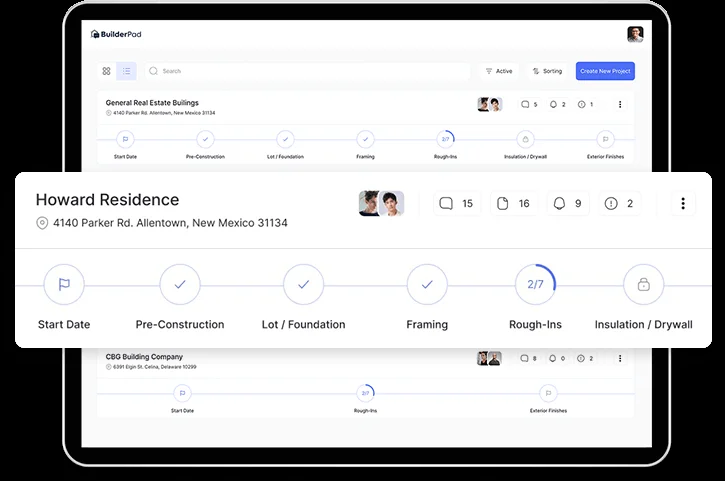
Total budget plus per-category allowances. Builder sets a project total budget and per-category allowances (cabinets $35K, plumbing fixtures $8K, lighting $6K). Homeowner sees the allowance, makes selections within or outside it, and the platform tracks variance. There’s no committed-cost vs. actual-cost reporting at the line-item level — that’s a job-costing function BuilderPad doesn’t ship — but the allowance-vs-pick variance is exactly the conversation a residential builder needs to have with the homeowner before the framer starts.
Spec sheets, estimates, and supporting documents attached at the selection level. Instead of emailing PDFs and hoping the homeowner reads them, the spec lives on the selection itself. The cabinet selection has the cabinet manufacturer’s spec sheet attached. The plumbing fixture selection has the install requirements attached. The flooring selection has the warranty language attached. When the framer opens the project the morning of cabinet install, the spec is in the same place as the selection record.
Automated reminders for selections coming due. This is the operational mechanism that prevents the “homeowner forgot to pick” failure mode. The platform fires reminder emails on a schedule the builder configures — three weeks out, two weeks out, one week out, overdue — and the homeowner gets the same reminder cadence regardless of whether the office manager remembered to send it. For a 12-month custom build with 30+ selection categories, this kind of automation is the difference between a clean schedule and a slip.
Approval timestamps that close the dispute. Every selection records who approved it and when. When the homeowner says in week 18 “I never picked that tile,” the timestamp closes the conversation in 30 seconds. This is the operational version of the residential builder’s most expensive recurring liability — the change-order argument — and it’s worth the platform’s monthly cost even at solo-builder scale.
What the Selections module does not ship: line-item estimating with markup configuration, vendor bid management for the actual material orders, real-time pricing feeds from suppliers, or proposal-to-deposit closing workflow. The Selections module is the homeowner decision layer, not the procurement layer. For procurement, you’re either keeping it in your existing process or pairing BuilderPad with Roofr (for roof-specific work) or running estimates separately in a tool like Buildertrend or Projul which ships native estimating.
The honest read: for a custom home builder where the Selections workflow is the actual operational pain point — and for many residential builders, it is — BuilderPad’s $124/month Professional tier earns its keep on this module alone. For an operation where estimating and procurement are equally painful, BuilderPad covers half the workflow and you’ll need a second tool for the other half.
Scheduling: Three Views, One Critical-Path Engine
The scheduling module is the second pillar and the operational depth surprises most contractors evaluating BuilderPad alongside heavier platforms. Three views (Calendar, List, Gantt), drag-and-drop schedule manipulation in Gantt, automatic schedule recalculation when dependencies shift, overdue alerts, baseline comparison, and weekly outlook emails — that’s a real critical-path-aware scheduling engine, not just a calendar UI.
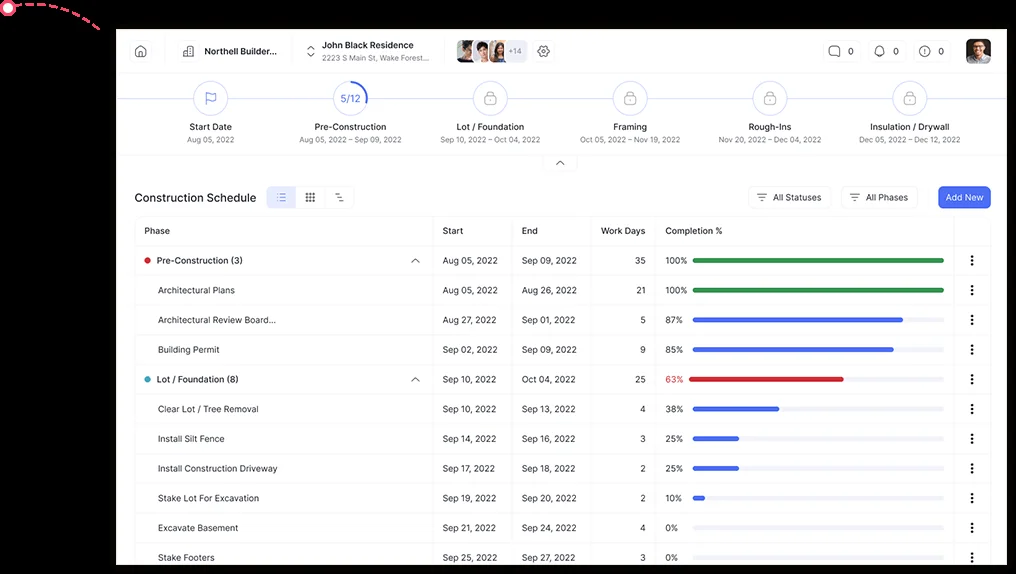
The view-switching is the surface layer. Calendar view is the daily-rhythm tool — birds-eye visibility of the upcoming two weeks for a project manager who wants to see what’s happening this Tuesday without scrolling a Gantt. List view is the simple sequential breakdown — every schedule item in order with progress indicators, useful for a foreman who wants to confirm what’s ahead. Gantt view is where the actual schedule manipulation happens — drag a task to a new date, the engine recalculates downstream dependencies, the critical path updates, and the overdue alerts fire on items that just crossed the line.
Auto-scheduling with dependencies is where the engine earns its keep. Define that “drywall starts after framing inspection passes” and “cabinet install starts after drywall completes,” and when framing slips three days because the lumber yard delivered short, the platform automatically pushes drywall, cabinet install, and every downstream task three days out — the schedule recalculates without anyone manually rebuilding it. For a 12-month custom build with 200+ scheduled items and 50+ dependency relationships, this kind of automation is the difference between a maintained schedule and a schedule that drifts to fiction by month four.
Critical path identification highlights the tasks where any slip directly affects the final completion date. For a custom home builder fielding the recurring “when will it be done?” question, knowing which 15 of the 200 scheduled items are on the critical path versus which 185 have float is the operational answer to that question. The platform surfaces critical-path tasks visually rather than burying them in a report.
Gantt project baselines capture the original schedule on day one and compare against actual progress. When the homeowner says in month six “we were supposed to be done by August,” the baseline tells you where the original commitment was and where each slip happened — not as ammunition, but as the documented reality that informs the change-order conversation.
Weekly outlook emails push to the team and homeowner automatically, summarizing what’s coming up in the next seven days. This is the kind of communication automation that residential builders consistently get wrong manually (because nobody has time to draft the weekly status email at 6pm on Friday), and BuilderPad ships it as a default workflow rather than an opt-in feature.
What the scheduling module does not ship: multi-tech FSM-style dispatch boards, GPS route optimization, recurring-service-plan scheduling for maintenance work, capacity-based scheduling with crew availability gates, or integration with time-tracking apps like ClockShark or QuickBooks Time. This is project-style scheduling, not field-service scheduling — and the distinction matters specifically for HVAC, plumbing, and electrical operations where dispatch is the actual scheduling pain point. For those trades, ServiceTitan, Housecall Pro, or Jobber are the architectural fit.
The honest read: for a residential builder running project-style schedules across 3-30 active jobs, BuilderPad’s scheduling engine is more capable than the $39-$165/month price suggests, and the auto-schedule with dependencies is the kind of feature most contractors don’t realize they need until they’ve used it for a month and stopped manually pushing schedule items.
The Mobile App on the Job Site
Mobile-first usage is the validation test for any contractor PM platform — if the foreman won’t open it on the job site, the platform fails regardless of how clean the desktop UI is. BuilderPad ships a native iOS and Android app with the workflows that actually matter in the field: photo and video capture, document scanning into the File Cabinet, push notifications on schedule changes and homeowner activity, geo-location tagging on captures, and real-time sync with the web platform.
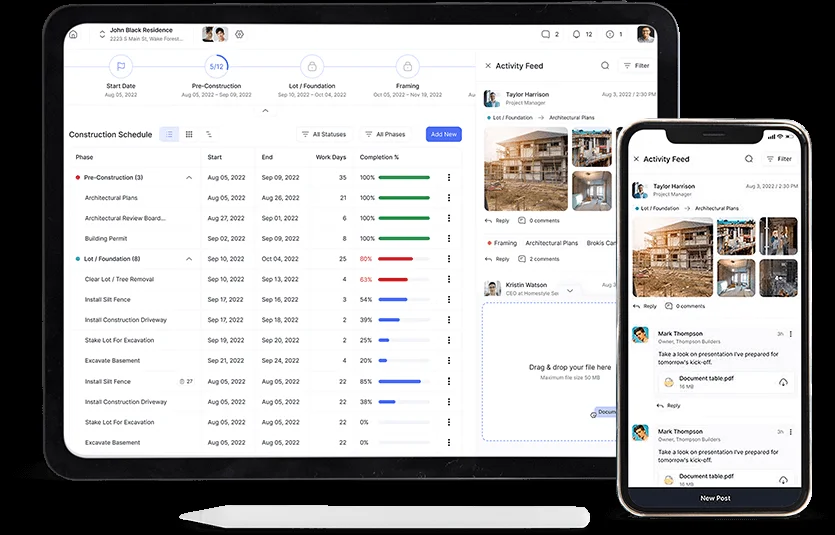
The four mobile capabilities BuilderPad highlights match the actual field workflow:
Push notifications. Foreman gets pinged when the homeowner approves a selection, when the schedule shifts, when a comment lands on the activity feed. No checking the platform every hour — the platform finds you.
Real-time sync. Mobile capture lands in the web portal before the office manager refreshes the page. Office capture lands on the foreman’s phone before he leaves the parking lot. The sync isn’t queued or batched — it’s real-time bidirectional.
Geo-location. Photos and videos captured on-site carry GPS metadata, useful for documenting which job site a particular capture came from when reviewing 40+ photos at the end of the week. Not a GPS time clock for crew payroll — just metadata-on-capture.
Document scanning. The mobile app scans physical documents (paper estimates, marked-up plans, signed change orders) directly into the File Cabinet using the device camera, with auto-cropping and document-edge detection. For builders who still receive paper documents from suppliers and inspectors, this collapses a separate scan-and-upload workflow to a single tap.
What the mobile app does not explicitly document: offline capture and queued upload (for capture on a property with no cell signal), in-app time tracking for crew payroll, in-app invoicing for tap-to-pay payment collection, or in-app estimating for in-driveway proposals. The mobile experience is documentation-and-communication-focused, not transactional. For service-trade contractors needing tap-to-pay invoicing in the driveway, Housecall Pro or Jobber are the fit.
The Capterra and GetApp review aggregators don’t have meaningful BuilderPad mobile-specific feedback yet (review counts are effectively zero on both platforms as of April 2026), so the mobile experience evaluation rests on vendor materials and the App Store / Play Store ratings — both of which list BuilderPad with positive sentiment but low review volume. The honest read: the mobile app surface area is appropriate for the platform’s three-pillar focus, but the third-party validation is light and any buyer should run the 14-day free trial with the field crew specifically before committing on mobile fit.
Activity Feed & Communication: The Single Source of Truth
The third pillar is communication, and BuilderPad’s pitch is direct: a single source of truth for every conversation about the project across the team, the subs, and the homeowner. The Activity Feed is the implementation — a chronological, searchable, filterable timeline that holds rich text posts, images, videos, files, comments, threaded discussions, and internal-only conversations kept private from the client.
The mechanics that make it work:
Filtering by phase, schedule item, or selection. The feed is searchable across the full project history, but the practical workflow is filtering — “show me everything that happened in the framing phase” or “show me every comment on the cabinet selection” or “show me what the framer posted last week.” For a 12-month custom build with 800+ activity feed posts by completion, the filter layer is what keeps the feed usable rather than overwhelming.
Internal-only discussions kept private from the homeowner. Office staff, foreman, and subs can have a discussion thread that’s invisible to the homeowner — the kind of conversation that happens when the framer’s invoice is wrong, the HVAC sub is double-booked, or the lumber order needs to be re-cut. The permission boundary is clean and the homeowner doesn’t see what they shouldn’t see.
Hashtag organization and @mentions. Posts can be tagged for cross-cutting concerns (#delays, #change-orders, #permits) and team members can be @mentioned for accountability. Combined with the filter layer, hashtags effectively give the platform a lightweight task-and-issue tracking surface without shipping a full ticketing module.
Push notifications on the mobile app. When something lands on the feed that involves you, you know about it without having to check. The notification model defaults to relevant-to-you rather than firehose-everything, which is the difference between a tool the team actually opens and a tool that gets muted in the first week.
For a custom home build where the conversation typically scatters across email, text messages, phone calls, and in-person updates, the Activity Feed is the workflow that pulls those streams into one place — and the operational benefit is exactly the thing residential builders consistently identify as the platform’s strongest moat in the homepage testimonials.
“BuilderPad is our competitive advantage that our clients love! An easy way for our clients to receive progress updates and provide feedback, with no learning curve.”
— Britney Wallace, B. Wallace Design & Construction, on the BuilderPad homepage
What the communication layer does not ship: SMS-native messaging (the homeowner gets emails and platform notifications, not text messages from the platform’s number), AI-summarized weekly recaps, AI-drafted homeowner communications, or integration with external chat tools like Slack or Microsoft Teams. The communication is in-platform — which is a feature for the single-source-of-truth thesis and a limitation for operations that already live in Slack.
File Cabinet & Document Workflow
The supporting infrastructure layer is the File Cabinet — BuilderPad’s name for the document storage, organization, and sharing layer that holds contracts, estimates, invoices, plans, selections, permits, and any other project artifact. It’s not a separate product, it’s the document substrate that the other three pillars build on.
What the File Cabinet ships:
Cloud storage with unlimited photo and video storage on every tier. This is the unsung pricing detail — Basic at $39/month doesn’t cap storage at 10GB or charge per-photo overage. The unlimited storage on every tier matters for any operation capturing 50+ photos per active project, which describes most residential builders.
Mobile document scanning. Already covered in the mobile section, but worth re-flagging — physical documents are scannable into the File Cabinet from the mobile app with auto-edge-detection and cropping.
In-app file preview. PDF and image previews open inline rather than requiring download, which means the homeowner can review the contract or the foreman can confirm the spec sheet without the friction of a download-and-open workflow.
Role-based permission management. Granular access controls determine who can view, modify, or remove files. The homeowner sees the contract, the inspection reports, and the photo gallery; the foreman sees the plans, schedules, and internal documentation; the subs see only their assigned scopes. This is the same permission engine that drives the Activity Feed’s internal-only threads.
Public folder/file sharing for non-project members. When you need to send a contract to a lawyer or a permit document to a city inspector, public sharing creates a link without requiring them to be a project member. Useful for the recurring “send the architect the latest revised plans” workflow.
Selection integration. Files attached to a selection appear on the homeowner-facing selection record. The cabinet spec sheet attached to the cabinet selection shows up where it belongs.
What the File Cabinet does not explicitly ship: document version control with revision history, e-signature workflow (no DocuSign or HelloSign integration documented), document approval routing chains, or AI-summarized document content. For e-signature on contracts, you’re using a separate tool like DocuSign, HelloSign, or Dropbox Sign and uploading the signed PDF to the File Cabinet manually. For commercial GCs needing structured submittal review with revision tracking, Procore is the architectural fit.
Where BuilderPad Lags: AI, Integrations, and the 2026 Roadmap
Three honest gaps in BuilderPad’s product surface as of April 2026 deserve direct attention because they’re the dimensions where the platform compares unfavorably to every credible competitor in the residential construction PM category. The pricing advantage is real; these gaps are also real; the right buyer treats both as inputs to the architectural decision rather than dismissing either.
AI capabilities are zero. No documented AI features on the BuilderPad website, feature pages, blog, or marketing materials — no AI document summarization, no AI scheduling suggestions, no AI selection recommendations, no AI meeting transcription, no AI photo tagging, no AI-drafted homeowner communications, no AI roadmap announcements. This is a strategic gap in 2026, when Buildertrend has rolled out AI document and scheduling capabilities, ClickUp shipped autonomous Super Agents and Brain MAX in the December 2025 4.0 release, Monday.com integrated AI Blocks across the platform, Projul partners with 1build for AI cost data, and Procore has multiple AI features in production. For contractors who view AI as central to their next-24-month operational stack, BuilderPad is the wrong architectural bet today, and the silent public roadmap means there’s no clear date when this changes. For contractors who view AI as nice-to-have rather than must-have, this is a non-issue.
Native integrations are zero. No documented native QuickBooks Online or Desktop integration, no Zapier connector listed in Zapier’s app directory, no public API for custom integration work, no third-party developer ecosystem, no marketplace of integration partners. This is materially different from Buildertrend (native two-way QuickBooks Online sync, financing partnerships, mature integration ecosystem), Projul (native QuickBooks Online + Desktop, 1build, CompanyCam integrations), Contractor Foreman (native QuickBooks, payment processors), and ClickUp (1,000+ tools through native connectors and Zapier). For contractors who run a connected stack — QuickBooks for accounting, CompanyCam for photo doc, EagleView for measurements, a CRM for sales — BuilderPad doesn’t connect to any of those tools natively, and the manual reentry tax grows linearly with project volume.
The public 2026 roadmap is silent. The BuilderPad blog has not published meaningful product updates since January 2024 (the only 2025 blog posts on builderpad.com are off-topic casino content). There are no public 2026 roadmap announcements, no public changelog with shipped feature updates, no published quarterly product releases, no public engineering hiring announcements signaling investment. This isn’t proof the platform is unmaintained — active customers are still landing the testimonials on the homepage, the application appears to be operating normally, and the founder profile suggests ongoing focus — but it’s a buyer-evaluation flag worth raising directly on a sales call before signing an annual contract. The honest recommendation: ask BuilderPad’s sales team for the 2026 roadmap, the recent feature changelog, and the AI strategy before committing. If those answers are clear, the platform’s other strengths still earn the subscription for the right buyer profile. If those answers are unclear or evasive, the architectural risk is real and a Projul or Buildertrend commitment is the safer bet for a long-term operational tool.
For high-touch custom home builders where homeowner-facing communication is the operational moat — and where the inbound call volume from new prospects is high — pairing BuilderPad with an AI call answering service like Smith.ai addresses the front-of-funnel gap without requiring BuilderPad itself to ship AI capabilities. The architecture: Smith.ai answers and qualifies inbound prospect calls, books discovery meetings, and routes qualified leads to the builder; BuilderPad runs the project once the contract signs. This is the pragmatic 2026 stack pattern for builders who want client-experience-first PM without giving up on AI augmentation in the broader operation.
What Real Custom Home Builders Say About BuilderPad
Third-party review aggregators don’t have meaningful BuilderPad volume yet — Capterra and GetApp both list BuilderPad with zero verified reviews as of April 2026, and G2 has not yet aggregated significant BuilderPad sentiment. The available customer voice is therefore vendor-curated testimonials from the BuilderPad homepage, which carry the standard caveat (these are selected for marketing purposes and aren’t a representative sample) but also the standard advantage (these are real attributable builders with real businesses, not anonymous quotes).
The three named testimonials on builderpad.com, in order of appearance on the homepage:
“BuilderPad helped my clients and team all stay in sync, to ensure a smooth process throughout the construction process. I will not build another house without it!”
— Grant Dickens, Dickens Built
“BuilderPad is our competitive advantage that our clients love! An easy way for our clients to receive progress updates and provide feedback, with no learning curve.”
— Britney Wallace, B. Wallace Design & Construction
“BuilderPad took all the guesswork out of construction management software! Our team is now able to manage their jobs and clients with more efficiency than ever!”
— Kevin Merta, Custom Estate Homes
The themes that emerge across the three testimonials match the platform’s positioning — client experience as the moat (“competitive advantage that our clients love,” “no learning curve”), team-and-client synchronization (“stay in sync,” “smooth process”), and operational simplicity (“took all the guesswork out,” “more efficiency than ever”). BuilderPad’s published vendor metric of 94% of customers reporting on-time and on-budget completion is consistent with the testimonials’ framing, though the underlying methodology of that customer survey isn’t published.
What’s missing from the open-platform feedback layer: third-party validation at scale. Buildertrend has 2,400+ Capterra reviews. ClickUp has 9,400+ G2 reviews. Projul has 5,000+ active contractors providing review aggregator feedback. BuilderPad has the homepage testimonials and not much else publicly aggregated yet. For a buyer evaluating BuilderPad in April 2026, the right move is to ask the BuilderPad sales team for direct customer references in your trade and project size, run the 14-day free trial with a real homeowner on a real project, and validate the experience hands-on before committing — because the open-platform sentiment hasn’t yet accumulated to the validation density that makes vendor-curated testimonials feel sufficient.
How We Scored BuilderPad on Eight Project Management Dimensions
BuilderPad lands at 3.6/5 in the project management category under our eight-dimension scoring framework — strong on client experience and pricing value, weaker on financials, integrations, and AI capabilities. The dimension-by-dimension breakdown is below; the full methodology is published at /how-we-review/.
Weighted dimension scores feed into the overall 70/30 primary-category formula with the +0.20 calibration constant adopted April 2026. Single-category product means the formula simplifies to weighted score + 0.20.
Selections workflow with allowance budgets, file attachments, automated reminders, and approval timestamps is the platform's flagship moat. Weekly outlook emails and real-time activity feed sync close the homeowner-experience loop. This is where BuilderPad earns its subscription specifically for residential builders.
$39-$165/month annual with unlimited users on every tier, 14-day free trial without credit card, no setup fees, no long-term contracts. The cheapest credible client-experience-first PM in the residential category by a meaningful margin against Buildertrend or Projul.
Three-view scheduling (Calendar, List, Gantt), drag-drop manipulation, auto-scheduling with task dependencies, critical path identification, baseline comparison, weekly outlook emails. Solid project-style scheduling depth — not FSM dispatch, not appropriate for service trades.
Native iOS and Android apps with photo/video capture, push notifications, geo-location, document scanning, real-time web sync. No documented offline mode, no GPS time clock for crew payroll, no in-app invoicing or estimating. Field-documentation focused, not field-transactional.
File Cabinet with in-app preview, mobile scanning, role-based permissions, public sharing, and Selection integration is solid for residential workflow. No structured RFI submission, no submittal log with revision tracking, no e-signature integration, no change-order workflow with cost-impact tracking. Right depth for residential, light for commercial GC needs.
Selection allowances + budget tracking only. No committed-cost vs. actual-cost reporting, no AIA-style progress billing, no retainage tracking, no estimate-to-PO-to-invoice flow, no native QuickBooks sync. Budget-light, not job costing — meaningful gap for any operation tracking margin at the line-item level.
No documented native integrations as of April 2026 — no QuickBooks, no Zapier, no CompanyCam, no EagleView, no Hover, no public API. The walled-garden architecture is the platform's biggest functional gap and the dimension that most directly limits operational fit for contractors running a connected stack.
Zero documented AI features in 2026. No AI document summarization, no AI scheduling, no AI selection recommendations, no AI meeting transcription, no public AI roadmap. Strategic gap against every credible PM competitor in the category.
Computed math: 4.2 × 0.15 + 3.7 × 0.15 + 2.5 × 0.13 + 1.5 × 0.13 + 4.7 × 0.12 + 4.5 × 0.12 + 1.5 × 0.10 + 4.0 × 0.10 = 3.36 weighted. Plus 0.20 calibration constant = 3.56 → rounds to 3.6/5 overall. Single-category product, so 70/30 primary/secondary blend simplifies to single weighted score + calibration.
The 3.6/5 reflects the honest split — strong specifically on the dimensions that matter for residential client experience (Client Portal at 4.7, Scheduling at 4.2, Pricing at 4.5), weak on the dimensions that matter for connected stacks and 2026-current AI workflows (Integrations at 1.5, AI at 1.5, Job Costing at 2.5). For a buyer whose operational priorities map onto BuilderPad’s strengths, the score understates the fit. For a buyer whose priorities map onto the gaps, the score is generous. The dimension breakdown is the actual answer; the overall number is the summary.
BuilderPad vs Buildertrend, CoConstruct, and Projul
The four-platform comparison is the most-searched intent for residential builders evaluating BuilderPad — these are the products the same operation typically looks at side-by-side, and the architectural choice depends on revenue scale, feature depth requirements, and whether AI and integrations are operational priorities for the next 24 months.
Buildertrend is the category-leading purpose-built construction PM at $339-$829/month flat with unlimited users, native QuickBooks two-way sync, AIA-style progress billing, native homeowner financing partnerships (Parafin builder financing, Nelnet Bank homeowner financing), a deeply-developed Selections module that’s the residential PM moat, and 4.7/5 customer service across 2,483+ Capterra reviews. Buildertrend acquired CoConstruct in 2021, so CoConstruct is no longer an independent platform — existing CoConstruct customers were migrated into Buildertrend’s product line over 2022-2024, and new buyers evaluating “CoConstruct alternatives” are effectively looking at Buildertrend or its competitors. Pick Buildertrend for $1M-$15M residential GCs and custom home builders where homeowner financing, AIA progress billing, native QuickBooks sync, and integration breadth are operational requirements, and where the $339-$829/month math works at your project margin.
Projul is the contractor-authored construction-purpose-built PM at $399-$1,199/month annual-only billing — built by a Saint George, Utah general contractor (Eric Fortenberry) for residential GCs, remodelers, and restoration operations, with native QuickBooks Online sync on Core+ tier and the rare native QuickBooks Desktop sync on Pro tier. Includes selections, change orders, geofenced mobile time tracking, 1build AI cost-data partnership, and progress billing. Projul scores 4.0/5 in our review, validated by 5,000+ active contractors, 4.7/5 Capterra, and 4.9/5 G2. Pick Projul for residential GCs and remodelers running 5-25 active projects who need the construction-purpose-built feature depth (estimating, change orders, progress billing, time tracking with geofencing) plus QuickBooks integration, and where the $399-$1,199/month annual commitment is justified against project margin.
BuilderPad is the simplicity-and-affordability play at $39-$165/month annual with unlimited users on every tier, the same homeowner-experience focus as Buildertrend with materially shallower depth on financials, integrations, and AI. The 14-day free trial without credit card and the unlimited-user pricing model are operationally attractive for solo through 10-employee custom home builders, design-heavy remodelers, and pool/specialty contractors where the focus is purely on project execution and client experience and the existing accounting workflow lives in QuickBooks Desktop without sync requirements.
The decision matrix: at $1M+ revenue scaling toward $15M, pick Buildertrend for the bundled depth and homeowner financing. At residential GC or remodeler scale needing native QuickBooks and full estimating-to-billing depth, pick Projul. At solo through 10-employee scale focused purely on the homeowner experience layer with no QuickBooks sync requirement and willing to accept zero AI and zero integrations as 2026 trade-offs, pick BuilderPad. The platforms target overlapping segments at different price points and feature depths; the choice is rarely between any two of them for the same operation, and the honest answer is that the $39 price tag is what brings residential builders to BuilderPad while the $339 sticker is what eliminates it — that’s the actual decision logic, not feature-by-feature comparison.
Who BuilderPad Is Built For
The honest profile of the contractor where BuilderPad is the architecturally correct pick:
Solo to 10-employee custom home builders running 3-15 active projects where the Selections workflow and homeowner-facing client portal are the operational priorities. The Professional tier at $124/month annual with unlimited users covers this profile cleanly and the platform’s three-pillar focus matches the actual workflow.
Design-heavy remodelers (kitchen, bath, basement, major renovation) where homeowner experience drives the close and the work involves 30+ selection categories per project. The Selections module is purpose-built for this exact use case and earns its keep at the $39-$165/month price point.
Pool contractors and specialty contractors (per BuilderPad’s own customer profile) where project-style scheduling and client communication are the operational core, and where field service dispatch isn’t part of the workflow.
Operations running QuickBooks Desktop standalone without sync requirements — if your accounting flow is “office manager enters invoices into QuickBooks at month-end” and not “estimate-to-invoice has to flow automatically,” BuilderPad’s lack of QuickBooks integration is a tolerable trade for the price advantage.
Contractors who view AI capabilities as nice-to-have rather than must-have for the next 24 months — if you’re not building an AI-augmented operation, BuilderPad’s AI silence is a non-issue and the focused feature surface is the actual benefit.
Builders selling on client experience as the moat — the homepage testimonials all flag this exact thesis (“competitive advantage that our clients love,” “stay in sync,” “no learning curve”), and the platform’s product pillars are designed to make that thesis operational.
Who Should Look Elsewhere
The honest profile of the contractor where BuilderPad is the wrong architectural pick — and what to look at instead:
Insurance restoration roofers writing primarily Xactimate scopes — BuilderPad has no Xactimate import, no ESX export, no adjuster-line-by-line scope structure, and no integration with EagleView or Hover for aerial measurement. Look at: JobNimbus, AccuLynx, or Roofr for that workflow.
Multi-tech HVAC, plumbing, or electrical operations — BuilderPad is project-based PM, not field service management; there’s no FSM-style dispatch board, no GPS route optimization, no recurring-service scheduling for maintenance plans, no in-driveway estimating for service calls. Look at: ServiceTitan, Housecall Pro, or Jobber for the architectural fit.
Commercial GCs running document-heavy submittal review and compliance audit trails — BuilderPad doesn’t ship the document control depth, RFI workflow rigor, or audit-trail features that Procore is purpose-built for; the project ceiling is also 30 active jobs without an Enterprise quote. Look at: Procore for commercial GC scale, or Buildertrend at the residential-commercial boundary.
Contractors who need native QuickBooks sync — BuilderPad has no QuickBooks integration. Look at: Buildertrend (native two-way QuickBooks Online sync), Projul (native QuickBooks Online + Desktop), or Contractor Foreman (native QuickBooks integration).
Contractors who need AI capabilities in 2026 — BuilderPad has zero AI features and a silent public roadmap. Look at: ClickUp at $7/user/month with Brain at $9/user/month for the most aggressive AI in the PM category, or Buildertrend for shipped AI capabilities inside a construction-purpose-built platform.
Contractors selling on a polished proposal-and-deposit close at the kitchen table — BuilderPad doesn’t ship proposal PDFs with e-signature and Stripe deposit collection. Look at: Roofr for roofing-specific kitchen-table close, XBuild for AI-native proposal workflow, or Buildertrend for the bundled close-and-build platform.
Operations needing a homeowner financing flow at point-of-sale — BuilderPad has no Stripe integration native, no Wisetack or Hearth partnerships, no in-portal financing application. Look at: Buildertrend (native Parafin builder financing and Nelnet Bank homeowner financing) or pair Wisetack/Hearth with your existing PM workflow.
$15M+ commercial or large residential GCs — BuilderPad’s 30-active-project ceiling on the Scale tier is a hard cap without an Enterprise quote, and the feature depth is architected for solo-through-mid-residential, not commercial scale. Look at: Procore for commercial scale, or Buildertrend Pro tier for high-end residential.
The Bottom Line
BuilderPad earns the subscription specifically for the contractor profile it was built for: a solo through 10-employee custom home builder, design-heavy remodeler, or pool/specialty contractor where the Selections workflow is the actual operational pain point, where the unlimited-user pricing model wins against per-seat alternatives, where the existing accounting flow can tolerate manual reconciliation against QuickBooks, and where 2026’s AI silence and integration walled-garden are tolerable trade-offs against the $39-$165/month price advantage.
The architecturally honest summary: at $124/month Professional tier annual, a 5-employee custom home builder running 8-12 concurrent projects gets a focused, simple, client-experience-first platform that does Selections, Scheduling, and Communication well — and the platform’s three-pillar focus is the feature, not the limitation. For the buyer profile that lines up with this, BuilderPad is the right tool and the savings versus Buildertrend’s $339/month or Projul’s $399/month annual fund something else in the operation.
For every other profile — insurance restoration with Xactimate, multi-tech FSM dispatch, commercial GCs needing document control depth, residential builders requiring native QuickBooks sync, operations betting on AI augmentation in the next 24 months, or builders running a connected stack of CRM + photo doc + accounting + measurement — BuilderPad’s architecture doesn’t fit, and the alternatives in this review are the better picks.
The 14-day free trial without a credit card is the lowest-friction way to validate fit. Spin up a real project, invite a real homeowner, run a Selections workflow with actual cabinet specs, and see whether the platform’s three pillars match your operation’s pain points before any money changes hands. That trial is the actual answer, and no review can substitute for it.
Visit builderpad.com to start the 14-day trial.
