


The math contractors actually run on a scheduling tool looks like this. A solo plumber clears about 3 to 6 service calls a day. A 4-tech HVAC shop clears 12 to 20. A typical residential booking captures 40 to 90 dollars in deposit, processes through Stripe or Square at the standard 2.9 percent + 30 cents, and lives on someone’s phone calendar. The annual revenue from that booking flow is real, but the tool that runs the booking flow shouldn’t cost more than a single service call per month. Setmore is the only scheduling platform in 2026 where that math works without a credit card.
The free tier covers four staff calendars, 200 appointments per month, native Stripe and Square and PayPal and LawPay payment processing, a custom-branded booking page, email reminders, the full iOS and Android apps, and one-way calendar sync. Compare to Calendly’s free tier, which limits you to one event type forever and gates payment processing to the $10-per-seat Standard plan. Compare to Acuity Scheduling, which has no free tier at all — Starter starts at $16 per month annual. Compare to Square Appointments’ free tier, which limits to a single user. Setmore’s free plan is the most generous starting point in the customer-facing scheduling category, full stop, and that’s the editorial wedge that makes it worth a real review for the contractor audience.
“So many booking software companies assume customers come to you. Setmore know that some of us travel to customers.” — Rory C., Owner, mobile woodburner and chimney service, Capterra review August 2020 (5/5 stars)
That quote is the whole product positioning in one line from a verified contractor’s mouth. The question this review answers: when does that positioning translate into a defensible scheduling tool for a trade contractor in 2026, and when does it fall apart?
What the Free Tier Actually Covers (And Why That Matters)
The free tier is the differentiator and it deserves to lead. Most “free” scheduling tools are demo bait — Calendly free is one event type, Acuity has no free tier, Vagaro charges per location, Booksy is industry-locked. Setmore Free is a working production tool for a one-truck operation indefinitely.
Free vs Pro · Verified May 2026
What $0 Covers and What $5/User Adds
Most contractors will run on Free for the first six to twelve months, then move to Pro the moment they hit 200 appointments or need SMS reminders. Both tiers are honestly named and the upgrade path is clean.
Setmore Free
Solo · 1-4 staff · indefinite
$0
forever · no credit card
- ✓Up to 4 staff calendars · 200 appointments per month
- ✓Native payment processing — Stripe, Square, PayPal, LawPay (this is the rare differentiator)
- ✓Custom branded booking page on a {your-name}.setmore.com URL
- ✓Email reminders, custom contact fields, basic intake form
- ✓Full iOS + Android apps · class scheduling · Zoom integration
- ×No SMS reminders · no two-way calendar sync · Setmore branding stays
Setmore Pro
Realistic contractor floor
$5
/user/mo · annual · or $12 monthly
- +Unlimited users + unlimited monthly appointments
- +SMS reminders — the no-show killer; realistic threshold for any contractor use
- +Two-way calendar sync — Google, Outlook, Office 365, iCloud all push and pull
- +Recurring appointments · branding removal · API access
- +Google review request automation · customer block list · priority support
- +Video appointments via Zoom, Google Meet, or built-in Teleport
Solo Pro: $60/year. 5-tech crew Pro: $300/year. 10-tech crew Pro: $600/year. Calendly Standard at $10/seat/month runs $600/year for the same 5-tech crew — Setmore Pro is roughly half the cost for an equivalent feature set.
The threshold to upgrade is honest and easy to call. You hit 200 appointments in a month, you upgrade. You need SMS reminders to cut no-shows, you upgrade. You bring on a fifth tech and bust the 4-staff free ceiling, you upgrade. Until any of those happen, the free tier is a real production tool — not a 14-day trial countdown.
The Customer-Facing Booking Page
This is what every Setmore customer actually sees, and where the platform’s design quality lands or falls.
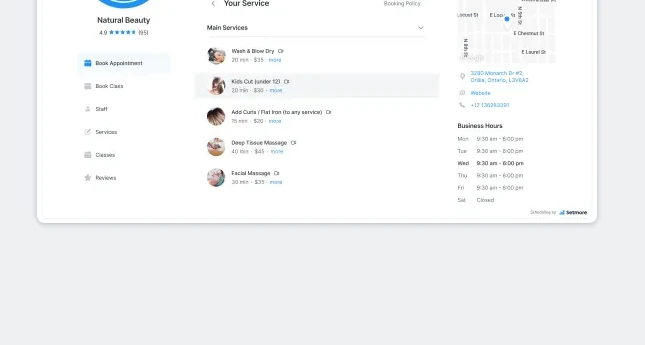
The mechanic is straightforward — you define services with duration and price, set business hours per staff member, embed the booking widget on your website or share the public URL, and the customer picks a slot, fills the intake form, optionally pays a deposit, and lands on your calendar. Same architecture as Calendly and Acuity. The differences live in the small things.
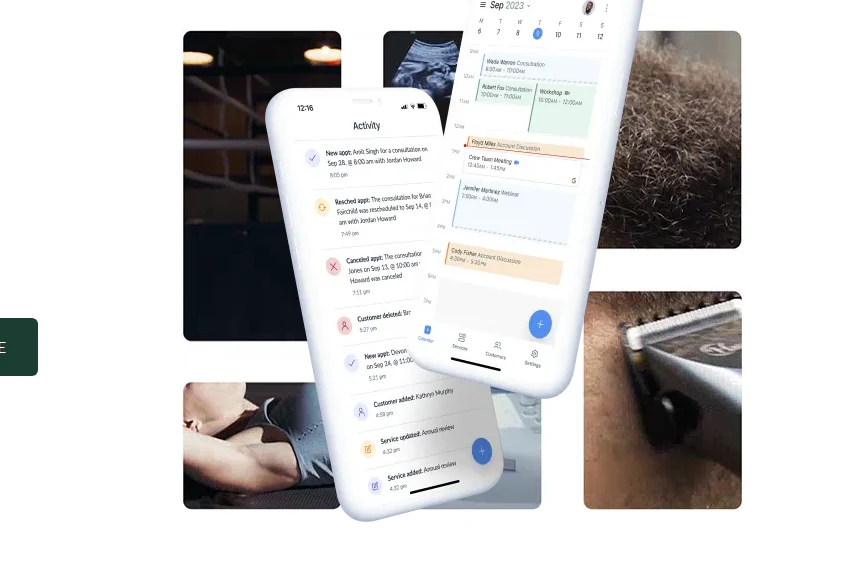
Branding depth on the free tier: Custom logo, custom cover image, custom service descriptions, and a vanity subdomain ({your-name}.setmore.com) all ship on Free. The “Powered by Setmore” footer doesn’t go away until Pro, which is fair given the price. Calendly’s branding removal lives on Teams at $16/seat/month; Acuity’s lives on Premium at $49/month annual. Setmore’s at $5/user/month annual is meaningfully cheaper for the same outcome.
Payment-on-booking on Free: This is the single biggest differentiator versus Calendly and Acuity. A free Setmore user takes a $50 inspection deposit through Stripe at standard 2.9 percent + 30 cents fees with no Setmore platform fee on top. Calendly’s Stripe integration lives on Standard. Acuity’s payment processing exists on every paid tier but there’s no free tier. Note worth verifying for your specific operation: Reddit threads in late 2025 cited an additional Setmore application fee on top of Stripe transaction fees; that claim was not directly verifiable on Setmore’s pricing page or help docs as of May 2 2026, but it’s worth confirming with Setmore support before you build a high-volume payment workflow on the free tier.
Intake form depth: Custom contact fields ship on the booking page, but there’s no conditional logic — every customer sees every field regardless of which service they picked. For a multi-trade operation booking HVAC tune-ups, leak repairs, and full installs through the same Setmore page, the intake form has to be the lowest common denominator across all three services. The documented workaround is linking out to Jotform or Typeform via a post-booking redirect URL, which works but loses the single-page UX.
Reminders: Email reminders ship on Free; SMS reminders are gated to Pro. SMS is non-negotiable for any contractor whose customer is going to be home expecting a tech in a 2-hour window — text messages reduce no-shows by 40 to 60 percent versus email-only. The realistic Setmore floor for trade-contractor use is Pro, not Free, the moment you have a staff calendar that depends on the customer being there when you arrive.
The Mobile App, Honestly Split
The Setmore mobile app is the most contractor-relevant piece of the platform — staff manage today’s schedule from a truck — and it’s also where the honest editorial split happens.
App Store Reality Check
iOS 4.7 vs Android 3.8 — A Real Gap
Almost a full star difference between the two app stores, with thousands of reviews on each side. Plan accordingly if your office or crew runs Android.
iOS App Store
4.7
/ 5 · 9,200 ratings
Strong sentiment, Activity feed redesign well-received
Latest version 6.82.1 (April 2025) · Connect feature for team chat shipped April 2025 · "easy to use, glances at calendar from a truck" is the consistent praise pattern
Google Play Store
3.8
/ 5 · 5,940 ratings
Sync issues + July 2024 redesign drove rating down
Google Calendar sync inconsistencies are the dominant complaint pattern · push-notification timing changed in late-2024 (defaults to 15 min before, often arrives at 12 min) · UI feels "cluttered, too much visual information"
Practical recommendation: pressure-test the Android app's Google Calendar sync on your specific phones during the free tier window before committing a multi-tech crew to Setmore. iOS users are unaffected by the gap.
The 0.9-star gap is real and cite-worthy. iOS App Store reviewer Courtney McCurry wrote in July 2024: “After this latest update, I no longer have access to my clients past history. I no longer can see all of my notifications within the app, my app glitches and it won’t show me appointments that have been booked… if the glitches aren’t fixed, I will have no choice but to move to a different app for booking.” That’s an iOS user — even the higher-rated platform has real issues post-redesign.
On the Android side, Capterra reviewer Sasha W. (therapist) flagged: “Blocked times not synced to Google Calendar.” Robert T. (accounting): “lot of issue with syncing with Outlook 365.” The Google Calendar sync inconsistencies show up across multiple review platforms and Setmore’s own community forums — the workaround is to occasionally trigger a manual re-sync, but that’s friction a service-trade dispatcher doesn’t have time for at 8am on a Friday.
Counterweight worth flagging: the iOS 4.7 across 9,200 ratings is genuinely strong — that’s more reviews and a higher rating than ServiceM8 (the iOS-native FSM) and competitive with Calendly and Acuity at similar review counts. If your operation is iPhone-only, the Setmore mobile experience is a real product win, not a marketing claim.
The AI Question (And Why Setmore Said No)
Most product reviews in 2026 cover AI features. This one covers their deliberate absence, because the absence is itself the editorial point.
Setmore has zero native AI features as of May 2 2026, and parent company AnywhereWorks has publicly positioned the brand against AI scheduling. The December 2025 Setmore blog post titled “Why human support matters even more in the era of AI” is the explicit corporate stance. The Live Receptionist add-on launched January 2026 explicitly emphasizes “real people answer your phone, not bots” — and AnywhereWorks owns AnswerConnect, the human call-handling service that powers it. This is not an AI laggard waiting to ship. It’s an AI-skeptical brand by design.
Three things contractors should understand about that position:
One — there’s no AI Notetaker, no AI scheduling assistant, and no Model Context Protocol server on the 2026 roadmap. Calendly shipped AI Notetaker in 2025 and has a documented AI roadmap for 2026 (AI Assistant, MCP Server). Setmore has no equivalent shipping or on the roadmap. If AI in your scheduling tool matters editorially or operationally, Setmore is the wrong product full stop.
Two — the Live Receptionist add-on is human, not AI. At approximately $99/month per third-party reporting (Setmore hides the price behind a demo request), 24/7 bilingual English and Spanish call coverage, US-only, no setup fees or contracts. The receptionists are real AnswerConnect agents who book directly into the Setmore calendar through the parent-company integration. Worth pricing against Smith.ai (also human + AI hybrid), Ruby Receptionist (human-only, established trades vendor), and Goodcall or Rosie (AI-only, lower per-minute cost) if you’re evaluating receptionist services for trades.
Three — third-party AI integrations exist but aren’t co-marketed. Goodcall is an AI phone assistant that hits Setmore’s API to book, reschedule, and cancel appointments. It’s not built by Setmore and isn’t on the official integrations page. If you want AI receptionist + Setmore booking, Goodcall is the documented bridge — not Live Receptionist.
The honest editorial read: AnywhereWorks has chosen a defensible market position. There’s a real audience of contractors and small businesses who don’t want AI in their booking flow, who trust human receptionists more than voice agents, and who view AI as overhyped marketing. For that audience, Setmore is genuinely the right product and the brand position is a feature, not a bug. For everyone else, it’s a structural disqualifier and you should look at Calendly instead.
What Setmore Doesn’t Connect To (The FSM-Stack Gap)
This is the section that decides whether Setmore makes sense for your specific contractor stack, and the answer is binary in 2026.
Setmore has zero native integrations to the contractor FSM ecosystem. Verified May 2 2026 against setmore.com/integrations and each platform’s own marketplace:
FSM Integration Reality · Verified May 2026
No Native Bridge to Any Contractor FSM
Setmore is genuinely standalone. If your operations live inside an FSM platform, this is a dead-end booking layer.
Native
Salesforce
Lead-sync workflow available
Native: Stripe · Square · PayPal · LawPay · Zoom · Google Meet · Teleport · QuickBooks · HubSpot · Salesforce · Mailchimp · ActiveCampaign · Google Calendar · Office 365 · iCloud · Outlook · Facebook · Instagram · Zapier (6 triggers / 2 actions)
The practical implication for trades is direct: if your operations run on an FSM platform, Setmore is the wrong booking layer. The FSM platforms above all ship their own customer-facing booking widgets that are purpose-built for their respective trades. Adding Setmore on top creates two booking widgets, two customer databases, and two calendars to manually keep in sync. Every time.
The defensible Setmore use case is the pre-FSM contractor — the solo plumber whose CRM is QuickBooks, the one-truck HVAC who tracks customers in a spreadsheet, the apprentice electrician building a side hustle on weekends. For that audience, Setmore replaces nothing because nothing was there. The free tier is the front-door booking layer that didn’t exist before.
The other defensible case is the Smith.ai-paired operation. Smith.ai’s native integration is with Calendly, not Setmore — and there’s no published Setmore + Smith.ai bridge. If you’re running Smith.ai for AI receptionist call answering, your scheduling layer should be Calendly to keep the integration native, not Setmore. This is a real workflow note that catches contractors off-guard who assume “they’re both scheduling tools, the receptionist will work with either one.” It won’t.
How Setmore Fits Across the Trades
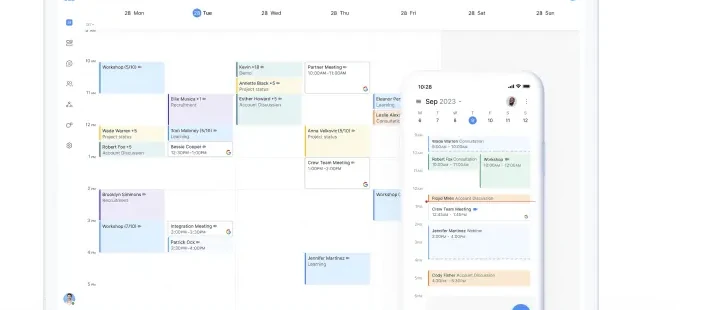
The TradeFitChart on this page renders Setmore’s per-trade scoring methodology, but the editorial summary below works through the same data in plain English. Setmore’s strongest trades are the ones with mostly-residential customers, mostly-single-tech jobs, and mostly-online customer acquisition. The trades it limits hardest are the multi-tech dispatch operations and the insurance-restoration shops.
HVAC (works well, ~65 fit) — Service-call front-door booking on the free tier covers a one-truck operation indefinitely. Recurring tune-up appointments on Pro handle the maintenance program at the calendar level (note: not at the billing level — for membership auto-billing, Acuity Standard is the better tool). FSM still required for dispatch, parts inventory, equipment age tracking, and load calculations once you grow past 4 techs.
Plumbing (works, ~65) — Same pattern as HVAC. Free tier viable for solo and 1-tech ops; Pro at $5/user/month annual covers 2-4 techs with SMS reminders. No Jobber bridge means once you adopt Jobber for FSM operations, replace Setmore with Jobber’s native scheduling.
Electrical (works, ~60) — Service-call booking layer works; the trade has fewer recurring service plans than HVAC, so the recurring-appointment Pro feature is less valuable. Limited integrations to estimating tools.
General Contractor (works, ~70) — Setmore’s strongest contractor fit. Design consult booking with paid Stripe deposits is the use case the free tier was built for. Pro tier handles 2-4 person GC offices well. Past that scale, Buildertrend or Procore replace the need entirely.
Roofing (limits, ~55) — Inspection-deposit booking fits, but the broader roofing workflow (Xactimate scopes, supplements, insurance work, EagleView measurements) is better served by JobNimbus or AccuLynx, and once those tools are in place, their native scheduling replaces Setmore. Limit, not built.
Landscaping (works, ~60) — One-time consult bookings fit. Recurring lawn-care subscriptions are the gap — Setmore’s recurring appointments are calendar-level, not billing-level, so the auto-charge subscription has to be handled outside Setmore. Acuity ships native memberships.
Painting / Restoration / Solar (works to limits, 55-65) — Initial consult booking with a paid deposit is the consistent use case. Each of these has a more specialized tool downstream of the booking flow (paint estimating tools, Xactimate for restoration, solar-specific design tools for solar) that ultimately replaces or wraps Setmore.
Cleaning (works, ~70) — Solo cleaners and 2-3 person residential cleaning ops fit Setmore well; the recurring biweekly/monthly schedule lives at the calendar level, and free-tier payment processing collects deposits or full payments on booking. Past 5 techs, an FSM (Jobber, ZenMaid, Booker) takes over.
The pattern across every trade is the same: Setmore is the right answer at the small end, and the wrong answer once an FSM platform enters the picture. The threshold is whether you’ve adopted an FSM yet. Below that line, Setmore is a defensible booking layer. Above it, Setmore is a duplicate calendar with no bridge.
What Real Customers Say (Verified Reviews)
Setmore lands at 4.6 across 958 verified Capterra reviews — meaningful sample size, consistent customer sentiment over multiple years. Three named reviews are worth pulling forward because they capture different parts of the contractor reality.
The strongest contractor-leaning quote:
“This software gives my customers the ability to book my services online, pay for the appointment, get confirmation of the appointment and get reminders before the appointment. The best thing for me is that customers book me and I travel to their homes to service their woodburner and chimney. So many booking software companies assume customers come to you. Setmore know that some of us travel to customers.” — Rory C., Owner, mobile woodburner & chimney service, Renewables & Environment industry, Capterra 5/5 stars · August 2020
This is the single quote that explains why Setmore deserves coverage on a contractor-focused site. The platform was built for the customer-comes-to-you model (salons, fitness studios, healthcare) and the contractor-goes-to-customer model is sometimes a fit despite the original positioning.
The pricing-versus-Calendly comparison:
“Affordable alternative to Calendly, simple… UI.” — Jan M., Project Analyst, Computer Software, Capterra 3/5 stars · November 2024
Three-star review, but the pros section names the Calendly comparison directly. The five-dollar Pro tier versus Calendly’s $10/seat Standard is a real decision driver for cost-sensitive small businesses.
The honest critical pattern:
“Text reminders are linked to another phone number connected to setmore. So if the customer texts back to that number instead of my personal number I don’t get the messages.” — Jodee S., Remedial Massage and Hypnotherapy, Capterra 4/5 stars · September 2024
The SMS reply-routing complaint is the single most consistent friction point across recent Capterra and App Store reviews. For a tech in a truck whose customer texts “running 10 minutes late” in response to a Setmore-issued reminder, that message goes into a Setmore-controlled phone number and never reaches the staff member’s actual line. Other scheduling platforms have addressed this with reply-routing rules; Setmore hasn’t as of May 2 2026.
What Changed in 2025 and What’s Coming in 2026
Three updates from the last twelve months are worth flagging for contractors evaluating Setmore in May 2026.
Connect (April 2025) — Internal team messaging, file sharing, and push notifications between staff shipped on mobile. This is the WhatsApp-replacement feature for small contractor crews — dispatcher messages a tech, tech replies, photos and files attach to specific appointments. Not Slack-deep, but a real workflow upgrade for operations that were running on personal text threads before.
Microsoft Sign-in (February 2025) — Office 365 users can now use SSO. Marginal feature for trades, more relevant for the broader small-business audience.
Live Receptionist by AnswerConnect (January 2026) — Human call-answering add-on launched at approximately $99/month per third-party reporting. 24/7 bilingual English and Spanish coverage, US-only, no setup fees. The integration is tighter than an unrelated answering service because parent company AnywhereWorks owns both Setmore and AnswerConnect.
No public 2026 roadmap — Setmore does not publish a public roadmap. Updates ship continuously (weekly bug fixes, quarterly features). The most likely 2026 themes based on Connect’s April 2025 trajectory: deeper team-collaboration features, more native integrations on the marketing/CRM side (HubSpot is already there; Salesforce is already there), and continued investment in Live Receptionist as the differentiating add-on. No AI features are expected in 2026 — this is consistent with the brand position, not an oversight.
The Verdict
Setmore is the right answer for a narrow audience and the wrong answer for a much larger one, and the line between the two is whether you run an FSM platform.
The right audience: solo contractors, mobile-service operators, 1-to-4-tech shops without an FSM, owners who want native payment processing on a free tier, operations valuing the human Live Receptionist add-on over AI alternatives, and contractors comparing Setmore Pro to Calendly Standard at half the cost. For that audience, the free tier is genuinely the most generous starting point in the scheduling category, the iOS app at 4.7 across 9,200 ratings is a real product win, and the math at $5/user/month annual is hard to argue with against Calendly’s $10/seat or Acuity’s $16/month annual.
The wrong audience: anyone running Jobber, Housecall Pro, ServiceTitan, JobNimbus, AccuLynx, or GoHighLevel — Setmore has zero native bridges and creates duplicate calendars. Contractors who want AI in their scheduling tool — Setmore is publicly anti-AI by brand position. Operations selling memberships, packages, or recurring service-plan subscriptions — Acuity Standard ships those native and Setmore doesn’t. Crews of 5+ techs needing multi-tech dispatch, GPS routing, or capacity-based scheduling — Setmore is a calendar, not a dispatch system.
The honest editorial read: Setmore deserves a 3.7 in our scheduling methodology, not a 4.0, because the contractor-specific dimensions (FSM integrations, dispatch logic, conditional intake forms, native memberships, AI maturity) are where it falls short, and those dimensions are weighted accordingly. The Capterra 4.6 across 958 reviews is real, but it reflects the broader small-business audience where Setmore genuinely shines — yoga studios, fitness coaches, healthcare practitioners, salon owners. For contractors specifically, the editorial caveats are real and the right tool depends entirely on where you are in your scaling journey.
Buy Setmore Free if you’re a solo trade or pre-FSM contractor who needs a customer-facing booking page with payments tomorrow morning. Buy Setmore Pro at $5/user/month annual if you’ve outgrown the 4-staff or 200-appointment ceiling and you still don’t have an FSM. Skip Setmore entirely if you’re already on Jobber, HCP, ServiceTitan, JobNimbus, AccuLynx, or GoHighLevel — use the FSM’s native scheduler instead. Pair with Goodcall if you want AI receptionist with Setmore booking; pair with Live Receptionist if you want human receptionist with Setmore booking; don’t try to pair with Smith.ai because that integration isn’t published and Calendly is the right scheduler for Smith.ai instead.
Match the workflow to the tool, not the other way around.
