

The first-notice-of-loss call comes in at 7:42 a.m. — water main break in a 4,200-square-foot house in Slidell, four inches of standing water in the kitchen and dining room, the homeowner is panicking, the carrier wants a scope by end of business. The mitigation tech is there by 9 a.m. with a DS1 camera and a tactical backpack.
Twenty seconds per room. Kitchen, dining, hallway, two bedrooms, the bathroom, the laundry, the garage. By 9:20 he’s done capturing. By 9:25 the 360 tours are uploaded from the truck. By 4:30 that afternoon — well before the carrier’s deadline — the Xactimate-ready ESX file lands in his inbox with all room dimensions, cabinets, fixtures, and structural details pre-tagged. The estimator opens it in Xactimate and has a defensible scope back to the carrier by end of day.
That’s the workflow DocuSketch was built around. Restoration only. Insurance billing cycle only. The DS1 camera, the 7-hour Express sketch turnaround, the Xactimate ESX export, and (as of May 2026) the 360AI engine that aims to compress all of that into real-time on-site delivery — every part of the platform exists to shorten the gap between site visit and carrier-ready estimate.
“I just go out to a job, set up a camera, take the 360°, and send it off. By the time I get back to the office, the sketch can be ready.” — John Kiska, Paul Davis Restoration, Southeast St. Louis region, DocuSketch customer reviews
Context for this review: DocuSketch processed over 1 million claims as of May 2026, serves 30,000+ restoration professionals, has 8 of the 10 largest restoration franchises as customers, and won the RIA Contractor’s Choice Award for Best Product/Tool two years running (2024 and 2026). G2 named it leader in property restoration software for two consecutive quarters. The audience is restoration. Read everything below through that lens.
Step 1 — Capture: the DS1 camera, 20 seconds per room
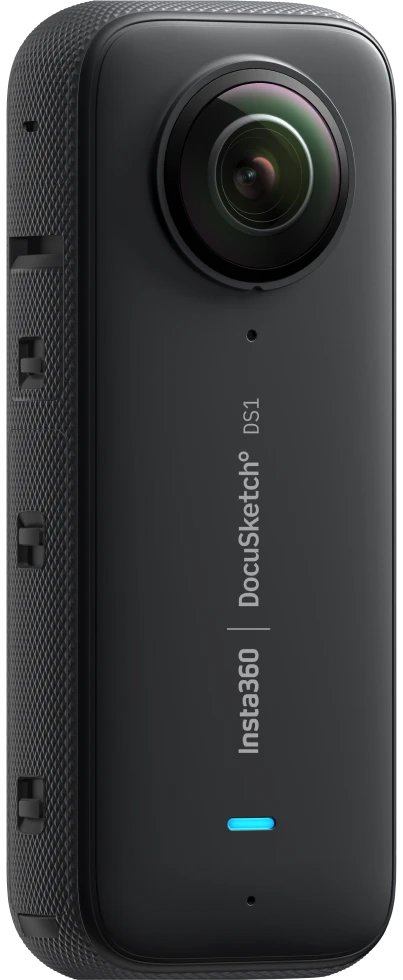
The DS1 is a 180-gram 360 camera built on Insta360 hardware and pre-configured for the DocuSketch workflow. IP-rated waterproof to 10 meters. Operating range -4°F to 104°F. USB-C, micro SD storage, dual swappable batteries.
Twenty seconds in each room. The capture starts when the tech taps the shutter and ends when the camera completes a full sweep. No spatial-AI floor-plan-pinning happens during capture — that’s done server-side after upload.
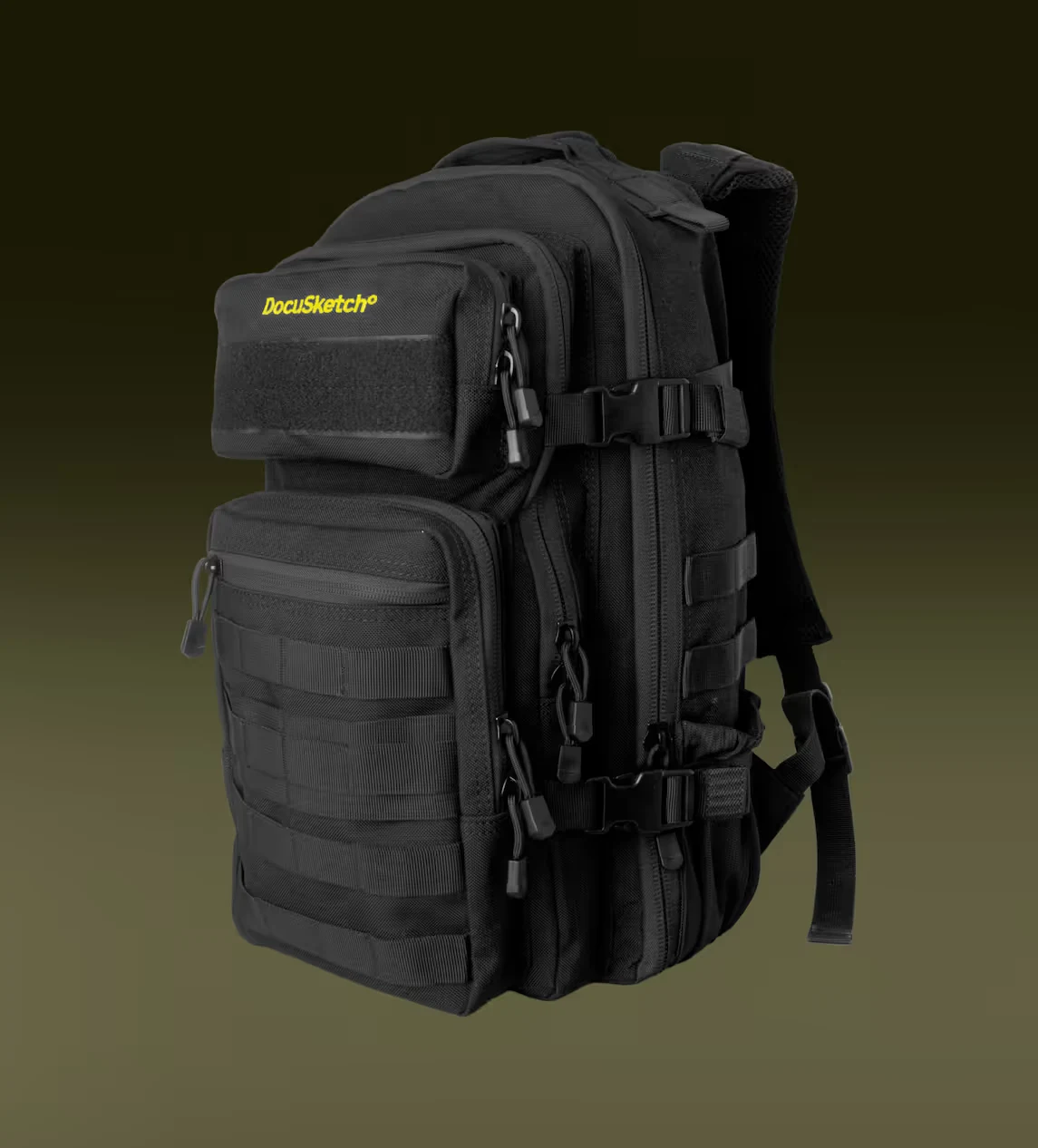
The camera ships in the Field Camera Kit at $795: DS1 camera, Tactical Backpack (purpose-built for crew transport), tripod, magnetic LED work-light (the one you actually need in pitch-dark fire scenes and unfinished basements), 64GB micro SD, USB-C cable, and ten reusable arrow cards for marking the path the tech walked. That’s the working kit — not a consumer camera with a hard-hat mount stuck on it.
What the DS1 doesn’t do: there’s no live preview floor-plan auto-pinning the way OpenSpace Vision Engine does. There’s no drone integration the way DroneDeploy Aerial does. The DS1 is single-purpose hardware: capture cleanly in restoration field conditions, upload reliably from cell-spotty disaster zones, hand off to the sketch team. That’s the entire job.
Step 2 — Upload: the mobile app and 360 tour
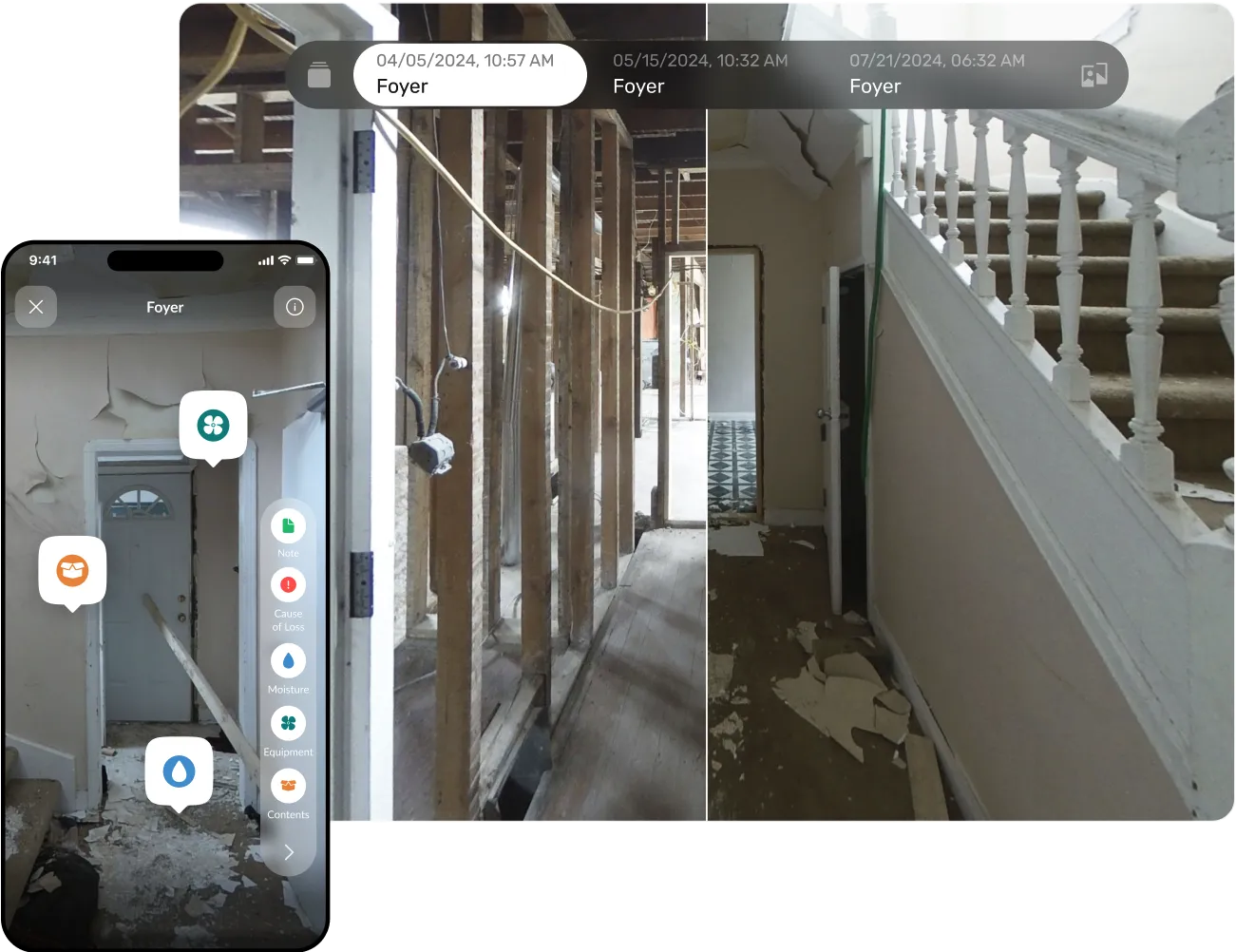
The tech uploads from the truck via the DocuSketch mobile app on iPhone or iPad. Each room becomes a navigable 360 tour in the web app at app.docusketch.com. The tech can add voice annotations, video, or text comments per room, mark damage zones, and queue the sketch request — all from the field.
A few things worth knowing about the mobile experience. The iOS app sits at 3.5 stars across 38 ratings as of May 2026, which is mid-pack for the photo-doc category — CompanyCam is at 4.7, OpenSpace at 4.0, Raken at 4.6. The recurring complaint patterns: navigation friction in the 360 viewer (no on-screen arrows for moving between rooms), and image-quality limits when zooming into fine detail on the captured tours. The DS1 camera hardware is solid; the mobile app handling the review-and-upload step is where the friction sits.
What you get out of the upload step: a navigable 360 tour per room shareable with adjusters, in-house teams, or carriers. Voice/video/text annotations. Timeline view showing before/during/after captures of the same property over the claim lifecycle. From there you either request a sketch (Step 3) or hand the tour straight to the adjuster.
Step 3 — Sketch: 7-hour Express, Xactimate-ready ESX file
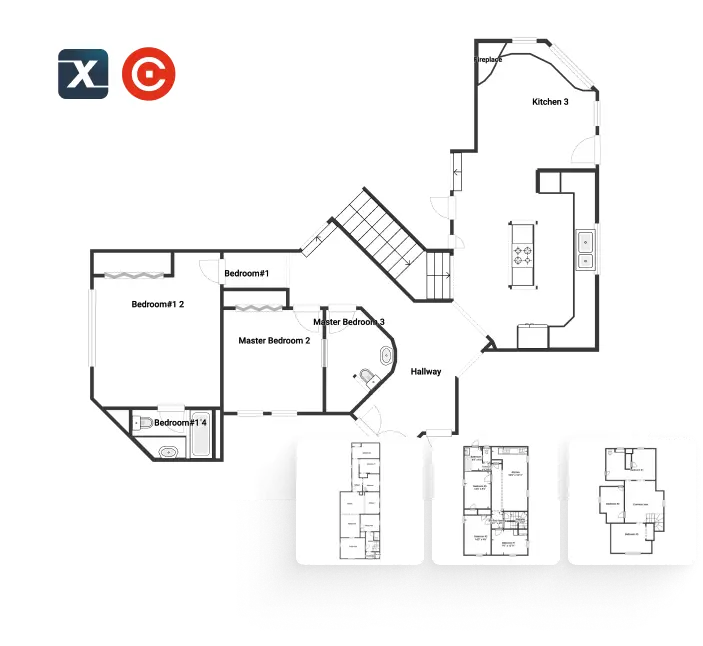
This is the step that defines DocuSketch. The 360 tours upload, the contractor requests a sketch, and a trained DocuSketch team produces a digital floor plan with room dimensions, cabinets, plumbing fixtures, ceiling features, attic details, and bay windows — already structured for Xactimate (.esx) or CoreLogic/Cotality (.fml) import.
Two delivery tiers:
Express — 7-hour turnaround, overnight delivery included. $429-$1,095/mo for 5/10/20 properties. $48-$55 per additional sketch credit.
Standard — slower turnaround, paid overnight delivery ($12-$20 per delivery). $379-$975/mo for 5/10/20 properties. $42-$45 per additional credit.
A sketch credit covers up to 2,500 square feet. A typical 4,000-sf residential property uses two credits; a small commercial loss in a strip mall might fit in one. The published per-credit math is what makes the pricing model unique — you’re paying for properties documented, not users licensed or square feet uploaded.
What lands in your inbox at the 7-hour mark on Express tier: an ESX file you drop directly into Xactimate, or an FML file for CoreLogic/Symbility. Room labels, dimensions, cabinets, fixtures, ceilings, attics, and structural details are all pre-tagged. The estimator doesn’t re-key any of it.
For a Paul Davis franchise running 80-120 mitigation claims a month, the math works because the estimating bottleneck collapses from days to hours. For a 1099 adjuster mobilized on a CAT event running 30 claims a week, it’s the difference between billing the carrier on day 3 versus day 8. For a 5-person restoration shop doing 8 claims a month, the OpEx hit is real but so is the time saved.
Step 4 — Estimate: optional certified-estimator service
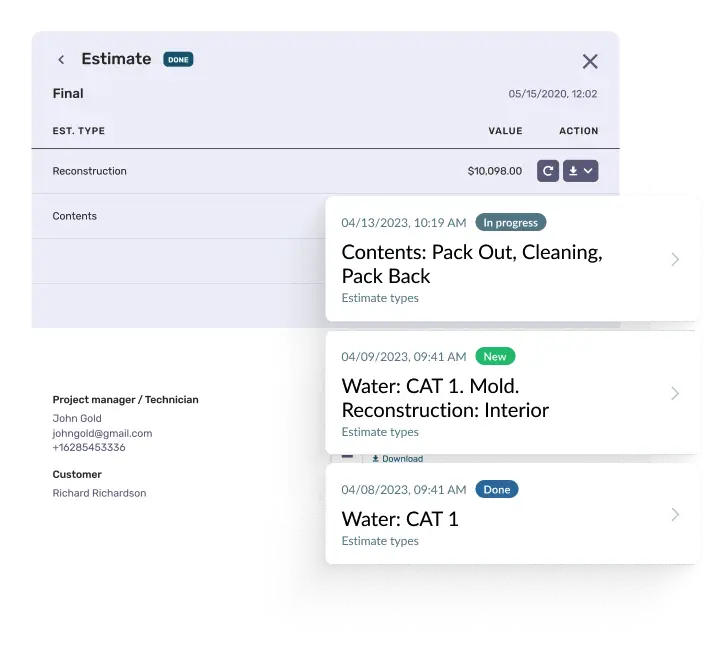
Here’s where DocuSketch becomes a stacked workflow product instead of just a sketch tool. Optional. Add-on subscription. Volume-tiered pricing.
You hand the certified estimator team your 360 tours and damage notes. They produce an insurance-compliant Xactimate or CoreLogic estimate within 24 hours — line items mapped against the carrier’s price list, measurements pre-loaded from the sketch, scope-of-work documentation written to claim-defensibility standards.
The pricing tiers are based on your monthly estimate volume:
| Monthly Estimate Volume | Price | Overage |
|---|---|---|
| Up to $50,000 | $500/mo | + 1.0% |
| Up to $100,000 | $800/mo | + 1.0% |
| Up to $200,000 | $1,400/mo | + 0.9% |
| Up to $300,000 | $1,950/mo | + 0.8% |
| $500,000+ | Custom | — |
For shops without an in-house Xactimate-certified estimator (which is most small-to-mid restoration operations), this offloads the bottleneck entirely. For shops that already employ a Xactimate estimator, the service can backstop overflow during CAT events when claim volume spikes 4-5x normal load.
Practical math: a restoration shop billing $80,000 a month in mitigation work would land in the $800/mo tier, paying about 1% of estimate volume to offload the Xactimate work. A shop billing $250,000/month sits at the $1,950/mo tier — roughly 0.78% of volume — and gets the certified-estimator pipeline that scales with their CAT-season spikes.
What the carrier actually receives
Three deliverables flow into the carrier’s claim system from a single 20-second-per-room walk-through:
The navigable 360 tour. Every captured room is a clickable 360 view with voice, video, or text annotations. Adjusters walk the property from their desk. No re-inspection scheduling. No tape-measure session. Quote from David Niewiadomski, Senior Project Manager at Commodore Construction, on FeaturedCustomers: “This level of access and documentation essentially equals protection.”
The structured digital floor plan. Xactimate-ready ESX file or CoreLogic-ready FML file. Loads directly into the carrier’s estimating tool without re-keying. Room dimensions, cabinets, plumbing fixtures, ceiling features, attic details, bay windows — all pre-tagged.
The insurance-compliant estimate (if you subscribe to the Estimating service). Xactimate-format scope of work with line items, measurements, and damage documentation already mapped to the carrier’s price list. Delivered in 24 hours.
The compounding effect is what makes this a billing-cycle compression tool, not just a sketching tool. The adjuster spends less time on inspection. The contractor spends less time on estimating. The supplement-and-dispute cycle has linked-evidence audit trail back to the source imagery. The carrier pays faster because the documentation is defensible.
What you’ll pay all-in
DocuSketch is more transparent than OpenSpace or DroneDeploy on pricing — actual dollar amounts are published on docusketch.com/pricing — but the model surprises contractors who expect a CompanyCam-style flat rate.
The math for a typical restoration shop doing 10 mitigation jobs a month, on Standard tier with overnight delivery, plus hardware amortized over 36 months and the lowest-tier estimating service:
| Line item | Monthly cost |
|---|---|
| Standard 10-property pack | $575 |
| Overnight delivery (~4 sketches/mo) | $60 |
| DS1 Field Camera Kit ($795 / 36 mo) | $22 |
| Estimating service ($50K tier) | $500 |
| Total | ~$1,157/mo |
At Express tier (overnight included) and lower estimate volume: ~$700-$800/mo all-in.
For a high-volume Paul-Davis-scale franchise running 100+ properties/month, custom Enterprise pricing applies and the per-property cost drops materially.
For a 5-person mitigation shop doing 5 claims a month: Standard 5-pack at $379/mo + hardware + maybe estimating service = $700-$900/mo. That’s a real OpEx line, but it’s also the difference between billing on day 3 of a claim versus day 8 — which on $80K-$150K monthly mitigation revenue is meaningful cash-flow compression.
What you can’t do: pilot with a free trial. The DS1 camera at $795 is a real upfront commitment before you’ve validated the workflow against your actual claim mix. Plan a sales-led demo capture with your real claim conditions before signing.
The 360AI launch — what changes if it ships on time
DocuSketch’s most consequential 2026 development is the 360AI Engine, announced March 24, 2026, with broader rollout this month (May 2026). Beta access is open now.
The pitch: 360 capture turns into floor plan, scope of work, and estimate while the tech is still on-site. Before the truck leaves the property, the carrier-ready paperwork is done.
Five named features per the Restoration & Remediation Magazine launch coverage:
- 360 capture to instant floor plans — mitigation-caliber sketches generated on-device without the 7-hour Express wait
- Speech-to-scope documentation — voice-driven, bilingual (English/Spanish), auto-fills line items as the tech narrates damage
- On-site estimate generation — AI-powered mapping with confidence indicators, complete before the tech leaves the job
- ESX export for carrier workflows — Xactimate-compatible files generated on-site
- Linked-evidence audit trail — every estimate line item points back to source 360 imagery for carrier review
CEO Ralf von Grafenstein in the launch announcement: “It’s due time for the restoration industry to get a technology upgrade — one that will support restoration professionals, carriers, and homeowners in making the claims process faster and easier.” VP of Product Andrew Wirick: “Speed to estimate is a clear pain point, but in order to get there we need a workflow powered by AI to connect every step with transparency and efficiency.”
If 360AI ships on time and holds up under real claim load, the 7-hour Express wait that’s been DocuSketch’s biggest workflow gap collapses to on-site real-time. That changes the platform’s competitive positioning materially — it stops being a sketch-and-estimate-as-a-service and starts being an end-to-end on-site claim tool.
What to watch through Q3 2026: beta-to-GA timing, accuracy claims under real claim load, how the audit trail holds up in a contested supplement situation. Worth tracking but not yet production-ready as of May 2026.
Where DocuSketch slots into your stack
DocuSketch is a layer in a restoration stack, not a replacement for one. Here’s where it fits and where it doesn’t.
It pairs cleanly with:
- Xactimate (Verisk) — ESX file imports directly, no re-keying. The flagship pairing — most restoration carriers run Xactimate, so this is the integration that defines the platform.
- CoreLogic / Cotality Symbility — FML format export. Same workflow as Xactimate but for the carriers running on Symbility instead.
- PSA Proven Jobs — integration launched February 11, 2026. 360 tours, voice notes, photos, and annotations attach directly to PSA jobs without download/upload. This is the only restoration-CRM native integration DocuSketch has shipped to date.
It doesn’t natively integrate with — verified May 5, 2026:
| Tool | Native? | Notes |
|---|---|---|
| JobNimbus | No | Common restoration CRM — workflow is parallel, not integrated |
| AccuLynx | No | Roofing-focused; restoration overlap minimal |
| Encircle | No | Direct restoration competitor |
| Restoration Manager | No | Restoration-specific PM tool |
| DASH | No | Next Gear Solutions restoration platform |
| Buildertrend | No | Residential GC platform |
| Jobber | No | Service-trade FSM |
| Housecall Pro | No | Service-trade FSM |
| ServiceTitan | No | Service-trade FSM |
| GoHighLevel | No | Marketing automation |
| Smith.ai | No | AI receptionist |
| Zapier | Unverified | No published connector as of May 2026 |
Practical implication for restoration shops on JobNimbus (the most common pattern): DocuSketch sits beside the CRM, not inside it. Files move via Xactimate ESX export and manual upload to the JobNimbus job record. Workable, but not seamless. If PSA-style native integrations expand to JobNimbus or AccuLynx in 2026-2027, that gap closes — but as of May 5, 2026, PSA is the only restoration-CRM native integration shipped.
What restoration contractors say
Customer voice on DocuSketch is overwhelmingly restoration-native — every named testimonial below is from a working mitigation, water, fire, or biohazard contractor or a 1099 adjuster, not a generalist contractor:
“DocuSketch lets you create fully documented virtual records of a claim five times faster than other methods.” — Chris Laney, Water Out, DocuSketch reviews page
“We have been using DocuSketch for just under two years now, and it has been a game changer for RMC.” — Brian T, Process Improvement Manager, RMC, DocuSketch reviews page
“DocuSketch has simplified the sketching process across all of our locations. We no longer have inaccurate sketches that have to be checked in the field multiple times or redone by the construction team.” — Chris G, COO, DocuSketch reviews page
“By using Docusketch our technicians are now able to capture accurate data from site and relay back to interested parties without them attending.” — Curtis Q, Owner Operator, DocuSketch reviews page
“Faster estimate times. Able to scope higher volume of homes.” — Jerry L, Reconstruction Manager, DocuSketch reviews page
“How I first found out about this app was during my time handling fire claims in Colorado, it was taking me four hours to measure a 5,000-square-foot house.” — Insurance adjuster, Apple App Store · February 2024
The honest counter-signal: the iOS app’s 3.5-star rating across 38 reviews is the lowest mobile rating of the photo-doc tools we cover. The recurring complaint patterns touch UI navigation friction (no on-screen arrows for moving between captured rooms) and image-quality limits when zooming on fine detail. The DS1 camera hardware itself is solid; the mobile experience for review-and-upload is where the friction sits, and worth pressure-testing during the demo.
Who this is for, who it isn’t
DocuSketch’s audience is narrower than most photo-documentation tools — and that’s a feature, not a bug. The product depth is real exactly because it isn’t trying to serve roofing, remodeling, HVAC, and commercial GC simultaneously.
It’s the right pick if you run:
- Water mitigation, fire/smoke remediation, mold remediation, or biohazard restoration — the entire workflow is tuned for your billing cycle. The 360-to-Xactimate path is shorter than any competitor’s.
- A Paul Davis, Servpro, BluSky, RestoPros, or similar restoration franchise — the franchise-network depth is real (8 of 10 largest restoration franchises are on the platform), and the per-property pricing model scales sensibly to franchise procurement.
- A 1099 adjuster mobilized on CAT events — the speed advantage compounds when you’re running 30+ claims a week and the bottleneck is estimating throughput, not capture.
- A small-to-mid restoration shop without an in-house Xactimate estimator — the Estimating-as-a-service offloads the bottleneck entirely at $500-$1,950/mo depending on volume.
It’s the wrong pick if you run:
- Roofing work — use AccuLynx or JobNimbus. Both have native EagleView integration and roofing-specific estimating that DocuSketch isn’t built for. For roof-only measurement, EagleView and Hover ship pre-flown imagery.
- Residential remodel or custom home building — use Buildertrend for the GC platform, CompanyCam at $13/user/month for photo documentation. DocuSketch’s per-property model doesn’t fit non-claim residential work.
- HVAC, plumbing, or electrical service — use Workiz, ServiceTitan, Jobber, or Housecall Pro. Service trades don’t run on Xactimate. For marketing automation on top, the Jobber + GoHighLevel paired stack under $400/month combined is the right pattern.
- Commercial GC work, BIM-coordinated jobs — use OpenSpace for 360 walks with Procore integration, DroneDeploy for drone-first or exterior, Raken for daily-reports + safety. Different ecosystem entirely — commercial construction runs on Procore and Autodesk Construction Cloud, not Xactimate.
- A photo-doc-first residential operation needing flat-rate pricing — use CompanyCam. $13/user/month for unlimited photos, native integrations to JobNimbus, Jobber, AccuLynx, Buildertrend. DocuSketch’s per-property model is more expensive per shot.
- An operation that needs to validate via free trial before committing — DocuSketch doesn’t offer one, and the DS1 camera at $795 is a real upfront commitment. Plan a sales-led demo capture with your real claim conditions before signing.
The bottom line
DocuSketch in 2026 is the most defensible 360-capture-to-Xactimate workflow tool for restoration contractors and CAT-mobilized 1099 adjusters, and the editorial moat is the entire stack — DS1 hardware, 7-hour Express sketch turnaround, Xactimate ESX / CoreLogic FML export, and the Estimating-as-a-service layer that offloads the carrier-billing bottleneck. The 360AI engine launching this month closes the last remaining workflow gap (the 7-hour wait) if it ships at the claimed accuracy level under real claim load.
The catches matter. Pricing is per-property-per-month — surprising for contractors expecting CompanyCam-style flat rates. The mobile app’s 3.5-star rating is the lowest of the photo-doc tools we cover. The integration roster outside the carrier-side stack is thin: PSA shipped February 2026, but no JobNimbus, AccuLynx, Encircle, DASH, or Restoration Manager native integrations as of May 5, 2026. No free trial. The DS1 hardware is a real $795 upfront commitment.
The 4.3 rating reflects the asymmetric strengths in restoration-native workflow depth, the Xactimate ESX export advantage, and the 360AI roadmap, weighted against the mobile-app friction, integration thinness on the CRM side, and per-property pricing model that’s less forgiving than flat-rate alternatives. If you’re a restoration contractor or 1099 adjuster, DocuSketch is the editorial winner of its niche. If you’re not, the per-property pricing model and the Xactimate-only integration profile will both tell you within the first week — and the right move is one of the redirects above.
Two scenarios make the buying decision easy: if you’ve ever lost a claim cycle to estimating throughput, this product is the answer. If you’ve ever paid an in-house Xactimate estimator and watched them sit idle between CAT events, the Estimating-as-a-service replaces that overhead at fixed monthly cost. Match the tool to the bottleneck — DocuSketch’s bottleneck is restoration-claim throughput, and nothing else in the photo-doc category is built around that.
