


Search Contractor ToolStack

Find reviews, head-to-head comparisons, category guides, and more.

jobnimbus ai call answering vs servicetitan roofing crm
magicplan logo and branding
Research-Based Review

magicplan Review 2026: iPhone Floor Plans + Restoration Estimating

By Steven Risher | Updated 2026-05-08

Editorial Verdict SILVER · VERY GOODBest iPhone-Based Floor Plan + Estimating Combo for Solo and Small Restoration Teams
Editorial
4.3/5
By Editor
Community
No Votes Yet

magicplan is the cheapest legitimate way for a contractor to walk into a property and walk back out with a working floor plan. You point your iPhone at a room, the LiDAR sensor maps it, walls and doors and windows pop into place, and a few minutes later you have a 2D and 3D plan ready to export to Xactimate or hand to your estimator. There's a forever-free Starter tier with two full projects, paid solo plans starting around thirteen bucks a month, and team plans that scale up from there.

The reason this matters in 2026 is that magicplan finally got the integrations right. Native two-way connections to Jobber, JobNimbus, Housecall Pro, and CompanyCam mean the floor plan you sketch on-site lands in the CRM your office already uses without anyone re-keying anything. PrecisionLink launched May 4, 2026 and pairs the app with twenty-plus Bluetooth laser distance meters from Bosch, Leica, Stabila, Stanley/DeWalt, Hilti, and Johnson Level for measurements they describe as accurate to the millimeter. The Scope of Work feature is in early access and the Xactimate ESX export is solid.

Where it falls short is honest to flag. LiDAR struggles in low-light conditions and arched ceilings. The object library is narrower than what dedicated CAD tools ship. Overage pricing is forty dollars per extra project, which adds up fast if you misjudge your monthly volume. The Samsung tablet support is thin compared to iOS. And you still need an iPhone Pro or iPad Pro for full LiDAR — older or non-Pro phones drop you back to the manual sketch tools, which work but slower.

It's the right tool if you're a solo restoration contractor, a one-truck remodeler, an inspector, or a small mitigation team that wants to skip the seven-hundred-dollar camera kit and run everything from the iPhone already in your pocket. It's the wrong tool for commercial GCs running BIM-coordinated jobs, large multi-trade GCs needing aerial measurements, and any operation where the phone-LiDAR limitations matter more than the speed and price.

Right pick for solo and small restoration / remodel / inspection contractors who want iPhone-based floor plans + native CRM integrations on a budget. Wrong pick for commercial GCs, multi-trade GCs needing aerial, or shops with hardened iPhone-LiDAR field condition concerns.

iOS Rating
4.7
40K+ ratings · Strongest mobile rating in photo-doc
Free Starter
2 projects
Forever free · Full features · No credit card
PrecisionLink
May 2026
20+ Bluetooth laser meters · Bosch/Leica/Stabila/DeWalt
Native Integrations
Jobber · JobNimbus · HCP · CompanyCam
Plus Xactimate ESX + Cotality FML export
From Free Starter (2 projects) · Sketch from $12.99/moFree Trial AI-Powered Mobile App
Try magicplan Free

Photo Documentation Scores

Capture Speed & Field Workflow
4.5
Organization & Tagging
4.2
Integrations with CRM, PM & Estimating
4.7
Pricing & Value
4.0
Sharing, Reports & Client/Insurance Portals
4.3
Mobile Reliability
4.5
AI & Auto-Categorization
3.8

Weighted by importance to contractors. How we score →

Contractor Estimating Scores

Estimate Accuracy
3.5
Integrations
4.5
Proposal Generation
3.8
Trade Specialization
3.5
Aerial Measurement
1.5
AI Capabilities
3.8
Pricing & Value
4.0

Weighted by importance to contractors. How we score →

Trade Fit Report

How Well Does magicplan Fit Your Trade?

Based on features, integrations, and real contractor feedback

Built For This Works Well Use With Limits Look Elsewhere
Restoration
Built For This
General Contractor
Works Well
Painting
Works Well
Roofing
Use With Limits
HVAC
Use With Limits
Plumbing
Use With Limits
Electrical
Use With Limits
Solar
Use With Limits
Cleaning
Use With Limits
Landscaping
Use With Limits
Live Contractor Poll · Updated Daily

Rate magicplan — Voted by 0 Contractors

Real ratings from contractors using magicplan daily. Annual rolling.

Overall Rating Your headline rating — how good is it, all things considered
Mobile App / Field Use Performance on phone, tablet, and in low-signal job sites
Ease of Use How quickly your crew picked it up; daily UX
Features That Matter Whether the things you need are actually there
Integrations How well it connects to QBO, CompanyCam, EagleView, etc.
Value for Price Whether the cost matches what you're getting
Want your quote featured publicly below? Quotes from verified contractors rotate as featured testimonials with your name, business, state, and trade — pulled from your verified profile. Anonymous quotes are stored privately for sentiment analysis.

Be the first contractor to rate magicplan — your vote starts the leaderboard.

A solo restoration contractor pulls up to a water-damaged single-family home in Slidell. The carrier wants documentation, photos, a floor plan, and a starting estimate by end of business. The contractor reaches for the iPhone in his pocket — not a $795 camera kit — and walks into the house.

That iPhone is the entire hardware investment. The LiDAR sensor on the iPhone Pro turns the device into a working floor plan scanner. The room scan takes under a minute. The walls, doors, and windows pop into the live 2D and 3D sketch automatically. Photos and 360 captures attach to the rooms as he walks. Moisture readings from a paired Tramex meter sync over Bluetooth. By the time he’s back in the truck, a Xactimate-ready ESX file is ready to export and a working estimate is queued for the homeowner.

That’s the magicplan pitch in one walk-through. This review covers what the app actually does, what it costs (the pricing model surprises people), how the integrations to Jobber, JobNimbus, Housecall Pro, and CompanyCam actually work, what the AI features look like in 2026, where the platform falls short, and which contractors should buy it versus the DocuSketch alternative for restoration work.

“You can go into a building and have it drawn up in just a few minutes.” — Tim H., Purchasing Agent, Capterra 5/5 stars · 2+ years on platform

Quick context. magicplan launched the original AR room-scan capability in 2010 and shipped LiDAR support in version 9.1 when the iPhone 12 Pro made the sensor available. The iOS app sits at 4.7 stars across more than 40,000 ratings as of May 2026 — the strongest mobile rating in the photo-documentation category. The company repositioned heavily toward restoration in 2024-2025, with named customers including Belfor Germany, Paul Davis franchise affiliates, KBAC Flooring, FREEDOM, and PROKIL. RIA Australia partnership announced 2026. PrecisionLink shipped May 4, 2026 as the most consequential feature update of the year.


What does magicplan actually do, and how does it compare to DocuSketch’s $795 camera kit?

The core workflow is iPhone-LiDAR-or-AR room scan → magicplan generates 2D and 3D floor plans → contractor adds photos, notes, moisture readings, and damage tags → estimate generates from a price list → export to Xactimate ESX or Cotality FML for the carrier side.
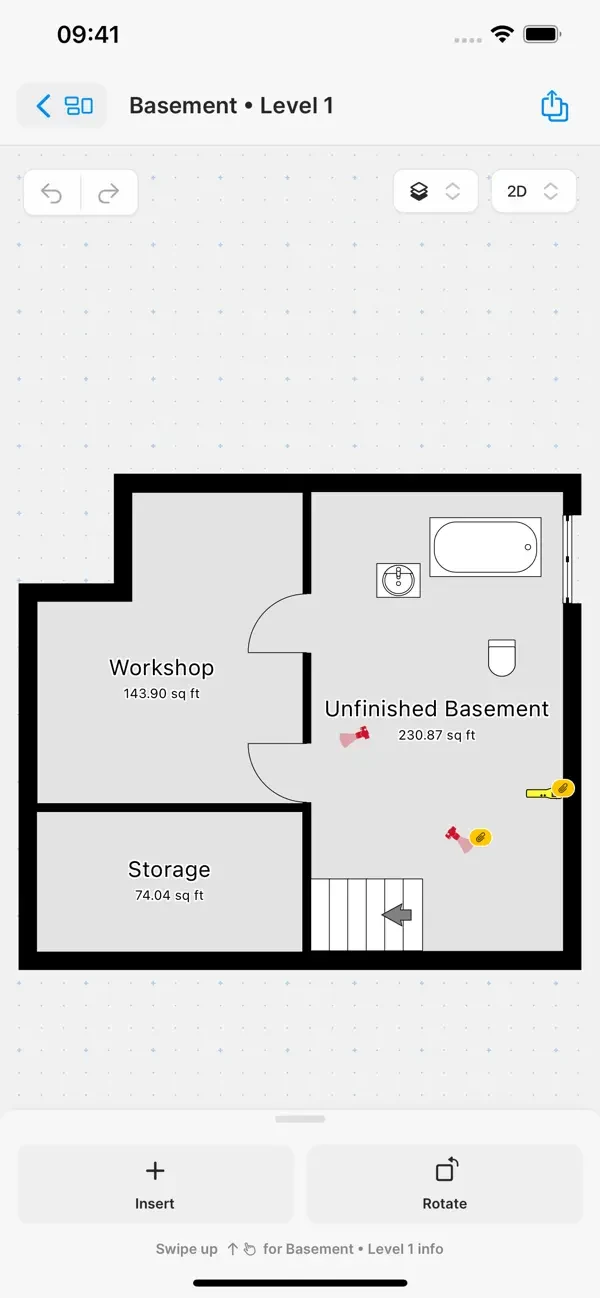
The magicplan iOS Editor screen on iPhone showing a multi-room residential floor plan in progress — walls, doors, and dimensions visible with the editing toolbar, the live 2D and 3D CAD environment contractors use to refine sketches after capture
The magicplan Editor on iPhone — live 2D/3D CAD environment for refining floor plans after capture.

The fundamental difference versus DocuSketch is hardware. DocuSketch ships a dedicated DS1 camera in a $795 Field Camera Kit — purpose-built for pitch-dark restoration field conditions, IP-rated waterproof, magnetic LED work-light included. The trade-off is that you’re locked into DocuSketch’s per-property pricing model and the hardware investment is real upfront.

magicplan flips that math. The hardware is the iPhone Pro the contractor already owns. The cost barrier collapses to a free Starter tier (two complete projects, no time limit) and a $12.99/month entry-level Sketch plan. For a solo contractor or a small team, that’s the difference between paying $1,000+ in setup costs to get into the workflow versus paying $13.

The trade-off is honest. The DS1 camera handles low-light fire scenes and remote disaster zones in ways an iPhone LiDAR sensor can’t match cleanly. magicplan’s answer is fall-back tools — manual sketching, AR-only mode without LiDAR, and the new PrecisionLink Bluetooth laser meter pairing for measurement-critical work. Workable, but slower than a properly-configured DS1 walk in the conditions DocuSketch was specifically built for.

The right framing: DocuSketch is restoration-native infrastructure for franchises and CAT-mobilized adjusters running heavy claim volume. magicplan is the iPhone-accessible alternative for solo contractors, small teams, and any operation that values low entry cost and integration to the residential-service stack over hardware-and-workflow specialization.


Which iPhone do you actually need?

This question matters more than the marketing implies, because the LiDAR-based experience and the manual-sketch fallback are meaningfully different products in practice.

LiDAR-capable iPhones (full experience):

  • iPhone 12 Pro / 12 Pro Max
  • iPhone 13 Pro / 13 Pro Max
  • iPhone 14 Pro / 14 Pro Max
  • iPhone 15 Pro / 15 Pro Max
  • iPhone 16 Pro / 16 Pro Max
  • iPhone 17 Pro / 17 Pro Max

LiDAR-capable iPads (full experience):

  • iPad Pro 11” and 12.9”, 2020 onward
  • iPad Pro M-series, all generations

No LiDAR (manual sketch / AR-only fallback):

  • All non-Pro iPhones (12, 13, 14, 15, 16, 17 base)
  • iPad Air (any generation)
  • iPad Mini, base iPad
  • All Android devices (manual sketching only)

The practical implication: if your crews are running personal iPhones and you don’t know which models, audit them before committing. Most professional contractor teams running iPhone Pro devices already have LiDAR. The friction shows up for solo techs on older or budget devices, and for any operation standardized on Samsung or budget Android phones.

For a solo restoration contractor on an iPhone 13 Pro or newer, the experience is exactly what the marketing claims. For a 5-person team where two of the techs have non-Pro phones, you’re looking at an inconsistent experience across the crew, which usually means standardizing on company-issued LiDAR-capable iPads for field documentation.


The capture flow has three modes the contractor picks based on the property and the precision needed.
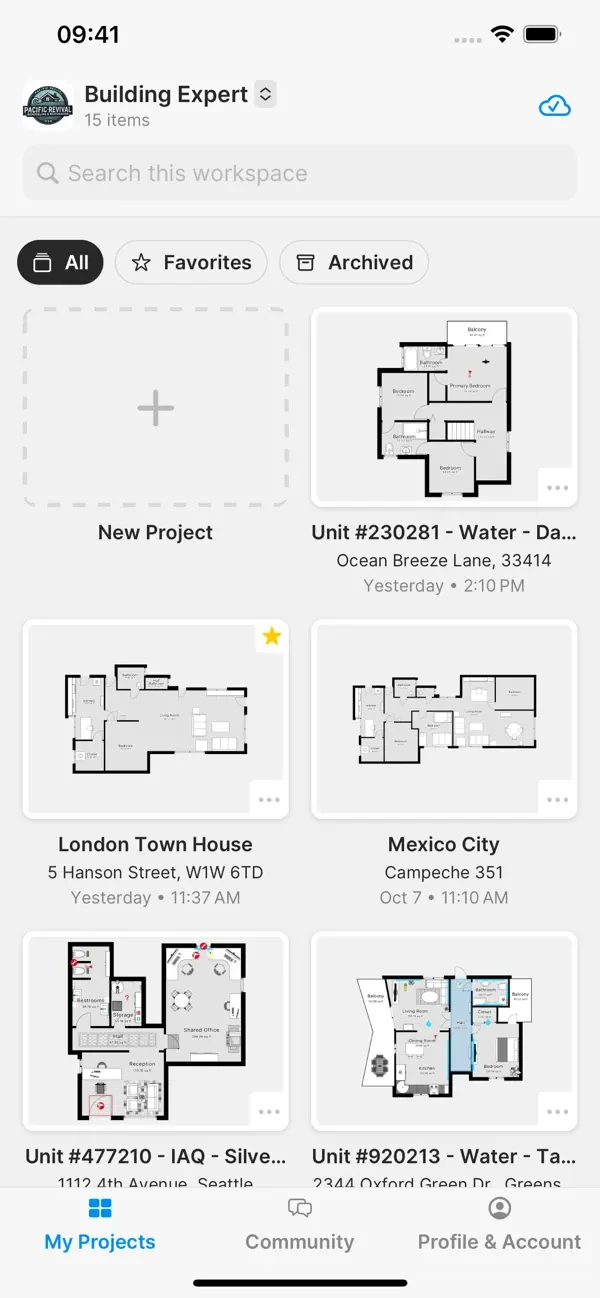
The magicplan iOS app home screen showing project list with thumbnail previews of recent floor plans, including residential rooms with measurements visible — the project hierarchy view contractors see when launching the app
The magicplan iOS app home — project list with sketch thumbnails, the navigation chrome contractors see daily.

Mode 1 — LiDAR auto-scan (full experience on iPhone Pro / iPad Pro). The contractor opens the project, taps capture, and walks the room. The LiDAR sensor maps the space in real-time. Walls, corners, windows, doors, and major furniture pop into the sketch automatically. A typical residential room takes under one minute. The app handles multi-room scanning in a single session — walk the whole floor without stopping between rooms. Ceiling height, room dimensions, and major fixtures are detected and tagged.

Mode 2 — AR-assisted manual sketch (works on any iOS or Android device with a camera). Without a LiDAR sensor, the contractor uses the device camera plus AR overlay to mark wall corners and door positions manually. Slower than LiDAR but produces the same final 2D and 3D output. Useful for non-Pro phones or when LiDAR can’t read the space (low-light or arched ceilings).

Mode 3 — PrecisionLink with Bluetooth laser meters (launched May 4, 2026). For measurement-critical work where centimeter-level LiDAR isn’t tight enough, the contractor pairs a Bluetooth laser distance meter and shoots measurements directly into the live sketch. Magicplan supports 20+ laser meters from Bosch, Leica, Stabila, Stanley/DeWalt, Hilti, and Johnson Level. The geometry scales automatically. The accuracy claim is 100% — millimeter-level precision for tile work, finish carpentry, cabinet specs, or any case where precision matters.

Bernd Wolfram, magicplan’s Chief Product Officer at PrecisionLink launch: “PrecisionLink is about giving control back to the professional on-site. You’re in the space. You know what matters.”

The output, regardless of capture mode, is the same — a 2D and 3D floor plan with detected objects, room dimensions, attached photos and notes, and full export options including Xactimate ESX, Cotality FML, PDF, DXF, JPG, PNG, SVG, CSV, OBJ, and USDZ. Field-to-office sync handles team collaboration without manual file shuffling.


What does it cost, and which plan is right for you?

magicplan’s pricing model surprises contractors who expect either a flat-rate-per-user model (CompanyCam-style) or a custom-quote sales-led model (DocuSketch-style). It’s neither — it’s a hybrid.

2026 Pricing · Free Trial Available
Solo plans in-app · Team plans sales-quoted

Free Starter tier with 2 projects forever. Solo plans purchased via App Store IAP. PRO Team plans require sales conversation. All plans include unlimited users.

Starter · Free Forever
\$0 2 projects
Full features · No time limit · No CC
The genuine free tier. Validate the entire workflow on real claims before paying.
Sketch · Solo
\$12.99 /mo or \$129.99/yr
Floor plans + export · Single user
Sketch creation, 2D/3D, all export formats. No estimating or reports module.
Report · Solo
\$39.99 /mo or \$399.99/yr
Sketch + photos + notes + reports
Adds structured PDF reports with photos, notes, markups. Right tier for most field techs.
Estimate · Solo
\$89.99 /mo or \$899.99/yr
Everything + estimating + ESX export
Built-in price-list estimating, Xactimate ESX export. The right tier for solo restoration estimators.

Annual billing saves about 17% across all solo plans. PRO Team plans (Flex / 12 / 24) are sales-quoted with minimum 10 projects/month, unlimited users included, and \$40/project overage. Existing Sketch/Report/Estimate subscribers retain their plans during the PRO transition.

The decision logic for solo contractors is straightforward. If you only need floor plans and exports, Sketch at $12.99/mo. If you also need photo/notes/markup reports for handing to adjusters or homeowners, Report at $39.99/mo. If you also need built-in estimating with Xactimate ESX export, Estimate at $89.99/mo. Annual billing saves about 17% across all three tiers.

The team math gets harder. PRO plans require minimum 10 projects per month and overage runs $40 per additional property. For a 5-person mitigation team running 30 projects a month, you’d want PRO 12 with 30+ projects allocated upfront — sales-quoted only, but expect $300-$500/month with no overage at that volume. Compared to DocuSketch at $379-$1,095/mo for similar property volumes plus $795 in hardware, magicplan is meaningfully cheaper at the small-team end.

The watch-out: project allocation. If you sign up for the 10-project tier and run 17 jobs in a busy CAT month, you’ll auto-bill seven $40 overages. That’s $280 extra. Size your tier slightly above projected average rather than at the average — the rollover handles the slow months, the overage doesn’t help you in the busy ones.


Does magicplan integrate with the residential-service stack?

The integration roster is the strongest single argument for picking magicplan over a hardware-required restoration competitor like DocuSketch, because it directly slots magicplan into the FSM and CRM tools residential-service contractors actually use.
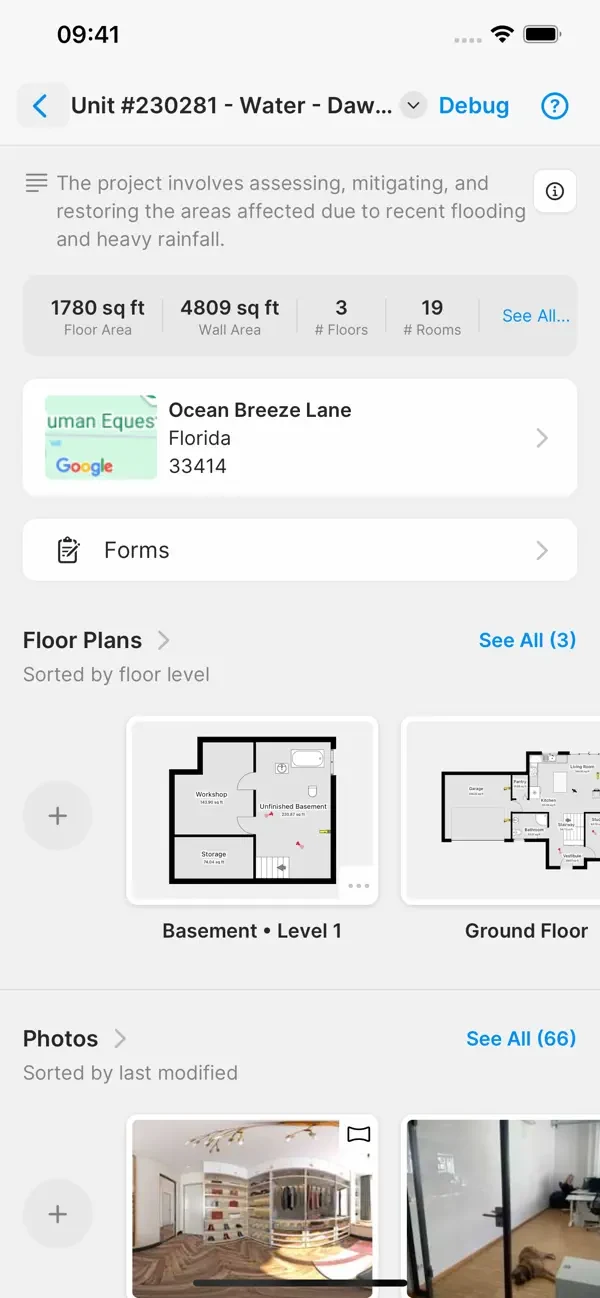
The magicplan iOS Project Overview screen showing a single restoration claim project with property address, captured photos, room thumbnails, scope notes, and the Field-to-Office sync status — the data layer that pushes to Jobber, JobNimbus, Housecall Pro, and CompanyCam via native integrations
Project overview — the data view that pushes to Jobber, JobNimbus, HCP, and CompanyCam via native sync.

Native CRM and FSM integrations (verified against magicplan.app/integrations on May 5, 2026):

  • Jobber — project management; sketches and reports sync to Jobber jobs
  • JobNimbus — CRM; floor plans and photos push to job records
  • Housecall Pro — project management; full job-data sync (Alexander L. on GetApp confirmed: “the data all comes from house call pro”)
  • CompanyCam — photo-documentation peer; project triggers sync between platforms
  • HubSpot CRM, Pipedrive, Salesforce, Service Fusion, Zoho CRM, Zendesk Sell — broader CRM coverage

Native estimating integrations:

  • Xactimate® — ESX file export
  • Cotality™ (formerly CoreLogic) — FML format export

Cloud and collaboration: Google Drive, OneDrive, Dropbox, Box, Asana, Trello, Slack, Gmail, Google Sheets

Hardware / measurement:

  • Bluetooth laser distance meters via PrecisionLink: Bosch, Leica DISTO, Stabila, Stanley/DeWalt, Hilti, Johnson Level (20+ models)
  • Tramex moisture meters
  • Insta360 and Ricoh 360° cameras

Plus Zapier for the long tail of CRMs, FSMs, and tools without native connections.

What’s not native (verified May 5, 2026): no ServiceTitan direct (Zapier only), no AccuLynx native (Zapier-only based on roster), no Buildertrend native (Zapier), no Procore native, no GoHighLevel native (Zapier), no Smith.ai (different category — call answering doesn’t connect to floor plans).

The practical implication: if you’re running Jobber + GoHighLevel as a paired stack under $400/month combined for residential service work, magicplan slots in cleanly underneath as the field-documentation layer for the restoration jobs in your mix. If you’re running JobNimbus for storm-damage roofing-plus-restoration work, the JobNimbus integration ships native and the Xactimate ESX export handles the carrier side. If you’re a Housecall Pro shop, the integration is mature enough that real customers cite it in their reviews — not just on the integrations page.

For shops on commercial Procore-coordinated jobs, magicplan isn’t the right tool. Use OpenSpace or DroneDeploy for that ecosystem. For roofing-specific aerial measurement, use EagleView or Hover — magicplan is iPhone-LiDAR-only with no aerial product.


What’s new in 2026, and what’s worth tracking?

The last twelve months have been more active than magicplan’s positioning would suggest. Five updates worth knowing about:
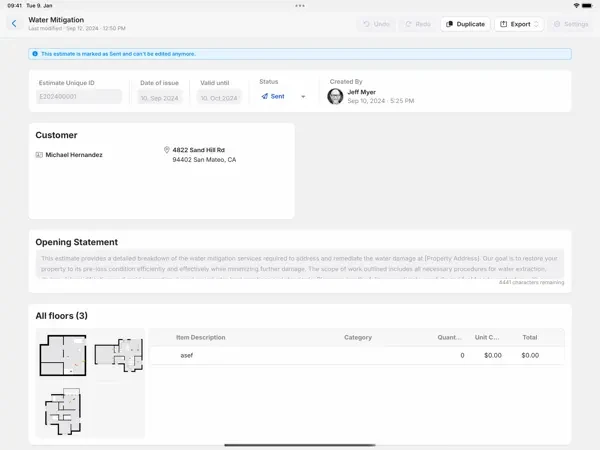
The magicplan Estimates view on iPad showing a structured restoration estimate generated from a captured floor plan — line items with quantities, unit prices, materials and labor totals, and the export buttons for Xactimate ESX and Cotality FML format ready for adjuster handoff
The Estimates view — line items tied to floor-plan dimensions, ready for Xactimate ESX or Cotality FML export.

1. PrecisionLink (May 4, 2026) — the headline launch. Bluetooth laser distance meter pairing with 100% measurement accuracy claim and 20+ supported devices across Bosch, Leica, Stabila, Stanley/DeWalt, Hilti, and Johnson Level. The most significant improvement to the measurement workflow since LiDAR auto-scan landed in 2020.

2. Scope of Work feature (early access) — automated scope generation tied to detected damage and floor plan, designed specifically for restoration claim documentation. Currently in early-access beta with full GA expected in 2026. If it ships at the claimed accuracy under real claim load, it changes magicplan’s positioning materially for restoration shops doing volume work.

3. RIA Australia partnership (early 2026) — the Restoration Industry Association of Australia welcomed magicplan as new partner with member benefits. Signal that magicplan’s restoration-vertical strategy is getting traction in international markets, not just North America.

4. Field Notes blog cadence and content marketing depth — magicplan published meaningful long-form content in 2025-2026 on water mitigation training, photo documentation playbooks, and field-to-estimator handoffs. Tactical material that suggests the company is investing in restoration-vertical knowledge transfer, not just feature releases.

5. PRO subscription tier reorganization — new team customers now access PRO Flex / PRO 12 / PRO 24 tiers (project-based, sales-quoted) versus existing Sketch/Report/Estimate IAP subscriptions which remain available for solo users. Existing legacy subscribers retain their plans during the transition.

What to watch through Q3-Q4 2026: Scope of Work GA and accuracy claims under real claim load, broader Android tablet support depth, any Procore or AccuLynx native integration announcements (the obvious gaps in the current roster), and whether the per-project pricing model holds up against hybrid CompanyCam-style flat rates as the residential market gets more price-sensitive.


What do real contractors say after a year on the platform?

The customer voice across Capterra, GetApp, and the App Store is consistent and tracks with the marketing claims more closely than most contractor software does.

On speed and ease of use:

“You can go into a building and have it drawn up in just a few minutes.” — Tim H., Purchasing Agent, Health/Wellness, Capterra 5/5 · 2+ years

“I really like that it is easy to create sketches from homes.” — Bence V., Construction Owner, Capterra 5/5 · December 25, 2023

“Magicplan is amazing for sketches and also building your estimates.” — Kayla P., Construction Manager, Capterra 5/5 · March 12, 2025

On LiDAR specifically:

“Accurate floor plan in a 3rd of the time.” — Thomas H., Construction Owner, Capterra 4/5 · less than 6 months on platform

“This app is awesome and makes my job so much easier… the beta is a game changer.” — Shannon R., Field Technician, Insurance, Capterra 5/5 · February 1, 2025 · 2+ years

On the integration story (the strongest validation point):

“The data all comes from house call pro.” — Alexander L., Managing Member, GetApp review

That last quote matters because it confirms the Housecall Pro integration works in production for real contractors, not just on the integrations page. The Jobber, JobNimbus, and CompanyCam integrations have similar reviewer validation in the broader review pool.

The honest counter-signal — recurring complaints:

Shannon R. on the LiDAR limits: the beta “does not work well in the dark and arched ceilings get a little messy.” Multiple Capterra reviewers cite limited object library options. John M., a construction president, flagged limited Samsung tablet compatibility. Michael C., a construction owner: corner detection struggles with furniture present. Tim H.: PC editing capabilities lacking compared to the iPad Editor experience.

These are real friction points that show up consistently across the review pool. None are deal-breakers for the audience magicplan is built for, but they’re worth knowing before you commit.


Who’s it for, and who should use something else?

It’s the right tool if you’re:

  • A solo restoration contractor running 5-15 mitigation jobs a month and want iPhone-based capture without the $795 hardware investment
  • A one-truck remodeler doing kitchen, bath, or whole-house remodel work where iPhone LiDAR + photo documentation + PDF reports cover most of your field-to-office workflow
  • A small mitigation team (1-5 employees) where the PRO Flex or PRO 12 plan handles your monthly project volume cleanly and you value Jobber / Housecall Pro / JobNimbus integration over hardware specialization
  • An inspector, appraiser, or insurance field tech who walks properties to document damage or condition and needs a fast floor-plan workflow that doesn’t require a separate hardware kit
  • A Realtor or property manager doing condition reports, listing prep, or damage documentation where the iPhone-LiDAR experience is good enough and the integration story doesn’t need to be deep
  • A budget-conscious restoration shop that wants to validate the workflow on the free Starter tier (2 complete projects, no time limit, full features) before committing real money

It’s the wrong tool if you’re:

  • A commercial GC running BIM-coordinated jobs — use OpenSpace for the 360-walk + Procore + ACC workflow, DroneDeploy for drone-first or exterior, Raken for daily-reports plus safety. Different ecosystem entirely; commercial construction runs on Procore, not Xactimate.
  • A multi-trade GC or specialty subcontractor needing aerial measurement — magicplan is iPhone-LiDAR-only with no drone or aerial product. Use DroneDeploy for drone-based measurement, EagleView or Hover for pre-flown roof imagery.
  • A roofing contractor whose work is roof-only — use AccuLynx or JobNimbus for the roofing-specific CRM with native EagleView integration, and use those CRMs’ built-in estimating rather than magicplan’s general floor-plan estimator.
  • A mid-to-large restoration franchise running 50+ claims a month at scale — DocuSketch is purpose-built for franchise-network depth with the DS1 hardware kit, optional certified-estimator service, and PSA Proven Jobs integration. The Paul Davis / Servpro / BluSky-scale operations standardize on DocuSketch for team consistency reasons that matter at scale.
  • An operation that needs hardened equipment for low-light or rough field conditions — iPhone Pro LiDAR struggles in pitch-dark fire scenes, arched ceilings, and remote disaster zones with no power. The DocuSketch DS1 with magnetic LED work-light handles those conditions cleanly. magicplan’s fall-back to manual sketching is workable but slower in those exact cases.
  • A Samsung-or-Android-standardized field crew — magicplan’s iOS LiDAR experience is meaningfully better than Android. If you can’t standardize on iPhone Pro hardware across your crew, the experience inconsistency will be a real friction point.

Final answer: should you buy it?

magicplan in 2026 is the most defensible iPhone-based floor-plan-plus-photo-documentation tool for solo and small-team residential contractors, restoration techs, and inspectors — and the editorial moat is the combination of three things competitors can’t match together: free Starter tier with two real projects, native integrations to the residential-service stack (Jobber, JobNimbus, Housecall Pro, CompanyCam, Xactimate, Cotality), and the strongest mobile rating in the photo-doc category at 4.7 stars across more than 40,000 ratings.

The catches are honest. LiDAR has real limits in low-light and arched-ceiling conditions. The object library is narrower than dedicated CAD tools. Per-project overage at $40 stings if you misjudge volume. Samsung and Android support is thin compared to iOS. And you still need an iPhone Pro for the full LiDAR experience.

The 4.3 rating reflects the asymmetric strengths in iPhone accessibility, integration depth to the residential-service stack, and mobile reliability, weighted against the LiDAR field-condition limits, object library narrowness, and per-project pricing model that’s less forgiving than flat-rate alternatives. Same numerical rating as DocuSketch (4.3) but earned in completely different ways — DocuSketch wins on franchise-scale restoration depth and dedicated hardware; magicplan wins on accessibility, integrations, and mobile experience.

Two scenarios make the buying decision easy. If you’re a solo contractor or one-truck operation and you’ve ever thought “I just need a working floor plan from my iPhone without buying $795 in hardware,” this is your tool — start with the free Starter tier today. If you’re already running Jobber plus CompanyCam plus Xactimate for residential restoration work, magicplan slots cleanly underneath as the field-documentation and floor-plan layer your stack is missing.

Match the tool to your actual phone, your actual project volume, and your actual integration needs. magicplan does well exactly when those three things line up — and the free trial means you can prove it on real work before paying a dollar.

Our Verdict

magicplan is the cheapest legitimate way for a contractor to walk into a property and walk back out with a working floor plan. You point your iPhone at a room, the LiDAR sensor maps it, walls and doors and windows pop into place, and a few minutes later you have a 2D and 3D plan ready to export to Xactimate or hand to your estimator. There's a forever-free Starter tier with two full projects, paid solo plans starting around thirteen bucks a month, and team plans that scale up from there. The reason this matters in 2026 is that magicplan finally got the integrations right. Native two-way connections to Jobber, JobNimbus, Housecall Pro, and CompanyCam mean the floor plan you sketch on-site lands in the CRM your office already uses without anyone re-keying anything. PrecisionLink launched May 4, 2026 and pairs the app with twenty-plus Bluetooth laser distance meters from Bosch, Leica, Stabila, Stanley/DeWalt, Hilti, and Johnson Level for measurements they describe as accurate to the millimeter. The Scope of Work feature is in early access and the Xactimate ESX export is solid. Where it falls short is honest to flag. LiDAR struggles in low-light conditions and arched ceilings. The object library is narrower than what dedicated CAD tools ship. Overage pricing is forty dollars per extra project, which adds up fast if you misjudge your monthly volume. The Samsung tablet support is thin compared to iOS. And you still need an iPhone Pro or iPad Pro for full LiDAR — older or non-Pro phones drop you back to the manual sketch tools, which work but slower. It's the right tool if you're a solo restoration contractor, a one-truck remodeler, an inspector, or a small mitigation team that wants to skip the seven-hundred-dollar camera kit and run everything from the iPhone already in your pocket. It's the wrong tool for commercial GCs running BIM-coordinated jobs, large multi-trade GCs needing aerial measurements, and any operation where the phone-LiDAR limitations matter more than the speed and price.

★ 4.3/5

What Works

7 pros
  • The iPhone in your pocket is the entire hardware kit.
    No \$795 camera. No tactical backpack. No swappable batteries. If you've got an iPhone 12 Pro or newer (or any iPad Pro), the LiDAR sensor turns the device into a working floor plan scanner. That's the fundamental reason a solo remodeler or a one-truck restoration contractor picks magicplan over DocuSketch — it's the cheapest legitimate way into the LiDAR-based-floor-plan workflow, and the recurring software cost is a fraction of what hardware-required competitors charge.
  • Native integrations to the residential-trade stack are best-in-category for this segment.
    Two-way Jobber, JobNimbus, Housecall Pro, and CompanyCam connections actually work. Xactimate ESX export and Cotality FML export ship for the carrier side. CRMs include HubSpot, Pipedrive, Salesforce, Service Fusion, Zoho, Zendesk Sell. Hardware integrations cover Bosch, Leica DISTO, Stabila, Stanley/DeWalt, Hilti, and Johnson Level laser distance meters. Tramex moisture meters. Insta360 and Ricoh 360 cameras. Plus full Zapier coverage for everything not on the native list. If you're already running Jobber + CompanyCam + Xactimate (the dominant residential restoration stack), magicplan slots in cleanly.
  • iOS app sits at 4.7 stars across 40,000+ ratings — strongest mobile rating in the photo-documentation category.
    CompanyCam is also at 4.7, but with smaller volume. DocuSketch sits at 3.5 stars on 38 ratings. OpenSpace is at 4.0 on 41. The recurring praise across named Capterra reviews is speed (\"have it drawn up in just a few minutes\" — Tim H., Purchasing Agent), accuracy with LiDAR (\"accurate floor plan in a 3rd of the time\" — Thomas H., Construction Owner), and integration with the rest of the stack (\"the data all comes from house call pro\" — Alexander L., Managing Member, GetApp).
  • PrecisionLink launched May 4, 2026 and is a real upgrade for measurement-heavy work.
    Bernd Wolfram, Chief Product Officer: \"PrecisionLink is about giving control back to the professional on-site. You're in the space. You know what matters.\" Twenty-plus Bluetooth laser distance meters pair with the magicplan Editor, transferring measurements directly into the live 2D/3D sketch with automatic geometry scaling. The accuracy claim is millimeter-level — useful for tile work, finish carpentry, cabinet specs, and any case where LiDAR's centimeter-level precision isn't tight enough. This is the headline feature contractors should evaluate during the free Starter trial.
  • The free Starter tier is genuinely useful, not a crippled demo.
    Two complete projects with full feature access. No time limit. No credit card. No subscription deadline. Most contractors can validate the entire workflow — capture, sketch, photo, estimate, export to Xactimate — on the free tier before paying a dollar. Compared to OpenSpace and DroneDeploy (no free trials, sales-led pilots only) and DocuSketch (no free trial, \$795 hardware up front), this is the most contractor-friendly evaluation path in the photo-doc category.
  • Estimating is built-in, not an add-on you bolt on later.
    The Estimate Plan at \$89.99/mo or \$899.99/yr ($75/mo annual equivalent) ties room dimensions and detected objects directly to a customizable price list. Built-in or import-your-own pricing. Quantities link to floor plan automatically. Material and labor calculations roll up to a PDF estimate ready to share with the carrier or homeowner. For a solo restoration contractor or small remodel shop without an in-house Xactimate estimator, this is a meaningful workflow shortcut — and the Scope of Work feature in early access takes it further.
  • The data export options cover the formats contractors actually need.
    Sketch outputs ship as PDF, JPG, PNG, SVG, CSV, DXF, OBJ, USDZ. Xactimate ESX direct export. CoreLogic / Cotality FML format. The DXF export specifically matters for any contractor handing files to architects or engineers. The CSV export feeds spreadsheet workflows for material takeoff. The USDZ format works for AR-walkthrough handoffs to homeowners. That breadth is unusually comprehensive for a phone-based tool.

What to Watch

7 cons
  • Forty dollars per extra project gets expensive fast if you miscount.
    Plans start at 10 projects per month minimum. Go over and each additional property is automatically billed at \$40. Rolling over unused projects helps, but a contractor who misjudges seasonal volume can end up with a real overage bill — one third-party analysis showed an example contractor paying \$245 in overages on top of a \$10/mo subscription, ending up at \$255 total for the month. Read your projected monthly project count carefully and consider sizing up rather than risking overage.
  • LiDAR struggles in low-light conditions and on arched or non-standard ceilings.
    Shannon R., a field technician in insurance with 2+ years on the platform, captured the limit clearly on Capterra: the LiDAR beta \"does not work well in the dark and arched ceilings get a little messy.\" For a restoration contractor walking a fire-damaged interior with no power on, this matters. The DocuSketch DS1 hardware kit ships a magnetic LED work-light specifically for this case. magicplan's answer is to fall back to manual sketching with PrecisionLink-paired laser meters — workable, but slower than LiDAR in proper light.
  • The object library is narrower than dedicated CAD tools, and reviewers consistently flag this.
    Multiple Capterra reviewers cite limited object library options as the most-mentioned con. Custom objects can be created, but the default catalog covers basic doors, windows, plumbing fixtures, appliances, and furniture without the depth a remodeler bidding kitchen finishes or a custom home builder spec'ing trim profiles really wants. For a restoration contractor scoping water damage this is fine; for a kitchen-and-bath specialty contractor, less so.
  • Samsung and Android tablet support is thin compared to iOS.
    John M., a construction president on Capterra, flagged limited Samsung tablet compatibility as the main weakness for his operation. The full LiDAR experience is iOS Pro device only — Android phones drop back to the manual sketch tools. If your crews run Samsung phones (still common in trades), the experience is meaningfully worse than what your friends running iPhones get. This is a hardware-platform reality, not magicplan's fault — but it's a real fit signal.
  • Furniture in the room blocks corner detection and slows the scan.
    Michael C., a construction owner with 6-12 months on the platform, flagged that the LiDAR struggles to detect corners when furniture is present. For a remodeler walking an empty new-construction property this is fine. For a restoration contractor walking a furnished home with water damage, you may need to move furniture or accept that the corner detection will require manual fix-up. Plan extra time on furnished sites or use the Bluetooth laser meter pairing for the manual fallback.
  • The PC editing experience is limited.
    Tim H. on Capterra: PC editing capabilities lacking. The platform is genuinely mobile-first, and that's a feature for field use. But if your office estimator wants to clean up a sketch on a desktop with a real keyboard and mouse, the cloud editor isn't as full-featured as the iPad Editor experience. This is a small but real friction point for shops with a clear field-vs-office split.
  • No aerial measurement.
    If your work involves any meaningful exterior or roof measurement, magicplan doesn't cover it. EagleView and Hover handle the aerial side via pre-flown imagery. DroneDeploy Aerial covers drone-based site mapping. magicplan is iPhone-LiDAR-only, which means anything outside or above ground level falls outside its scope. For a roofing contractor or any contractor whose work involves substantial exterior measurement, you'll be running magicplan plus a separate aerial tool.

Frequently Asked Questions

Three pricing paths depending on whether you're solo or running a team. Verified May 5, 2026 against magicplan.app/pricing and the Apple App Store in-app purchase listing. (1) Starter (free, forever): 2 complete projects, full features, no time limit, no credit card. The genuine free tier — most contractors can validate the workflow on this before paying. (2) Solo plans (per-user, in-app): Sketch \$12.99/mo or \$129.99/yr — floor plan creation + export. Report \$39.99/mo or \$399.99/yr — adds photos, notes, markups, structured PDF reports. Estimate \$89.99/mo or \$899.99/yr — adds price-list-driven estimating + Xactimate ESX export. Annual saves about 17% vs monthly. (3) PRO Team plans (project-based, sales-quoted): PRO Flex (month-to-month), PRO 12 (12-month contract, lower per-project rate), PRO 24 (24-month contract, lowest per-project rate). All PRO plans require minimum 10 projects/month, include unlimited users, allow project rollover. Overage at \$40 per additional project, billed automatically. Hardware: none required — uses your existing iPhone. Optional Bluetooth laser distance meters from Bosch/Leica/Stabila/Stanley/DeWalt/Hilti/Johnson Level (\$80-\$400 depending on model) pair via PrecisionLink for laser-accurate measurements. Practical math: a solo restoration contractor running 5-8 claims a month on the Estimate Plan: \$75/mo annual equivalent. A 5-person restoration team on PRO 12 with 30 projects/month: contact sales — likely \$300-\$500/mo with no overage at that volume. Compared to DocuSketch (\$379-\$1,095/mo + \$795 hardware), magicplan is meaningfully cheaper at the small-team end.
LiDAR support on iOS requires iPhone 12 Pro or newer Pro models, or any iPad Pro from 2020+. Verified against magicplan documentation and user reviews May 5, 2026. The base iPhone (non-Pro) doesn't ship a LiDAR sensor — you can still use magicplan but you fall back to manual measurement and AR-only sketching, which works but takes longer than a true LiDAR scan. Specifically: iPhone 12 Pro / 12 Pro Max, iPhone 13 Pro / 13 Pro Max, iPhone 14 Pro / 14 Pro Max, iPhone 15 Pro / 15 Pro Max, iPhone 16 Pro / 16 Pro Max, iPhone 17 Pro / 17 Pro Max all have LiDAR. iPad Pro 11\" and 12.9\" from 2020 onwards. Standard iPhone 14, 15, 16, 17 (non-Pro) — no LiDAR. iPad Air, iPad Mini, base iPad — no LiDAR. Practical implication: if your crews are running personal iPhones and you don't know which models, do a quick audit before committing. Most contractor crews running iPhone Pro devices already have LiDAR-capable phones; the friction is solo techs on older or budget devices. Android support exists for the manual sketching workflow but is thinner than iOS.
Yes — all four are native integrations as of May 2026, and this is one of the strongest integration stories in the photo-documentation category for residential trades. Verified against magicplan.app/integrations. Native CRM/PM integrations: Jobber (project management — sync floor plans + estimates to job records), JobNimbus (CRM — push completed sketches and reports into the JobNimbus job timeline), Housecall Pro (project management — Alexander L. on GetApp confirmed the workflow: \"the data all comes from house call pro\"), CompanyCam (project management — sync triggers on project creation in either platform via Zapier). Other native CRMs: HubSpot, Pipedrive, Salesforce, Service Fusion, Zoho CRM, Zendesk Sell. Estimating: Xactimate® ESX export, Cotality™ FML format. Cloud / collaboration: Google Drive, OneDrive, Dropbox, Box, Asana, Trello, Slack, Gmail, Google Sheets. Hardware: Bluetooth laser distance meters via PrecisionLink (Bosch, Leica DISTO, Stabila, Stanley/DeWalt, Hilti, Johnson Level — 20+ models), Tramex moisture meters, Insta360 and Ricoh 360 cameras. Plus Zapier for the long tail. Practical implication: if you're a residential service contractor running Jobber or Housecall Pro plus CompanyCam, magicplan adds the floor-plan + estimating layer without disrupting your existing stack. For roofing-restoration shops on JobNimbus or AccuLynx, the JobNimbus integration ships native (AccuLynx native is unverified — likely Zapier-only). For marketing automation on top of Jobber, the Jobber + GoHighLevel paired stack under \$400/month combined remains the most-cited residential service combination, and magicplan slots cleanly underneath it as the field-documentation layer.
Five AI capabilities shipped or in active rollout as of May 2026. (1) LiDAR auto-detection (production since 2020 with magicplan v9.1) — automatically detects ceiling height, walls, corners, windows, doors, and furniture during room scan. Single session, multi-room scanning. (2) PrecisionLink (launched May 4, 2026) — Bluetooth laser-meter pairing with automatic geometry scaling and 100% measurement accuracy claim across 20+ supported laser distance meters from Bosch, Leica, Stabila, Stanley/DeWalt, Hilti, Johnson Level. (3) AR Room Scan (touch-less experience) — point the device at the space and the AI builds the sketch in real-time without manual placement. (4) Scope of Work (early access — full GA expected 2026) — automated scope generation tied to detected damage and floor plan, designed for restoration claim documentation. (5) \"Ask AI about magicplan\" — embedded AI assistant for in-app help and workflow guidance. What's missing vs other AI-heavy photo-doc tools: magicplan doesn't ship a separate AI takeoff product like the Beam AI or XBuild AI estimating engines, doesn't have spatial-intelligence equivalent to OpenSpace's Vision Engine for commercial 360 walks, and doesn't claim percent-complete progress AI like DroneDeploy. The AI here is fit-for-purpose for the iPhone-based field-documentation use case, not a competitor to AI takeoff specialists. The Scope of Work feature ramping in 2026 is the development worth tracking — if it ships at the claimed accuracy under real claim load, it changes magicplan's positioning materially for restoration shops doing volume work.
It's both — but the estimating depth is workflow-tier, not Xactimate-replacement-tier. Honest read on the estimating capability: the Estimate Plan generates material and labor estimates from your floor plan tied to a customizable price list (built-in or import your own). Quantities link automatically to detected room dimensions and tagged objects. The output is a structured PDF estimate ready to share with the homeowner or carrier, plus direct ESX export to Xactimate or FML to Cotality for the actual carrier-side estimating workflow. What it does well: for a solo or small-team restoration contractor without an in-house Xactimate estimator, the in-app estimator handles the math from sketch through ready-to-share PDF without re-keying. Kayla P., a construction manager on Capterra: \"Magicplan is amazing for sketches and also building your estimates.\" Michael C., a construction owner: \"ease of completing reports and estimates.\" What it doesn't do: replace Xactimate for restoration carrier work — Xactimate is the carrier-billing standard and magicplan ships ESX export specifically to feed into it, not replace it. It's also not a Roofr-style AI takeoff for roofing measurement, not a Beam AI-style multi-trade commercial takeoff, and not an XBuild-style AI bid platform. Practical pattern: most restoration contractors use magicplan to capture the field documentation and produce the floor plan, then export to Xactimate where the carrier-billable estimate gets finalized. The built-in estimator is for cash jobs, smaller scopes, or shops without a Xactimate seat — and for those use cases, it's enough.
Customer voice across Capterra, GetApp, and the App Store hits the same handful of notes consistently. Speed and ease of use lead the positive reviews. Tim H. (Purchasing Agent, Health/Wellness, 2+ years on Capterra): \"You can go into a building and have it drawn up in just a few minutes.\" Bence V. (Construction Owner, 6-12 months): \"I really like that it is easy to create sketches from homes.\" Kayla P. (Construction Manager, March 12, 2025): \"Magicplan is amazing for sketches and also building your estimates.\" Shannon R. (Insurance Field Technician, February 1, 2025): \"This app is awesome and makes my job so much easier.\" The LiDAR speed advantage is the most-cited specific benefit — Thomas H. (Construction Owner): \"accurate floor plan in a 3rd of the time.\" The integration story is what drives stack-fit. Alexander L. (Managing Member, GetApp): \"The data all comes from house call pro\" — confirming the Housecall Pro connection works in production for real contractors, not just on the integrations page. The recurring complaints to take seriously: LiDAR struggles in low-light and arched-ceiling conditions (Shannon R.: \"does not work well in the dark and arched ceilings get a little messy\"). Object library limits across multiple reviews. Limited Samsung/Android support. Furniture blocks corner detection in cluttered rooms. PC editing capabilities are thinner than the iPad experience. The 4.7 stars across 40,000+ App Store ratings is genuine — it's the strongest mobile rating in the photo-documentation category and meaningfully higher than DocuSketch (3.5 stars on 38 ratings) or OpenSpace (4.0 on 41).
Different products solving the same restoration documentation problem from opposite price points and hardware approaches. Choose DocuSketch if your bottleneck is claim-cycle compression at scale — water mitigation or fire/smoke restoration franchises (Paul Davis, Servpro, BluSky), CAT-mobilized 1099 adjusters running 30+ claims a week, or any operation where the seven-hour Express ESX turnaround and the dedicated DS1 camera kit ($795) make sense for your billing cycle. DocuSketch is restoration-native end-to-end with optional certified-estimator service ($500-$1,950/mo). Choose magicplan if you're a solo restoration contractor, a small mitigation team (1-5 employees), a one-truck remodeler, or any operation that wants iPhone-based capture without the hardware investment and at meaningfully lower software cost. The free Starter tier with 2 projects lets you validate the workflow before paying. The native Jobber, JobNimbus, and Housecall Pro integrations slot magicplan into the residential-service-trade stack DocuSketch doesn't natively integrate with. Use both if you scale up — small franchise networks sometimes run magicplan for solo techs and standardized DocuSketch for team-of-three+ field documentation, with both feeding Xactimate. The honest read: magicplan wins on accessibility (no $795 hardware, free trial, $13/mo solo entry) and integrations to the residential service stack. DocuSketch wins on franchise-network depth, dedicated hardware built for pitch-dark fire scenes, and the Estimating-as-a-service offload. Same 4.3/5 rating in our methodology because the strengths are asymmetric, not because the products are equivalent.
Get The Next Review

Independent contractor software reviews — in your inbox.

One email when we publish a new product review, head-to-head comparison, or AI tool deep-dive. Field-tested by a tradesman, not recycled vendor copy.

No spam · ~1 email/month · Unsubscribe in 1 click