


The number every commercial superintendent who switches to Raken cites: four minutes and thirty-eight seconds. That’s the time a Construction Bids editorial-test superintendent — with no prior Raken experience — spent producing a professional, photo-documented daily report on day one. The same daily report on paper, on the same project, ran past forty minutes. The 87% time savings is the entire pitch for Raken in one number, and it’s the reason 4,500-plus commercial construction firms with 70,000-plus users run on the platform in May 2026.
Raken is not a residential trade tool. Founded 2014 in Carlsbad California, acquired in a September 9 2025 majority-stake deal by Sverica Capital Management, the platform is aimed unambiguously at commercial general contractors, specialty subcontractors on commercial jobs, self-perform divisions, and industrial or heavy-civil contractors. The hero headline at rakenapp.com reads “Field management made easy” — not “scheduling,” not “photo doc,” not “CRM.” If your daily reality is residential remodels, HVAC service calls, roofing insurance work, or solo handyman jobs, this is not your tool, and the second half of this review redirects you to the right one.
“The simplicity of it for guys to use that are not tech savvy. It is very user friendly.” — Capterra reviewer summary across 248 verified reviews, 4.6/5 average (source)
What this review covers: how the daily-report workflow actually compresses to under five minutes via voice-to-text on a phone, what the published-tier-pricing-doesn’t-exist sales process actually looks like in 2026, what Raken AI shipped versus the Procore Copilot benchmark, the integration ecosystem that maps cleanly onto commercial construction and explicitly does not map onto residential trades, what 4,500-plus customers actually say in named Capterra and G2 reviews, and which contractor segments should be requesting a demo today versus running screaming toward Buildertrend, JobNimbus, or Jobber.
What Raken Actually Is (And What It Isn’t)
The positioning question matters because Raken is constantly mis-bucketed. Capterra files it under “Construction Management Software.” Sverica’s press release calls it a “field management platform.” G2 categorizes it as “construction management” and “daily reporting” depending on the search. The hub here lists it as project-management primary with photo-documentation secondary, scored against both dimension frameworks.
The clean way to think about Raken: it’s the field-capture layer for commercial construction. Daily reports, photos, time tracking, toolbox talks, observations, quality checklists — all captured on a mobile-first app that a superintendent in a basement or a foreman on a 30-story crane can use without staff training. Then everything pushes into the office’s accounting system (QuickBooks / Sage / Foundation / Viewpoint) for payroll and invoicing, and into the project management system (Procore / Autodesk) for the GC’s documentation system of record.
What Raken is not: a project management platform on its own. There’s no scheduling tool, no client portal, no proposal workflow, no estimating, no CRM, no dispatch board, no customer-facing booking widget. The decision to stay narrowly focused is the editorial moat — Procore tries to do everything and the mobile app is the famous compromise; Raken does one thing and the mobile app is the famous strength.
How Daily Reports Actually Work in Raken
This is the core feature, and the architectural decision worth understanding before any demo conversation.
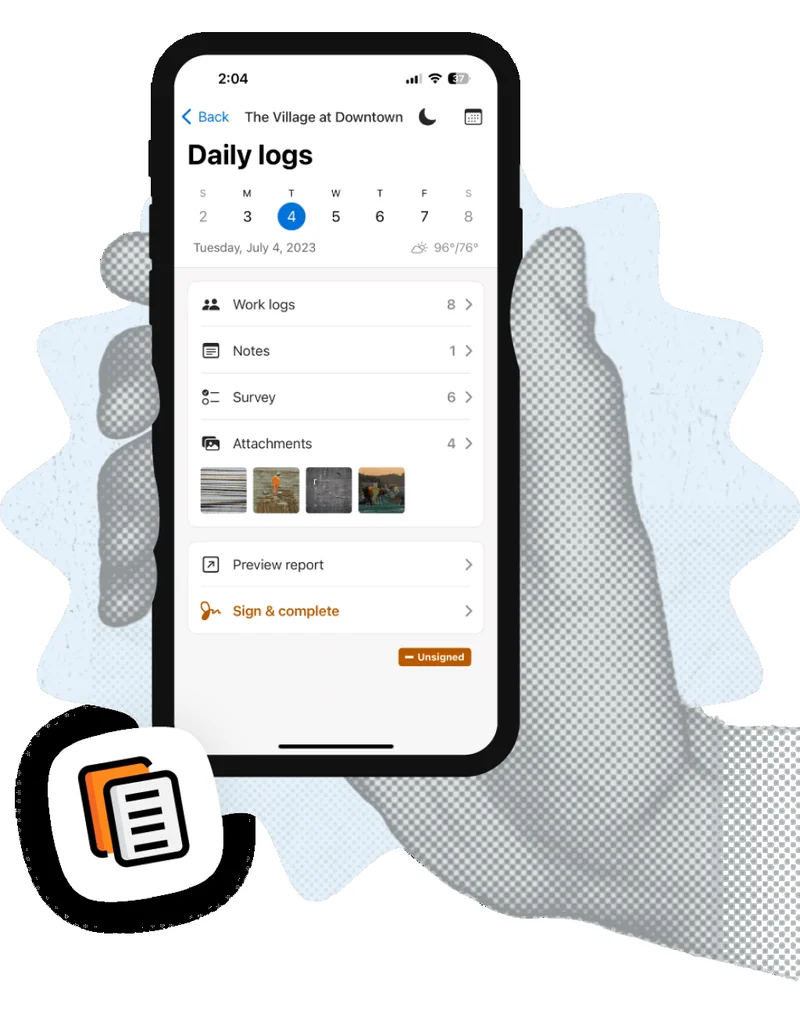
A superintendent opens the project on the mobile app, taps Daily Logs, and the app pre-populates the date, the project name, and the weather automatically (Raken pulls weather from the project’s GPS coordinates). Then the four capture surfaces:
Work Logs. Crew composition, hours, job classifications, cost codes — entered manually or pulled from the morning kiosk-mode time clock. Notes. Free-form text plus voice-to-text capture; this is where the “narrate-while-walking” workflow happens, and it’s the speed differentiator versus paper or generic note-taking apps. Surveys. Custom or pre-built questionnaires for specific compliance requirements (the GC asks for daily safety verification, you check the boxes). Attachments. Photos with auto time/date stamps, optional markup annotations, and descriptive captions. Voice-to-text for caption fields ships in the same workflow.
When the day’s capture is done, the superintendent taps Preview Report, reviews the auto-generated branded PDF (logo, colors, project name, weather, all populated), then taps Sign & Complete. The PDF auto-distributes via email to the GC’s office, the project owner’s distribution list, and any internal stakeholders defined in project settings. The whole loop runs in under five minutes if the data was captured during the day.
Collaborator Reports are the differentiator versus competitors. Subcontractors on the project can submit their own independent dailies through Raken (free for them — no seat license required) that auto-roll up into the master daily report under the GC’s Raken account. The mechanic eliminates the manual sub-data-entry step that traditionally falls on the GC superintendent at the end of every day, and it’s the reason commercial GCs with 5+ subs on a project see the cleanest ROI on Raken.
Segmented Daily Reports let multiple superintendents on the same large project file their own dailies (by shift, by location, by trade) that aggregate into a master report. Useful for industrial and heavy-civil operations running 24-hour shifts or geographically separated subareas under one project.
What Raken Costs in 2026 (And Why You’ll Be on a Sales Call)
Pricing transparency is the structural weakness in Raken’s go-to-market — and it’s worth flagging before the demo conversation, not after.
2026 Pricing · Sales-Quoted Only
Directional Tier Ladder · Aggregator-Sourced
Raken's official pricing page is a contact form. The numbers below synthesize across ITQlick, Workyard, SoftwareSuggest, and Connecteam — none of which agree exactly. Treat as directional, not gospel.
Free / Starter
$0
/user · limited
Very small teams · basic dailies
Limited to basic daily-report functionality; not a production-grade tier for any commercial GC operation
Basic
~$15
/user/mo annual
Unlimited projects · daily reports · branding
Task management, offline mode, custom-branded PDFs — the realistic floor for a commercial GC
Professional
~$37
/user/mo annual
+ Surveys · safety checklists · integrations
User caps around 30 per source; the typical commercial GC pick
Performance · Top Tier
~$46
/user/mo annual
Unlimited users · API · dedicated CSM
Performance is the larger-GC tier with dedicated customer success and API access for custom integrations
A 25-person commercial GC on Professional pencils to roughly $11,000/year based on the directional ladder. ITQlick reports a wider $31.99-$79.99/user range that may reflect Performance + add-ons; Connecteam disclosed in-app numbers Raken clarified are individual self-serve, not team subscriptions. Get a written quote with renewal-pricing language before signing.
The honest read: this is a sales-led GTM, and the trade-off is that you’ll be on two-to-three discovery calls before you see a real number. Capterra reviewers have flagged unexpected year-two cost increases as a recurring complaint pattern — the Sverica acquisition in September 2025 brought new pricing-model attention but no published-pricing pivot has materialized through May 2026.
Free trial is confirmed available but the duration isn’t disclosed publicly. Industry default is 15 days for sales-led products in this category. Test the daily-report mobile workflow on your real superintendents during the trial window — field-team adoption rate is the variable that determines real ROI, and it’s only knowable by running real production sites for a week or two.
The AI Question: Three Real Features, Not a Copilot
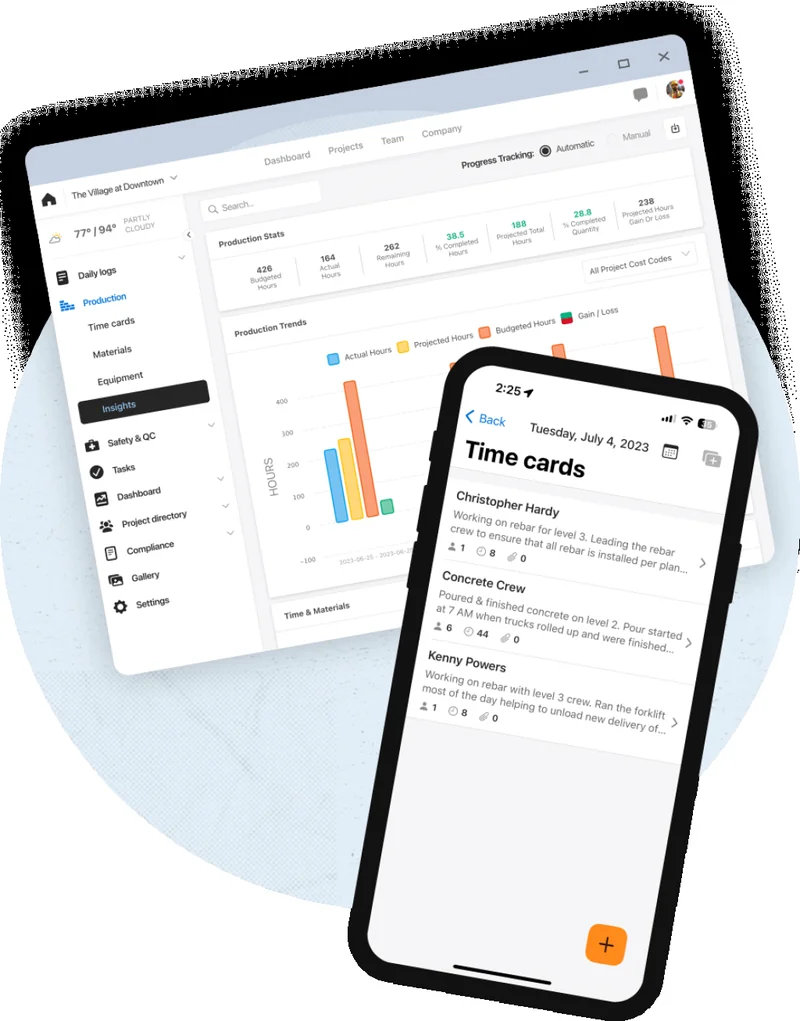
Raken AI is real, narrow, and honest about what it does. The AI page at rakenapp.com/features/ai lists three production-shipped features as of May 2026:
AI Photo Tagging. Auto-applies relevant keyword tags during photo upload — concrete, framing, electrical, demolition, scaffolding, exterior, interior. Accelerates gallery search when a 5-month-old project has 3,000+ field photos that nobody had time to manually tag. Useful, narrow, ships utility value without overpromising.
AI Photo ID. Facial-recognition verification at mobile time-clock check-ins. The kiosk or mobile app captures a selfie, compares it against the worker’s reference image, and either approves the clock-in or flags it for supervisor review. The anti-buddy-punching use case is real and quantifiable — for a unionized 50-person commercial GC operation where labor-cost integrity is a 4-figure weekly variable, this feature alone justifies the AI feature investment. iOS app store description references it directly; the iOS v6.1.x release notes flag it as a recent addition.
AI Daily Report Summaries. Scans the day’s dailies across work logs, notes, surveys, and observations; identifies critical issues (safety incidents, schedule slippages, weather-driven delays); generates an executive summary that PMs can read in 30 seconds instead of 10 minutes. For mid-to-large GCs running 10+ active projects with corporate reporting requirements, the summary layer is meaningful productivity for the office side of operations.
Voice-to-text capture in the daily report workflow is treated as a standard mobile feature, not branded as AI, but it’s effectively an AI capability that materially compresses report-creation time. The Construction Bids 4-minute-38-second test result depends on it.
Versus Procore Copilot: Procore is meaningfully ahead on AI maturity. Copilot does conversational queries across project data (“show me all RFIs from last month with cost-impact”), predictive analytics on schedule slippage, AI-assisted RFI drafting, and integrates AI across the broader PM platform. Raken AI is three specific features, not a Copilot-class horizontal AI surface. For AI-forward commercial GCs, Procore wins this comparison.
Versus CompanyCam AI: roughly even on photo tagging maturity. CompanyCam has had AI photo search longer and leads with AI in marketing; Raken’s AI page is buried two clicks deep on the website despite the underlying features being real.
Versus Fieldwire Field Intelligence AI: Raken’s AI is broader (3 features across photo, time, and reports); Fieldwire’s plan-markup AI is deeper in its specific lane.
The Sverica acquisition stated commitment to “new product features” suggests AI investment will continue through 2026. No public roadmap detail beyond that as of May 3 2026.
Integrations: Commercial-Construction-Flavored, Not Residential-Trade
This is the segment where most contractors mis-evaluate Raken, and the integration roster is the cleanest single fit signal in the platform.
Native Integrations · Verified May 3 2026
24+ Native Integrations · Commercial-Construction Stack
Procore + QuickBooks + Sage + Foundation + Viewpoint native. Zero native bridges to Jobber, HCP, ServiceTitan, JobNimbus, AccuLynx, or GoHighLevel — by design.
Native · Deep
QuickBooks Desktop
30-min sync · cost codes + employees
Native
Sage 100 / 300 / Intacct
All three Sage flagship products
Native
Foundation
Construction-specific accounting
Native
Viewpoint Vista + Spectrum
Trimble's commercial accounting
Native
Autodesk + Bluebeam
Drawings + plan markup
Native
Cloud Storage (5)
Egnyte · Drive · Box · Dropbox · OneDrive
Native
Reality Capture
EarthCam · DroneDeploy · HoloBuilder · TrueLook
No native [Smith.ai](/software/smith-ai/), no native [Buildertrend](/software/buildertrend/), no native [CompanyCam](/software/companycam/), no native [Fieldwire](/software/fieldwire/), no published Zapier path to any of the residential-trade FSMs. Raken's market is commercial GCs running Procore — that's the integration story, by design.
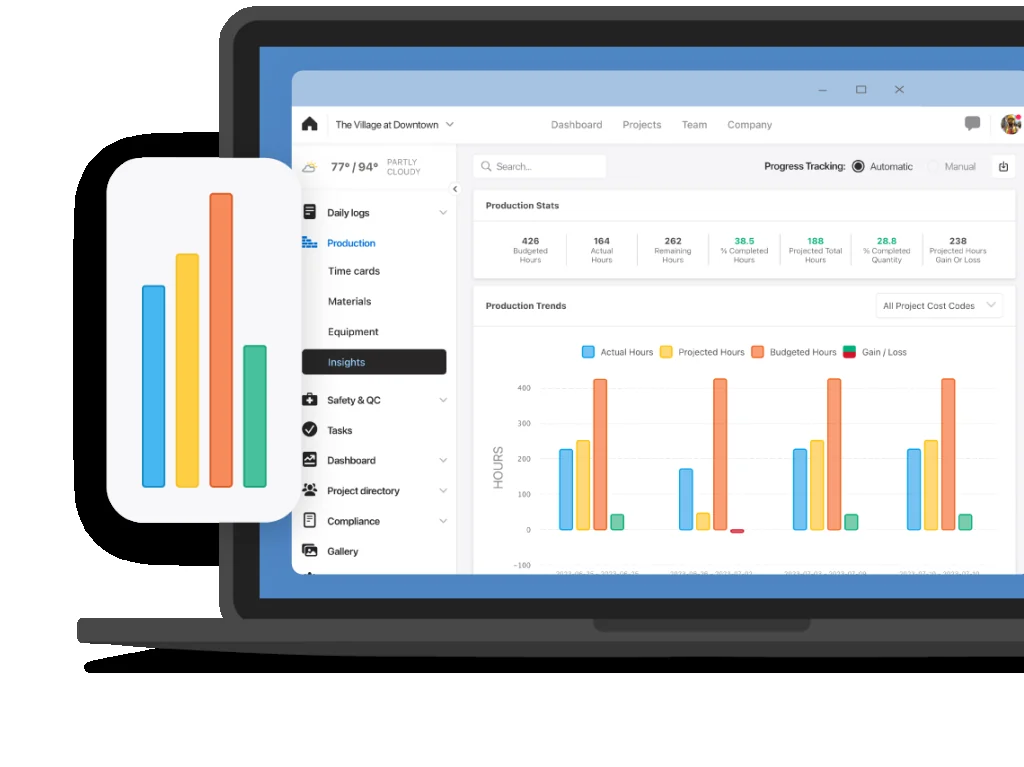
The Procore integration deserves a closer look because it’s the load-bearing one for most Raken customers. Daily reports captured in Raken push automatically and in real-time into Procore as official project documentation. Photos sync with their Raken metadata (timestamp, GPS, captions, tags) preserved. Observations and quality checklists flow through. The pairing is documented at rakenapp.com/procore-raken, and the practical workflow is: superintendents prefer Raken’s mobile app over Procore’s mobile app for daily-report capture, then everything ends up in Procore as the contractual system of record.
The QuickBooks integration is the other deep one. QuickBooks Online syncs Workers and Projects from QBO into Raken in near real-time; time cards push from Raken back to QBO Time Activities for payroll processing. QuickBooks Desktop syncs every 30 minutes for projects, cost codes, pay types, and employees. For commercial GCs with a full-time bookkeeper running QuickBooks-based operations, the integration is payroll-grade — labor data flows out of the field and into the books without manual re-entry.
Where Raken Beats Procore (And Where Procore Wins)
The most common scheduling mistake commercial GCs make is treating Raken and Procore as alternatives instead of layers. They aren’t. The right framing is which-one-do-you-need-first or do-you-need-both.
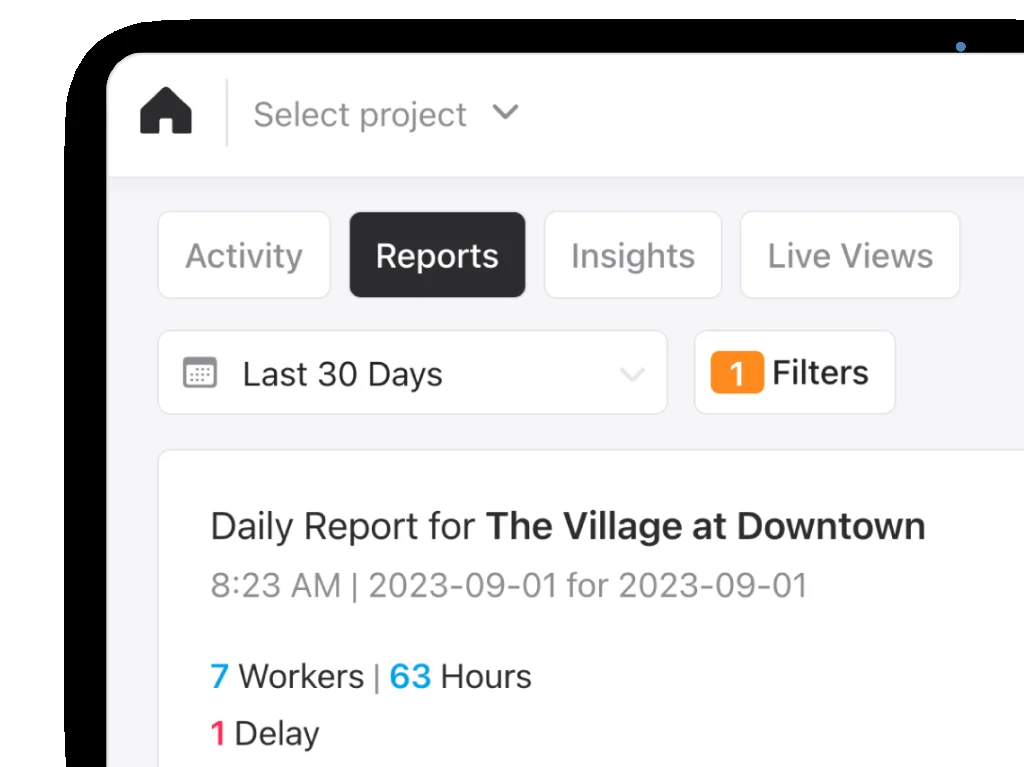
Raken wins on: mobile-first daily report capture (the iOS app at 4.8 across 21K versus Procore’s mobile app at significantly lower iOS ratings), voice-to-text speed in the field, branded PDF output that owners actually want to read, Collaborator Reports for sub-data rollup, time-clock kiosk mode, AI Photo ID for anti-buddy-punching, and per-user pricing that’s roughly an order of magnitude lower than Procore at small-to-mid commercial GC scale.
Procore wins on: project management depth across RFIs, submittals, drawings, and change orders; financial management and job cost analytics; horizontal AI Copilot across the whole platform; integration marketplace breadth at 500+ apps; and contractual position as the system of record for owner-side requirements (most large commercial owners require Procore for documentation).
The pairing is the most common production stack: Procore is the contractual PM platform; Raken is the field-team-acceptance unlock for the data-capture layer. Most superintendents prefer Raken’s mobile app over Procore’s mobile app for daily reports specifically, and everything ends up in Procore via the native integration anyway. That’s the entire pairing logic.
When Raken alone is sufficient: smaller commercial GCs (5-25 employees), specialty subcontractors writing dailies for Procore-running GCs (you don’t need to buy Procore to push data into one), and self-perform divisions with simpler PM needs.
When Procore alone is sufficient: larger commercial GCs ($10M+ revenue) where the Procore mobile app is acceptable to your superintendents (test before assuming) and the analytics + financials surface is load-bearing. Verify mobile-app field-team acceptance before assuming this.
When both are needed: mid-to-large commercial GCs ($5M-$50M+) where Procore is the contractual requirement and Raken is the field-team-acceptance unlock for daily-report adoption. This is the most common stack in commercial construction in 2026.
What Real Contractors Say About Raken
The customer sentiment data is the strongest part of Raken’s editorial case. Five named verbatim quotes worth pulling forward — three positive, one negative, one editorial outcome.
“Daily logs saved our company money from lending legal action with photographic evidence.” — Jason B., Systems Engineer (Capterra)
That’s the single most contractor-relevant outcome quote in the dataset. Photographic evidence on daily reports is what wins or loses construction litigation, and Raken’s branded-PDF-with-photos output is purpose-built for it.
“Sharing and providing information between coworkers has been much easier.” — Luis D., Project Manager (G2 verified review)
“Auto distribution is helpful. Attachments are so easy and scalable in the field.” — Jenny M., Office Manager (G2 verified review)
“User-friendly design makes documentation much easier and faster in construction.” — Paul C., Assistant Project Manager (G2 verified review)
“The integration is not as complete as we had hoped with our job costing system.” — Anonymous Capterra verified reviewer (Capterra)
That last quote is the honest counter — the integration ecosystem is real but the depth varies by accounting system. QuickBooks-based GCs report cleaner workflows; teams running custom or older job-costing systems flag friction.
Editorial outcome data point worth citing: Construction Bids ran a hands-on test where a brand-new Raken superintendent — no prior product training — produced a professional, photo-documented daily report on day one in four minutes thirty-eight seconds. The same daily report on paper, on the same project, ran past forty minutes. That’s not a marketing-deck claim — it’s a verifiable test outcome.
Aggregate review-platform stats (verified May 3 2026): Capterra 4.6/5 across 248 verified reviews with sub-scores at 4.5+ on Ease of Use, Customer Service, Features, and Value for Money. G2 reports 94% satisfaction across 381+ reviews per third-party aggregation (G2 page returned 403 on direct fetch but third-party citations align). iOS App Store at 4.8/5 across approximately 21,000 ratings — the strongest single trust signal in the field-management category. Google Play at approximately 4.3/5 across 2,390 ratings — the cite-worthy iOS/Android reliability gap. Cross-platform aggregator SelectHub: 1,200+ verified reviews from G2, Capterra, App Store, Google Play through February 2026 — 93% user satisfaction.
What Changed in 2025-2026
Three updates from the last twelve months are worth flagging for contractors evaluating Raken in May 2026.
Sverica Capital Management majority-stake acquisition (September 9, 2025). The most material event in Raken’s recent history. Strategic growth investment, amount undisclosed. CEO Ty Kalklosch continues; Sverica’s Jordan Richards (Managing Partner) and Michael Dougherty (Principal) joined the board. Stated commitment: “reinvest back into the company, launch new product features and ultimately aspire to lead the category.” The structurally bullish read for Raken in 2026 — meaningful growth runway behind a category where multiple startups have folded mid-contract leaving customers stranded.
iOS app v6.1.x feature wave (early 2025). “Frictionless RFIs” with streamlined RFI workflows, redesigned time card screens, California overtime compliance templates, and AI Photo ID anti-buddy-punching all shipped in a coordinated mobile release. Version 6.1.11 (April 20, 2025) was the most recent on-record at the time of the iOS App Store listing review.
Q1 2026 product update post titled “A More Optimized Workflow” referenced new tools and integrations on the Raken blog, though specifics weren’t surfaced in the title. Active blog cadence with posts on AI usage, employee certifications, document management, and RFI workflows confirms continued product investment post-acquisition.
No public 2026 roadmap. Raken doesn’t publish a public roadmap. Most-likely 2026 themes based on Sverica reinvestment thesis: deeper AI features (broadening from 3 narrow utilities toward something more Copilot-class), potential CRM-adjacent features for the field-side (don’t bet on it), and continued integration ecosystem expansion within the commercial-construction stack. No AI receptionist or AI agent features are expected — Raken’s AI thesis is utility-feature, not autonomous-agent.
Who Should Use Raken
Six contractor archetypes where Raken is editorially the right pick:
Commercial general contractors at $1M-$50M revenue scale running daily-report-required jobs. The platform was built for you. The Procore integration is the load-bearing pairing.
Specialty trade subcontractors on commercial jobs — concrete, framing, mechanical, electrical, drywall, glazing — required to submit dailies to a GC who runs Procore or expects formal report PDFs. You can run Raken without buying Procore yourself; data still pushes into the GC’s Procore via the native integration.
Self-perform divisions of mid-to-large GCs where superintendents need to push fast, branded daily PDFs to owners and PMs without staff training overhead.
Restoration and disaster-response contractors writing daily reports for insurance billing. Photographic evidence on dated dailies is what insurance adjusters require, and Raken’s branded-PDF output ships in the format adjusters expect.
Industrial and heavy-civil contractors — production tracking, equipment hours, crew time across multiple sites and shifts. Segmented Daily Reports specifically address the multi-shift/multi-area workflow that Procore’s daily reports handle awkwardly.
Compliance-heavy commercial operations running OSHA-driven safety programs — Toolbox Talks, Observations, Quality Checklists with 100+ pre-built templates. The platform is purpose-built around “capture once, report everywhere” for inspectorate-grade evidence.
Who Should NOT Use Raken
Six wrong-fit contractor archetypes with explicit redirects to the right tool.
Residential remodelers and custom home builders — Buildertrend is purpose-built for you with native scheduling, customer portal, sales pipeline, selections workflow, and proposal generation that Raken doesn’t ship. Use Buildertrend.
HVAC, plumbing, and electrical service businesses — Workiz, ServiceTitan, Jobber, or Housecall Pro are the right tools. Multi-tech dispatch, capacity-based scheduling, recurring service plans, customer-facing booking, GPS routing — none of which Raken does, all of which you need. Use whichever FSM fits your trade and crew size. If you also want marketing automation and AI call answering on top of the FSM, the Jobber + GoHighLevel stack went native in September 2025 and now runs as a paired stack for under $400 a month combined — most 5-to-50-employee residential service operations end up running both.
Roofing contractors with insurance work — JobNimbus or AccuLynx handle Xactimate scope, supplements, EagleView measurements, and the production-board workflow Raken doesn’t model. Use one of those.
Solo contractors and 1-5-person shops — Raken’s per-user pricing plus commercial feature density is overkill. Contractor Foreman at $332/month flat for unlimited users or Jobber Core at $39/month is the right cost-to-value ratio.
Photo-documentation-first operations — CompanyCam has cleaner photo organization UX, deeper photo AI search, better Android stability, and lower per-seat cost. If photos are 80%+ of why you’re shopping, pick CompanyCam.
Sales-pipeline-driven contractors — Raken has zero CRM functionality. JobNimbus, GoHighLevel, or Jobber are the right tools depending on trade.
Job-cost-obsessed contractors — Raken’s job costing is shallow per Workyard’s review. Buildertrend, Knowify, or a Procore-tier PM is the right layer.
The Verdict
Raken is the most defensible field-capture tool for commercial construction in 2026, and the editorial moat is the mobile app — 4.8 stars across 21,000 iOS ratings is what you buy. The platform doesn’t try to be Procore, doesn’t try to be Buildertrend, doesn’t try to be JobNimbus, and the focused architecture is the strength, not a limitation. The Sverica Capital acquisition in September 2025 brings runway behind a product that already runs at 4,500+ firms. Raken AI is real but narrow — three honest utility features that solve specific superintendent friction without overpromising platform-AI capabilities Raken doesn’t ship.
Buy Raken if you’re a commercial GC writing daily reports for owner-side documentation, a specialty sub on commercial jobs required to submit dailies to a Procore-running GC, a restoration contractor documenting insurance work, or a self-perform division where the field team’s daily-report workflow is the bottleneck.
Pair Raken with Procore if you’re at $5M-$50M+ commercial revenue running Procore as the contractual system of record. Raken handles the field-capture mobile workflow that superintendents actually accept; Procore handles the office’s PM, financials, and analytics. The native real-time sync makes the pairing seamless.
Skip Raken entirely if you’re residential remodeling (use Buildertrend), HVAC/plumbing/electrical service (use Workiz, ServiceTitan, Jobber, or HCP), roofing insurance (use JobNimbus or AccuLynx), solo or 1-5 employees (use Contractor Foreman or Jobber Core), photo-doc-first (use CompanyCam), or sales-pipeline-driven (use JobNimbus, GHL, or Jobber).
The editorial honest read: Raken is a 3.7 in our methodology, not a 4.5, because the contractor-stack-fit-broadly dimensions where it doesn’t compete (scheduling, client portal, job costing) are weighted into the score. The 4.8 iOS rating across 21,000 ratings is real; it just lives inside a narrow product that’s the right pick for a narrow audience. Match the audience to your operation, and Raken is the editorial winner. Match the wrong audience to it, and you’ll have an expensive sales call with no follow-up.
Match the workflow to the tool, not the other way around.
