

Why Two Contractors Built Their Own CRM
Mike Vidan was running a seven-figure pressure washing business out of Savannah, Georgia. Justin Rogers was running a service company in Louisiana while building a 744,000-subscriber YouTube channel teaching contractors how to start and grow their own. They kept getting the same question from their audiences: “What software should I use?” Their honest answer, for years, was “Stitch together five to ten tools and accept that none of them really fit.”
QuoteIQ is what they built. Development started in 2022, the platform launched in October 2023, and it now serves 40,000-plus contractors across 50-plus home service industries — funded entirely by the founders’ own businesses, with no venture capital behind the build.
The features QuoteIQ ships first reflect the founders’ operator backgrounds: InstaQuote for customer self-quoting, MapMeasure Pro for satellite measurements, Before/After AI for sales-closing imagery, a 24/7 Virtual Call Team for the calls a working contractor can’t take. And the AI features show up on the $29.99 entry tier rather than the enterprise plan — a meaningful access decision for solo operators.
The real question this review is built around: for the exterior and maintenance trades that Jobber and Housecall Pro half-serve, is QuoteIQ the better fit? After verifying the pricing, AI features, QuickBooks integration, the February 2026 update, and the user testimonials — the picture is favorable with caveats worth knowing.
QuoteIQ at a Glance: Verdict, Ratings, and Who It’s Built For
App Store 4.7★ across 3,100+ ratings is a strong external mobile signal. Capterra sample is still building — 6 reviews today, growing as the platform matures.
App Store 4.7 across 3,100+ ratings is the headline data point — that's a stronger mobile-adoption signal than most CRM-category competitors achieve even with multi-year operating history.
A condensed match guide here, with the full breakdown in the “Who QuoteIQ Is For” section later: best fit is exterior and maintenance service trades on crews 1-30 where per-seat pricing has started to compound. Consider weighing alternatives like Workiz, ServiceTitan, Housecall Pro, JobNimbus, or AccuLynx if your operation centers on HVAC service dispatch or insurance-restoration roofing workflows where those platforms have years of vertical depth. QuickBooks Desktop users will need to plan a migration to QuickBooks Online first.
What QuoteIQ Actually Costs in 2026
Get this part right or the rest of the review doesn’t matter. There’s a published-pricing fog around QuoteIQ — Capterra, SaaSworthy, and several review aggregators still show stale February 2026 numbers, and the company raised Elite and Max prices significantly after launch. Here’s the verified live pricing as of May 2026, cross-checked against both QuoteIQ’s published pricing page and its QuickBooks integration help-center documentation.
Annual billing saves about two months on every tier. Existing subscribers are price-locked. 14-day free trial requires no credit card.
- Users1
- AI credits500
- Annual$25/mo
- Users2
- AI credits1,500
- Annual$62.50/mo
- Users4
- AI credits3,000
- QuickBooks✓ included
- Users10
- AI credits5,000
- Annual$249/mo
- UsersUNLIMITED
- AI credits8,000
- Annual$582.50/mo
Real-world cost math: 10-user crew on Elite = $29.90/user/mo · 30-user crew on Max = $23.30/user/mo · 100-user crew on Max = $6.99/user/mo. QuoteIQ's pure-price advantage kicks in around 22 users vs Jobber (26 on Jobber's annual billing) and 20+ users vs Housecall Pro — below that, headline price favors competitors, but the AI bundle changes the math.
The pricing thesis worth understanding: QuoteIQ’s Max tier at $699/mo with unlimited users is structurally different from every per-seat competitor. On Jobber, a 15-person crew lands on Plus at $499/mo month-to-month ($399 annual), and every seat past 15 adds $29, so a 25-person crew is $789/mo. On Housecall Pro, the math is similar. On ServiceTitan, you’re talking $200+ per technician per month. QuoteIQ’s flat-rate Max stays at $699 whether you have 12 users or 120.
QuoteIQ's tier-based pricing compared against Jobber and Housecall Pro at common team sizes (QuoteIQ verified live May 2026; Jobber verified September 2026). Pure-price break-even: ~22 users vs Jobber (~26 on annual billing), ~20+ users vs HCP. Below those, headline price favors competitors — but QuoteIQ ships AI Autopilot + Virtual Call Team on every plan, where Jobber sells its AI Receptionist as a $29/mo add-on and HCP doesn't ship one natively.
| Team size | QuoteIQ Max (flat) | Jobber est. | Housecall Pro est. | QuoteIQ $/user/mo |
|---|---|---|---|---|
| 5 users | Elite $299 | Connect $139 | Essentials $189 | $59.80 (Elite) |
| 10 users | Elite $299 | Grow $199 | MAX $399 (+2) | $29.90 |
| 15 users | Max $699 | Plus $499 | MAX $574 (+7) | $46.60 |
| 30 users | Max $699 | $934 (+15) | $1,099 (+22) | $23.30 |
| 100 users | Max $699 | $2,964 (+85) | $3,549 (+92) | $6.99 |
Jobber and Housecall Pro figures use month-to-month plan-tier pricing: Jobber Core $49 (1 user) → Connect $139 (5) → Grow $199 (10) → Plus $499 (15) + $29/additional user, verified September 2026 (annual billing runs $29 → $99 → $149 → $399); Housecall Pro Basic $79 → Essentials $189 → MAX $329 + $75/additional user. QuoteIQ's pure-price advantage lands past ~22 users vs Jobber (~26 on annual billing) and 20+ users vs HCP. Below those thresholds, headline price favors competitors — but the AI Autopilot + Virtual Call Team bundle (free on every QuoteIQ tier; a $29/mo AI Receptionist add-on on Jobber, absent from HCP) changes the cost-per-feature math at every team size.
Best for crews 25+: QuoteIQ Max at $699/mo flat-rate is the cheapest field CRM at this scale — at 30 users, Jobber runs $934 month-to-month ($834 annual) and HCP runs $1,099 for the same headcount, roughly 34% and 57% more expensive. Best for solo through 3-person crews: Essentials ($29.99) and Beginner ($74.99) compete head-to-head with Jobber Core ($49) and HCP Basic ($79), beating both on AI features bundled. Best for crews 4-9: Pro ($149.99) is the sweet spot — QuickBooks integration kicks in, automation unlocks, AI credits hit 3,000/month. HCP Essentials ($189, 5 users) and Jobber Connect ($139, 5 users) are cheaper on plan price alone at this size, but neither includes an AI receptionist in the plan price (Jobber’s is a $29/mo add-on) — close that gap and QuoteIQ wins on cost-per-feature.
The pricing fog worth knowing: Capterra and several review aggregators still show February 2026 announcement pricing (Elite at $249.99 with 7 users, Max at $399.99 with unlimited). Live pricing today is Elite $299 with 10 users and Max $699 with unlimited — Max is up 75% from the announcement. The official price-lock guarantee means existing subscribers keep their old rates, but new signups pay current. If you’re going to sign up, the rationale to do it sooner rather than later is real — the price-lock is forward, not retroactive.
What unlocks at each tier:
- Essentials ($29.99): Estimates, invoicing, scheduling, payments, Virtual Call Team, AI Autopilot
- Beginner (+$45/mo): MapMeasure Pro, QuoteIQ Cam (photo doc), Review Multiplier, e-signatures, AI text/image generation
- Pro (+$75/mo): QuickBooks Online integration, email/text automation, in-app calling/texting, job costing
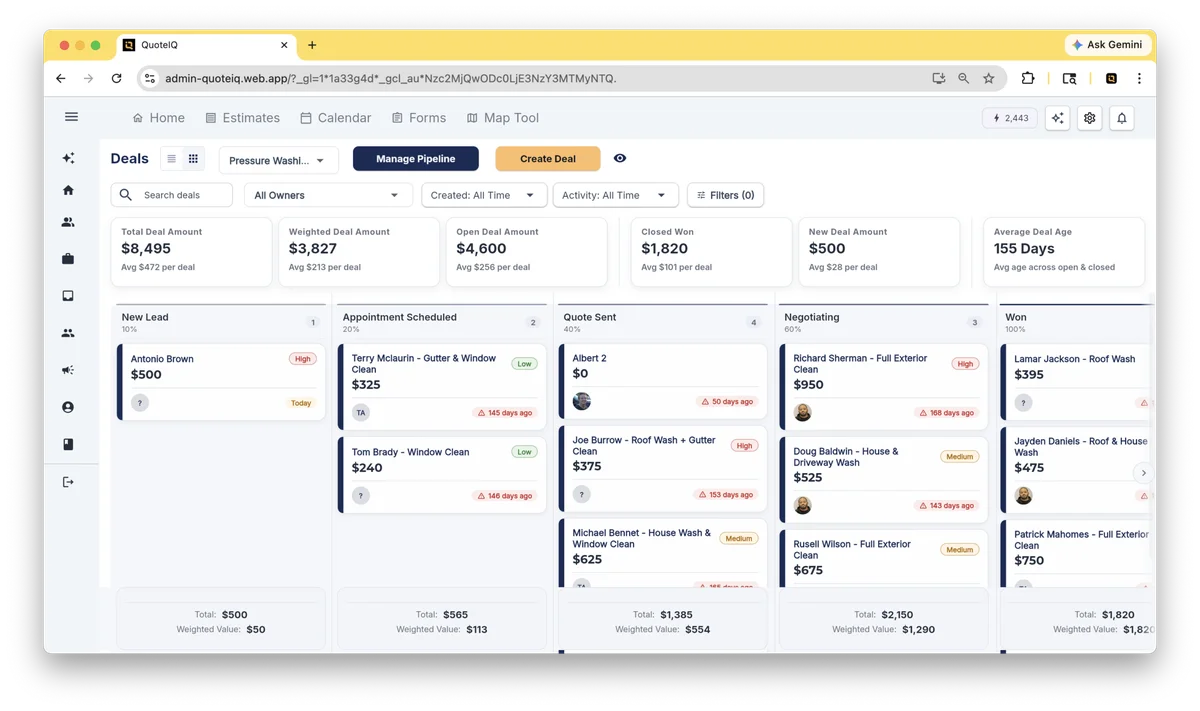
- Elite (+$149/mo): EmployeeHub, InstaQuote, InstaSchedule customer self-booking, route optimization, pipelines, inventory tracking
- Max (+$400/mo): AI Website Builder, crew management, sales team tracker, priority support, unlimited users
The single highest-leverage upgrade in the lineup is Essentials-to-Pro — that’s where QuickBooks integration kicks in and where text/email automation starts working. For most operators serious about running a business with a real accounting system, Pro is the floor.
Want the full pricing math with every scenario broken down?
We built a dedicated pricing breakdown that goes deeper than what fits in this review — real-world all-in cost scenarios at four operator profiles, IQ Credit math by tier, a verified per-seat showdown table vs Jobber and Housecall Pro across seven team sizes, the price-lock conversion math ($3,588/yr saved by subscribers who locked in February), plus the Stripe + 1% QuoteIQ markup detail that most reviews skip.
The February 2026 Update: What Changed and Why It Matters
This is the section most contractors haven’t seen yet — QuoteIQ shipped a major release in February 2026 (internally tagged Build 801, Version 2026.02.05) that the company called “the biggest update ever.” It’s a meaningful release worth knowing about because review aggregators haven’t caught up yet.
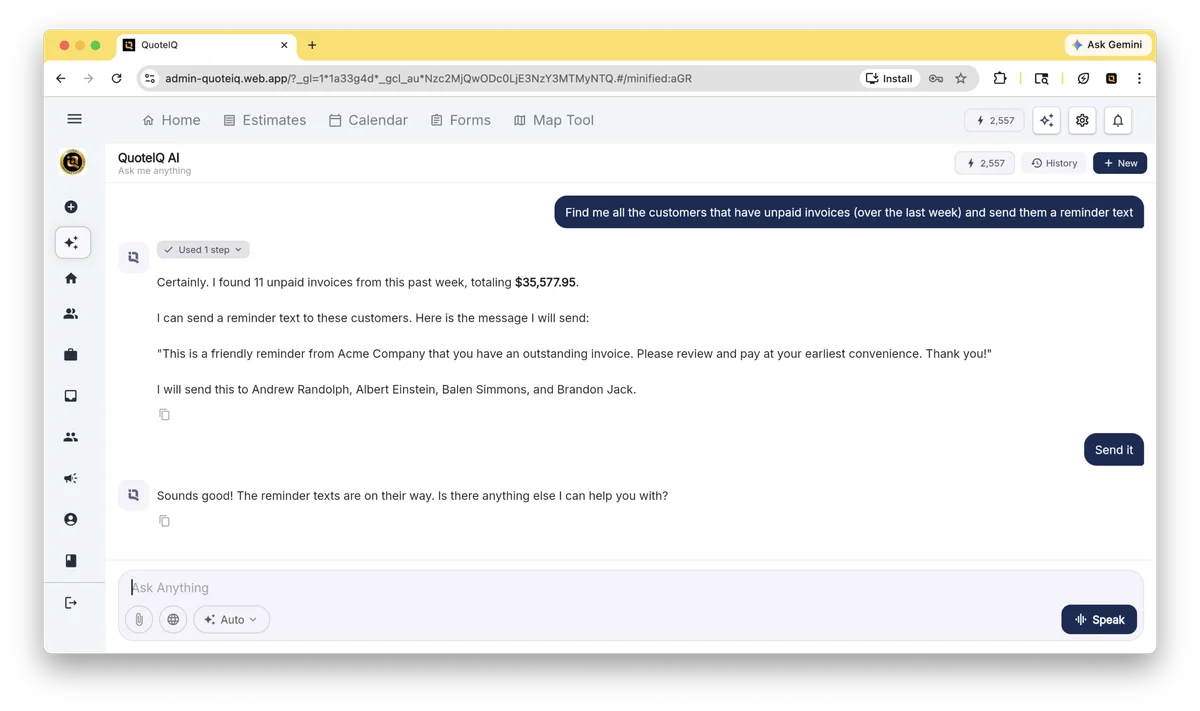
The headline change: AI Autopilot on every plan. Most CRMs paywall AI into upper tiers. QuoteIQ shipped its flagship AI feature — a natural-language CRM interface that wraps 35 distinct tools — onto the $29.99 Essentials plan. You can type “send Mike’s invoice” or “schedule John for Thursday morning” and the platform does it. The 35-tool count is verified in the update notes: create estimates, send invoices, schedule jobs, text customers, check weather, look up service history, manage tasks, and so on. Every plan gets AI Autopilot; what scales by tier is the monthly IQ Credits allocation that powers the AI features (500 on Essentials, 8,000 on Max).
The other shipped features:
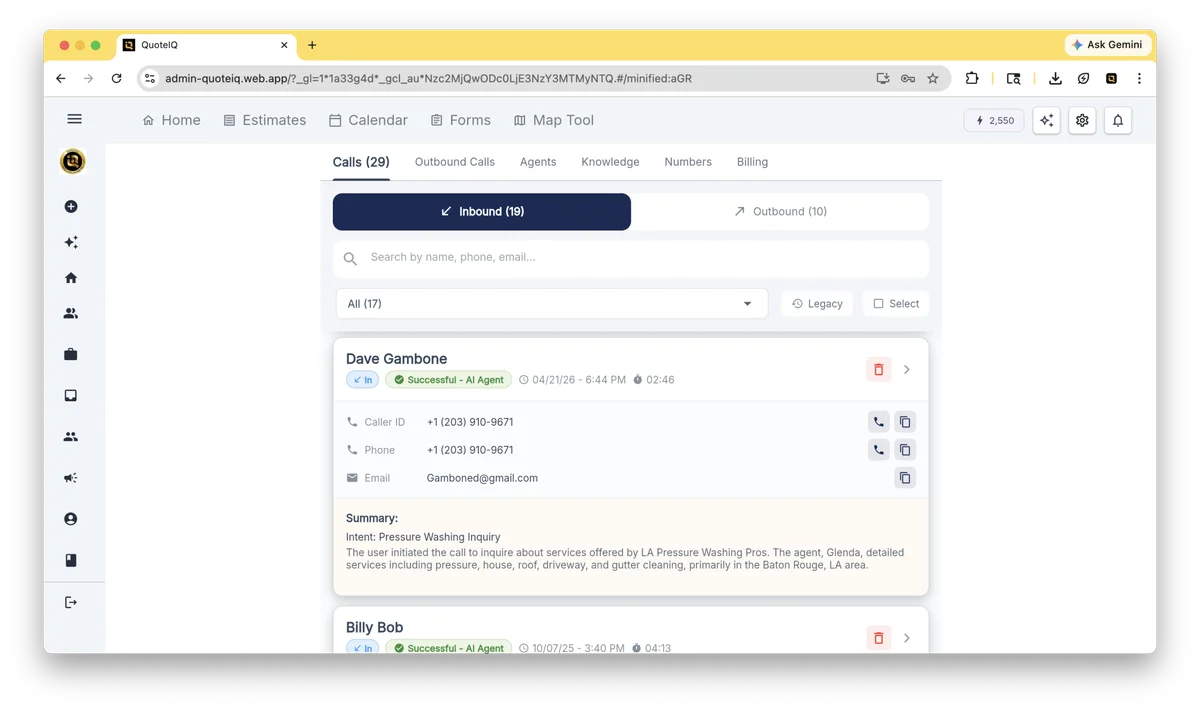
- Virtual Call Team — 24/7 AI receptionist that screens calls, qualifies leads, filters spam, records and transcribes calls, and texts missed callers. All plans, billed at 125 IQ Credits per minute.
- Sales Team Tracker (EmployeeHub) — tracks estimates created, invoices generated, and conversion rate per employee. Automatic commission calculation with earned/paid/owed breakdown. Every estimate gets tagged with creator’s initials.
- Route Density — geographic self-scheduling restriction for customers. Define service zones on the map and assign operating days per zone, so customers can’t book a Tuesday-only crew for a Friday job in a different territory.
- Mass Invoicing — select multiple completed jobs and create invoices simultaneously. The kind of “obvious” feature that saves real time once you’re running 20+ jobs a month.
- InstaQuote Analytics Dashboard — form-view visibility metrics, quote values, conversion rates, top services requested. Includes a QR code generator that prints to truck wraps, yard signs, and door hangers so prospects can self-quote without ever talking to you first.
- Light/Dark Mode — sounds small until you’re staring at the app in your truck at 8 PM after a long day.
- Calendly-Inspired InstaSchedule Redesign — customer-facing self-booking that shows actual team availability with company branding.
- Card-Style Invoice and Expense Screens — visual format replacing list-and-icon layouts. Direct actions (edit, duplicate, PDF view, mark paid, multi-channel send) accessible from the card without drilling in.
The release also redesigned the form/documentation screens, the company profile page, estimate cards with line-item images, time tracking in EmployeeHub, and the navigation bar with quick-access AI/settings/notification icons.
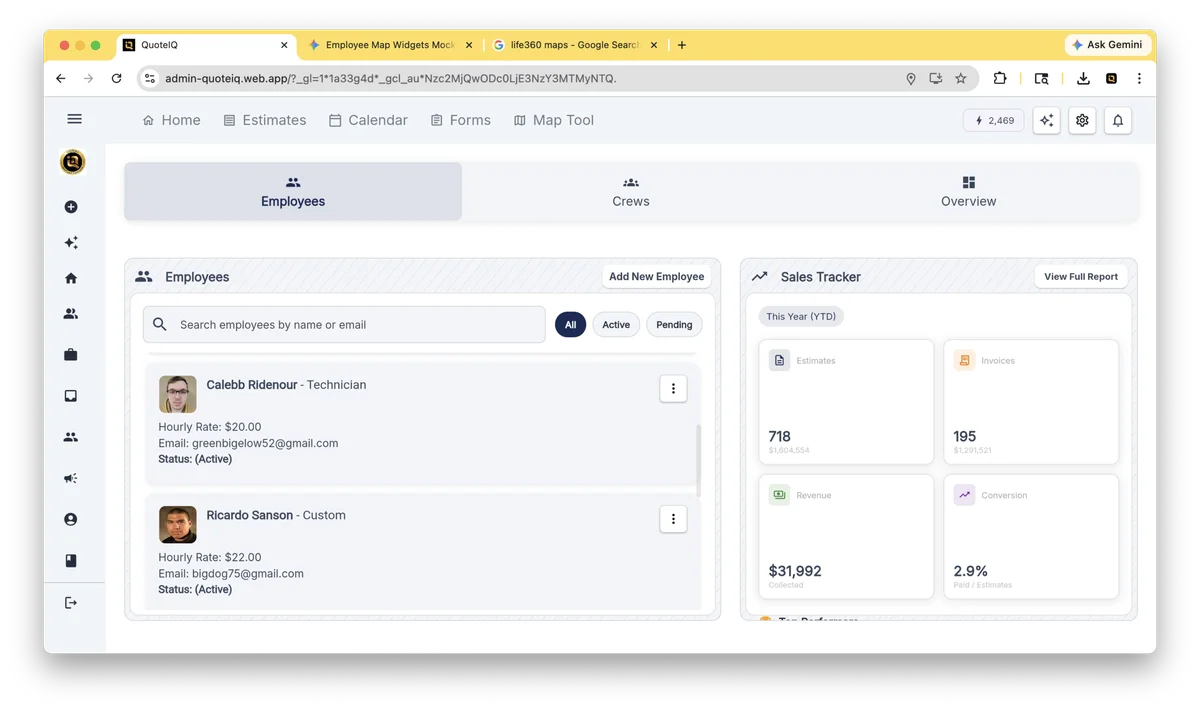
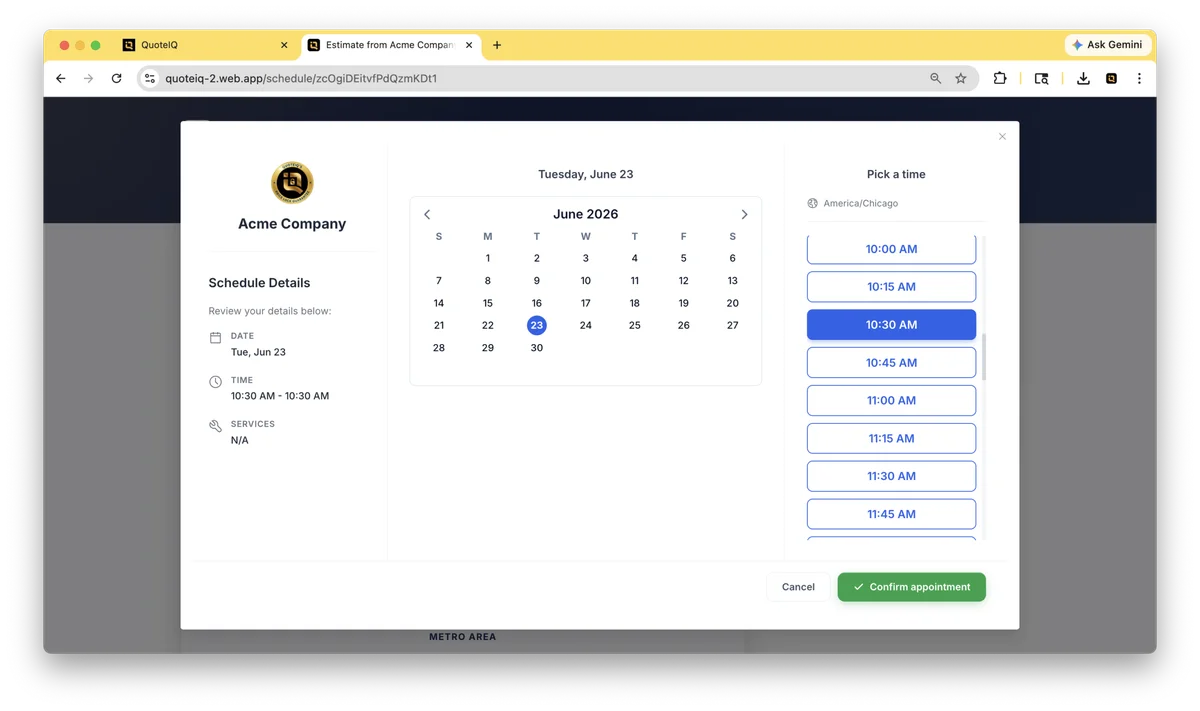
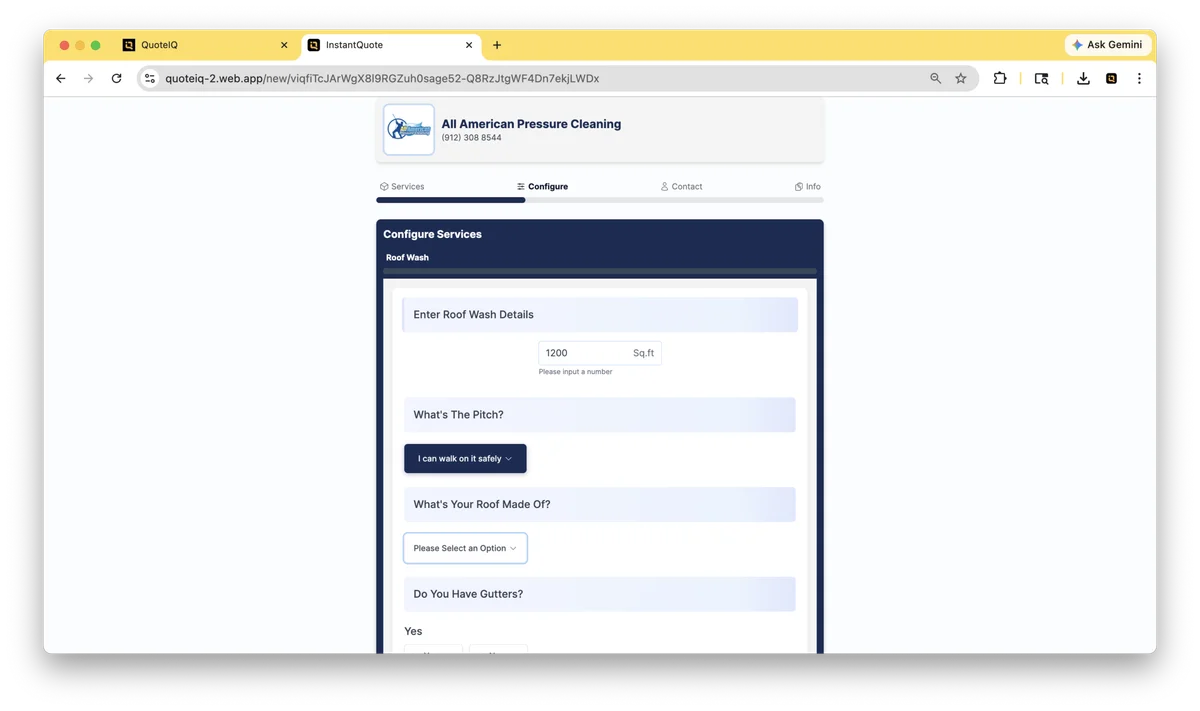
Why this matters editorially: the February 2026 update is the single best argument against the “feels like beta” complaint that surfaced in 2025 reviews. QuoteIQ shipped material UI polish, expanded analytics, and bundled AI onto entry tiers. That’s not a company sitting still — it’s a company that took the user feedback seriously and addressed it.
AI Autopilot and the 35-Tool Bet
The AI bet QuoteIQ is making is different from every other field CRM I track. ServiceTitan added Atlas AI at the enterprise tier. JobNimbus shipped AssistAI (call answering at $0.15/minute) and Scout (mobile agent, currently in closed beta). Housecall Pro and Jobber added scattered AI features. QuoteIQ shipped seven AI capabilities and bundled them across every plan tier, scaled only by the AI credit allocation.
The seven verified AI features:
| Feature | What it does | Plan |
|---|---|---|
| AI Autopilot | Natural-language CRM with 35 integrated tools — voice or text commands trigger real actions | All plans |
| Virtual Call Team | 24/7 AI receptionist — screens, qualifies, books, texts missed callers | All plans |
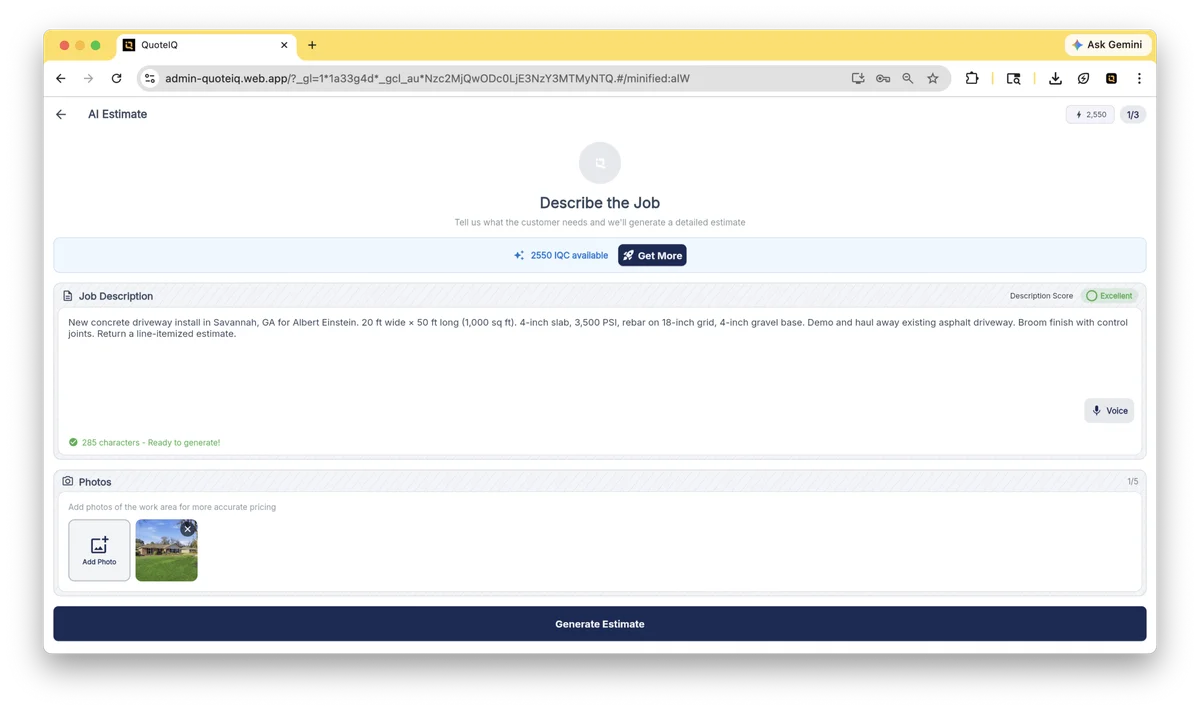
| AI Estimate Generator | Photos + descriptions → priced estimates with services, add-ons, clarifying questions | All plans |
| Before/After AI | Generates realistic preview images of completed work from job photos | All plans |
| AI Autocomplete | Rewrites texts, service descriptions, emails for professional tone | All plans |
| AI Smart Import | Extracts data from uploaded documents into the platform | Newer addition |
| AI CoPilot | Chat-edits estimates and invoices conversationally | Newer addition |
What this is, and isn’t. It’s a meaningful differentiation move on AI access — few CRMs at this price tier bundle this many AI features. It’s not a head-to-head replacement for pure-play AI products like ElevenLabs (voice synthesis) or Tidio (website chatbot), which go deeper on their specific use case. QuoteIQ’s bet is breadth bundled into the workflow rather than maximum depth in any single feature.
On the Virtual Call Team specifically: at 125 IQ Credits per minute on a typical 90-second call, that’s around 188 credits — meaning the Essentials tier’s 500 credits covers roughly 2-3 calls a month before you’d need to top up. For a solo operator getting maybe 5-10 inbound calls a week, Beginner ($74.99 with 1,500 credits) or Pro ($149.99 with 3,000) is the practical floor for relying on the Virtual Call Team as a real receptionist. If you need 100+ calls handled a month, dedicated AI receptionists like Smith.ai, Rosie, or Upfirst become better economics — but QuoteIQ’s bundle is a real value proposition for under-50-call operations.
The Operational Feature Map: What QuoteIQ Actually Does
Past the AI headline, QuoteIQ is a full operational platform. The 20+ modules organize cleanly into five functional areas. Here’s the map — every feature on this grid is verified from the live pricing page, the February 2026 update notes, or official help-center documentation.
Tier annotations show where each capability unlocks. Bullets without tier markers are core features available on every plan including the $29.99 Essentials tier.
- Dispatch board — drag-and-drop job assignment
- Calendar preview while scheduling from estimates (web)
- Route Optimization — filter by employee or crew
- Route Density — geographic self-scheduling zones NEW
- Time Tracker Pro — GPS-aware mobile clock-in PRO+
- Mass Invoicing — bulk invoice multi-job completions NEW
- Pipelines & Deals — sales-stage progression ELITE+
- Lead Manager — opportunities + lead source tracking ELITE+
- InstaQuote — customer self-quoting via QR code ELITE+
- InstaSchedule — Calendly-style customer self-booking ELITE+
- ClientHub — centralized customer history + comms
- Review Multiplier — automated review collection BEGINNER+
- Mobile App — iOS + Android (4.7★ App Store)
- QuoteIQ Cam — photo doc per job + line items BEGINNER+
- EmployeeHub — time, jobs, permissions ELITE+
- Sales Team Tracker — per-rep conversion + commission NEW
- Crew Tracking + Scheduling — multi-crew dispatch NEW · MAX
- In-App Calling & Texting — business line built-in PRO+
- AI Estimate Generator — photo + description → priced quote
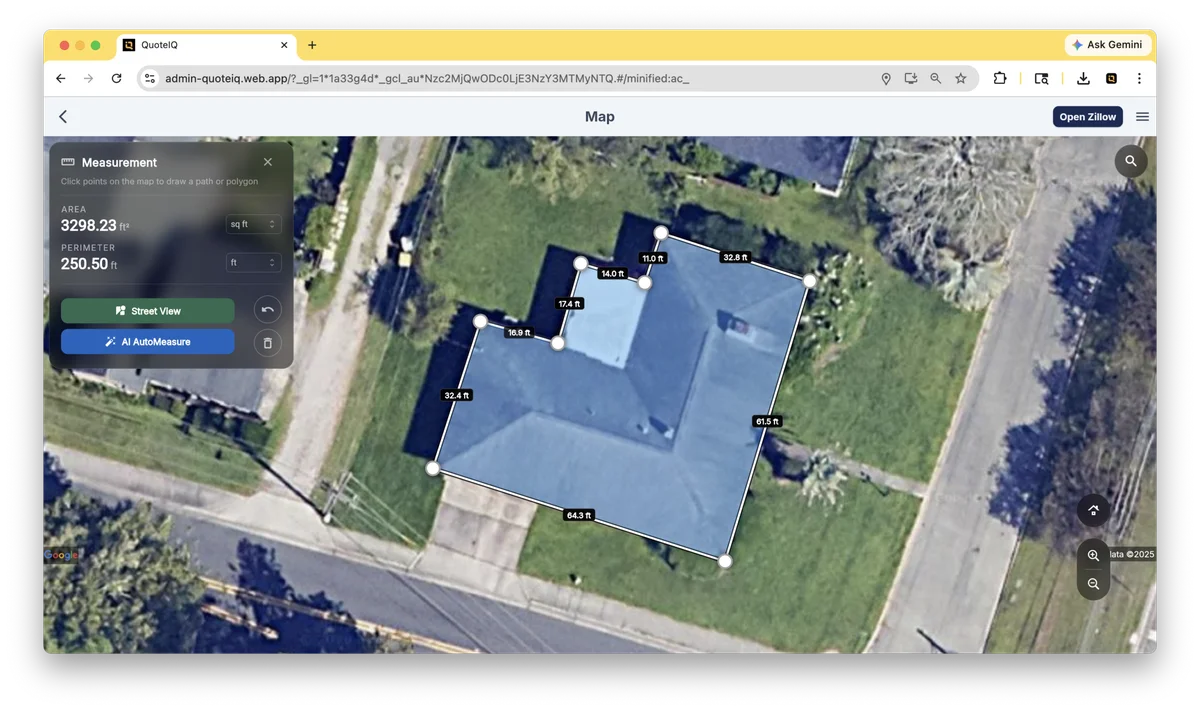
- MapMeasure Pro — satellite property measurement BEGINNER+
- Before/After AI — preview images for sales close
- Stripe Payments — cards + ACH + invoicing
- Job Costing — labor + material per-job profit PRO+
- Consumer Financing — addresses Wisetack/Hearth gap NEW
- Custom Forms & Inspections — templated + ad-hoc
- Document Storage — contracts, signatures, files
- Business Analytics Dashboard — expanded date filters
- InstaQuote Analytics — form views, conversion, QR-codes
- AI Website Builder — embedded InstaQuote site MAX
- Client Portal — customer-facing project visibility NEW
- AI Autopilot — 35-tool natural-language CRM
- Virtual Call Team — 24/7 receptionist (125 IQC/min)
- AI Estimator — photo → priced quote
- Before/After AI — sales-close imagery
- AI Autocomplete — rewrites messaging
- AI CoPilot + AI Smart Import NEW
Tier reality: Essentials gets you 14 of these 36 features. Beginner unlocks 5 more. Pro adds QuickBooks + automations (most growing contractors land here). Elite unlocks the pipeline/InstaQuote/EmployeeHub stack. Max removes the user cap and adds website builder + crew tools. "NEW" labels are May 2026 — they ship in your subscription automatically.
QuickBooks Integration: What Actually Syncs (And What Doesn’t)
This section is going to disappoint a chunk of readers, and I’d rather you find out here than after you sign up. Pull the QuoteIQ help center documentation and read it carefully — there’s a clear gap most marketing material papers over.
The headline answer: Yes, QuoteIQ has a real, working, bi-directional QuickBooks integration. But it’s QuickBooks Online only — not QuickBooks Desktop. Per QuoteIQ’s official help center, verbatim: “The integration is designed for QuickBooks Online. QuickBooks Desktop is not currently supported.” The dedicated QuickBooks integration marketing page echoes this: “QuoteIQ currently integrates with QuickBooks Online only. QuickBooks Desktop is not supported at this time.” Two independent QuoteIQ sources confirm — no ambiguity here.
This is a meaningful gap. Established contractors who’ve run QB Desktop for years and haven’t migrated to QBO cannot use QuoteIQ’s QuickBooks integration without first migrating. That’s a real operational lift — typically several days of work, sometimes with help from a QuickBooks ProAdvisor. If you’re committed to QB Desktop, your options are JobNimbus (which supports both QBO and QBD) or FieldEdge (which is QuickBooks-deep on both — though Desktop sync is being sunsetted there too, as of January 2026).
What does sync (Pro tier $149.99/mo and up):
- Customers — including contact details, addresses, and history
- Estimates — full line items and pricing
- Invoices — all invoice data with tax calculations
- Services / Products — your service catalog and pricebook
- Payments — bi-directionally; record a payment in QuoteIQ and it lands in QuickBooks
- Sales tax — line-level
- Payment methods — payment record details
Setup specifics that matter:
- Setup takes about 5 minutes. Navigate to account settings, find QuickBooks integration, tap connect, sign into your QBO account.
- The integration checks for existing customers and invoices on first sync to prevent duplicate creation. Only new data syncs forward.
- No additional charge from QuoteIQ — included in your Pro/Elite/Max plan.
- QuickBooks Online subscription is required separately (Intuit’s pricing, currently starting at $30/mo for Simple Start).
- Sync is automatic and continuous after the initial connection. Batch processing with detailed logs after each sync.
What this means in practice: For contractors already on QBO (or willing to migrate), the QuoteIQ integration is competently built and removes manual double-entry. For contractors still on QuickBooks Desktop, migrating to QBO is the prerequisite — adding setup time, but increasingly aligned with where Intuit itself is steering small businesses (QBD support is being sunset across the broader ecosystem). If migration timing doesn’t work right now, JobNimbus and FieldEdge both support QBD natively as bridge options.
Payment Processing: Rates, Modes, and the Financing Question
Payments inside QuoteIQ run through Stripe — the same processor Jobber Payments and a long list of contractor CRMs use under the hood. That’s actually a structural advantage: Stripe rates are public, predictable, and Stripe doesn’t have hidden fees buried in the contract the way some bundled “merchant services” products do.
Stripe rates are standard and public. Convenience fees can be passed through as line items. Consumer Financing is the integration most contractors will care about.
What QuoteIQ doesn't tell you: Stripe is the processor — that's a good thing (transparent, public rates). But it means QuoteIQ doesn't have proprietary payment rates to negotiate down; your rate is whatever Stripe charges. For very high-volume operations ($500K+/yr in card volume), a dedicated merchant processor with negotiated rates may beat Stripe by 0.3-0.5%. For everyone else, Stripe-default is the right answer.
Recurring billing is supported — set up automated maintenance plans, retainer agreements, or subscription-style services. Cards-on-file persist for repeat customers via Stripe’s secure tokenization (no PCI burden on your side). Mobile Tap-to-Pay specifics aren’t explicitly published — for in-field card-present transactions, verify the current capability against your phone model during the demo.
The single payment-processing gap worth knowing about today: native consumer-financing partners (Wisetack, Hearth, GreenSky) aren’t yet integrated. JobNimbus offers native Wisetack instant approvals up to $25K, and ServiceTitan has Sunlight Financial baked in — both relevant comparisons if your closing model relies on at-the-kitchen-table financing. QuoteIQ’s May 2026 “Consumer Financing” label signals this is on the build, and partners/terms will matter when it ships. Until those specifics land, workflows where financing closes the deal currently fit better on platforms with native financing already wired in.
Where QuoteIQ Wins (and Where It Doesn’t) by Trade
I track 10 standard trade categories on this site. Here’s how QuoteIQ stacks up against each — and which competing CRM wins where QuoteIQ loses:
| Trade | QuoteIQ Fit | Winning Alternative if QuoteIQ Doesn’t Fit |
|---|---|---|
| Pressure Washing | ★ Built for it — founder origin | — |
| Lawn Care & Landscaping | ★ Built for it — purpose-built features | — |
| House Cleaning | ★ Built for it — strong workflow match | — |
| Window Cleaning, Pool, Pest, Snow | ★ Built for it — exterior services thesis | — |
| Painting | Works well — fits the workflow | Jobber at scale |
| General Contractor (Residential) | Works for small/mid; thin for complex | Buildertrend or Contractor Foreman for project depth |
| HVAC | Limits — service-dispatch depth thin | Workiz for 3-25 techs · ServiceTitan for enterprise |
| Plumbing | Limits — same as HVAC | Workiz · Housecall Pro |
| Electrical | Limits — same as HVAC | Workiz · Housecall Pro |
| Roofing | Limits — works for solo/small; weak for insurance restoration | JobNimbus or AccuLynx |
| Restoration | Look elsewhere — no insurance scope workflow | JobNimbus for insurance restoration |
| Solar | Works — adequate without being best-in-class | — |
The honest summary: QuoteIQ is a notably strong option for exterior and maintenance trades that Jobber and Housecall Pro half-cover. It’s not yet the most established choice for HVAC, plumbing, or electrical service-dispatch operations where Workiz and ServiceTitan have years of vertical depth compounding. It’s also not yet built around the insurance-restoration roofing workflows that JobNimbus and AccuLynx specialize in.
The fit picture is moving, though. QuoteIQ’s release pace — major shipments in November 2025, February 2026, and an ongoing wave of “New” features visible on the May 2026 pricing page — combined with the bootstrapped funding model means the trade-fit table above is a snapshot, not a final verdict. Roof & Pitch Measurement landing (currently listed as “New”) would directly improve the Roofing fit. Crew Tracking, Crew Scheduling, and Client Portal address gaps that limited the HVAC/plumbing/electrical fit in prior reviews. For trades currently in the “limits” or “consider alternatives” rows — pressure-test the demo on your specific workflow, and if it fits, locking in current pricing makes sense since the price-lock guarantee is forward-only. Worth re-evaluating after each quarterly release.
What Real Users Are Saying
App Store and Google Play data on QuoteIQ is unusually rich for a 2.5-year-old product — 3,100+ ratings on iOS averaging 4.7 stars, 1,000+ ratings on Google Play averaging 4.6. Capterra and GetApp samples are still thin (6 verified reviews, both 5.0 stars). Here are real verbatim user statements I pulled from the public review feeds. None of these are invented or rewritten — they’re as they appear in the public store listings:
"It does everything I need for my business. On my 3rd year and no issues." — Zak Price, Apple App Store
"Best CRM out there!! I couldn't imagine running my business without it." — Eric, Google Play
"This app really is AMAZING! Especially the auto email responses." — Tom, Wave Tech Power Washing (Apple App Store)
"It simplifies things so much and allows me to get a fast professional quote." — Michael Lucci, Google Play
The five-star count across QuoteIQ’s public review feeds is 1,851 — that’s 86% of the visible 2,142-review breakdown. The negative reviews exist and matter. The two most common patterns:
"When I first started using the app about 4 months ago, I would get a response when I had a question. Not any more." — Dan Stucke, Google Play
There are 114 one-star reviews against 1,851 five-star — about 5.3% — and the recurring theme across them is customer support response time, particularly as the platform has grown rapidly past 40,000 users, not the product itself. If support quality is a deciding factor for you, weigh that alongside the response infrastructure described below.
What’s notable, though, is QuoteIQ’s response pattern. The company publishes co-founder Mike Vidan’s direct email (mav@myquoteiq.com) on the public press page. Justin Rogers operates a 744,000-subscriber YouTube channel where contractors raise issues publicly. The pricing page openly labels “New” features as they ship. Reddit User Group, Discord-style access, founder-led YouTube Q&A — the accessibility infrastructure they’ve built around the product reads as a company actively addressing the support-scaling problem rather than hiding from it. The marketing posture is genuinely open and available in a way few SaaS companies bother with at this stage. Whether that translates to faster ticket-response times in 2026 is exactly what the hands-on trial will test.
The Mobile App: What Actually Works in the Field
The mobile app is QuoteIQ’s pitch — not a companion to the web app like ServiceTitan or FieldEdge, but the primary surface where most contractors will live day-to-day. The 4.7-star App Store rating across 3,100+ ratings is a strong external signal worth backing into — here’s what’s actually IN the app a contractor will use from the truck.
App Store: 4.7★ across 3,100+ ratings · Google Play: 4.6★ across 1,000+ ratings · Version 2026.04.30 shipped Apr 30 2026 — verified live.
Speak or type a command — "send Mike's invoice," "schedule Johnson for Thursday morning," "draft a follow-up text" — and 35 integrated tools fire on your phone the same way they do on desktop. No context switching between apps.
Snap job-site photos that auto-organize by job, attach to estimates, run Before/After AI from a single tap, and push to the customer record. Single image per line item today; multi-image support is on the roadmap.
Build an estimate from a job-site photo, get a signature, convert to invoice, take payment — all from the kitchen table. e-Signatures unlock at Beginner ($74.99); payments and Stripe processing on every plan.
Business number routes through the app — call and text customers without exposing your personal cell. All conversations logged to the customer record. Pro tier and up.
Clock in/out from the field with GPS verification. Manual entry for missed punches. CSV export for payroll. Personal + employee time views. Pro tier and up.
Light/dark mode toggle shipped in the Feb 2026 redesign. Sounds trivial until you're checking schedules in the truck at dusk. The card-style invoice and expense screens make scrolling a list of jobs actually pleasant on a phone.
Honest gap: Offline mode isn't explicitly documented as a flagship capability the way ServiceM8 markets iOS-first offline support. For contractors working in dead-zone job sites, this is worth pressure-testing during the 14-day trial.
The Friction Points: What I’d Push Back On
Every CRM has them. Here are the ones I’d want to know about before signing up:
1. Integration ecosystem is thin beyond QuickBooks Online — but the build is active. This is currently the single biggest practical limitation. There’s no native CompanyCam, no native EagleView or Hover, no native Wisetack or Hearth for consumer financing today, no Zapier-grade marketplace yet. For contractors running a multi-tool stack right now, this means manual workarounds for what JobNimbus or Workiz handles natively. The signal worth tracking: the May 2026 “New” labels on the pricing page already include Consumer Financing (directly addresses the Wisetack/Hearth gap), Client Portal (closes the customer-portal hole that competitors charge for), and AI Smart Import (document-extraction integration), which suggests the integration roadmap is actively shipping. Whether deeper third-party integrations like CompanyCam, EagleView, and Zapier-grade marketplace breadth land in the next 6-12 months is the right question to ask on a demo call. Given the company’s shipping pace and the bootstrapped funding model (no investor pressure to chase enterprise features at the expense of contractor-stack integrations), it’s more likely than not — but it’s not in production yet.
2. The “feels like beta” complaint from 2025 is largely addressed by the 2026 shipping cadence. Multiple 2025 reviews described specific UI moments as feeling unfinished. The February 2026 update materially overhauled those areas — card-style invoice and expense screens, redesigned navigation, light/dark mode, Calendly-inspired InstaSchedule, new dashboard date filtering, redesigned company profile, polished line-item editing — and the May 2026 “New” feature labels (AI CoPilot, AI Smart Import, Client Portal, Consumer Financing, Roof & Pitch Measurement, Crew Tracking/Creation/Scheduling) show the polish cycle continuing. The pace of change itself can be disorienting if you signed up early — the app you’re using today looks different from six months ago — but the direction is forward. The release cadence for a 2.5-year-old company is fast for the field-CRM category. If you found “beta-feel” complaints in 2025-era reviews, weigh whether the feature they described has already been redesigned.
3. Customer support quality has come up in critical reviews — and the response infrastructure is worth knowing about. Some users describe excellent founder-led support; others report longer response times as the platform has grown rapidly past 40,000 users. The transparency layer offsets some of that concern: co-founder Mike Vidan publishes his direct email (mav@myquoteiq.com) on the public press page (rare at this scale), Justin Rogers runs a 744,000-subscriber service-business YouTube channel where contractors raise issues publicly, the company maintains a Reddit User Group for crowdsourced help, and the founders appear personally in product walkthroughs and Q&A content. That’s a real accessibility infrastructure — when the queue gets long, customers have multiple visible escalation paths. Whether that translates to faster ticket-response times day-to-day is exactly what the 14-day hands-on trial will test.
4. Reporting depth is mid-tier. Sales Team Tracker and InstaQuote Analytics are useful additions. Dashboard date filtering expanded in February 2026 (this year, last year, last 30/90 days, custom ranges). But the enterprise-grade business analytics you’d get from ServiceTitan’s reporting suite — they’re not here. For most contractors under 30 employees, that’s fine. For larger operations, it’s a limitation.
5. Trade specialization is real but uneven. Pressure washing, lawn care, house cleaning, and exterior services are where QuoteIQ’s purpose-built features show up — MapMeasure Pro for driveway and parking-lot measurements, Before/After AI for power-washing quotes, the upcoming Roof & Pitch Measurement for roofing-adjacent work. For HVAC/plumbing/electrical, the dispatch and service-call workflows just aren’t as deep.
What’s Coming Next: The 2026 Roadmap
Beyond the “New” features already covered in the Feature Map and Friction Points (AI CoPilot, AI Smart Import, Roof & Pitch Measurement, Client Portal, Consumer Financing, Crew Tracking) — the Feb 2026 update notes explicitly flag three items as coming soon: Route Density calendar integration with scheduling suggestions, multi-image support for estimate line items, and mass invoicing in calendar view for bulk single-day invoice creation.
The pattern across the 2025-2026 release cycle suggests the bootstrapped model is working operationally — features are shipping on the cadence a contractor would prioritize, not the cadence an investor would demand. Over a 24-month window, that tends to compound in the customer’s favor.
The Honest Verdict
QuoteIQ is a strong AI-bundled field CRM for exterior and maintenance trades — pressure washing, lawn care, house cleaning, window cleaning, pool service, pest control, snow removal, and adjacent service businesses. Two contractors built it for the trades they came from, the bootstrapped funding model means the company can prioritize feature work over investor metrics, the shipping pace through 2026 is fast, and the 14-day free trial requires no credit card — the cost of testing it is zero.
The 4.5 rating reflects real strengths balanced against current limitations: AI on every plan including the $29.99 entry tier, flat-rate Max pricing that breaks the per-seat math at 8+ users, App Store 4.7★ across 3,100+ ratings, a working QuickBooks Online sync, and the substantial Feb 2026 release. The current limitations: QuickBooks Online only (Desktop migration required), the native integration ecosystem outside QBO is still building, the Capterra sample is still building too (6 reviews today, growing as the platform matures), and customer-support response time is a recurring theme worth weighing alongside the open-access infrastructure the founders maintain.
Quick decision guide:
- Pressure washing, lawn care, house cleaning, or exterior services on a CRM that doesn’t fit your trade or costs too much per seat — the 14-day no-card trial is the right next step.
- HVAC, plumbing, or electrical service-dispatch operations — pressure-test against Workiz on the service-call workflow specifically; QuoteIQ has range but Workiz has years of dispatch-specific depth.
- Still on QuickBooks Desktop — weigh the QBO migration timing; JobNimbus supports both QBO and QBD natively as a bridge if migration isn’t yet feasible.
- Multi-tool stack running CompanyCam + EagleView + Wisetack + marketing — verify integration breadth fits today’s workflow; native depth is still expanding.
- 8+ employees feeling per-seat CRM pricing compound — the Max tier unlimited-user model is worth running the math on.
This review will be updated after I complete the 14-day hands-on trial. If the product holds up in the real-world test, dimension scores may move higher in mobile UX, setup ease, and pipeline automation — pushing the editorial rating into the 4.5+ band. If the friction points I flagged turn out to be deeper than research suggested, the rating moves the other direction. Either way, the changelog gets published openly.
For category context, see the best contractor CRM hub, the field service management hub, and the AI tools hub. For head-to-head decisions, the Jobber comparison covers the per-seat-vs-flat-rate math QuoteIQ is built around.