


There’s a question every commercial GC and specialty subcontractor evaluating field-first construction PM platforms eventually lands on: which app will the foreman actually open on the tablet at 6:30am before the crew arrives? Most office-led platforms — including the heavyweight Procore — have rich desktop workflows that the project manager loves and the field crew avoids. Fieldwire is built the other way around: mobile-first from 2013, designed for the iPad in the field rather than the screen in the trailer, and the operational result shows up in the 4.6/5 across 97 verified Capterra reviews with 92% positive sentiment.
The 2026 strategic story for Fieldwire is two-fold. First, the Hilti acquisition closed November 2021 for approximately $300 million — Hilti’s largest acquisition to date and the moat against the SaaS-startup-disappearance risk that plagues construction technology. Second, Field Intelligence™ AI shipping rapidly through 2025-2026 — photo tagging that auto-categorizes uploaded photos by discipline launched October 14, 2025; 3D tasks and faster model setup shipped April 7, 2026; natural language search across plans, tasks, photos, and forms; auto-fill weekly reporting forms; and cross-project reporting that surfaces reliable subcontractors versus ones who consistently fall behind.
What this review covers: how Fieldwire’s free tier actually works for solo and small-crew operations, what the four-tier pricing structure ($39/$64/$89 per user/month) unlocks at each step, why the tablet-first design is the moat that competitors can’t quickly replicate, the Field Intelligence AI roadmap and what’s shipping versus beta, the Hilti backing and what it means for long-term platform reliability, the integration ecosystem reality (DocuSign, Smartsheet, Microsoft Project, Track3D plus Open API — meaningfully smaller than Procore’s 9 native ERPs), what 97 verified Capterra reviewers actually say in their own words, dimension-by-dimension scoring across project management primary and scheduling secondary categories, and which contractor profiles the platform fits versus the ones who should pick Procore, Buildertrend, JobNimbus, or Jobber instead.
“Fieldwire is best at: Creating markups on Plan, document management, assigning task, linking task to the drawing and also tracking a progress.”
— Bishnu A., Project Engineer, on Capterra
The Free Tier That Genuinely Runs a Project
Pricing is the entry point most contractors evaluating Fieldwire start with — and the free tier is the headline feature that pulls solo and small-crew operations into the platform without a sales conversation. Unlike Procore’s ACV-based opaque custom quotes or Buildertrend’s demo-gated $339-$829/month tiers, Fieldwire publishes four transparent pricing tiers on fieldwire.com/pricing with no sales gating, and the free tier requires no credit card.
All prices verified against fieldwire.com/pricing in April 2026, billed annually. No credit card required for free tier. Field Intelligence AI gated to Business tier and above. RFIs, submittals, change orders, and budget management gated to Business Plus.
- →5 users · 3 projects · 100 sheets
- →Plan viewing, task management, specs, files, photos, checklists
- →Mobile app on iOS and Android · Voice dictation
- →Unlimited projects + sheets
- →Reports/exports, sheet compare, project templates
- →Custom task statuses
- →Field Intelligence™ AI — photo tagging, NL search, auto-form fill
- →Custom forms · App integrations
- →BIM viewer · 3D coordination
- →RFIs, submittals, change orders
- →Budget management module
- →Custom contracts available with API + SSO
The price-vs-alternatives math: at a 5-person specialty subcontractor on Pro, the math is 5 × $39 × 12 = $2,340/year. At a 10-person GC on Business with AI, the math is 10 × $64 × 12 = $7,680/year. At a 20-person commercial GC on Business Plus with full PM workflow, the math is 20 × $89 × 12 = $21,360/year — meaningfully cheaper than [Procore's](/software/procore/) ACV-based $30K-$80K+/year for $50M-$200M ACV operations, with precise per-user cost predictability that Procore's opaque ACV quotes don't provide.
The free tier is the pull. For a solo specialty contractor — say a finish carpenter or a small electrical sub — the 5-user / 3-project / 100-sheet limit covers the entire daily workflow without any subscription cost. Plan viewing on the tablet, task management with photo attachments, voice-dictated punch lists, document storage — all included. The free tier doesn’t expire, doesn’t downgrade, and doesn’t require a credit card on file. That’s a meaningfully different evaluation experience from Procore’s demo-gated sales process or Buildertrend’s custom pricing conversations.
The tier-jump math gets interesting at the Business tier — that’s where Field Intelligence™ AI unlocks, BIM viewer becomes available, and the integration ecosystem opens up. For a 10-person GC running multi-trade coordination on real commercial work, the $64 per user/month math justifies itself through the AI productivity gain alone (photo tagging, auto-form fill, predictive issue surfacing), independent of the BIM viewer.
The Business Plus tier at $89 per user/month is where the structured commercial PM workflow lands — RFIs, submittals, change orders, budget management. This is the comparison point against Procore, and it’s also where Fieldwire’s per-user model can become more expensive than ACV-based pricing at very large operations. A 100-employee commercial GC on Business Plus is $89 × 100 × 12 = $106,800/year, which exceeds typical Procore ACV pricing for the same operation. The cross-over point is roughly the $50M-$100M ACV / 50-employee mark.
Plan Viewing & Markup — The Foundation That Got Fieldwire to 4.6/5 on Capterra
Plan viewing is Fieldwire’s foundational feature and the dimension that consistently shows up in Capterra reviews as the operational moat. The workflow is straightforward but the execution is meaningfully better than the alternatives: drag-and-drop sheet upload (PDF or image formats), automatic version control across revisions, sheet compare to highlight what changed between revisions, and in-context markup tools (callouts, dimensions, comments, rectangles, text annotations) that work cleanly on iPad and Android tablets in field conditions.
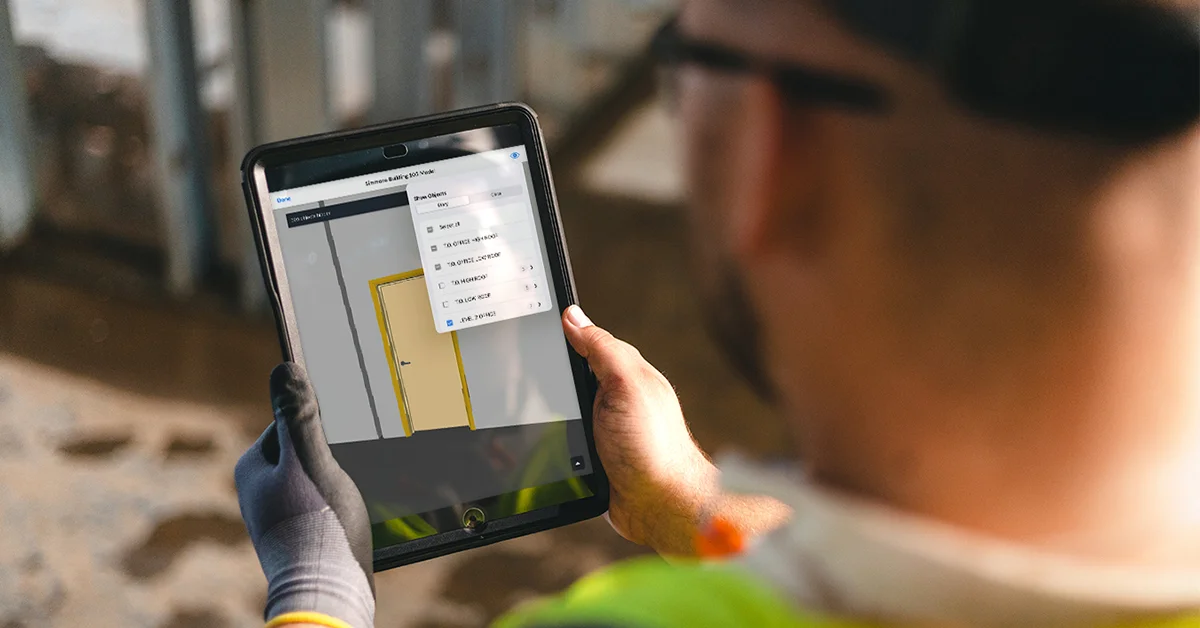
What makes the workflow work at field scale:
Sheet compare across revisions is the feature most reviewers single out. When Architect issues Rev 3 of the floor plans on Tuesday, the foreman opens Fieldwire on the tablet Wednesday morning and sees exactly what changed — highlighted differences, side-by-side comparison, and a clear answer to the recurring “wait, was this dimension always this?” question that drives field rework. For commercial GCs running multi-trade coordination, sheet compare is the difference between catching a revision-driven coordination conflict before the slab pour and discovering it during the punch walk.
In-context markup that survives offline conditions matters specifically for crews working on rural job sites or in basements with weak cell signal. Markups created offline queue and sync when the tablet rejoins the network, and the markup persistence is documented as more reliable than competitors in field conditions. Capterra reviewer feedback consistently flags this resilience as the operational productivity gain that justifies the platform’s cost.
Pin-to-drawing for tasks and issues is the workflow that ties everything together. A task created during a walkthrough pins to the exact drawing location where the issue exists; the photo attachment provides the visual context; the assignee receives the task with the location and photo intact. When the trade arrives the next morning, they tap the pin and see exactly what needs to be addressed. This is the workflow that compresses a 90-minute punch walkthrough into 30 minutes for a single foreman.
Voice dictation for punch list items is the field-productivity feature contractors actually use daily. Speak the punch item into the tablet during the walkthrough, AI handles the transcription, the item gets pinned with photo attachments. The speed difference is the practical reason foremen actually open Fieldwire on the tablet rather than carrying a notebook and re-entering items at the office.
“The whole project collaboration is based on this software considering it links everyone on the Project management team.”
— Bishnu A., Project Engineer, on Capterra
Tasks, Punch Lists, and Voice Dictation in the Field
Tasks and punch lists are Fieldwire’s daily-use workhorse — the feature that makes the platform sticky on the tablet. The architecture is straightforward but the execution is field-shaped: tasks are pinned to drawing locations, attached to photos and documents, assigned to teams or individuals, and tracked through configurable status workflows. The Pro tier adds custom task statuses (configure your own workflow stages beyond the default Open/In Progress/Closed), and the Business tier adds custom forms that route into the task pipeline.
The features that compound for daily use:
Task templates for repeating workflows. Standard punch lists, standard quality inspections, standard safety walkthroughs — defined once as templates, instantiated repeatedly across projects. For a commercial GC running 8-12 active projects with similar punch protocols, the template library compresses setup time meaningfully.
Checklists pinned to drawings. Capterra reviewer Mark W., Owner: “The checklist feature really helps keep things moving. I pin drawings and notes, and it saves a lot of back-and-forth.” Checklists with required-step gating create the structured walkthrough discipline that reduces missed items.
Photo attachments with location metadata. Photos captured during the walkthrough attach to the task or punch item directly, with GPS metadata documenting the field location. This is the same pattern competitors ship — but Fieldwire’s mobile-first design makes the capture-to-attached-task flow a single-tap experience rather than a multi-step workflow.
Real-time sync with the office. Changes made on the tablet land in the office portal immediately; changes made in the office land on the tablet immediately. The sync isn’t queued or batched — it’s real-time bidirectional, which Capterra reviewer Marvin E., Estimator, flagged as the meaningful daily-use benefit: “Everyone is connected, and we are all able to see in real time what is going on in each project.”
What the task workflow doesn’t ship as well: structured RFI submission, submittal review chains with revision tracking, and change-order routing with cost-impact tracking are gated to the Business Plus tier at $89 per user/month. For a 5-person specialty subcontractor on the Pro tier at $39 per user/month, the structured commercial PM document workflow isn’t available — the workflow is task-based rather than RFI-based, which is fine for field-execution but not for full commercial GC document control rigor.
Field Intelligence™: Fieldwire’s AI Pivot in 2025-2026
The 2026 strategic story for Fieldwire is unambiguously Field Intelligence™ — the AI capability layer that started shipping in October 2025 and has continued rolling out features through April 2026. The architecture is meaningfully different from Procore’s Helix + Datagrid (which targets agentic AI across third-party ERPs) and from Buildertrend’s AI Client Updates (which targets residential homeowner communication). Field Intelligence is field-execution-focused — photo organization, jobsite question-answering, and reporting automation — which matches Fieldwire’s tablet-first product shape.
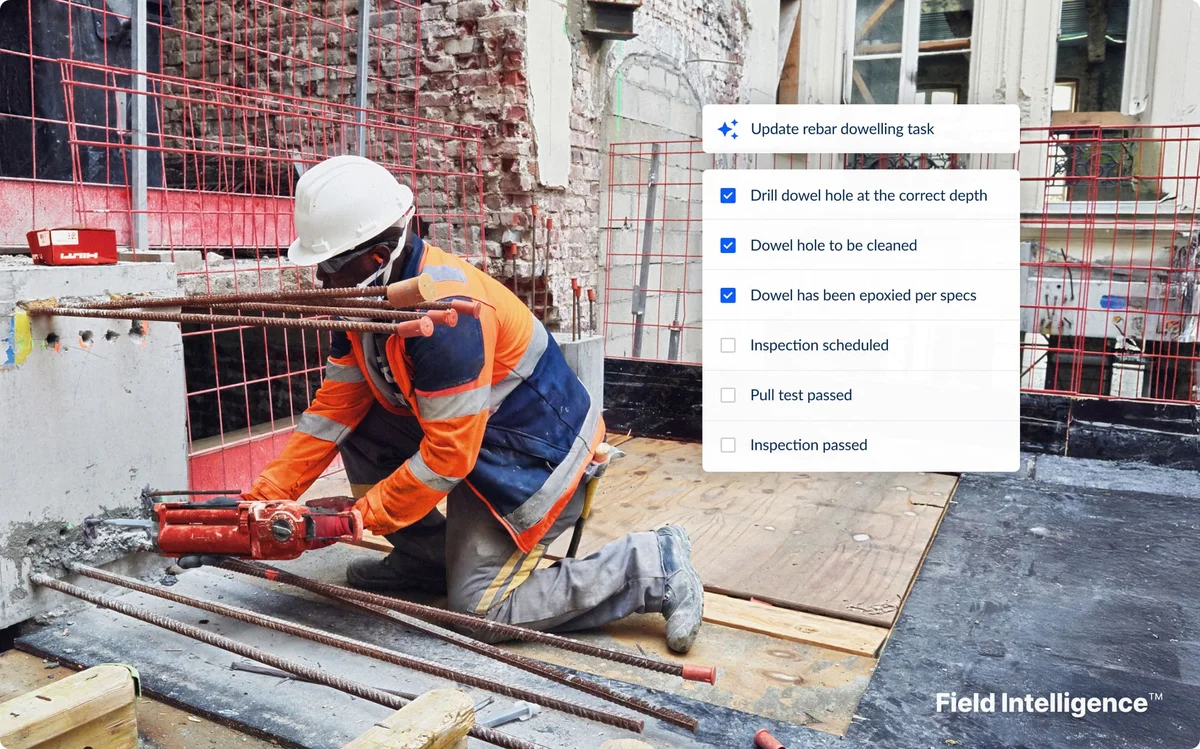
The four core capabilities Fieldwire ships under the Field Intelligence umbrella, each available on the Business tier ($64 per user/month) and Business Plus tier ($89 per user/month):
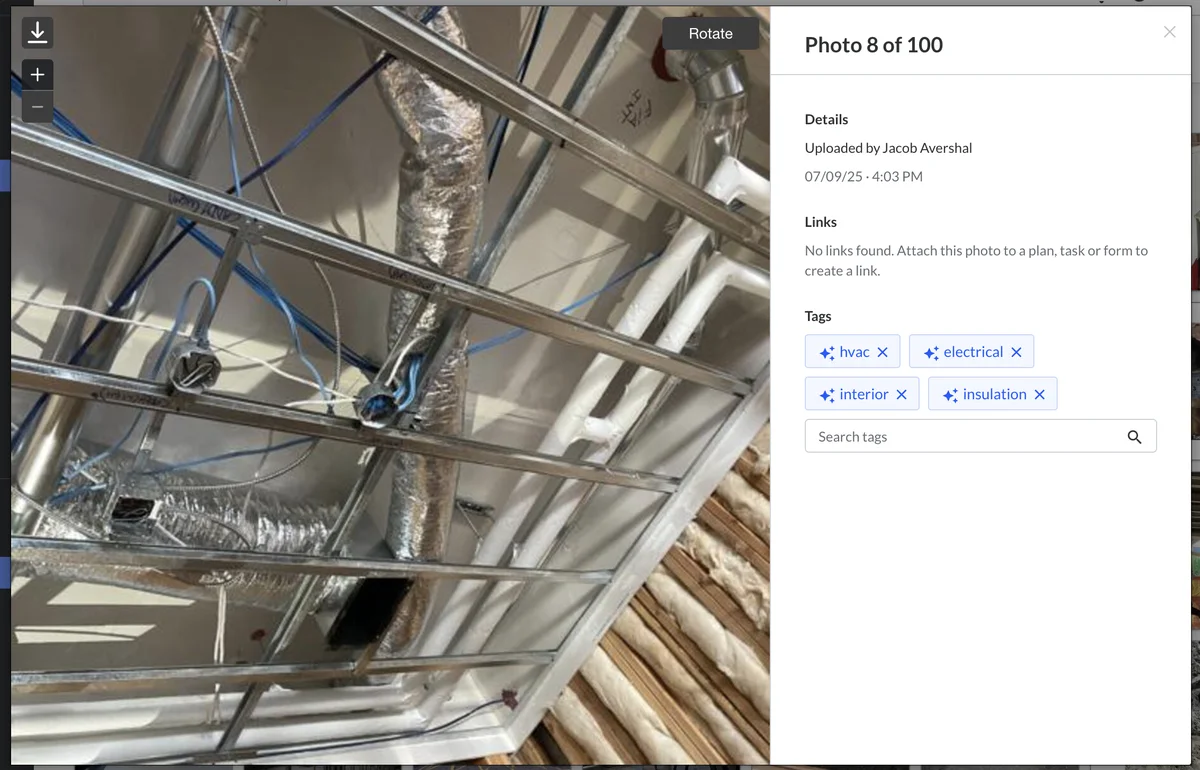
Vision — computer vision over uploaded photos and drawings to surface insights without manual review. The headline shipped feature is AI Photo Tagging, launched October 14, 2025: every new photo uploaded to Fieldwire gets automatically tagged with the relevant discipline (HVAC, electrical, interior, insulation, structural, mechanical, plumbing, finishes), allowing crews to filter and search the photo archive by trade rather than scrolling chronologically. For a 12-month commercial project that accumulates 800-1,200 photos, the discipline-based filtering is the difference between finding the photo of a specific HVAC penetration in 30 seconds versus 10 minutes of scrolling.
Plan — auto-organizes uploaded project documents (drawings, schedules, specs) and links/plans/generates submittals from the document corpus. Upload a 200-page spec book and Field Intelligence parses the structure, identifies the submittal requirements, and surfaces them as draftable submittal packages. For commercial GCs running submittal-heavy work, the time savings on submittal package preparation is meaningful.
Record — creates tasks with photos and details automatically added for comprehensive job logging. The pattern: forms identify issues during inspections; Field Intelligence converts the identified issues into structured tasks with the photo attachments and location metadata; the task lands in the assignee’s queue without manual transcription.
Report — analyzes tasks, forms, and photos to flag schedule slips, budget risks, and safety concerns before they become problems. The cross-project reporting layer specifically reveals patterns that single-project view doesn’t expose — which subcontractors consistently deliver on time, which routinely fall behind, which trades have the highest safety incident rates, which project types run over budget. For a multi-project commercial GC running portfolio operations, this is the kind of insight that previously required a dedicated analyst building Excel reports.
Privacy and security commitments: Fieldwire never uses customer data to train AI without explicit permission, never shares it with model providers, and keeps every customer’s information strictly separated from ingestion through inference. The privacy posture is meaningfully more conservative than the AI category default and worth flagging for buyers concerned about data residency.
Beta status disclosure: Field Intelligence is in beta as of April 2026 per the public AI page, with sign-ups available but specific tier-by-tier feature gating not fully detailed publicly. The honest recommendation: request the current Field Intelligence roadmap and beta-vs-GA status directly on a Fieldwire sales call before committing to a Business or Business Plus annual contract — the AI capability is real and shipping, but the public materials don’t fully detail what’s GA versus what’s beta.
The Hilti Connection: What Backed Fieldwire’s Last Five Years
The Hilti acquisition is the second strategic story behind Fieldwire’s 2026 positioning, and one of the clearer reasons buyers can commit to the platform without the SaaS-startup-disappearance worry that plagues construction technology. Hilti acquired Fieldwire in November 2021 for approximately $300 million — Hilti’s largest acquisition to date and one of the largest construction technology deals of 2021.
The relationship pre-dated the acquisition: Hilti participated in Fieldwire’s Series B financing round in 2017, providing strategic guidance as Fieldwire scaled from its 2013 San Francisco founding. By the time the acquisition announcement landed, the integration thesis was already well-developed — Hilti as the global construction tools and software company headquartered in Liechtenstein, Fieldwire as the jobsite management software layer that complemented Hilti’s hardware portfolio.
What Hilti’s ownership means for buyers in 2026:
Long-term platform reliability. Hilti is a multi-billion-dollar global company with deep balance-sheet stability, a publicly disclosed strategic commitment to construction software as a category, and a pattern of long-term investment rather than quick-flip M&A. For commercial GCs evaluating Fieldwire against the alternative of running on a venture-backed startup with uncertain runway, the Hilti backing is a defensible operational guarantee.
Continued R&D investment post-acquisition. Field Intelligence AI shipping rapidly through 2025-2026 — photo tagging October 2025, 3D tasks April 2026, multi-page plan exports, DocuSign integration, Smartsheet integration, Microsoft Project integration — reflects sustained engineering investment under Hilti ownership. The platform isn’t on a slow-sunset trajectory; it’s actively expanding feature surface.
Hardware-software integration with the Hilti ecosystem. Fieldwire integrates with Hilti’s broader software portfolio including ON!Track asset management (track tools and equipment across job sites), PROFIS engineering software (design and specification tools), and the Hilti tool fleet management ecosystem. For contractors already running Hilti hardware as part of their tool fleet, the integration is operationally relevant. For contractors not running Hilti hardware, the Fieldwire platform is fully usable on its own without conflict-of-interest concern.
No editorial influence on third-party integrations. Hilti’s ownership doesn’t constrain Fieldwire’s integration roster — DocuSign, Smartsheet, Microsoft Project, Box, Dropbox, and Track3D are all independent third-party connectors that operate outside Hilti’s hardware ecosystem. Buyers concerned that a Hilti-owned platform might limit non-Hilti integrations should know this isn’t the case.
The competitive read: Hilti backing positions Fieldwire as one of the more defensible long-term bets in the construction PM category specifically against venture-backed competitors with uncertain runway. The platform is unlikely to disappear, get pivoted, or undergo a forced platform migration — a meaningful operational consideration when the contract you’re signing is annual and the workflow you’re building is multi-year.
RFIs, Submittals, Change Orders & Budget — Business Plus Territory
The structured commercial PM workflow — RFIs, submittals, change orders, and budget management — lives on the Business Plus tier at $89 per user/month, gated above the Free, Pro, and Business tiers. This is the comparison point against Procore and the dimension where Fieldwire’s per-user pricing math becomes more nuanced.
What Business Plus ships:
RFIs (Requests for Information) with structured submission, automated routing to the right respondent, due-date tracking, response chain visibility, attachments and drawing references, and integration into the project record. The audit trail is the value: when a sub claims they never received the answer to RFI #248 about the slab depth, the timestamped record is the conversation-ender — same pattern as Procore’s RFI workflow but without the same depth of permission and routing complexity.
Submittals with submission packages, revision tracking with rev numbers, review chain routing across architect/engineer/owner roles, approval and rejection logging, and package distribution back to the trade subcontractor. The submittal log becomes the procurement source of truth for documented approvals.
Change Orders with cost-impact tracking, schedule-impact analysis, routing for approval, and integration with the budget module. The workflow is functional but not as developed as Procore’s Contract Management with OCR-powered change order processing.
Budget Management with budget vs actual tracking, the new Activity tab (added October 2025) tracking changes/notes/attachments, over/under cost visibility, and the basic financial layer commercial GCs need. Capterra reviewers note the budget module is functional but lighter than dedicated job-costing tools — for full job-costing depth at commercial scale, the architectural pattern is Fieldwire + a dedicated ERP rather than Fieldwire alone.
The cost step from Pro ($39/user/month) to Business ($64/user/month with AI) to Business Plus ($89/user/month) is real and worth budgeting against. For a 10-person GC, the annual delta from Business to Business Plus is 10 × $25 × 12 = $3,000/year — meaningful for cost-conscious operations but also meaningfully cheaper than Procore’s ACV-based $30K-$80K+/year for comparable feature depth.
The critical nuance: at very large operations (50+ users), Fieldwire Business Plus per-user pricing can exceed Procore’s ACV pricing for the same operation. The cross-over point is roughly $50M-$100M ACV / 50-employee mark. Below that scale, Fieldwire is cheaper; above it, Procore’s ACV math becomes competitive.
BIM Viewer + 3D Tasks (April 2026 Release)
The BIM viewer is one of Fieldwire’s strategic differentiators against lighter PM platforms — available on the Business tier and above, with significant capability expansion shipped in the April 7, 2026 release.
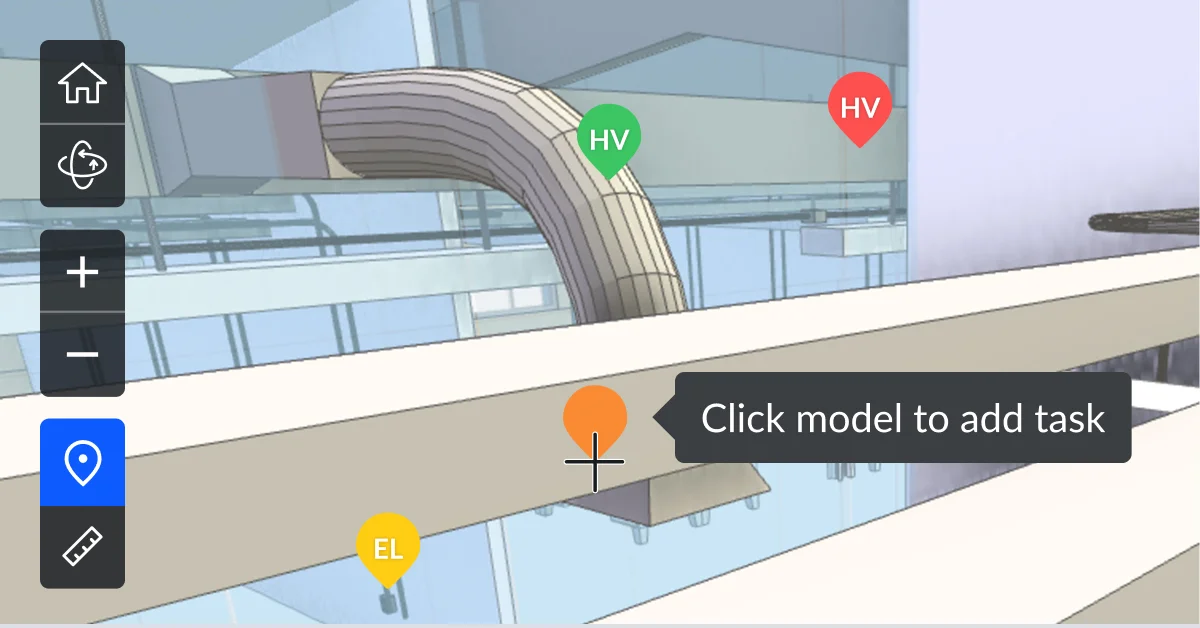
What ships on the BIM side:
3D BIM viewer on iPad and desktop — load IFC, RVT, or NWD files into Fieldwire and view the 3D model in the field on the tablet or in the office on the desktop. Walk a worker through coordination details by showing them the 3D model exactly where they’re working.
3D Tasks (April 2026 release) — pin tasks directly to BIM model locations rather than just to 2D drawing locations. A coordination clash discovered in the model becomes a task with the 3D model location attached; the assignee opens the task and sees the exact spot in the 3D model where the issue lives. This is the workflow that meaningfully advances Fieldwire’s coordination depth against tools like Bluebeam Revu (which is 2D-focused) and toward dedicated BIM coordination platforms (Navisworks Manage, BIM Track).
Cut 3D Model Sections (October 2025 release) — create multiple cut sections in 3D/BIM models for detailed floor, wall, or slab analysis, rather than only viewing the full assembly. For coordination work where the issue is internal to a wall or beneath a slab, the cut section workflow exposes the geometry that matters.
Faster Model Setup (April 2026 release) — improvements to BIM model upload and processing speed; reviewer feedback indicated upload time was a friction point on large IFC files prior to this release.
Multi-page Plan Exports (April 2026 release) — export annotated plans across multiple pages in a single export operation, rather than page-by-page; for closeout package preparation, this is a meaningful time savings.
What the BIM viewer doesn’t ship as well as dedicated BIM coordination tools: Revit and Navisworks integration depth is meaningfully shallower per Capterra reviewer feedback. For clash-detection-heavy commercial GC work where the BIM coordination workflow lives in Navisworks Manage with dedicated clash detection routines, Fieldwire is functional but not the architectural fit. Fieldwire’s BIM is built for field consumption of BIM data, not for office authoring or clash detection of BIM models.
Integrations: DocuSign, Smartsheet, Microsoft Project + the Open API
The integration ecosystem is one of Fieldwire’s clearer dimensions of weakness compared to Procore’s 9 native ERPs and 500+ App Marketplace, and worth budgeting around for operations that need tight cross-system sync.
Confirmed native integrations as of April 2026:
DocuSign (October 2025 release) — secure form signing with audit trails for compliance documentation. Forms initiated in Fieldwire route through DocuSign for signature, and the signed audit trail returns to the Fieldwire form record. For commercial GCs needing structured signature workflows on safety forms, change orders, and acceptance documents, this is the integration that makes the documentation chain audit-ready.
Smartsheet (October 2025 release) — cross-project task import for analytics and trend identification. Tasks across multiple Fieldwire projects export to Smartsheet for the broader operational dashboard view; trend identification across the project portfolio happens in Smartsheet’s analytics layer.
Microsoft Project (October 2025 release) — direct planning data synchronization between Fieldwire schedules and Microsoft Project schedules. For commercial GCs whose master schedule lives in Microsoft Project, the sync eliminates the manual reentry tax that’s typical of project management tooling.
Box and Dropbox — plan and document storage sync; allows contractors using Box or Dropbox as the document source-of-truth to surface those documents inside Fieldwire’s plan viewer.
Track3D (strategic integration announced 2025) — AI-powered reality capture (drone, 360-camera site capture) integrated with Fieldwire’s field management, enabling faster punch list closeout, improved inspections, and seamless plan synchronization between captured reality and original drawings.
Hilti software ecosystem — ON!Track asset management, PROFIS engineering software, Hilti tool fleet management. Operationally relevant for contractors already running Hilti hardware.
Open API on the Custom Contracts tier — enables data extraction, analysis, automation, and syncing with other platforms including custom-built connectors for accounting systems (QBO, Sage, Vista) that aren’t natively supported.
What’s NOT natively integrated:
- No native QuickBooks Online or Desktop — for residential GCs running QBO as the accounting backbone, this is a real gap; Buildertrend, Contractor Foreman, or Projul ship native QBO sync
- No native Sage 100/300/Intacct — for commercial GCs whose accounting team is on Sage, Procore’s native Sage integration suite is the architectural fit
- No native Vista/Spectrum/Yardi/MRI/Acumatica — same pattern; Procore covers these natively
- No native CompanyCam or Bluebeam — for photo-doc-heavy or PDF-markup-heavy operations, parallel tooling rather than integrated workflow
- No native EagleView or Hover — for aerial measurement workflows, look at Roofr, JobNimbus, or AccuLynx for that integration depth
- No native Zapier or Make connector — limits the no-code integration shortcut available on platforms like ClickUp or Monday.com
The Open API on the Custom tier is the bridge for operations that need integrations not on the native list — but custom API integration is a meaningful engineering effort, not a no-code shortcut, and worth budgeting separately if the integration is operationally critical.
For high-touch commercial GCs where inbound prospect call volume drives meaningful revenue (RFP requests, qualified-lead intake from owners and architects), pairing Fieldwire with an AI call answering service like Smith.ai addresses the front-of-funnel layer that Fieldwire itself doesn’t ship — Smith.ai handles prospect intake and lead qualification; Fieldwire runs the construction once the contract signs.
What Real Construction Teams Say About Fieldwire
Fieldwire’s third-party validation depth is solid — 4.6/5 across 97 verified Capterra reviews with 92% positive sentiment, 8% neutral, and 0% negative sentiment. Sub-scores: ease of use 4.3/5, features 4.3/5, customer service 4.6/5, value for money 4.4/5. The customer service score specifically is at category-best level and consistent with the broader Hilti ownership commitment to long-term platform support.
The themes that emerge across the verified reviewer feedback:
“Everyone is connected, and we are all able to see in real time what is going on in each project.”
— Marvin E., Estimator, on Capterra
“The checklist feature really helps keep things moving. I pin drawings and notes, and it saves a lot of back-and-forth.”
— Mark W., Owner, on Capterra
“Fieldwire is best at: Creating markups on Plan, document management, assigning task, linking task to the drawing and also tracking a progress.”
— Bishnu A., Project Engineer, on Capterra
The critical reviews are honest and worth surfacing — Fieldwire’s negative reviewer feedback concentrates on three themes: sync performance with large files, advanced feature limitations for complex commercial workflows, and BIM tool integration depth. Each is real and worth weighing.
“It lags sometimes during revision on the drawings…it takes a lot of time to reupload and make a revision.”
— Bishnu A., Project Engineer, on Capterra
“Some advanced features can feel limited, especially when managing more complex project workflows.”
— Murtaza L., General Manager, on Capterra
“Syncing can occasionally be slow, particularly when working with large drawing files or in areas with weaker internet connectivity.”
— Murtaza L., General Manager, on Capterra
The customer roster on the Fieldwire homepage validates the commercial-construction depth: Webcor Builders (Moscone Center expansion in San Francisco), EllisDon (Providence Care Hospital in Kingston, Ontario), Clark Construction (Washington State University in Pullman, WA), Brookfield Properties, Sutter Health, Johnson Controls, Speller Metcalfe, Graham Construction, GrahamUK, Built, Climatec, Bockmon & Woody, Cougnaud, Colt Builders, Morguard. The named case studies are commercial GCs running multi-million-dollar projects, validating the platform’s architectural fit at commercial scale beyond the small-crew free tier.
How We Scored Fieldwire on PM + Scheduling Dimensions
Fieldwire lands at 4.0/5 overall under our dual-listed scoring framework — strong on the dimensions that matter for field-execution workflow (Mobile 5.0, Pricing Value 4.7, Document Workflow 4.5, AI 4.5), pulled down by the Scheduling secondary category where the project-style scheduling doesn’t include FSM dispatch capabilities.
Project Management primary (weighted 4.06) carries 70%; Scheduling secondary (weighted 3.07) carries 30%. Plus +0.20 calibration constant adopted April 2026.
Mobile-first design from 2013, native iOS and Android with voice dictation for punch lists, real-time bidirectional sync, photo capture with location metadata, offline markup with queued sync. The dimension where Fieldwire beats every office-led PM platform on the market and earns the foreman's daily-use loyalty.
Free tier with 5 users, 3 projects, 100 sheets — genuinely usable for solo operations. Transparent published pricing $39/$64/$89 per user/month with no sales gating. Per-user model becomes more expensive than ACV-based at 50+ users but cheaper at most contractor scales.
Plan viewing with sheet compare, in-context markup, pin-to-drawing tasks, drawing version control. RFIs, submittals, and change orders gated to Business Plus tier. Document workflow strong on field side but lighter than Procore's commercial-GC depth.
Field Intelligence™ with photo tagging (Oct 2025), natural language search, auto-form fill, predictive analysis, cross-project reporting. Beta status as of April 2026 but real shipping capability. Field-execution-focused rather than agentic-across-ERPs like Procore Helix + Datagrid.
Project schedule with task dependencies, Microsoft Project integration (Oct 2025), 3D Tasks (Apr 2026). Solid project-style scheduling depth — not FSM dispatch, no GPS routing, no recurring service plans. Right depth for commercial GC project work.
DocuSign, Smartsheet, Microsoft Project, Box, Dropbox, Track3D, Hilti software ecosystem, plus Open API on Custom tier. Materially smaller ecosystem than Procore's 9 native ERPs and 500+ App Marketplace. No native QuickBooks Online, no native Sage suite, no native Zapier app.
Budget management module on Business Plus tier with new Activity tab tracking changes. Functional but lighter than dedicated job-costing tools. No native AIA-style progress billing, no committed-vs-actual cost tracking with bidirectional ERP sync. Architecture: Fieldwire + dedicated ERP rather than Fieldwire alone for full job costing.
Owner portal exists but is institutional-developer-focused, NOT residential homeowner-experience-focused. No Selections module like Buildertrend ships, no allowance budget approval workflow, no homeowner-facing kitchen-table close pattern. Right depth for commercial owner-developers; light for residential design-build.
Computed math: PM weighted = 4.2×0.15 + 4.5×0.15 + 3.5×0.13 + 3.7×0.13 + 2.5×0.12 + 4.7×0.12 + 4.5×0.10 + 5.0×0.10 = 4.06. Scheduling weighted (Calendar 4.0, Dispatch 2.0, Self-booking 1.0, Mobile 5.0, Recurring 1.5, Conflicts 4.0, Integrations 4.0, Pricing 4.0) = 3.07. Dual-category 70/30 formula: 0.70 × 4.06 + 0.30 × 3.07 + 0.20 = 3.96 → rounds to 4.0/5.
The 4.0/5 reflects the honest split — strong specifically on the dimensions that matter for field-execution workflow (mobile-first tablet UX, voice dictation, plan markup, AI photo tagging), pulled down by the integration ecosystem gap (no QBO, no Sage suite, no Zapier) and by the Scheduling secondary scoring where the project-style scheduling doesn’t include FSM dispatch capabilities. For buyers whose operational priorities map onto Fieldwire’s strengths, the score understates the fit.
Fieldwire vs Procore vs Bluebeam Revu
The three-platform comparison covers the products commercial GCs and specialty subcontractors typically evaluate side-by-side with Fieldwire. Each represents a meaningfully different architectural fit, and the right pick depends on team size, project scale, ERP requirements, and whether the operation needs full back-office document control depth or field-first crew workflow.
Procore at ACV-based $15K-$80K+/year is the heavyweight commercial PM platform — purpose-built for $20M+ commercial GCs and large specialty subcontractors, ships 9 native ERPs and 500+ App Marketplace integrations, the most aggressive AI roadmap (Helix + Datagrid Jan 2026), best-in-category document workflow rigor (RFIs, submittals, BIM, drawing markup with OCR-powered Contract Management). Pick Procore for $20M+ commercial GCs and large subs needing full integration ecosystem and document workflow depth at the ACV math that justifies itself at scale.
Fieldwire at Free / $39 / $64 / $89 per-user-per-month is the field-first PM that lives on tablets — strongest plan markup and punch list workflow in the category, voice dictation, Field Intelligence AI shipping fast, Hilti ownership for long-term reliability, but materially shallower on integrations and commercial document control depth than Procore. Pick Fieldwire for general contractors and specialty subs of any size where field-crew tablet usage is the primary daily workflow, the free tier or $39-$89 per-user pricing fits the operational budget, and Procore’s ACV pricing is overkill.
Bluebeam Revu is the dedicated PDF markup, measurement, and BIM coordination tool — desktop-first (with cloud collaboration via Bluebeam Cloud), the industry-standard PDF measurement and takeoff platform for estimators and project engineers, but not a full PM platform (no tasks, no schedule, no field-crew workflow). Pick Bluebeam Revu for estimators and project engineers needing best-in-category PDF measurement and markup, paired with Fieldwire or Procore as the broader PM platform.
The decision matrix by team size and operation type:
- Solo or small specialty subcontractor (1-5 users): Fieldwire Free or Pro ($39/user) — the free tier alone covers most daily workflow.
- 5-20 person GC or specialty sub running commercial work: Fieldwire Business ($64/user) for AI capability or Business Plus ($89/user) for full PM workflow — meaningfully cheaper than Procore at this scale.
- 20-50 person commercial GC: Fieldwire Business Plus or Procore depending on ERP requirements; Fieldwire if the accounting team is on QuickBooks Online or running through Smoothlink, Procore if the accounting team is on Sage 300/Intacct/Vista/Spectrum.
- 50+ person commercial GC: Procore typically wins on integration breadth and ACV pricing math; Fieldwire’s per-user pricing becomes more expensive at this scale.
- Estimating-heavy operations: Bluebeam Revu paired with Fieldwire or Procore as the broader PM platform.
- FSM dispatch operations (HVAC/plumbing/electrical service trades): ServiceTitan, Housecall Pro, or Jobber — Fieldwire is fundamentally a different product shape.
For commercial GCs evaluating tools to pair with Fieldwire on the front-of-funnel side, Smith.ai handles inbound prospect calls and lead qualification — Smith.ai handles the “RFP intake from owners and architects” layer; Fieldwire runs the construction execution once the contract signs. This pairing pattern is the pragmatic 2026 stack for commercial operations where every inbound call could be the next $5M opportunity.
Who Fieldwire Is Built For
The honest profile of the contractor where Fieldwire is the architecturally correct pick:
General contractors of any size running commercial or residential project work where field-crew tablet usage is the primary daily workflow. The platform’s mobile-first design specifically rewards operations whose foremen, supers, and crews use the tablet as the daily-use device.
Specialty subcontractors (mechanical, electrical, plumbing, structural, finishes) with $1M-$50M in annual project value, where the per-user pricing math at $39-$89 per user/month is meaningfully cheaper than Procore’s ACV-based custom quotes.
Solo operators and small crews running 1-3 active projects who can run indefinitely on the Free tier (5 users, 3 projects, 100 sheets) without escalating to a paid subscription. This is the lowest-friction entry into commercial PM tooling we’ve reviewed.
Operations whose master schedule lives in Microsoft Project — the native Microsoft Project integration (October 2025) eliminates the manual reentry tax for commercial GCs running Microsoft Project as the schedule source-of-truth.
Contractors needing AI-driven photo organization and reporting automation at the Business tier — Field Intelligence’s photo tagging by discipline, natural language search, auto-form fill, and cross-project reporting are real shipping capabilities and the most field-relevant AI in the construction PM category.
Contractors already running Hilti hardware as part of the tool fleet — the integration with ON!Track, PROFIS, and the broader Hilti software ecosystem is operationally relevant and reflects the company’s hardware-software integration thesis.
Buyers worried about platform reliability — Hilti’s $300M acquisition and continued R&D investment make Fieldwire one of the more defensible long-term bets in the construction PM category against venture-backed alternatives with uncertain runway.
Who Should Skip Fieldwire
The honest profile of the contractor where Fieldwire is the wrong architectural pick — and what to pick instead:
FSM dispatch operations — HVAC, plumbing, electrical service work where the daily workflow is multi-tech dispatch, GPS route optimization, recurring service plan scheduling, and in-driveway tap-to-pay invoicing. Fieldwire is fundamentally project-based PM, not service-trade FSM. Look at: ServiceTitan, Housecall Pro, or Jobber.
Insurance restoration roofers writing primarily Xactimate scopes — Fieldwire has no Xactimate import, no ESX export, no integration with EagleView or Hover for aerial measurement. Look at: JobNimbus, AccuLynx, or Roofr.
Custom home builders selling on homeowner experience — Fieldwire’s owner portal is institutional-developer-focused; no homeowner-facing Selections module with allowance budgets and approval timestamps, no AIA-style progress billing with retainage. Look at: Buildertrend for design-heavy residential work, Projul for contractor-authored construction-purpose-built workflow, or BuilderPad at $39-$199/month for the simplicity-and-affordability play.
$50M+ commercial GCs needing full ERP integration breadth — Fieldwire’s integration ecosystem is materially smaller than Procore’s 9 native ERPs and 500+ App Marketplace; for operations whose accounting team is on Sage 300 CRE, Sage Intacct, Vista, or Spectrum, Procore’s native sync is the architectural fit.
Contractors running QuickBooks Online without willingness to add a third-party connector — Fieldwire has no native QBO integration; Buildertrend (native QBO two-way sync), Contractor Foreman (native QBO and QBO Advanced), or Projul (native QBO on Core+) are the architecturally honest picks.
Solo operators running 5+ active projects — the Free tier caps at 3 active projects; Pro tier at $39 per user/month is the next step. For solo-through-5-employee operations running 10+ jobs concurrently, flat-rate platforms like BuilderPad (unlimited users on every tier) make the math cleaner.
Estimators needing dedicated PDF measurement and markup depth — Bluebeam Revu is the industry-standard tool for that workflow and meaningfully deeper than Fieldwire on PDF measurement specifically; pair Bluebeam Revu with Fieldwire as the broader PM platform.
Operations needing native AI-native estimating — Fieldwire’s Field Intelligence is field-execution-focused, not estimating-focused. For AI estimating, look at Beam AI (multi-trade AI takeoffs) or XBuild (AI-native chat-first roofing proposal platform).
The Bottom Line
Fieldwire earns the subscription specifically for the contractor profile where field-crew tablet usage is the primary daily workflow. The Free tier is the lowest-friction entry into commercial PM tooling we’ve reviewed, the per-user pricing scales transparently from $39 Pro through $89 Business Plus, and Field Intelligence™ AI is shipping real capabilities (photo tagging October 2025, 3D tasks April 2026, natural language search, auto-form fill) that differentiate against lighter platforms. The Hilti backing since November 2021 (~$300M acquisition) is a meaningful long-term reliability moat against venture-backed competitors with uncertain runway.
The architecturally honest summary: at the Pro tier ($39/user/month), a 10-person GC running multi-trade coordination on real commercial work gets a focused, field-first platform that crews actually use on the tablet — and the Free tier alone runs solo and small-crew operations without any subscription cost. For the buyer profile where field-execution workflow is the priority and Procore’s ACV pricing is overkill, Fieldwire is the right architectural pick.
For every other profile — service-trade dispatch, insurance restoration with Xactimate, custom home builders selling design-build at residential scale, $50M+ commercial GCs needing full ERP integration breadth, contractors requiring native QuickBooks Online sync — Fieldwire is not the architectural fit, and the alternatives in this review are the better picks.
The 4.6/5 across 97 verified Capterra reviews is the validation density that vendor marketing can’t fake. Customer service rated 4.6/5 specifically reflects Hilti’s commitment to long-term platform support, and the customer roster (Webcor, EllisDon, Clark, Brookfield, Sutter Health, Johnson Controls) validates the commercial-construction depth at scale beyond the small-crew free tier.
The Free tier with no credit card requirement is the lowest-friction way to validate fit. Spin up a real project, invite the foreman and crew, run a real punch walkthrough with voice dictation and AI photo tagging — see whether the platform’s tablet-first design matches your operation’s pain points before any money changes hands.
Visit fieldwire.com to start the free tier.
